cat for markdown
See the code[!IMPORTANT] This repository is no longer maintained.
You can find a maintained fork at https://github.com/BIRSAx2/mdcat.
Fancy cat for Markdown (that is, CommonMark):
$ mdcat sample.md
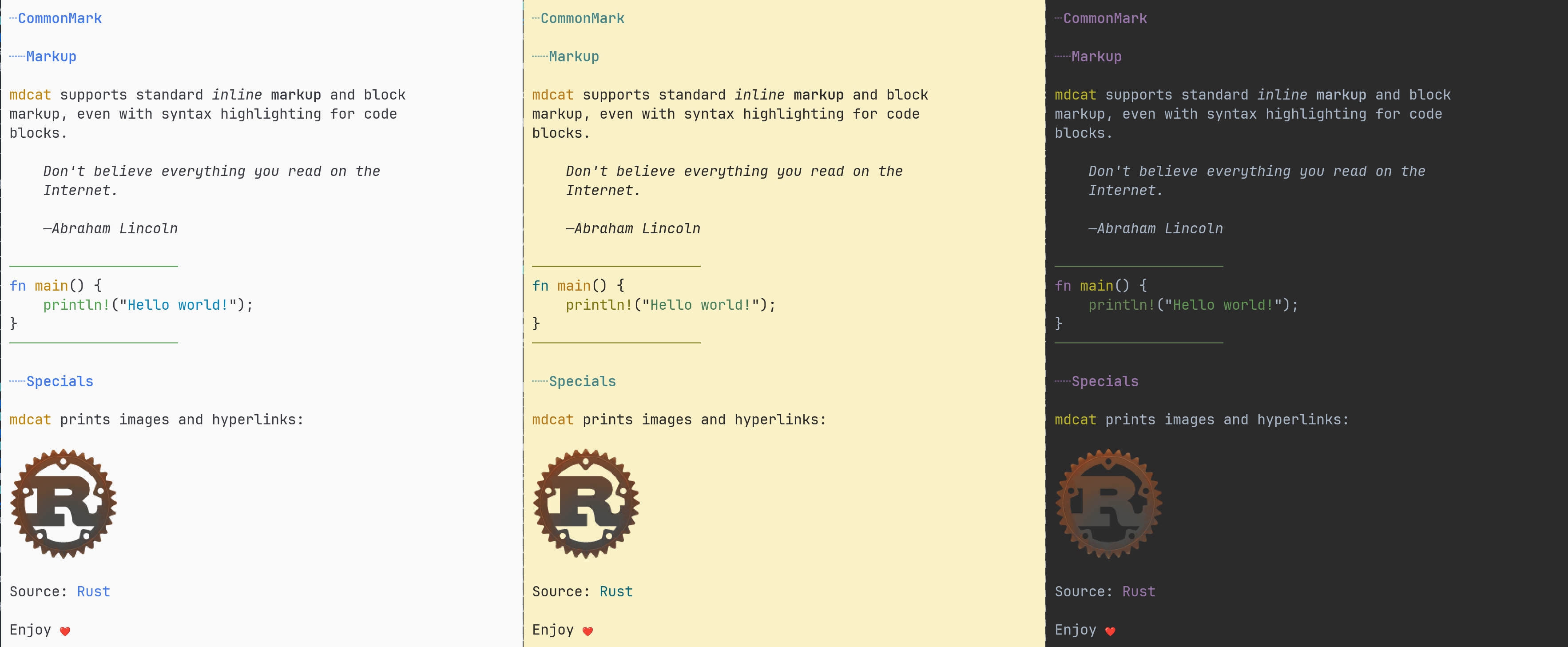
mdcat in WezTerm, with "One Light (base16)", "Gruvbox Light", and "Darcula (base16)" (from left to right), and JetBrains Mono as font.
mdcat works best with iTerm2, WezTerm, and kitty, and a good terminal font with italic characters.
Then it
| Terminal | Basic syntax | Syntax highlighting | Images | Jump marks |
|---|---|---|---|---|
| Basic ANSI¹ | ✓ | ✓ | ||
| Windows 10 console | ✓ | ✓ | ||
| Terminology | ✓ | ✓ | ✓ | |
| iTerm2 | ✓ | ✓ | ✓² | ✓ |
| kitty | ✓ | ✓ | ✓² | |
| WezTerm | ✓ | ✓ | ✓² | |
| VSCode | ✓ | ✓ | ✓² | |
| Ghostty | ✓ | ✓ | ✓² |
Not supported:
Try mdcat --help or read the mdcat(1) manpage.
mdcat manually with cargo install mdcat (see below for details).mdcat can be linked or copied to mdless; if invoked as mdless it automatically uses pagination.
Run cargo build --release.
Building requires libcurl.
When packaging mdcat you may wish to include the following additional artifacts:
A symlink or hardlink from mdless to mdcat (see above).
Shell completions for relevant shells, by invoking mdcat --completions after building, e.g.
$ mdcat --completions fish > /usr/share/fish/vendor_completions.d/mdcat.fish
$ mdcat --completions bash > /usr/share/bash-completion/completions/mdcat
$ mdcat --completions zsh > /usr/share/zsh/site-functions/_mdcat
# Same for mdless if you include it
$ mdless --completions fish > /usr/share/fish/vendor_completions.d/mdless.fish
$ mdless --completions bash > /usr/share/bash-completion/completions/mdless
$ mdless --completions zsh > /usr/share/zsh/site-functions/_mdless
A build of the man page mdcat.1.adoc, using AsciiDoctor:
$ asciidoctor -b manpage -a reproducible -o /usr/share/man/man1/mdcat.1 mdcat.1.adoc
$ gzip /usr/share/man/man1/mdcat.1
# If you include a mdless as above, you may also want to support man mdless
$ ln -s mdcat.1.gz /usr/share/man/man1/mdless.1.gz
mdcat can output extensive tracing information when asked to.
Run mdcat with $MDCAT_LOG=trace for complete tracing information, or with $MDCAT_LOG=mdcat::render=trace to trace only rendering.
Copyright Sebastian Wiesner sebastian@swsnr.de
Binaries are subject to the terms of the Mozilla Public License, v. 2.0, see LICENSE.
Most of the source is subject to the terms of the Mozilla Public License, v. 2.0, see LICENSE, unless otherwise noted; some files are subject to the terms of the Apache 2.0 license, see http://www.apache.org/licenses/LICENSE-2.0
(top 24 of 43)
402 followers · starred Jun 2018
2,179 followers · starred Jul 2018
52 followers · starred Oct 2023
1,091 followers · starred Sep 2020
cat for markdown
See the code[!IMPORTANT] This repository is no longer maintained.
You can find a maintained fork at https://github.com/BIRSAx2/mdcat.
Fancy cat for Markdown (that is, CommonMark):
$ mdcat sample.md
mdcat in WezTerm, with "One Light (base16)", "Gruvbox Light", and "Darcula (base16)" (from left to right), and JetBrains Mono as font.
mdcat works best with iTerm2, WezTerm, and kitty, and a good terminal font with italic characters.
Then it
| Terminal | Basic syntax | Syntax highlighting | Images | Jump marks |
|---|---|---|---|---|
| Basic ANSI¹ | ✓ | ✓ | ||
| Windows 10 console | ✓ | ✓ | ||
| Terminology | ✓ | ✓ | ✓ | |
| iTerm2 | ✓ | ✓ | ✓² | ✓ |
| kitty | ✓ | ✓ | ✓² | |
| WezTerm | ✓ | ✓ | ✓² | |
| VSCode | ✓ | ✓ | ✓² | |
| Ghostty | ✓ | ✓ | ✓² |
Not supported:
Try mdcat --help or read the mdcat(1) manpage.
mdcat manually with cargo install mdcat (see below for details).mdcat can be linked or copied to mdless; if invoked as mdless it automatically uses pagination.
Run cargo build --release.
Building requires libcurl.
When packaging mdcat you may wish to include the following additional artifacts:
A symlink or hardlink from mdless to mdcat (see above).
Shell completions for relevant shells, by invoking mdcat --completions after building, e.g.
$ mdcat --completions fish > /usr/share/fish/vendor_completions.d/mdcat.fish
$ mdcat --completions bash > /usr/share/bash-completion/completions/mdcat
$ mdcat --completions zsh > /usr/share/zsh/site-functions/_mdcat
# Same for mdless if you include it
$ mdless --completions fish > /usr/share/fish/vendor_completions.d/mdless.fish
$ mdless --completions bash > /usr/share/bash-completion/completions/mdless
$ mdless --completions zsh > /usr/share/zsh/site-functions/_mdless
A build of the man page mdcat.1.adoc, using AsciiDoctor:
$ asciidoctor -b manpage -a reproducible -o /usr/share/man/man1/mdcat.1 mdcat.1.adoc
$ gzip /usr/share/man/man1/mdcat.1
# If you include a mdless as above, you may also want to support man mdless
$ ln -s mdcat.1.gz /usr/share/man/man1/mdless.1.gz
mdcat can output extensive tracing information when asked to.
Run mdcat with $MDCAT_LOG=trace for complete tracing information, or with $MDCAT_LOG=mdcat::render=trace to trace only rendering.
Copyright Sebastian Wiesner sebastian@swsnr.de
Binaries are subject to the terms of the Mozilla Public License, v. 2.0, see LICENSE.
Most of the source is subject to the terms of the Mozilla Public License, v. 2.0, see LICENSE, unless otherwise noted; some files are subject to the terms of the Apache 2.0 license, see http://www.apache.org/licenses/LICENSE-2.0
(top 24 of 43)
402 followers · starred Jun 2018
2,179 followers · starred Jul 2018
52 followers · starred Oct 2023
1,091 followers · starred Sep 2020



