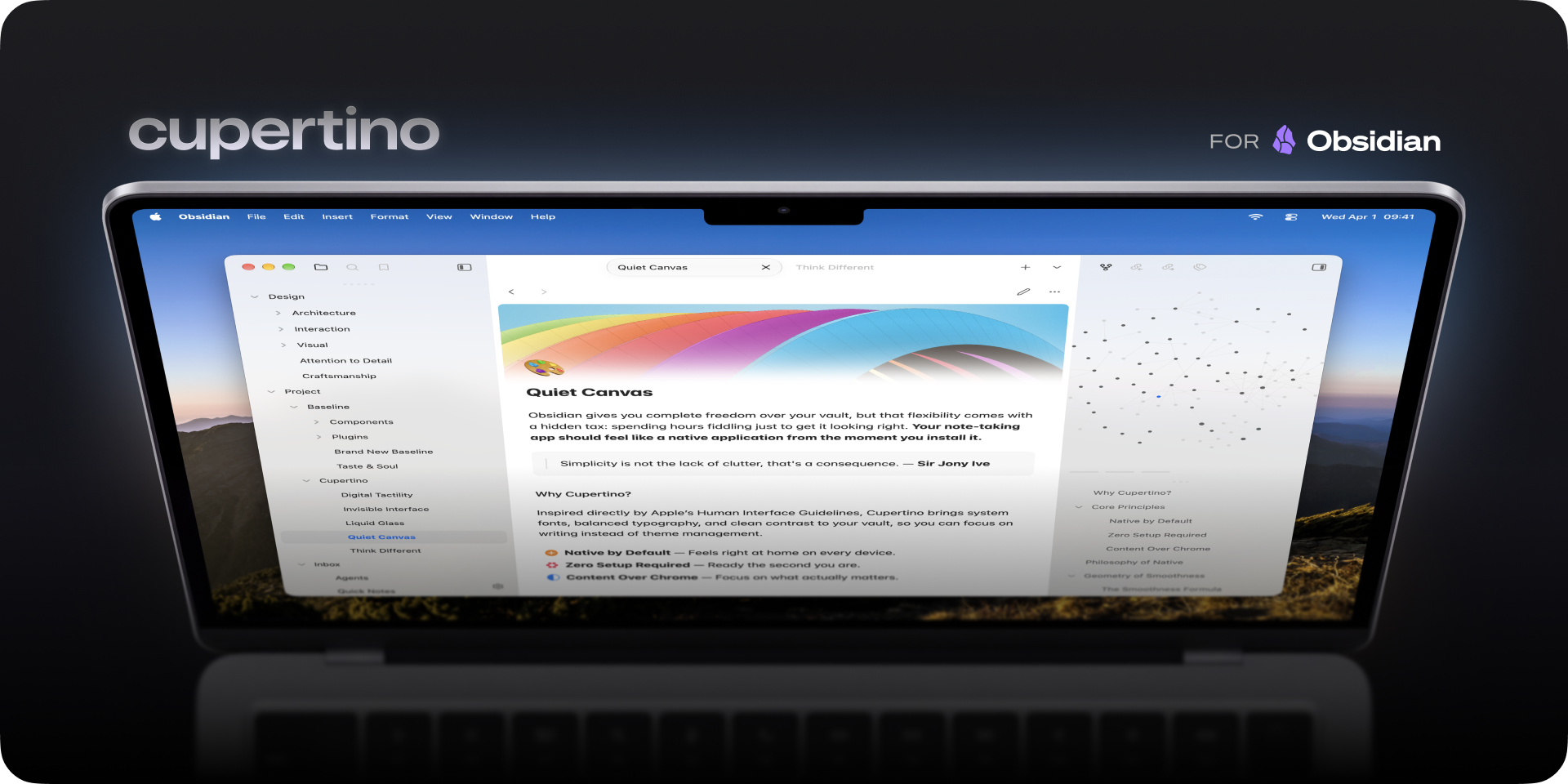
A native look and feel Obsidian theme crafted for the way you think.
CSS
1,277
1,635 commits
updated Oct 8, 2026
Feels right at home. Clean typography, refined spacing, and native-inspired components make Cupertino feel like it belongs on any device.
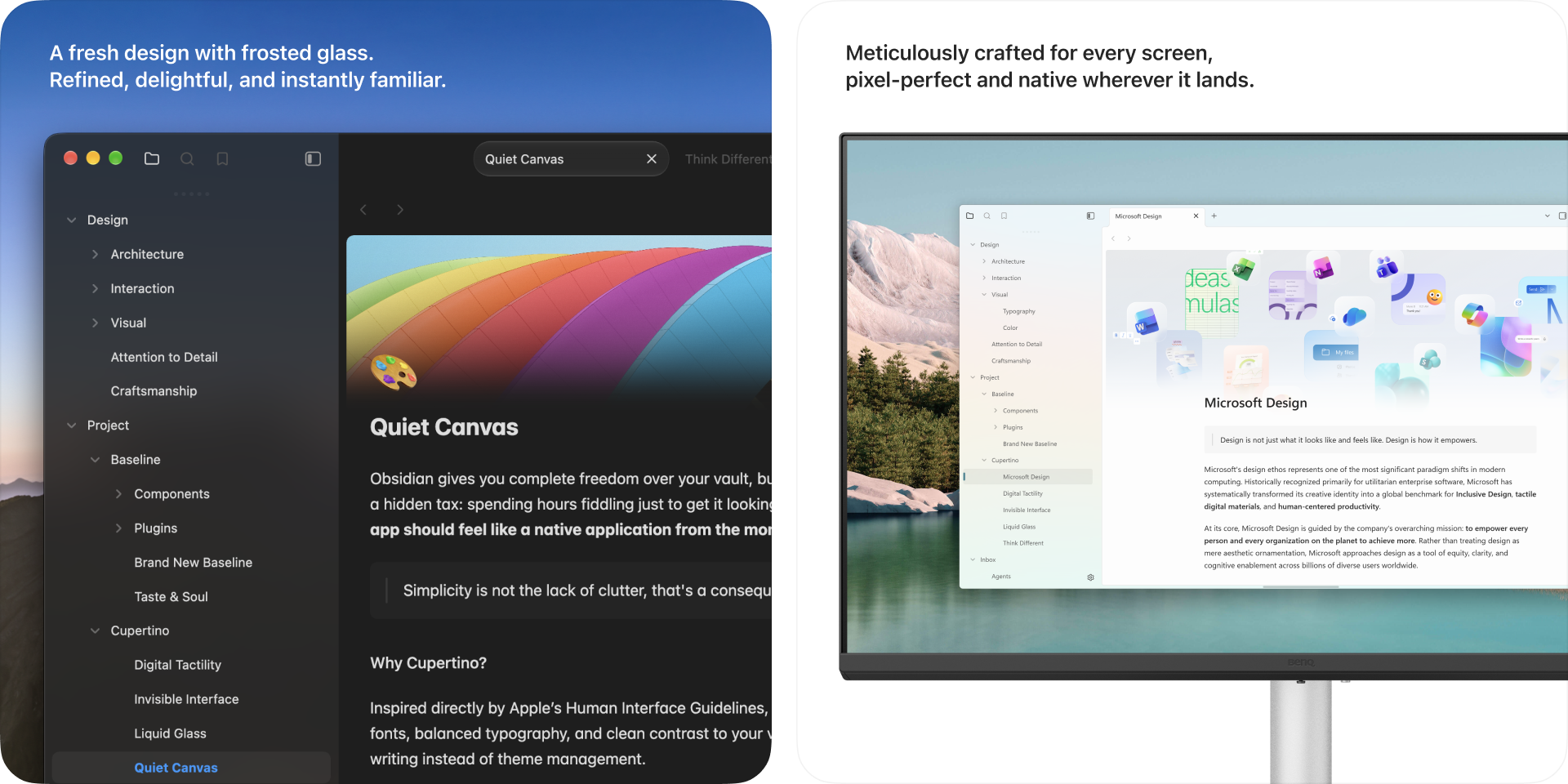
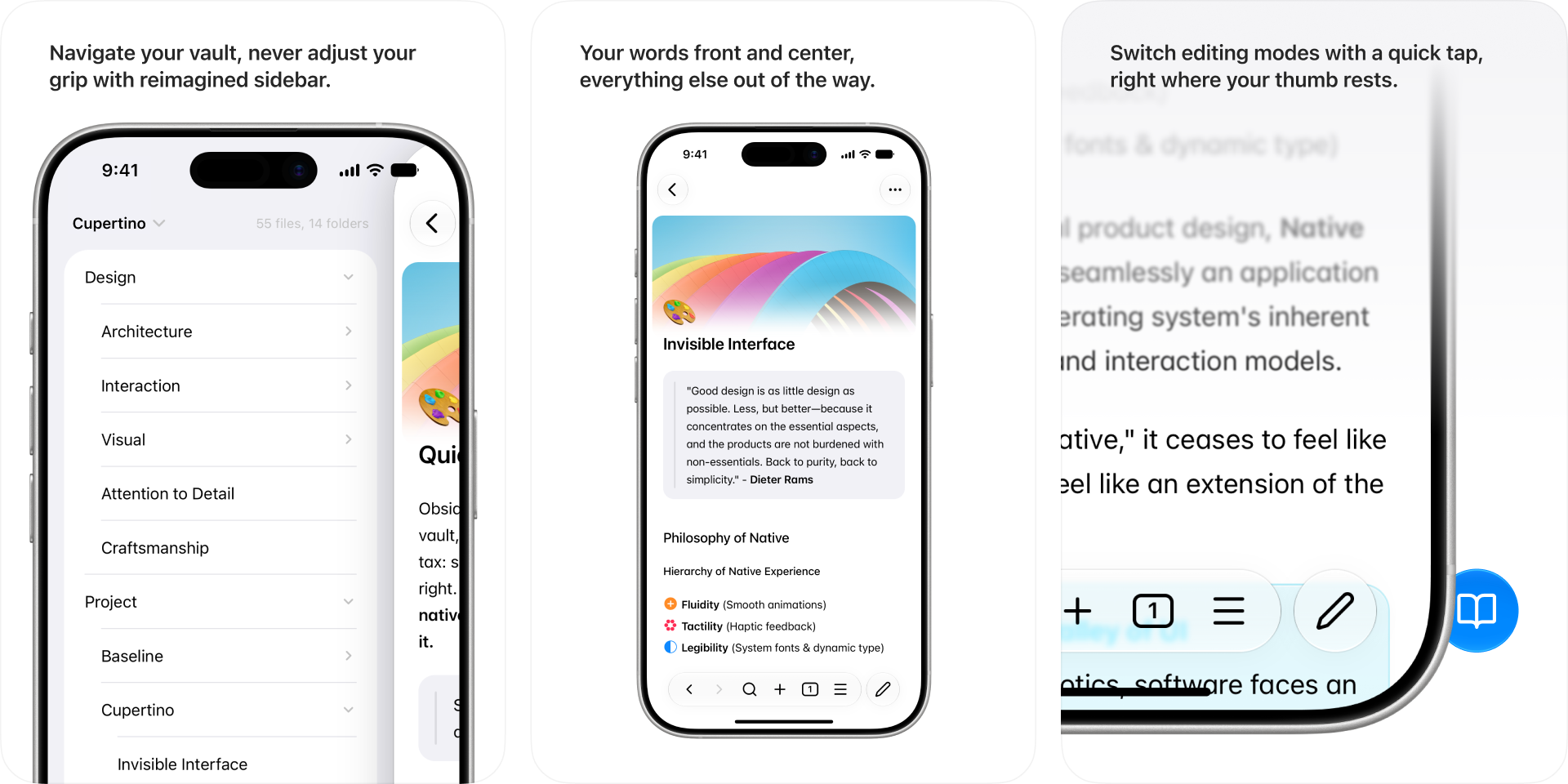
Built for mobile. Everything is redesigned for touch. One-hand reachability, comfortable spacing, and intuitive layout make your vault feel right in your pocket.
Cupertino exists because great tools should just work. No rabbit holes. No endless tweaking. Just a beautiful, distraction-free place to think and write.
Fewer plugins
Everything you need is here without plugins. Cupertino is complete the moment you install it.
Fewer customizations
Every option is an invitation to procrastinate. Cupertino keeps choices intentionally minimal so you stay in flow.
Less visual noise
Low-priority UI elements step back automatically. What remains is what matters.
Cupertino works beautifully on its own. These plugins let you fine-tune the experience if you'd like.
Enable focus view, hover sidebars. Or disable active line highlight, centered tabs, and compact status bar, and more.
Bring translucent window effects to Windows and macOS for an even more native feel.
Cupertino supports all filter and helper classes from Minimal.
| Class | Description |
|---|---|
banner | Add at the end of the image link, e.g. ![[image.jpeg|banner]] |
banner-fade | Add faded edge to the banner (requires banner) |
banner-icon | Add an emoji or letter as note icon using callout, e.g. > [!banner-icon] 👋 |
banner-title | Moves inline title next to the icon (requires banner-icon) |
y0, y5... to y100 | Adjust the vertical position of the banner (requires banner), from 0 to 100 in steps of 5 |
| Class | Description |
|---|---|
wide | Entire note uses wide line width |
max | Entire note uses max line width |
table-100, bases-100, img-100 | Fill 100% of the pane width |
table-max, bases-max, img-max | Fill the max line width (default 90%) |
table-wide, bases-wide, img-wide | Fill the wide line width |
| Class | Description |
|---|---|
cards (required) | Set all Dataview tables to card layout |
list-cards | Set all bullet lists to card layout |
cards-align-bottom | Align the last element of a card to the bottom |
cards-cover | Images are resized to fill the defined space |
cards-16-9 | Fit images in cards to 16:9 ratio |
cards-1-1 | Fit images in cards to 1:1 ratio (square) |
cards-2-1 | Fit images in cards to 2:1 ratio |
cards-2-3 | Fit images in cards to 2:3 ratio |
cards-cols-1 to 8 | Force a specific number of columns (from 1 to 8) |
| Class | Description |
|---|---|
embed-strict | Remove embed background |
embed-hide-title | Hide embedded file title |
Add at the end of the image link, e.g. ![[image.jpeg#invert]]
| Filter | Description |
|---|---|
#blend | Blend image into background |
#invert | Invert images in dark mode — ideal for charts and handwriting on light backgrounds |
#invertW | Invert images in light mode — ideal for charts and handwriting on dark backgrounds |
#circle | Crop image to a circle |
#outline | Add outline around image |
#interface | Add drop shadow behind image |
| Class | Description |
|---|---|
img-grid | Activate image grids |
| Class | Description |
|---|---|
table-nowrap | Disable line wrapping in table cells |
table-wrap | Force line wrapping in table cells |
table-center | Center small tables narrower than line width |
table-numbers | Add row numbers to tables |
table-tabular | Use tabular figures in tables |
table-small | Use small font size in tables |
table-tiny | Use tiny font size in tables |
table-lines | Add borders around all table cells |
row-lines | Add borders between table rows |
col-lines | Add borders between table columns |
row-alt | Add striped background to alternating table rows |
col-alt | Add striped background to alternating table columns |
row-hover | Highlight rows on hover |
| Class | Description |
|---|---|
bases-row-alt | Add striped background to alternating Bases table view rows |
bases-col-alt | Add striped background to alternating Bases table view columns |
bases-plain | Hide embedded Bases toolbar |
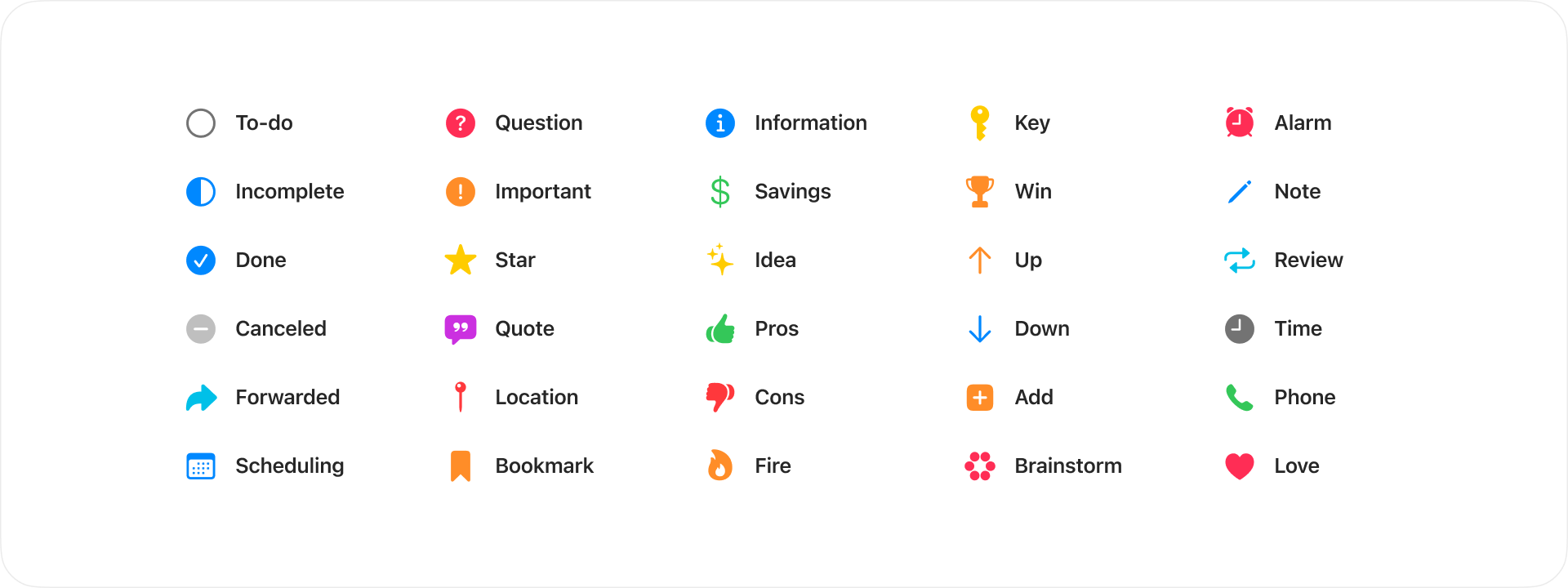
| Syntax | Description |
|---|---|
- [ ] | To-do |
- [/] | Incomplete |
- [x] | Done |
- [-] | Canceled |
- [>] | Forwarded |
- [<] | Scheduling |
- [?] | Question |
- [!] | Important |
- [*] | Star |
- ["] | Quote |
- [l] | Location |
- [b] | Bookmark |
- [i] | Information |
- [S] | Savings |
- [I] | Idea |
- [p] | Pros |
- [c] | Cons |
- [f] | Fire |
- [k] | Key |
- [w] | Win |
- [u] | Up |
- [d] | Down |
- [+] | Add |
- [B] | Brainstorm |
- [a] | Alarm |
- [n] | Note |
- [R] | Review |
- [t] | Time |
- [P] | Phone |
- [L] | Love |
Cupertino is licensed under the MIT license.
2,592 followers · starred Sep 2025
1,195 followers · starred Mar 2025
334 followers · starred Jan 2025
1,337 followers · starred Jan 2025
A native look and feel Obsidian theme crafted for the way you think.
CSS
1,277
1,635 commits
updated Oct 8, 2026
Feels right at home. Clean typography, refined spacing, and native-inspired components make Cupertino feel like it belongs on any device.
Built for mobile. Everything is redesigned for touch. One-hand reachability, comfortable spacing, and intuitive layout make your vault feel right in your pocket.
Cupertino exists because great tools should just work. No rabbit holes. No endless tweaking. Just a beautiful, distraction-free place to think and write.
Fewer plugins
Everything you need is here without plugins. Cupertino is complete the moment you install it.
Fewer customizations
Every option is an invitation to procrastinate. Cupertino keeps choices intentionally minimal so you stay in flow.
Less visual noise
Low-priority UI elements step back automatically. What remains is what matters.
Cupertino works beautifully on its own. These plugins let you fine-tune the experience if you'd like.
Enable focus view, hover sidebars. Or disable active line highlight, centered tabs, and compact status bar, and more.
Bring translucent window effects to Windows and macOS for an even more native feel.
Cupertino supports all filter and helper classes from Minimal.
| Class | Description |
|---|---|
banner | Add at the end of the image link, e.g. ![[image.jpeg|banner]] |
banner-fade | Add faded edge to the banner (requires banner) |
banner-icon | Add an emoji or letter as note icon using callout, e.g. > [!banner-icon] 👋 |
banner-title | Moves inline title next to the icon (requires banner-icon) |
y0, y5... to y100 | Adjust the vertical position of the banner (requires banner), from 0 to 100 in steps of 5 |
| Class | Description |
|---|---|
wide | Entire note uses wide line width |
max | Entire note uses max line width |
table-100, bases-100, img-100 | Fill 100% of the pane width |
table-max, bases-max, img-max | Fill the max line width (default 90%) |
table-wide, bases-wide, img-wide | Fill the wide line width |
| Class | Description |
|---|---|
cards (required) | Set all Dataview tables to card layout |
list-cards | Set all bullet lists to card layout |
cards-align-bottom | Align the last element of a card to the bottom |
cards-cover | Images are resized to fill the defined space |
cards-16-9 | Fit images in cards to 16:9 ratio |
cards-1-1 | Fit images in cards to 1:1 ratio (square) |
cards-2-1 | Fit images in cards to 2:1 ratio |
cards-2-3 | Fit images in cards to 2:3 ratio |
cards-cols-1 to 8 | Force a specific number of columns (from 1 to 8) |
| Class | Description |
|---|---|
embed-strict | Remove embed background |
embed-hide-title | Hide embedded file title |
Add at the end of the image link, e.g. ![[image.jpeg#invert]]
| Filter | Description |
|---|---|
#blend | Blend image into background |
#invert | Invert images in dark mode — ideal for charts and handwriting on light backgrounds |
#invertW | Invert images in light mode — ideal for charts and handwriting on dark backgrounds |
#circle | Crop image to a circle |
#outline | Add outline around image |
#interface | Add drop shadow behind image |
| Class | Description |
|---|---|
img-grid | Activate image grids |
| Class | Description |
|---|---|
table-nowrap | Disable line wrapping in table cells |
table-wrap | Force line wrapping in table cells |
table-center | Center small tables narrower than line width |
table-numbers | Add row numbers to tables |
table-tabular | Use tabular figures in tables |
table-small | Use small font size in tables |
table-tiny | Use tiny font size in tables |
table-lines | Add borders around all table cells |
row-lines | Add borders between table rows |
col-lines | Add borders between table columns |
row-alt | Add striped background to alternating table rows |
col-alt | Add striped background to alternating table columns |
row-hover | Highlight rows on hover |
| Class | Description |
|---|---|
bases-row-alt | Add striped background to alternating Bases table view rows |
bases-col-alt | Add striped background to alternating Bases table view columns |
bases-plain | Hide embedded Bases toolbar |
| Syntax | Description |
|---|---|
- [ ] | To-do |
- [/] | Incomplete |
- [x] | Done |
- [-] | Canceled |
- [>] | Forwarded |
- [<] | Scheduling |
- [?] | Question |
- [!] | Important |
- [*] | Star |
- ["] | Quote |
- [l] | Location |
- [b] | Bookmark |
- [i] | Information |
- [S] | Savings |
- [I] | Idea |
- [p] | Pros |
- [c] | Cons |
- [f] | Fire |
- [k] | Key |
- [w] | Win |
- [u] | Up |
- [d] | Down |
- [+] | Add |
- [B] | Brainstorm |
- [a] | Alarm |
- [n] | Note |
- [R] | Review |
- [t] | Time |
- [P] | Phone |
- [L] | Love |
Cupertino is licensed under the MIT license.
2,592 followers · starred Sep 2025
1,195 followers · starred Mar 2025
334 followers · starred Jan 2025
1,337 followers · starred Jan 2025