
Turn your Windows PC into a console. A full-screen, controller-first game launcher for the TV that also lets the gamepad drive Windows itself — no keyboard or mouse needed.
See the codeSee what people are saying
README


Turn your Windows PC into a console.
Your games and your whole desktop, driven from the couch with just a controller.

loungepad.app · ▶ Watch the trailer




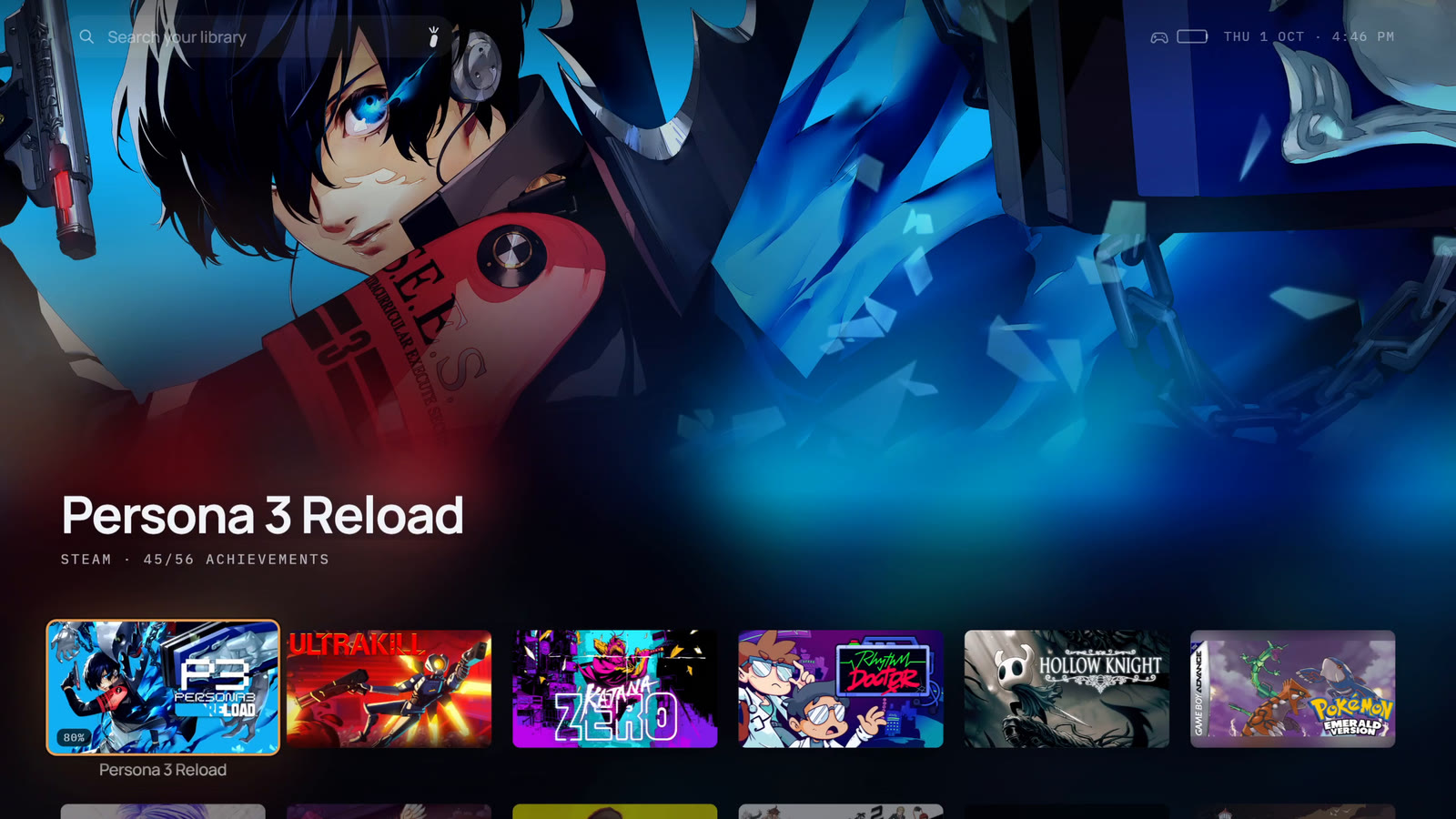
Loungepad is a full-screen launcher for a PC connected to a TV, by cable or streamed from another room. It puts every game you own in one library and makes the controller a complete input device, so you never walk to the desk for the mouse. And it's still a PC: emulators, mods and every Windows app are a button away.
https://github.com/user-attachments/assets/0aa19943-f788-4f97-ac93-ffba33159b6f
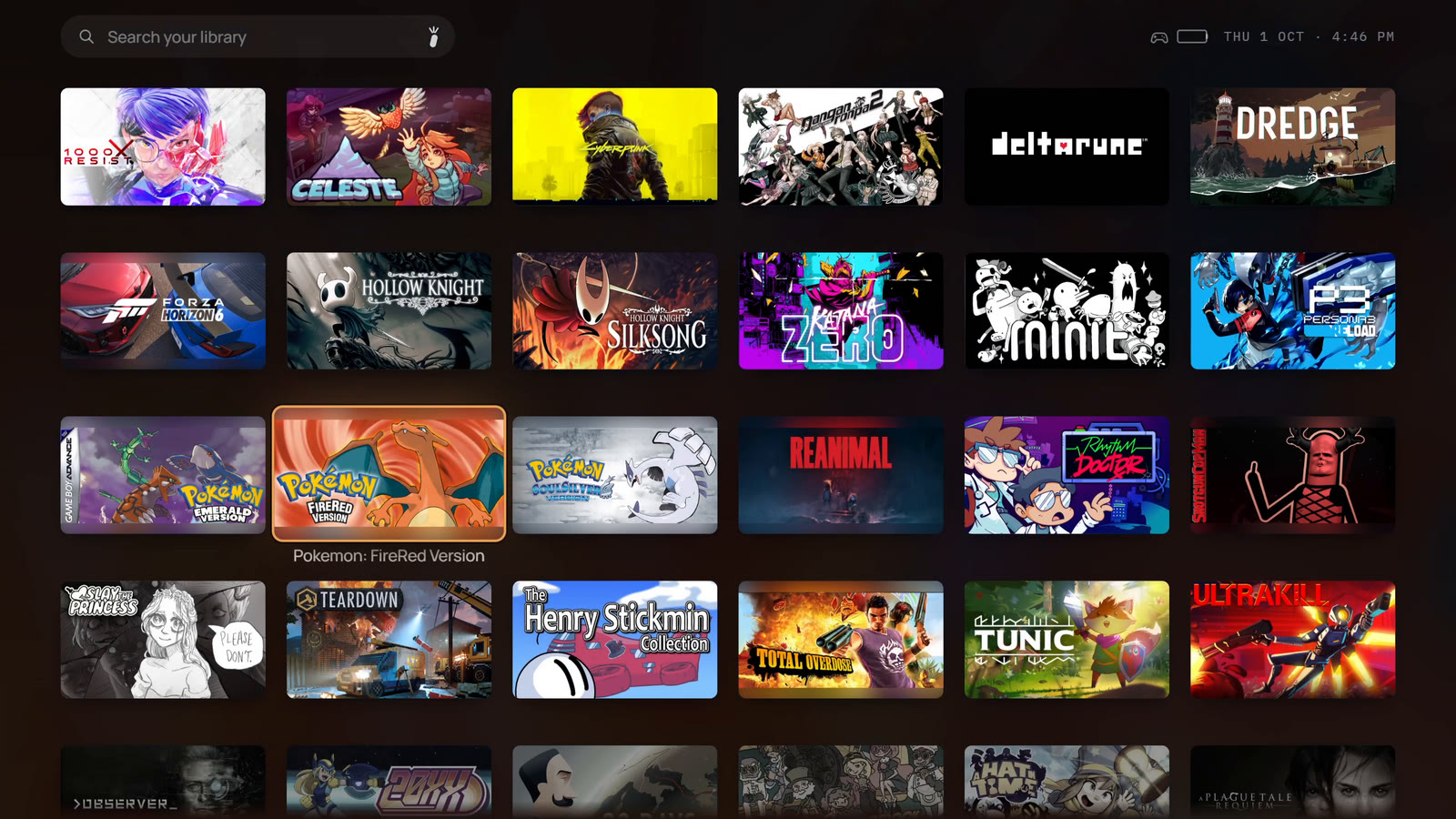
Every game you own, in one library
- Steam, Epic, GOG, the Xbox app and PC Game Pass, plus your emulators and ROMs, side by side. Installed games are found on their own, and the games you own but haven't installed can come in too, one press from installing.
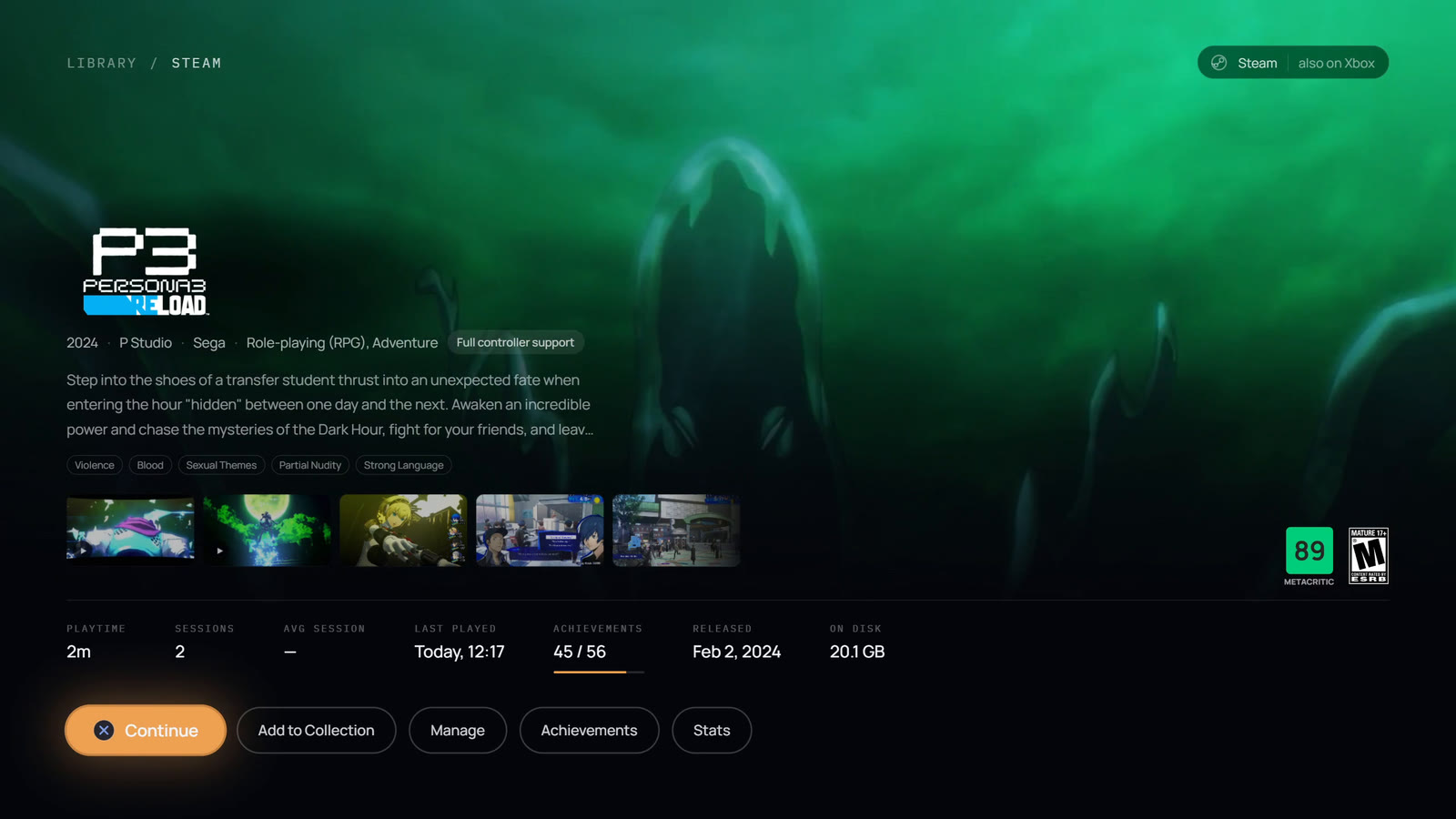
- Art, descriptions, ratings and trailers are fetched for every game, with no setup.
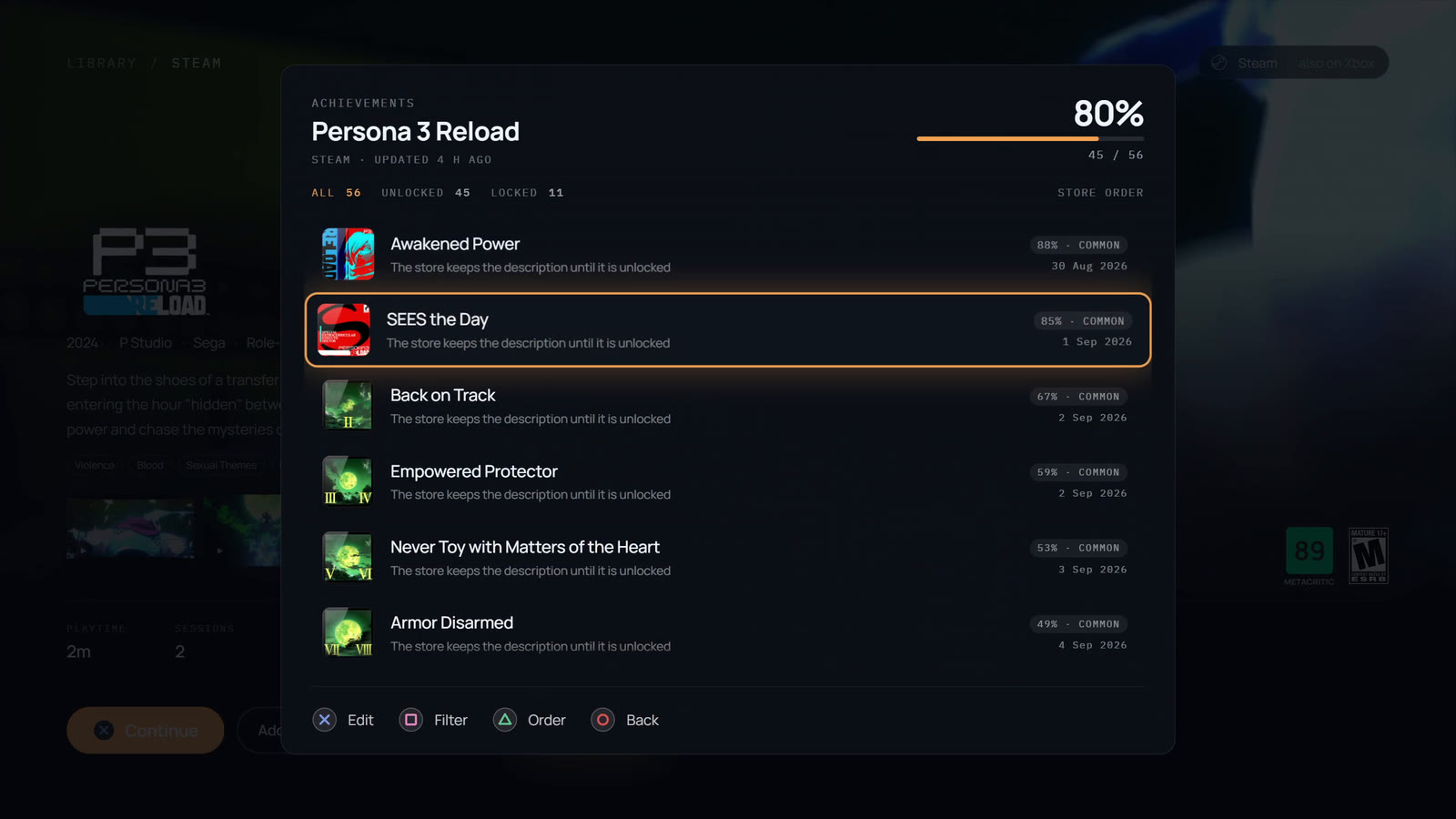
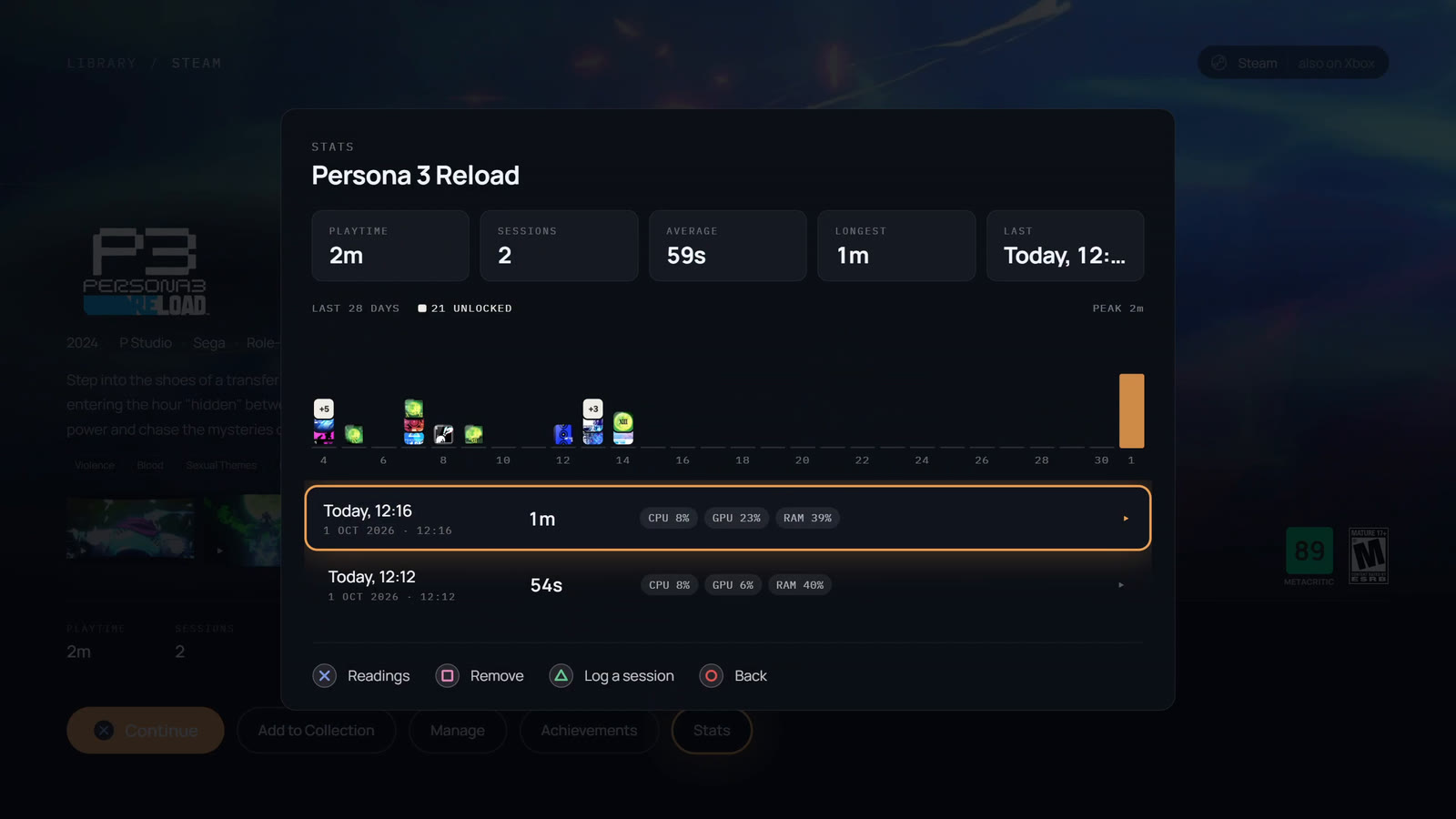
- Achievements and play stats. Every session is recorded, with CPU and GPU readings.
- Favorites, collections, filters and search, and one button to hide anything that isn't a game.
 |  |
 |  |
No keyboard. No mouse.
Most couch launchers stop once a game starts. Loungepad covers everything after it:
- The left stick is the mouse, the right stick scrolls, and A and B click, anywhere in Windows. A DualSense touchpad works like a laptop's.
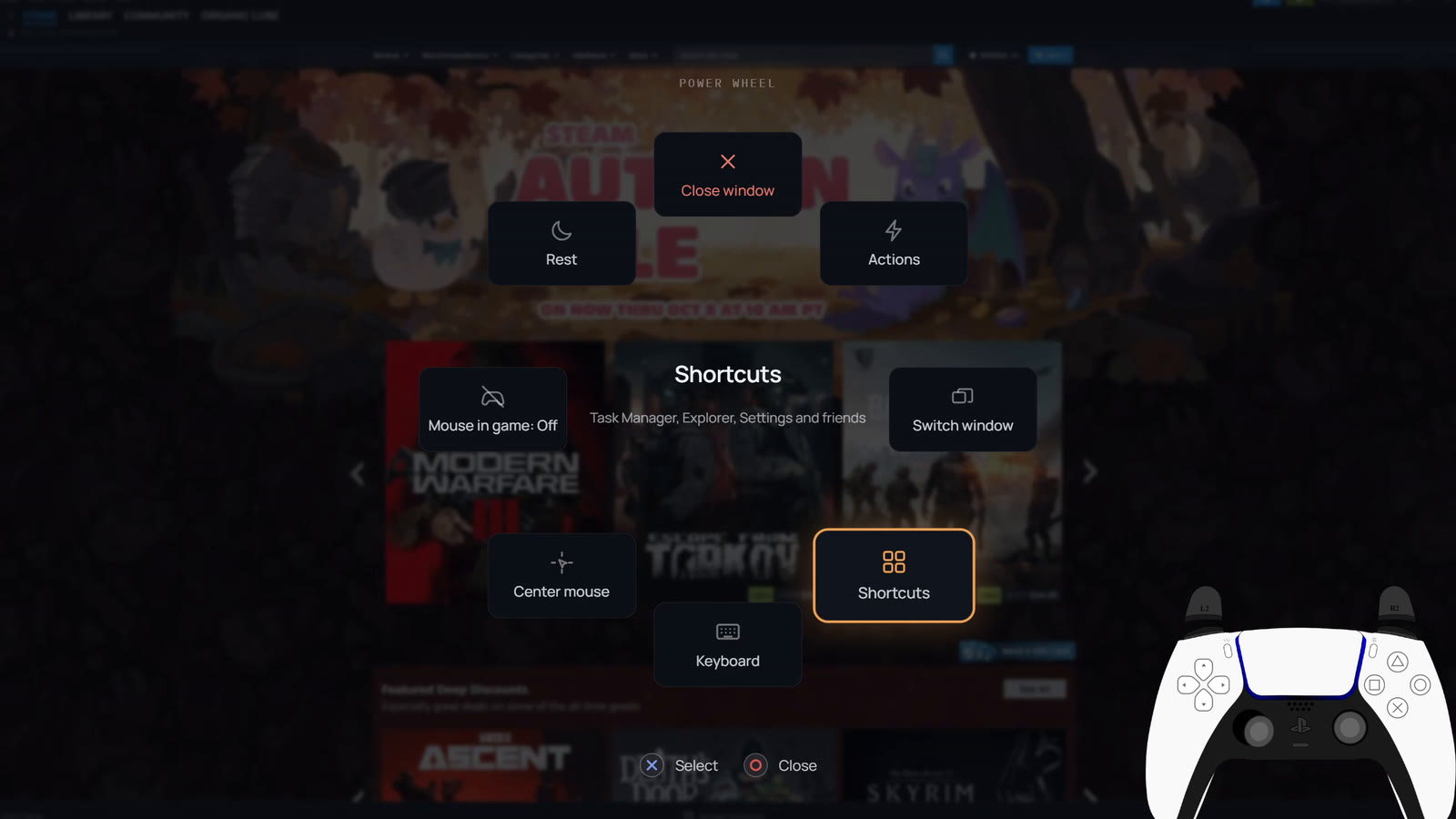
- The Power Wheel. Tap the Xbox button (PS or Home on other pads) anywhere, even mid-game, to switch windows, close what's stuck, jump to Task Manager or Settings, or rest the TV. Hold it to bring Loungepad back.
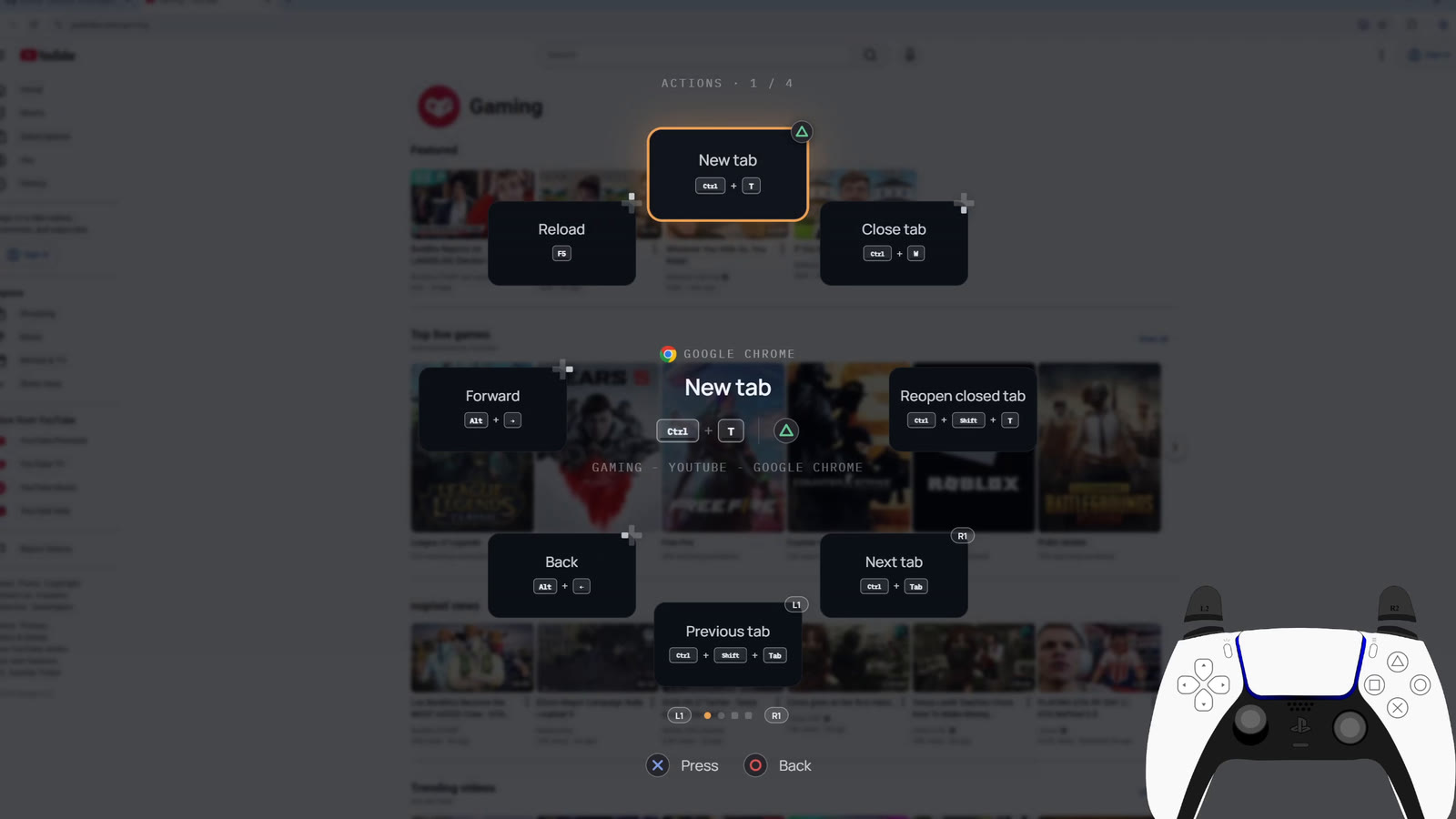
- App shortcuts on your controller, ready for browsers, Spotify, VLC, Discord, File Explorer and more, or add your own. Pick one from the Power Wheel or give it a button.
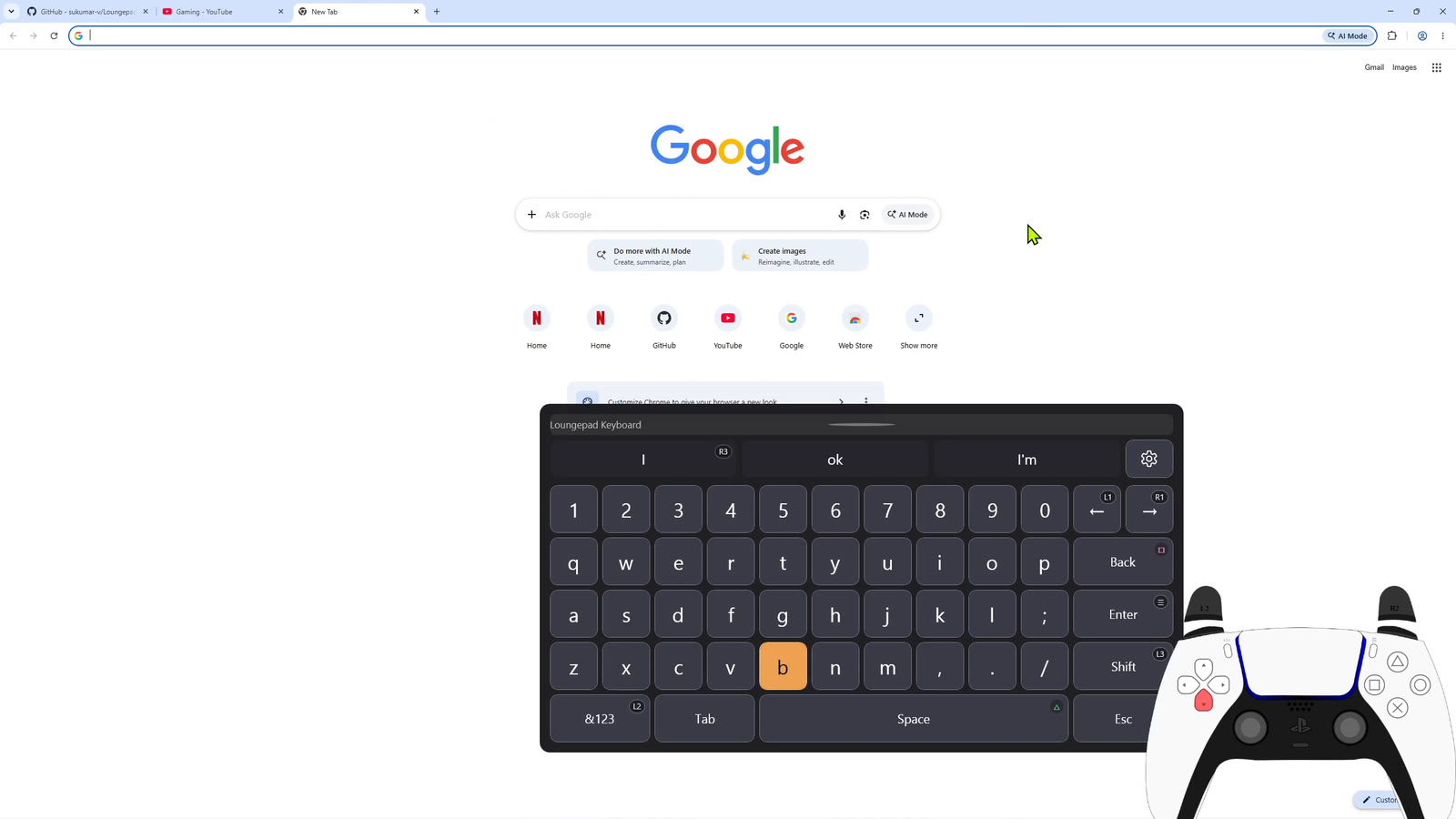
- An on-screen keyboard built for controllers. View (Create on a DualSense) raises it anywhere in Windows, with word suggestions.
- It rests like a console. Put the controller down and the TV goes dark and the game pauses; any button brings both back.
 |  |
 | 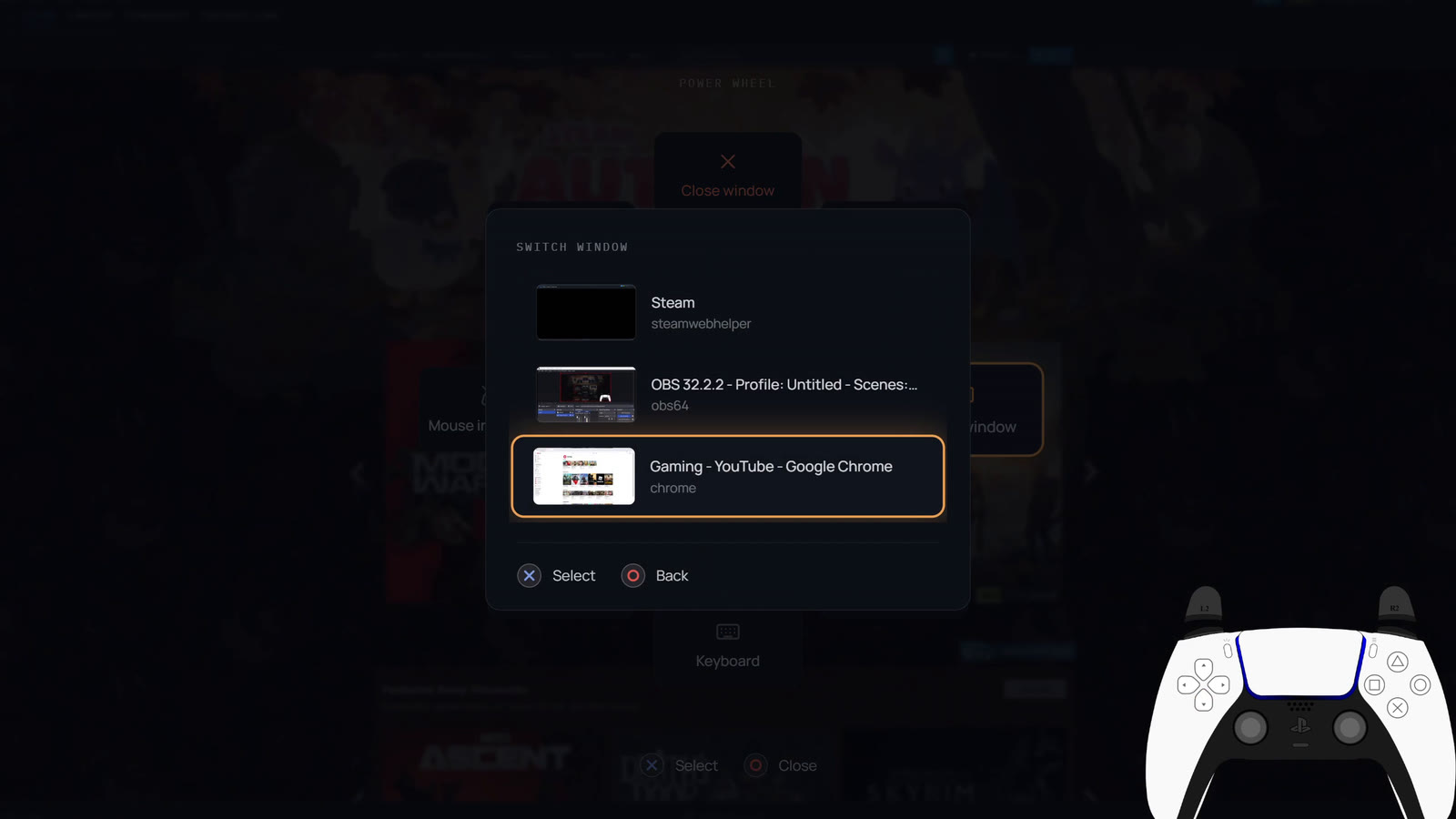 |
Works with Xbox, PlayStation, Switch and other controllers. A keyboard and mouse work too.
What a console can't do
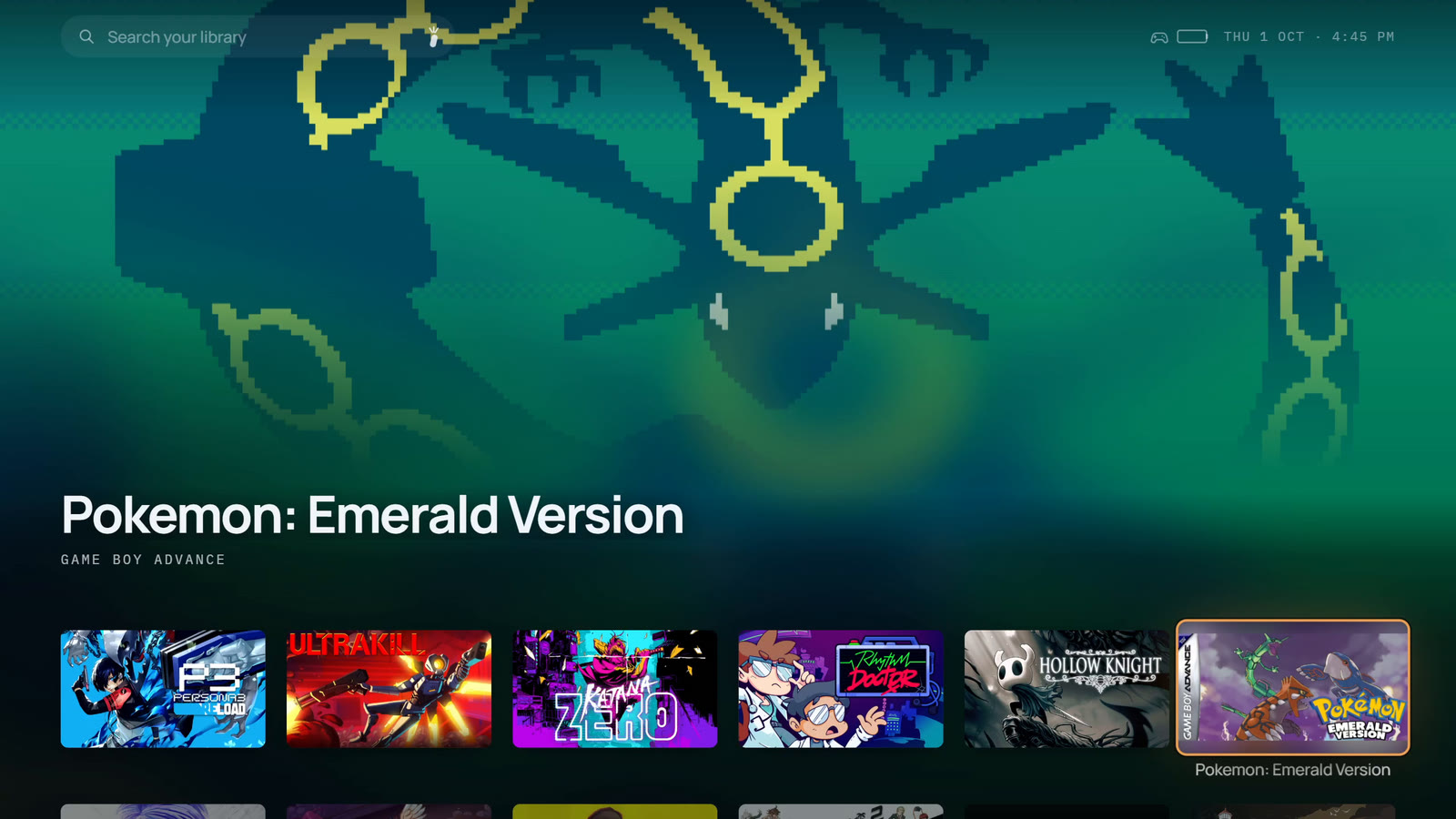
- Emulators and ROMs. RetroArch, Dolphin, PCSX2, DuckStation and about twenty more are found automatically, with RetroArch's playlists and your ROM folders. ROMs get box art and sit in the library with everything else.
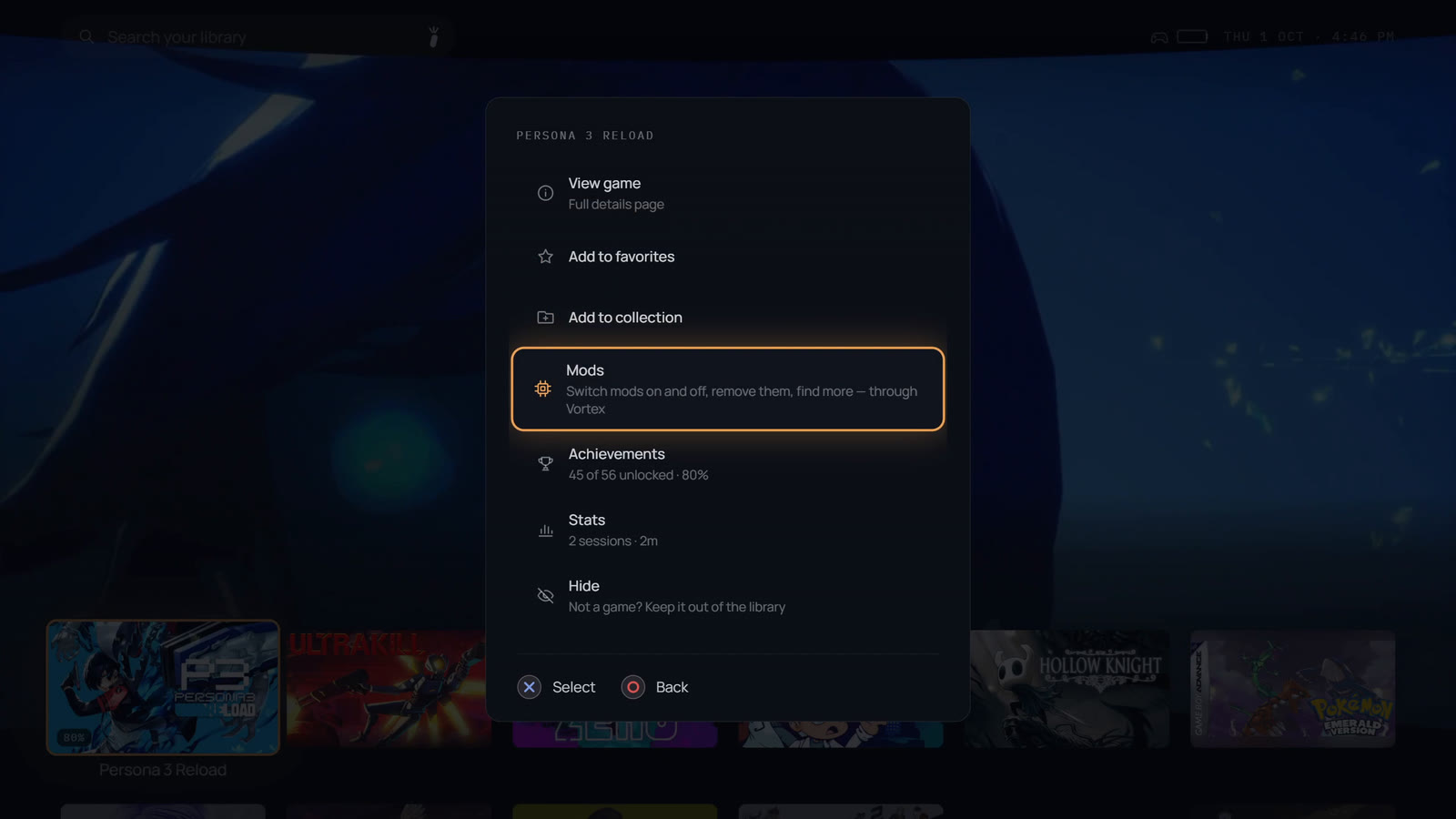
- Mods. Turn mods on and off, remove them and find new ones from the couch, through Vortex.
- Themes. Two built in, Loungepad and Shelf, with your choice of accent colour. Or write your own in CSS.
 |  |
Install
- Download
Loungepad.exeand move it somewhere it can stay under your user folder, such as a folder in Documents (notProgram Files, so it can update itself). - Run it. Releases are code-signed, but SmartScreen can still warn about a new release until enough people have run it: if it does, choose More info → Run anyway.
- A short setup, driven with the controller, asks which screen is the TV, signs in to your stores and picks the look. It finds your games while you answer.
It's one file, with nothing to unzip and nothing else to install: .NET is bundled, and Windows
already has the WebView2 runtime. Loungepad updates itself from this repository's releases.
Settings and the library live in %APPDATA%\Loungepad; to uninstall, delete Loungepad.exe.
Controls
| Controller | Keyboard | On the library |
|---|---|---|
| A | Enter | Launch / select |
| B | Esc | Back |
| X | X | Filter and sort |
| Y | Ctrl | A game's options |
| View | / | Search, with the on-screen keyboard |
| Menu | Tab | Settings |
| LB | ` | Stats |
| Xbox button, tap | Power Wheel | |
| Xbox button, hold | Show or hide Loungepad; the in-game menu while a game runs |
PlayStation and Switch pads use the buttons in the same places, and the hints on screen show them.
Documentation
- User guide: every feature in detail, from store sign-ins to emulators, mods, and rest and sleep.
- Themes: how to write your own.
- Development: building, packaging and how it works inside.
Questions, ideas and problems
- Tell us what to build next: a one-minute form. Rate Loungepad, tick the features you want most, and say anything else. No account needed.
- Discord: get help, share your couch setup, and vote in polls.
- Discussions: ask a question, show off your setup, or post an idea. Upvote the ideas you want most.
- Report a problem if something doesn't work the way it should.
Want to leave a tip?
Loungepad is free, and it will stay free. If you'd like to say thanks, give to a good cause instead: GiveWell recommends the charities that do the most good for each dollar, and Charity Navigator rates thousands more, whatever cause you care about.
Build
Needs the .NET 8 SDK and the WebView2 runtime (Windows already has it).
dotnet build Loungepad.sln
Run Loungepad\bin\Debug\net8.0-windows\Loungepad.exe, with --windowed for a 1280×720 window.
Packaging a release is in Development.
Contributing
Bug reports and small fixes are welcome; open an issue first for anything larger, and post feature ideas in Discussions. Build steps, the conventions this repo follows, and what is deliberately out of scope are in CONTRIBUTING.md.
License
Licensed under the Apache License 2.0. See NOTICE for attribution and third-party components.
"Loungepad" and the Loungepad logo are not covered by that grant — section 6 of the license reserves trademarks. Fork it freely; give the fork its own name.
Similar repos


Turn your Windows PC into a console. A full-screen, controller-first game launcher for the TV that also lets the gamepad drive Windows itself — no keyboard or mouse needed.
See the codeSee what people are saying
README
Turn your Windows PC into a console.
Your games and your whole desktop, driven from the couch with just a controller.
loungepad.app · ▶ Watch the trailer
Loungepad is a full-screen launcher for a PC connected to a TV, by cable or streamed from another room. It puts every game you own in one library and makes the controller a complete input device, so you never walk to the desk for the mouse. And it's still a PC: emulators, mods and every Windows app are a button away.
https://github.com/user-attachments/assets/0aa19943-f788-4f97-ac93-ffba33159b6f
Every game you own, in one library
- Steam, Epic, GOG, the Xbox app and PC Game Pass, plus your emulators and ROMs, side by side. Installed games are found on their own, and the games you own but haven't installed can come in too, one press from installing.
- Art, descriptions, ratings and trailers are fetched for every game, with no setup.
- Achievements and play stats. Every session is recorded, with CPU and GPU readings.
- Favorites, collections, filters and search, and one button to hide anything that isn't a game.
| |
| |
No keyboard. No mouse.
Most couch launchers stop once a game starts. Loungepad covers everything after it:
- The left stick is the mouse, the right stick scrolls, and A and B click, anywhere in Windows. A DualSense touchpad works like a laptop's.
- The Power Wheel. Tap the Xbox button (PS or Home on other pads) anywhere, even mid-game, to switch windows, close what's stuck, jump to Task Manager or Settings, or rest the TV. Hold it to bring Loungepad back.
- App shortcuts on your controller, ready for browsers, Spotify, VLC, Discord, File Explorer and more, or add your own. Pick one from the Power Wheel or give it a button.
- An on-screen keyboard built for controllers. View (Create on a DualSense) raises it anywhere in Windows, with word suggestions.
- It rests like a console. Put the controller down and the TV goes dark and the game pauses; any button brings both back.
| |
| |
Works with Xbox, PlayStation, Switch and other controllers. A keyboard and mouse work too.
What a console can't do
- Emulators and ROMs. RetroArch, Dolphin, PCSX2, DuckStation and about twenty more are found automatically, with RetroArch's playlists and your ROM folders. ROMs get box art and sit in the library with everything else.
- Mods. Turn mods on and off, remove them and find new ones from the couch, through Vortex.
- Themes. Two built in, Loungepad and Shelf, with your choice of accent colour. Or write your own in CSS.
| |
Install
- Download
Loungepad.exeand move it somewhere it can stay under your user folder, such as a folder in Documents (notProgram Files, so it can update itself). - Run it. Releases are code-signed, but SmartScreen can still warn about a new release until enough people have run it: if it does, choose More info → Run anyway.
- A short setup, driven with the controller, asks which screen is the TV, signs in to your stores and picks the look. It finds your games while you answer.
It's one file, with nothing to unzip and nothing else to install: .NET is bundled, and Windows
already has the WebView2 runtime. Loungepad updates itself from this repository's releases.
Settings and the library live in %APPDATA%\Loungepad; to uninstall, delete Loungepad.exe.
Controls
| Controller | Keyboard | On the library |
|---|---|---|
| A | Enter | Launch / select |
| B | Esc | Back |
| X | X | Filter and sort |
| Y | Ctrl | A game's options |
| View | / | Search, with the on-screen keyboard |
| Menu | Tab | Settings |
| LB | ` | Stats |
| Xbox button, tap | Power Wheel | |
| Xbox button, hold | Show or hide Loungepad; the in-game menu while a game runs |
PlayStation and Switch pads use the buttons in the same places, and the hints on screen show them.
Documentation
- User guide: every feature in detail, from store sign-ins to emulators, mods, and rest and sleep.
- Themes: how to write your own.
- Development: building, packaging and how it works inside.
Questions, ideas and problems
- Tell us what to build next: a one-minute form. Rate Loungepad, tick the features you want most, and say anything else. No account needed.
- Discord: get help, share your couch setup, and vote in polls.
- Discussions: ask a question, show off your setup, or post an idea. Upvote the ideas you want most.
- Report a problem if something doesn't work the way it should.
Want to leave a tip?
Loungepad is free, and it will stay free. If you'd like to say thanks, give to a good cause instead: GiveWell recommends the charities that do the most good for each dollar, and Charity Navigator rates thousands more, whatever cause you care about.
Build
Needs the .NET 8 SDK and the WebView2 runtime (Windows already has it).
dotnet build Loungepad.sln
Run Loungepad\bin\Debug\net8.0-windows\Loungepad.exe, with --windowed for a 1280×720 window.
Packaging a release is in Development.
Contributing
Bug reports and small fixes are welcome; open an issue first for anything larger, and post feature ideas in Discussions. Build steps, the conventions this repo follows, and what is deliberately out of scope are in CONTRIBUTING.md.
License
Licensed under the Apache License 2.0. See NOTICE for attribution and third-party components.
"Loungepad" and the Loungepad logo are not covered by that grant — section 6 of the license reserves trademarks. Fork it freely; give the fork its own name.