
Minimalist MIDI Sequencer
See the codeREADME
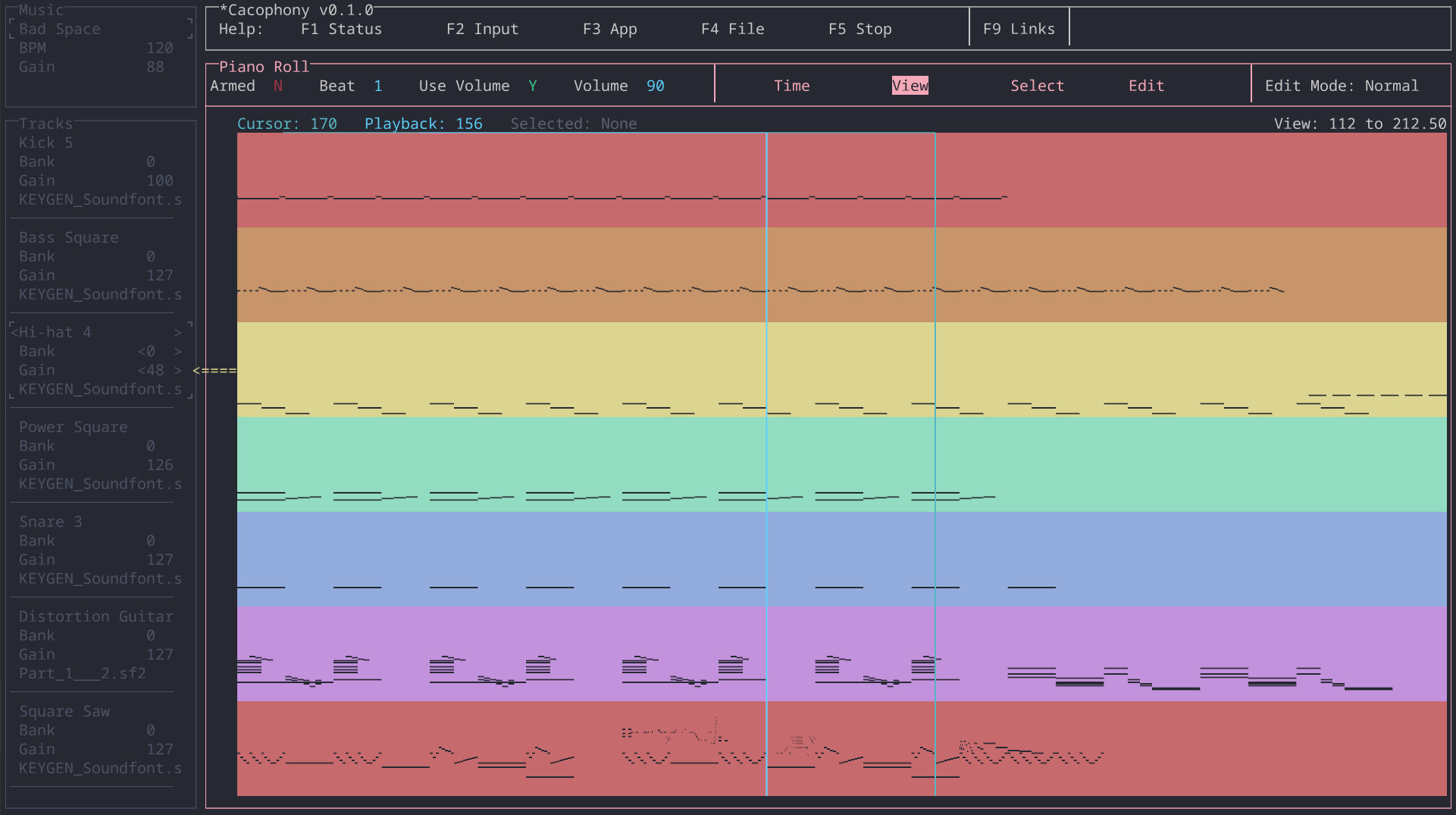
Cacophony is a minimalist and ergonomic MIDI sequencer. It's minimalist in that it doesn't have a lot of functionality MIDI sequencers have. It's ergonomic in that there is no mouse input and a very clean interface, allowing you to juggle less inputs and avoid awkward mouse motions.
Buy Cacophony (or compile it yourself).
How to compile
I compile Cacophony with Rust 1.74.0 for Linux, MacOS, or Windows. Below is a list of operating systems I've tested:
Linux:
- Ubuntu 18.04 i386 with X11
- Ubuntu 18.04 x64 with X11
- Ubuntu 20.04 x64 with X11
- Ubuntu 22.04 x64 with X11
- Ubuntu 24.04 x64 with X11
MacOS:
- Catalina 10.15.7 x64
- Ventura 13.2.1 Apple Silicon
Windows:
- Windows 10 x64
All platforms
- Install Rust (stable)
- Clone this repo
Linux
Debian 11
apt install clang cmake speech-dispatcher libspeechd-dev pkg-config libssl-dev librust-alsa-sys-devcargo build --release --features speech_dispatcher_0_9
Debian 12
apt install clang cmake speech-dispatcher libspeechd-dev pkg-config libssl-dev librust-alsa-sys-devcargo build --release --features speech_dispatcher_0_11
Ubuntu 18
apt install clang cmake speech-dispatcher libspeechd-dev pkg-config libssl-dev alsacargo build --release --features speech_dispatcher_0_9
Ubuntu 20
apt install clang cmake speech-dispatcher libspeechd-dev pkg-config libssl-dev alsa librust-alsa-sys-devcargo build --release --features speech_dispatcher_0_9
Ubuntu 22 and 24
apt install clang cmake speech-dispatcher libspeechd-dev pkg-config libssl-dev alsa librust-alsa-sys-devcargo build --release --features speech_dispatcher_0_11
MacOS
cargo install cargo-bundlecargo bundle --release
Windows
cargo build --release
Set the data directory
Cacophony's default data directory is located at ../data. To set the default data directory at compile time, set the CACOPHONY_BUILD_DATA_DIR enviroment variable:
export CACOPHONY_BUILD_DATA_DIR=/usr/share/cacophony
cargo build --release
Tests
To test, just cargo test --all.
Sometimes when debugging, it's useful to create the same initial setup every time. To do this, you can pass input events in like this: cargo run -- --events events.txt
...where the contents of events.txt is something like:
NextPanel
AddTrack
EnableSoundFontPanel
SelectFile
How to run
You can run Cacophony like any other application or you can use Rust's cargo run to compile and execute.
Linux
There are two ways to run Cacophony:
- Copy + paste
data/into the output directory (target/release/). Open a terminal inrelease/and run./Cacophony. - Instead of
cargo build --release, runcargo run --releaseInclude the--featureslisted above, for examplecargo build --release --features speech_dispatcher_0_11on Ubuntu 22
MacOS
There are two ways to run Cacophony:
- After compiling, double-click
Cacophony.app(located in./target/release/) cargo run --releaseThis will compile and launch the application but it won't create a .app
Windows
There are two ways to run Cacophony:
- Copy + paste
data/into the output directory (target/release/) and double-clickCacophony.exe(located inrelease/) - Instead of
cargo build --release, runcargo run --release
Upload
Assuming that you are Esther Alter and you have the relevant credentials on your computer, you can upload the website and create itch.io builds by doing this:
cd pypy -3 build.py
Contributors



Similar repos


Languages
Rust
94.8%
HTML
4.2%
Minimalist MIDI Sequencer
See the codeREADME
Cacophony is a minimalist and ergonomic MIDI sequencer. It's minimalist in that it doesn't have a lot of functionality MIDI sequencers have. It's ergonomic in that there is no mouse input and a very clean interface, allowing you to juggle less inputs and avoid awkward mouse motions.
Buy Cacophony (or compile it yourself).
How to compile
I compile Cacophony with Rust 1.74.0 for Linux, MacOS, or Windows. Below is a list of operating systems I've tested:
Linux:
- Ubuntu 18.04 i386 with X11
- Ubuntu 18.04 x64 with X11
- Ubuntu 20.04 x64 with X11
- Ubuntu 22.04 x64 with X11
- Ubuntu 24.04 x64 with X11
MacOS:
- Catalina 10.15.7 x64
- Ventura 13.2.1 Apple Silicon
Windows:
- Windows 10 x64
All platforms
- Install Rust (stable)
- Clone this repo
Linux
Debian 11
apt install clang cmake speech-dispatcher libspeechd-dev pkg-config libssl-dev librust-alsa-sys-devcargo build --release --features speech_dispatcher_0_9
Debian 12
apt install clang cmake speech-dispatcher libspeechd-dev pkg-config libssl-dev librust-alsa-sys-devcargo build --release --features speech_dispatcher_0_11
Ubuntu 18
apt install clang cmake speech-dispatcher libspeechd-dev pkg-config libssl-dev alsacargo build --release --features speech_dispatcher_0_9
Ubuntu 20
apt install clang cmake speech-dispatcher libspeechd-dev pkg-config libssl-dev alsa librust-alsa-sys-devcargo build --release --features speech_dispatcher_0_9
Ubuntu 22 and 24
apt install clang cmake speech-dispatcher libspeechd-dev pkg-config libssl-dev alsa librust-alsa-sys-devcargo build --release --features speech_dispatcher_0_11
MacOS
cargo install cargo-bundlecargo bundle --release
Windows
cargo build --release
Set the data directory
Cacophony's default data directory is located at ../data. To set the default data directory at compile time, set the CACOPHONY_BUILD_DATA_DIR enviroment variable:
export CACOPHONY_BUILD_DATA_DIR=/usr/share/cacophony
cargo build --release
Tests
To test, just cargo test --all.
Sometimes when debugging, it's useful to create the same initial setup every time. To do this, you can pass input events in like this: cargo run -- --events events.txt
...where the contents of events.txt is something like:
NextPanel
AddTrack
EnableSoundFontPanel
SelectFile
How to run
You can run Cacophony like any other application or you can use Rust's cargo run to compile and execute.
Linux
There are two ways to run Cacophony:
- Copy + paste
data/into the output directory (target/release/). Open a terminal inrelease/and run./Cacophony. - Instead of
cargo build --release, runcargo run --releaseInclude the--featureslisted above, for examplecargo build --release --features speech_dispatcher_0_11on Ubuntu 22
MacOS
There are two ways to run Cacophony:
- After compiling, double-click
Cacophony.app(located in./target/release/) cargo run --releaseThis will compile and launch the application but it won't create a .app
Windows
There are two ways to run Cacophony:
- Copy + paste
data/into the output directory (target/release/) and double-clickCacophony.exe(located inrelease/) - Instead of
cargo build --release, runcargo run --release
Upload
Assuming that you are Esther Alter and you have the relevant credentials on your computer, you can upload the website and create itch.io builds by doing this:
cd pypy -3 build.py
Similar repos
Contributors
Languages
Rust
94.8%
HTML
4.2%