Point it at any web page and it finds the video, extracts the stream, transcodes it and casts in real time to your TV. It even burns subtitles….
Go
2,401
394 commits
updated Oct 11, 2026






Cast web video to your TV without screen mirroring. Castor extracts streams, converts incompatible formats, and optionally generates subtitles. Run locally or offload media processing to a NAS.
Castor bundles no content or sources and refuses DRM. Use only content you are authorized to access; see Purpose and disclaimer.
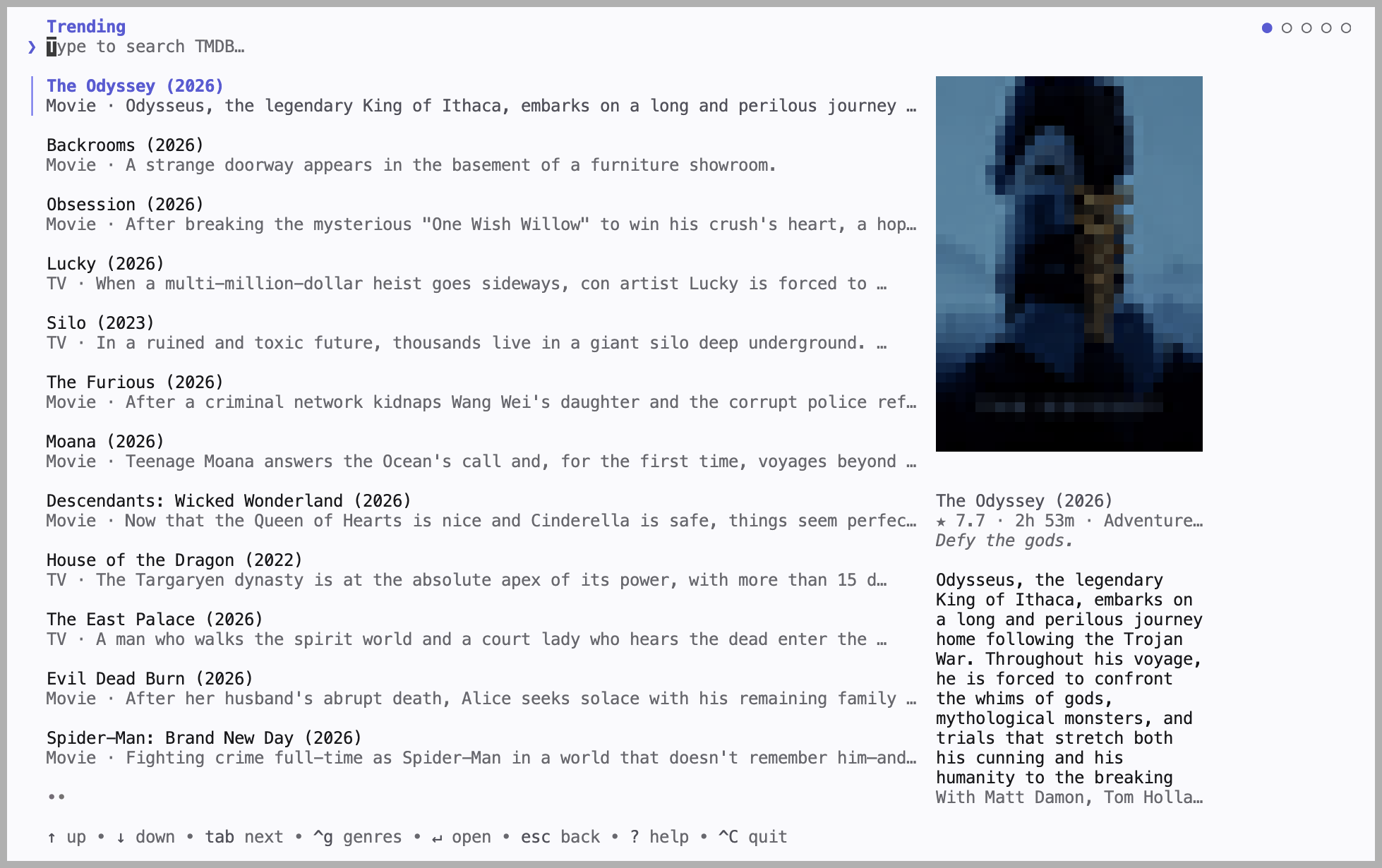
Run castor cast to browse titles and cast, without leaving the terminal.
Install on macOS (other platforms) and find your TV:
brew install --cask stupside/tap/castor
castor scan
Save config.yaml in your working directory:
device:
  name: "Living Room TV"   # exact name from `castor scan`
  type: dlna               # or: chromecast, roku
Cast a page:
castor cast player https://example.com/watch/some-video
castor scanfound nothing? See Troubleshooting.
| Command | What it does |
|---|---|
castor scan | List the devices on your network |
castor cast player <url> | Cast a web page with an embedded video player |
castor cast url <url> | Cast a direct stream or video URL |
castor cast | Browse titles and cast, interactively (needs a TMDB key) |
castor cast movie <id> | Resolve a movie id against your sources and cast |
castor cast episode <id> --season N --episode N | Same, for a TV episode |
castor media-server | Probe, rank, convert, and serve streams |
castor scraping-server | Extract stream candidates using Chrome |
castor api-server | Discover/control devices and orchestrate casts |
castor cast --dry-run ... prints the streams it found instead of casting. Run castor --help for all flags.
Use a native binary on your TV's network, with these tools on PATH:
| Tool | Version | Used for |
|---|---|---|
| Chrome / Chromium | Any recent | Finding the video on a page |
| ffmpeg | 7.1+ | Converting the video for your TV |
| ffprobe | 7.1+ | Reading the video's format |
Encoding uses a working GPU encoder, falling back to software.
brew install --cask stupside/tap/castor.castor_<version>_linux_amd64.tar.gz (or _arm64) from the latest release and put castor on your PATH.castor.exe on PATH. Install tools with winget install Gyan.FFmpeg and winget install Google.Chrome. For SmartScreen, choose More info → Run anyway; allow firewall access on private networks for discovery.Castor reads config.yaml (or --config <path>), then overlays git-ignored config.local.yaml. Environment variables such as CASTOR_CAST__MAX_HEIGHT=720 override both. CLI casting needs device; other keys have defaults. Keep secrets out of git; see SECURITY.md.
Subtitles are burned into served, read-once video (e.g. DLNA), not self-fetching Chromecast/Roku playback. The appropriate default model downloads once to your cache.
cast:
  subtitles: en            # a language code, or auto to detect it; unset for none
whisper:
  # model_path: ""         # ggml-tiny.en for en, multilingual ggml-tiny otherwise
Set whisper.model_path to use a larger model (e.g. multilingual ggml-base.bin). English-only models reject other languages and auto.
Choose the tallest stream within this ceiling and scale known taller video down:
cast:
  max_height: 2160         # default: 1080
Title commands substitute IDs into your source templates, trying proxies in order. Add only sites you are authorized to use:
sources:
  - proxies: ["https://your-source.example"]   # base URLs, tried in order
    templates:
      movie: "/embed/movie/{itemID}"
      episode: "/embed/tv/{itemID}/{season}-{episode}"
Only the interactive browser needs a TMDB key:
tmdb:
  api_key: "<KEY>"
Run on the server with server.token set:
castor media-server # listens on :8410 (server.listen)
On your computer:
server:
  url: http://my-nas:8410
  token: "<a long random string, the same on both>"
Your computer discovers and controls the TV; the server processes media. Closing the terminal leaves playback running; Ctrl+C stops it. Cast preferences come from the client, the Whisper model from media. Set server.advertise to an address the TV can reach; use HTTPS outside a trusted network.
Run each command in a separate process; API must reach the TV's network:
castor media-server      # :8410
castor scraping-server   # :8412
castor api-server        # :8411
Set server.url: http://localhost:8410 and scraping.url: http://localhost:8412 for API. Configure independent server.token, scraping.token, and api.token; $TOKEN below is the API token.
curl -X POST http://localhost:8411/castor.v1.DeviceService/ListDevices \
  -H "Authorization: Bearer $TOKEN" \
  -H 'Content-Type: application/json' -d '{}'

curl -X POST http://localhost:8411/castor.v1.CastService/Cast \
  -H "Authorization: Bearer $TOKEN" \
  -H 'Content-Type: application/json' \
  -d '{"target": {"deviceId": "<id from ListDevices>"}, "source": {"stream": {"url": "https://example.com/video.m3u8"}}}'
For a page, use "source": {"pages": {"urls": ["https://example.com/watch"]}}. Stop ends a cast; Watch streams feedback (use buf curl or a generated client). CLI clients connect with api.url and api.token.
Page casts go API → scraping → media; direct streams bypass scraping. Media never receives webpages. Without api.url, CLI starts missing services on loopback. See ARCHITECTURE.md for contracts, ownership, and lifecycle.
| Protocol | Works with | Status |
|---|---|---|
DLNA / UPnP (MediaRenderer:1) | Most smart TVs, and players like Kodi, VLC, and Plex | Tested on Samsung |
| Chromecast | Google Cast devices | Experimental, not yet tried on real hardware |
| Roku | Roku TVs and players, through a sideloaded channel | Experimental, not yet tried on real hardware |
Castor sideloads a playback channel:
devices:
  roku:
    password: "<dev-web-server-password>"   # first cast only
For a published channel, set devices.roku.app_id instead; no developer mode/password needed. Relayed Roku playback runs about 30 s behind.
castor scan finds nothing: pin the device by IPDiscovery cannot cross VLANs/subnets and is blocked on Android/Termux. Set host to skip discovery:
device:
  name: "Living Room TV"   # now just a label
  type: dlna
  host: 192.168.0.3        # the device's LAN IP
For DLNA, host can be a full description URL (e.g. http://192.168.0.3:9197/dmr). On Android/Termux, leave network.interface empty.
The page's video must start without a click. DRM streams are refused.
Force served playback rather than handing the TV a link:
cast:
  delivery: serve   # "auto" (the default) decides per source
Try once with CASTOR_CAST__DELIVERY=serve; it costs bandwidth and CPU. castor --debug explains delivery decisions.
The image includes Chrome, ffmpeg, and ffprobe. --device /dev/dri enables Intel VA-API; otherwise encoding uses software.
[!WARNING] The Compose stack targets Linux host networking for LAN discovery and device-reachable media URLs. On macOS/Windows, use the native binary for discovery. Docker Desktop 4.34+ has opt-in host networking, but cannot bind directly to the host's network interfaces.
docker run --rm --network host ghcr.io/stupside/castor:latest scan

docker run --rm --network host --device /dev/dri \
  -v "$PWD/config.yaml:/config.yaml" \
  -v castor-cache:/root/.cache \
  ghcr.io/stupside/castor:latest \
  cast player https://example.com/watch/some-video
The cache volume preserves Whisper models. On Linux, put CASTOR_SERVER__TOKEN, CASTOR_SCRAPING__TOKEN, and CASTOR_API__TOKEN in git-ignored .env, then run docker compose up -d. API and media use host networking; scraping is published only on loopback. Remove the /dev/dri mapping on hosts without Intel VA-API. A standalone bridged media container needs -p 8410:8410 and server.advertise set to a device-reachable address.
Tags: :latest (stable), :canary (preview), or a pinned :vX.Y.Z.
No bundled video or sources; no DRM decryption or circumvention. You are responsible for lawful use and compliance with site terms. Provided as-is for lawful, personal, and educational use.
See CONTRIBUTING.md, and ARCHITECTURE.md for how castor works inside.
(top 24 of 38)
227 followers · starred Jul 2026
457 followers · starred Jul 2026
4,596 followers · starred Jul 2026
523 followers · starred Jul 2026
Point it at any web page and it finds the video, extracts the stream, transcodes it and casts in real time to your TV. It even burns subtitles….
Go
2,401
394 commits
updated Oct 11, 2026
Cast web video to your TV without screen mirroring. Castor extracts streams, converts incompatible formats, and optionally generates subtitles. Run locally or offload media processing to a NAS.
Castor bundles no content or sources and refuses DRM. Use only content you are authorized to access; see Purpose and disclaimer.
Run castor cast to browse titles and cast, without leaving the terminal.
Install on macOS (other platforms) and find your TV:
brew install --cask stupside/tap/castor
castor scan
Save config.yaml in your working directory:
device:
  name: "Living Room TV"   # exact name from `castor scan`
  type: dlna               # or: chromecast, roku
Cast a page:
castor cast player https://example.com/watch/some-video
castor scanfound nothing? See Troubleshooting.
| Command | What it does |
|---|---|
castor scan | List the devices on your network |
castor cast player <url> | Cast a web page with an embedded video player |
castor cast url <url> | Cast a direct stream or video URL |
castor cast | Browse titles and cast, interactively (needs a TMDB key) |
castor cast movie <id> | Resolve a movie id against your sources and cast |
castor cast episode <id> --season N --episode N | Same, for a TV episode |
castor media-server | Probe, rank, convert, and serve streams |
castor scraping-server | Extract stream candidates using Chrome |
castor api-server | Discover/control devices and orchestrate casts |
castor cast --dry-run ... prints the streams it found instead of casting. Run castor --help for all flags.
Use a native binary on your TV's network, with these tools on PATH:
| Tool | Version | Used for |
|---|---|---|
| Chrome / Chromium | Any recent | Finding the video on a page |
| ffmpeg | 7.1+ | Converting the video for your TV |
| ffprobe | 7.1+ | Reading the video's format |
Encoding uses a working GPU encoder, falling back to software.
brew install --cask stupside/tap/castor.castor_<version>_linux_amd64.tar.gz (or _arm64) from the latest release and put castor on your PATH.castor.exe on PATH. Install tools with winget install Gyan.FFmpeg and winget install Google.Chrome. For SmartScreen, choose More info → Run anyway; allow firewall access on private networks for discovery.Castor reads config.yaml (or --config <path>), then overlays git-ignored config.local.yaml. Environment variables such as CASTOR_CAST__MAX_HEIGHT=720 override both. CLI casting needs device; other keys have defaults. Keep secrets out of git; see SECURITY.md.
Subtitles are burned into served, read-once video (e.g. DLNA), not self-fetching Chromecast/Roku playback. The appropriate default model downloads once to your cache.
cast:
  subtitles: en            # a language code, or auto to detect it; unset for none
whisper:
  # model_path: ""         # ggml-tiny.en for en, multilingual ggml-tiny otherwise
Set whisper.model_path to use a larger model (e.g. multilingual ggml-base.bin). English-only models reject other languages and auto.
Choose the tallest stream within this ceiling and scale known taller video down:
cast:
  max_height: 2160         # default: 1080
Title commands substitute IDs into your source templates, trying proxies in order. Add only sites you are authorized to use:
sources:
  - proxies: ["https://your-source.example"]   # base URLs, tried in order
    templates:
      movie: "/embed/movie/{itemID}"
      episode: "/embed/tv/{itemID}/{season}-{episode}"
Only the interactive browser needs a TMDB key:
tmdb:
  api_key: "<KEY>"
Run on the server with server.token set:
castor media-server # listens on :8410 (server.listen)
On your computer:
server:
  url: http://my-nas:8410
  token: "<a long random string, the same on both>"
Your computer discovers and controls the TV; the server processes media. Closing the terminal leaves playback running; Ctrl+C stops it. Cast preferences come from the client, the Whisper model from media. Set server.advertise to an address the TV can reach; use HTTPS outside a trusted network.
Run each command in a separate process; API must reach the TV's network:
castor media-server      # :8410
castor scraping-server   # :8412
castor api-server        # :8411
Set server.url: http://localhost:8410 and scraping.url: http://localhost:8412 for API. Configure independent server.token, scraping.token, and api.token; $TOKEN below is the API token.
curl -X POST http://localhost:8411/castor.v1.DeviceService/ListDevices \
  -H "Authorization: Bearer $TOKEN" \
  -H 'Content-Type: application/json' -d '{}'

curl -X POST http://localhost:8411/castor.v1.CastService/Cast \
  -H "Authorization: Bearer $TOKEN" \
  -H 'Content-Type: application/json' \
  -d '{"target": {"deviceId": "<id from ListDevices>"}, "source": {"stream": {"url": "https://example.com/video.m3u8"}}}'
For a page, use "source": {"pages": {"urls": ["https://example.com/watch"]}}. Stop ends a cast; Watch streams feedback (use buf curl or a generated client). CLI clients connect with api.url and api.token.
Page casts go API → scraping → media; direct streams bypass scraping. Media never receives webpages. Without api.url, CLI starts missing services on loopback. See ARCHITECTURE.md for contracts, ownership, and lifecycle.
| Protocol | Works with | Status |
|---|---|---|
DLNA / UPnP (MediaRenderer:1) | Most smart TVs, and players like Kodi, VLC, and Plex | Tested on Samsung |
| Chromecast | Google Cast devices | Experimental, not yet tried on real hardware |
| Roku | Roku TVs and players, through a sideloaded channel | Experimental, not yet tried on real hardware |
Castor sideloads a playback channel:
devices:
  roku:
    password: "<dev-web-server-password>"   # first cast only
For a published channel, set devices.roku.app_id instead; no developer mode/password needed. Relayed Roku playback runs about 30 s behind.
castor scan finds nothing: pin the device by IPDiscovery cannot cross VLANs/subnets and is blocked on Android/Termux. Set host to skip discovery:
device:
  name: "Living Room TV"   # now just a label
  type: dlna
  host: 192.168.0.3        # the device's LAN IP
For DLNA, host can be a full description URL (e.g. http://192.168.0.3:9197/dmr). On Android/Termux, leave network.interface empty.
The page's video must start without a click. DRM streams are refused.
Force served playback rather than handing the TV a link:
cast:
  delivery: serve   # "auto" (the default) decides per source
Try once with CASTOR_CAST__DELIVERY=serve; it costs bandwidth and CPU. castor --debug explains delivery decisions.
The image includes Chrome, ffmpeg, and ffprobe. --device /dev/dri enables Intel VA-API; otherwise encoding uses software.
[!WARNING] The Compose stack targets Linux host networking for LAN discovery and device-reachable media URLs. On macOS/Windows, use the native binary for discovery. Docker Desktop 4.34+ has opt-in host networking, but cannot bind directly to the host's network interfaces.
docker run --rm --network host ghcr.io/stupside/castor:latest scan

docker run --rm --network host --device /dev/dri \
  -v "$PWD/config.yaml:/config.yaml" \
  -v castor-cache:/root/.cache \
  ghcr.io/stupside/castor:latest \
  cast player https://example.com/watch/some-video
The cache volume preserves Whisper models. On Linux, put CASTOR_SERVER__TOKEN, CASTOR_SCRAPING__TOKEN, and CASTOR_API__TOKEN in git-ignored .env, then run docker compose up -d. API and media use host networking; scraping is published only on loopback. Remove the /dev/dri mapping on hosts without Intel VA-API. A standalone bridged media container needs -p 8410:8410 and server.advertise set to a device-reachable address.
Tags: :latest (stable), :canary (preview), or a pinned :vX.Y.Z.
No bundled video or sources; no DRM decryption or circumvention. You are responsible for lawful use and compliance with site terms. Provided as-is for lawful, personal, and educational use.
See CONTRIBUTING.md, and ARCHITECTURE.md for how castor works inside.
(top 24 of 38)
227 followers · starred Jul 2026
457 followers · starred Jul 2026
4,596 followers · starred Jul 2026
523 followers · starred Jul 2026