Your self-hosted movie & TV library, streamable anywhere.
See the code

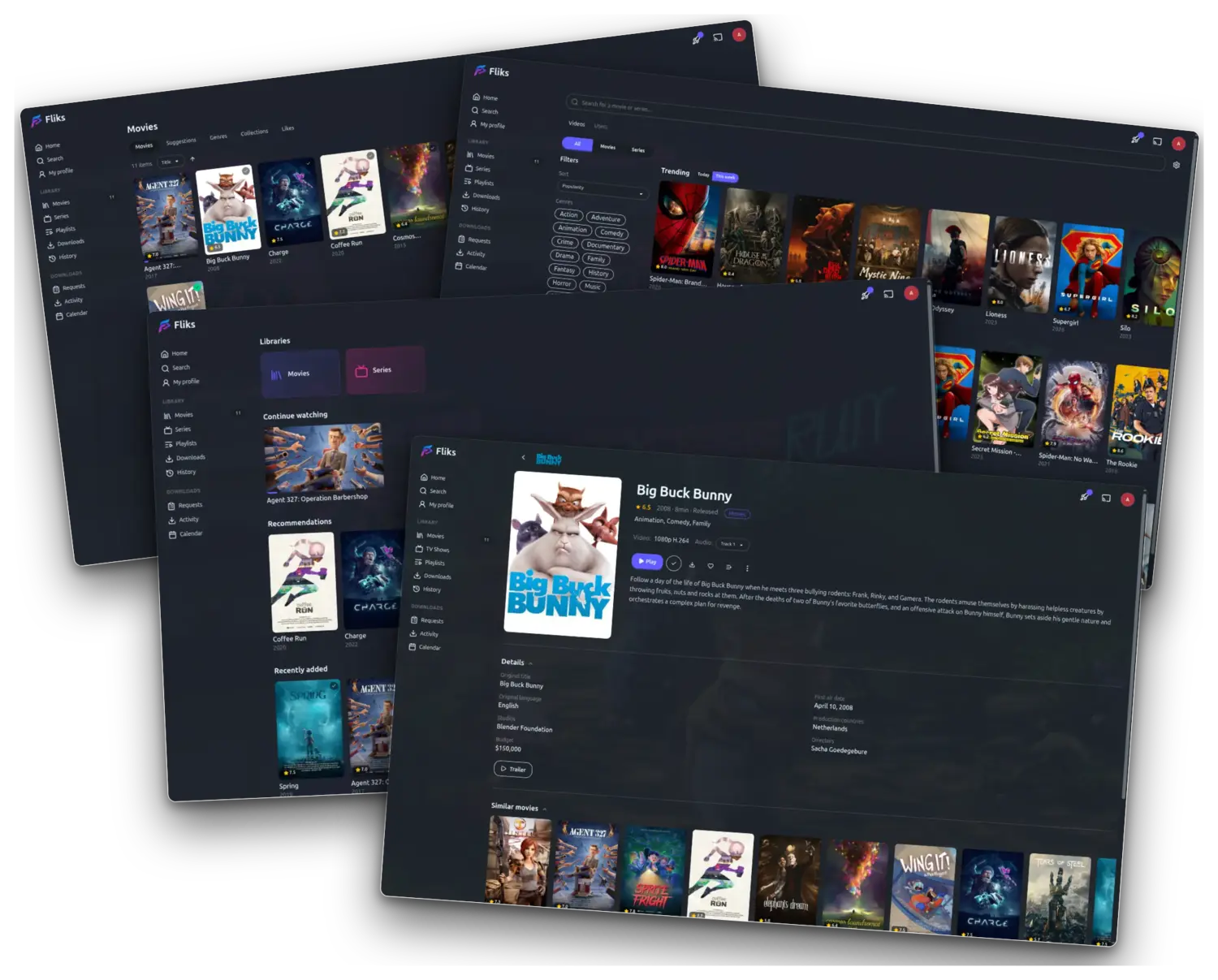
Your personal video collection, on every screen in the house.
Point Fliks at the folders where your videos live and it does the rest: covers, descriptions, cast, seasons and episodes, laid out like the streaming apps you already use — except the library is yours.
It turns a folder of video files into a proper streaming service for the household. Everyone gets their own profile and their own place in every episode; start something on your phone, sit down, and the TV picks it up where you left off. It plays on whatever screen is in front of you, and converts the video on the fly when that screen can't handle the original file.
Self-hosted: the server runs on your machine, there is no account to create, no subscription, and nothing leaves the house.
.srt, .ass), with
your choice remembered per show.Fliks ships with no way to acquire media. You install what you want from
Settings > Plugins: the official catalog is configured out of the
box, and you can add other sources or import a .fkplugin archive by
hand.
data
plugin ships JSON and executes nothing at all, while a process
plugin gets its own child process under its own uid, plus its own
PostgreSQL role and schema. It cannot reach another plugin's tables,
or yours.Writing one: docs/plugins.md.
Fliks runs on plenty of devices. Start a film on your phone and finish it on the TV: your place follows you from one to the other. Here is the full list of what it runs on.
| Client | Where to get it | Minimum | Notes |
|---|---|---|---|
| Web / PWA | your browser, at the server URL | any current browser | installable to the home screen |
| iOS · iPadOS | App Store | iOS 16.6 | |
| Android | Play Store | Android 6 (API 23) | phone + tablet |
| Android TV | Play Store | Android 6 | |
| Samsung TV (Tizen) | sideload for now | Tizen 5.5 | works fully, not yet on Samsung Apps |
| LG TV (webOS) | LG Content Store | webOS 7.0 | approved, on the store |
| Desktop | release assets | macOS: Apple Silicon | Windows .exe, macOS .dmg, Linux .deb / AppImage |
| Chromecast | built in, cast from any client | any | custom receiver, same player engine |
| Apple TV | App Store | tvOS 17 | native SwiftUI app |
| Nintendo Switch | build the .nro from switchfliks | homebrew-enabled console | beta, native client with hardware decode |
| How you run it | Platforms | Hardware transcoding | Ships with |
|---|---|---|---|
| Docker (recommended) | linux/amd64, linux/arm64 | Intel QSV · VAAPI · NVIDIA NVENC · AMD | backend, web client, FFmpeg |
| Windows — tray app, NSIS installer | Windows x64 | Intel QSV · AMD AMF · NVIDIA NVENC, auto-detected | everything, no dependencies |
macOS — menu-bar app, .dmg | macOS 13 Ventura+, Apple Silicon | VideoToolbox | everything, no dependencies |
| From source | anywhere Node runs | whatever your FFmpeg exposes | — |
The image is a single container: NestJS backend, the built Angular client served as static assets, and a self-contained jellyfin-ffmpeg build. A PostgreSQL container sits beside it (the example Compose pins 18.3).
Which hardware path is available depends on the machine, not on Fliks — it probes at startup and falls back to CPU when nothing else answers.
| Codec | CPU | Intel QSV | VAAPI | NVIDIA NVENC | AMD AMF | VideoToolbox |
|---|---|---|---|---|---|---|
| H.264 | ✅ | ✅ | ✅ | ✅ | ✅ | ✅ |
| HEVC | ✅ | ✅ | ✅ | ✅ | ✅ | ✅ |
| AV1 | ✅ | ✅ | ✅ | ✅ | ✅ | — |
HDR10, HLG and Dolby Vision are tone-mapped to SDR when the receiving device can't render them.
The server runs on one machine in the house — the one holding your video files. Everything else connects to it. Three ways to install it; they give you the same Fliks, so pick whichever suits the machine. All you need is a folder with your videos and about two minutes.
Download the installer from the
latest release and run it.
Fliks sits in the system tray and starts with the machine. Nothing else
to install. Details in windows/.
Download the .dmg from the
latest release and drag it
to Applications. Fliks sits in the menu bar. Apple Silicon, macOS 13
Ventura or newer. Details in macos/.
curl -LO https://raw.githubusercontent.com/fliks-app/fliks/main/docker-compose.example.yml
mv docker-compose.example.yml docker-compose.yml
Open the file and set three things:
POSTGRES_PASSWORD and DB_PASSWORD — the same real password/path/to/your/media:/medias:ro mount — where your files arePORT — only if 4848 is taken on the hostdocker compose up -d
Whichever you picked, open http://<host>:4848 in a browser — on the
machine itself that's http://localhost:4848. Sign in with the account
Fliks creates on its first boot:
| Username | Password |
|---|---|
admin | password |
Change that password right away — user menu → Account. Then add a
library pointing at your video folder (/medias under Docker), and Fliks
scans it and goes looking for the covers.
Then install the app on your phone or TV, point it at the same address, and you're done.
AGPL-3.0-or-later — run a modified version on a network and you owe its users the modified source.
Your self-hosted movie & TV library, streamable anywhere.
See the code
Your personal video collection, on every screen in the house.
Point Fliks at the folders where your videos live and it does the rest: covers, descriptions, cast, seasons and episodes, laid out like the streaming apps you already use — except the library is yours.
It turns a folder of video files into a proper streaming service for the household. Everyone gets their own profile and their own place in every episode; start something on your phone, sit down, and the TV picks it up where you left off. It plays on whatever screen is in front of you, and converts the video on the fly when that screen can't handle the original file.
Self-hosted: the server runs on your machine, there is no account to create, no subscription, and nothing leaves the house.
.srt, .ass), with
your choice remembered per show.Fliks ships with no way to acquire media. You install what you want from
Settings > Plugins: the official catalog is configured out of the
box, and you can add other sources or import a .fkplugin archive by
hand.
data
plugin ships JSON and executes nothing at all, while a process
plugin gets its own child process under its own uid, plus its own
PostgreSQL role and schema. It cannot reach another plugin's tables,
or yours.Writing one: docs/plugins.md.
Fliks runs on plenty of devices. Start a film on your phone and finish it on the TV: your place follows you from one to the other. Here is the full list of what it runs on.
| Client | Where to get it | Minimum | Notes |
|---|---|---|---|
| Web / PWA | your browser, at the server URL | any current browser | installable to the home screen |
| iOS · iPadOS | App Store | iOS 16.6 | |
| Android | Play Store | Android 6 (API 23) | phone + tablet |
| Android TV | Play Store | Android 6 | |
| Samsung TV (Tizen) | sideload for now | Tizen 5.5 | works fully, not yet on Samsung Apps |
| LG TV (webOS) | LG Content Store | webOS 7.0 | approved, on the store |
| Desktop | release assets | macOS: Apple Silicon | Windows .exe, macOS .dmg, Linux .deb / AppImage |
| Chromecast | built in, cast from any client | any | custom receiver, same player engine |
| Apple TV | App Store | tvOS 17 | native SwiftUI app |
| Nintendo Switch | build the .nro from switchfliks | homebrew-enabled console | beta, native client with hardware decode |
| How you run it | Platforms | Hardware transcoding | Ships with |
|---|---|---|---|
| Docker (recommended) | linux/amd64, linux/arm64 | Intel QSV · VAAPI · NVIDIA NVENC · AMD | backend, web client, FFmpeg |
| Windows — tray app, NSIS installer | Windows x64 | Intel QSV · AMD AMF · NVIDIA NVENC, auto-detected | everything, no dependencies |
macOS — menu-bar app, .dmg | macOS 13 Ventura+, Apple Silicon | VideoToolbox | everything, no dependencies |
| From source | anywhere Node runs | whatever your FFmpeg exposes | — |
The image is a single container: NestJS backend, the built Angular client served as static assets, and a self-contained jellyfin-ffmpeg build. A PostgreSQL container sits beside it (the example Compose pins 18.3).
Which hardware path is available depends on the machine, not on Fliks — it probes at startup and falls back to CPU when nothing else answers.
| Codec | CPU | Intel QSV | VAAPI | NVIDIA NVENC | AMD AMF | VideoToolbox |
|---|---|---|---|---|---|---|
| H.264 | ✅ | ✅ | ✅ | ✅ | ✅ | ✅ |
| HEVC | ✅ | ✅ | ✅ | ✅ | ✅ | ✅ |
| AV1 | ✅ | ✅ | ✅ | ✅ | ✅ | — |
HDR10, HLG and Dolby Vision are tone-mapped to SDR when the receiving device can't render them.
The server runs on one machine in the house — the one holding your video files. Everything else connects to it. Three ways to install it; they give you the same Fliks, so pick whichever suits the machine. All you need is a folder with your videos and about two minutes.
Download the installer from the
latest release and run it.
Fliks sits in the system tray and starts with the machine. Nothing else
to install. Details in windows/.
Download the .dmg from the
latest release and drag it
to Applications. Fliks sits in the menu bar. Apple Silicon, macOS 13
Ventura or newer. Details in macos/.
curl -LO https://raw.githubusercontent.com/fliks-app/fliks/main/docker-compose.example.yml
mv docker-compose.example.yml docker-compose.yml
Open the file and set three things:
POSTGRES_PASSWORD and DB_PASSWORD — the same real password/path/to/your/media:/medias:ro mount — where your files arePORT — only if 4848 is taken on the hostdocker compose up -d
Whichever you picked, open http://<host>:4848 in a browser — on the
machine itself that's http://localhost:4848. Sign in with the account
Fliks creates on its first boot:
| Username | Password |
|---|---|
admin | password |
Change that password right away — user menu → Account. Then add a
library pointing at your video folder (/medias under Docker), and Fliks
scans it and goes looking for the covers.
Then install the app on your phone or TV, point it at the same address, and you're done.
AGPL-3.0-or-later — run a modified version on a network and you owe its users the modified source.



