
README
DockProgress
Show progress in your app's Dock icon
Requirements
macOS 12+
Install
Add https://github.com/sindresorhus/DockProgress in the “Swift Package Manager” tab in Xcode.
Latest version: 5.1.0
API
Usage
Manually set the progress
import DockProgress

foo.onUpdate = { progress in
	DockProgress.progress = progress
}
Specify a Progress instance
import Foundation
import DockProgress

let progress = Progress(totalUnitCount: 1)
progress.becomeCurrent(withPendingUnitCount: 1)

DockProgress.progressInstance = progress
The given Progress instance is weakly stored. It's up to you to retain it.
Use in SwiftUI
import SwiftUI
import DockProgress

struct ContentView: View {
	@State private var progress = 0.0

	var body: some View {
		VStack {
			ProgressView(value: progress)
			Button("Start") {
				progress = 0.5
			}
		}
		.dockProgress(progress)
	}
}
Pass nil to reset the progress. By default, progress resets when the view disappears.
Styles
Includes built-in styles (bar, squircle, circle, badge, pie) plus support for custom styles using SwiftUI views or Canvas drawing.
See the example app in the Xcode project for demonstrations.
Custom Styles
Create custom progress indicators with:
- SwiftUI View:
.customView { progress in /* return any View */ }- Maximum flexibility with any SwiftUI view - SwiftUI Canvas:
.customCanvas { context, size, progress in /* draw on canvas */ }- High-performance custom drawing - Legacy Core Graphics:
.custom(drawHandler: (_ rect: CGRect) -> Void)- Direct Core Graphics drawing (backward compatibility)
Bar
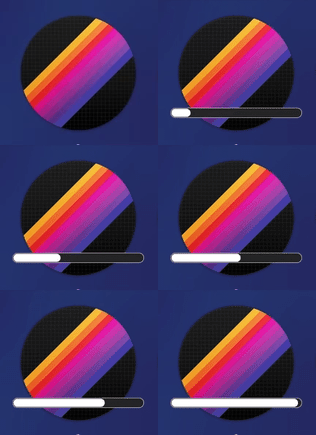
import DockProgress

DockProgress.style = .bar
This is the default.
Squircle
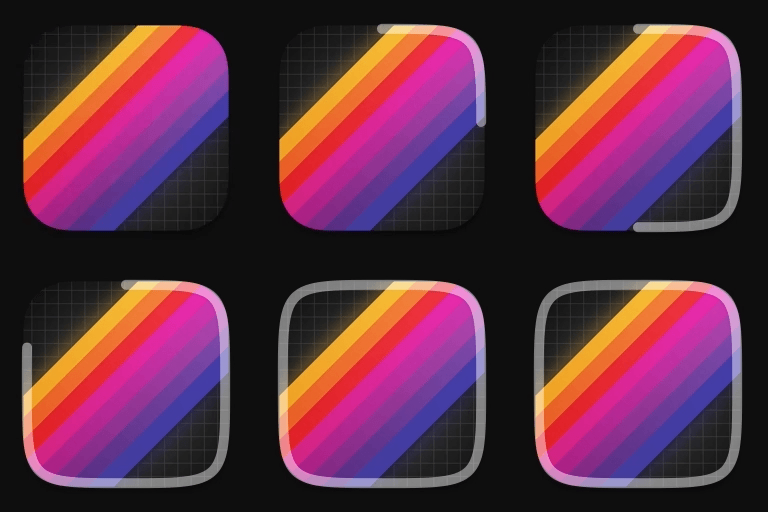
import DockProgress

DockProgress.style = .squircle(color: .white.opacity(0.5))
Fits perfectly around macOS app icons by default. Use the inset parameter for adjustments if needed.
Circle
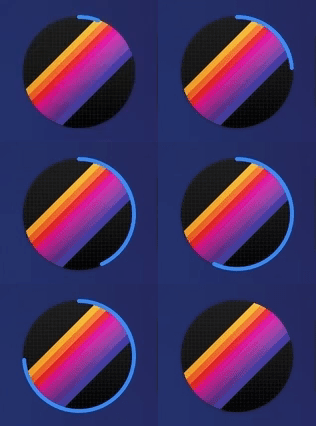
import DockProgress

DockProgress.style = .circle(radius: 55, color: .blue)
Badge
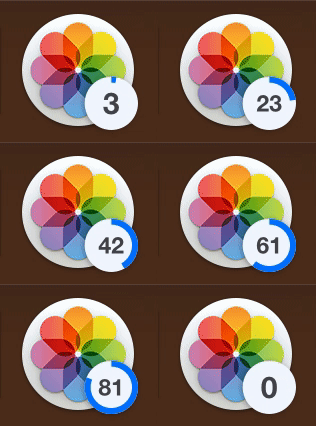
import DockProgress

DockProgress.style = .badge(color: .blue, badgeValue: { getDownloadCount() })
Large numbers are shortened: 1012 → 1k, 10000 → 9k+.
Note: badgeValue is for counts (downloads, files, etc.), not percentages.
Pie
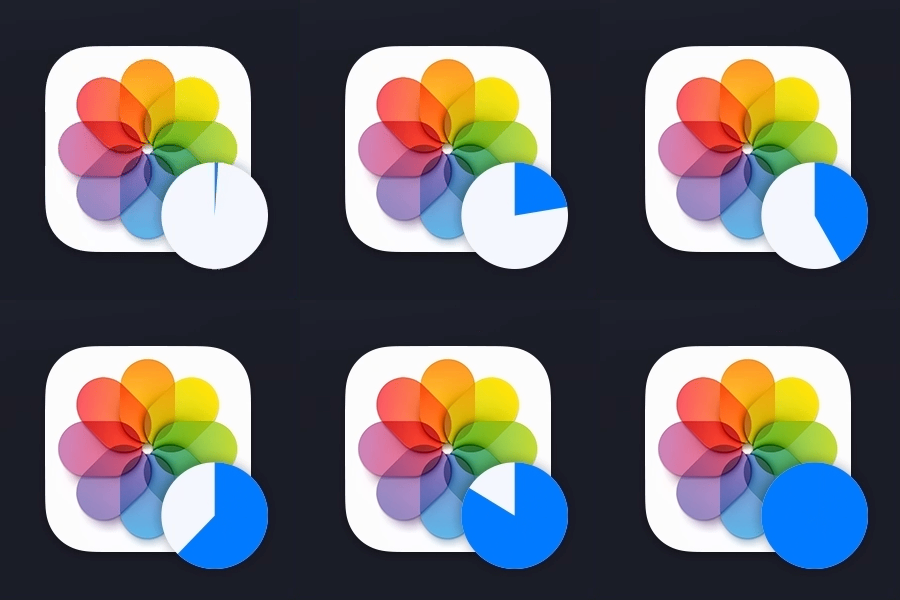
import DockProgress

DockProgress.style = .pie(color: .blue)
Related
- Defaults - Swifty and modern UserDefaults
- KeyboardShortcuts - Add user-customizable global keyboard shortcuts to your macOS app
- LaunchAtLogin - Add "Launch at Login" functionality to your macOS app
- More…
Significant stargazers

1,683 followers · starred Mar 2018

1,570 followers · starred Mar 2018

31 followers · starred Oct 2020

10 followers · starred Apr 2018
Similar repos


Languages
Swift
100.0%
README
DockProgress
Show progress in your app's Dock icon
Requirements
macOS 12+
Install
Add https://github.com/sindresorhus/DockProgress in the “Swift Package Manager” tab in Xcode.
Latest version: 5.1.0
API
Usage
Manually set the progress
import DockProgress

foo.onUpdate = { progress in
	DockProgress.progress = progress
}
Specify a Progress instance
import Foundation
import DockProgress

let progress = Progress(totalUnitCount: 1)
progress.becomeCurrent(withPendingUnitCount: 1)

DockProgress.progressInstance = progress
The given Progress instance is weakly stored. It's up to you to retain it.
Use in SwiftUI
import SwiftUI
import DockProgress

struct ContentView: View {
	@State private var progress = 0.0

	var body: some View {
		VStack {
			ProgressView(value: progress)
			Button("Start") {
				progress = 0.5
			}
		}
		.dockProgress(progress)
	}
}
Pass nil to reset the progress. By default, progress resets when the view disappears.
Styles
Includes built-in styles (bar, squircle, circle, badge, pie) plus support for custom styles using SwiftUI views or Canvas drawing.
See the example app in the Xcode project for demonstrations.
Custom Styles
Create custom progress indicators with:
- SwiftUI View:
.customView { progress in /* return any View */ }- Maximum flexibility with any SwiftUI view - SwiftUI Canvas:
.customCanvas { context, size, progress in /* draw on canvas */ }- High-performance custom drawing - Legacy Core Graphics:
.custom(drawHandler: (_ rect: CGRect) -> Void)- Direct Core Graphics drawing (backward compatibility)
Bar
import DockProgress

DockProgress.style = .bar
This is the default.
Squircle
import DockProgress

DockProgress.style = .squircle(color: .white.opacity(0.5))
Fits perfectly around macOS app icons by default. Use the inset parameter for adjustments if needed.
Circle
import DockProgress

DockProgress.style = .circle(radius: 55, color: .blue)
Badge
import DockProgress

DockProgress.style = .badge(color: .blue, badgeValue: { getDownloadCount() })
Large numbers are shortened: 1012 → 1k, 10000 → 9k+.
Note: badgeValue is for counts (downloads, files, etc.), not percentages.
Pie
import DockProgress

DockProgress.style = .pie(color: .blue)
Related
- Defaults - Swifty and modern UserDefaults
- KeyboardShortcuts - Add user-customizable global keyboard shortcuts to your macOS app
- LaunchAtLogin - Add "Launch at Login" functionality to your macOS app
- More…
Similar repos
Significant stargazers
1,683 followers · starred Mar 2018
1,570 followers · starred Mar 2018
31 followers · starred Oct 2020
10 followers · starred Apr 2018
Languages
Swift
100.0%