The Open-Source, Plugin-Driven Geospatial Intelligence Engine
A modular situational awareness platform designed to ingest live data streams and render them as interactive, cinematic layers on a high-fidelity CesiumJS 3D globe.











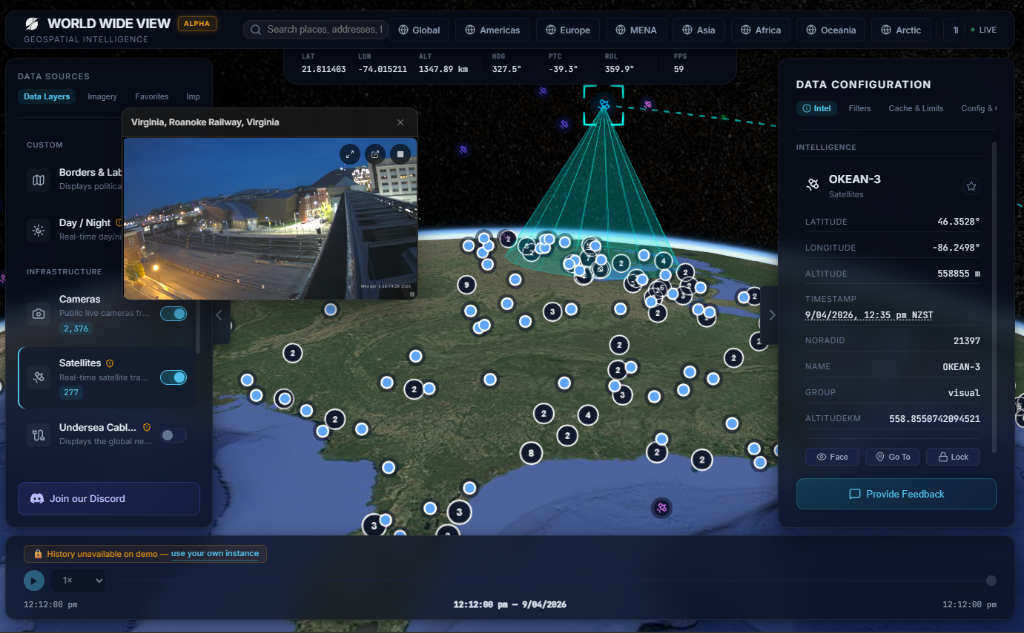
WorldWideView is a real-time geospatial engine visualizing live global data on an interactive 3D globe. Utilizing a dynamic "All-Bundle" plugin architecture, independent data sources—like live aircraft, maritime vessels, or conflict events—are ingested and rendered decoupled from the core 3D viewer.
DataBus.DataBus for high-frequency WebSocket updatesWorldWideView separates the data acquisition layer from the frontend rendering loop, using a real-time event bus to bridge them.
flowchart TD
    subgraph Data Sources
    A[Public APIs] -->|Poll| B[Data Engine Seeders]
    C[Microservices] -->|Stream| B
    end

    subgraph Frontend Pipeline
    B -->|WebSocket /stream| D[DataBus & WsClient]
    D -->|Hydrate| E[Zustand Store]
    E -->|Memoized Entities| F[Entity Renderer]
    F -->|Primitives| G[CesiumJS Globe]
    end

    subgraph Plugins
    H[Plugin Registry] -->|Load| I[Dynamic Import CDNs]
    end

    H -.-> D
Before running the application, ensure you have the following installed:
coolify-db / local compose container)WorldWideView uses a multi-stage Dockerfile designed for standalone output. To deploy instantly on your own server:
Mac/Linux:
mkdir worldwideview && cd worldwideview
curl -fsSL https://raw.githubusercontent.com/silvertakana/worldwideview/main/self-host/setup.sh | bash
Windows (PowerShell):
mkdir worldwideview; cd worldwideview
Invoke-WebRequest -Uri https://raw.githubusercontent.com/silvertakana/worldwideview/main/self-host/setup.ps1 -UseBasicParsing | Invoke-Expression
[!NOTE] Ensure you connect a PostgreSQL database via the
DATABASE_URLenvironment variable for production deployments.
The self-hosted globe runs on any domain, LAN IP, or hostname you choose - localhost, a private network address, a custom domain, or behind a reverse proxy. There is no allowlist to update and nothing restricts which origin you open the instance on: the local edition automatically trusts the incoming origin, so login and CSRF cookie handling work on any address. Behind a reverse proxy, set BETTER_AUTH_TRUSTED_ORIGINS (comma-separated) to the public origins your users will access. For local dev servers, set ALLOWED_DEV_ORIGIN (comma-separated) to the dev origin(s) you browse from.
To run the source code locally for contributing or developing:
git clone https://github.com/silvertakana/worldwideview.git
cd worldwideview
pnpm install
pnpm run setup   # generates .env.local with BETTER_AUTH_SECRET + ENCRYPTION_MASTER_KEY
pnpm run dev:all # boots the UI, cache layers, and the data engine
Visit http://localhost:3000 to see the live globe.
The codebase utilizes a pnpm monorepo configuration:
worldwideview/
├── src/                  # Core frontend app
│   ├── app/              # Next.js App Router (pages, API routes)
│   ├── components/       # Shared UI, Globe panels, and 3D layouts
│   ├── core/             # DataBus, Polling, PluginManager, Store
│   └── plugins/          # Built-in plugins and registry logic
├── packages/             # Monorepo packages
│   ├── wwv-plugin-sdk/   # SDK interfaces and manifest schemas
│   └── wwv-plugin-*/     # Individual plugins & their backends
├── prisma/               # Database schemas & migrations
└── .agents/              # Agent rules, workflows, and documentation
WorldWideView operates on an open-core philosophy. The platform itself is data-agnostic; all data sources are dynamically imported as plugins at runtime.
@worldwideview/wwv-cli.WorldWideView is distributed across several specialized repositories:
worldwideview (This Repo): Main frontend, CesiumJS rendering engine, and core plugin framework.wwv-data-engine: Open-source community data backend for polling public APIs.worldwideview-plugins: First-party maintained plugins.worldwideview-marketplace: The web application driving the plugin directory.worldwideview-web: Marketing and landing site.szski/wwv-mcp: Reference MCP server for driving the globe from an LLM agent (Claude Code, Claude Desktop, Cursor, Cline, …) via the Agent Bus. Contributor-hosted today; may move under the project org.WorldWideView exposes a built-in MCP endpoint at /api/mcp. Any MCP-compatible client (Claude Desktop, Claude Code, Cursor, Cline, etc.) can connect to it directly without a separate sidecar server.
Generate an API key from the /setup page (Settings > API Keys). Pass it as a Bearer token in every request.
Add the following block to your MCP client configuration. Replace https://your-host with the actual origin where WorldWideView is running (e.g. http://localhost:3000 for local development).
{
  "mcpServers": {
    "worldwideview": {
      "type": "http",
      "url": "https://your-host/api/mcp",
      "headers": {
        "Authorization": "Bearer <your-api-key>"
      }
    }
  }
}
Plugin tools (tools contributed by loaded plugins) appear in tools/list only after the browser tab that is running WorldWideView has loaded the relevant plugin and published its catalog. The server snapshots the catalog at the moment each request arrives.
Because the server is stateless and per-request, it cannot push list_changed notifications proactively. If you load a new plugin in the browser after your MCP client has already called tools/list, call tools/list again to pick up the new tools.
feat:, fix:, refactor:). Every commit should utilize our semantic versioning [/commit] workflow.jsdom. All new core logic should be accompanied by tests, running via pnpm test.See Docs: Development and Docs: Testing for more details.
We welcome community contributions! Please review our coding standards and PR processes before submitting code. For detailed instructions on local development and setting up your environment, see our CONTRIBUTING.md.
This project is licensed under the Elastic License 2.0 - see the LICENSE file for details.
Explore our comprehensive documentation suite for detailed engineering insights:
[!IMPORTANT] Fair-Use Notice: This application may contain copyrighted material the use of which has not always been specifically authorized by the copyright owner. Such material is made available for educational purposes, situational awareness, and to advance understanding of global events under "fair use" (Section 107 of the US Copyright Law).
143 followers · starred May 2026
9 followers · starred May 2026
2 followers · starred May 2026
40 followers · starred May 2026
The Open-Source, Plugin-Driven Geospatial Intelligence Engine
A modular situational awareness platform designed to ingest live data streams and render them as interactive, cinematic layers on a high-fidelity CesiumJS 3D globe.
WorldWideView is a real-time geospatial engine visualizing live global data on an interactive 3D globe. Utilizing a dynamic "All-Bundle" plugin architecture, independent data sources—like live aircraft, maritime vessels, or conflict events—are ingested and rendered decoupled from the core 3D viewer.
DataBus.DataBus for high-frequency WebSocket updatesWorldWideView separates the data acquisition layer from the frontend rendering loop, using a real-time event bus to bridge them.
flowchart TD
    subgraph Data Sources
    A[Public APIs] -->|Poll| B[Data Engine Seeders]
    C[Microservices] -->|Stream| B
    end

    subgraph Frontend Pipeline
    B -->|WebSocket /stream| D[DataBus & WsClient]
    D -->|Hydrate| E[Zustand Store]
    E -->|Memoized Entities| F[Entity Renderer]
    F -->|Primitives| G[CesiumJS Globe]
    end

    subgraph Plugins
    H[Plugin Registry] -->|Load| I[Dynamic Import CDNs]
    end

    H -.-> D
Before running the application, ensure you have the following installed:
coolify-db / local compose container)WorldWideView uses a multi-stage Dockerfile designed for standalone output. To deploy instantly on your own server:
Mac/Linux:
mkdir worldwideview && cd worldwideview
curl -fsSL https://raw.githubusercontent.com/silvertakana/worldwideview/main/self-host/setup.sh | bash
Windows (PowerShell):
mkdir worldwideview; cd worldwideview
Invoke-WebRequest -Uri https://raw.githubusercontent.com/silvertakana/worldwideview/main/self-host/setup.ps1 -UseBasicParsing | Invoke-Expression
[!NOTE] Ensure you connect a PostgreSQL database via the
DATABASE_URLenvironment variable for production deployments.
The self-hosted globe runs on any domain, LAN IP, or hostname you choose - localhost, a private network address, a custom domain, or behind a reverse proxy. There is no allowlist to update and nothing restricts which origin you open the instance on: the local edition automatically trusts the incoming origin, so login and CSRF cookie handling work on any address. Behind a reverse proxy, set BETTER_AUTH_TRUSTED_ORIGINS (comma-separated) to the public origins your users will access. For local dev servers, set ALLOWED_DEV_ORIGIN (comma-separated) to the dev origin(s) you browse from.
To run the source code locally for contributing or developing:
git clone https://github.com/silvertakana/worldwideview.git
cd worldwideview
pnpm install
pnpm run setup   # generates .env.local with BETTER_AUTH_SECRET + ENCRYPTION_MASTER_KEY
pnpm run dev:all # boots the UI, cache layers, and the data engine
Visit http://localhost:3000 to see the live globe.
The codebase utilizes a pnpm monorepo configuration:
worldwideview/
├── src/                  # Core frontend app
│   ├── app/              # Next.js App Router (pages, API routes)
│   ├── components/       # Shared UI, Globe panels, and 3D layouts
│   ├── core/             # DataBus, Polling, PluginManager, Store
│   └── plugins/          # Built-in plugins and registry logic
├── packages/             # Monorepo packages
│   ├── wwv-plugin-sdk/   # SDK interfaces and manifest schemas
│   └── wwv-plugin-*/     # Individual plugins & their backends
├── prisma/               # Database schemas & migrations
└── .agents/              # Agent rules, workflows, and documentation
WorldWideView operates on an open-core philosophy. The platform itself is data-agnostic; all data sources are dynamically imported as plugins at runtime.
@worldwideview/wwv-cli.WorldWideView is distributed across several specialized repositories:
worldwideview (This Repo): Main frontend, CesiumJS rendering engine, and core plugin framework.wwv-data-engine: Open-source community data backend for polling public APIs.worldwideview-plugins: First-party maintained plugins.worldwideview-marketplace: The web application driving the plugin directory.worldwideview-web: Marketing and landing site.szski/wwv-mcp: Reference MCP server for driving the globe from an LLM agent (Claude Code, Claude Desktop, Cursor, Cline, …) via the Agent Bus. Contributor-hosted today; may move under the project org.WorldWideView exposes a built-in MCP endpoint at /api/mcp. Any MCP-compatible client (Claude Desktop, Claude Code, Cursor, Cline, etc.) can connect to it directly without a separate sidecar server.
Generate an API key from the /setup page (Settings > API Keys). Pass it as a Bearer token in every request.
Add the following block to your MCP client configuration. Replace https://your-host with the actual origin where WorldWideView is running (e.g. http://localhost:3000 for local development).
{
  "mcpServers": {
    "worldwideview": {
      "type": "http",
      "url": "https://your-host/api/mcp",
      "headers": {
        "Authorization": "Bearer <your-api-key>"
      }
    }
  }
}
Plugin tools (tools contributed by loaded plugins) appear in tools/list only after the browser tab that is running WorldWideView has loaded the relevant plugin and published its catalog. The server snapshots the catalog at the moment each request arrives.
Because the server is stateless and per-request, it cannot push list_changed notifications proactively. If you load a new plugin in the browser after your MCP client has already called tools/list, call tools/list again to pick up the new tools.
feat:, fix:, refactor:). Every commit should utilize our semantic versioning [/commit] workflow.jsdom. All new core logic should be accompanied by tests, running via pnpm test.See Docs: Development and Docs: Testing for more details.
We welcome community contributions! Please review our coding standards and PR processes before submitting code. For detailed instructions on local development and setting up your environment, see our CONTRIBUTING.md.
This project is licensed under the Elastic License 2.0 - see the LICENSE file for details.
Explore our comprehensive documentation suite for detailed engineering insights:
[!IMPORTANT] Fair-Use Notice: This application may contain copyrighted material the use of which has not always been specifically authorized by the copyright owner. Such material is made available for educational purposes, situational awareness, and to advance understanding of global events under "fair use" (Section 107 of the US Copyright Law).
143 followers · starred May 2026
9 followers · starred May 2026
2 followers · starred May 2026
40 followers · starred May 2026



