
5KB WebGL globe lib.
See the codeSee what people are saying
README
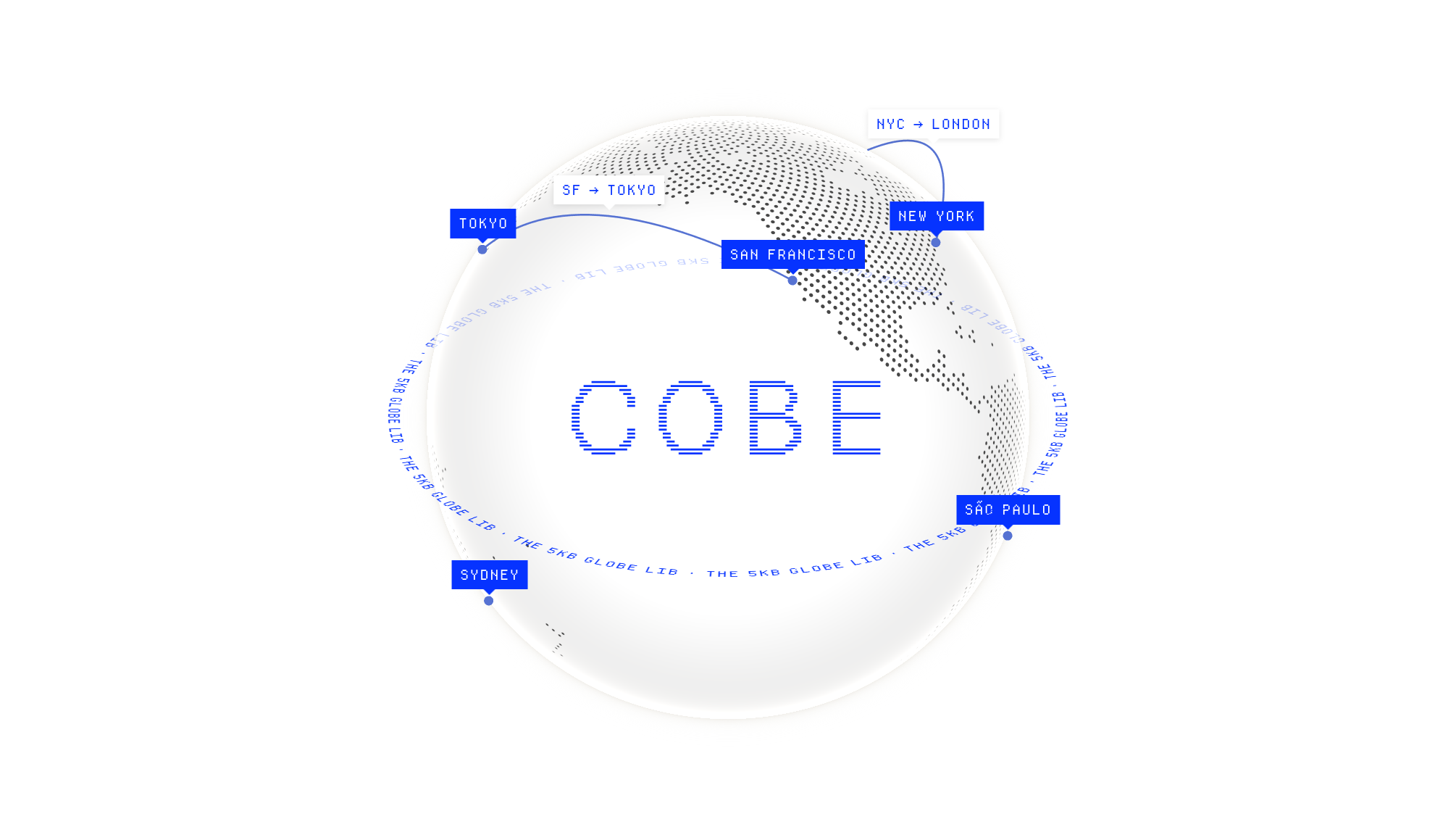
Use any DOM element as bindable markers.
CSS transitions, animations, filters, interactivity, all just work.
High perf, zero deps, ~5KB.
Quick Start
<canvas
  id="cobe"
  style="width: 500px; height: 500px;"
  width="1000"
  height="1000"
></canvas>
import createGlobe from 'cobe'

let phi = 0
let canvas = document.getElementById("cobe")

const globe = createGlobe(canvas, {
  devicePixelRatio: 2,
  width: 1000,
  height: 1000,
  phi: 0,
  theta: 0,
  dark: 0,
  diffuse: 1.2,
  scale: 1,
  mapSamples: 16000,
  mapBrightness: 6,
  baseColor: [0.3, 0.3, 0.3],
  markerColor: [1, 0.5, 1],
  glowColor: [1, 1, 1],
  offset: [0, 0],
  markers: [
    { location: [37.7595, -122.4367], size: 0.03 },
    { location: [40.7128, -74.006], size: 0.1, color: [1, 0, 0] }, // custom color
  ],
  arcs: [
    {
      from: [37.7595, -122.4367],
      to: [40.7128, -74.006],
      color: [1, 0.5, 0.5], // custom color (optional)
    },
  ],
  arcColor: [1, 0.5, 1],
  arcWidth: 0.5,
  arcHeight: 0.3,
  markerElevation: 0.02,
  onRender: (state) => {
    // Called on every animation frame.
    // `state` will be an empty object, return updated params.
    state.phi = phi
    phi += 0.01
  },
})

// To destroy the instance and bindings:
// `globe.destroy()`
Arcs
Arcs connect two locations on the globe:
arcs: [
  {
    from: [37.7595, -122.4367],
    to: [35.6762, 139.6503],
    color: [1, 0.5, 0.5], // optional, uses arcColor if not set
  },
]
Bindable Markers & Arcs
Markers and arcs can have an id property for CSS Anchor Positioning:
markers: [
  { location: [37.7595, -122.4367], size: 0.03, id: 'sf' },
],
arcs: [
  { from: [37.7595, -122.4367], to: [35.6762, 139.6503], id: 'sf-tokyo' },
]
.marker-label {
  position: absolute;
  position-anchor: --cobe-sf;
  bottom: anchor(top);
  left: anchor(center);
  opacity: var(--cobe-visible-sf, 0);
  filter: blur(calc((1 - var(--cobe-visible-sf, 0)) * 8px));
  transition: opacity 0.3s, filter 0.3s;
}

.arc-label {
  position: absolute;
  position-anchor: --cobe-arc-sf-tokyo;
  bottom: anchor(top);
  left: anchor(center);
  opacity: var(--cobe-visible-arc-sf-tokyo, 0);
}
The globe exposes:
--cobe-{id}/--cobe-arc-{id}— CSS anchor names for positioning--cobe-visible-{id}/--cobe-visible-arc-{id}— visibility variable (0 when behind globe, 1 when visible)
Use the visibility variable to drive opacity, blur, scale, or any CSS property for smooth transitions.
Acknowledgment
This project is inspired & based on the great work of:
- Spherical Fibonacci Mapping, Benjamin Keinert et al.
- https://www.shadertoy.com/view/lllXz4, Inigo Quilez
- https://github.blog/2020-12-21-how-we-built-the-github-globe
- https://github.com/vaneenige/phenomenon
- https://github.com/evanw/glslx
World map asset from:
License
The MIT License.
Significant stargazers
(top 24 of 62)

377 followers · starred Jul 2026

892 followers · starred Jan 2024

965 followers · starred Mar 2026

476 followers · starred Sep 2022
Similar repos


Languages
TypeScript
63.5%
CSS
21.4%
JavaScript
15.1%
5KB WebGL globe lib.
See the codeSee what people are saying
README
Use any DOM element as bindable markers.
CSS transitions, animations, filters, interactivity, all just work.
High perf, zero deps, ~5KB.
Quick Start
<canvas
  id="cobe"
  style="width: 500px; height: 500px;"
  width="1000"
  height="1000"
></canvas>
import createGlobe from 'cobe'

let phi = 0
let canvas = document.getElementById("cobe")

const globe = createGlobe(canvas, {
  devicePixelRatio: 2,
  width: 1000,
  height: 1000,
  phi: 0,
  theta: 0,
  dark: 0,
  diffuse: 1.2,
  scale: 1,
  mapSamples: 16000,
  mapBrightness: 6,
  baseColor: [0.3, 0.3, 0.3],
  markerColor: [1, 0.5, 1],
  glowColor: [1, 1, 1],
  offset: [0, 0],
  markers: [
    { location: [37.7595, -122.4367], size: 0.03 },
    { location: [40.7128, -74.006], size: 0.1, color: [1, 0, 0] }, // custom color
  ],
  arcs: [
    {
      from: [37.7595, -122.4367],
      to: [40.7128, -74.006],
      color: [1, 0.5, 0.5], // custom color (optional)
    },
  ],
  arcColor: [1, 0.5, 1],
  arcWidth: 0.5,
  arcHeight: 0.3,
  markerElevation: 0.02,
  onRender: (state) => {
    // Called on every animation frame.
    // `state` will be an empty object, return updated params.
    state.phi = phi
    phi += 0.01
  },
})

// To destroy the instance and bindings:
// `globe.destroy()`
Arcs
Arcs connect two locations on the globe:
arcs: [
  {
    from: [37.7595, -122.4367],
    to: [35.6762, 139.6503],
    color: [1, 0.5, 0.5], // optional, uses arcColor if not set
  },
]
Bindable Markers & Arcs
Markers and arcs can have an id property for CSS Anchor Positioning:
markers: [
  { location: [37.7595, -122.4367], size: 0.03, id: 'sf' },
],
arcs: [
  { from: [37.7595, -122.4367], to: [35.6762, 139.6503], id: 'sf-tokyo' },
]
.marker-label {
  position: absolute;
  position-anchor: --cobe-sf;
  bottom: anchor(top);
  left: anchor(center);
  opacity: var(--cobe-visible-sf, 0);
  filter: blur(calc((1 - var(--cobe-visible-sf, 0)) * 8px));
  transition: opacity 0.3s, filter 0.3s;
}

.arc-label {
  position: absolute;
  position-anchor: --cobe-arc-sf-tokyo;
  bottom: anchor(top);
  left: anchor(center);
  opacity: var(--cobe-visible-arc-sf-tokyo, 0);
}
The globe exposes:
--cobe-{id}/--cobe-arc-{id}— CSS anchor names for positioning--cobe-visible-{id}/--cobe-visible-arc-{id}— visibility variable (0 when behind globe, 1 when visible)
Use the visibility variable to drive opacity, blur, scale, or any CSS property for smooth transitions.
Acknowledgment
This project is inspired & based on the great work of:
- Spherical Fibonacci Mapping, Benjamin Keinert et al.
- https://www.shadertoy.com/view/lllXz4, Inigo Quilez
- https://github.blog/2020-12-21-how-we-built-the-github-globe
- https://github.com/vaneenige/phenomenon
- https://github.com/evanw/glslx
World map asset from:
License
The MIT License.
Similar repos
Significant stargazers
(top 24 of 62)
377 followers · starred Jul 2026
892 followers · starred Jan 2024
965 followers · starred Mar 2026
476 followers · starred Sep 2022
Languages
TypeScript
63.5%
CSS
21.4%
JavaScript
15.1%