
GeoGrid is a MapLibre GL JS plugin for adding a highly customizable geographic grid to your map.
TypeScript
41
32 commits
updated Jun 22, 2025
README
GeoGrid for MapLibre GL
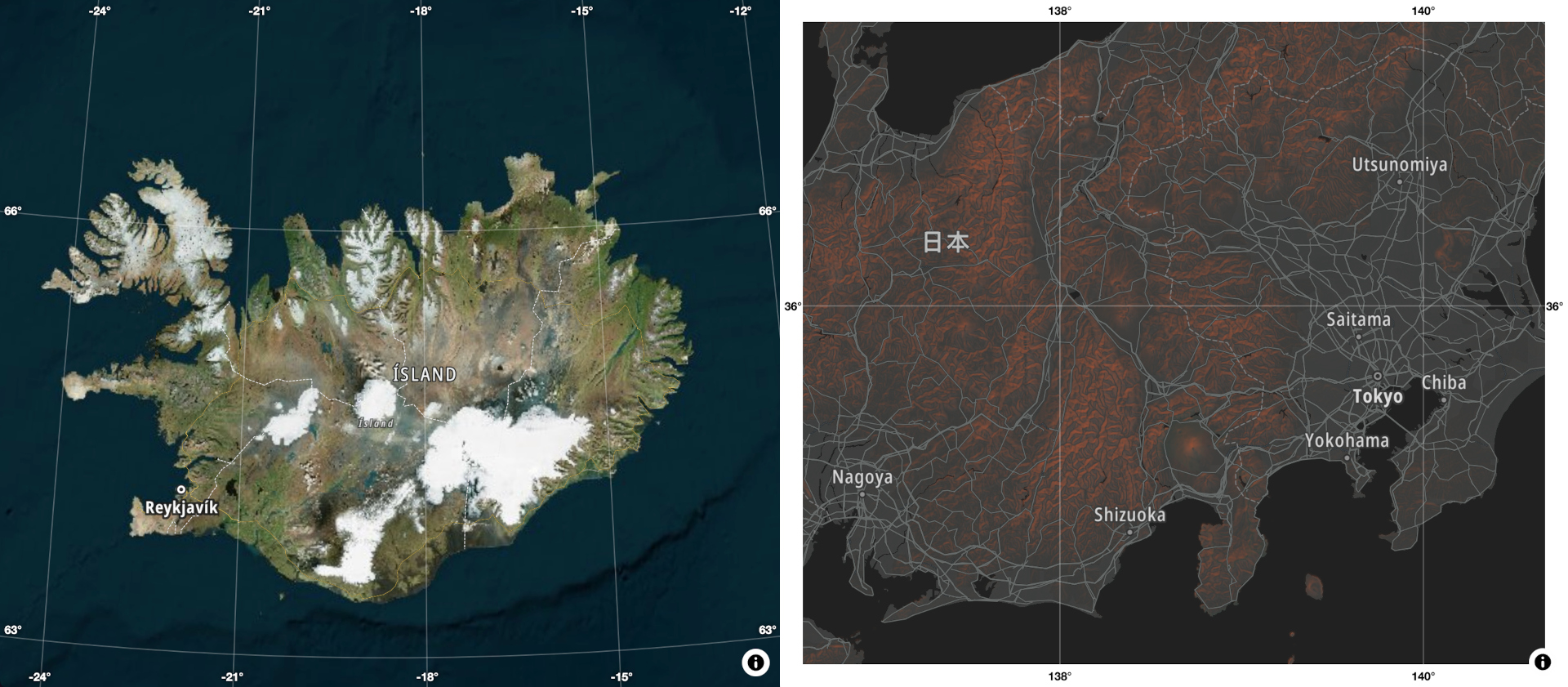
GeoGrid is a MapLibre GL JS plugin for adding a highly customizable geographic grid (graticule) to your map.
Features
- Display Geographic Grid: Adds a grid with labeled coordinates to the map.
- [Experimental] Globe Projection Support - Works with globe projection in maplibre-gl-js 5.x.
- Customizable Grid Density: Adjust grid density dynamically based on zoom level.
- Zoom Level Visibility Range: Control grid visibility with the
zoomLevelRangeoption. - Custom Label Formats: Change the label format to suit your needs. Default format:
[degrees]° [minutes]’ [seconds]’’ - Flexible Styling: Modify grid and labels styles using JS API. For advanced use cases, override container and label CSS.
- Layer Placement Control: Place grid lines under any existing map layer using
beforeLayerId. - Dynamic Label Visibility: Labels automatically hide when the map is rotated away from north.
- Optimized Performance: Only elements visible in the viewport are rendered, ensuring no performance impact.
- Easy Removal: Remove the grid programmatically using the
remove()method. - TypeScript Support: Includes TypeScript definitions for better development experience.
- ES Module Ready: Available as a JavaScript module for modern workflows.
Installation
Get it from NPM:
npm i geogrid-maplibre-gl
Or use it from the CDN:
<script type="module" src="https://unpkg.com/geogrid-maplibre-gl@latest"></script>
<link href="https://unpkg.com/geogrid-maplibre-gl@latest/dist/geogrid.css" rel="stylesheet" />
Usage
Minimal example
import { GeoGrid } from 'geogrid-maplibre-gl';
// Import css from 'geogrid-maplibre-gl/dist/geogrid.css'

// const map = new maplibregl.Map(...);

new GeoGrid({ map });
All options
import { GeoGrid } from 'geogrid-maplibre-gl';

// const map = new maplibregl.Map(...);

new GeoGrid({
    map,
    beforeLayerId: 'labels'
    gridStyle: {
        color: 'rgba(255, 255, 255, 0.5)'
        width: 2,
        dasharray: [5, 10]
    },
    labelStyle: {
        color: 'rgba(255, 255, 255, 0.5)',
        fontSize: 18,
        textShadow: '0 0 10px rgba(0, 0, 0)'
    },
    zoomLevelRange: [0, 13],
    gridDensity: (zoomLevel) => 10;
    formatLabels: (degreesFloat) => Math.floor(degreesFloat);
});
Programatically removing and re-adding:
const geogrid = new GeoGrid({ map });

// On some event
geogrid.remove();

// On another event
geogrid.add();
Styling
Most of the styling can be done with API options gridStyle and labelStyle.
If those options are not enough, it is possible to override CSS classes:
geogrid- The main container for labels.geogrid__label- Invidual label elements.geogrid__label--left- Labels on the left.geogrid__label--right- Labels on the right.geogrid__label--top- Labels on the top.geogrid__label--bottom- Labels on the bottom.
To prevent overriding default properties, nest overrides inside .geogrid-overrides selector.
For example:
.geogrid-overrides .geogrid__label {
    color: red
}
Contributors


Similar repos


Languages
TypeScript
87.3%
Shell
9.9%
JavaScript
1.3%
CSS
1.0%
GeoGrid is a MapLibre GL JS plugin for adding a highly customizable geographic grid to your map.
TypeScript
41
32 commits
updated Jun 22, 2025
README
GeoGrid for MapLibre GL
GeoGrid is a MapLibre GL JS plugin for adding a highly customizable geographic grid (graticule) to your map.
Features
- Display Geographic Grid: Adds a grid with labeled coordinates to the map.
- [Experimental] Globe Projection Support - Works with globe projection in maplibre-gl-js 5.x.
- Customizable Grid Density: Adjust grid density dynamically based on zoom level.
- Zoom Level Visibility Range: Control grid visibility with the
zoomLevelRangeoption. - Custom Label Formats: Change the label format to suit your needs. Default format:
[degrees]° [minutes]’ [seconds]’’ - Flexible Styling: Modify grid and labels styles using JS API. For advanced use cases, override container and label CSS.
- Layer Placement Control: Place grid lines under any existing map layer using
beforeLayerId. - Dynamic Label Visibility: Labels automatically hide when the map is rotated away from north.
- Optimized Performance: Only elements visible in the viewport are rendered, ensuring no performance impact.
- Easy Removal: Remove the grid programmatically using the
remove()method. - TypeScript Support: Includes TypeScript definitions for better development experience.
- ES Module Ready: Available as a JavaScript module for modern workflows.
Installation
Get it from NPM:
npm i geogrid-maplibre-gl
Or use it from the CDN:
<script type="module" src="https://unpkg.com/geogrid-maplibre-gl@latest"></script>
<link href="https://unpkg.com/geogrid-maplibre-gl@latest/dist/geogrid.css" rel="stylesheet" />
Usage
Minimal example
import { GeoGrid } from 'geogrid-maplibre-gl';
// Import css from 'geogrid-maplibre-gl/dist/geogrid.css'

// const map = new maplibregl.Map(...);

new GeoGrid({ map });
All options
import { GeoGrid } from 'geogrid-maplibre-gl';

// const map = new maplibregl.Map(...);

new GeoGrid({
    map,
    beforeLayerId: 'labels'
    gridStyle: {
        color: 'rgba(255, 255, 255, 0.5)'
        width: 2,
        dasharray: [5, 10]
    },
    labelStyle: {
        color: 'rgba(255, 255, 255, 0.5)',
        fontSize: 18,
        textShadow: '0 0 10px rgba(0, 0, 0)'
    },
    zoomLevelRange: [0, 13],
    gridDensity: (zoomLevel) => 10;
    formatLabels: (degreesFloat) => Math.floor(degreesFloat);
});
Programatically removing and re-adding:
const geogrid = new GeoGrid({ map });

// On some event
geogrid.remove();

// On another event
geogrid.add();
Styling
Most of the styling can be done with API options gridStyle and labelStyle.
If those options are not enough, it is possible to override CSS classes:
geogrid- The main container for labels.geogrid__label- Invidual label elements.geogrid__label--left- Labels on the left.geogrid__label--right- Labels on the right.geogrid__label--top- Labels on the top.geogrid__label--bottom- Labels on the bottom.
To prevent overriding default properties, nest overrides inside .geogrid-overrides selector.
For example:
.geogrid-overrides .geogrid__label {
    color: red
}
Similar repos
Contributors
Languages
TypeScript
87.3%
Shell
9.9%
JavaScript
1.3%
CSS
1.0%