Automatic Video Generation from Scientific Papers
See the codeEnglish | 简体中文
Paper2Video: Automatic Video Generation from Scientific Papers
从学术论文自动生成演讲视频
Zeyu Zhu*,
Kevin Qinghong Lin*,
Mike Zheng Shou
Show Lab, National University of Singapore
📄 Paper | 🤗 Daily Paper | 📊 Dataset | 🌐 Project Website | 💬 X (Twitter)
| Paper | Image | Audio |
|---|---|---|
 🔗 Paper link |  Hinton's photo |  🔗 Audio sample |
https://github.com/user-attachments/assets/39221a9a-48cb-4e20-9d1c-080a5d8379c4
Check out more examples at 🌐 project page.
Any contributions are welcome!
https://github.com/user-attachments/assets/a655e3c7-9d76-4c48-b946-1068fdb6cdd9

This work solves two core problems for academic presentations:
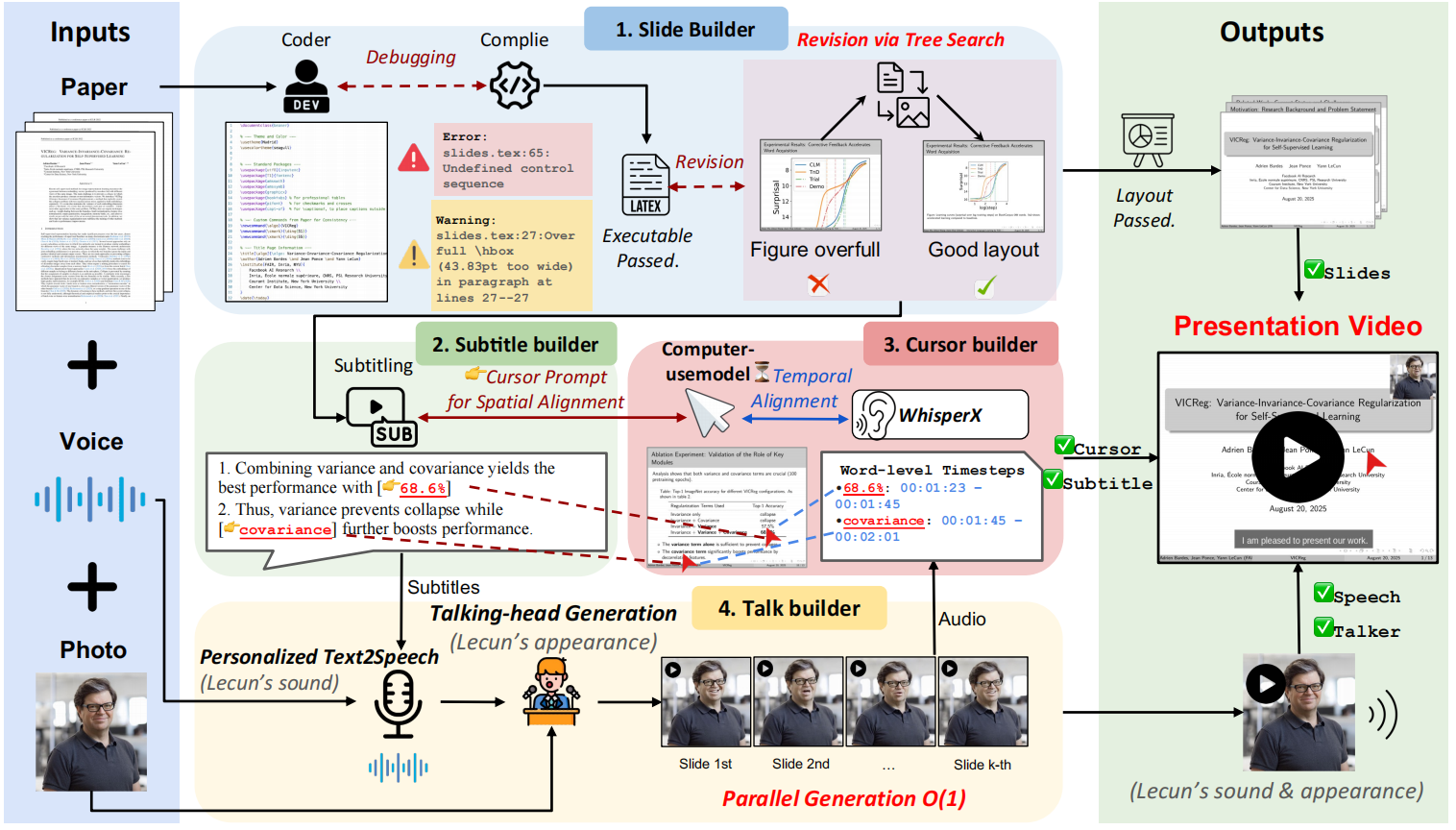
Left: How to create a presentation video from a paper?
PaperTalker — an agent that integrates slides, subtitling, cursor grounding, speech synthesis, and talking-head video rendering.
Right: How to evaluate a presentation video?
Paper2Video — a benchmark with well-designed metrics to evaluate presentation quality.
Prepare the environment:
cd src
conda create -n p2v python=3.10
conda activate p2v
pip install -r requirements.txt
conda install -c conda-forge tectonic
[Optional] Skip this part if you do not need a human presenter.
Download the dependent code and follow the instructions in Hallo2 to download the model weight.
git clone https://github.com/fudan-generative-vision/hallo2.git
You need to prepare the environment separately for talking-head generation to potential avoide package conflicts, please refer to Hallo2. After installing, use which python to get the python environment path.
cd hallo2
conda create -n hallo python=3.10
conda activate hallo
pip install -r requirements.txt
Export your API credentials:
export GEMINI_API_KEY="your_gemini_key_here"
export OPENAI_API_KEY="your_openai_key_here"
The best practice is to use GPT4.1 or Gemini2.5-Pro for both LLM and VLMs. We also support locally deployed open-source model(e.g., Qwen), details please referring to Paper2Poster.
The script pipeline.py provides an automated pipeline for generating academic presentation videos. It takes LaTeX paper sources together with reference image/audio as input, and goes through multiple sub-modules (Slides → Subtitles → Speech → Cursor → Talking Head) to produce a complete presentation video. ⚡ The minimum recommended GPU for running this pipeline is NVIDIA A6000 with 48G.
Run the following command to launch a fast generation (without talking-head generation):
python pipeline_light.py \
    --model_name_t gpt-4.1 \
    --model_name_v gpt-4.1 \
    --result_dir /path/to/output \
    --paper_latex_root /path/to/latex_proj \
    --ref_img /path/to/ref_img.png \
    --ref_audio /path/to/ref_audio.wav \
    --gpu_list [0,1,2,3,4,5,6,7]
Run the following command to launch a full generation (with talking-head generation):
python pipeline.py \
    --model_name_t gpt-4.1 \
    --model_name_v gpt-4.1 \
    --model_name_talking hallo2 \
    --result_dir /path/to/output \
    --paper_latex_root /path/to/latex_proj \
    --ref_img /path/to/ref_img.png \
    --ref_audio /path/to/ref_audio.wav \
    --talking_head_env /path/to/hallo2_env \
    --gpu_list [0,1,2,3,4,5,6,7]
| Argument | Type | Default | Description |
|---|---|---|---|
--model_name_t | str | gpt-4.1 | LLM |
--model_name_v | str | gpt-4.1 | VLM |
--model_name_talking | str | hallo2 | Talking Head model. Currently only hallo2 is supported |
--result_dir | str | /path/to/output | Output directory (slides, subtitles, videos, etc.) |
--paper_latex_root | str | /path/to/latex_proj | Root directory of the LaTeX paper project |
--ref_img | str | /path/to/ref_img.png | Reference image (must be square portrait) |
--ref_audio | str | /path/to/ref_audio.wav | Reference audio (recommended: ~10s) |
--ref_text | str | None | Optional reference text (for style guidance for subtitles) |
--beamer_templete_prompt | str | None | Optional reference text (for style guidance for slides) |
--gpu_list | list[int] | "" | GPU list for parallel execution (used in cursor generation and Talking Head rendering) |
--if_tree_search | bool | True | Whether to enable tree search for slide layout refinement |
--stage | str | "[0]" | Pipeline stages to run (e.g., [0] full pipeline, [1,2,3] partial stages) |
--talking_head_env | str | /path/to/hallo2_env | python environment path for talking-head generation |
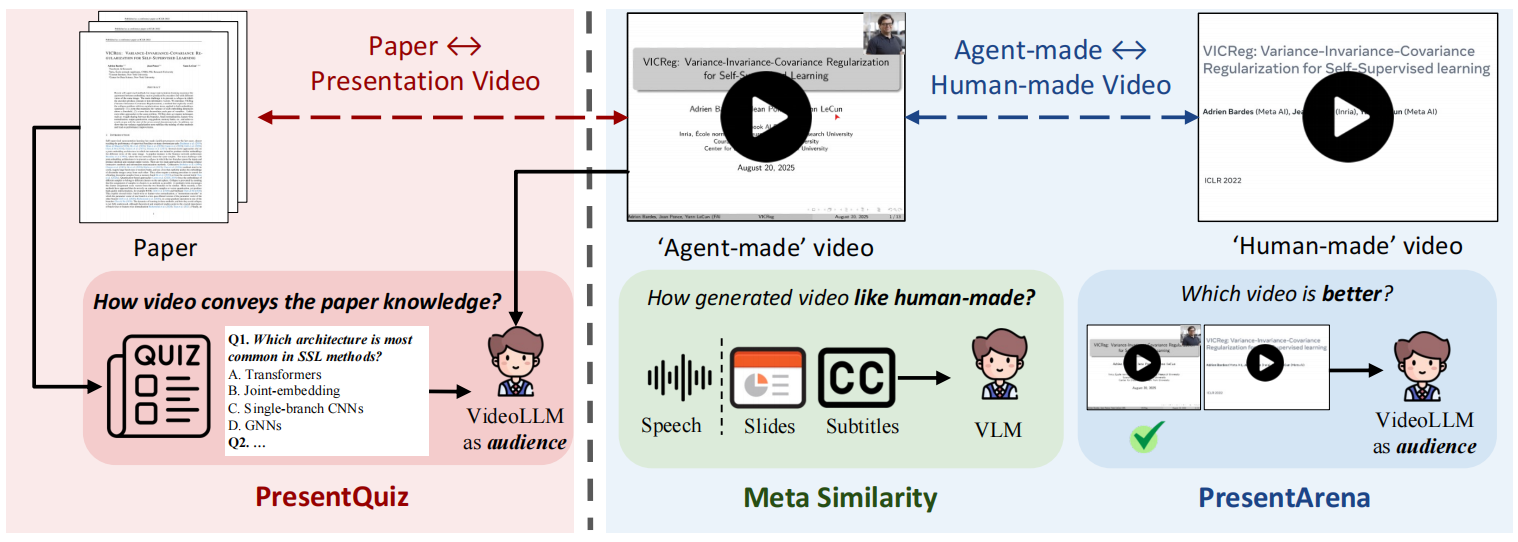
Unlike natural video generation, academic presentation videos serve a highly specialized role: they are not merely about visual fidelity but about communicating scholarship. This makes it difficult to directly apply conventional metrics from video synthesis(e.g., FVD, IS, or CLIP-based similarity). Instead, their value lies in how well they disseminate research and amplify scholarly visibility.From this perspective, we argue that a high-quality academic presentation video should be judged along two complementary dimensions:
To capture these goals, we introduce evaluation metrics specifically designed for academic presentation videos: Meta Similarity, PresentArena, PresentQuiz, IP Memory.
cd src/evaluation
conda create -n p2v_e python=3.10
conda activate p2v_e
pip install -r requirements.txt
python MetaSim_audio.py --r /path/to/result_dir --g /path/to/gt_dir --s /path/to/save_dir
python MetaSim_content.py --r /path/to/result_dir --g /path/to/gt_dir --s /path/to/save_dir
python PresentArena.py --r /path/to/result_dir --g /path/to/gt_dir --s /path/to/save_dir
cd PresentQuiz
python create_paper_questions.py ----paper_folder /path/to/data
python PresentQuiz.py --r /path/to/result_dir --g /path/to/gt_dir --s /path/to/save_dir
cd IPMemory
python construct.py
python ip_qa.py
See the codes for more details!
👉 Paper2Video Benchmark is available at: HuggingFace
Check out How Paper2Video for Paper2Video:
https://github.com/user-attachments/assets/ff58f4d8-8376-4e12-b967-711118adf3c4
If you find our work useful, please cite:
@misc{paper2video,
      title={Paper2Video: Automatic Video Generation from Scientific Papers},
      author={Zeyu Zhu and Kevin Qinghong Lin and Mike Zheng Shou},
      year={2025},
      eprint={2510.05096},
      archivePrefix={arXiv},
      primaryClass={cs.CV},
      url={https://arxiv.org/abs/2510.05096},
}
2,396 followers · starred Mar 2026
153 followers · starred Nov 2025
300 followers · starred Oct 2025
2,361 followers · starred May 2026
Automatic Video Generation from Scientific Papers
See the codeEnglish | 简体中文
Paper2Video: Automatic Video Generation from Scientific Papers
从学术论文自动生成演讲视频
Zeyu Zhu*,
Kevin Qinghong Lin*,
Mike Zheng Shou
Show Lab, National University of Singapore
📄 Paper | 🤗 Daily Paper | 📊 Dataset | 🌐 Project Website | 💬 X (Twitter)
| Paper | Image | Audio |
|---|---|---|
🔗 Paper link | Hinton's photo | 🔗 Audio sample |
https://github.com/user-attachments/assets/39221a9a-48cb-4e20-9d1c-080a5d8379c4
Check out more examples at 🌐 project page.
Any contributions are welcome!
https://github.com/user-attachments/assets/a655e3c7-9d76-4c48-b946-1068fdb6cdd9
This work solves two core problems for academic presentations:
Left: How to create a presentation video from a paper?
PaperTalker — an agent that integrates slides, subtitling, cursor grounding, speech synthesis, and talking-head video rendering.
Right: How to evaluate a presentation video?
Paper2Video — a benchmark with well-designed metrics to evaluate presentation quality.
Prepare the environment:
cd src
conda create -n p2v python=3.10
conda activate p2v
pip install -r requirements.txt
conda install -c conda-forge tectonic
[Optional] Skip this part if you do not need a human presenter.
Download the dependent code and follow the instructions in Hallo2 to download the model weight.
git clone https://github.com/fudan-generative-vision/hallo2.git
You need to prepare the environment separately for talking-head generation to potential avoide package conflicts, please refer to Hallo2. After installing, use which python to get the python environment path.
cd hallo2
conda create -n hallo python=3.10
conda activate hallo
pip install -r requirements.txt
Export your API credentials:
export GEMINI_API_KEY="your_gemini_key_here"
export OPENAI_API_KEY="your_openai_key_here"
The best practice is to use GPT4.1 or Gemini2.5-Pro for both LLM and VLMs. We also support locally deployed open-source model(e.g., Qwen), details please referring to Paper2Poster.
The script pipeline.py provides an automated pipeline for generating academic presentation videos. It takes LaTeX paper sources together with reference image/audio as input, and goes through multiple sub-modules (Slides → Subtitles → Speech → Cursor → Talking Head) to produce a complete presentation video. ⚡ The minimum recommended GPU for running this pipeline is NVIDIA A6000 with 48G.
Run the following command to launch a fast generation (without talking-head generation):
python pipeline_light.py \
    --model_name_t gpt-4.1 \
    --model_name_v gpt-4.1 \
    --result_dir /path/to/output \
    --paper_latex_root /path/to/latex_proj \
    --ref_img /path/to/ref_img.png \
    --ref_audio /path/to/ref_audio.wav \
    --gpu_list [0,1,2,3,4,5,6,7]
Run the following command to launch a full generation (with talking-head generation):
python pipeline.py \
    --model_name_t gpt-4.1 \
    --model_name_v gpt-4.1 \
    --model_name_talking hallo2 \
    --result_dir /path/to/output \
    --paper_latex_root /path/to/latex_proj \
    --ref_img /path/to/ref_img.png \
    --ref_audio /path/to/ref_audio.wav \
    --talking_head_env /path/to/hallo2_env \
    --gpu_list [0,1,2,3,4,5,6,7]
| Argument | Type | Default | Description |
|---|---|---|---|
--model_name_t | str | gpt-4.1 | LLM |
--model_name_v | str | gpt-4.1 | VLM |
--model_name_talking | str | hallo2 | Talking Head model. Currently only hallo2 is supported |
--result_dir | str | /path/to/output | Output directory (slides, subtitles, videos, etc.) |
--paper_latex_root | str | /path/to/latex_proj | Root directory of the LaTeX paper project |
--ref_img | str | /path/to/ref_img.png | Reference image (must be square portrait) |
--ref_audio | str | /path/to/ref_audio.wav | Reference audio (recommended: ~10s) |
--ref_text | str | None | Optional reference text (for style guidance for subtitles) |
--beamer_templete_prompt | str | None | Optional reference text (for style guidance for slides) |
--gpu_list | list[int] | "" | GPU list for parallel execution (used in cursor generation and Talking Head rendering) |
--if_tree_search | bool | True | Whether to enable tree search for slide layout refinement |
--stage | str | "[0]" | Pipeline stages to run (e.g., [0] full pipeline, [1,2,3] partial stages) |
--talking_head_env | str | /path/to/hallo2_env | python environment path for talking-head generation |
Unlike natural video generation, academic presentation videos serve a highly specialized role: they are not merely about visual fidelity but about communicating scholarship. This makes it difficult to directly apply conventional metrics from video synthesis(e.g., FVD, IS, or CLIP-based similarity). Instead, their value lies in how well they disseminate research and amplify scholarly visibility.From this perspective, we argue that a high-quality academic presentation video should be judged along two complementary dimensions:
To capture these goals, we introduce evaluation metrics specifically designed for academic presentation videos: Meta Similarity, PresentArena, PresentQuiz, IP Memory.
cd src/evaluation
conda create -n p2v_e python=3.10
conda activate p2v_e
pip install -r requirements.txt
python MetaSim_audio.py --r /path/to/result_dir --g /path/to/gt_dir --s /path/to/save_dir
python MetaSim_content.py --r /path/to/result_dir --g /path/to/gt_dir --s /path/to/save_dir
python PresentArena.py --r /path/to/result_dir --g /path/to/gt_dir --s /path/to/save_dir
cd PresentQuiz
python create_paper_questions.py ----paper_folder /path/to/data
python PresentQuiz.py --r /path/to/result_dir --g /path/to/gt_dir --s /path/to/save_dir
cd IPMemory
python construct.py
python ip_qa.py
See the codes for more details!
👉 Paper2Video Benchmark is available at: HuggingFace
Check out How Paper2Video for Paper2Video:
https://github.com/user-attachments/assets/ff58f4d8-8376-4e12-b967-711118adf3c4
If you find our work useful, please cite:
@misc{paper2video,
      title={Paper2Video: Automatic Video Generation from Scientific Papers},
      author={Zeyu Zhu and Kevin Qinghong Lin and Mike Zheng Shou},
      year={2025},
      eprint={2510.05096},
      archivePrefix={arXiv},
      primaryClass={cs.CV},
      url={https://arxiv.org/abs/2510.05096},
}
2,396 followers · starred Mar 2026
153 followers · starred Nov 2025
300 followers · starred Oct 2025
2,361 followers · starred May 2026