
Not just slides - delivery-ready talks
See the codeREADME
DeepSlide: From Artifacts to Presentation Delivery


DeepSlide is not a tool that simply “makes a PPT for you”, but a delivery-first, human-in-the-loop system for complete presentation preparation and delivery.
It helps users go beyond slide generation to support the full workflow of presentation delivery, including narrative planning, logical chain editing, slide generation, script drafting, interactive enhancement, and rehearsal feedback.
🌐 Chinese Version: README_zh.md
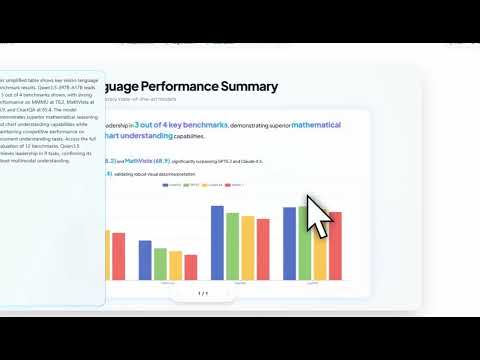
News
- [2026.03.10] We now provide a simple 4-step guide to use DeepSlide directly inside OpenClaw.
If you are already using OpenClaw and want to add a dedicated agent for presentation generation, narrative organization, and delivery preparation, you can follow the tutorial below:
[DeepSlide + OpenClaw](https://www.yuque.com/puitar/pug2ub/didlfrgy5ogxzl6p?singleDoc# 《DeepSlide+龙虾直接接入飞书!》) - [2026.03.06] DeepSlide is officially released.
We open-sourced DeepSlide as a human-in-the-loop, delivery-first presentation system designed not only for slide creation, but for the broader goal of full presentation delivery.
Instead of stopping at static deck generation, DeepSlide supports a more complete workflow covering requirement clarification, narrative proposal, logical chain control, evidence-grounded slide generation, script writing, interactive enhancement, and rehearsal-oriented preparation.
OpenClaw Skill
We ship an AgentSkills-compatible OpenClaw skill at skills/deepslide-openclaw/:
- Install & initialize DeepSlide (runs services on the host)
- Build and use a Docker-based TeX toolchain for LaTeX compilation (no local TeX required)
- Deploy & operate (start/stop + basic health checks)
If your OpenClaw workspace is not the repo root, add skills via skills.load.extraDirs (in ~/.openclaw/openclaw.json)
(ClawHub Link).
Key Claim
A high-quality talk is not mainly determined by whether the static slides “look nice”. What matters more is whether information is organized and delivered under audience cognition and attention constraints—including narrative coherence, timing and pacing control, attention guidance, and rehearsal readiness. In other words, artifact quality ≠ delivery quality.
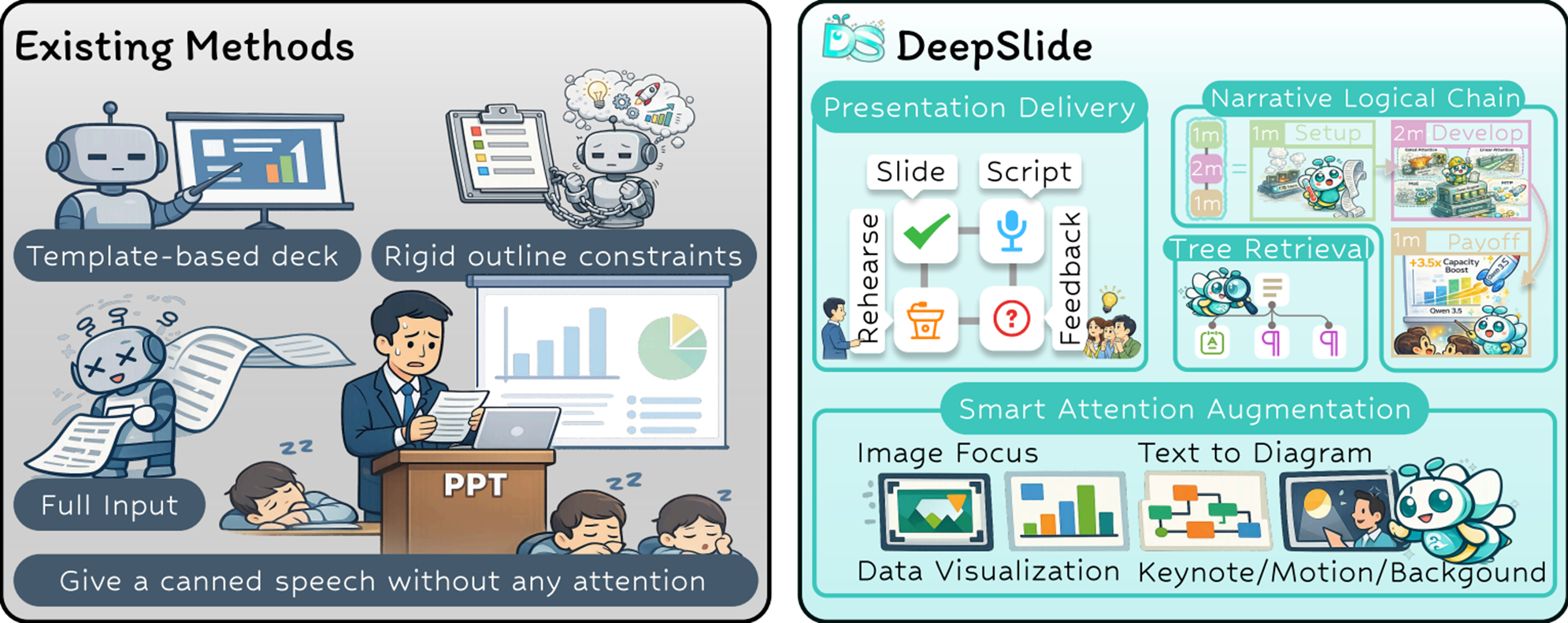
Figure 1. Comparison with existing methods: DeepSlide targets end-to-end presentation delivery rather than deck authoring only.
A Four-Stage End-to-End Pipeline (Delivery-First)
To this end, DeepSlide proposes a four-stage end-to-end pipeline: requirement clarification & narrative proposals → logical-chain editing & evidence-grounded generation → interactive enhancement & attention control → rehearsal & evaluation. This shifts presentation preparation from improving artifact quality to improving delivery quality.
- Controllable narrative strategy: generates multiple time-budgeted logical-chain candidates, supports node-level editing and emphasis allocation
- Co-delivery of script and slides: produces both
recipe/content.tex(slides) andrecipe/speech.txt(script) - In-talk attention strategies: optional enhancements such as content-aware image focus, table visualization, and text-to-diagram
- Rehearsal guidance: provides voice preview and simulates audience questions with actionable suggestions
Four-Stage Framework
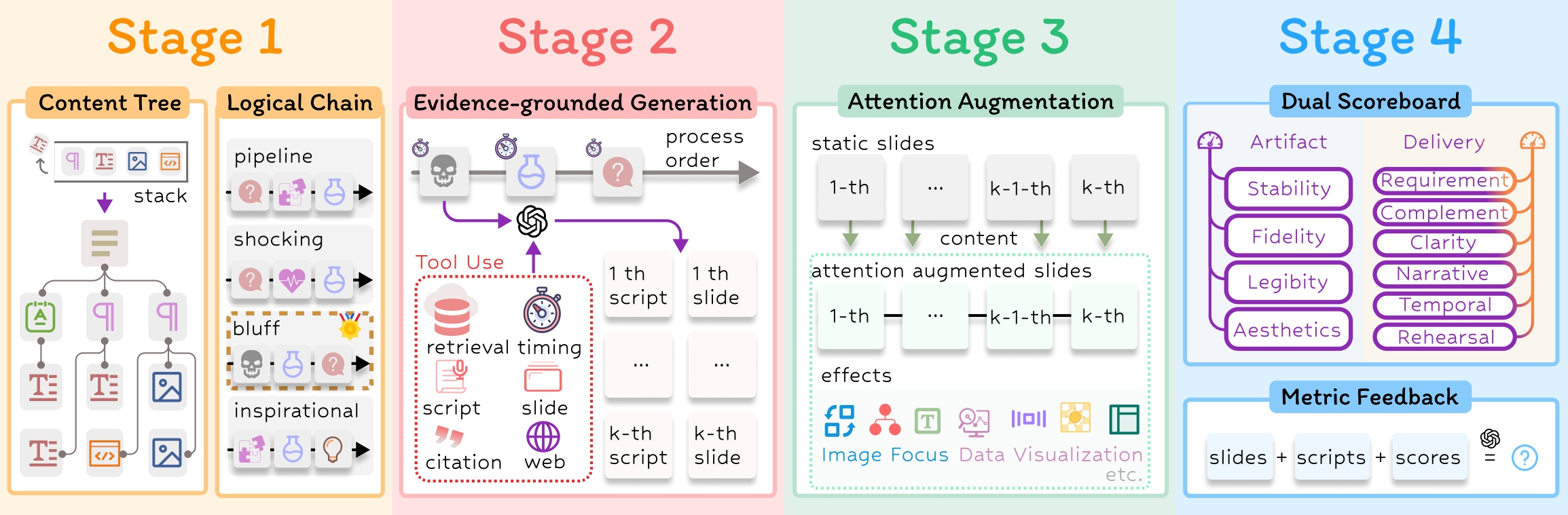
Figure 2. Overview of the four-stage framework: a closed-loop delivery workflow from requirement clarification to generation/enhancement, and finally rehearsal/evaluation.
To better evaluate from both artifact quality and delivery quality, we developed an LLM-based dual-scoreboard evaluation, and compared against a set of existing methods:
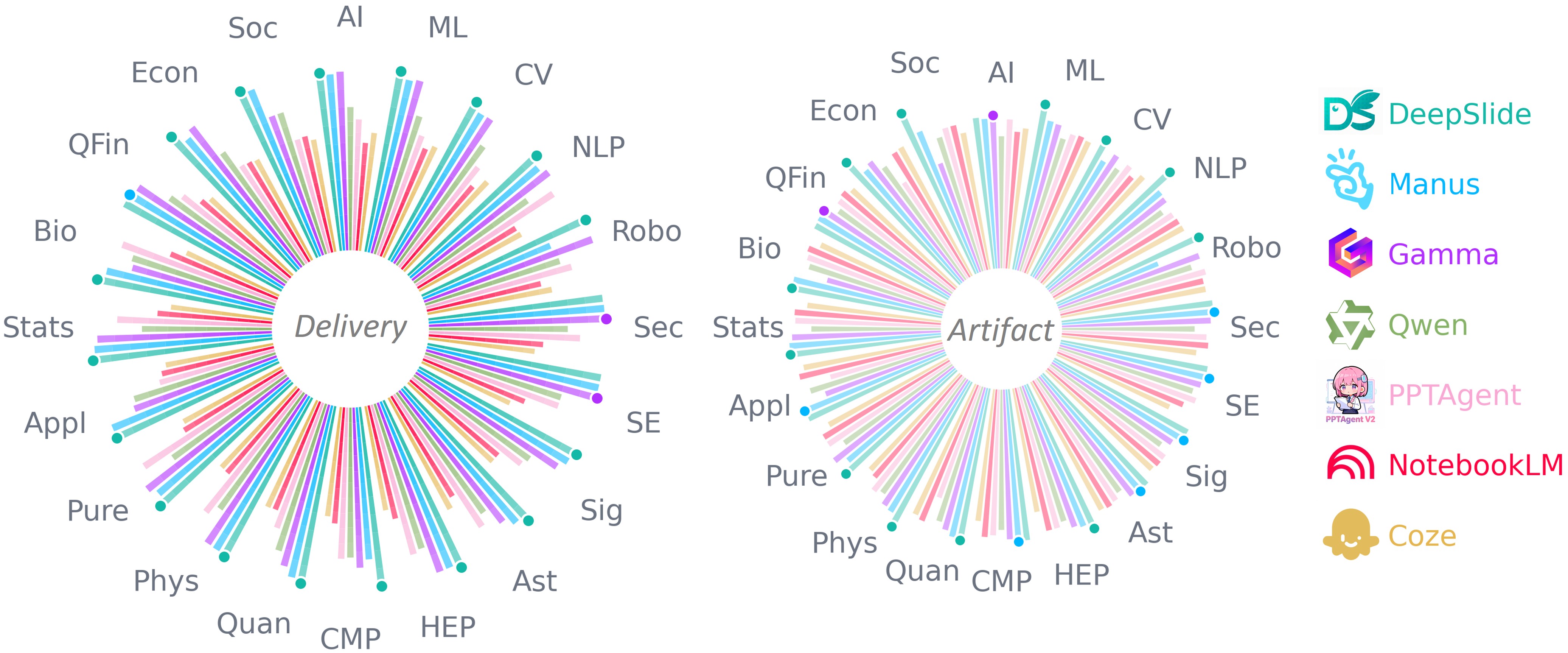
Figure 3. Dual-scoreboard results across 20 domains (Artifact vs. Delivery).
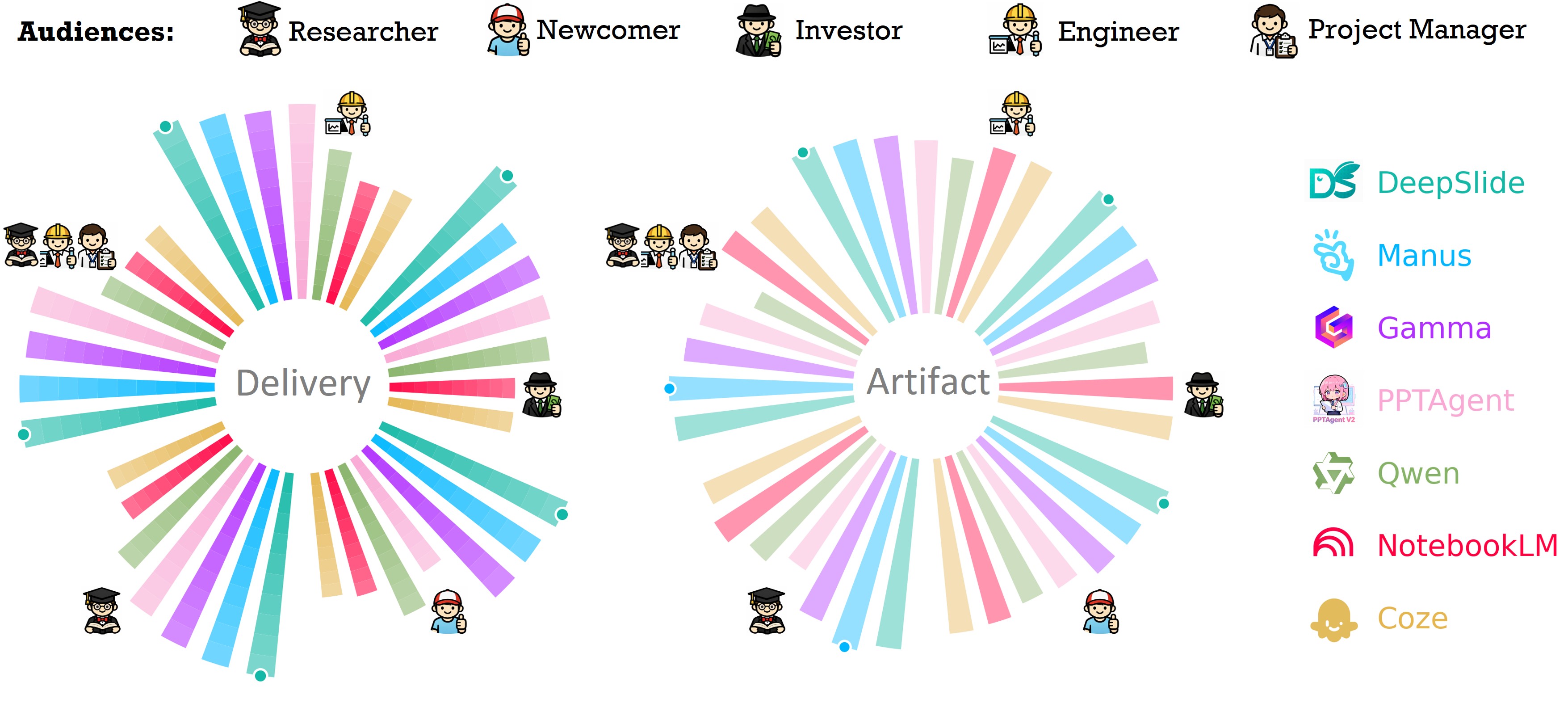
Figure 4. Dual-scoreboard results under mixed role settings (Artifact vs. Delivery).
System Overview
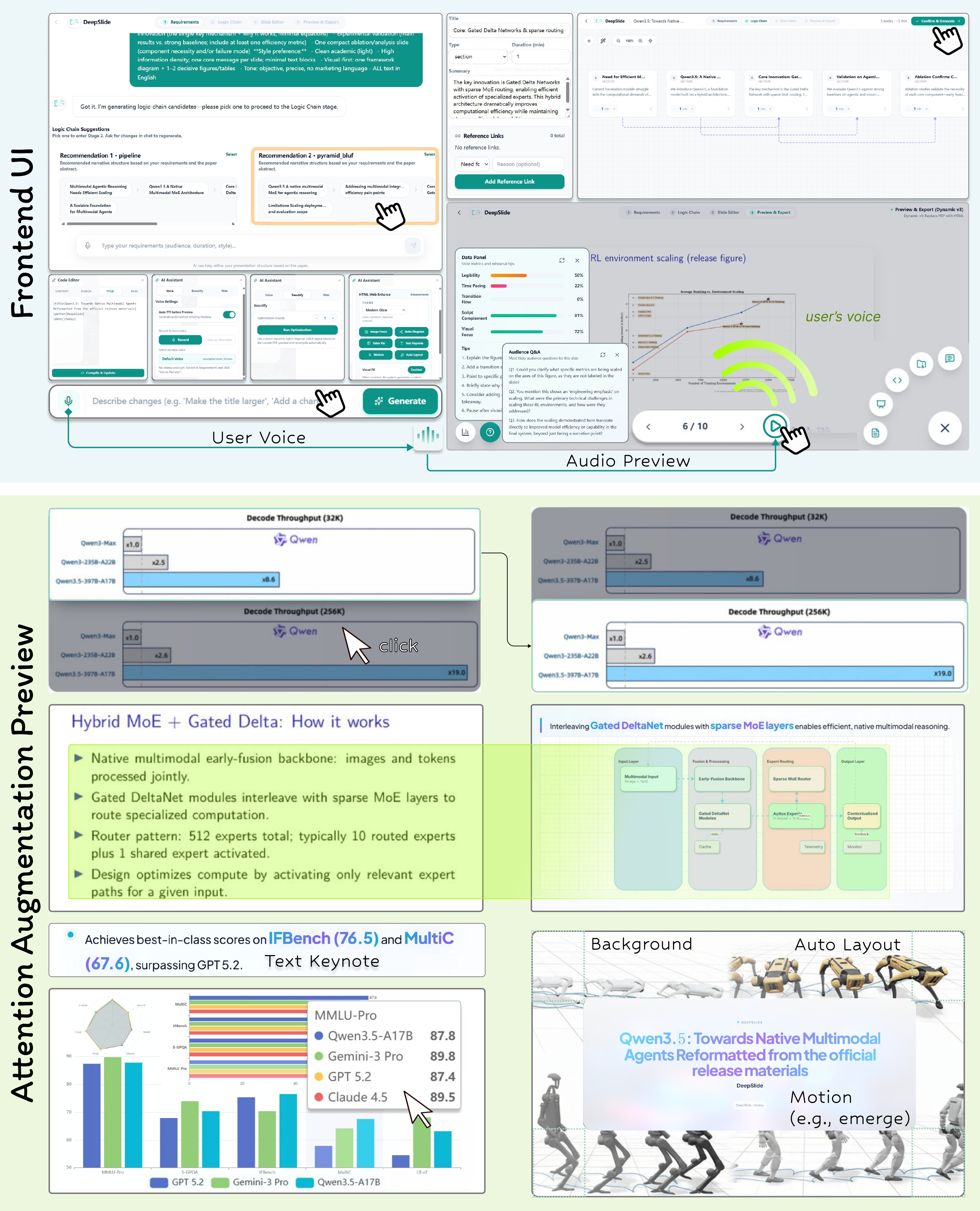
Figure 5. System UI and key capabilities: logical-chain editing, evidence-grounded generation, interactive enhancement, and a rehearsal loop.
Core Ideas
The paper argues that existing “slide agents / generators” typically reduce the cost of deck authoring, but still fail to cover the full burden of talk preparation. There are three main gaps:
- Lack of selectable, editable narrative strategies: many systems either skip narrative planning or output only a single generic outline, with weak personalization and no controllable timing/emphasis allocation
- Lack of in-talk attention strategies: most systems deliver static decks without content-aware attention guidance (focus, progressive reveal, expressive encoding for dense charts)
- Lack of rehearsal support: they stop at generating pages, without slide-aligned non-redundant scripts, rehearsal feedback, or preparedness for on-stage Q&A
DeepSlide’s methodology is: the presenter only needs to lock in high-level decisions (audience, total duration, goals, style intent, narrative skeleton, and emphasis allocation). The system then executes the rest under controllable constraints, forming an iterative delivery loop. This is implemented as four stages:
- Stage 1: Requirement clarification & narrative proposals: collect requirements via open-ended dialog and output multiple time-budgeted logical-chain candidates
- Stage 2: Logical-chain editing & evidence-grounded generation: node-level edits (reorder/add/remove/rewrite/timing/cross-reference), retrieve evidence from source material, and generate slides + script
- Stage 3: Interactive enhancement & attention control: provide content-aware optional enhancements (focus, table visualization, text-to-diagram, auto layout, etc.)
- Stage 4: Rehearsal & evaluation: audience-view rehearsal (optional audio), actionable revision suggestions, and one-click export of deliverables
Architecture and Code
The core implementation lives in deepslide/, and runtime consists of three services:
deepslide/backend: FastAPI (parsing, generation, compilation, export, evaluation entrypoints)deepslide/frontend: Vite + React (interactive editing, preview, dialog entrypoints)next-ai-draw-io: Next.js (diagrams and draw.io capabilities)
DeepSlide/
├── deepslide/
│   ├── backend/
│   ├── frontend/
│   ├── env.md               # Model/Agent env vars overview
│   ├── install.sh           # Dependency install script (shortcut)
│   ├── start.sh             # One-click start for all 3 services
│   ├── stop.sh              # One-click stop
│   └── clear.sh             # Clear caches/artifacts (dangerous: deletes projects)
├── experiments/             # Evaluation reproduction (dual-scoreboard / ablations)
├── DeepSlide-Arxiv/         # Paper artifact directory (figures/tables/latex)
├── assets/                  # README assets (synced from the paper)
└── README_zh.md
Prerequisites
- Linux/macOS (recommended)
- Python 3.10+ (3.12 recommended)
- Node.js 18+ (20 LTS recommended)
- npm 9+
- LaTeX (for Beamer:
xelatex+ beamer packages). Strongly recommended to use the providedcontainer/dockerfileso you don’t need to install TeX locally.
Local Setup and Run (Recommended)
0) Run with Docker
This repo provides container/dockerfile with TeXLive and Python. You can use Docker to get a ready-to-use TeX compile environment without installing TeX locally:
docker build -t deepslide:latest -f container/dockerfile .

docker run -it --rm \
  -v "$(pwd)":/app \
  -p 5173:5173 -p 8001:8001 -p 6002:6002 \
  deepslide:latest bash
Inside the container, run the same steps below under /app (or directly run deepslide/start.sh).
1) Install Dependencies
cd next-ai-draw-io
npm install
cd ..

cd deepslide/backend
python3 -m venv .venv
source .venv/bin/activate
pip install --upgrade pip
pip install -r requirements.txt
cd ../..

cd deepslide/frontend
npm install
cd ../..
You may also use the shortcut script (still recommended to prepare venv/permissions first): bash deepslide/install.sh.
2) Configure Models and Ports
Edit deepslide/.env. See deepslide/env.md for detailed model environment variables.
3) One-Click Start
cd deepslide
bash start.sh
Default endpoints (ports can be changed in .env):
- Frontend:
http://127.0.0.1:5173 - Backend API:
http://127.0.0.1:8001/api/v1 - Backend Docs:
http://127.0.0.1:8001/docs - next-ai-draw-io:
http://127.0.0.1:6002
Stop all services:
cd deepslide
bash stop.sh
Configuration: Models and Ports
Minimal Working Configuration
Replace the key with your own value; do not commit real keys.
# Default text LLM
DEFAULT_MODEL_PLATFORM_TYPE=openai
DEFAULT_MODEL_TYPE=gpt-4o-mini
DEFAULT_MODEL_API_URL=https://api.openai.com/v1
DEFAULT_MODEL_API_KEY=YOUR_API_KEY

# Dev Ports
BACKEND_PORT=8001
FRONTEND_PORT=5173
NEXT_AI_DRAWIO_PORT=6002
Agent-Level Overrides (Recommended)
DeepSlide supports configuring different provider/model/base_url/api_key for different Agents, so you can use cheaper models for simple steps and stronger models for hard steps. See deepslide/env.md for the full list of fields and Agent names.
Scripts (start/stop/clear/install)
deepslide/start.sh
- Reads
deepslide/.env - Starts three services:
next-ai-draw-io, backenduvicorn, frontendvite - Writes PIDs into
deepslide/.pids/for stop/cleanup
deepslide/stop.sh
- Stops services via PID files first
- Falls back to process-pattern kill (backend/frontend/next-ai-draw-io)
deepslide/clear.sh (Dangerous)
Resets runtime state by cleaning caches and generated artifacts (including projects, uploads, and ASR/TTS intermediates). Do not run it if you want to keep project results.
deepslide/install.sh
Installs backend/frontend/next-ai-draw-io dependencies (shortcut script).
Workflow: From Materials to Delivery
- Open the frontend and create a project
- Upload materials (paper PDF / LaTeX zip / multi-doc references)
- Finish requirement clarification (audience, total duration, goal, style preference)
- Inspect and choose one of the narrative logical-chain candidates (editable timing/emphasis allocation)
- Generate slides + script: produce
recipe/content.texandrecipe/speech.txt - Compile/preview and apply interactive enhancements (focus, visualization, diagrams, auto layout, etc.)
- Enter the rehearsal loop: preview metrics, revision suggestions, audience-question simulation (Stage 4)
- Export deliverables (PDF / PPTX / ZIP)
Experiments and Evaluation Reproduction
The evaluation code is under experiments/. The core idea is a dual-scoreboard: distinguishing static artifact quality (Artifact) vs. delivery quality (Delivery).
Prerequisite: Install evaluation dependencies
It is recommended to create a dedicated venv for evaluation:
python3 -m venv experiments/.venv
source experiments/.venv/bin/activate
pip install --upgrade pip
pip install -r experiments/main/requirements.txt
Prerequisite: Configure evaluation environment variables
Copy and fill:
experiments/main/.env.template→experiments/main/.env
It includes:
- LLM Judge (for subjective metrics)
- OCR (default uses VLM for OCR; can be disabled)
One-click reproduction: main evaluation (main)
source experiments/.venv/bin/activate
python experiments/main/run_oneclick.py
Outputs are typically under experiments/main/outputs/ (scores / reports, etc.).
One-click reproduction: role evaluation (role)
source experiments/.venv/bin/activate
python experiments/role/run_oneclick.py
Ablations (K/L/S)
The ablation entrypoint is experiments/xr/run_eval.py:
source experiments/.venv/bin/activate
python experiments/xr/run_eval.py scan
python experiments/xr/run_eval.py evaluate --judge llm --llm-mode packed
python experiments/xr/run_eval.py report
Notes:
- If you don’t configure OCR, run evaluate with
--require-ocr 0or setEVAL_OCR_MODE=off(metrics depending on OCR will be affected) - If you don’t configure LLM judge, run with
--require-judge 0(metrics requiring judge will be skipped)
Dependencies (next-ai-draw-io / index-tts)
next-ai-draw-io
deepslide/start.sh starts this service. Before the first run, make sure you run npm install in next-ai-draw-io/.
index-tts (Optional: voice preview / TTS)
The backend TTS logic calls index-tts/index-tts-main (and relies on the uv command). If you need voice preview, follow index-tts/index-tts-main/README.md to install and prepare checkpoints, and ensure uv is available in PATH.
FAQ
- Frontend can’t connect to backend: check
BACKEND_PORTand whether the backend is running; check if PID files exist underdeepslide/.pids/ - next-ai-draw-io not running: make sure dependencies are installed; default port is 6002
- LaTeX compilation fails: ensure
xelatex+ beamer dependencies are present (or use the Docker environment); check missing fonts - Evaluation errors about missing OCR / Judge: configure
EVAL_MODEL_*andDEFAULT_VLM_*inexperiments/main/.env.template, or skip via--require-ocr 0/--require-judge 0
Community

|
|
Paper and Citation
@misc{yang2026deepslideartifactspresentationdelivery,
      title={DeepSlide: From Artifacts to Presentation Delivery},
      author={Ming Yang and Zhiwei Zhang and Jiahang Li and Haoseng Liu and Yuzheng Cai and Weiguo Zheng},
      year={2026},
      eprint={2605.15202},
      archivePrefix={arXiv},
      primaryClass={cs.AI},
      url={https://arxiv.org/abs/2605.15202},
}
Similar repos


Languages
Python
45.9%
TypeScript
42.3%
JavaScript
5.2%
TeX
5.1%
Not just slides - delivery-ready talks
See the codeREADME
DeepSlide: From Artifacts to Presentation Delivery
DeepSlide is not a tool that simply “makes a PPT for you”, but a delivery-first, human-in-the-loop system for complete presentation preparation and delivery.
It helps users go beyond slide generation to support the full workflow of presentation delivery, including narrative planning, logical chain editing, slide generation, script drafting, interactive enhancement, and rehearsal feedback.
🌐 Chinese Version: README_zh.md
News
- [2026.03.10] We now provide a simple 4-step guide to use DeepSlide directly inside OpenClaw.
If you are already using OpenClaw and want to add a dedicated agent for presentation generation, narrative organization, and delivery preparation, you can follow the tutorial below:
[DeepSlide + OpenClaw](https://www.yuque.com/puitar/pug2ub/didlfrgy5ogxzl6p?singleDoc# 《DeepSlide+龙虾直接接入飞书!》) - [2026.03.06] DeepSlide is officially released.
We open-sourced DeepSlide as a human-in-the-loop, delivery-first presentation system designed not only for slide creation, but for the broader goal of full presentation delivery.
Instead of stopping at static deck generation, DeepSlide supports a more complete workflow covering requirement clarification, narrative proposal, logical chain control, evidence-grounded slide generation, script writing, interactive enhancement, and rehearsal-oriented preparation.
OpenClaw Skill
We ship an AgentSkills-compatible OpenClaw skill at skills/deepslide-openclaw/:
- Install & initialize DeepSlide (runs services on the host)
- Build and use a Docker-based TeX toolchain for LaTeX compilation (no local TeX required)
- Deploy & operate (start/stop + basic health checks)
If your OpenClaw workspace is not the repo root, add skills via skills.load.extraDirs (in ~/.openclaw/openclaw.json)
(ClawHub Link).
Key Claim
A high-quality talk is not mainly determined by whether the static slides “look nice”. What matters more is whether information is organized and delivered under audience cognition and attention constraints—including narrative coherence, timing and pacing control, attention guidance, and rehearsal readiness. In other words, artifact quality ≠ delivery quality.
Figure 1. Comparison with existing methods: DeepSlide targets end-to-end presentation delivery rather than deck authoring only.
A Four-Stage End-to-End Pipeline (Delivery-First)
To this end, DeepSlide proposes a four-stage end-to-end pipeline: requirement clarification & narrative proposals → logical-chain editing & evidence-grounded generation → interactive enhancement & attention control → rehearsal & evaluation. This shifts presentation preparation from improving artifact quality to improving delivery quality.
- Controllable narrative strategy: generates multiple time-budgeted logical-chain candidates, supports node-level editing and emphasis allocation
- Co-delivery of script and slides: produces both
recipe/content.tex(slides) andrecipe/speech.txt(script) - In-talk attention strategies: optional enhancements such as content-aware image focus, table visualization, and text-to-diagram
- Rehearsal guidance: provides voice preview and simulates audience questions with actionable suggestions
Four-Stage Framework
Figure 2. Overview of the four-stage framework: a closed-loop delivery workflow from requirement clarification to generation/enhancement, and finally rehearsal/evaluation.
To better evaluate from both artifact quality and delivery quality, we developed an LLM-based dual-scoreboard evaluation, and compared against a set of existing methods:
Figure 3. Dual-scoreboard results across 20 domains (Artifact vs. Delivery).
Figure 4. Dual-scoreboard results under mixed role settings (Artifact vs. Delivery).
System Overview
Figure 5. System UI and key capabilities: logical-chain editing, evidence-grounded generation, interactive enhancement, and a rehearsal loop.
Core Ideas
The paper argues that existing “slide agents / generators” typically reduce the cost of deck authoring, but still fail to cover the full burden of talk preparation. There are three main gaps:
- Lack of selectable, editable narrative strategies: many systems either skip narrative planning or output only a single generic outline, with weak personalization and no controllable timing/emphasis allocation
- Lack of in-talk attention strategies: most systems deliver static decks without content-aware attention guidance (focus, progressive reveal, expressive encoding for dense charts)
- Lack of rehearsal support: they stop at generating pages, without slide-aligned non-redundant scripts, rehearsal feedback, or preparedness for on-stage Q&A
DeepSlide’s methodology is: the presenter only needs to lock in high-level decisions (audience, total duration, goals, style intent, narrative skeleton, and emphasis allocation). The system then executes the rest under controllable constraints, forming an iterative delivery loop. This is implemented as four stages:
- Stage 1: Requirement clarification & narrative proposals: collect requirements via open-ended dialog and output multiple time-budgeted logical-chain candidates
- Stage 2: Logical-chain editing & evidence-grounded generation: node-level edits (reorder/add/remove/rewrite/timing/cross-reference), retrieve evidence from source material, and generate slides + script
- Stage 3: Interactive enhancement & attention control: provide content-aware optional enhancements (focus, table visualization, text-to-diagram, auto layout, etc.)
- Stage 4: Rehearsal & evaluation: audience-view rehearsal (optional audio), actionable revision suggestions, and one-click export of deliverables
Architecture and Code
The core implementation lives in deepslide/, and runtime consists of three services:
deepslide/backend: FastAPI (parsing, generation, compilation, export, evaluation entrypoints)deepslide/frontend: Vite + React (interactive editing, preview, dialog entrypoints)next-ai-draw-io: Next.js (diagrams and draw.io capabilities)
DeepSlide/
├── deepslide/
│   ├── backend/
│   ├── frontend/
│   ├── env.md               # Model/Agent env vars overview
│   ├── install.sh           # Dependency install script (shortcut)
│   ├── start.sh             # One-click start for all 3 services
│   ├── stop.sh              # One-click stop
│   └── clear.sh             # Clear caches/artifacts (dangerous: deletes projects)
├── experiments/             # Evaluation reproduction (dual-scoreboard / ablations)
├── DeepSlide-Arxiv/         # Paper artifact directory (figures/tables/latex)
├── assets/                  # README assets (synced from the paper)
└── README_zh.md
Prerequisites
- Linux/macOS (recommended)
- Python 3.10+ (3.12 recommended)
- Node.js 18+ (20 LTS recommended)
- npm 9+
- LaTeX (for Beamer:
xelatex+ beamer packages). Strongly recommended to use the providedcontainer/dockerfileso you don’t need to install TeX locally.
Local Setup and Run (Recommended)
0) Run with Docker
This repo provides container/dockerfile with TeXLive and Python. You can use Docker to get a ready-to-use TeX compile environment without installing TeX locally:
docker build -t deepslide:latest -f container/dockerfile .

docker run -it --rm \
  -v "$(pwd)":/app \
  -p 5173:5173 -p 8001:8001 -p 6002:6002 \
  deepslide:latest bash
Inside the container, run the same steps below under /app (or directly run deepslide/start.sh).
1) Install Dependencies
cd next-ai-draw-io
npm install
cd ..

cd deepslide/backend
python3 -m venv .venv
source .venv/bin/activate
pip install --upgrade pip
pip install -r requirements.txt
cd ../..

cd deepslide/frontend
npm install
cd ../..
You may also use the shortcut script (still recommended to prepare venv/permissions first): bash deepslide/install.sh.
2) Configure Models and Ports
Edit deepslide/.env. See deepslide/env.md for detailed model environment variables.
3) One-Click Start
cd deepslide
bash start.sh
Default endpoints (ports can be changed in .env):
- Frontend:
http://127.0.0.1:5173 - Backend API:
http://127.0.0.1:8001/api/v1 - Backend Docs:
http://127.0.0.1:8001/docs - next-ai-draw-io:
http://127.0.0.1:6002
Stop all services:
cd deepslide
bash stop.sh
Configuration: Models and Ports
Minimal Working Configuration
Replace the key with your own value; do not commit real keys.
# Default text LLM
DEFAULT_MODEL_PLATFORM_TYPE=openai
DEFAULT_MODEL_TYPE=gpt-4o-mini
DEFAULT_MODEL_API_URL=https://api.openai.com/v1
DEFAULT_MODEL_API_KEY=YOUR_API_KEY

# Dev Ports
BACKEND_PORT=8001
FRONTEND_PORT=5173
NEXT_AI_DRAWIO_PORT=6002
Agent-Level Overrides (Recommended)
DeepSlide supports configuring different provider/model/base_url/api_key for different Agents, so you can use cheaper models for simple steps and stronger models for hard steps. See deepslide/env.md for the full list of fields and Agent names.
Scripts (start/stop/clear/install)
deepslide/start.sh
- Reads
deepslide/.env - Starts three services:
next-ai-draw-io, backenduvicorn, frontendvite - Writes PIDs into
deepslide/.pids/for stop/cleanup
deepslide/stop.sh
- Stops services via PID files first
- Falls back to process-pattern kill (backend/frontend/next-ai-draw-io)
deepslide/clear.sh (Dangerous)
Resets runtime state by cleaning caches and generated artifacts (including projects, uploads, and ASR/TTS intermediates). Do not run it if you want to keep project results.
deepslide/install.sh
Installs backend/frontend/next-ai-draw-io dependencies (shortcut script).
Workflow: From Materials to Delivery
- Open the frontend and create a project
- Upload materials (paper PDF / LaTeX zip / multi-doc references)
- Finish requirement clarification (audience, total duration, goal, style preference)
- Inspect and choose one of the narrative logical-chain candidates (editable timing/emphasis allocation)
- Generate slides + script: produce
recipe/content.texandrecipe/speech.txt - Compile/preview and apply interactive enhancements (focus, visualization, diagrams, auto layout, etc.)
- Enter the rehearsal loop: preview metrics, revision suggestions, audience-question simulation (Stage 4)
- Export deliverables (PDF / PPTX / ZIP)
Experiments and Evaluation Reproduction
The evaluation code is under experiments/. The core idea is a dual-scoreboard: distinguishing static artifact quality (Artifact) vs. delivery quality (Delivery).
Prerequisite: Install evaluation dependencies
It is recommended to create a dedicated venv for evaluation:
python3 -m venv experiments/.venv
source experiments/.venv/bin/activate
pip install --upgrade pip
pip install -r experiments/main/requirements.txt
Prerequisite: Configure evaluation environment variables
Copy and fill:
experiments/main/.env.template→experiments/main/.env
It includes:
- LLM Judge (for subjective metrics)
- OCR (default uses VLM for OCR; can be disabled)
One-click reproduction: main evaluation (main)
source experiments/.venv/bin/activate
python experiments/main/run_oneclick.py
Outputs are typically under experiments/main/outputs/ (scores / reports, etc.).
One-click reproduction: role evaluation (role)
source experiments/.venv/bin/activate
python experiments/role/run_oneclick.py
Ablations (K/L/S)
The ablation entrypoint is experiments/xr/run_eval.py:
source experiments/.venv/bin/activate
python experiments/xr/run_eval.py scan
python experiments/xr/run_eval.py evaluate --judge llm --llm-mode packed
python experiments/xr/run_eval.py report
Notes:
- If you don’t configure OCR, run evaluate with
--require-ocr 0or setEVAL_OCR_MODE=off(metrics depending on OCR will be affected) - If you don’t configure LLM judge, run with
--require-judge 0(metrics requiring judge will be skipped)
Dependencies (next-ai-draw-io / index-tts)
next-ai-draw-io
deepslide/start.sh starts this service. Before the first run, make sure you run npm install in next-ai-draw-io/.
index-tts (Optional: voice preview / TTS)
The backend TTS logic calls index-tts/index-tts-main (and relies on the uv command). If you need voice preview, follow index-tts/index-tts-main/README.md to install and prepare checkpoints, and ensure uv is available in PATH.
FAQ
- Frontend can’t connect to backend: check
BACKEND_PORTand whether the backend is running; check if PID files exist underdeepslide/.pids/ - next-ai-draw-io not running: make sure dependencies are installed; default port is 6002
- LaTeX compilation fails: ensure
xelatex+ beamer dependencies are present (or use the Docker environment); check missing fonts - Evaluation errors about missing OCR / Judge: configure
EVAL_MODEL_*andDEFAULT_VLM_*inexperiments/main/.env.template, or skip via--require-ocr 0/--require-judge 0
Community
|
|
|
Paper and Citation
@misc{yang2026deepslideartifactspresentationdelivery,
      title={DeepSlide: From Artifacts to Presentation Delivery},
      author={Ming Yang and Zhiwei Zhang and Jiahang Li and Haoseng Liu and Yuzheng Cai and Weiguo Zheng},
      year={2026},
      eprint={2605.15202},
      archivePrefix={arXiv},
      primaryClass={cs.AI},
      url={https://arxiv.org/abs/2605.15202},
}
Similar repos
Languages
Python
45.9%
TypeScript
42.3%
JavaScript
5.2%
TeX
5.1%