
「ICLR 2025」 A Sanity Check for AI-generated Image Detection
Python
339
47 commits
updated Jun 4, 2025
README
A Sanity Check for AI-generated Image Detection
Shilin Yan1†, Ouxiang Li1,2†, Jiayin Cai1†, Yanbin Hao2, Xiaolong Jiang1, Yao Hu1, Weidi Xie3‡
1Xiaohongshu Inc. 2University of Science and Technology of China 3Shanghai Jiao Tong University



🔥 News
- [2025-01-23]🎉🎉🎉 AIDE is accepted by ICLR 2025.
- [2024-12-29]🔥🔥🔥 We release the Chamelon dataset.
- [2024-06-20]🔥🔥🔥 We release the code and checkpoints of AIDE.
🔍 Chameleon
License:
Chameleon is only used for academic research. Commercial use in any form is prohibited.
🌟🌟🌟 If you need the Chameleon dataset, please send an email to tattoo.ysl@gmail.com. 🔥🔥🔥
Comparison of Chameleon with existing benchmarks.
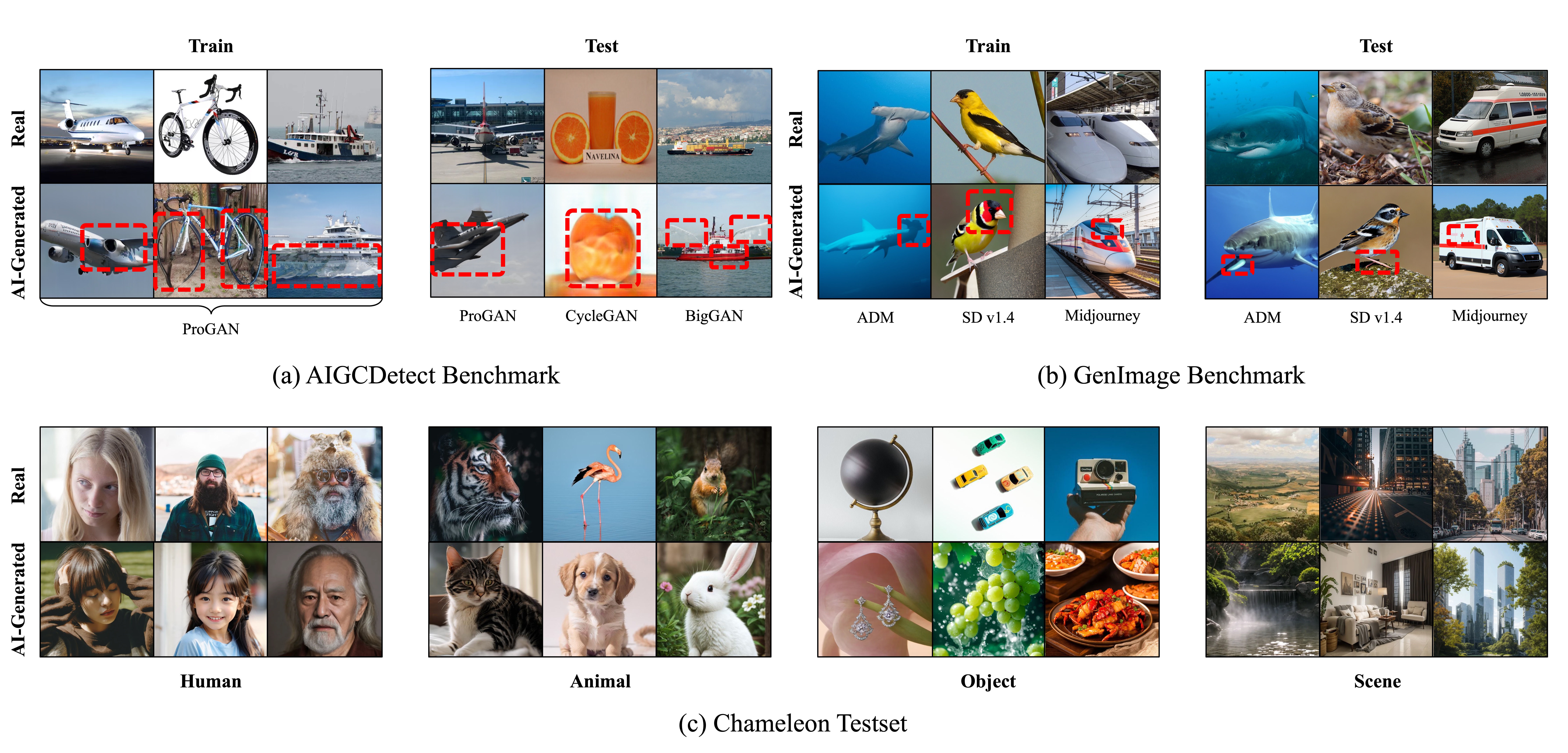
We visualize two contemporary AI-generated image benchmarks, namely:
- (a) AIGCDetect Benchmark
- (b) GenImage Benchmark
where all images are generated from publicly available generators, such as ProGAN (GAN-based), SD v1.4 (DM-based), and Midjourney (commercial API). These images are generated by unconditional situations or conditioned on simple prompts (e.g., photo of a plane) without delicate manual adjustments, thereby inclined to generate obvious artifacts in consistency and semantics (marked with red boxes).
In contrast, our Chameleon dataset in (c) aims to simulate real-world scenarios by collecting diverse images from online websites, where these online images are carefully adjusted by photographers and AI artists.
👀 Method
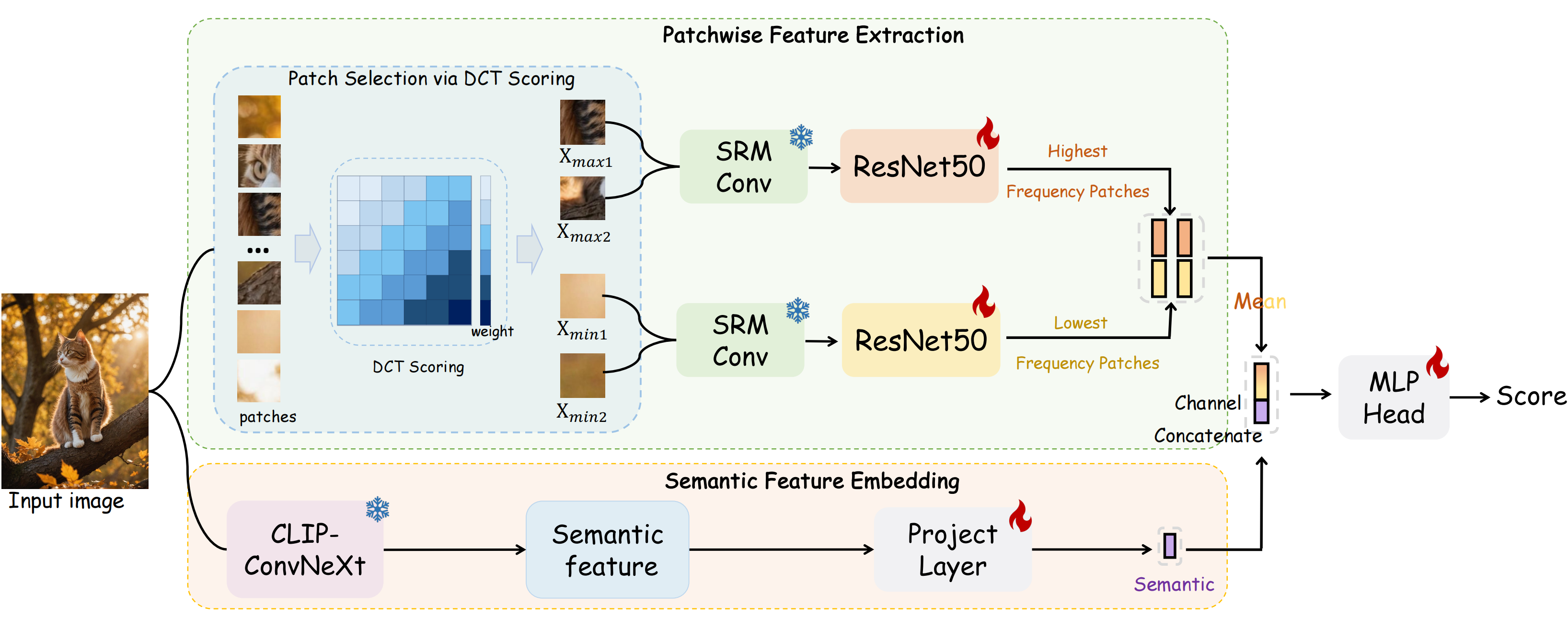
We conduct a sanity check on "whether the task of AI-generated image detection has been solved". To start with, we present Chameleon dataset, consisting AI-generated images that are genuinely challenging for human perception. To quantify the generalization of existing methods, we evaluate 9 off-the-shelf AI-generated image detectors on Chameleon dataset. Upon analysis, almost all models classify AI-generated images as real ones. Later, we propose AIDE~(AI-generated Image DEtector with Hybrid Features), which leverages multiple experts to simultaneously extract visual artifacts and noise patterns.
Requirements
We test the codes in the following environments, other versions may also be compatible:
- CUDA 11.8
- Python 3.10
- Pytorch 2.0.1
Setup
First, clone the repository locally.
https://github.com/shilinyan99/AIDE
Then, install Pytorch 2.0.1 using the conda environment.
conda install pytorch==2.0.1 torchvision==0.15.2 torchaudio==2.0.2 -c pytorch
Lastly, install the necessary packages and pycocotools.
pip install -r requirements.txt
Get Started
Training
./scripts/train.sh --data_path [/path/to/train_data] --eval_data_path [/path/to/eval_data] --resnet_path [/path/to/pretrained_resnet_path] --convnext_path [/path/to/pretrained_convnext_path] --output_dir [/path/to/output_dir] [other args]
For example, training on ProGAN, run the following command:
./scripts/train.sh --data_path dataset/progan/train --eval_data_path dataset/progan/eval --resnet_path pretrained_ckpts/resnet50.pth --convnext_path pretrained_ckpts/open_clip_pytorch_model.bin --output_dir results/progan_train
Inference
Inference using the trained model.
./scripts/eval.sh --data_path [/path/to/train_data] --eval_data_path [/path/to/eval_data] --resume [/path/to/progan_train] --eval True --output_dir [/path/to/output_dir]
For example, evaluating the progan_train model, run the following command:
./scripts/eval.sh --data_path dataset/progan/train --eval_data_path dataset/progan/eval --resume results/progan_train/progan_train.pth --eval True --output_dir results/progan_train
Dataset
Training Set
We adopt the training set in CNNSpot and GenImage.
Test Set
The whole test set we used in our experiments can be downloaded from AIGCDetectBenchmark and GenImage.
Model Zoo
Our training checkpoints can be downloaded from link.
Acknowledgement
This repo is based on ConvNeXt. We also refer to the repositories CNNSpot、AIGCDetectBenchmark、GenImage and DNF. Thanks for their wonderful works.
Citation
@article{yan2024sanity,
  title={A Sanity Check for AI-generated Image Detection},
  author={Yan, Shilin and Li, Ouxiang and Cai, Jiayin and Hao, Yanbin and Jiang, Xiaolong and Hu, Yao and Xie, Weidi},
  journal={arXiv preprint arXiv:2406.19435},
  year={2024}
}
Contact
If you have any question about this project, please feel free to contact tattoo.ysl@gmail.com.
Contributors

47 commits
Similar repos




Languages
Python
99.0%
「ICLR 2025」 A Sanity Check for AI-generated Image Detection
Python
339
47 commits
updated Jun 4, 2025
README
A Sanity Check for AI-generated Image Detection
Shilin Yan1†, Ouxiang Li1,2†, Jiayin Cai1†, Yanbin Hao2, Xiaolong Jiang1, Yao Hu1, Weidi Xie3‡
1Xiaohongshu Inc. 2University of Science and Technology of China 3Shanghai Jiao Tong University
🔥 News
- [2025-01-23]🎉🎉🎉 AIDE is accepted by ICLR 2025.
- [2024-12-29]🔥🔥🔥 We release the Chamelon dataset.
- [2024-06-20]🔥🔥🔥 We release the code and checkpoints of AIDE.
🔍 Chameleon
License:
Chameleon is only used for academic research. Commercial use in any form is prohibited.
🌟🌟🌟 If you need the Chameleon dataset, please send an email to tattoo.ysl@gmail.com. 🔥🔥🔥
Comparison of Chameleon with existing benchmarks.
We visualize two contemporary AI-generated image benchmarks, namely:
- (a) AIGCDetect Benchmark
- (b) GenImage Benchmark
where all images are generated from publicly available generators, such as ProGAN (GAN-based), SD v1.4 (DM-based), and Midjourney (commercial API). These images are generated by unconditional situations or conditioned on simple prompts (e.g., photo of a plane) without delicate manual adjustments, thereby inclined to generate obvious artifacts in consistency and semantics (marked with red boxes).
In contrast, our Chameleon dataset in (c) aims to simulate real-world scenarios by collecting diverse images from online websites, where these online images are carefully adjusted by photographers and AI artists.
👀 Method
We conduct a sanity check on "whether the task of AI-generated image detection has been solved". To start with, we present Chameleon dataset, consisting AI-generated images that are genuinely challenging for human perception. To quantify the generalization of existing methods, we evaluate 9 off-the-shelf AI-generated image detectors on Chameleon dataset. Upon analysis, almost all models classify AI-generated images as real ones. Later, we propose AIDE~(AI-generated Image DEtector with Hybrid Features), which leverages multiple experts to simultaneously extract visual artifacts and noise patterns.
Requirements
We test the codes in the following environments, other versions may also be compatible:
- CUDA 11.8
- Python 3.10
- Pytorch 2.0.1
Setup
First, clone the repository locally.
https://github.com/shilinyan99/AIDE
Then, install Pytorch 2.0.1 using the conda environment.
conda install pytorch==2.0.1 torchvision==0.15.2 torchaudio==2.0.2 -c pytorch
Lastly, install the necessary packages and pycocotools.
pip install -r requirements.txt
Get Started
Training
./scripts/train.sh --data_path [/path/to/train_data] --eval_data_path [/path/to/eval_data] --resnet_path [/path/to/pretrained_resnet_path] --convnext_path [/path/to/pretrained_convnext_path] --output_dir [/path/to/output_dir] [other args]
For example, training on ProGAN, run the following command:
./scripts/train.sh --data_path dataset/progan/train --eval_data_path dataset/progan/eval --resnet_path pretrained_ckpts/resnet50.pth --convnext_path pretrained_ckpts/open_clip_pytorch_model.bin --output_dir results/progan_train
Inference
Inference using the trained model.
./scripts/eval.sh --data_path [/path/to/train_data] --eval_data_path [/path/to/eval_data] --resume [/path/to/progan_train] --eval True --output_dir [/path/to/output_dir]
For example, evaluating the progan_train model, run the following command:
./scripts/eval.sh --data_path dataset/progan/train --eval_data_path dataset/progan/eval --resume results/progan_train/progan_train.pth --eval True --output_dir results/progan_train
Dataset
Training Set
We adopt the training set in CNNSpot and GenImage.
Test Set
The whole test set we used in our experiments can be downloaded from AIGCDetectBenchmark and GenImage.
Model Zoo
Our training checkpoints can be downloaded from link.
Acknowledgement
This repo is based on ConvNeXt. We also refer to the repositories CNNSpot、AIGCDetectBenchmark、GenImage and DNF. Thanks for their wonderful works.
Citation
@article{yan2024sanity,
  title={A Sanity Check for AI-generated Image Detection},
  author={Yan, Shilin and Li, Ouxiang and Cai, Jiayin and Hao, Yanbin and Jiang, Xiaolong and Hu, Yao and Xie, Weidi},
  journal={arXiv preprint arXiv:2406.19435},
  year={2024}
}
Contact
If you have any question about this project, please feel free to contact tattoo.ysl@gmail.com.
Similar repos
Contributors
47 commits
Languages
Python
99.0%