One of the "BEST" markdown preview extensions for Visual Studio Code
See the code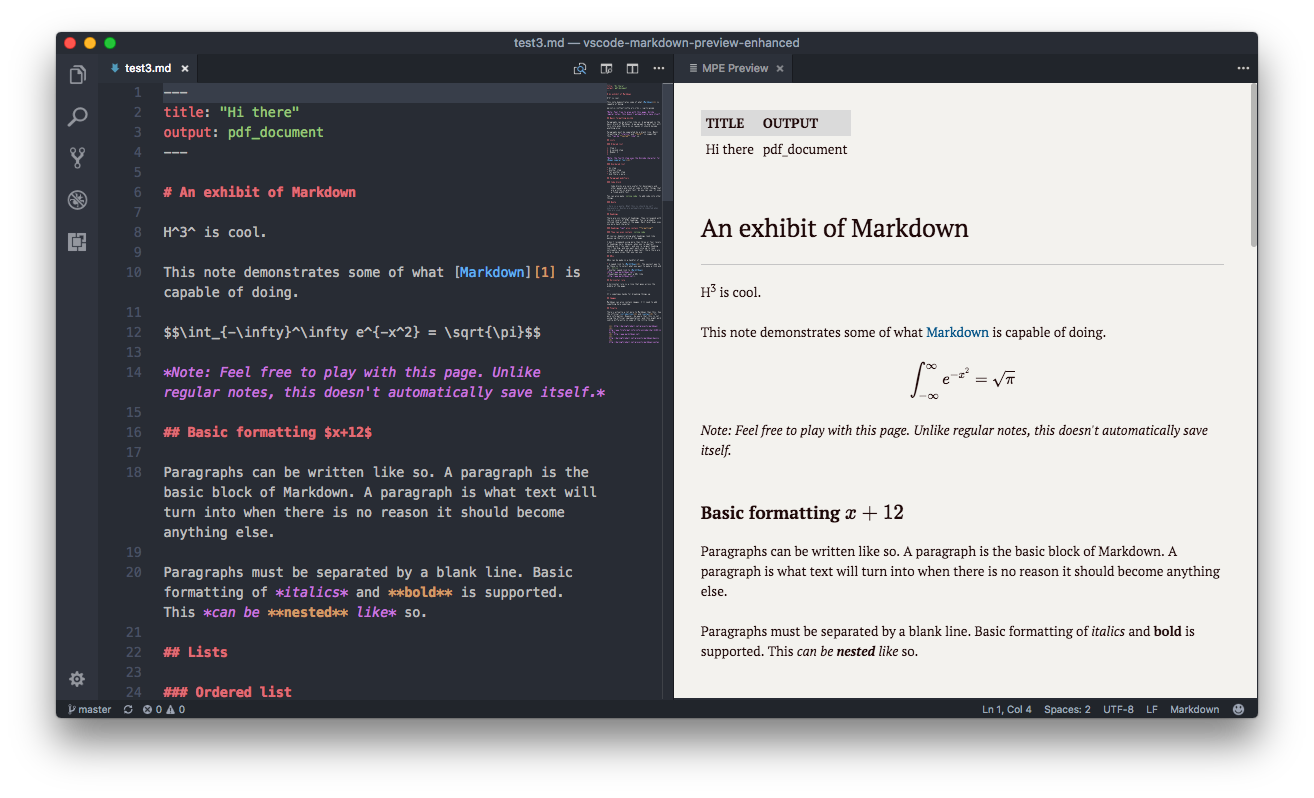
Markdown Preview Enhanced is an open source project released under the University of Illinois/NCSA Open Source License. Its ongoing development is made possible thanks to the support by these awesome backers. You can help make this project better by supporting us on GitHub Sponsors, PayPal, or 微信支付 Wechat Pay. Thank you!

These GitHub Sponsors and Backers help push this project forward 🎉.
Markdown Preview Enhanced is an extension that provides you with many useful functionalities such as automatic scroll sync, math typesetting, mermaid, PlantUML, WebSequenceDiagrams, pandoc, PDF export, code chunk, presentation writer, etc. A lot of its ideas are inspired by Markdown Preview Plus and RStudio Markdown.
Feel free to ask questions, post issues, submit pull request, and request new features.
For more information about this project and how to use this extension, please check out our documentation ⬇︎
.md).See the Keybindings table below for more shortcuts.
This extension does not collect, transmit, or share your data with any external service. The core preview, scroll sync, math typesetting, diagram rendering, and all editor features run entirely on your local machine. No telemetry, no tracking, no phone-home.
plantumlServer config) or a local .jar file. Unless explicitly configured to use kroki.io, no diagram data is sent to any remote service.If you have any questions about data handling, please open an issue.
To check out the documentation, visit
Contact me if you are willing to help translate the documentation :)
The cmd key for Windows is ctrl.
| Shortcuts | Functionality |
|---|---|
| cmd-k v or ctrl-k v | Open preview to the Side |
| cmd-shift-v or ctrl-shift-v | Open preview |
| cmd-k shift-l or ctrl-k shift-l | Open locked preview to the Side |
| cmd-k cmd-shift-l or ctrl-k ctrl-shift-l | Toggle preview lock |
| ctrl-shift-s | Sync preview / Sync source |
| shift-enter | Run Code Chunk |
| ctrl-shift-enter | Run all Code Chunks |
| cmd-= or cmd-shift-= | Preview zoom in |
| cmd-- or cmd-shift-_ | Preview zoom out |
| cmd-0 | Preview reset zoom |
| esc | Toggle sidebar TOC |
Please check the Releases page of this project.
367 followers · starred Nov 2020
1,590 followers · starred Feb 2021
638 followers · starred Feb 2021
4,155 followers · starred Apr 2026
One of the "BEST" markdown preview extensions for Visual Studio Code
See the code
Markdown Preview Enhanced is an open source project released under the University of Illinois/NCSA Open Source License. Its ongoing development is made possible thanks to the support by these awesome backers. You can help make this project better by supporting us on GitHub Sponsors, PayPal, or 微信支付 Wechat Pay. Thank you!
These GitHub Sponsors and Backers help push this project forward 🎉.
Markdown Preview Enhanced is an extension that provides you with many useful functionalities such as automatic scroll sync, math typesetting, mermaid, PlantUML, WebSequenceDiagrams, pandoc, PDF export, code chunk, presentation writer, etc. A lot of its ideas are inspired by Markdown Preview Plus and RStudio Markdown.
Feel free to ask questions, post issues, submit pull request, and request new features.
For more information about this project and how to use this extension, please check out our documentation ⬇︎
.md).See the Keybindings table below for more shortcuts.
This extension does not collect, transmit, or share your data with any external service. The core preview, scroll sync, math typesetting, diagram rendering, and all editor features run entirely on your local machine. No telemetry, no tracking, no phone-home.
plantumlServer config) or a local .jar file. Unless explicitly configured to use kroki.io, no diagram data is sent to any remote service.If you have any questions about data handling, please open an issue.
To check out the documentation, visit
Contact me if you are willing to help translate the documentation :)
The cmd key for Windows is ctrl.
| Shortcuts | Functionality |
|---|---|
| cmd-k v or ctrl-k v | Open preview to the Side |
| cmd-shift-v or ctrl-shift-v | Open preview |
| cmd-k shift-l or ctrl-k shift-l | Open locked preview to the Side |
| cmd-k cmd-shift-l or ctrl-k ctrl-shift-l | Toggle preview lock |
| ctrl-shift-s | Sync preview / Sync source |
| shift-enter | Run Code Chunk |
| ctrl-shift-enter | Run all Code Chunks |
| cmd-= or cmd-shift-= | Preview zoom in |
| cmd-- or cmd-shift-_ | Preview zoom out |
| cmd-0 | Preview reset zoom |
| esc | Toggle sidebar TOC |
Please check the Releases page of this project.
367 followers · starred Nov 2020
1,590 followers · starred Feb 2021
638 followers · starred Feb 2021
4,155 followers · starred Apr 2026