
Local pipeline and review app for 35mm negative scans: conversion, dust removal, tagging, publishing
Python
0
1 commits
updated Oct 5, 2026
See what people are saying
README
35mm-studio
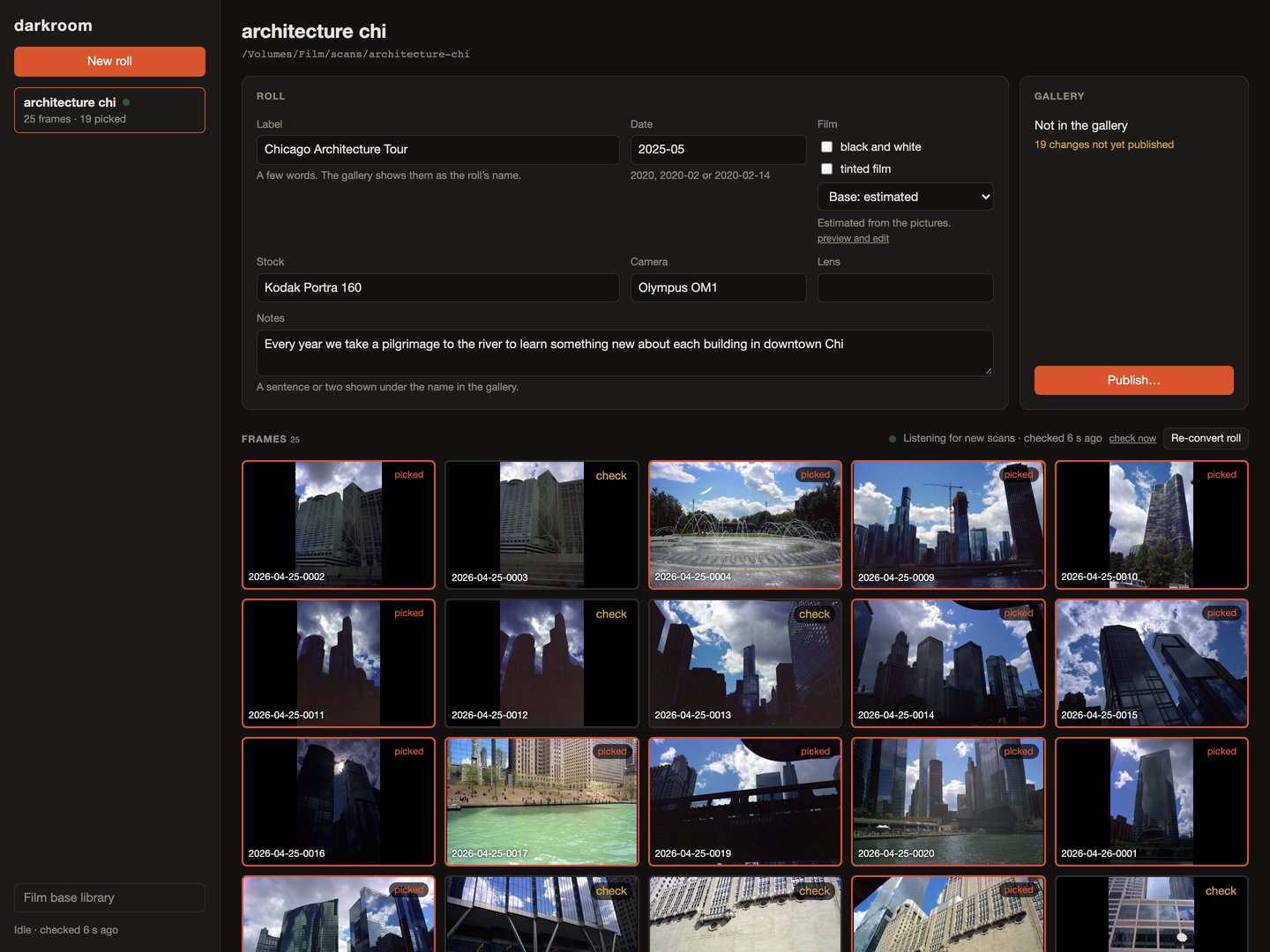
A local app that turns raw 35mm negative scans into finished photos. VueScan writes raw 48-bit TIFFs into a roll folder; the server notices each new file, crops, inverts and colour balances it, removes dust, drafts tags with a local vision model, and exports a JPEG. The studio is where you review the roll: contact sheet, per-frame edits, dust and red-eye fixes, film base, and publishing the picked frames.
Everything runs on localhost. No cloud service is needed except for the optional R2 publish target.
What's here
server/: Python (FastAPI). Folder watching, the processing queue, negative conversion, dust detection and LaMa inpainting, red-eye, film base measurement, labeling through Ollama, roll storage, publishing.apps/studio/: Vite and React. Roll list, contact sheet, frame review panels, film base library, publish dialog.
Each roll is a plain folder: roll.json, raw/ (the scanner writes here and the app never changes it),
frames/*.json (recipe, review state, metadata), work/*.tif (16-bit positives) and out/ (JPEGs). Any edit is
a re-run of the recipe against the untouched raw scan.
Requirements
Python 3.12 with uv, Node 22+ with pnpm. Optional: Ollama for
labeling (DARKROOM_VLM picks the model), darktable for hand edits. The LaMa weights download on first use.
Paths for app config and caches are macOS defaults; set DARKROOM_HOME to put them anywhere.
Run
pnpm install
pnpm dev
Open http://127.0.0.1:5175. The API runs on 8787. pnpm dev keeps config and caches in .devhome/ and publishes to
.publish/. Create a roll from the sidebar and point its raw folder at some negative scans.
pnpm darkroom runs the same thing against your real config. Publish settings go in a .env at the repo root:
DARKROOM_PUBLISH_DIR=<folder> for a local folder, or R2_ACCOUNT_ID, R2_BUCKET, R2_ACCESS_KEY_ID and
R2_SECRET_ACCESS_KEY for Cloudflare R2. GALLERY_URL sets the site address used in private roll links.
Tests
uv run --project server pytest
Extending
The app is split so a feature adds files instead of editing shared ones.
- Pipeline stages are in
server/darkroom/stages/. A process job runsPROCESS_STAGESin order on a sharedContext(ctx.negis the working negative,ctx.imgthe positive; put results for the frame JSON inctx.changes). Slower work such as labeling goes inJOBSand runs as a separate low-priority job. - API routes: any module in
server/darkroom/api/that definesrouteris mounted automatically. - Storage:
store.Rollreads and writesroll.jsonandframes/<stem>.json; useroll.update_frame(stem, **changes). - Studio panels live in
apps/studio/src/review/and takePanelProps(roll,frame). Keep a feature's API calls, types and CSS in their own files next to its panel.
To run a second copy beside the first, move the server with DARKROOM_HOME and --port, and the studio with
STUDIO_PORT and DARKROOM_API.
License
MIT
Similar repos


Local pipeline and review app for 35mm negative scans: conversion, dust removal, tagging, publishing
Python
0
1 commits
updated Oct 5, 2026
See what people are saying
README
35mm-studio
A local app that turns raw 35mm negative scans into finished photos. VueScan writes raw 48-bit TIFFs into a roll folder; the server notices each new file, crops, inverts and colour balances it, removes dust, drafts tags with a local vision model, and exports a JPEG. The studio is where you review the roll: contact sheet, per-frame edits, dust and red-eye fixes, film base, and publishing the picked frames.
Everything runs on localhost. No cloud service is needed except for the optional R2 publish target.
What's here
server/: Python (FastAPI). Folder watching, the processing queue, negative conversion, dust detection and LaMa inpainting, red-eye, film base measurement, labeling through Ollama, roll storage, publishing.apps/studio/: Vite and React. Roll list, contact sheet, frame review panels, film base library, publish dialog.
Each roll is a plain folder: roll.json, raw/ (the scanner writes here and the app never changes it),
frames/*.json (recipe, review state, metadata), work/*.tif (16-bit positives) and out/ (JPEGs). Any edit is
a re-run of the recipe against the untouched raw scan.
Requirements
Python 3.12 with uv, Node 22+ with pnpm. Optional: Ollama for
labeling (DARKROOM_VLM picks the model), darktable for hand edits. The LaMa weights download on first use.
Paths for app config and caches are macOS defaults; set DARKROOM_HOME to put them anywhere.
Run
pnpm install
pnpm dev
Open http://127.0.0.1:5175. The API runs on 8787. pnpm dev keeps config and caches in .devhome/ and publishes to
.publish/. Create a roll from the sidebar and point its raw folder at some negative scans.
pnpm darkroom runs the same thing against your real config. Publish settings go in a .env at the repo root:
DARKROOM_PUBLISH_DIR=<folder> for a local folder, or R2_ACCOUNT_ID, R2_BUCKET, R2_ACCESS_KEY_ID and
R2_SECRET_ACCESS_KEY for Cloudflare R2. GALLERY_URL sets the site address used in private roll links.
Tests
uv run --project server pytest
Extending
The app is split so a feature adds files instead of editing shared ones.
- Pipeline stages are in
server/darkroom/stages/. A process job runsPROCESS_STAGESin order on a sharedContext(ctx.negis the working negative,ctx.imgthe positive; put results for the frame JSON inctx.changes). Slower work such as labeling goes inJOBSand runs as a separate low-priority job. - API routes: any module in
server/darkroom/api/that definesrouteris mounted automatically. - Storage:
store.Rollreads and writesroll.jsonandframes/<stem>.json; useroll.update_frame(stem, **changes). - Studio panels live in
apps/studio/src/review/and takePanelProps(roll,frame). Keep a feature's API calls, types and CSS in their own files next to its panel.
To run a second copy beside the first, move the server with DARKROOM_HOME and --port, and the studio with
STUDIO_PORT and DARKROOM_API.
License
MIT