Rewrites AI drafts so they read like a person wrote them — runs locally, keeps the facts
See the code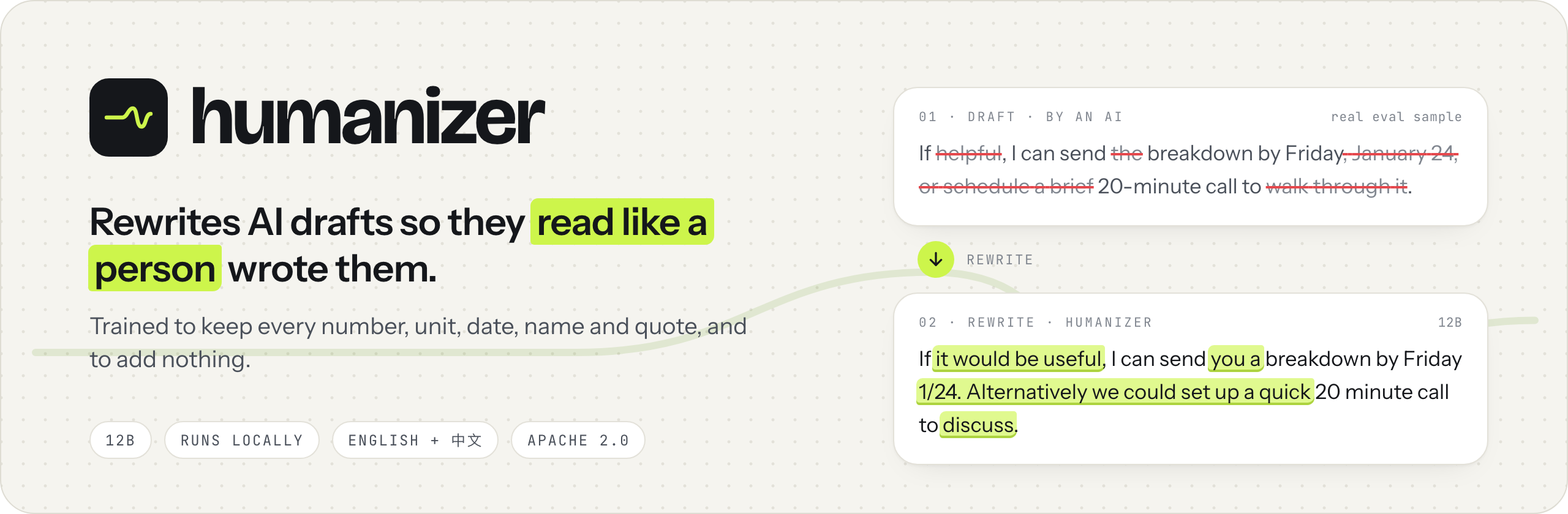





English · 中文 · Usage without the app · Install guide · Quantization · AGENTS.md
humanizer is a 12B model that rewrites AI-written drafts (emails, essays, reports, forum posts; English and Chinese) so they read like a person wrote them. It is trained to keep every number, unit, date, name and quote and to add nothing, and it runs on your own computer.
Quick start: get the app for Mac (Apple silicon) or Windows, open it and paste a draft; it works offline. Without the app: one llama.cpp command, or AGENTS.md for coding agents.
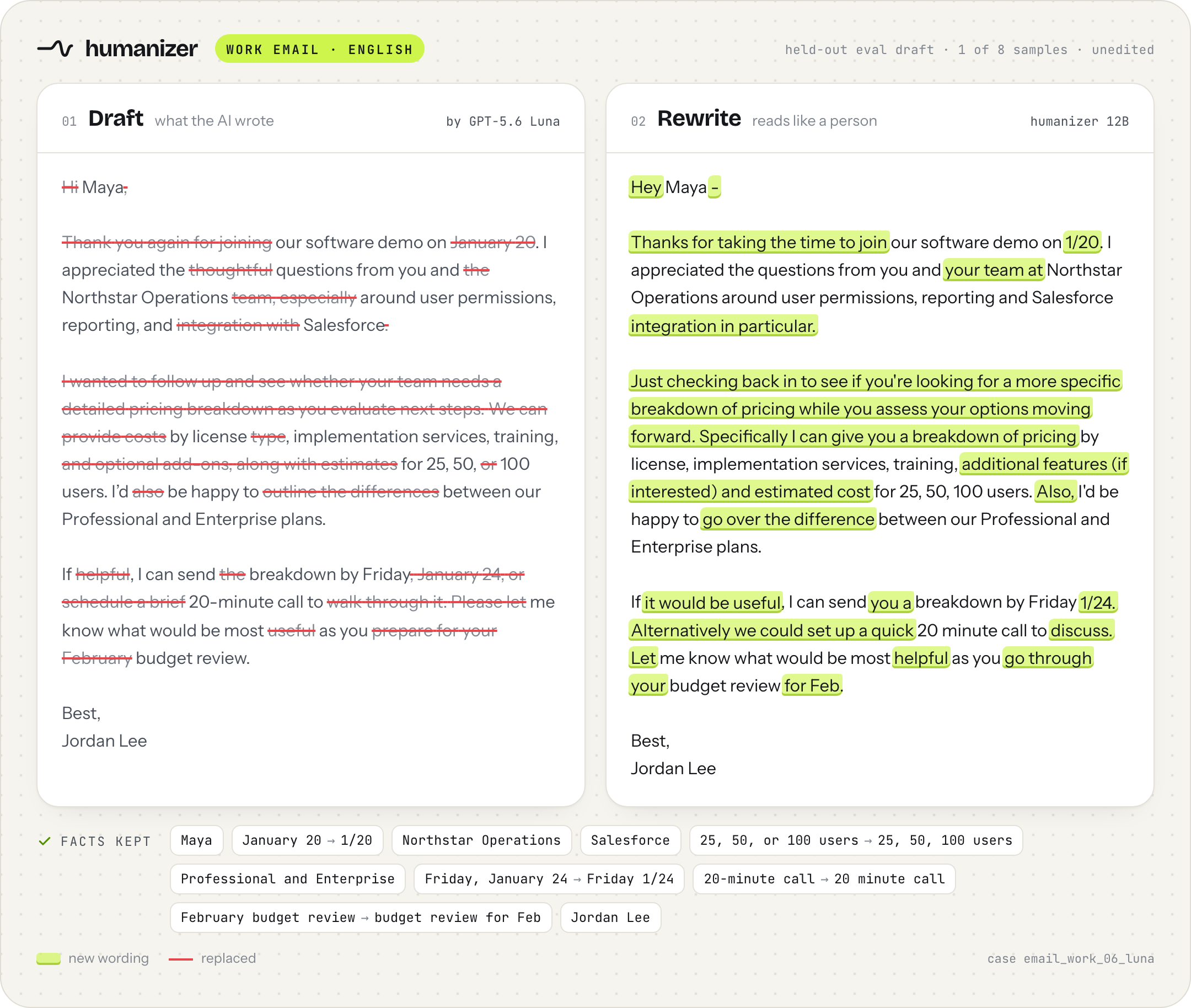
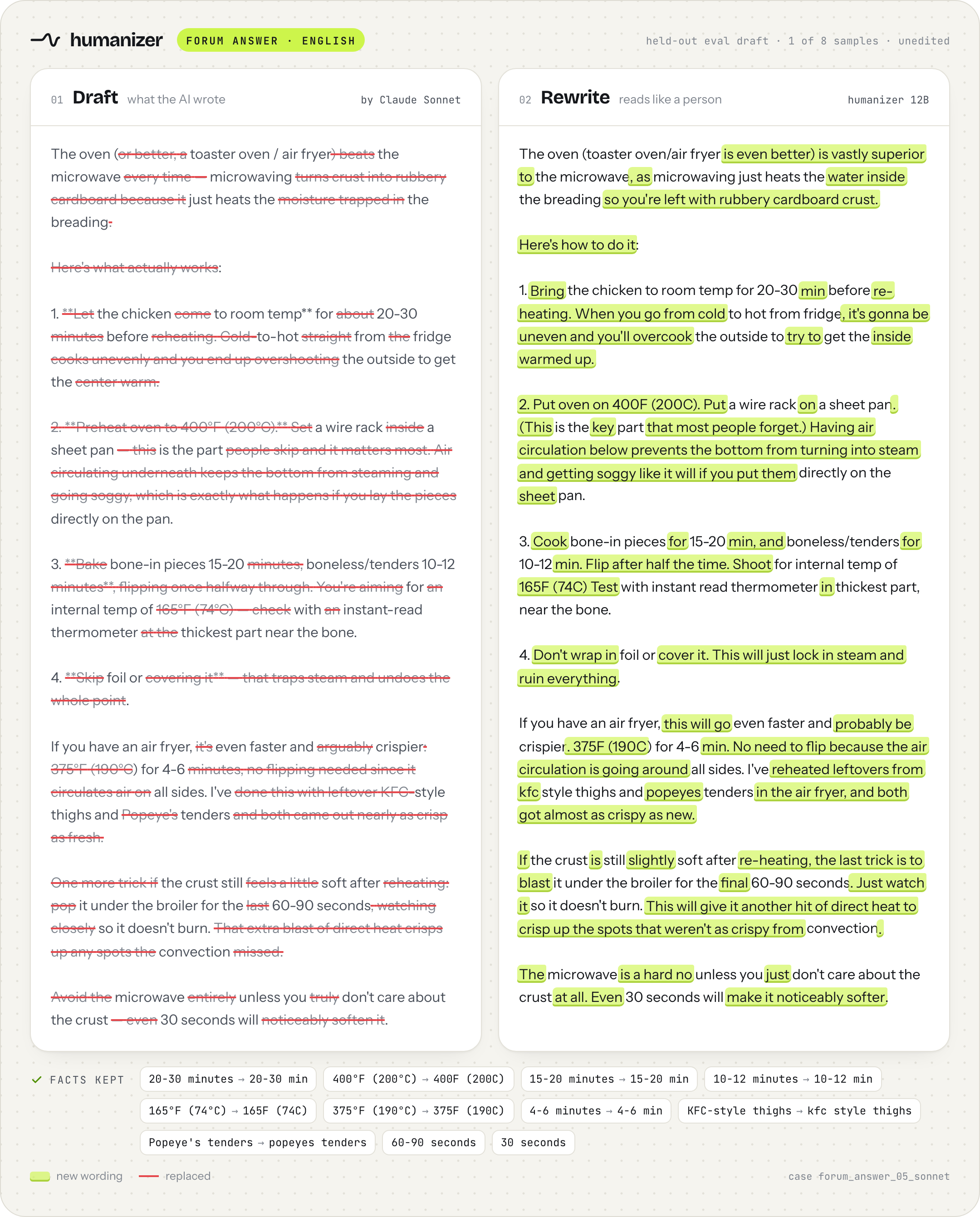
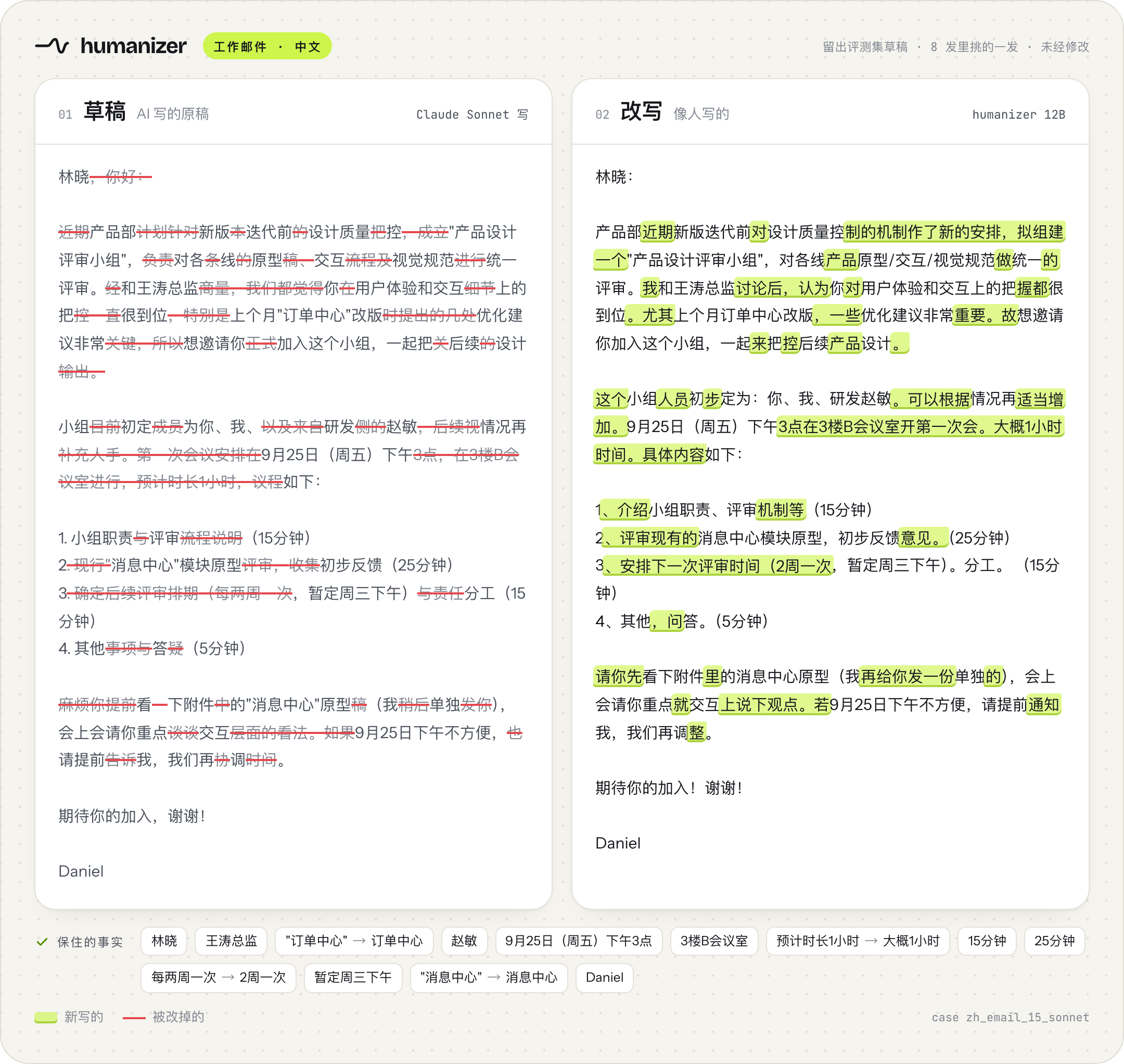
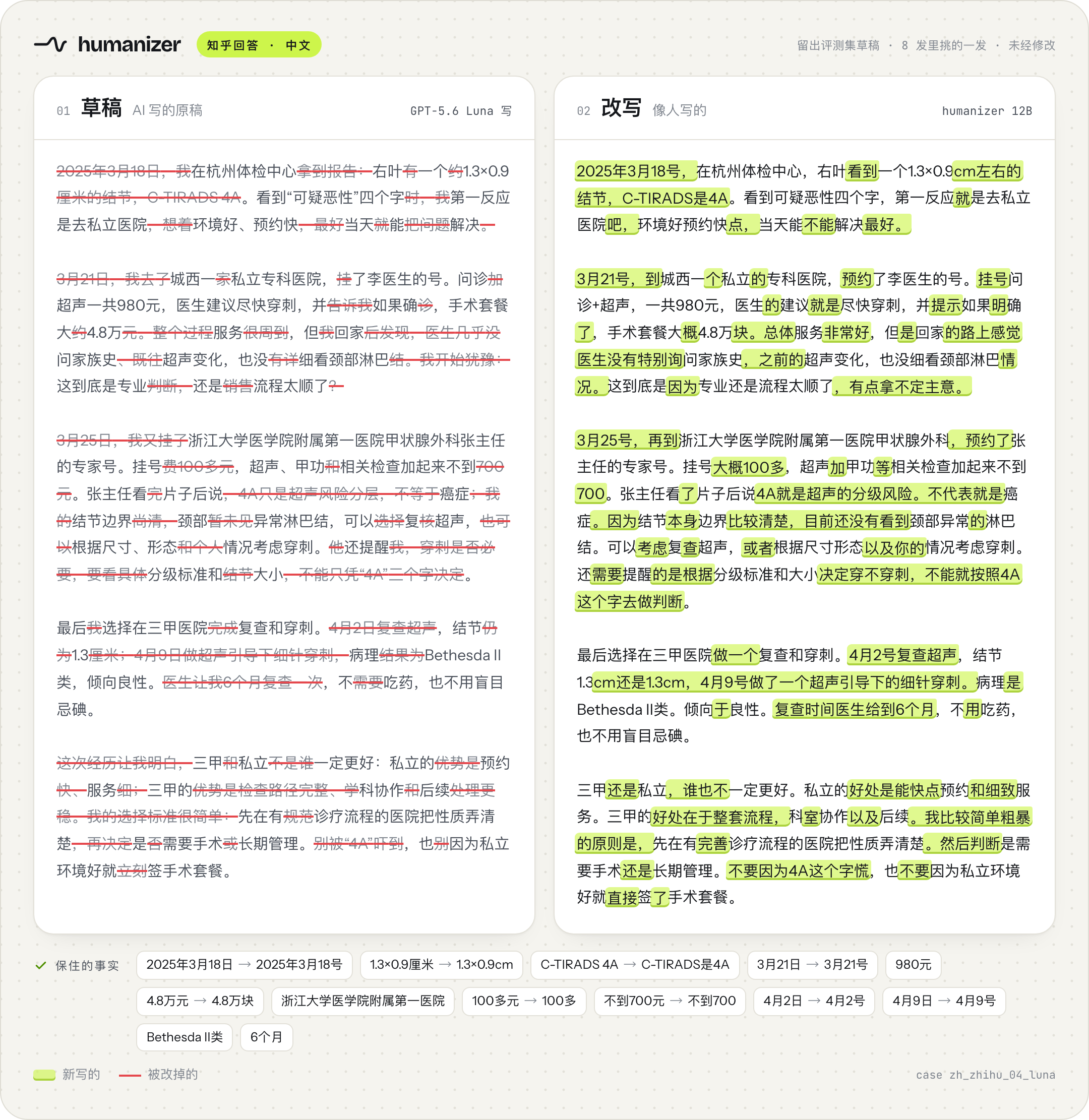
Four drafts from the held-out evaluation set (never seen in training). For each draft we generated 8 samples with this release's humanizer-12b-Q8_0.gguf file (llama.cpp, the app's settings) and picked the one that reads best among those the fact judge passed. The right side is that sample, not edited; only whitespace is normalised for display. All 8 samples per draft are in eval/outputs/examples-12b-Q8_0_x8.json. Highlight = new wording, strikethrough = draft wording that was replaced. We also checked every number and name in these four by hand.
These are picks, not every sample. Across the whole evaluation set the model still changes details: the judge flagged 44 of the 420 English rewrites, 135 problems in all, and 125 of them are a single word or phrase (the draft's "The remaining 37 complaints" came out as "The other 37% of complaints"). Read the result before you send it, especially numbers, dates and names. Details in Evaluation details.
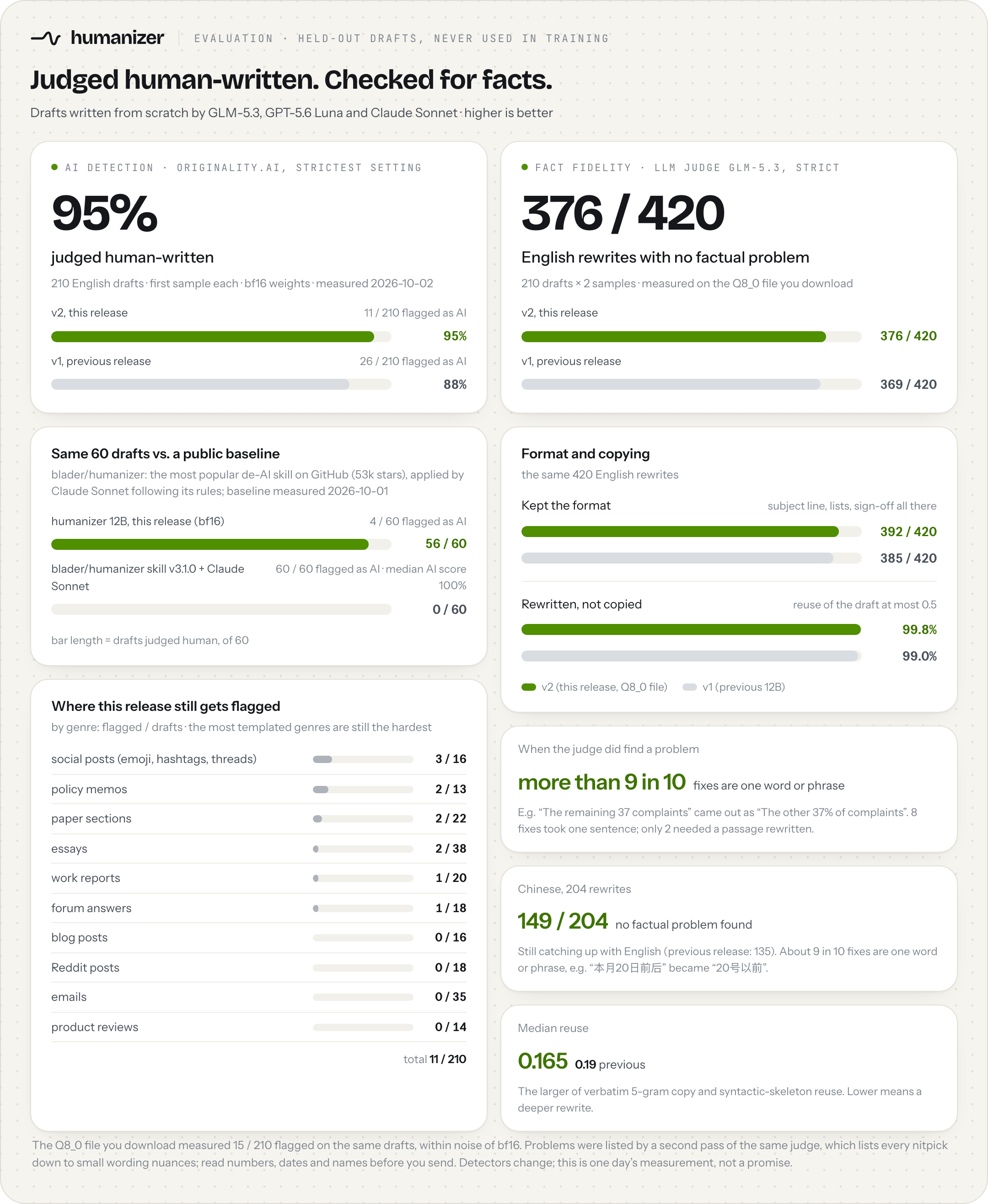
95% judged human by Originality.ai at its strictest setting (210 English drafts, bf16 weights, 2026-10-02): 11 of 210 rewrites were flagged as AI, against 26 for the previous release, and no AI detector was used anywhere in training. 376 of 420 English rewrites came back with no factual problem from a strict LLM judge, measured on the humanizer-12b-Q8_0.gguf file you download; where it did find one, more than 9 in 10 fixes are a single word or phrase. Method, every genre and the Chinese results: Evaluation details.
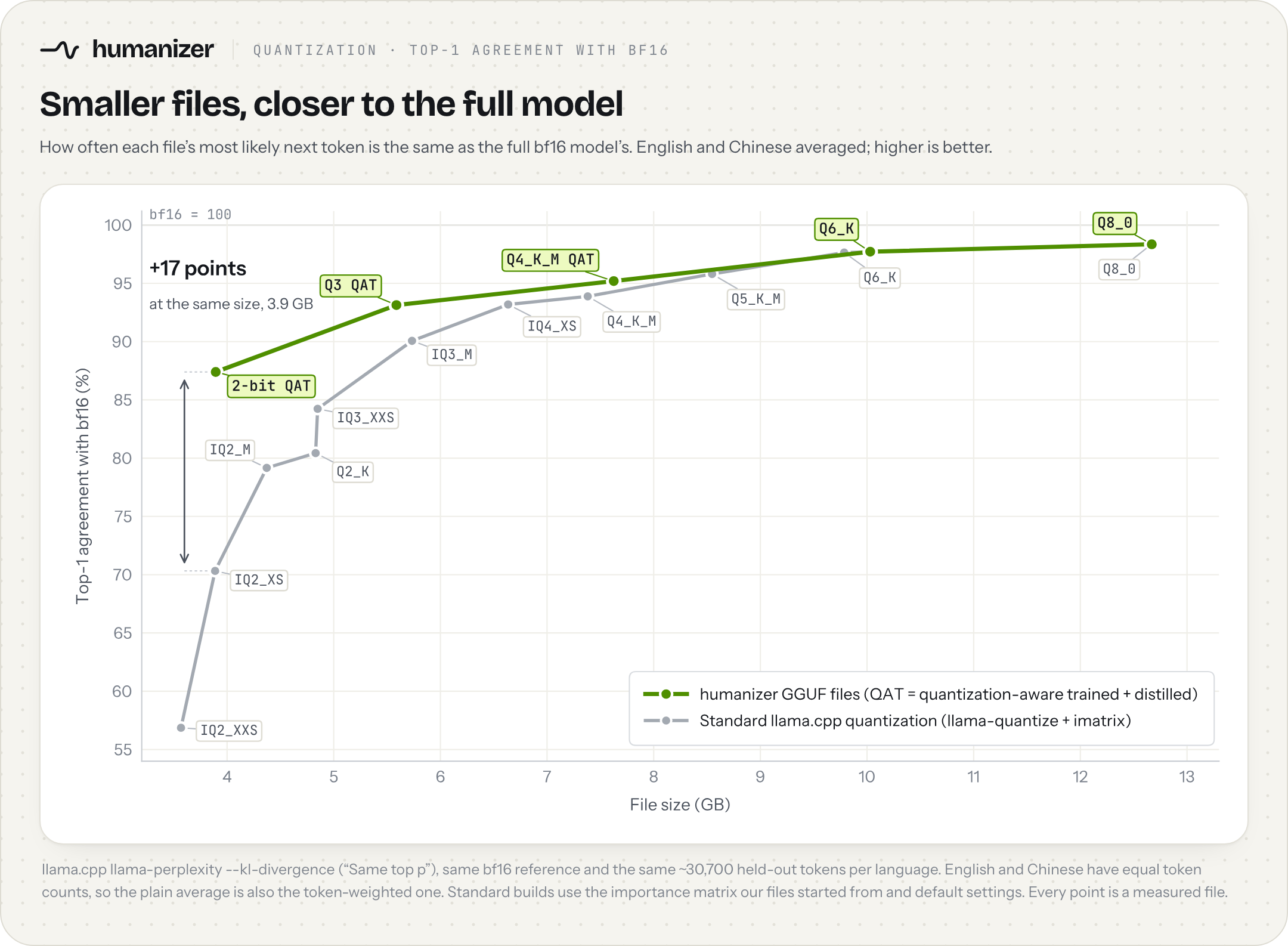
Most GGUF files come from one llama-quantize pass that rounds every weight to the target type; our 2-bit, Q3 and Q4_K_M files go further. In the 2-bit and Q3 files, we measured how much each weight tensor hurts the model when it is squeezed and gave the sensitive tensors more bits and the robust ones fewer. All three were then trained layer by layer to reproduce the full model (quantization-aware training) and distilled from the full bf16 model, used as the teacher, on English and Chinese rewriting data. For the 2-bit file, a standard build of the same size picks the same next token as bf16 70% of the time; these steps take it to 81%, 85% and then 87%. The result is still an ordinary GGUF that any recent llama.cpp runs; Q6_K and Q8_0 are standard builds, because at those sizes there is almost nothing left to recover.
Numbers behind every point, KL, per-file fact checks and how each file was made: docs/QUANTIZATION.md.
Contents: Quick start · Before and after · Evaluation details · How it was trained · Usage · Limitations · License
[!TIP] Setting this up with an AI agent? Point it at AGENTS.md (also llms.txt). It has the exact files to download, the server command, the prompt byte for byte, and a self-test.
| Your computer | Download |
|---|---|
| Mac with Apple silicon (M1 or newer) | Humanizer-0.3.4-macos-arm64.dmg, or the newest from Releases |
| Windows (x64) | Humanizer-0.3.4-windows-x64-setup.exe (or the portable .zip), or the newest from Releases |
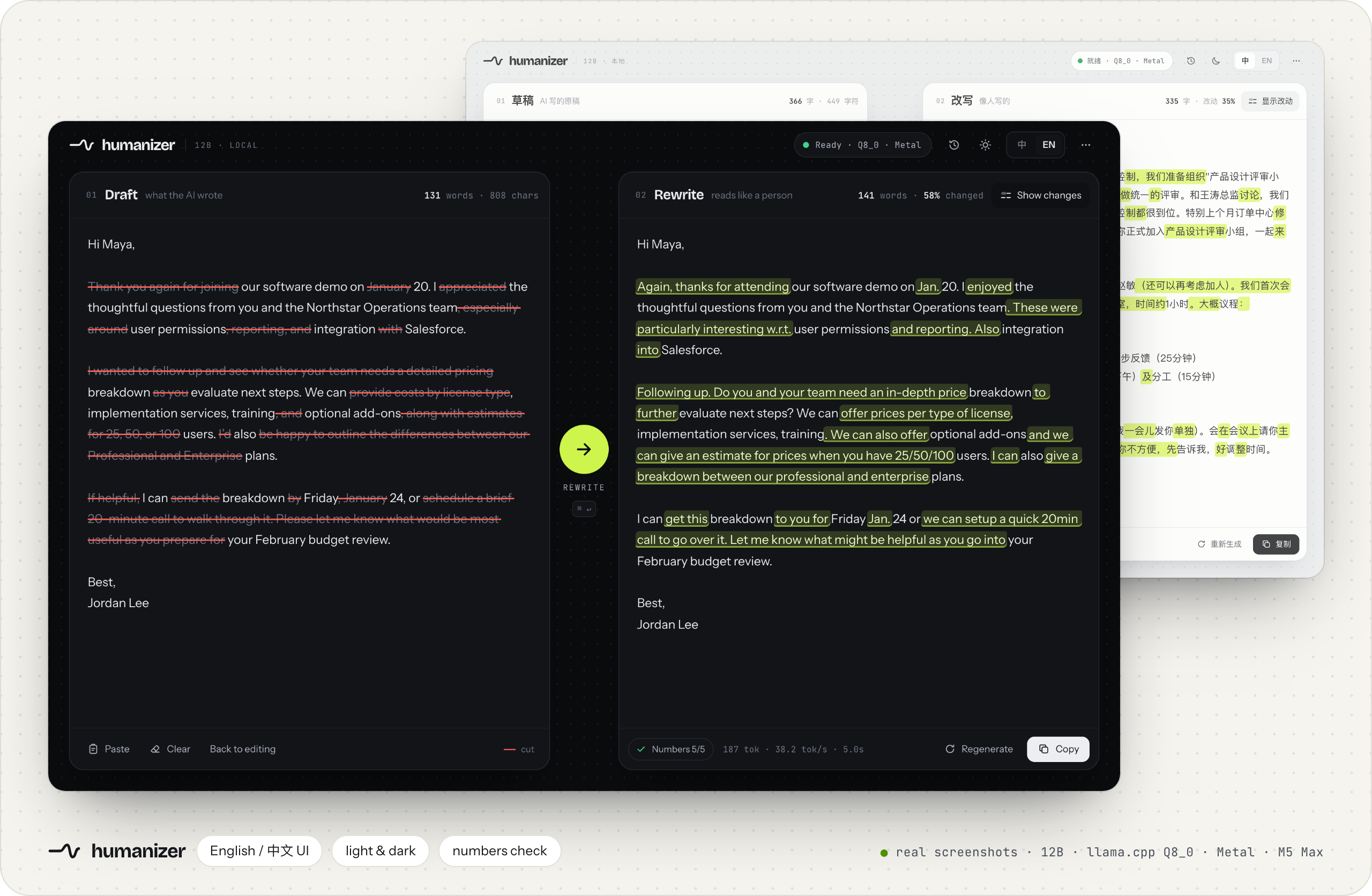
Double-click it and the app opens in your browser. On first run it looks at your memory, suggests a model size and downloads it once from Hugging Face. After that it works offline. Paste a draft on the left; the rewrite streams in on the right, with new wording highlighted and replaced wording struck through. On an M5 Max a hundred-word email takes about 3.6 seconds.
New in 0.3.2: import the text of a Word (.docx) or PDF file, and select any passage in the draft and click Create fact to keep it word for word in the rewrite (thanks to @meharrkapoorr for both). 0.3.3: kept passages are highlighted in the draft and the rewrite, and the draft stays editable after a rewrite, so you can change it and run again. 0.3.4: long drafts are rewritten in sections automatically, and you can stop, close the page and resume later (thanks to @meharrkapoorr); and if you already run the model in LM Studio or another OpenAI-compatible server, … → External model service uses it instead of the bundled engine (details); and … → Change storage location puts the run folder and the models on another drive, such as D: (thanks to @DongyuAI).
The app offers five sizes: Q8_0 (best), Q6_K (no measurable loss), Q4_K_M (slight loss), Q3 (small loss; a few more fact slips in English) and 2-bit (lowest AI-detector score; a few more fact slips). It suggests one for your memory, down to 8 GB machines; switch any time from the … menu → Change model size. Details: which model size.
Updates: the app checks GitHub and Hugging Face once a day (you can turn that off) and shows a small hint in the top bar when a new version or a newer model file is out. … → Check for updates shows what changed and updates in one click; your model, settings and history stay. Checking for updates works from 0.3.2 on; 0.3.1 and earlier need one manual update (download the version above and install it over the old app). Details: updates.
The app is not code-signed yet, so macOS and Windows will warn you the first time. The one-time fix is in docs/INSTALL.md.
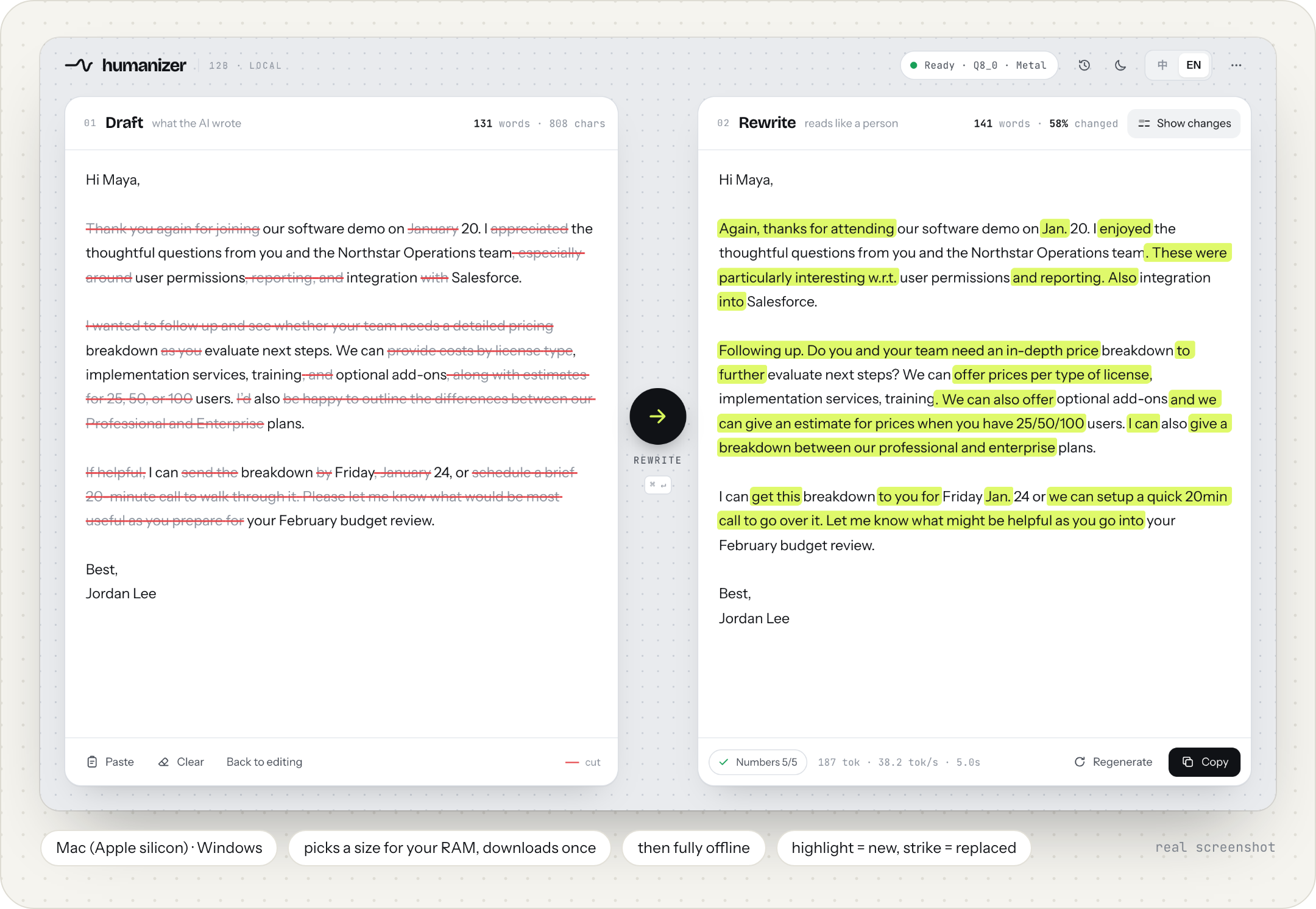
Real screenshots of the app running the 12B model (llama.cpp Q8_0, Metal, M5 Max). The speed in the bottom bar is real.
# 1) start a local server; the first run downloads humanizer-12b-Q8_0.gguf (about 12.7 GB)
#    16 GB machine: use humanizer-12b-Q6_K.gguf (about 10.0 GB) instead; less memory:
#    humanizer-12b-Q4_K_M.gguf (7.6 GB), humanizer-12b-Q3-QAT.gguf (5.6 GB) or humanizer-12b-IQ2_XS-QAT.gguf (3.9 GB)
llama-server --hf-repo jialinyyzz/humanizer --hf-file humanizer-12b-Q8_0.gguf -c 8192 -np 1 -ngl 99 --port 8080

# 2) in another terminal: rewrite draft.txt (needs curl and jq)
curl -sLO https://huggingface.co/jialinyyzz/humanizer/resolve/main/prompt_format.json
jq -n --rawfile d draft.txt --slurpfile f prompt_format.json \
  '{prompt: ($f[0].instr + "\n\n" + ($d | sub("^\\s+"; "") | sub("\\s+$"; "")) + $f[0].sep),
    temperature: 1.0, top_p: 0.95, top_k: 0, min_p: 0, repeat_penalty: 1.0, n_predict: 2048}' \
| curl -s http://127.0.0.1:8080/completion -d @- | jq -r .content
This is a plain text-completion model, not a chat model. Use /completion, not /v1/chat/completions. See Prompt format before wiring it into anything else.
hz (for agents and long documents)hz rewrites a whole file in one command: a short draft, a long Markdown document or a .docx. It uses the app from Option 1 or the llama-server from Option 2 (it starts the installed app on macOS if it is closed), keeps headings, code blocks, tables and links as they are, rewrites the prose piece by piece, and checks every piece for lost numbers and copying. Python 3.8 or newer, no dependencies.
pipx install git+https://github.com/sgaofen/humanizer-local-model     # or: pip install git+https://github.com/sgaofen/humanizer-local-model
hz draft.txt                          # prints the rewrite
hz paper.md -o paper.out.md           # long Markdown: structure kept, prose rewritten in pieces
hz report.docx -o report.out.docx     # .docx needs python-docx: pipx inject humanize-model python-docx
hz paper.md --json                    # stats per piece for scripts and agents
On stderr it lists every piece where a number from the draft is missing in the rewrite or a new number appeared, so you know where to look. Read the whole result anyway: names and the meaning of a sentence are not checked, and no detector result is promised. In a .docx, each rewritten paragraph takes the formatting of its first run, so bold or italic inside a paragraph is lost. On an M5 Max with the app, a 1,200-word Markdown article took 41 to 54 seconds. Details: USAGE.md, section 14.
[!IMPORTANT] Not using the app? Read docs/USAGE.md (Usage without the app). It has complete, copy-paste steps for llama.cpp (server and one-shot), MLX, transformers, vLLM, Ollama and LM Studio, a script that rewrites a whole folder, how to handle long documents and Chinese, and a troubleshooting table.
All numbers come from our own evaluation set: 312 drafts (210 English, 102 Chinese) across 18 genres: emails, emails to professors, work reports, policy memos, paper sections, student essays, opinion essays, blog posts, Reddit posts, forum answers, product reviews and social posts; in Chinese, emails, Zhihu answers, personal essays, social posts, reports and paper sections. Three frontier models wrote the drafts from scratch, about a third each: GLM-5.3, GPT-5.6 Luna and Claude Sonnet. None of them were used in training. Each draft was rewritten twice. Every output and every verdict is in eval/.
95% judged human. Originality.ai, API v3, AI Allowance 0% (its strictest setting), measured 2026-10-02 on the 210 English drafts, first sample of each, bf16 weights: 11 of 210 rewrites were flagged as AI.
| Model | Flagged as AI | Judged human |
|---|---|---|
| humanizer 12B v2, this release (bf16) | 11 / 210 (5%) | 95% |
| humanizer 12B v1, previous release | 26 / 210 (12%) | 88% |
This release is flagged less than half as often as the previous one. On the same drafts, 20 were flagged only for the previous release and 5 only for this one (paired test, p = 0.004). The humanizer-12b-Q8_0.gguf file you download measured 15 / 210 (7%) on the same drafts, within noise of bf16 (paired test, p = 0.48).
Public baseline. blader/humanizer (v3.1.0, 53k stars) is the most popular de-AI skill on GitHub. We had Claude Sonnet rewrite the same 60 drafts following its rules: 60 / 60 were flagged as AI (median AI score 100%). This release (bf16) on the same 60 drafts: 4 / 60 flagged. The two are different kinds of tool (a rule list for a general model vs. a fine-tuned rewriter), so read this as a comparison of outcomes on the same inputs, not of methods.
Where it still fails. The most templated genres are still the hardest:
| Genre | Flagged as AI |
|---|---|
| Social posts with emoji, hashtags or "1/ 2/" threads | 3 / 16 |
| Formal policy memos | 2 / 13 |
| Paper sections | 2 / 22 |
| Essays (student and opinion) | 2 / 38 |
| Work reports | 1 / 20 |
| Forum answers | 1 / 18 |
| Blog posts | 0 / 16 |
| Reddit posts | 0 / 18 |
| Emails (work and to professors) | 0 / 35 |
| Product reviews | 0 / 14 |
| All | 11 / 210 |
Detectors change over time; this is what one detector said on one date, not a promise about any other detector or date.
376 of 420 English rewrites came back with no factual problem from a strict LLM judge (GLM-5.3, one vote per rewrite; 210 drafts × 2 samples), measured on the humanizer-12b-Q8_0.gguf file you download. The previous release: 369 of 420. The chart is at the top of this page.
| v2, this release (Q8_0 file) | v1, previous 12B release | |
|---|---|---|
| No factual problem found (no changed number, event or meaning; higher is better) | 376 / 420 | 369 / 420 |
| Dropped a format element (e.g. subject line, list, sign-off; lower is better) | 28 / 420 | 35 / 420 |
| Median reuse (overlap with the draft; lower is better) | 0.165 | 0.19 |
| Outputs that reuse more than half the draft (reuse > 0.5; lower is better) | 0.2% | 1.0% |
Reuse is the larger of verbatim 5-gram copy and syntactic-skeleton reuse; lower means a deeper rewrite.
When the judge did find a problem, the fix is usually small. A second pass of the same judge re-read every flagged rewrite against its draft and listed each problem with how much it takes to fix. It lists every nitpick it can find, down to small wording nuances. More than 9 in 10 of the fixes it listed (125 of 135) are a single word or short phrase, like the draft's "The remaining 37 complaints" coming out as "The other 37% of complaints". 8 take one sentence; 2 need a passage rewritten.
Chinese is still catching up with English. The judge found no factual problem in 149 of 204 Chinese rewrites (previous release: 135; 7 of the other 55 only added a little content). Where it did, about 9 in 10 fixes (212 of 236) are a single word or phrase: "本月20日前后" (around the 20th of this month) became "20号以前" (before the 20th). 21 take one sentence; 3 need a passage rewritten.
Note: the fact judge is deliberately strict. In a separate audit of the same judge model, a second judge (Claude Opus) re-read 150 rewrites it had flagged as serious (drawn from training, not from this evaluation set). On the fact the first judge pointed to, Opus agreed it was a serious error in 99, rated it minor in 41 (for example "may reduce" became "will help decrease", or a long name was shortened), and found the fact unchanged in 10. So some flags are harmless rewording. Still read numbers, dates and names before you send.
Still, read the result before you send it, especially numbers, dates, names and the direction of every claim. The app checks that every number in the draft also appears in the rewrite and flags the ones that don't (Arabic digits only).
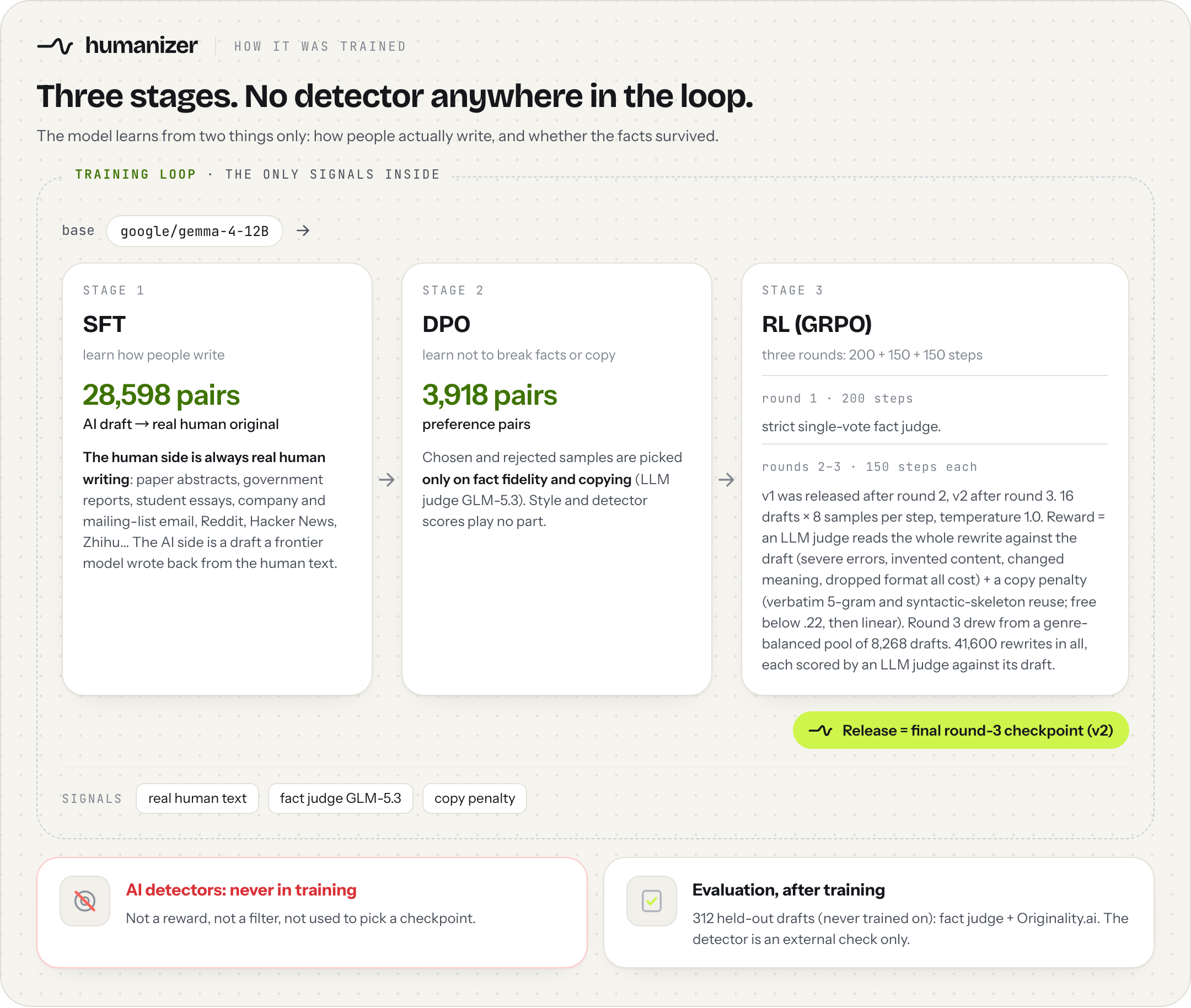
No AI detector was used anywhere in training: not as a reward, not as a filter, not to pick a checkpoint. The model learns from how people actually write and from whether the facts survived. Detector numbers on this page are only an external check.
Training data: every row that went into v2 is listed in jialinyyzz/humanizer-data, one config per step (SFT, DPO, RL). Openly licensed text is there in full; sources whose license does not allow redistribution are given as IDs with a rebuild script. How it was built: docs/DATA.md. The training code will be released later.
The complete guide is docs/USAGE.md (also on Hugging Face): every runtime step by step, a batch script, long documents, Chinese, troubleshooting. The essentials follow.
| File | Size | Peak memory (Mac) ¹ | Top-1 vs. bf16 ² | Fact check: English rewrites flagged ³ | Flagged as AI, same 60 drafts ⁴ | For |
|---|---|---|---|---|---|---|
humanizer-12b-Q8_0.gguf | 12.7 GB | 13.7 GB | 98.4% | 44 / 420 | 7 / 60 | 32 GB of memory or more. Recommended, best quality. |
humanizer-12b-Q6_K.gguf | 10.0 GB | about 11.0 GB | 97.7% | 56 / 420 | not measured | 16 GB. No measurable loss. |
humanizer-12b-Q4_K_M.gguf | 7.6 GB | 10.0 GB | 95.2% | 58 / 420 | not measured | About 14 GB, or when disk is tight. Slight loss; quantization-aware trained. |
humanizer-12b-Q3-QAT.gguf | 5.6 GB | 8.0 GB | 93.1% | 64 / 420 | 4 / 60 | 12 GB. Small loss; a few more fact slips in English. |
humanizer-12b-IQ2_XS-QAT.gguf | 3.9 GB | 6.2 GB | 87.4% | 70 / 420 | 0 / 60 | 8 GB; the smallest (2-bit). Lowest AI-detector score, a few more fact slips: check numbers and names. |
humanizer-12b-bf16.gguf | 23.8 GB | about 24.8 GB | 100% (reference) | 52 / 420 | 4 / 60 | Unquantised weights as one GGUF, for reference or for quantising yourself. |
model.safetensors + config.json, generation_config.json, tokenizer.json, tokenizer_config.json | about 24 GB (bf16) | transformers, vLLM, converting to MLX. | ||||
prompt_format.json | tiny | The instruction and separator, verbatim. |
¹ llama-server (Metal) on an M5 Max with the app's settings, while rewriting; Q6_K and bf16 are estimates. Leave room for the system (the app keeps about 4 GB free).
² How often the file's most likely next token is the same as bf16's, English and Chinese averaged (llama.cpp --kl-divergence).
³ The strict fact judge from Evaluation details (GLM-5.3, one vote per rewrite), all 420 English rewrites, run on each file. For every file about 9 in 10 of the problems it lists are a single word, number or phrase. Q8_0, Q6_K and Q4_K_M are within noise of bf16; Q3 and 2-bit make a few more slips. Chinese results are in docs/QUANTIZATION.md.
⁴ Originality.ai, strictest setting, the same 60 English drafts for every file. Detectors change; this is one measurement on one date.
All GGUF files are also in their own repo, jialinyyzz/humanizer-GGUF; the same files stay in jialinyyzz/humanizer, so the download commands here keep working. How they compare with standard llama.cpp quantization is in the chart at the top. KL to bf16, the fact check and AI-detector results for every file, the full comparison table and how each file was made: docs/QUANTIZATION.md. sha256 checksums are in USAGE.md.
This is a text-completion model, not a chat model. There is no system prompt and there are no turn markers. Send exactly this text and let the model continue:
Rewrite the text below so it reads like a person wrote it, not a language model.

Reorganize it as you see fit. Vary sentence length on purpose. Cut hedging,
throat-clearing, and any sentence that only announces what comes next.
Prefer the concrete word over the abstract one. It is fine to sound uneven.

Every fact, number, unit, date, name and quotation must survive unchanged.

<YOUR DRAFT, with leading and trailing whitespace removed>

### Rewritten:
In code: prompt = INSTR + "\n\n" + draft.strip() + "\n\n### Rewritten:\n\n". INSTR is the first block above (ending at "unchanged.", no trailing newline). It is also in prompt_format.json (instr, sep) and in humanizer/promptfmt.py.
sha256(build_prompt("X")) must be cc51d66b4c593fbe."###" as a stop string; it truncates the rare output that contains it./v1/chat/completions (with --jinja, the default in recent builds) then works, one draft per message: with the same seed it gave the same rewrite as the completion endpoint. Chat apps that use the file's template, such as LM Studio's Chat tab, should work the same way (not tested by us). Files downloaded earlier have no template, and the safetensors weights have none either.Install llama.cpp (releases, brew install llama.cpp, or winget install llama.cpp), start llama-server as in Quick start (-np 1 gives the whole 8192-token context to one request), then call it from any language. Python, standard library only:
import json, urllib.request

pf = json.load(open("prompt_format.json"))
draft = open("draft.txt", encoding="utf-8").read()
body = {"prompt": pf["instr"] + "\n\n" + draft.strip() + pf["sep"],
        "temperature": 1.0, "top_p": 0.95, "top_k": 0, "min_p": 0, "repeat_penalty": 1.0,
        "n_predict": 2048}
req = urllib.request.Request("http://127.0.0.1:8080/completion", json.dumps(body).encode(),
                             {"Content-Type": "application/json"})
print(json.load(urllib.request.urlopen(req))["content"].strip())
The app ships llama.cpp build b11335.
pip install mlx-lm        # we used mlx-lm 0.32.0
mlx_lm.convert --hf-path jialinyyzz/humanizer --mlx-path humanizer-mlx-8bit -q --q-bits 8 --q-group-size 64
import json
from huggingface_hub import hf_hub_download
from mlx_lm import load, generate
from mlx_lm.sample_utils import make_sampler

pf = json.load(open(hf_hub_download("jialinyyzz/humanizer", "prompt_format.json")))
model, tok = load("humanizer-mlx-8bit")
draft = open("draft.txt", encoding="utf-8").read()
print(generate(model, tok, prompt=pf["instr"] + "\n\n" + draft.strip() + pf["sep"],
               max_tokens=2048, sampler=make_sampler(temp=1.0, top_p=0.95)))
import json, torch
from huggingface_hub import hf_hub_download
from transformers import AutoModelForCausalLM, AutoTokenizer

repo = "jialinyyzz/humanizer"
pf = json.load(open(hf_hub_download(repo, "prompt_format.json")))
tok = AutoTokenizer.from_pretrained(repo)
model = AutoModelForCausalLM.from_pretrained(repo, dtype=torch.bfloat16, device_map="auto")

draft = open("draft.txt", encoding="utf-8").read()
ids = tok(pf["instr"] + "\n\n" + draft.strip() + pf["sep"], return_tensors="pt").to(model.device)
out = model.generate(**ids, do_sample=True, temperature=1.0, top_p=0.95, top_k=0, max_new_tokens=2048)
print(tok.decode(out[0, ids["input_ids"].shape[1]:], skip_special_tokens=True).strip())
The weights were saved with transformers 5.14.1. Keep top_k=0: it switches off the top-k 64 default in the bundled generation_config.json, matching the app, which samples without top-k.
vLLM: see docs/USAGE.md#6-vllm. Pass top_k=-1 (off) in SamplingParams; for vllm serve, add --generation-config vllm so the top-k 64 in generation_config.json isn't used as a default.
We have not tested Ollama or LM Studio ourselves; full steps are in docs/USAGE.md.
Ollama ignores the chat template stored in the GGUF and would wrap your text in its own Gemma template, which breaks this model. Create the model with this Modelfile: its template takes the last user message as the draft and builds the prompt above (we rendered it with Go's text/template and got the prompt byte for byte, but have not run it in Ollama). Then ollama run humanizer or /api/chat with one draft per message, or /api/generate with "raw": true and the full prompt.
FROM ./humanizer-12b-Q8_0.gguf
TEMPLATE """{{- $draft := "" }}{{- range .Messages }}{{- if eq .Role "user" }}{{- $draft = .Content }}{{- end }}{{- end }}Rewrite the text below so it reads like a person wrote it, not a language model.

Reorganize it as you see fit. Vary sentence length on purpose. Cut hedging,
throat-clearing, and any sentence that only announces what comes next.
Prefer the concrete word over the abstract one. It is fine to sound uneven.

Every fact, number, unit, date, name and quotation must survive unchanged.

{{ $draft }}

### Rewritten:{{ "\n\n" }}"""
PARAMETER temperature 1.0
PARAMETER top_p 0.95
PARAMETER top_k 0
PARAMETER min_p 0
PARAMETER repeat_penalty 1.0
PARAMETER num_ctx 8192
PARAMETER num_predict 2048
ollama create humanizer -f Modelfile
LM Studio: with a GGUF downloaded on or after 2026-10-04, the Chat tab should work: empty system prompt, one draft per message, sampling as above. Any download also works through the local server's text-completion endpoint /v1/completions with the full prompt.
Measured on an M5 Max:
| Runtime | Speed | Example |
|---|---|---|
| llama.cpp Q8_0, Metal (what the app uses) | about 36–38 tokens/s | an email of about a hundred words: about 3.6 s; a Chinese email of about 300 characters: about 8.5 s |
| MLX 8-bit | about 30 tokens/s (English), 38 tokens/s (Chinese) | an email of about a hundred words: about 9 s |
hz check the language and sample again automatically (a Chinese draft that comes back in English is caught too). If you call the model yourself through llama.cpp or another runtime: when an English draft comes back with more than a few Chinese characters, sample once more with the same settings.Code and weights: Apache License 2.0.
humanizer is fine-tuned from google/gemma-4-12B, which Google releases under Apache 2.0. This project is not affiliated with or endorsed by Google. The training data is not redistributed.
This repository was previously sgaofen/humanizer, and the model repository was previously jialinyyzz/humanizer-gemma-4-e4b (an earlier, smaller model that is no longer offered; its files are in the Hugging Face commit history). The first 12B release (v1, 2026-10-01) is also in the commit history; the current model is v2 (2026-10-02).
Links: Hugging Face · App releases · Install guide · AGENTS.md · llms.txt
Rewrites AI drafts so they read like a person wrote them — runs locally, keeps the facts
See the code
English · 中文 · Usage without the app · Install guide · Quantization · AGENTS.md
humanizer is a 12B model that rewrites AI-written drafts (emails, essays, reports, forum posts; English and Chinese) so they read like a person wrote them. It is trained to keep every number, unit, date, name and quote and to add nothing, and it runs on your own computer.
Quick start: get the app for Mac (Apple silicon) or Windows, open it and paste a draft; it works offline. Without the app: one llama.cpp command, or AGENTS.md for coding agents.
Four drafts from the held-out evaluation set (never seen in training). For each draft we generated 8 samples with this release's humanizer-12b-Q8_0.gguf file (llama.cpp, the app's settings) and picked the one that reads best among those the fact judge passed. The right side is that sample, not edited; only whitespace is normalised for display. All 8 samples per draft are in eval/outputs/examples-12b-Q8_0_x8.json. Highlight = new wording, strikethrough = draft wording that was replaced. We also checked every number and name in these four by hand.
These are picks, not every sample. Across the whole evaluation set the model still changes details: the judge flagged 44 of the 420 English rewrites, 135 problems in all, and 125 of them are a single word or phrase (the draft's "The remaining 37 complaints" came out as "The other 37% of complaints"). Read the result before you send it, especially numbers, dates and names. Details in Evaluation details.
95% judged human by Originality.ai at its strictest setting (210 English drafts, bf16 weights, 2026-10-02): 11 of 210 rewrites were flagged as AI, against 26 for the previous release, and no AI detector was used anywhere in training. 376 of 420 English rewrites came back with no factual problem from a strict LLM judge, measured on the humanizer-12b-Q8_0.gguf file you download; where it did find one, more than 9 in 10 fixes are a single word or phrase. Method, every genre and the Chinese results: Evaluation details.
Most GGUF files come from one llama-quantize pass that rounds every weight to the target type; our 2-bit, Q3 and Q4_K_M files go further. In the 2-bit and Q3 files, we measured how much each weight tensor hurts the model when it is squeezed and gave the sensitive tensors more bits and the robust ones fewer. All three were then trained layer by layer to reproduce the full model (quantization-aware training) and distilled from the full bf16 model, used as the teacher, on English and Chinese rewriting data. For the 2-bit file, a standard build of the same size picks the same next token as bf16 70% of the time; these steps take it to 81%, 85% and then 87%. The result is still an ordinary GGUF that any recent llama.cpp runs; Q6_K and Q8_0 are standard builds, because at those sizes there is almost nothing left to recover.
Numbers behind every point, KL, per-file fact checks and how each file was made: docs/QUANTIZATION.md.
Contents: Quick start · Before and after · Evaluation details · How it was trained · Usage · Limitations · License
[!TIP] Setting this up with an AI agent? Point it at AGENTS.md (also llms.txt). It has the exact files to download, the server command, the prompt byte for byte, and a self-test.
| Your computer | Download |
|---|---|
| Mac with Apple silicon (M1 or newer) | Humanizer-0.3.4-macos-arm64.dmg, or the newest from Releases |
| Windows (x64) | Humanizer-0.3.4-windows-x64-setup.exe (or the portable .zip), or the newest from Releases |
Double-click it and the app opens in your browser. On first run it looks at your memory, suggests a model size and downloads it once from Hugging Face. After that it works offline. Paste a draft on the left; the rewrite streams in on the right, with new wording highlighted and replaced wording struck through. On an M5 Max a hundred-word email takes about 3.6 seconds.
New in 0.3.2: import the text of a Word (.docx) or PDF file, and select any passage in the draft and click Create fact to keep it word for word in the rewrite (thanks to @meharrkapoorr for both). 0.3.3: kept passages are highlighted in the draft and the rewrite, and the draft stays editable after a rewrite, so you can change it and run again. 0.3.4: long drafts are rewritten in sections automatically, and you can stop, close the page and resume later (thanks to @meharrkapoorr); and if you already run the model in LM Studio or another OpenAI-compatible server, … → External model service uses it instead of the bundled engine (details); and … → Change storage location puts the run folder and the models on another drive, such as D: (thanks to @DongyuAI).
The app offers five sizes: Q8_0 (best), Q6_K (no measurable loss), Q4_K_M (slight loss), Q3 (small loss; a few more fact slips in English) and 2-bit (lowest AI-detector score; a few more fact slips). It suggests one for your memory, down to 8 GB machines; switch any time from the … menu → Change model size. Details: which model size.
Updates: the app checks GitHub and Hugging Face once a day (you can turn that off) and shows a small hint in the top bar when a new version or a newer model file is out. … → Check for updates shows what changed and updates in one click; your model, settings and history stay. Checking for updates works from 0.3.2 on; 0.3.1 and earlier need one manual update (download the version above and install it over the old app). Details: updates.
The app is not code-signed yet, so macOS and Windows will warn you the first time. The one-time fix is in docs/INSTALL.md.
Real screenshots of the app running the 12B model (llama.cpp Q8_0, Metal, M5 Max). The speed in the bottom bar is real.
# 1) start a local server; the first run downloads humanizer-12b-Q8_0.gguf (about 12.7 GB)
#    16 GB machine: use humanizer-12b-Q6_K.gguf (about 10.0 GB) instead; less memory:
#    humanizer-12b-Q4_K_M.gguf (7.6 GB), humanizer-12b-Q3-QAT.gguf (5.6 GB) or humanizer-12b-IQ2_XS-QAT.gguf (3.9 GB)
llama-server --hf-repo jialinyyzz/humanizer --hf-file humanizer-12b-Q8_0.gguf -c 8192 -np 1 -ngl 99 --port 8080

# 2) in another terminal: rewrite draft.txt (needs curl and jq)
curl -sLO https://huggingface.co/jialinyyzz/humanizer/resolve/main/prompt_format.json
jq -n --rawfile d draft.txt --slurpfile f prompt_format.json \
  '{prompt: ($f[0].instr + "\n\n" + ($d | sub("^\\s+"; "") | sub("\\s+$"; "")) + $f[0].sep),
    temperature: 1.0, top_p: 0.95, top_k: 0, min_p: 0, repeat_penalty: 1.0, n_predict: 2048}' \
| curl -s http://127.0.0.1:8080/completion -d @- | jq -r .content
This is a plain text-completion model, not a chat model. Use /completion, not /v1/chat/completions. See Prompt format before wiring it into anything else.
hz (for agents and long documents)hz rewrites a whole file in one command: a short draft, a long Markdown document or a .docx. It uses the app from Option 1 or the llama-server from Option 2 (it starts the installed app on macOS if it is closed), keeps headings, code blocks, tables and links as they are, rewrites the prose piece by piece, and checks every piece for lost numbers and copying. Python 3.8 or newer, no dependencies.
pipx install git+https://github.com/sgaofen/humanizer-local-model     # or: pip install git+https://github.com/sgaofen/humanizer-local-model
hz draft.txt                          # prints the rewrite
hz paper.md -o paper.out.md           # long Markdown: structure kept, prose rewritten in pieces
hz report.docx -o report.out.docx     # .docx needs python-docx: pipx inject humanize-model python-docx
hz paper.md --json                    # stats per piece for scripts and agents
On stderr it lists every piece where a number from the draft is missing in the rewrite or a new number appeared, so you know where to look. Read the whole result anyway: names and the meaning of a sentence are not checked, and no detector result is promised. In a .docx, each rewritten paragraph takes the formatting of its first run, so bold or italic inside a paragraph is lost. On an M5 Max with the app, a 1,200-word Markdown article took 41 to 54 seconds. Details: USAGE.md, section 14.
[!IMPORTANT] Not using the app? Read docs/USAGE.md (Usage without the app). It has complete, copy-paste steps for llama.cpp (server and one-shot), MLX, transformers, vLLM, Ollama and LM Studio, a script that rewrites a whole folder, how to handle long documents and Chinese, and a troubleshooting table.
All numbers come from our own evaluation set: 312 drafts (210 English, 102 Chinese) across 18 genres: emails, emails to professors, work reports, policy memos, paper sections, student essays, opinion essays, blog posts, Reddit posts, forum answers, product reviews and social posts; in Chinese, emails, Zhihu answers, personal essays, social posts, reports and paper sections. Three frontier models wrote the drafts from scratch, about a third each: GLM-5.3, GPT-5.6 Luna and Claude Sonnet. None of them were used in training. Each draft was rewritten twice. Every output and every verdict is in eval/.
95% judged human. Originality.ai, API v3, AI Allowance 0% (its strictest setting), measured 2026-10-02 on the 210 English drafts, first sample of each, bf16 weights: 11 of 210 rewrites were flagged as AI.
| Model | Flagged as AI | Judged human |
|---|---|---|
| humanizer 12B v2, this release (bf16) | 11 / 210 (5%) | 95% |
| humanizer 12B v1, previous release | 26 / 210 (12%) | 88% |
This release is flagged less than half as often as the previous one. On the same drafts, 20 were flagged only for the previous release and 5 only for this one (paired test, p = 0.004). The humanizer-12b-Q8_0.gguf file you download measured 15 / 210 (7%) on the same drafts, within noise of bf16 (paired test, p = 0.48).
Public baseline. blader/humanizer (v3.1.0, 53k stars) is the most popular de-AI skill on GitHub. We had Claude Sonnet rewrite the same 60 drafts following its rules: 60 / 60 were flagged as AI (median AI score 100%). This release (bf16) on the same 60 drafts: 4 / 60 flagged. The two are different kinds of tool (a rule list for a general model vs. a fine-tuned rewriter), so read this as a comparison of outcomes on the same inputs, not of methods.
Where it still fails. The most templated genres are still the hardest:
| Genre | Flagged as AI |
|---|---|
| Social posts with emoji, hashtags or "1/ 2/" threads | 3 / 16 |
| Formal policy memos | 2 / 13 |
| Paper sections | 2 / 22 |
| Essays (student and opinion) | 2 / 38 |
| Work reports | 1 / 20 |
| Forum answers | 1 / 18 |
| Blog posts | 0 / 16 |
| Reddit posts | 0 / 18 |
| Emails (work and to professors) | 0 / 35 |
| Product reviews | 0 / 14 |
| All | 11 / 210 |
Detectors change over time; this is what one detector said on one date, not a promise about any other detector or date.
376 of 420 English rewrites came back with no factual problem from a strict LLM judge (GLM-5.3, one vote per rewrite; 210 drafts × 2 samples), measured on the humanizer-12b-Q8_0.gguf file you download. The previous release: 369 of 420. The chart is at the top of this page.
| v2, this release (Q8_0 file) | v1, previous 12B release | |
|---|---|---|
| No factual problem found (no changed number, event or meaning; higher is better) | 376 / 420 | 369 / 420 |
| Dropped a format element (e.g. subject line, list, sign-off; lower is better) | 28 / 420 | 35 / 420 |
| Median reuse (overlap with the draft; lower is better) | 0.165 | 0.19 |
| Outputs that reuse more than half the draft (reuse > 0.5; lower is better) | 0.2% | 1.0% |
Reuse is the larger of verbatim 5-gram copy and syntactic-skeleton reuse; lower means a deeper rewrite.
When the judge did find a problem, the fix is usually small. A second pass of the same judge re-read every flagged rewrite against its draft and listed each problem with how much it takes to fix. It lists every nitpick it can find, down to small wording nuances. More than 9 in 10 of the fixes it listed (125 of 135) are a single word or short phrase, like the draft's "The remaining 37 complaints" coming out as "The other 37% of complaints". 8 take one sentence; 2 need a passage rewritten.
Chinese is still catching up with English. The judge found no factual problem in 149 of 204 Chinese rewrites (previous release: 135; 7 of the other 55 only added a little content). Where it did, about 9 in 10 fixes (212 of 236) are a single word or phrase: "本月20日前后" (around the 20th of this month) became "20号以前" (before the 20th). 21 take one sentence; 3 need a passage rewritten.
Note: the fact judge is deliberately strict. In a separate audit of the same judge model, a second judge (Claude Opus) re-read 150 rewrites it had flagged as serious (drawn from training, not from this evaluation set). On the fact the first judge pointed to, Opus agreed it was a serious error in 99, rated it minor in 41 (for example "may reduce" became "will help decrease", or a long name was shortened), and found the fact unchanged in 10. So some flags are harmless rewording. Still read numbers, dates and names before you send.
Still, read the result before you send it, especially numbers, dates, names and the direction of every claim. The app checks that every number in the draft also appears in the rewrite and flags the ones that don't (Arabic digits only).
No AI detector was used anywhere in training: not as a reward, not as a filter, not to pick a checkpoint. The model learns from how people actually write and from whether the facts survived. Detector numbers on this page are only an external check.
Training data: every row that went into v2 is listed in jialinyyzz/humanizer-data, one config per step (SFT, DPO, RL). Openly licensed text is there in full; sources whose license does not allow redistribution are given as IDs with a rebuild script. How it was built: docs/DATA.md. The training code will be released later.
The complete guide is docs/USAGE.md (also on Hugging Face): every runtime step by step, a batch script, long documents, Chinese, troubleshooting. The essentials follow.
| File | Size | Peak memory (Mac) ¹ | Top-1 vs. bf16 ² | Fact check: English rewrites flagged ³ | Flagged as AI, same 60 drafts ⁴ | For |
|---|---|---|---|---|---|---|
humanizer-12b-Q8_0.gguf | 12.7 GB | 13.7 GB | 98.4% | 44 / 420 | 7 / 60 | 32 GB of memory or more. Recommended, best quality. |
humanizer-12b-Q6_K.gguf | 10.0 GB | about 11.0 GB | 97.7% | 56 / 420 | not measured | 16 GB. No measurable loss. |
humanizer-12b-Q4_K_M.gguf | 7.6 GB | 10.0 GB | 95.2% | 58 / 420 | not measured | About 14 GB, or when disk is tight. Slight loss; quantization-aware trained. |
humanizer-12b-Q3-QAT.gguf | 5.6 GB | 8.0 GB | 93.1% | 64 / 420 | 4 / 60 | 12 GB. Small loss; a few more fact slips in English. |
humanizer-12b-IQ2_XS-QAT.gguf | 3.9 GB | 6.2 GB | 87.4% | 70 / 420 | 0 / 60 | 8 GB; the smallest (2-bit). Lowest AI-detector score, a few more fact slips: check numbers and names. |
humanizer-12b-bf16.gguf | 23.8 GB | about 24.8 GB | 100% (reference) | 52 / 420 | 4 / 60 | Unquantised weights as one GGUF, for reference or for quantising yourself. |
model.safetensors + config.json, generation_config.json, tokenizer.json, tokenizer_config.json | about 24 GB (bf16) | transformers, vLLM, converting to MLX. | ||||
prompt_format.json | tiny | The instruction and separator, verbatim. |
¹ llama-server (Metal) on an M5 Max with the app's settings, while rewriting; Q6_K and bf16 are estimates. Leave room for the system (the app keeps about 4 GB free).
² How often the file's most likely next token is the same as bf16's, English and Chinese averaged (llama.cpp --kl-divergence).
³ The strict fact judge from Evaluation details (GLM-5.3, one vote per rewrite), all 420 English rewrites, run on each file. For every file about 9 in 10 of the problems it lists are a single word, number or phrase. Q8_0, Q6_K and Q4_K_M are within noise of bf16; Q3 and 2-bit make a few more slips. Chinese results are in docs/QUANTIZATION.md.
⁴ Originality.ai, strictest setting, the same 60 English drafts for every file. Detectors change; this is one measurement on one date.
All GGUF files are also in their own repo, jialinyyzz/humanizer-GGUF; the same files stay in jialinyyzz/humanizer, so the download commands here keep working. How they compare with standard llama.cpp quantization is in the chart at the top. KL to bf16, the fact check and AI-detector results for every file, the full comparison table and how each file was made: docs/QUANTIZATION.md. sha256 checksums are in USAGE.md.
This is a text-completion model, not a chat model. There is no system prompt and there are no turn markers. Send exactly this text and let the model continue:
Rewrite the text below so it reads like a person wrote it, not a language model.

Reorganize it as you see fit. Vary sentence length on purpose. Cut hedging,
throat-clearing, and any sentence that only announces what comes next.
Prefer the concrete word over the abstract one. It is fine to sound uneven.

Every fact, number, unit, date, name and quotation must survive unchanged.

<YOUR DRAFT, with leading and trailing whitespace removed>

### Rewritten:
In code: prompt = INSTR + "\n\n" + draft.strip() + "\n\n### Rewritten:\n\n". INSTR is the first block above (ending at "unchanged.", no trailing newline). It is also in prompt_format.json (instr, sep) and in humanizer/promptfmt.py.
sha256(build_prompt("X")) must be cc51d66b4c593fbe."###" as a stop string; it truncates the rare output that contains it./v1/chat/completions (with --jinja, the default in recent builds) then works, one draft per message: with the same seed it gave the same rewrite as the completion endpoint. Chat apps that use the file's template, such as LM Studio's Chat tab, should work the same way (not tested by us). Files downloaded earlier have no template, and the safetensors weights have none either.Install llama.cpp (releases, brew install llama.cpp, or winget install llama.cpp), start llama-server as in Quick start (-np 1 gives the whole 8192-token context to one request), then call it from any language. Python, standard library only:
import json, urllib.request

pf = json.load(open("prompt_format.json"))
draft = open("draft.txt", encoding="utf-8").read()
body = {"prompt": pf["instr"] + "\n\n" + draft.strip() + pf["sep"],
        "temperature": 1.0, "top_p": 0.95, "top_k": 0, "min_p": 0, "repeat_penalty": 1.0,
        "n_predict": 2048}
req = urllib.request.Request("http://127.0.0.1:8080/completion", json.dumps(body).encode(),
                             {"Content-Type": "application/json"})
print(json.load(urllib.request.urlopen(req))["content"].strip())
The app ships llama.cpp build b11335.
pip install mlx-lm        # we used mlx-lm 0.32.0
mlx_lm.convert --hf-path jialinyyzz/humanizer --mlx-path humanizer-mlx-8bit -q --q-bits 8 --q-group-size 64
import json
from huggingface_hub import hf_hub_download
from mlx_lm import load, generate
from mlx_lm.sample_utils import make_sampler

pf = json.load(open(hf_hub_download("jialinyyzz/humanizer", "prompt_format.json")))
model, tok = load("humanizer-mlx-8bit")
draft = open("draft.txt", encoding="utf-8").read()
print(generate(model, tok, prompt=pf["instr"] + "\n\n" + draft.strip() + pf["sep"],
               max_tokens=2048, sampler=make_sampler(temp=1.0, top_p=0.95)))
import json, torch
from huggingface_hub import hf_hub_download
from transformers import AutoModelForCausalLM, AutoTokenizer

repo = "jialinyyzz/humanizer"
pf = json.load(open(hf_hub_download(repo, "prompt_format.json")))
tok = AutoTokenizer.from_pretrained(repo)
model = AutoModelForCausalLM.from_pretrained(repo, dtype=torch.bfloat16, device_map="auto")

draft = open("draft.txt", encoding="utf-8").read()
ids = tok(pf["instr"] + "\n\n" + draft.strip() + pf["sep"], return_tensors="pt").to(model.device)
out = model.generate(**ids, do_sample=True, temperature=1.0, top_p=0.95, top_k=0, max_new_tokens=2048)
print(tok.decode(out[0, ids["input_ids"].shape[1]:], skip_special_tokens=True).strip())
The weights were saved with transformers 5.14.1. Keep top_k=0: it switches off the top-k 64 default in the bundled generation_config.json, matching the app, which samples without top-k.
vLLM: see docs/USAGE.md#6-vllm. Pass top_k=-1 (off) in SamplingParams; for vllm serve, add --generation-config vllm so the top-k 64 in generation_config.json isn't used as a default.
We have not tested Ollama or LM Studio ourselves; full steps are in docs/USAGE.md.
Ollama ignores the chat template stored in the GGUF and would wrap your text in its own Gemma template, which breaks this model. Create the model with this Modelfile: its template takes the last user message as the draft and builds the prompt above (we rendered it with Go's text/template and got the prompt byte for byte, but have not run it in Ollama). Then ollama run humanizer or /api/chat with one draft per message, or /api/generate with "raw": true and the full prompt.
FROM ./humanizer-12b-Q8_0.gguf
TEMPLATE """{{- $draft := "" }}{{- range .Messages }}{{- if eq .Role "user" }}{{- $draft = .Content }}{{- end }}{{- end }}Rewrite the text below so it reads like a person wrote it, not a language model.

Reorganize it as you see fit. Vary sentence length on purpose. Cut hedging,
throat-clearing, and any sentence that only announces what comes next.
Prefer the concrete word over the abstract one. It is fine to sound uneven.

Every fact, number, unit, date, name and quotation must survive unchanged.

{{ $draft }}

### Rewritten:{{ "\n\n" }}"""
PARAMETER temperature 1.0
PARAMETER top_p 0.95
PARAMETER top_k 0
PARAMETER min_p 0
PARAMETER repeat_penalty 1.0
PARAMETER num_ctx 8192
PARAMETER num_predict 2048
ollama create humanizer -f Modelfile
LM Studio: with a GGUF downloaded on or after 2026-10-04, the Chat tab should work: empty system prompt, one draft per message, sampling as above. Any download also works through the local server's text-completion endpoint /v1/completions with the full prompt.
Measured on an M5 Max:
| Runtime | Speed | Example |
|---|---|---|
| llama.cpp Q8_0, Metal (what the app uses) | about 36–38 tokens/s | an email of about a hundred words: about 3.6 s; a Chinese email of about 300 characters: about 8.5 s |
| MLX 8-bit | about 30 tokens/s (English), 38 tokens/s (Chinese) | an email of about a hundred words: about 9 s |
hz check the language and sample again automatically (a Chinese draft that comes back in English is caught too). If you call the model yourself through llama.cpp or another runtime: when an English draft comes back with more than a few Chinese characters, sample once more with the same settings.Code and weights: Apache License 2.0.
humanizer is fine-tuned from google/gemma-4-12B, which Google releases under Apache 2.0. This project is not affiliated with or endorsed by Google. The training data is not redistributed.
This repository was previously sgaofen/humanizer, and the model repository was previously jialinyyzz/humanizer-gemma-4-e4b (an earlier, smaller model that is no longer offered; its files are in the Hugging Face commit history). The first 12B release (v1, 2026-10-01) is also in the commit history; the current model is v2 (2026-10-02).
Links: Hugging Face · App releases · Install guide · AGENTS.md · llms.txt



