Low-Latency Accelerated Web Remote Desktop Streaming Platform for Self-Hosting, Containers, Kubernetes, or Cloud/HPC
See the code





Moonlight, Google Stadia, or GeForce NOW in noVNC form factor for Linux X11 and Wayland, in any HTML5 web interface you wish to embed inside, with at least 60 frames per second on Full HD resolution.
We are in need of maintainers and community contributors. Please consider stepping up, as we can never have too much help!
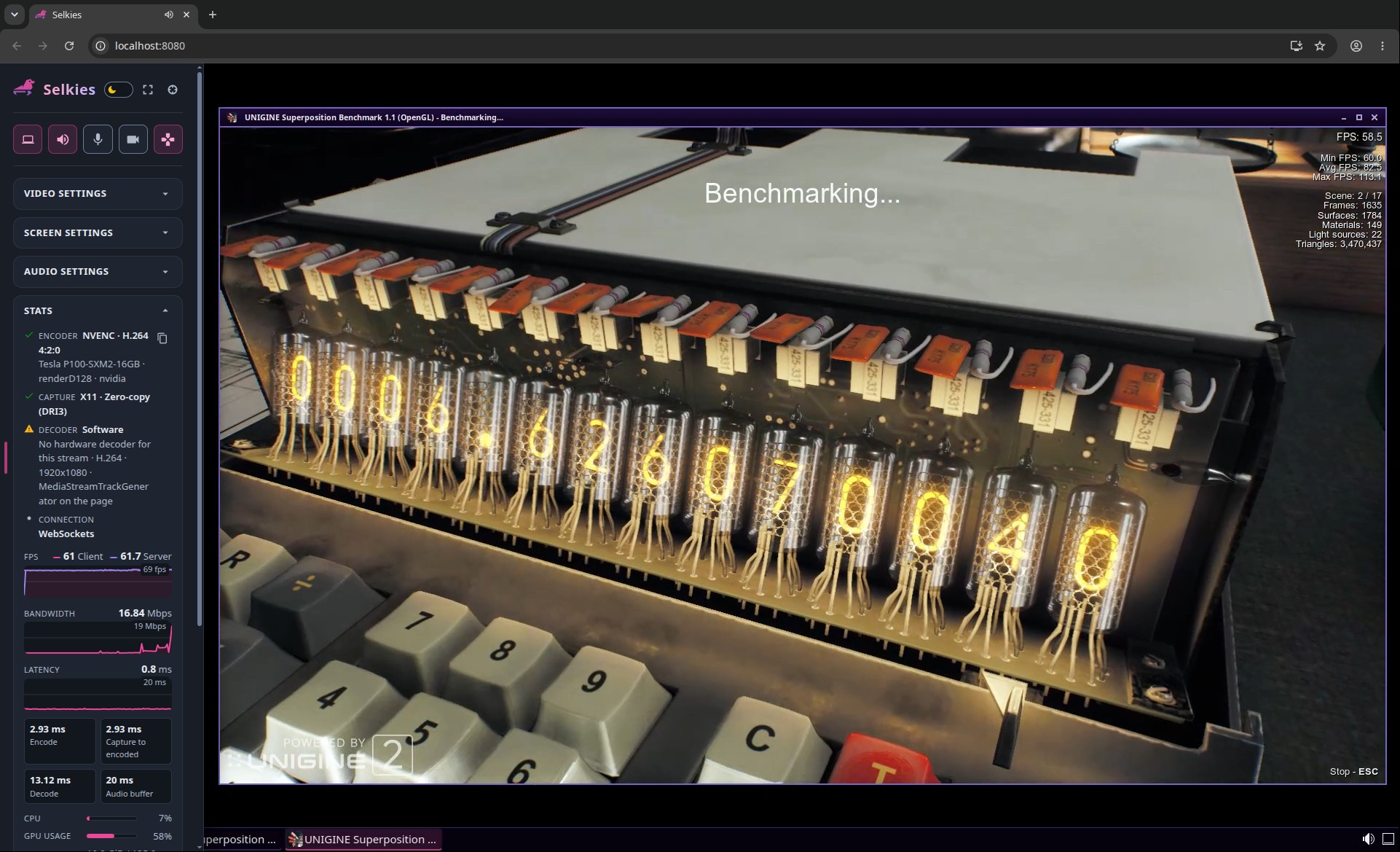
Selkies is an open-source low-latency high-performance Linux-native GPU/CPU-accelerated HTML5 remote desktop streaming platform, for self-hosting, containers, Kubernetes, or Cloud/HPC platforms, started out first by Google engineers, then open-sourced and developed by academic researchers, LinuxServer.io, and community contributors. It streams over plain WebSockets by default, with WebRTC available as an opt-in transport.
Selkies is designed for researchers studying Agentic AI, Graphical AI, Robotics, Autonomous Driving, Drug Discovery technologies, SLURM supercomputer or HPC system administrators, Jupyter, Kubernetes, Docker®, Coder infrastructure administrators, and Linux cloud gaming enthusiasts.
While designed for clustered or unprivileged containerized environments, Selkies can also be deployed in desktop computers, and any performance issue that would be problematic in cloud gaming platforms is also considered a bug.
The HTML5 client runs on Chromium, Firefox, and Safari, with two-way clipboard (text and images), low-latency zero-copy video rendering, automatic GPU selection, resilient keyboard, mouse, and gamepad input, and microphone and webcam forwarding into the session.
The desktop container carries a desktop, a browser, and an audio stack, so without a GPU this is the whole command:
docker run --name selkies -it -d --rm --shm-size=2g -p 8080:8080 \
    ghcr.io/selkies-project/selkies/desktop:latest-ubuntu26.04
Open https://localhost:8080, accept the container's self-signed certificate, and log in as ubuntu with the password mypasswd; -e PASSWD= sets another, which it needs before anyone else can reach the session. Getting Started has the commands for Intel, AMD, and NVIDIA GPUs and what each flag is for. The tag names the distribution inside the image, ubuntu26.04 or debiantrixie, after latest for the newest release or main for the newest commit.
Other ways to run it:
pip install selkies (Python 3.9 or newer) brings the server, its web client, and the capture extensions, and selkies-session then runs the desktop the host has installed, bringing up what it lacks for a session (a display and a sound server), which is how Jupyter, Coder, and Open OnDemand start it..deb, .rpm, .apk, and Arch packages, which attach Selkies to a display and sound server you run, and the AppImage, which installs nothing and starts a display and a sound server where none is running.FROM, and docker-selkies-egl-desktop and docker-selkies-glx-desktop are KDE Plasma desktops built on it.Read the Documentation for the rest. The Settings Reference lists every current setting. Licensing inventories the third-party components of an installation, with their licenses and where the GPL pieces come from.
Overall
Maintained
Code review
PyPI
Latest release
Releases this year
(top 24 of 36)
3,972 followers · starred Aug 2026
1,644 followers · starred May 2025
4,254 followers · starred Oct 2025
213 followers · starred Sep 2025
Low-Latency Accelerated Web Remote Desktop Streaming Platform for Self-Hosting, Containers, Kubernetes, or Cloud/HPC
See the code
Moonlight, Google Stadia, or GeForce NOW in noVNC form factor for Linux X11 and Wayland, in any HTML5 web interface you wish to embed inside, with at least 60 frames per second on Full HD resolution.
We are in need of maintainers and community contributors. Please consider stepping up, as we can never have too much help!
Selkies is an open-source low-latency high-performance Linux-native GPU/CPU-accelerated HTML5 remote desktop streaming platform, for self-hosting, containers, Kubernetes, or Cloud/HPC platforms, started out first by Google engineers, then open-sourced and developed by academic researchers, LinuxServer.io, and community contributors. It streams over plain WebSockets by default, with WebRTC available as an opt-in transport.
Selkies is designed for researchers studying Agentic AI, Graphical AI, Robotics, Autonomous Driving, Drug Discovery technologies, SLURM supercomputer or HPC system administrators, Jupyter, Kubernetes, Docker®, Coder infrastructure administrators, and Linux cloud gaming enthusiasts.
While designed for clustered or unprivileged containerized environments, Selkies can also be deployed in desktop computers, and any performance issue that would be problematic in cloud gaming platforms is also considered a bug.
The HTML5 client runs on Chromium, Firefox, and Safari, with two-way clipboard (text and images), low-latency zero-copy video rendering, automatic GPU selection, resilient keyboard, mouse, and gamepad input, and microphone and webcam forwarding into the session.
The desktop container carries a desktop, a browser, and an audio stack, so without a GPU this is the whole command:
docker run --name selkies -it -d --rm --shm-size=2g -p 8080:8080 \
    ghcr.io/selkies-project/selkies/desktop:latest-ubuntu26.04
Open https://localhost:8080, accept the container's self-signed certificate, and log in as ubuntu with the password mypasswd; -e PASSWD= sets another, which it needs before anyone else can reach the session. Getting Started has the commands for Intel, AMD, and NVIDIA GPUs and what each flag is for. The tag names the distribution inside the image, ubuntu26.04 or debiantrixie, after latest for the newest release or main for the newest commit.
Other ways to run it:
pip install selkies (Python 3.9 or newer) brings the server, its web client, and the capture extensions, and selkies-session then runs the desktop the host has installed, bringing up what it lacks for a session (a display and a sound server), which is how Jupyter, Coder, and Open OnDemand start it..deb, .rpm, .apk, and Arch packages, which attach Selkies to a display and sound server you run, and the AppImage, which installs nothing and starts a display and a sound server where none is running.FROM, and docker-selkies-egl-desktop and docker-selkies-glx-desktop are KDE Plasma desktops built on it.Read the Documentation for the rest. The Settings Reference lists every current setting. Licensing inventories the third-party components of an installation, with their licenses and where the GPL pieces come from.
Overall
Maintained
Code review
PyPI
Latest release
Releases this year
(top 24 of 36)
3,972 followers · starred Aug 2026
1,644 followers · starred May 2025
4,254 followers · starred Oct 2025
213 followers · starred Sep 2025