
Web-based remote desktop for Linux: SSH login, WebRTC screen, mouse and keyboard
Go
1
18 commits
updated Oct 2, 2026
See what people are saying
README
webdesk
If you can SSH to it, you can see it.
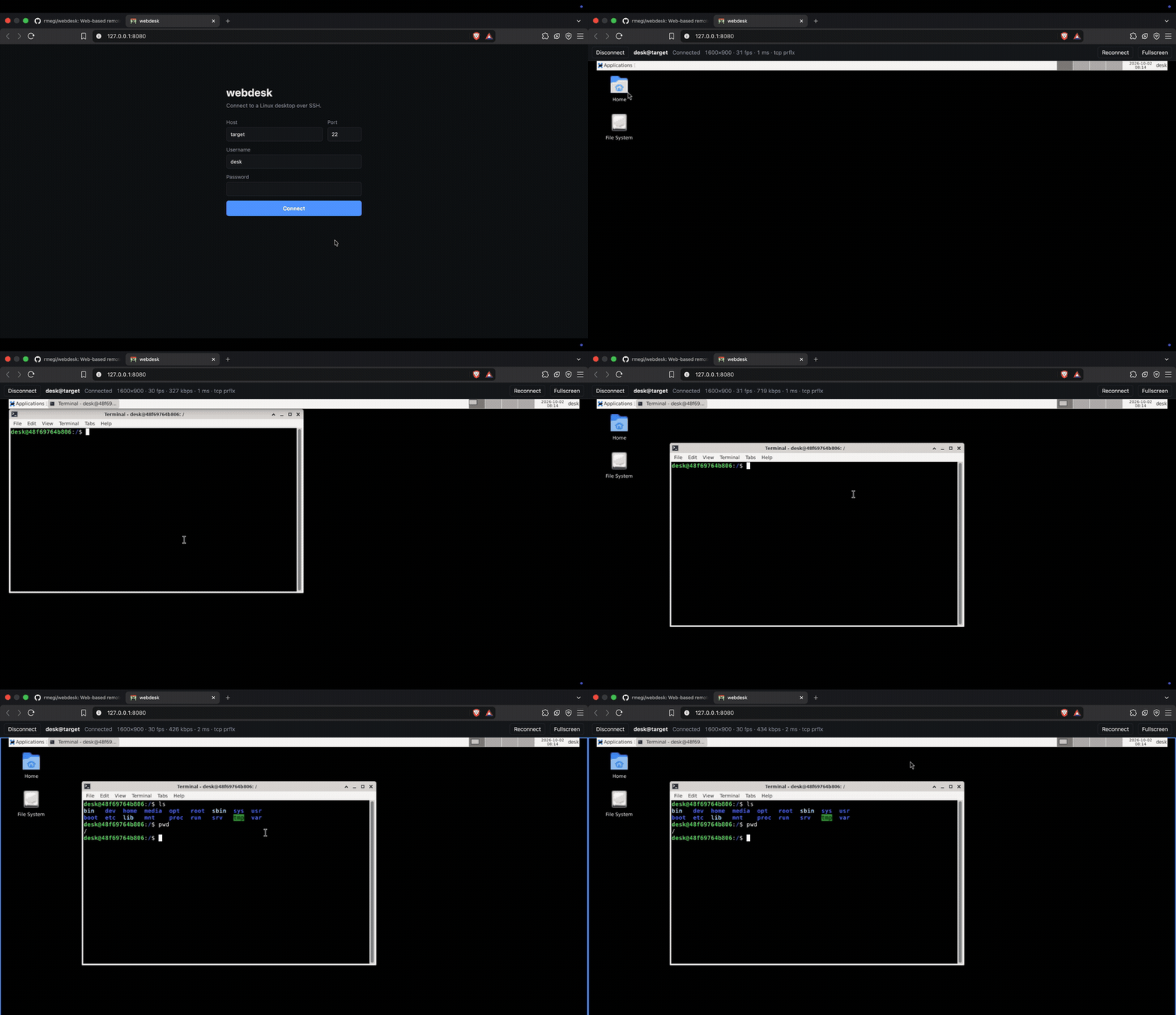
A Linux desktop in your browser. Type a machine's address and password like you would for SSH, and its screen appears — mouse, keyboard and clipboard working on it.
Nothing to install on the machine you're connecting to. No VNC server to set up, no ports to forward.
Browser ──WebSocket──▶ webdesk ──SSH──▶ your Linux machine
   ▲                                          │
   └───────── WebRTC: video + input ──────────┘
Try it
On Linux, one command installs whatever's missing (git, curl, Docker),
downloads webdesk into ~/webdesk and starts it:
curl -fsSL https://raw.githubusercontent.com/rmegi/webdesk/main/install.sh | sh
It asks for your sudo password if it has to install anything. Run it again to
update. Add | sh -s -- --with-target instead of | sh to also start a test
machine to connect to. No curl? wget -qO- <same URL> | sh does the same.
You can read the script first.
Already have Docker and a checkout:
docker compose up -d --build
Open http://127.0.0.1:8080 and log in the way you would over SSH. That's the whole setup — the web client, the server and the program that runs on the target machine are all built inside the image.
How it works
webdesk logs in over SSH and leaves a small Go binary in ~/.cache/webdesk/.
That binary captures the X screen with ffmpeg, encodes H.264, and opens a
WebRTC connection straight to your browser.
The server only introduces the two sides. Once they're talking, video and input go peer-to-peer and never touch it again.
Three things that make it feel quick:
- The cursor is drawn locally. It's kept out of the video and sent as a picture, so the pointer keeps up with your hand instead of trailing a round trip behind it.
- Keys travel by position, not by letter, so the machine's own keyboard layout stays in charge.
- No desktop? It makes one. A machine with no monitor gets a virtual X11 desktop on Xvfb, which keeps running after you disconnect — Log out ends it.
What the machine needs
Linux on x86_64 or arm64, reachable over SSH, with ffmpeg. A virtual desktop
also wants Xvfb, dbus-launch and one of LXDE, XFCE, MATE, LXQt, Openbox or
GNOME. On Debian and Ubuntu, webdesk offers to install whatever is missing from
the page, once you confirm.
Before you expose it
The page has no login of its own yet. Anyone who can reach it can use your
server to attempt SSH logins — and with the password left blank it will try
the server's own configured key against whatever hostname they type. So it
binds to 127.0.0.1, and you should leave it there.
To reach it from elsewhere, put the network in front of it rather than opening
the port: a Tailscale address, an SSH tunnel (ssh -L 8080:127.0.0.1:8080 …),
or a reverse proxy that does its own authentication. Setting HOST=0.0.0.0 on
a network you don't control hands an SSH proxy to everyone on it.
Host keys are pinned on first connect and a change is refused. Passwords are used for the SSH login and nothing else — never logged, never stored, and the browser remembers only host, port and username.
Running from source
Needs Python 3.11+, Node 24+ and Go 1.27. Node is build tooling only — the web
client is compiled with tsc and nothing uses it at runtime.
npm install
pip install -r backend/requirements.txt
npm run dev     # http://127.0.0.1:8080
There's no nginx this way, so the server hands out the page itself.
frontend/  Browser client (TypeScript) + its nginx image
backend/   Python server: SSH login, signaling relay
host/      Go program that runs on the target: capture, WebRTC, input
test/      Docker test machine: SSH server + XFCE on a virtual screen
| Script | What it does |
|---|---|
npm run dev | Build everything, run the server with auto-reload |
npm run docker | Build and start the app in Docker |
npm run docker:down | Stop every container, test machine included |
npm run test:target | Build and start the Docker test machine |
npm run build | Build the web client and host binaries (amd64 + arm64) |
npm run typecheck | Type-check the web client |
Build the images on each machine you run them on and they take that machine's architecture. The host binaries are cross-compiled for both either way, since the machines being controlled aren't the machine running the server.
CI type-checks the web client, imports the server, runs gofmt and go vet,
and builds everything including the images.
Test machine
A container with an SSH server and a logged-in XFCE desktop, so there's something to connect to without a spare Linux box:
npm run test:target
Connect to 127.0.0.1 port 2222, user desk, password desk. An empty
password uses the test key in test/ssh/. From a server that is itself in
Docker, use host target port 22 instead.
Configuration
Server:
| Variable | Default | Purpose |
|---|---|---|
PORT | 8080 | HTTP port |
HOST | 127.0.0.1 | Listen address — see above before changing |
WEBDESK_ICE_SERVERS | Google STUN | JSON array of RTCIceServer, e.g. to add a TURN relay |
WEBDESK_SSH_KEY | none | Comma-separated key paths tried when the password is empty |
Host program, read from the SSH session's environment:
| Variable | Default | Purpose |
|---|---|---|
WEBDESK_FPS | 30 | Capture frame rate |
WEBDESK_VIRTUAL_SIZE | 1920x1080 | Size of a virtual desktop |
WEBDESK_ICE_PORT | random | Pin WebRTC to one UDP+TCP port |
WEBDESK_ICE_HOST_IP | none | Advertise this IP instead of local ones |
Video and input go peer-to-peer, so your browser has to reach the target
machine directly. Both on the same tailnet or LAN is fine; browsing from
somewhere that can't route to it needs a TURN relay in WEBDESK_ICE_SERVERS.
Pinned host keys live in backend/data/known_hosts.json, kept in a named
volume under Docker. docker compose down -v forgets them.
Similar repos


Languages
Go
42.5%
Python
22.3%
TypeScript
15.7%
Shell
11.2%
Dockerfile
3.3%
CSS
2.9%
HTML
2.3%
Web-based remote desktop for Linux: SSH login, WebRTC screen, mouse and keyboard
Go
1
18 commits
updated Oct 2, 2026
See what people are saying
README
webdesk
If you can SSH to it, you can see it.
A Linux desktop in your browser. Type a machine's address and password like you would for SSH, and its screen appears — mouse, keyboard and clipboard working on it.
Nothing to install on the machine you're connecting to. No VNC server to set up, no ports to forward.
Browser ──WebSocket──▶ webdesk ──SSH──▶ your Linux machine
   ▲                                          │
   └───────── WebRTC: video + input ──────────┘
Try it
On Linux, one command installs whatever's missing (git, curl, Docker),
downloads webdesk into ~/webdesk and starts it:
curl -fsSL https://raw.githubusercontent.com/rmegi/webdesk/main/install.sh | sh
It asks for your sudo password if it has to install anything. Run it again to
update. Add | sh -s -- --with-target instead of | sh to also start a test
machine to connect to. No curl? wget -qO- <same URL> | sh does the same.
You can read the script first.
Already have Docker and a checkout:
docker compose up -d --build
Open http://127.0.0.1:8080 and log in the way you would over SSH. That's the whole setup — the web client, the server and the program that runs on the target machine are all built inside the image.
How it works
webdesk logs in over SSH and leaves a small Go binary in ~/.cache/webdesk/.
That binary captures the X screen with ffmpeg, encodes H.264, and opens a
WebRTC connection straight to your browser.
The server only introduces the two sides. Once they're talking, video and input go peer-to-peer and never touch it again.
Three things that make it feel quick:
- The cursor is drawn locally. It's kept out of the video and sent as a picture, so the pointer keeps up with your hand instead of trailing a round trip behind it.
- Keys travel by position, not by letter, so the machine's own keyboard layout stays in charge.
- No desktop? It makes one. A machine with no monitor gets a virtual X11 desktop on Xvfb, which keeps running after you disconnect — Log out ends it.
What the machine needs
Linux on x86_64 or arm64, reachable over SSH, with ffmpeg. A virtual desktop
also wants Xvfb, dbus-launch and one of LXDE, XFCE, MATE, LXQt, Openbox or
GNOME. On Debian and Ubuntu, webdesk offers to install whatever is missing from
the page, once you confirm.
Before you expose it
The page has no login of its own yet. Anyone who can reach it can use your
server to attempt SSH logins — and with the password left blank it will try
the server's own configured key against whatever hostname they type. So it
binds to 127.0.0.1, and you should leave it there.
To reach it from elsewhere, put the network in front of it rather than opening
the port: a Tailscale address, an SSH tunnel (ssh -L 8080:127.0.0.1:8080 …),
or a reverse proxy that does its own authentication. Setting HOST=0.0.0.0 on
a network you don't control hands an SSH proxy to everyone on it.
Host keys are pinned on first connect and a change is refused. Passwords are used for the SSH login and nothing else — never logged, never stored, and the browser remembers only host, port and username.
Running from source
Needs Python 3.11+, Node 24+ and Go 1.27. Node is build tooling only — the web
client is compiled with tsc and nothing uses it at runtime.
npm install
pip install -r backend/requirements.txt
npm run dev     # http://127.0.0.1:8080
There's no nginx this way, so the server hands out the page itself.
frontend/  Browser client (TypeScript) + its nginx image
backend/   Python server: SSH login, signaling relay
host/      Go program that runs on the target: capture, WebRTC, input
test/      Docker test machine: SSH server + XFCE on a virtual screen
| Script | What it does |
|---|---|
npm run dev | Build everything, run the server with auto-reload |
npm run docker | Build and start the app in Docker |
npm run docker:down | Stop every container, test machine included |
npm run test:target | Build and start the Docker test machine |
npm run build | Build the web client and host binaries (amd64 + arm64) |
npm run typecheck | Type-check the web client |
Build the images on each machine you run them on and they take that machine's architecture. The host binaries are cross-compiled for both either way, since the machines being controlled aren't the machine running the server.
CI type-checks the web client, imports the server, runs gofmt and go vet,
and builds everything including the images.
Test machine
A container with an SSH server and a logged-in XFCE desktop, so there's something to connect to without a spare Linux box:
npm run test:target
Connect to 127.0.0.1 port 2222, user desk, password desk. An empty
password uses the test key in test/ssh/. From a server that is itself in
Docker, use host target port 22 instead.
Configuration
Server:
| Variable | Default | Purpose |
|---|---|---|
PORT | 8080 | HTTP port |
HOST | 127.0.0.1 | Listen address — see above before changing |
WEBDESK_ICE_SERVERS | Google STUN | JSON array of RTCIceServer, e.g. to add a TURN relay |
WEBDESK_SSH_KEY | none | Comma-separated key paths tried when the password is empty |
Host program, read from the SSH session's environment:
| Variable | Default | Purpose |
|---|---|---|
WEBDESK_FPS | 30 | Capture frame rate |
WEBDESK_VIRTUAL_SIZE | 1920x1080 | Size of a virtual desktop |
WEBDESK_ICE_PORT | random | Pin WebRTC to one UDP+TCP port |
WEBDESK_ICE_HOST_IP | none | Advertise this IP instead of local ones |
Video and input go peer-to-peer, so your browser has to reach the target
machine directly. Both on the same tailnet or LAN is fine; browsing from
somewhere that can't route to it needs a TURN relay in WEBDESK_ICE_SERVERS.
Pinned host keys live in backend/data/known_hosts.json, kept in a named
volume under Docker. docker compose down -v forgets them.
Similar repos
Languages
Go
42.5%
Python
22.3%
TypeScript
15.7%
Shell
11.2%
Dockerfile
3.3%
CSS
2.9%
HTML
2.3%