Media manager
See the code







For more information about the tool, please visit the official webiste
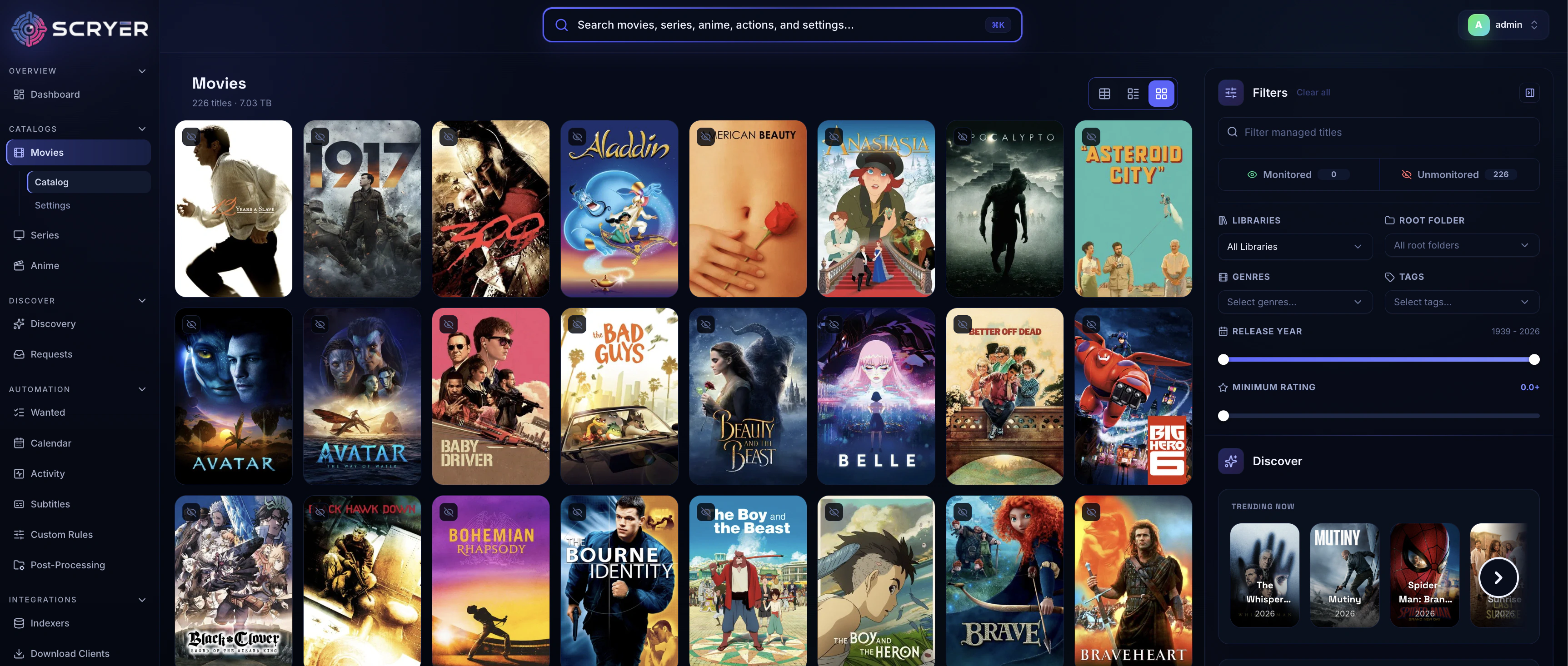
Scryer is a self-hosted media management application for movies, TV series, and anime.
At a high level, it:
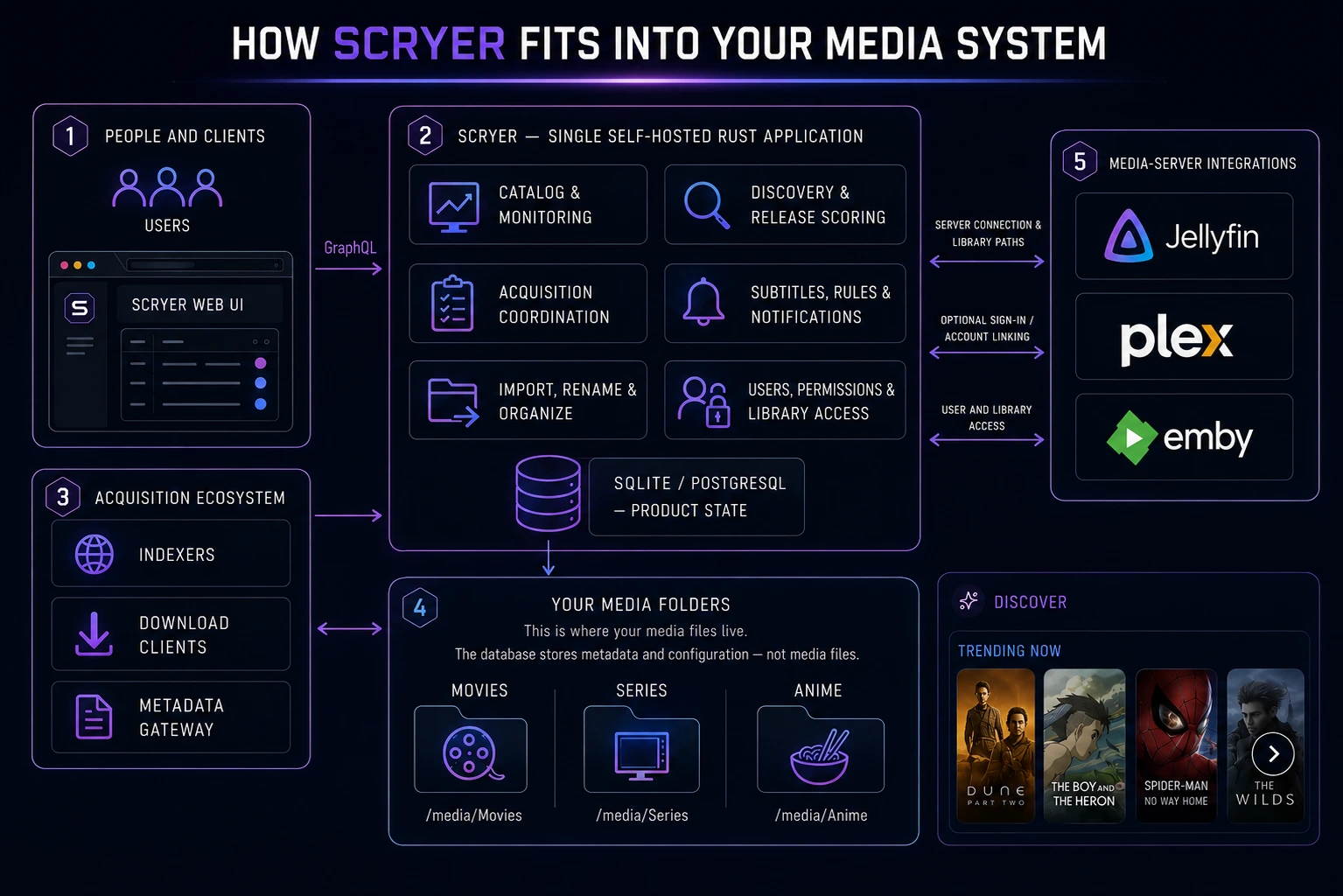
Conceptually it is "Sonarr + Radarr + Seerr + Bazarr, with some extra bits from other *arr tools", however Scryer is a single machine-code compiled binary that runs very efficiently compared to the *arr tools.
Scryer also handles Anime much better than the Arr tools, it uses multiple anime datasources (anidb, anilist, MAL, etc), understands the nuances of anime season and episode numbering, handles episode and multiseason packs cleanly, and even knows which episodes and movies are filler or canon!
Scryer was written from scratch and has no affiliation with the Servarr tools
Scryer ships as a single Rust binary with:
Scryer publishes a first-party container image:
ghcr.io/scryer-media/scryer:latestghcr.io/scryer-media/scryer:<minor>-latest
<minor>-latest tracks the 0.<minor>.x release line it was built fromFor Docker installation, Compose examples, environment variables, volumes, and deployment notes, see the Docker install docs.
Scryer publishes two forms of installation for Windows:
The MSI installs a desktop wrapper. Launching Scryer from the Start menu puts an icon in the notification area, starts the Scryer server in the background, and opens the web UI in an embedded Microsoft Edge WebView2 window — no browser tab and no service to configure. Clicking the tray icon shows Scryer's status and the usual actions (open, restart, quit); you can also opt into starting Scryer when you sign in. If WebView2 is not installed, Scryer opens the web UI in your default browser instead.
Upgrades — whether from inside Scryer, from a new MSI, or through winget — keep everything: your database, settings, logs, backups and your sign-in preference.
Uninstalling removes them. The uninstaller deletes Scryer's data folder
(%LOCALAPPDATA%\ScryerMedia\Scryer), which holds the database, logs, runtime
state and the WebView2 profile, and removes Scryer's Windows Credential Manager
entry. A backups folder inside it survives if it still contains anything.
Your media libraries and download folders are configured outside that folder and
are never touched. Back up anything you want to keep before uninstalling.
Scryer publishes a disk image per architecture — scryer-darwin-arm64.dmg for
Apple silicon and scryer-darwin-x86_64.dmg for Intel. Open it and drag
Scryer to Applications. Scryer then lives in the menu bar: it starts the
server for you and opens the web UI in an embedded WebKit window.
Scryer.app is not signed with an Apple Developer ID and is not notarized, so the first launch needs one extra step:
Either way you only do it once. If you would rather clear the quarantine flag from a terminal:
xattr -dr com.apple.quarantine /Applications/Scryer.app
Scryer updates an .app install in place. It downloads the signed replacement
bundle, checks its signature before anything moves, and swaps it for the
installed one — then the app restarts itself on the new version. The previous
bundle is kept beside it until the new one has started successfully.
For that to work, Scryer has to be able to replace the bundle where it lives: drag it into your Applications folder (or any folder you can write to) and open it from there. Scryer will tell you to do that, rather than updating, if you are running it straight from the disk image or from the temporary copy macOS makes when an app is opened from your Downloads folder.
The scryer-darwin-*-portable.tar.gz archives still ship the plain scryer
server binary for anyone running it headless.
Scryer publishes a first-party unraid application, view unraid community appication here.
Installation Steps:
If you're facing any issues with installation or issues, feel free to use any of our social platforms (Discord, Reddit, Github) for support!
For installation, upgrade guidance, and end-user documentation, use the website links at the top of this file.

340 followers · starred May 2026
196 followers · starred Jun 2026
348 followers · starred Sep 2026
41 followers · starred Sep 2026
Media manager
See the code
For more information about the tool, please visit the official webiste
Scryer is a self-hosted media management application for movies, TV series, and anime.
At a high level, it:
Conceptually it is "Sonarr + Radarr + Seerr + Bazarr, with some extra bits from other *arr tools", however Scryer is a single machine-code compiled binary that runs very efficiently compared to the *arr tools.
Scryer also handles Anime much better than the Arr tools, it uses multiple anime datasources (anidb, anilist, MAL, etc), understands the nuances of anime season and episode numbering, handles episode and multiseason packs cleanly, and even knows which episodes and movies are filler or canon!
Scryer was written from scratch and has no affiliation with the Servarr tools
Scryer ships as a single Rust binary with:
Scryer publishes a first-party container image:
ghcr.io/scryer-media/scryer:latestghcr.io/scryer-media/scryer:<minor>-latest
<minor>-latest tracks the 0.<minor>.x release line it was built fromFor Docker installation, Compose examples, environment variables, volumes, and deployment notes, see the Docker install docs.
Scryer publishes two forms of installation for Windows:
The MSI installs a desktop wrapper. Launching Scryer from the Start menu puts an icon in the notification area, starts the Scryer server in the background, and opens the web UI in an embedded Microsoft Edge WebView2 window — no browser tab and no service to configure. Clicking the tray icon shows Scryer's status and the usual actions (open, restart, quit); you can also opt into starting Scryer when you sign in. If WebView2 is not installed, Scryer opens the web UI in your default browser instead.
Upgrades — whether from inside Scryer, from a new MSI, or through winget — keep everything: your database, settings, logs, backups and your sign-in preference.
Uninstalling removes them. The uninstaller deletes Scryer's data folder
(%LOCALAPPDATA%\ScryerMedia\Scryer), which holds the database, logs, runtime
state and the WebView2 profile, and removes Scryer's Windows Credential Manager
entry. A backups folder inside it survives if it still contains anything.
Your media libraries and download folders are configured outside that folder and
are never touched. Back up anything you want to keep before uninstalling.
Scryer publishes a disk image per architecture — scryer-darwin-arm64.dmg for
Apple silicon and scryer-darwin-x86_64.dmg for Intel. Open it and drag
Scryer to Applications. Scryer then lives in the menu bar: it starts the
server for you and opens the web UI in an embedded WebKit window.
Scryer.app is not signed with an Apple Developer ID and is not notarized, so the first launch needs one extra step:
Either way you only do it once. If you would rather clear the quarantine flag from a terminal:
xattr -dr com.apple.quarantine /Applications/Scryer.app
Scryer updates an .app install in place. It downloads the signed replacement
bundle, checks its signature before anything moves, and swaps it for the
installed one — then the app restarts itself on the new version. The previous
bundle is kept beside it until the new one has started successfully.
For that to work, Scryer has to be able to replace the bundle where it lives: drag it into your Applications folder (or any folder you can write to) and open it from there. Scryer will tell you to do that, rather than updating, if you are running it straight from the disk image or from the temporary copy macOS makes when an app is opened from your Downloads folder.
The scryer-darwin-*-portable.tar.gz archives still ship the plain scryer
server binary for anyone running it headless.
Scryer publishes a first-party unraid application, view unraid community appication here.
Installation Steps:
If you're facing any issues with installation or issues, feel free to use any of our social platforms (Discord, Reddit, Github) for support!
For installation, upgrade guidance, and end-user documentation, use the website links at the top of this file.
340 followers · starred May 2026
196 followers · starred Jun 2026
348 followers · starred Sep 2026
41 followers · starred Sep 2026



