
Native macOS family tree editor. Genealogy stays in plain GEDCOM files on your disk, with offline place search, exact kinship terms, and no accounts or telemetry.
Swift
2
190 commits
updated Sep 20, 2026
See what people are saying (1)
README






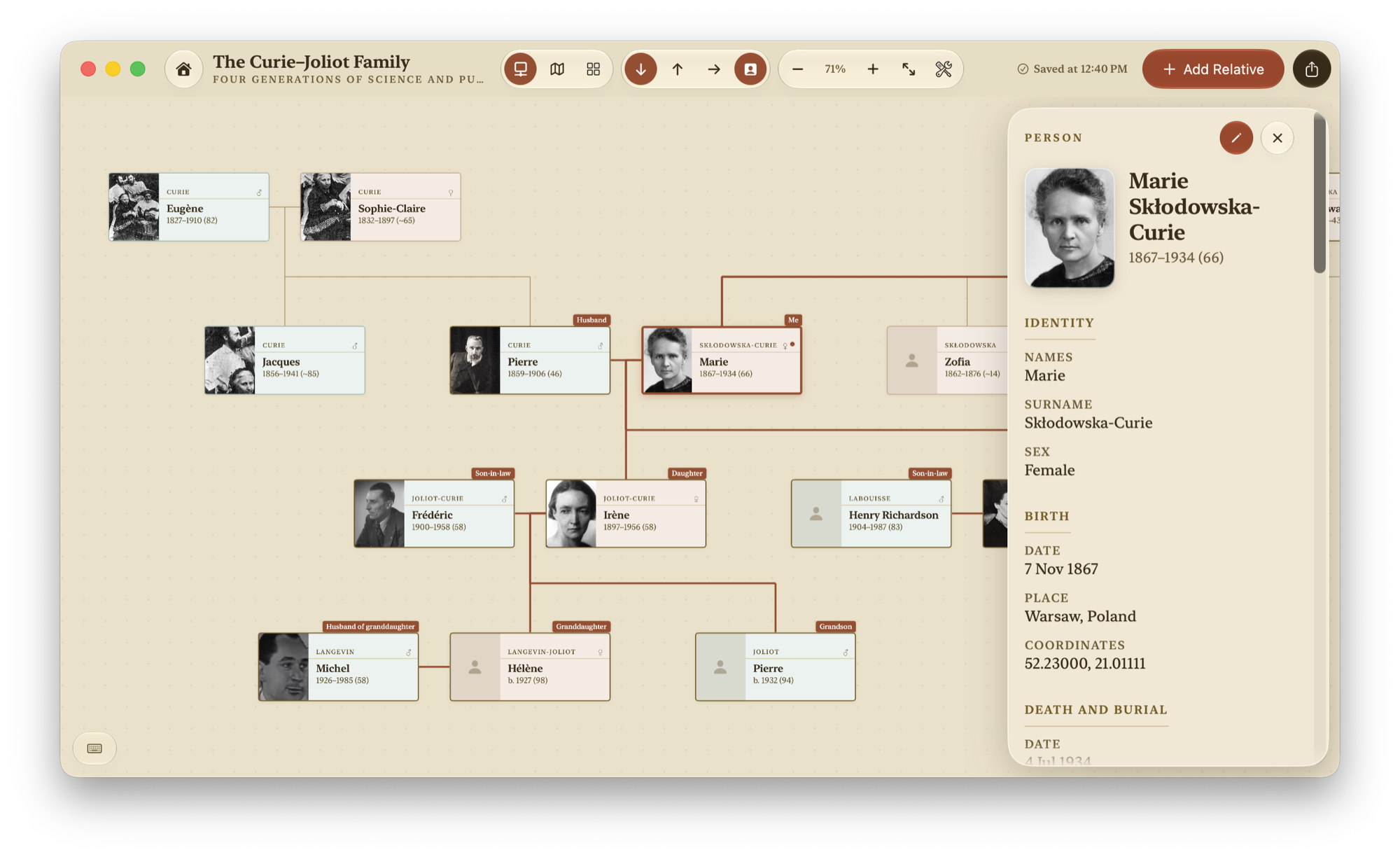
Swarm builds, visualizes and exports family trees, entirely on your Mac. Trees are plain GEDCOM files in a folder you can open in Finder: no accounts, no cloud, no telemetry, no AI.
It goes deep where most genealogy apps stop: exact kinship terms for any pair of people, patronymics, offline place search, and the encodings Soviet-era records arrive in. Native macOS, Swift, no third-party packages.
Quick look
 |  |
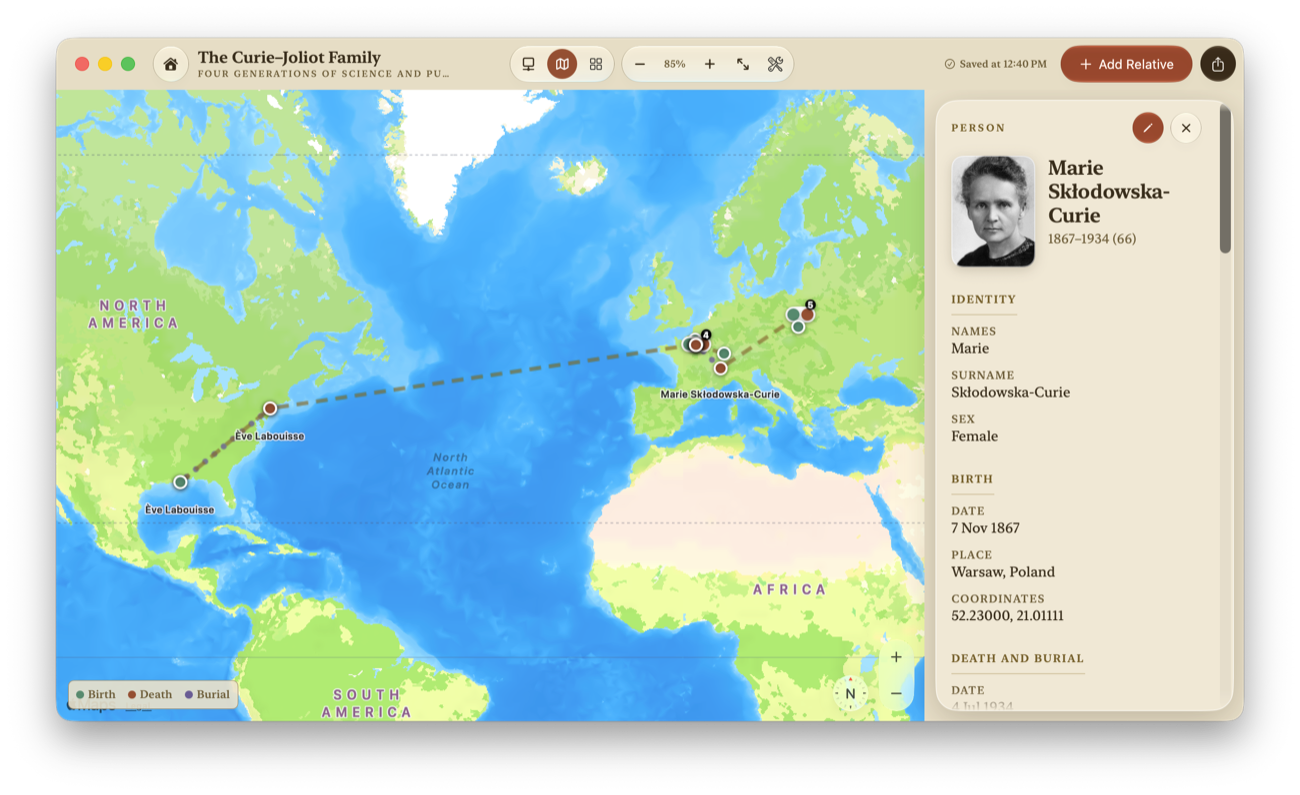 | 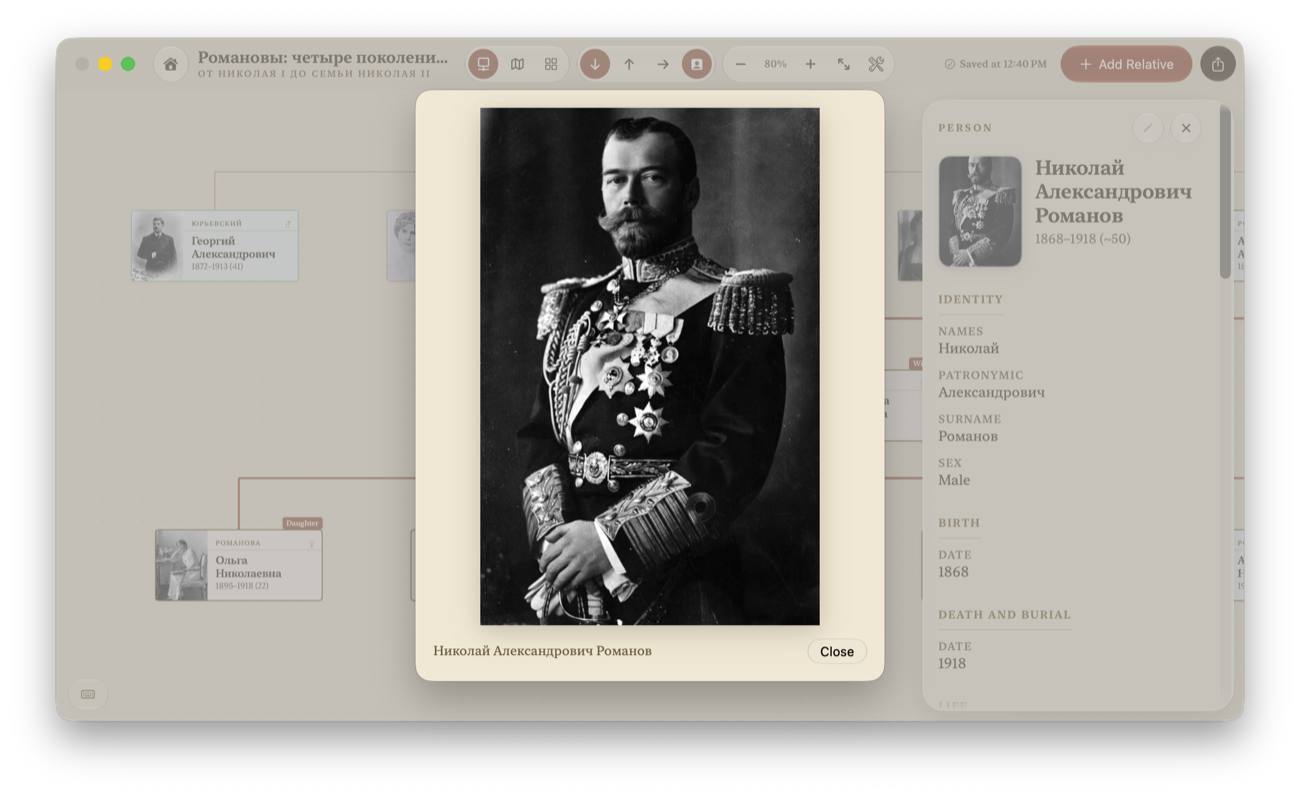 |
Install
Download the DMG from the latest release. Requires macOS 15 or later. The DMG is a universal binary, so it runs natively on both Apple silicon and Intel Macs. On macOS 26 and later the interface is drawn in Liquid Glass; on 15 through 25 it falls back to the app's own sepia controls.
Open the DMG and drag Swarm to Applications. The build is not yet signed with an Apple Developer ID or notarized, so macOS blocks the first launch. Open Swarm once, then go to System Settings ▸ Privacy & Security ▸ Open Anyway and confirm opening Swarm. You only need to do this once; leave your Mac's other security settings enabled.
To verify the download, put the release's .sha256 file next to the DMG and run:
shasum -a 256 -c Swarm-3.5.6.dmg.sha256
Try the Curie family
No family data needed. Download the example ZIP and double-click it to unpack it.
- Open Swarm and choose English.
- Click Import GEDCOM and select the unpacked curie-joliot folder, so the portraits and attachments come along too.
- The preview lists two country names without map coordinates. Check Continue with these warnings, then click Import. The family tree opens automatically.
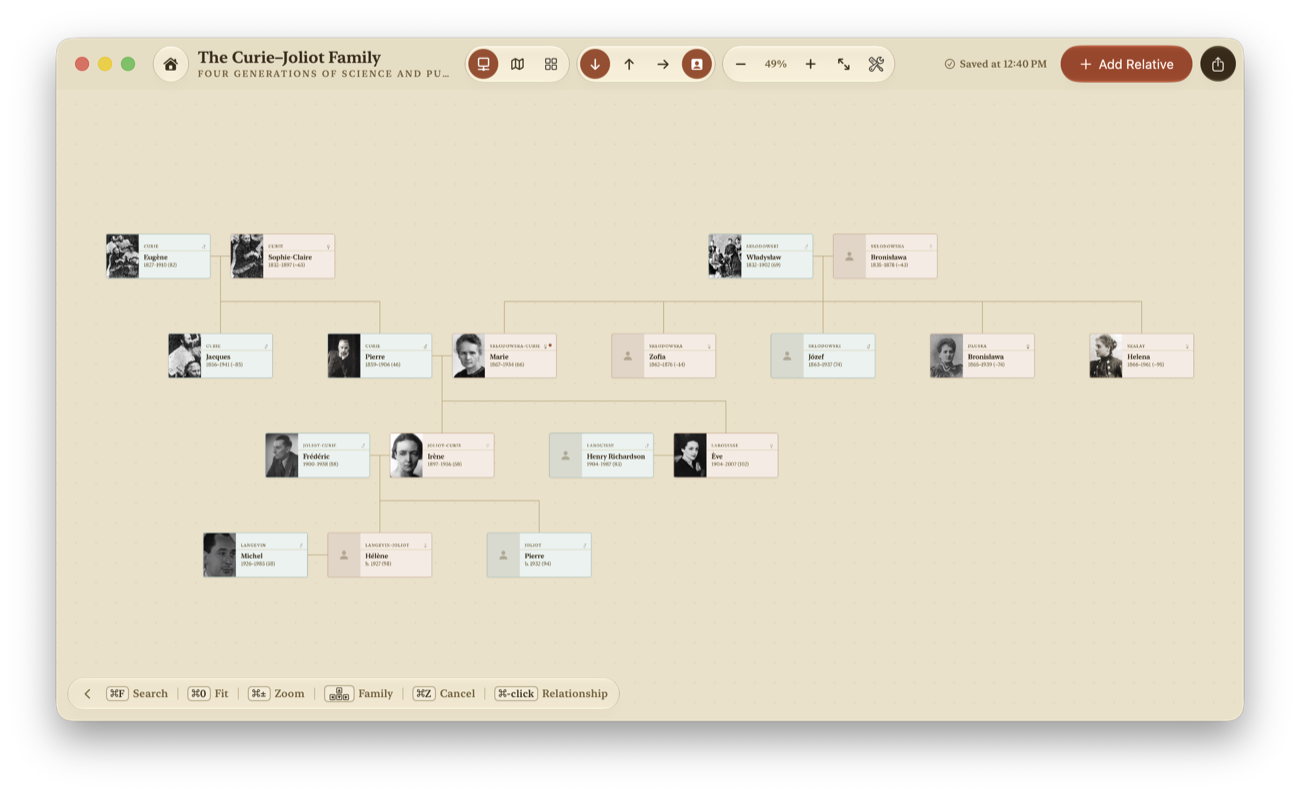
- Select Marie Curie to explore her relatives, or try the fan chart and PDF export.
Swarm imports a separate copy; the downloaded example stays unchanged. Image credits and licenses are included in the ZIP.
Features
- Tree diagram using the Buchheim-Jünger-Leipert layout, plus an ancestor fan chart and a map of birth, death and burial places.
- English and Russian kinship naming. Direct lineage, full and half siblings, neutral-sex relationships, cousins with exact removed generations, and in-laws (свёкор/тесть, деверь/шурин, золовка/свояченица, …). Ask "how are these two related?" about any pair and get the correct term.
- English and Russian interfaces, selected on first launch and switchable without restarting. Name order, sorting, examples, dates, plural grammar, Help, and PDF presentation follow the selected language.
- GEDCOM 5.5.1 import and export that works with Ancestry, Gramps and MyHeritage,
including standard map coordinates. Structures Swarm doesn't model survive
import → edit → export unchanged: event-level notes, source records, other programs'
custom tags. The original file is kept verbatim as
original-import.ged. - Merge someone else's tree into yours. Swarm combines matching people instead of duplicating them, finds the exact matches itself, and only suggests the likely ones. It takes a backup first, and any failure rolls back completely.
- Export to PDF or archive. The PDF opens with the diagram, then a card page per person with photos and attachments; export the whole tree or just the people selected on the canvas. A verified archive writes the tree, portraits and attachments to a folder, checksummed file by file.
- Photos and attachments. Any file, on any person.
- Workspaces for large trees. People, timeline, places, and sources with their citations, plus data review and recovery tools.
- Hard to lose a tree. Trees live in
~/Library/Application Support/Swarm/, one folder per tree. Swarm checksums every save and swaps it into place only once it verifies, keeps the last 50 revisions, and holds deleted items in Trash for 30 days. - Your family-tree files stay on your Mac. Place lookup runs against a bundled index of 476,958 bilingual GeoNames places, without sending searches anywhere. Optional Apple Maps uses a network connection, and Apple may receive the viewed region. Choose Offline Map in Settings to use maps without that connection.
How Swarm compares
- MacFamilyTree is the polished commercial Mac app, with more views and iOS sync. Swarm is free, open source, and stores plain GEDCOM files instead of a proprietary database.
- Gramps is open source with deeper research tooling. Swarm trades that depth for a native Mac interface and zero setup.
- Древо Жизни is the Russian kinship specialist, Windows-first and closed source. Swarm covers the same terminology, free and native on macOS.
- Ancestry and MyHeritage are cloud services with record hints and DNA. Swarm has no records database; it is for when the tree itself should stay on your Mac.
Example trees
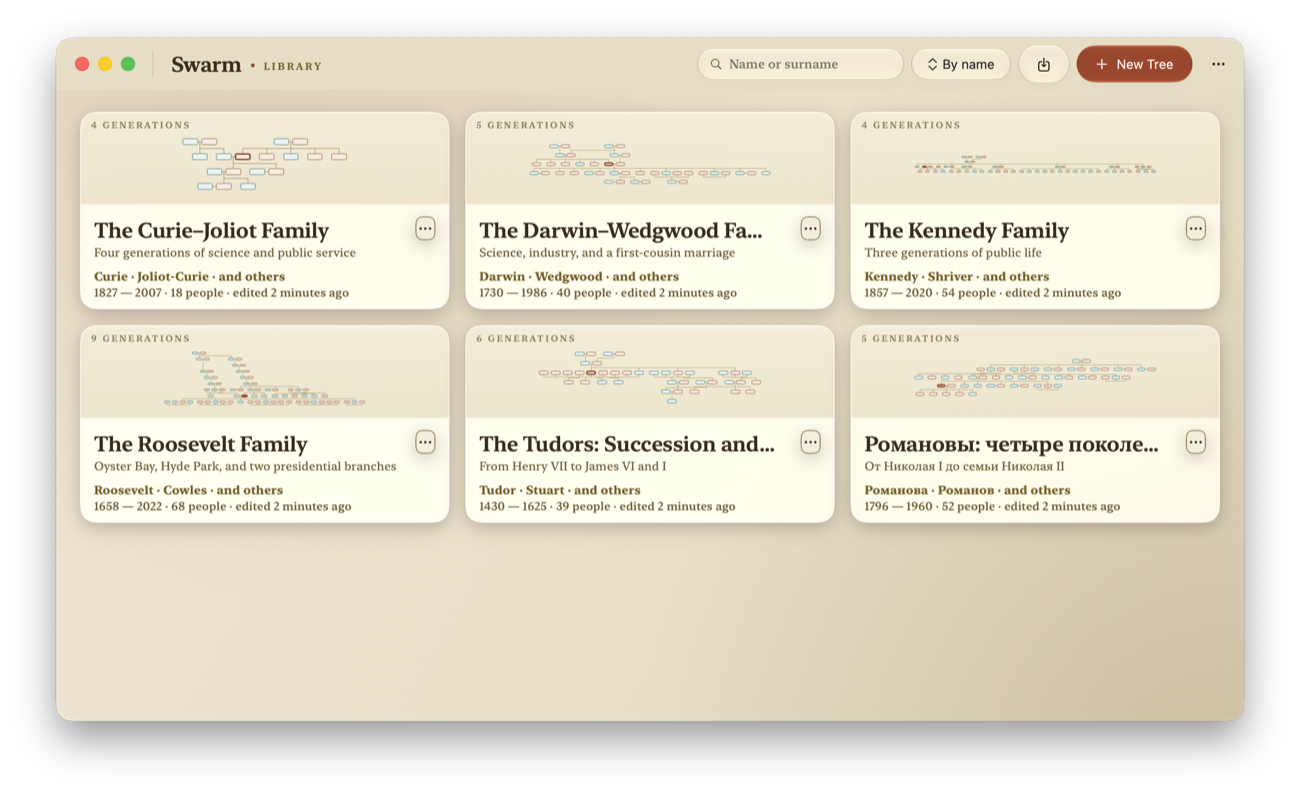
Six historical families ship in Examples/, one folder per tree: the Curies, Darwins, Kennedys, Romanovs, Roosevelts and Tudors, each with portraits, documents, mapped places and source citations. Everyone in them is a public figure, so these are the trees to open, screenshot and attach to a bug report. Credits are in Examples/CREDITS.csv.
To import one, click Import GEDCOM in the tree library and select the tree's
folder, Examples/tudor-succession/, not the .ged inside it. Choosing the folder
is what lets Swarm pick up the Media/ and Attachments/ beside the GEDCOM. Review any
warnings, acknowledge them if prompted, and click Import. Swarm only reads the
Examples/ folder, so you can import the same tree as often as you like.
Build and run
git clone https://github.com/samoilev/swarm.git
cd swarm
swift build -c release
swift run -c release Swarm
The manifest is swift-tools-version: 5.9, so the package builds in Swift 5 language
mode with strict concurrency checking turned on for the core module. A current Swift 6
toolchain — the one in Xcode 26 — is what it is built and tested against.
Swarm runs on macOS 15 but has to be built against the macOS 26 SDK or newer. macOS
picks the Liquid Glass look from the SDK a binary was linked against — the sdk field
of LC_BUILD_VERSION — and not from its deployment target, which is the separate
minos field.
The plain swift build above does not get this right on its own: SwiftPM's current
build system records sdk as the deployment target, so a locally built Swarm reports
minos 15.0, sdk 15.0 and renders without Liquid Glass even on macOS 26. That is a
local-development wart, not a shipping one — build_dmg.sh pins both fields explicitly
and fails the build if the linked SDK is below 26.0. To check any binary:
otool -l .build/out/Products/Release/Swarm | grep -A4 LC_BUILD_VERSION
To get the shipping look from a local build, pass the same flags the release script does:
swift build -c release \
  -Xlinker -platform_version -Xlinker macos -Xlinker 15.0 -Xlinker "$(xcrun --show-sdk-version)"
swift build alone gives you a debug build. Fine for development, slower on large trees.
You can also open the package folder in Xcode (File ▸ Open…). To develop against a
throwaway library, launch with --storage-folder /absolute/path/to/temporary-library.
License
Swarm is free software under the GNU General Public License v3.0. Bundled place and map data is third party and carries its own terms: GeoNames under CC BY 4.0, Natural Earth in the public domain. See THIRD_PARTY_NOTICES.md.
The Swarm name and icon are not covered by the GPL; please rename and re-icon any fork you redistribute.
Release history: CHANGELOG.md. Bug reports: open an issue, and never attach a real family GEDCOM. Vulnerabilities: SECURITY.md.
Contributors

187 commits

3 commits
Similar repos


Languages
Swift
98.5%
Native macOS family tree editor. Genealogy stays in plain GEDCOM files on your disk, with offline place search, exact kinship terms, and no accounts or telemetry.
Swift
2
190 commits
updated Sep 20, 2026
See what people are saying (1)
README
Swarm builds, visualizes and exports family trees, entirely on your Mac. Trees are plain GEDCOM files in a folder you can open in Finder: no accounts, no cloud, no telemetry, no AI.
It goes deep where most genealogy apps stop: exact kinship terms for any pair of people, patronymics, offline place search, and the encodings Soviet-era records arrive in. Native macOS, Swift, no third-party packages.
Quick look
| |
| |
Install
Download the DMG from the latest release. Requires macOS 15 or later. The DMG is a universal binary, so it runs natively on both Apple silicon and Intel Macs. On macOS 26 and later the interface is drawn in Liquid Glass; on 15 through 25 it falls back to the app's own sepia controls.
Open the DMG and drag Swarm to Applications. The build is not yet signed with an Apple Developer ID or notarized, so macOS blocks the first launch. Open Swarm once, then go to System Settings ▸ Privacy & Security ▸ Open Anyway and confirm opening Swarm. You only need to do this once; leave your Mac's other security settings enabled.
To verify the download, put the release's .sha256 file next to the DMG and run:
shasum -a 256 -c Swarm-3.5.6.dmg.sha256
Try the Curie family
No family data needed. Download the example ZIP and double-click it to unpack it.
- Open Swarm and choose English.
- Click Import GEDCOM and select the unpacked curie-joliot folder, so the portraits and attachments come along too.
- The preview lists two country names without map coordinates. Check Continue with these warnings, then click Import. The family tree opens automatically.
- Select Marie Curie to explore her relatives, or try the fan chart and PDF export.
Swarm imports a separate copy; the downloaded example stays unchanged. Image credits and licenses are included in the ZIP.
Features
- Tree diagram using the Buchheim-Jünger-Leipert layout, plus an ancestor fan chart and a map of birth, death and burial places.
- English and Russian kinship naming. Direct lineage, full and half siblings, neutral-sex relationships, cousins with exact removed generations, and in-laws (свёкор/тесть, деверь/шурин, золовка/свояченица, …). Ask "how are these two related?" about any pair and get the correct term.
- English and Russian interfaces, selected on first launch and switchable without restarting. Name order, sorting, examples, dates, plural grammar, Help, and PDF presentation follow the selected language.
- GEDCOM 5.5.1 import and export that works with Ancestry, Gramps and MyHeritage,
including standard map coordinates. Structures Swarm doesn't model survive
import → edit → export unchanged: event-level notes, source records, other programs'
custom tags. The original file is kept verbatim as
original-import.ged. - Merge someone else's tree into yours. Swarm combines matching people instead of duplicating them, finds the exact matches itself, and only suggests the likely ones. It takes a backup first, and any failure rolls back completely.
- Export to PDF or archive. The PDF opens with the diagram, then a card page per person with photos and attachments; export the whole tree or just the people selected on the canvas. A verified archive writes the tree, portraits and attachments to a folder, checksummed file by file.
- Photos and attachments. Any file, on any person.
- Workspaces for large trees. People, timeline, places, and sources with their citations, plus data review and recovery tools.
- Hard to lose a tree. Trees live in
~/Library/Application Support/Swarm/, one folder per tree. Swarm checksums every save and swaps it into place only once it verifies, keeps the last 50 revisions, and holds deleted items in Trash for 30 days. - Your family-tree files stay on your Mac. Place lookup runs against a bundled index of 476,958 bilingual GeoNames places, without sending searches anywhere. Optional Apple Maps uses a network connection, and Apple may receive the viewed region. Choose Offline Map in Settings to use maps without that connection.
How Swarm compares
- MacFamilyTree is the polished commercial Mac app, with more views and iOS sync. Swarm is free, open source, and stores plain GEDCOM files instead of a proprietary database.
- Gramps is open source with deeper research tooling. Swarm trades that depth for a native Mac interface and zero setup.
- Древо Жизни is the Russian kinship specialist, Windows-first and closed source. Swarm covers the same terminology, free and native on macOS.
- Ancestry and MyHeritage are cloud services with record hints and DNA. Swarm has no records database; it is for when the tree itself should stay on your Mac.
Example trees
Six historical families ship in Examples/, one folder per tree: the Curies, Darwins, Kennedys, Romanovs, Roosevelts and Tudors, each with portraits, documents, mapped places and source citations. Everyone in them is a public figure, so these are the trees to open, screenshot and attach to a bug report. Credits are in Examples/CREDITS.csv.
To import one, click Import GEDCOM in the tree library and select the tree's
folder, Examples/tudor-succession/, not the .ged inside it. Choosing the folder
is what lets Swarm pick up the Media/ and Attachments/ beside the GEDCOM. Review any
warnings, acknowledge them if prompted, and click Import. Swarm only reads the
Examples/ folder, so you can import the same tree as often as you like.
Build and run
git clone https://github.com/samoilev/swarm.git
cd swarm
swift build -c release
swift run -c release Swarm
The manifest is swift-tools-version: 5.9, so the package builds in Swift 5 language
mode with strict concurrency checking turned on for the core module. A current Swift 6
toolchain — the one in Xcode 26 — is what it is built and tested against.
Swarm runs on macOS 15 but has to be built against the macOS 26 SDK or newer. macOS
picks the Liquid Glass look from the SDK a binary was linked against — the sdk field
of LC_BUILD_VERSION — and not from its deployment target, which is the separate
minos field.
The plain swift build above does not get this right on its own: SwiftPM's current
build system records sdk as the deployment target, so a locally built Swarm reports
minos 15.0, sdk 15.0 and renders without Liquid Glass even on macOS 26. That is a
local-development wart, not a shipping one — build_dmg.sh pins both fields explicitly
and fails the build if the linked SDK is below 26.0. To check any binary:
otool -l .build/out/Products/Release/Swarm | grep -A4 LC_BUILD_VERSION
To get the shipping look from a local build, pass the same flags the release script does:
swift build -c release \
  -Xlinker -platform_version -Xlinker macos -Xlinker 15.0 -Xlinker "$(xcrun --show-sdk-version)"
swift build alone gives you a debug build. Fine for development, slower on large trees.
You can also open the package folder in Xcode (File ▸ Open…). To develop against a
throwaway library, launch with --storage-folder /absolute/path/to/temporary-library.
License
Swarm is free software under the GNU General Public License v3.0. Bundled place and map data is third party and carries its own terms: GeoNames under CC BY 4.0, Natural Earth in the public domain. See THIRD_PARTY_NOTICES.md.
The Swarm name and icon are not covered by the GPL; please rename and re-icon any fork you redistribute.
Release history: CHANGELOG.md. Bug reports: open an issue, and never attach a real family GEDCOM. Vulnerabilities: SECURITY.md.
Similar repos
Contributors
187 commits
3 commits
Languages
Swift
98.5%