
Veloop: instant webcam loop pedal and video soundboard for Google Meet, Zoom, and WebRTC calls. 100% local, open source.
TypeScript
4
15 commits
updated Sep 19, 2026
See what people are saying (1)
README
Veloop
Instant video soundboard & loop pedal for Google Meet, Zoom, and WebRTC calls





✨ Why Veloop?
- Pedal-First Video Looping — Step on your pedal or hold a hotkey to record yourself nodding or listening, then release to loop immediately.
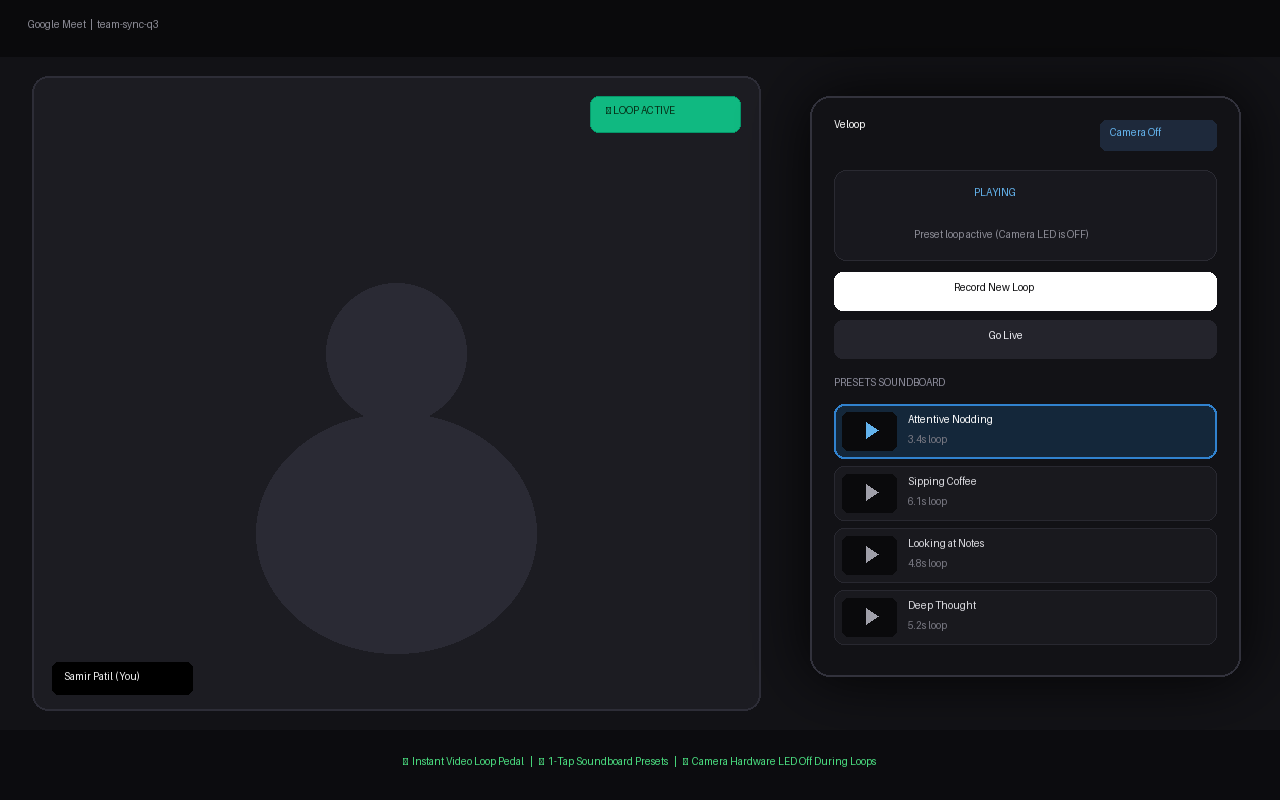
- Instant Soundboard Presets — Save in-meeting loops with custom titles (e.g., "Attentive Nodding", "Sipping Coffee", "Taking Notes") and trigger them on demand with a single click.
- Hardware Camera Power Management — When looping or playing a preset, physical webcam tracks are detached and released (
releaseHardwareCamera()), turning your webcam's green indicator LED OFF. - Seamless Seam Dissolves — Crossfade transitions ensure loops and returning-to-live blend smoothly without harsh visual cuts or freezing frames.
- 100% Private & Local — No external servers, no cloud uploads, zero telemetry. All video encoding (
MediaRecorderWebM) and storage run entirely inside local browserIndexedDB. - Zero Virtual Camera Drivers — Operates natively inside Chrome via browser
canvas.captureStream()andgetUserMediainterception without needing OBS or system-level kernel extensions.
📺 Demo Video
https://github.com/user-attachments/assets/e7c2297b-3fb2-44b7-981f-556eb217ce9d
▶️ Also on YouTube — Looping webcam feed during a live video call
Screenshot
📥 Installation
Chrome Web Store (Recommended)
Install Veloop with one click from the official Chrome Web Store:

👉 Get Veloop on the Chrome Web Store
Developer Mode (Local Install)
- Clone or download this repository:
git clone https://github.com/samirpatil2000/veloop.git cd veloop - Install dependencies and build:
npm install npm run build - Open Chrome and navigate to
chrome://extensions - Toggle Developer mode on (top-right corner)
- Click Load unpacked and select the
dist/directory inside this repository
🚀 How it Works
Veloop turns your browser into a digital video loop pedal. It intercepts navigator.mediaDevices.getUserMedia at the page level and routes your webcam through an ultra-low-latency 2D canvas compositor:
- Synthetic Video Stream: The meeting site receives a synthetic
MediaStreamoriginating from the compositor canvas. - Pedal Capture & Instant Loop: Holding Right Option / Alt captures uncompressed frames into memory while concurrently recording a compressed WebM stream via hardware-accelerated
MediaRecorder. - Webcam LED Extinction: The moment you enter loop mode, the raw camera hardware tracks are terminated. Your laptop or external webcam indicator light clicks off.
- Preset Soundboard: In the popup, name any active loop to store it permanently in
IndexedDB. Whenever you are in a call, 1-tap any card on your soundboard to replay that clip seamlessly. - Seamless Dissolve to Live: Hitting Right Command or L re-acquires the physical camera in the background and executes an alpha-blended crossfade back to reality.
📖 For complete architecture diagrams, WebRTC interception details, and pipeline specifications, see TECH_DOC.md.
⌨️ Hardware & Keyboard Controls
| Shortcut / Pedal | Action | Description |
|---|---|---|
| Right Option / Alt (Hold & Release) | Pedal Down / Up | Hold to record frames, release to immediately start looping |
| Right Command or L | Go Live | Seamlessly dissolves from loop or preset back to live camera feed |
| R | Toggle Record | Toggle start/stop recording without holding |
| 1 – 9 (Popup) | Trigger Preset | Play a saved soundboard preset card |
Physical foot pedals sending standard keyboard keystrokes (like Right Alt or USB pedal switch) work out-of-the-box.
🖥️ UI & Controls
- Popup Soundboard — Accessible via extension icon or keyboard. Features active recording state badges (
LIVE,REC,LOOP,PLAY), 1-tap preset triggers, and one-click preset labeling. - Studio Options Control Center — Customize maximum recording length, minimum tap threshold (to prevent accidental triggers), crossfade dissolve duration, and preview opacity.
⏱️ Video Durations & Timing Limits
Configure recording durations, trigger thresholds, and transition times via Options (chrome-extension://<id>/options.html):
| Setting | Default | Configurable Range | Description |
|---|---|---|---|
| Maximum Loop Duration | 30s | 1s – 120s (2 min) | Caps how long a loop can be. Auto-loops immediately if the limit is reached. |
| Minimum Recording Threshold | 1.0s | 0.1s – 5.0s | Discards brief accidental pedal taps below this duration. |
| Crossfade Dissolve Time | 0.5s | 0.0s – 3.0s | Smooth alpha transition duration when switching between loop and live camera. |
| Playback Frame Rate | 30 FPS | Fixed | Native frame rate for seamless WebRTC streaming on Google Meet, Zoom, etc. |
| Overlay Opacity | 50% | 0% – 100% | Ghosting preview opacity for camera alignment. |
⚖️ Privacy & Security
- Zero Cloud & Zero Telemetry: Veloop does not transmit any video, audio, or analytics to any remote server.
- Pure Local Storage: All saved presets reside exclusively within your browser's private
IndexedDBdatabase on your device. - Verified Scoped Permissions: Restricts script injection strictly to verified video calling domains (Google Meet, Zoom, Teams, Webex, Discord, Whereby).
📄 License
MIT License — feel free to contribute, build upon, or fork for your own setup.
Made with ❤️ for video meetings
Contributors

15 commits
Similar repos


Languages
TypeScript
62.6%
Python
12.9%
CSS
12.3%
HTML
10.1%
JavaScript
2.0%
Veloop: instant webcam loop pedal and video soundboard for Google Meet, Zoom, and WebRTC calls. 100% local, open source.
TypeScript
4
15 commits
updated Sep 19, 2026
See what people are saying (1)
README
Veloop
Instant video soundboard & loop pedal for Google Meet, Zoom, and WebRTC calls
✨ Why Veloop?
- Pedal-First Video Looping — Step on your pedal or hold a hotkey to record yourself nodding or listening, then release to loop immediately.
- Instant Soundboard Presets — Save in-meeting loops with custom titles (e.g., "Attentive Nodding", "Sipping Coffee", "Taking Notes") and trigger them on demand with a single click.
- Hardware Camera Power Management — When looping or playing a preset, physical webcam tracks are detached and released (
releaseHardwareCamera()), turning your webcam's green indicator LED OFF. - Seamless Seam Dissolves — Crossfade transitions ensure loops and returning-to-live blend smoothly without harsh visual cuts or freezing frames.
- 100% Private & Local — No external servers, no cloud uploads, zero telemetry. All video encoding (
MediaRecorderWebM) and storage run entirely inside local browserIndexedDB. - Zero Virtual Camera Drivers — Operates natively inside Chrome via browser
canvas.captureStream()andgetUserMediainterception without needing OBS or system-level kernel extensions.
📺 Demo Video
https://github.com/user-attachments/assets/e7c2297b-3fb2-44b7-981f-556eb217ce9d
▶️ Also on YouTube — Looping webcam feed during a live video call
Screenshot
📥 Installation
Chrome Web Store (Recommended)
Install Veloop with one click from the official Chrome Web Store:
👉 Get Veloop on the Chrome Web Store
Developer Mode (Local Install)
- Clone or download this repository:
git clone https://github.com/samirpatil2000/veloop.git cd veloop - Install dependencies and build:
npm install npm run build - Open Chrome and navigate to
chrome://extensions - Toggle Developer mode on (top-right corner)
- Click Load unpacked and select the
dist/directory inside this repository
🚀 How it Works
Veloop turns your browser into a digital video loop pedal. It intercepts navigator.mediaDevices.getUserMedia at the page level and routes your webcam through an ultra-low-latency 2D canvas compositor:
- Synthetic Video Stream: The meeting site receives a synthetic
MediaStreamoriginating from the compositor canvas. - Pedal Capture & Instant Loop: Holding Right Option / Alt captures uncompressed frames into memory while concurrently recording a compressed WebM stream via hardware-accelerated
MediaRecorder. - Webcam LED Extinction: The moment you enter loop mode, the raw camera hardware tracks are terminated. Your laptop or external webcam indicator light clicks off.
- Preset Soundboard: In the popup, name any active loop to store it permanently in
IndexedDB. Whenever you are in a call, 1-tap any card on your soundboard to replay that clip seamlessly. - Seamless Dissolve to Live: Hitting Right Command or L re-acquires the physical camera in the background and executes an alpha-blended crossfade back to reality.
📖 For complete architecture diagrams, WebRTC interception details, and pipeline specifications, see TECH_DOC.md.
⌨️ Hardware & Keyboard Controls
| Shortcut / Pedal | Action | Description |
|---|---|---|
| Right Option / Alt (Hold & Release) | Pedal Down / Up | Hold to record frames, release to immediately start looping |
| Right Command or L | Go Live | Seamlessly dissolves from loop or preset back to live camera feed |
| R | Toggle Record | Toggle start/stop recording without holding |
| 1 – 9 (Popup) | Trigger Preset | Play a saved soundboard preset card |
Physical foot pedals sending standard keyboard keystrokes (like Right Alt or USB pedal switch) work out-of-the-box.
🖥️ UI & Controls
- Popup Soundboard — Accessible via extension icon or keyboard. Features active recording state badges (
LIVE,REC,LOOP,PLAY), 1-tap preset triggers, and one-click preset labeling. - Studio Options Control Center — Customize maximum recording length, minimum tap threshold (to prevent accidental triggers), crossfade dissolve duration, and preview opacity.
⏱️ Video Durations & Timing Limits
Configure recording durations, trigger thresholds, and transition times via Options (chrome-extension://<id>/options.html):
| Setting | Default | Configurable Range | Description |
|---|---|---|---|
| Maximum Loop Duration | 30s | 1s – 120s (2 min) | Caps how long a loop can be. Auto-loops immediately if the limit is reached. |
| Minimum Recording Threshold | 1.0s | 0.1s – 5.0s | Discards brief accidental pedal taps below this duration. |
| Crossfade Dissolve Time | 0.5s | 0.0s – 3.0s | Smooth alpha transition duration when switching between loop and live camera. |
| Playback Frame Rate | 30 FPS | Fixed | Native frame rate for seamless WebRTC streaming on Google Meet, Zoom, etc. |
| Overlay Opacity | 50% | 0% – 100% | Ghosting preview opacity for camera alignment. |
⚖️ Privacy & Security
- Zero Cloud & Zero Telemetry: Veloop does not transmit any video, audio, or analytics to any remote server.
- Pure Local Storage: All saved presets reside exclusively within your browser's private
IndexedDBdatabase on your device. - Verified Scoped Permissions: Restricts script injection strictly to verified video calling domains (Google Meet, Zoom, Teams, Webex, Discord, Whereby).
📄 License
MIT License — feel free to contribute, build upon, or fork for your own setup.
Made with ❤️ for video meetings
Similar repos
Contributors
15 commits
Languages
TypeScript
62.6%
Python
12.9%
CSS
12.3%
HTML
10.1%
JavaScript
2.0%