
Buffer is a open-source lightweight, privacy-focused clipboard manager for macOS with searchable history and a quick ⇧⌘V shortcut.
See the codeSee what people are saying
README

Buffer
A lightweight, beautiful clipboard manager for macOS






✨ Why Buffer?
- Ultra-lightweight — Only ~2 MB download/install, minimal RAM/CPU usage
- 100% Private & Local — Everything stays on your Mac, no cloud, no tracking
- Text + Images + OCR — Copies anything; extracts searchable text from images/screenshots/memes using on-device Vision
- Great for developers — Handles large text snippets, JSON payloads, logs, and other verbose content with ease
- Large-content friendly — Lazy, chunked previews and disk-backed storage for multi‑MB text, with size indicators
- Pins & Smart History — Pin favorites, keep them anchored, and cycle history while prioritizing unpinned items
- Multi-select & multi‑paste — Select multiple items in history with clear on-screen instructions, paste them together, or bulk-delete with inline confirmation
- Bookmarks — Star important items with Cmd+B for quick reuse
- Tags & Filtering — Categorize history items with custom, color-coded tags. Quick tag items with
Cmd+Tand filter using#autocomplete in the search bar - Configurable hotkeys — Change the global shortcut in Settings with dynamic re-registration
- Native macOS Feel — Clean SwiftUI + AppKit menu-bar app
- Interactive Image Inspection Canvas — Pinch-to-zoom, pan, double-click fit/reset, and
⌘+/⌘-zoom controls for inspecting screenshots and image clips - Shortcuts Cheat Sheet & Content Zoom — On-screen interactive shortcuts popup (
⌘/), footer shortcuts bar, and content text zoom (⌘+/⌘-/⌘0) - Noise Controls & History Tiers — Configurable history capacity tiers and automatic noise filtering to suppress rapid duplicate clips and short fragments
- Seamless Updates — Built-in secure auto-updater with in-app notification chip, release highlights popover, and post-update HUD
- Inline Text Editing — Edit any text or code snippet directly within the clipboard history window with safe cancel (
Esc) and macOS pasteboard sync - Open Source — MIT license, actively maintained
📥 Download


- Download the
.dmgfrom the latest release - Drag Buffer.app to your Applications folder
- Launch it (lives in menu bar)
🍺 Install with Homebrew
Buffer can be installed as a Homebrew cask directly from this repository:
For Users
# 1. Tap the repository
brew tap samirpatil2000/buffer https://github.com/samirpatil2000/Buffer.git

# 2. Install Buffer
brew install --cask buffer
To upgrade:
brew upgrade --cask buffer
To completely uninstall (including preferences and application support files):
brew uninstall --zap buffer
[!TIP] If a dedicated
samirpatil2000/homebrew-buffertap repository is configured in the future, standard one-linerbrew install --cask samirpatil2000/buffer/bufferwill also be supported.
For Maintainers
The repository includes an automated script to generate and validate Casks/buffer.rb:
# Automatically computes SHA256 checksums from local DMGs (or remote release) and audits syntax:
./scripts/generate_homebrew_cask.sh
Typical release flow:
# 1. Bump version in Info.plist & README.md
# 2. Compile, sign, and notarize DMGs
./build_dmg.sh

# 3. Update Casks/buffer.rb with verified SHA256 hashes
./scripts/generate_homebrew_cask.sh

# 4. Commit and push release
git add Info.plist README.md Casks/buffer.rb
🚀 Getting Started
- Download the
.dmgfile from above - Drag Buffer to your Applications folder
- Launch Buffer — it will appear in your menu bar
- Copy anything — Buffer automatically saves it
- Press ⇧⌘V to access your clipboard history anytime!
🖥️ Screenshots
Beautiful split-pane interface with search and preview
Edit Text
Multi select & paste
Tags
Keyboard Shortcuts Cheat Sheet & Image Canvas
Interactive shortcuts cheat sheet popover (⌘/) and interactive image inspection canvas
History Size Tiers
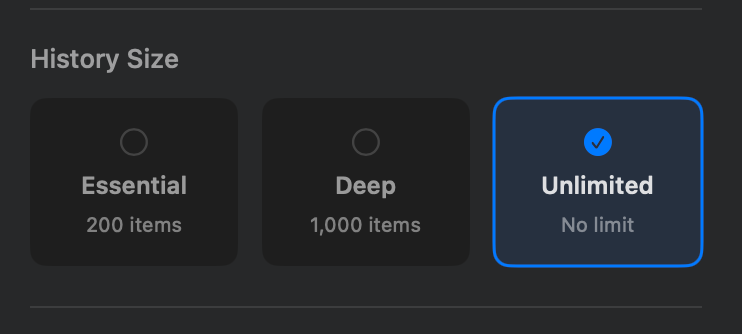
Configurable clipboard history retention tiers: Essential (200), Deep (1,000), or Unlimited
Inline Text Editing
Click the Pencil icon in the preview/detail pane to open an inline text editor and modify any text item directly. While editing, global keyboard shortcuts are temporarily bypassed so you can type normally. Click Save to persist changes and sync them to the macOS pasteboard, or press Escape to cancel and cleanly discard unsaved changes.
⌨️ Keyboard Shortcuts
Press ⌘/ anytime or click the Shortcuts button in the footer bar to open the interactive on-screen cheat sheet.
Navigation & Selection
| Shortcut | Action |
|---|---|
⇧⌘V | Open clipboard history |
↑ / ↓ | Navigate history items |
⇧↑ / ⇧↓ | Multi-select items (expands / shrinks range) |
⌘A | Select all items |
↵ Enter | Paste selected item to frontmost app |
⎋ Esc | Dismiss Buffer window / cancel edits |
Item Actions
| Shortcut | Action |
|---|---|
⌘C | Copy selected item to clipboard and dismiss |
⌘P | Pin / unpin selected item |
⌘B | Bookmark / unbookmark selected item |
⌘E | Edit snippet inline |
⌘T | Add tag to selected item |
⌘S | Save image to disk (for image items) |
⌘⌫ | Delete selected item (or multi-selected items) |
Zoom & Canvas
| Shortcut | Action |
|---|---|
⌘+ | Zoom in (larger rows & preview text) |
⌘- | Zoom out |
⌘0 | Reset zoom to 100% |
2× Click | Toggle image actual size / fit |
Pinch / Pan | Zoom & navigate image canvas on trackpad |
Application
| Shortcut | Action |
|---|---|
⌘, | Open Settings |
⌘/ | Toggle keyboard shortcuts cheat sheet |
🛠️ Building from Source
# Clone the repository
git clone https://github.com/samirpatil2000/Buffer.git
cd Buffer

# Open in Xcode
open Buffer.xcodeproj

# Build and run
# Press ⌘R in Xcode
Requirements
- macOS 13.0 or later
- Xcode 15.0 or later
- Swift 5.9
Star History
🤝 Contributing
Contributions are welcome! Feel free to:
- Report bugs
- Suggest features
- Submit pull requests
📄 License
MIT License — feel free to use this project however you like.
Made with ❤️ for macOS
Significant stargazers

85 followers · starred Apr 2026

93 followers · starred May 2026

1,537 followers · starred May 2026
Similar repos


Languages
Swift
96.6%
Shell
3.1%
Buffer is a open-source lightweight, privacy-focused clipboard manager for macOS with searchable history and a quick ⇧⌘V shortcut.
See the codeSee what people are saying
README
Buffer
A lightweight, beautiful clipboard manager for macOS
✨ Why Buffer?
- Ultra-lightweight — Only ~2 MB download/install, minimal RAM/CPU usage
- 100% Private & Local — Everything stays on your Mac, no cloud, no tracking
- Text + Images + OCR — Copies anything; extracts searchable text from images/screenshots/memes using on-device Vision
- Great for developers — Handles large text snippets, JSON payloads, logs, and other verbose content with ease
- Large-content friendly — Lazy, chunked previews and disk-backed storage for multi‑MB text, with size indicators
- Pins & Smart History — Pin favorites, keep them anchored, and cycle history while prioritizing unpinned items
- Multi-select & multi‑paste — Select multiple items in history with clear on-screen instructions, paste them together, or bulk-delete with inline confirmation
- Bookmarks — Star important items with Cmd+B for quick reuse
- Tags & Filtering — Categorize history items with custom, color-coded tags. Quick tag items with
Cmd+Tand filter using#autocomplete in the search bar - Configurable hotkeys — Change the global shortcut in Settings with dynamic re-registration
- Native macOS Feel — Clean SwiftUI + AppKit menu-bar app
- Interactive Image Inspection Canvas — Pinch-to-zoom, pan, double-click fit/reset, and
⌘+/⌘-zoom controls for inspecting screenshots and image clips - Shortcuts Cheat Sheet & Content Zoom — On-screen interactive shortcuts popup (
⌘/), footer shortcuts bar, and content text zoom (⌘+/⌘-/⌘0) - Noise Controls & History Tiers — Configurable history capacity tiers and automatic noise filtering to suppress rapid duplicate clips and short fragments
- Seamless Updates — Built-in secure auto-updater with in-app notification chip, release highlights popover, and post-update HUD
- Inline Text Editing — Edit any text or code snippet directly within the clipboard history window with safe cancel (
Esc) and macOS pasteboard sync - Open Source — MIT license, actively maintained
📥 Download
- Download the
.dmgfrom the latest release - Drag Buffer.app to your Applications folder
- Launch it (lives in menu bar)
🍺 Install with Homebrew
Buffer can be installed as a Homebrew cask directly from this repository:
For Users
# 1. Tap the repository
brew tap samirpatil2000/buffer https://github.com/samirpatil2000/Buffer.git

# 2. Install Buffer
brew install --cask buffer
To upgrade:
brew upgrade --cask buffer
To completely uninstall (including preferences and application support files):
brew uninstall --zap buffer
[!TIP] If a dedicated
samirpatil2000/homebrew-buffertap repository is configured in the future, standard one-linerbrew install --cask samirpatil2000/buffer/bufferwill also be supported.
For Maintainers
The repository includes an automated script to generate and validate Casks/buffer.rb:
# Automatically computes SHA256 checksums from local DMGs (or remote release) and audits syntax:
./scripts/generate_homebrew_cask.sh
Typical release flow:
# 1. Bump version in Info.plist & README.md
# 2. Compile, sign, and notarize DMGs
./build_dmg.sh

# 3. Update Casks/buffer.rb with verified SHA256 hashes
./scripts/generate_homebrew_cask.sh

# 4. Commit and push release
git add Info.plist README.md Casks/buffer.rb
🚀 Getting Started
- Download the
.dmgfile from above - Drag Buffer to your Applications folder
- Launch Buffer — it will appear in your menu bar
- Copy anything — Buffer automatically saves it
- Press ⇧⌘V to access your clipboard history anytime!
🖥️ Screenshots
Beautiful split-pane interface with search and preview
Edit Text
Multi select & paste
Tags
Keyboard Shortcuts Cheat Sheet & Image Canvas
Interactive shortcuts cheat sheet popover (⌘/) and interactive image inspection canvas
History Size Tiers
Configurable clipboard history retention tiers: Essential (200), Deep (1,000), or Unlimited
Inline Text Editing
Click the Pencil icon in the preview/detail pane to open an inline text editor and modify any text item directly. While editing, global keyboard shortcuts are temporarily bypassed so you can type normally. Click Save to persist changes and sync them to the macOS pasteboard, or press Escape to cancel and cleanly discard unsaved changes.
⌨️ Keyboard Shortcuts
Press ⌘/ anytime or click the Shortcuts button in the footer bar to open the interactive on-screen cheat sheet.
Navigation & Selection
| Shortcut | Action |
|---|---|
⇧⌘V | Open clipboard history |
↑ / ↓ | Navigate history items |
⇧↑ / ⇧↓ | Multi-select items (expands / shrinks range) |
⌘A | Select all items |
↵ Enter | Paste selected item to frontmost app |
⎋ Esc | Dismiss Buffer window / cancel edits |
Item Actions
| Shortcut | Action |
|---|---|
⌘C | Copy selected item to clipboard and dismiss |
⌘P | Pin / unpin selected item |
⌘B | Bookmark / unbookmark selected item |
⌘E | Edit snippet inline |
⌘T | Add tag to selected item |
⌘S | Save image to disk (for image items) |
⌘⌫ | Delete selected item (or multi-selected items) |
Zoom & Canvas
| Shortcut | Action |
|---|---|
⌘+ | Zoom in (larger rows & preview text) |
⌘- | Zoom out |
⌘0 | Reset zoom to 100% |
2× Click | Toggle image actual size / fit |
Pinch / Pan | Zoom & navigate image canvas on trackpad |
Application
| Shortcut | Action |
|---|---|
⌘, | Open Settings |
⌘/ | Toggle keyboard shortcuts cheat sheet |
🛠️ Building from Source
# Clone the repository
git clone https://github.com/samirpatil2000/Buffer.git
cd Buffer

# Open in Xcode
open Buffer.xcodeproj

# Build and run
# Press ⌘R in Xcode
Requirements
- macOS 13.0 or later
- Xcode 15.0 or later
- Swift 5.9
Star History
🤝 Contributing
Contributions are welcome! Feel free to:
- Report bugs
- Suggest features
- Submit pull requests
📄 License
MIT License — feel free to use this project however you like.
Made with ❤️ for macOS
Similar repos
Significant stargazers
85 followers · starred Apr 2026
93 followers · starred May 2026
1,537 followers · starred May 2026
Languages
Swift
96.6%
Shell
3.1%