
A tiny, fast scratchpad and clipboard manager for Mac
See the codeREADME
Itsypad





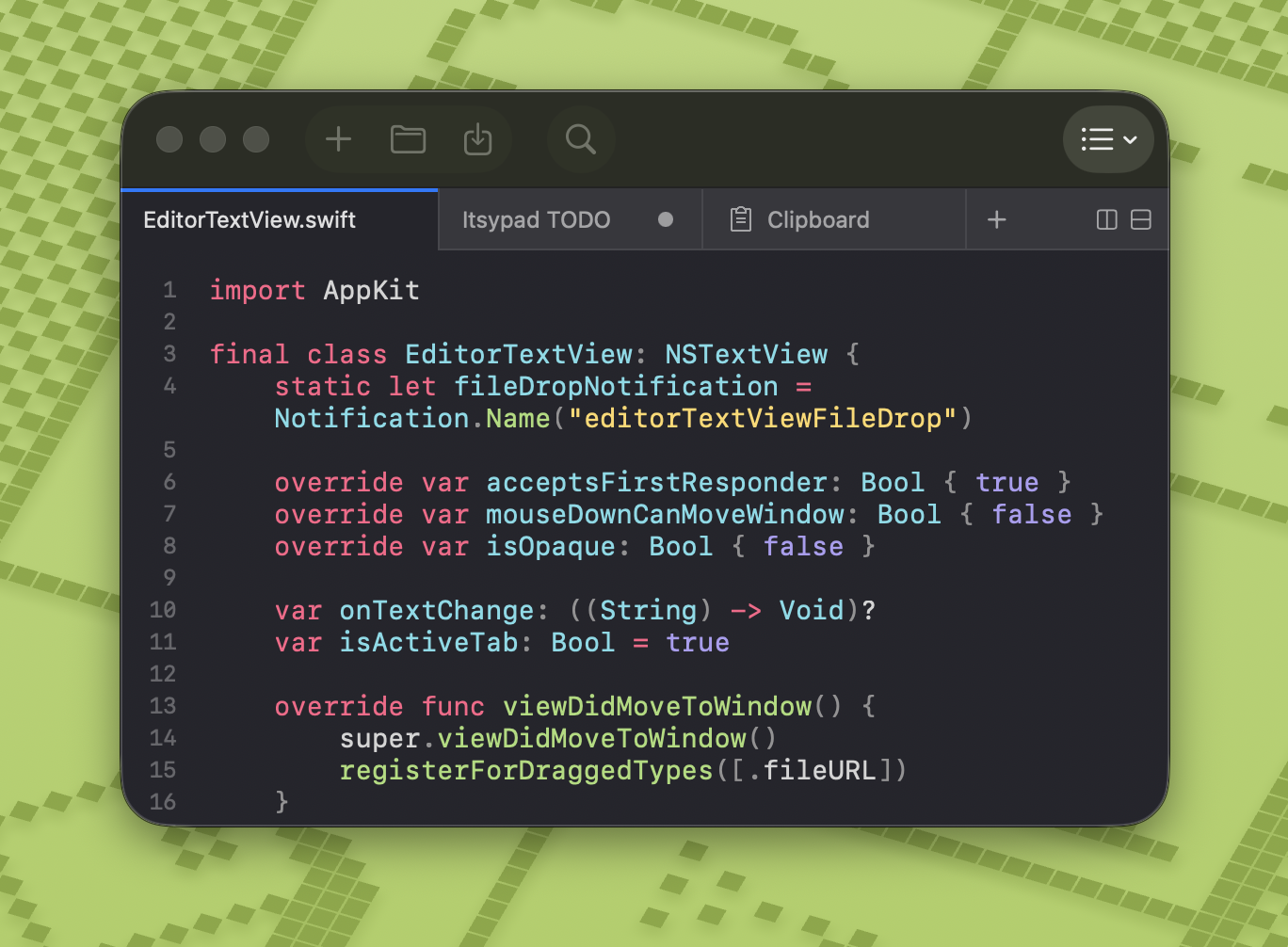
A tiny, fast scratchpad and clipboard manager for Mac. itsypad.app

❤️ If you enjoy Itsypad, grab the App Store version to support development and get automatic updates. You can also download the DMG from GitHub releases or install via Homebrew.
Features
- Text editor — syntax highlighting, multi-tab, split view, find and replace, clickable links, lists and checklists
- Clipboard manager — 1,000-item history, searchable, keyboard navigable, grid or panels layout, iCloud sync (text entries)
- Global hotkeys — tap left ⌥ three times to show/hide, or define your own hotkey
- Lightweight — nearly zero CPU and memory usage
- No AI, no telemetry — your data stays on your machine
- Menu bar icon — show or hide in menu bar
- Dock icon — show or hide in Dock, as you prefer
- Open at login — optional auto-start
- iCloud sync — sync scratch tabs and clipboard history (text only) across Macs via iCloud
- 12 languages — English, Spanish, French, German, Russian, Japanese, Simplified Chinese, Traditional Chinese, Korean, Portuguese (Brazil), Italian, Polish
Editor
- Multi-tab and split view — work on multiple files/notes at once, drag to reorder, pin tabs to keep them visible (tab bar by Bonsplit)
- Syntax highlighting — 185+ languages via highlight.js, with automatic language detection
- Find and replace — built-in find bar with next/previous match and use selection for find
- Session persistence — all tabs, content, and cursor positions are preserved across restarts
- Auto-save — content is continuously saved to session, never lose your work
- Markdown preview — side-by-side rendered preview for
.mdtabs (⇧⌘P), live-updates as you type, themed code blocks, local images - Clickable links — URLs in plain text and markdown tabs are highlighted and underlined; click to open in browser
- Always on top — pin the window above all other apps (⇧⌘T)
- Syntax themes — 9 curated themes (Atom One, Catppuccin, GitHub, Gruvbox, IntelliJ / Darcula, Itsypad, Stack Overflow, Tokyo Night, Visual Studio) with dark and light variants
Lists and checklists
Itsypad supports markdown-compatible lists and checklists directly in the editor. All state lives in the text itself — no hidden metadata, fully portable.
Syntax
- bullet item
* also a bullet
1. numbered item
- [ ] unchecked task
- [x] completed task
How it works
Type a list prefix and start writing. Press Enter to auto-continue with the next item. Press Enter on an empty item to exit list mode. Use Tab / Shift+Tab to indent and outdent list items.
For checklists, press ⇧⌘L to convert any line(s) to a checklist, or type - [ ] manually. Toggle checkboxes with ⌘Return or by clicking directly on the [ ] / [x] brackets. Checked items appear with strikethrough and dimmed text.
Move lines up or down with ⌥⌘↑ / ⌥⌘↓. Wrapped list lines align to the content start, not the bullet.
Visual styling
| Element | Appearance |
|---|---|
Bullet dashes -, * | 🔴 Magenta/red (bulletDashColor) |
Ordered numbers 1. | 🔴 Magenta/red (bulletDashColor) |
Checkbox brackets [ ], [x] | 🟣 Purple |
| Checked item content | |
URLs https://... | 🔵 Blue underlined (linkColor) |
Clipboard manager
- Text and images — stores up to 1,000 clipboard entries
- Searchable — filter history with highlighted search matches
- Click to copy — click any entry to copy it back to clipboard (or paste directly — configurable in settings)
- Quick-access shortcuts — ⌘1–9 to copy the Nth item, ⌥1–9 to paste it into the previously active app
- Zoom preview — hover a tile and click the magnifying glass to view full content in a near-fullscreen overlay
- Keyboard navigation — arrow keys to browse items, Enter to copy, Space to preview/unpreview, Escape to deselect
- Grid or panels — switch between a multi-column grid and full-width panel rows
- Configurable cards — adjust preview line count and font size in settings
- Delete entries — remove individual items on hover
- Separate hotkey — assign a dedicated global hotkey to show/hide
- iCloud sync — text entries sync across devices alongside scratch tabs (up to 200 most recent)
Also on iPhone & iPad
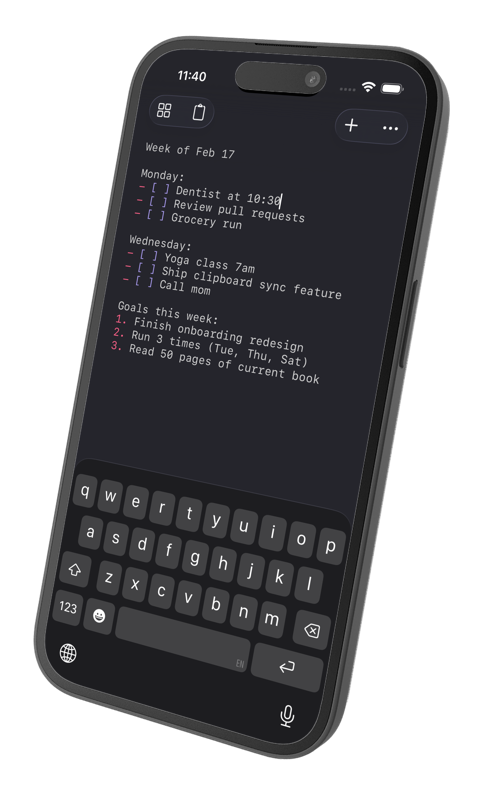
Itsypad is also on iPhone and iPad. Scratch tabs and clipboard history (text) sync across all your devices over iCloud.
Licensing in short: the Mac app is free and open source (MIT) via Homebrew or GitHub. The App Store version is a single one-time purchase that runs on iPhone, iPad and Mac, and supports development – no subscription.

Install
brew install --cask itsypad
Or download the latest DMG from GitHub releases.
Keyboard shortcuts
| Shortcut | Action |
|---|---|
| ⌘T / ⌘N | New tab |
| ⌘W | Close tab |
| ⌘O | Open file |
| ⌘S | Save |
| ⇧⌘S | Save as |
| ⌃Tab | Next tab |
| ⇧⌃Tab | Previous tab |
| ⌘F | Find |
| ⌥⌘F | Find and replace |
| ⌘G | Find next |
| ⇧⌘G | Find previous |
| ⌘E | Use selection for find |
| ⌘D | Duplicate line |
| ⌘Return | Toggle checkbox |
| ⇧⌘L | Toggle checklist |
| ⌥⌘↑ | Move line up |
| ⌥⌘↓ | Move line down |
| ⌘1–9 | Switch to tab by position |
| ⇧⌘T | Always on top |
| ⇧⌘D | Split right |
| ⇧⌃⌘D | Split down |
| ⌘+ | Increase font size |
| ⌘- | Decrease font size |
| ⌘0 | Reset font size |
| Tab | Indent line/selection |
| ⇧Tab | Unindent line/selection |
| Fn↓ / Fn↑ | Page down / up (moves cursor) |
Clipboard
| Shortcut | Action |
|---|---|
| ↓ | Move focus from search to first item |
| ↑↓←→ | Navigate between items |
| Return | Copy selected item (or paste — see settings) |
| Space | Toggle preview overlay |
| Escape | Deselect item / close preview |
| ⌘1–9 | Copy Nth visible item to clipboard |
| ⌥1–9 | Copy Nth item and paste into active app |
Also by me
If you like Itsypad, check out my other macOS apps - same philosophy of native, lightweight, no-bloat design.
Itsyhome – control your entire smart home from the macOS menu bar. Cameras, lights, thermostats, locks, scenes, and 18+ HomeKit device types. Global keyboard shortcuts, Stream Deck support, deeplinks, and webhooks for power users. Open source.
Itsytv – the missing Apple TV remote for macOS. Full D-pad and playback controls, now-playing widget, app launcher, text input, and multi-device support. Open source.
Distribution
Itsypad ships in two variants from the same codebase: a direct/DMG version (downloaded from GitHub/Homebrew) and an App Store version. The differences are minimal but important to understand.
Schemes and configs
| Scheme | Configs | Entitlements | Use |
|---|---|---|---|
itsypad | Debug / Release | itsypad-direct.entitlements | Direct/DMG distribution |
itsypad-appstore | Debug-AppStore / Release-AppStore | itsypad.entitlements | App Store distribution |
App Store configs set the APPSTORE Swift compilation condition, used to hide features that aren't allowed in the App Store (e.g. the update checker).
Entitlements
Both entitlements files are sandboxed and share the same capabilities:
| Entitlement | Direct | App Store |
|---|---|---|
app-sandbox | yes | yes |
files.user-selected.read-write | yes | yes |
files.bookmarks.app-scope | yes | yes |
cs.allow-unsigned-executable-memory | yes (highlight.js JSContext) | yes |
network.client | yes (update checker) | no |
ubiquity-kvstore-identifier | yes (legacy, unused) | yes (legacy, unused) |
icloud-container-identifiers | iCloud.com.nickustinov.itsypad | same |
icloud-container-environment | Production | same |
icloud-services | CloudKit | same |
The only real difference is network.client – the direct version needs it for checking GitHub releases. The App Store version doesn't need it because App Store handles updates.
Both versions use the same CloudKit container (iCloud.com.nickustinov.itsypad) and sync with each other.
Signing
- Direct/DMG: Signed with "Developer ID Application" certificate and a Developer ID provisioning profile. The build script (
scripts/build-release.sh) archives unsigned, embeds the profile, then manually signs with resolved entitlements (Xcode variables like$(TeamIdentifierPrefix)are expanded to literal values). - App Store: Signed automatically by Xcode with the App Store provisioning profile. Uploaded via Xcode Organizer or
xcodebuild -exportArchive.
iCloud sync
Both versions use CloudKit via CKSyncEngine for syncing scratch tabs and clipboard history. The CloudSyncEngine singleton manages the sync lifecycle. See the record schema and sync flow in the iOS migration docs.
Architecture
Sources/
├── App/
│   ├── AppDelegate.swift                # Menu bar, toolbar, window, and panel setup
│   ├── BonsplitRootView.swift           # SwiftUI root view rendering editor and clipboard tabs
│   ├── CloudSyncEngine.swift            # CloudKit sync via CKSyncEngine for tabs and clipboard
│   ├── G2SyncEngine.swift              # Even Realities G2 glasses sync (Labs)
│   ├── KVSMigration.swift              # Legacy iCloud KVS data migration
│   ├── Launch.swift                     # App entry point
│   ├── MenuBuilder.swift                # Main menu bar construction
│   ├── Models.swift                     # ShortcutKeys and shared data types
│   ├── TabStore.swift                   # Tab data model with persistence
│   └── UpdateChecker.swift              # GitHub release check for new versions
├── Editor/
│   ├── EditorContentView.swift          # NSViewRepresentable wrapping text view, scroll view, and gutter
│   ├── EditorCoordinator.swift          # Tab/pane orchestrator bridging TabStore and Bonsplit
│   ├── EditorStateFactory.swift         # Editor state creation and theme application
│   ├── EditorTextView.swift             # NSTextView subclass with editing helpers and file drops
│   ├── EditorTheme.swift                # Dark/light color palettes with CSS-derived theme cache
│   ├── FileWatcher.swift                # DispatchSource-based file change monitoring
│   ├── HighlightJS.swift                # JSContext wrapper for highlight.js with CSS/HTML parsing
│   ├── LanguageDetector.swift           # File extension → language mapping for highlight.js
│   ├── LayoutSerializer.swift           # Split layout capture and restore for session persistence
│   ├── LineNumberGutterView.swift       # Line number gutter drawn alongside the text view
│   ├── ListHelper.swift                 # List/checklist parsing, continuation, and toggling
│   ├── MarkdownPreviewManager.swift     # Markdown preview lifecycle and toolbar integration
│   ├── MarkdownPreviewView.swift        # WKWebView wrapper for rendered markdown preview
│   ├── MarkdownRenderer.swift           # Markdown-to-HTML via marked.js + highlight.js in JSContext
│   ├── SessionRestorer.swift            # Session restore logic for tabs and editor state
│   ├── SyntaxHighlightCoordinator.swift # Syntax highlighting coordinator using HighlightJS
│   └── SyntaxThemeRegistry.swift        # Curated syntax theme definitions with dark/light CSS mapping
├── Clipboard/
│   ├── ClipboardStore.swift             # Clipboard monitoring, history persistence, and CloudKit sync
│   ├── ClipboardContentView.swift       # NSCollectionView grid with search, keyboard nav, and layout
│   ├── ClipboardCollectionView.swift    # NSCollectionView subclass with key event delegation
│   ├── ClipboardCardItem.swift          # NSCollectionViewItem wrapper for card views
│   ├── ClipboardCardView.swift          # Individual clipboard card with preview, delete, and zoom
│   ├── ClipboardPreviewOverlay.swift    # Near-fullscreen zoom preview overlay
│   ├── ClipboardTabView.swift           # NSViewRepresentable wrapper for ClipboardContentView
│   ├── CardTextField.swift              # Non-interactive text field (suppresses I-beam cursor)
│   └── AccessibilityHelper.swift        # Accessibility check and CGEvent paste simulation
├── Settings/
│   ├── SettingsStore.swift              # UserDefaults-backed settings with change notifications
│   ├── SettingsView.swift               # SwiftUI settings window (general, editor, appearance, clipboard)
│   └── ShortcutRecorder.swift           # SwiftUI hotkey recorder control
├── Hotkey/
│   ├── HotkeyManager.swift              # Global hotkeys and triple-tap modifier detection
│   └── ModifierKeyDetection.swift       # Left/right modifier key identification from key codes
├── Resources/
│   ├── Assets.xcassets                  # App icon and custom images
│   └── Localizable.xcstrings           # String catalog for 12 languages
├── Info.plist                           # Bundle metadata and document types
├── itsypad.entitlements                 # App Store entitlements (sandbox, CloudKit, iCloud)
└── itsypad-direct.entitlements          # Direct/DMG entitlements (adds network.client for update checker)
Executable/
└── main.swift                           # Executable target entry point
Packages/
└── Bonsplit/                            # Local package: split pane and tab bar framework
Tests/
├── AutoDetectTests.swift
├── ClipboardShortcutTests.swift
├── ClipboardStoreTests.swift
├── CloudSyncEngineTests.swift
├── EditorThemeTests.swift
├── FileWatcherTests.swift
├── HighlightJSTests.swift
├── KVSMigrationTests.swift
├── LanguageDetectorTests.swift
├── LineNumberGutterViewTests.swift
├── ListHelperTests.swift
├── MarkdownPreviewManagerTests.swift
├── MarkdownRendererTests.swift
├── ModifierKeyDetectionTests.swift
├── SettingsStoreTests.swift
├── ShortcutKeysTests.swift
├── SyntaxThemeRegistryTests.swift
└── TabStoreTests.swift
scripts/
└── build-release.sh                    # Build, sign, and package DMG for direct distribution
Requirements
- macOS 14 (Sonoma) or later
- Xcode 16.0 or later
- XcodeGen for Xcode project generation
Building
xcodegen generate
open itsypad.xcodeproj
Then build and run with ⌘R in Xcode. Tests run with ⌘U.
Releasing
Both versions
- Bump
MARKETING_VERSIONandCURRENT_PROJECT_VERSIONinproject.yml - Run
xcodegen generate
Direct/DMG release
- Build, sign, and package:
bash scripts/build-release.sh
This archives with the itsypad scheme (Release config), embeds the Developer ID provisioning profile, signs with itsypad-direct.entitlements, and creates a DMG.
- Notarize and staple:
xcrun notarytool submit dist/itsypad-<VERSION>.dmg \
    --apple-id <APPLE_ID> --team-id <TEAM_ID> \
    --password <APP_SPECIFIC_PASSWORD> --wait
xcrun stapler staple dist/itsypad-<VERSION>.dmg
- Create the GitHub release:
gh release create v<VERSION> dist/itsypad-<VERSION>.dmg \
    --title "v<VERSION>" --notes "Release notes here"
git fetch --tags
The Homebrew cask is updated automatically – BrewTestBot picks up the new GitHub release and opens a bump PR, usually within a day. To push the update out immediately instead: brew bump-cask-pr itsypad --version <VERSION>.
App Store release
- Archive with the
itsypad-appstorescheme (Release-AppStoreconfig) in Xcode - Upload to App Store Connect via Xcode Organizer
- Submit for review in App Store Connect
Localization
Itsypad uses a Swift String Catalog (Sources/Resources/Localizable.xcstrings) for localization. Translations are edited directly in the xcstrings file.
Languages: English (base), Spanish, French, German, Russian, Japanese, Simplified Chinese, Traditional Chinese, Korean, Portuguese (Brazil), Italian, Polish.
Adding new strings
All user-facing strings use String(localized:defaultValue:) with a structured key:
// SwiftUI
Toggle(String(localized: "settings.general.show_in_menu_bar", defaultValue: "Show in menu bar"), isOn: $store.showInMenuBar)
Section(String(localized: "settings.editor.spacing", defaultValue: "Spacing")) { ... }

// AppKit
NSMenuItem(title: String(localized: "menu.file.new_tab", defaultValue: "New tab"), ...)
alert.messageText = String(localized: "alert.save_changes.title", defaultValue: "Do you want to save changes to \"\(name)\"?")
Key naming convention
Keys use dot-separated structured names: {area}.{context}.{name}
| Area | Example keys |
|---|---|
menu.* | menu.file.new_tab, menu.edit.copy, menu.view.always_on_top |
alert.* | alert.save_changes.title, alert.file_changed.reload |
settings.* | settings.general.title, settings.editor.font_size |
toolbar.* | toolbar.settings.label, toolbar.clipboard.tooltip |
clipboard.* | clipboard.empty_state, clipboard.search_placeholder |
tab.* | tab.context.copy_path, tab.context.pin |
time.* | time.just_now, time.minutes_ago |
accessibility.* | accessibility.alert.title |
update.* | update.available.message |
Workflow after adding new strings
- Build the project – Xcode auto-populates new keys in
Localizable.xcstrings - Add translations for all languages directly in
Localizable.xcstrings - Build and verify
License
MIT — see LICENSE.
Contributors


Similar repos


Languages
Swift
99.4%
A tiny, fast scratchpad and clipboard manager for Mac
See the codeREADME
Itsypad
A tiny, fast scratchpad and clipboard manager for Mac. itsypad.app
❤️ If you enjoy Itsypad, grab the App Store version to support development and get automatic updates. You can also download the DMG from GitHub releases or install via Homebrew.
Features
- Text editor — syntax highlighting, multi-tab, split view, find and replace, clickable links, lists and checklists
- Clipboard manager — 1,000-item history, searchable, keyboard navigable, grid or panels layout, iCloud sync (text entries)
- Global hotkeys — tap left ⌥ three times to show/hide, or define your own hotkey
- Lightweight — nearly zero CPU and memory usage
- No AI, no telemetry — your data stays on your machine
- Menu bar icon — show or hide in menu bar
- Dock icon — show or hide in Dock, as you prefer
- Open at login — optional auto-start
- iCloud sync — sync scratch tabs and clipboard history (text only) across Macs via iCloud
- 12 languages — English, Spanish, French, German, Russian, Japanese, Simplified Chinese, Traditional Chinese, Korean, Portuguese (Brazil), Italian, Polish
Editor
- Multi-tab and split view — work on multiple files/notes at once, drag to reorder, pin tabs to keep them visible (tab bar by Bonsplit)
- Syntax highlighting — 185+ languages via highlight.js, with automatic language detection
- Find and replace — built-in find bar with next/previous match and use selection for find
- Session persistence — all tabs, content, and cursor positions are preserved across restarts
- Auto-save — content is continuously saved to session, never lose your work
- Markdown preview — side-by-side rendered preview for
.mdtabs (⇧⌘P), live-updates as you type, themed code blocks, local images - Clickable links — URLs in plain text and markdown tabs are highlighted and underlined; click to open in browser
- Always on top — pin the window above all other apps (⇧⌘T)
- Syntax themes — 9 curated themes (Atom One, Catppuccin, GitHub, Gruvbox, IntelliJ / Darcula, Itsypad, Stack Overflow, Tokyo Night, Visual Studio) with dark and light variants
Lists and checklists
Itsypad supports markdown-compatible lists and checklists directly in the editor. All state lives in the text itself — no hidden metadata, fully portable.
Syntax
- bullet item
* also a bullet
1. numbered item
- [ ] unchecked task
- [x] completed task
How it works
Type a list prefix and start writing. Press Enter to auto-continue with the next item. Press Enter on an empty item to exit list mode. Use Tab / Shift+Tab to indent and outdent list items.
For checklists, press ⇧⌘L to convert any line(s) to a checklist, or type - [ ] manually. Toggle checkboxes with ⌘Return or by clicking directly on the [ ] / [x] brackets. Checked items appear with strikethrough and dimmed text.
Move lines up or down with ⌥⌘↑ / ⌥⌘↓. Wrapped list lines align to the content start, not the bullet.
Visual styling
| Element | Appearance |
|---|---|
Bullet dashes -, * | 🔴 Magenta/red (bulletDashColor) |
Ordered numbers 1. | 🔴 Magenta/red (bulletDashColor) |
Checkbox brackets [ ], [x] | 🟣 Purple |
| Checked item content | |
URLs https://... | 🔵 Blue underlined (linkColor) |
Clipboard manager
- Text and images — stores up to 1,000 clipboard entries
- Searchable — filter history with highlighted search matches
- Click to copy — click any entry to copy it back to clipboard (or paste directly — configurable in settings)
- Quick-access shortcuts — ⌘1–9 to copy the Nth item, ⌥1–9 to paste it into the previously active app
- Zoom preview — hover a tile and click the magnifying glass to view full content in a near-fullscreen overlay
- Keyboard navigation — arrow keys to browse items, Enter to copy, Space to preview/unpreview, Escape to deselect
- Grid or panels — switch between a multi-column grid and full-width panel rows
- Configurable cards — adjust preview line count and font size in settings
- Delete entries — remove individual items on hover
- Separate hotkey — assign a dedicated global hotkey to show/hide
- iCloud sync — text entries sync across devices alongside scratch tabs (up to 200 most recent)
Also on iPhone & iPad
Itsypad is also on iPhone and iPad. Scratch tabs and clipboard history (text) sync across all your devices over iCloud.
Licensing in short: the Mac app is free and open source (MIT) via Homebrew or GitHub. The App Store version is a single one-time purchase that runs on iPhone, iPad and Mac, and supports development – no subscription.
Install
brew install --cask itsypad
Or download the latest DMG from GitHub releases.
Keyboard shortcuts
| Shortcut | Action |
|---|---|
| ⌘T / ⌘N | New tab |
| ⌘W | Close tab |
| ⌘O | Open file |
| ⌘S | Save |
| ⇧⌘S | Save as |
| ⌃Tab | Next tab |
| ⇧⌃Tab | Previous tab |
| ⌘F | Find |
| ⌥⌘F | Find and replace |
| ⌘G | Find next |
| ⇧⌘G | Find previous |
| ⌘E | Use selection for find |
| ⌘D | Duplicate line |
| ⌘Return | Toggle checkbox |
| ⇧⌘L | Toggle checklist |
| ⌥⌘↑ | Move line up |
| ⌥⌘↓ | Move line down |
| ⌘1–9 | Switch to tab by position |
| ⇧⌘T | Always on top |
| ⇧⌘D | Split right |
| ⇧⌃⌘D | Split down |
| ⌘+ | Increase font size |
| ⌘- | Decrease font size |
| ⌘0 | Reset font size |
| Tab | Indent line/selection |
| ⇧Tab | Unindent line/selection |
| Fn↓ / Fn↑ | Page down / up (moves cursor) |
Clipboard
| Shortcut | Action |
|---|---|
| ↓ | Move focus from search to first item |
| ↑↓←→ | Navigate between items |
| Return | Copy selected item (or paste — see settings) |
| Space | Toggle preview overlay |
| Escape | Deselect item / close preview |
| ⌘1–9 | Copy Nth visible item to clipboard |
| ⌥1–9 | Copy Nth item and paste into active app |
Also by me
If you like Itsypad, check out my other macOS apps - same philosophy of native, lightweight, no-bloat design.
Itsyhome – control your entire smart home from the macOS menu bar. Cameras, lights, thermostats, locks, scenes, and 18+ HomeKit device types. Global keyboard shortcuts, Stream Deck support, deeplinks, and webhooks for power users. Open source.
Itsytv – the missing Apple TV remote for macOS. Full D-pad and playback controls, now-playing widget, app launcher, text input, and multi-device support. Open source.
Distribution
Itsypad ships in two variants from the same codebase: a direct/DMG version (downloaded from GitHub/Homebrew) and an App Store version. The differences are minimal but important to understand.
Schemes and configs
| Scheme | Configs | Entitlements | Use |
|---|---|---|---|
itsypad | Debug / Release | itsypad-direct.entitlements | Direct/DMG distribution |
itsypad-appstore | Debug-AppStore / Release-AppStore | itsypad.entitlements | App Store distribution |
App Store configs set the APPSTORE Swift compilation condition, used to hide features that aren't allowed in the App Store (e.g. the update checker).
Entitlements
Both entitlements files are sandboxed and share the same capabilities:
| Entitlement | Direct | App Store |
|---|---|---|
app-sandbox | yes | yes |
files.user-selected.read-write | yes | yes |
files.bookmarks.app-scope | yes | yes |
cs.allow-unsigned-executable-memory | yes (highlight.js JSContext) | yes |
network.client | yes (update checker) | no |
ubiquity-kvstore-identifier | yes (legacy, unused) | yes (legacy, unused) |
icloud-container-identifiers | iCloud.com.nickustinov.itsypad | same |
icloud-container-environment | Production | same |
icloud-services | CloudKit | same |
The only real difference is network.client – the direct version needs it for checking GitHub releases. The App Store version doesn't need it because App Store handles updates.
Both versions use the same CloudKit container (iCloud.com.nickustinov.itsypad) and sync with each other.
Signing
- Direct/DMG: Signed with "Developer ID Application" certificate and a Developer ID provisioning profile. The build script (
scripts/build-release.sh) archives unsigned, embeds the profile, then manually signs with resolved entitlements (Xcode variables like$(TeamIdentifierPrefix)are expanded to literal values). - App Store: Signed automatically by Xcode with the App Store provisioning profile. Uploaded via Xcode Organizer or
xcodebuild -exportArchive.
iCloud sync
Both versions use CloudKit via CKSyncEngine for syncing scratch tabs and clipboard history. The CloudSyncEngine singleton manages the sync lifecycle. See the record schema and sync flow in the iOS migration docs.
Architecture
Sources/
├── App/
│   ├── AppDelegate.swift                # Menu bar, toolbar, window, and panel setup
│   ├── BonsplitRootView.swift           # SwiftUI root view rendering editor and clipboard tabs
│   ├── CloudSyncEngine.swift            # CloudKit sync via CKSyncEngine for tabs and clipboard
│   ├── G2SyncEngine.swift              # Even Realities G2 glasses sync (Labs)
│   ├── KVSMigration.swift              # Legacy iCloud KVS data migration
│   ├── Launch.swift                     # App entry point
│   ├── MenuBuilder.swift                # Main menu bar construction
│   ├── Models.swift                     # ShortcutKeys and shared data types
│   ├── TabStore.swift                   # Tab data model with persistence
│   └── UpdateChecker.swift              # GitHub release check for new versions
├── Editor/
│   ├── EditorContentView.swift          # NSViewRepresentable wrapping text view, scroll view, and gutter
│   ├── EditorCoordinator.swift          # Tab/pane orchestrator bridging TabStore and Bonsplit
│   ├── EditorStateFactory.swift         # Editor state creation and theme application
│   ├── EditorTextView.swift             # NSTextView subclass with editing helpers and file drops
│   ├── EditorTheme.swift                # Dark/light color palettes with CSS-derived theme cache
│   ├── FileWatcher.swift                # DispatchSource-based file change monitoring
│   ├── HighlightJS.swift                # JSContext wrapper for highlight.js with CSS/HTML parsing
│   ├── LanguageDetector.swift           # File extension → language mapping for highlight.js
│   ├── LayoutSerializer.swift           # Split layout capture and restore for session persistence
│   ├── LineNumberGutterView.swift       # Line number gutter drawn alongside the text view
│   ├── ListHelper.swift                 # List/checklist parsing, continuation, and toggling
│   ├── MarkdownPreviewManager.swift     # Markdown preview lifecycle and toolbar integration
│   ├── MarkdownPreviewView.swift        # WKWebView wrapper for rendered markdown preview
│   ├── MarkdownRenderer.swift           # Markdown-to-HTML via marked.js + highlight.js in JSContext
│   ├── SessionRestorer.swift            # Session restore logic for tabs and editor state
│   ├── SyntaxHighlightCoordinator.swift # Syntax highlighting coordinator using HighlightJS
│   └── SyntaxThemeRegistry.swift        # Curated syntax theme definitions with dark/light CSS mapping
├── Clipboard/
│   ├── ClipboardStore.swift             # Clipboard monitoring, history persistence, and CloudKit sync
│   ├── ClipboardContentView.swift       # NSCollectionView grid with search, keyboard nav, and layout
│   ├── ClipboardCollectionView.swift    # NSCollectionView subclass with key event delegation
│   ├── ClipboardCardItem.swift          # NSCollectionViewItem wrapper for card views
│   ├── ClipboardCardView.swift          # Individual clipboard card with preview, delete, and zoom
│   ├── ClipboardPreviewOverlay.swift    # Near-fullscreen zoom preview overlay
│   ├── ClipboardTabView.swift           # NSViewRepresentable wrapper for ClipboardContentView
│   ├── CardTextField.swift              # Non-interactive text field (suppresses I-beam cursor)
│   └── AccessibilityHelper.swift        # Accessibility check and CGEvent paste simulation
├── Settings/
│   ├── SettingsStore.swift              # UserDefaults-backed settings with change notifications
│   ├── SettingsView.swift               # SwiftUI settings window (general, editor, appearance, clipboard)
│   └── ShortcutRecorder.swift           # SwiftUI hotkey recorder control
├── Hotkey/
│   ├── HotkeyManager.swift              # Global hotkeys and triple-tap modifier detection
│   └── ModifierKeyDetection.swift       # Left/right modifier key identification from key codes
├── Resources/
│   ├── Assets.xcassets                  # App icon and custom images
│   └── Localizable.xcstrings           # String catalog for 12 languages
├── Info.plist                           # Bundle metadata and document types
├── itsypad.entitlements                 # App Store entitlements (sandbox, CloudKit, iCloud)
└── itsypad-direct.entitlements          # Direct/DMG entitlements (adds network.client for update checker)
Executable/
└── main.swift                           # Executable target entry point
Packages/
└── Bonsplit/                            # Local package: split pane and tab bar framework
Tests/
├── AutoDetectTests.swift
├── ClipboardShortcutTests.swift
├── ClipboardStoreTests.swift
├── CloudSyncEngineTests.swift
├── EditorThemeTests.swift
├── FileWatcherTests.swift
├── HighlightJSTests.swift
├── KVSMigrationTests.swift
├── LanguageDetectorTests.swift
├── LineNumberGutterViewTests.swift
├── ListHelperTests.swift
├── MarkdownPreviewManagerTests.swift
├── MarkdownRendererTests.swift
├── ModifierKeyDetectionTests.swift
├── SettingsStoreTests.swift
├── ShortcutKeysTests.swift
├── SyntaxThemeRegistryTests.swift
└── TabStoreTests.swift
scripts/
└── build-release.sh                    # Build, sign, and package DMG for direct distribution
Requirements
- macOS 14 (Sonoma) or later
- Xcode 16.0 or later
- XcodeGen for Xcode project generation
Building
xcodegen generate
open itsypad.xcodeproj
Then build and run with ⌘R in Xcode. Tests run with ⌘U.
Releasing
Both versions
- Bump
MARKETING_VERSIONandCURRENT_PROJECT_VERSIONinproject.yml - Run
xcodegen generate
Direct/DMG release
- Build, sign, and package:
bash scripts/build-release.sh
This archives with the itsypad scheme (Release config), embeds the Developer ID provisioning profile, signs with itsypad-direct.entitlements, and creates a DMG.
- Notarize and staple:
xcrun notarytool submit dist/itsypad-<VERSION>.dmg \
    --apple-id <APPLE_ID> --team-id <TEAM_ID> \
    --password <APP_SPECIFIC_PASSWORD> --wait
xcrun stapler staple dist/itsypad-<VERSION>.dmg
- Create the GitHub release:
gh release create v<VERSION> dist/itsypad-<VERSION>.dmg \
    --title "v<VERSION>" --notes "Release notes here"
git fetch --tags
The Homebrew cask is updated automatically – BrewTestBot picks up the new GitHub release and opens a bump PR, usually within a day. To push the update out immediately instead: brew bump-cask-pr itsypad --version <VERSION>.
App Store release
- Archive with the
itsypad-appstorescheme (Release-AppStoreconfig) in Xcode - Upload to App Store Connect via Xcode Organizer
- Submit for review in App Store Connect
Localization
Itsypad uses a Swift String Catalog (Sources/Resources/Localizable.xcstrings) for localization. Translations are edited directly in the xcstrings file.
Languages: English (base), Spanish, French, German, Russian, Japanese, Simplified Chinese, Traditional Chinese, Korean, Portuguese (Brazil), Italian, Polish.
Adding new strings
All user-facing strings use String(localized:defaultValue:) with a structured key:
// SwiftUI
Toggle(String(localized: "settings.general.show_in_menu_bar", defaultValue: "Show in menu bar"), isOn: $store.showInMenuBar)
Section(String(localized: "settings.editor.spacing", defaultValue: "Spacing")) { ... }

// AppKit
NSMenuItem(title: String(localized: "menu.file.new_tab", defaultValue: "New tab"), ...)
alert.messageText = String(localized: "alert.save_changes.title", defaultValue: "Do you want to save changes to \"\(name)\"?")
Key naming convention
Keys use dot-separated structured names: {area}.{context}.{name}
| Area | Example keys |
|---|---|
menu.* | menu.file.new_tab, menu.edit.copy, menu.view.always_on_top |
alert.* | alert.save_changes.title, alert.file_changed.reload |
settings.* | settings.general.title, settings.editor.font_size |
toolbar.* | toolbar.settings.label, toolbar.clipboard.tooltip |
clipboard.* | clipboard.empty_state, clipboard.search_placeholder |
tab.* | tab.context.copy_path, tab.context.pin |
time.* | time.just_now, time.minutes_ago |
accessibility.* | accessibility.alert.title |
update.* | update.available.message |
Workflow after adding new strings
- Build the project – Xcode auto-populates new keys in
Localizable.xcstrings - Add translations for all languages directly in
Localizable.xcstrings - Build and verify
License
MIT — see LICENSE.
Similar repos
Contributors
Languages
Swift
99.4%