
Multi-Threaded FP32 Matrix Multiplication on x86 CPUs
See the codeREADME
Advanced GEMM Optimization on Modern Multi-Core x86 Processors
Important note: in the current implementation, the multithreading strategy, number of threads and tile sizes have been specifically optimized for AMD Ryzen 7 9700X and Intel Core Ultra 265 processors to achieve maximum performance. Depending on your CPU, you may need to fine-tune these parameters and choose an alternative parallelization strategy for optimal performance. More details can be found in the tutorial. For instance, on many-core server processors, it’s recommended to use nested parallelism and to parallelize multiple loops around the micro-kernel.
Key Features
- Performance comparable to modern BLAS libraries
- Simple and compact implementation in C, no assembly code
- Step by step, beginner-friendly tutorial
- Multithreading via OpenMP
- High-level design follows BLIS
Prerequisites
Install the following packages via apt if you are using a Debian-based Linux distribution
sudo apt-get install cmake build-essential gnuplot libomp-dev
Performance
Test environment:
- CPUs: AMD Ryzen 7 9700X @ 90W, Intel Core Ultra 265 @ 90W
- RAM: DDR5 7000 MHz CL36
- Compiler: GCC 13.3.0
- OS: Ubuntu Ubuntu 24.04.1 LTS
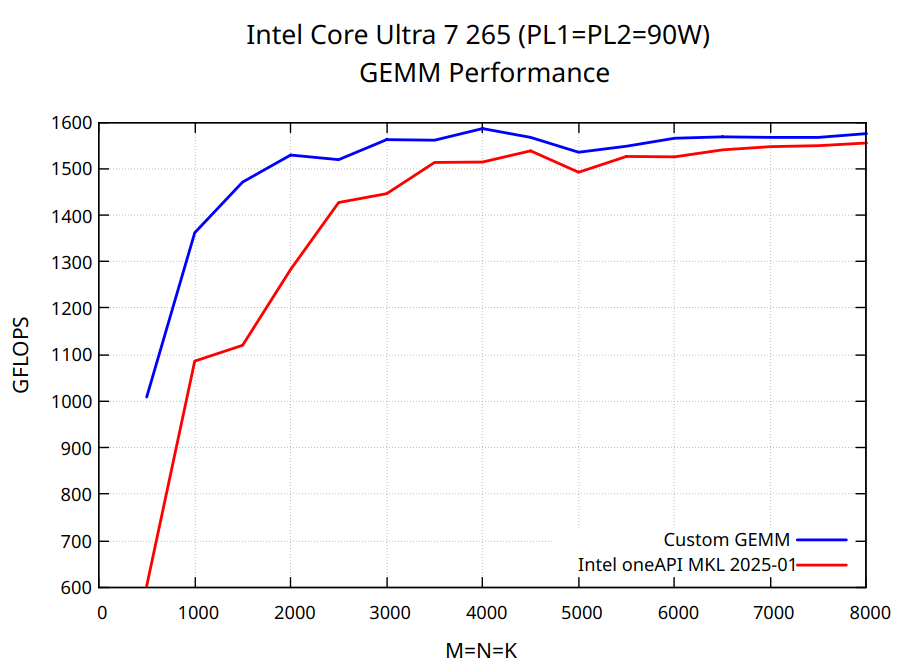
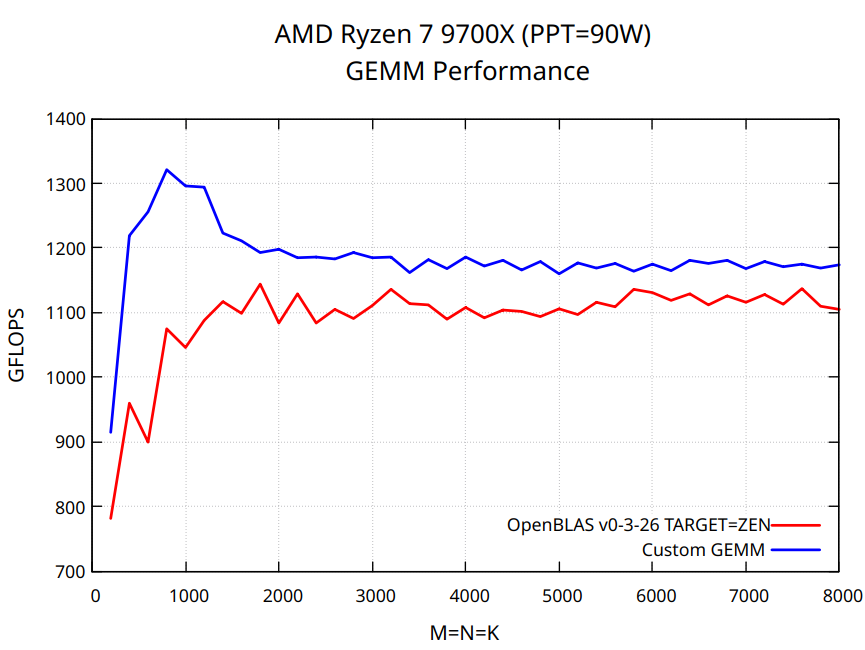
To benchmark the implementation, run the following script:
bash scripts/benchmark.sh NTHREADS OMP_SCHEDULE
Replace NTHREADS with the number of CPU cores (or CPU threads if your CPU supports hyper-threading). The variable OMP_SCHEDULE controls how loop iterations are distributed across threads aka load balancing. For Intel Core processors with P and E cores, use OMP_SCHEDULE=dynamic. For AMD processors, either OMP_SCHEDULE=auto or OMP_SCHEDULE=static typically yields better results. For example, on an Intel Core Ultra 265 use the following command:
bash scripts/benchmark.sh 20 dynamic
For optimal performance fine-tune the tile sizes MC, NC, KC in src/matmul.c. The benchmark parameters such as MINSIZE, STEPSIZE, NPTS and etc. can be adjusted in scripts/benchmark.sh.
Tests
bash scripts/test.sh NTHREADS OMP_SCHEDULE
Contributors

22 commits
Similar repos


Languages
C
97.9%
Python
1.3%
Multi-Threaded FP32 Matrix Multiplication on x86 CPUs
See the codeREADME
Advanced GEMM Optimization on Modern Multi-Core x86 Processors
Important note: in the current implementation, the multithreading strategy, number of threads and tile sizes have been specifically optimized for AMD Ryzen 7 9700X and Intel Core Ultra 265 processors to achieve maximum performance. Depending on your CPU, you may need to fine-tune these parameters and choose an alternative parallelization strategy for optimal performance. More details can be found in the tutorial. For instance, on many-core server processors, it’s recommended to use nested parallelism and to parallelize multiple loops around the micro-kernel.
Key Features
- Performance comparable to modern BLAS libraries
- Simple and compact implementation in C, no assembly code
- Step by step, beginner-friendly tutorial
- Multithreading via OpenMP
- High-level design follows BLIS
Prerequisites
Install the following packages via apt if you are using a Debian-based Linux distribution
sudo apt-get install cmake build-essential gnuplot libomp-dev
Performance
Test environment:
- CPUs: AMD Ryzen 7 9700X @ 90W, Intel Core Ultra 265 @ 90W
- RAM: DDR5 7000 MHz CL36
- Compiler: GCC 13.3.0
- OS: Ubuntu Ubuntu 24.04.1 LTS
To benchmark the implementation, run the following script:
bash scripts/benchmark.sh NTHREADS OMP_SCHEDULE
Replace NTHREADS with the number of CPU cores (or CPU threads if your CPU supports hyper-threading). The variable OMP_SCHEDULE controls how loop iterations are distributed across threads aka load balancing. For Intel Core processors with P and E cores, use OMP_SCHEDULE=dynamic. For AMD processors, either OMP_SCHEDULE=auto or OMP_SCHEDULE=static typically yields better results. For example, on an Intel Core Ultra 265 use the following command:
bash scripts/benchmark.sh 20 dynamic
For optimal performance fine-tune the tile sizes MC, NC, KC in src/matmul.c. The benchmark parameters such as MINSIZE, STEPSIZE, NPTS and etc. can be adjusted in scripts/benchmark.sh.
Tests
bash scripts/test.sh NTHREADS OMP_SCHEDULE
Similar repos
Contributors
22 commits
Languages
C
97.9%
Python
1.3%