
A reference implementation of Matrix Multiplication algorithms for ML on UPMEM PIM - a processing-in-memory platform
C
1
192 commits
updated Mar 9, 2026
README


PIM Matrix Multiplication Benchmarks
This project provides a reference implementation of matrix multiplication using Processing-In-Memory (PIM) capabilities of UPMEM DPUs. To that end it implements a matrix Tiling Schema and a host program to orchestrate the distributed computation across DPUs.
The project also includes a set of benchmarks and unit tests to validate the implementation, a CMake-based build system for easy compilation and integration, and a Docker Compose setup for consistent development and testing environments. One of the goals for the project is to be easily integrated into other CMake-based projects, so the library is designed to be modular and reusable.
Possible application domains for this project include deep learning, scientific computing, and any other domain that relies heavily on matrix operations. By leveraging the computational capabilities of DPUs, this project aims to provide significant performance improvements for matrix multiplication tasks, which are fundamental to many applications in these domains.
It could be used to serve as a backend for higher-level libraries or frameworks such as TensorFlow or PyTorch that require efficient matrix multiplication, or as a standalone library for applications that need to perform large-scale matrix operations.
It is important to note that this project is a reference implementation and may not be optimized for all use cases. Future work could include further optimizations, support for additional matrix operations, and integration with other libraries and frameworks.
While the raw performance of this implementation does not match the performance of highly optimized GPU-based libraries, it serves as a starting point for exploring the potential of PIM for matrix multiplication and provides a foundation for future optimizations and improvements. This project focuses on demonstrating the scaling potential of PIM for matrix multiplication, and the performance results should be interpreted in that context. The goal is to show how performance can improve as we scale up the number of DPUs, rather than achieving the highest possible performance on a single DPU or a small number of DPUs.
It can be used as a reference for researchers and developers interested in exploring the potential of PIM for matrix multiplication, and as a starting point for further optimizations and improvements in this area.
Table of Contents
- Architecture Overview
- Prerequisites
- Getting Started
- Integration Guide
- Documentation
- Roadmap
- Acknowledgements
Architecture Overview
This project is designed as a host-orchestrated PIM compute pipeline for GEMM-style workloads.
It combines explicit host-side scheduling with DPU-local tiled compute so teams can benchmark scaling, prototype optimizations quickly, and integrate into larger ML/HPC stacks with minimal friction.
Layered Architecture
-
Host Application Layer
- Benchmarks/tests and external applications construct matrices and invoke the PIM API.
- Responsible for experiment orchestration, iteration loops, and timing breakdowns.
-
Host Runtime & Orchestration Layer
pim_matrix_multiplication_frame_tstores execution metadata: DPU set, offsets, tile geometry, data types, and validity state.- Computes padding/alignment and memory frame layout per DPU.
- Splits input matrices into DPU-targeted submatrices, converts to tiled format, and schedules transfers.
-
Host↔DPU Contract Layer
dpu_pim_matrix_multiply_kernel_arguments_tdefines the binary ABI between host and kernel.- Encodes MRAM offsets, aligned dimensions, original dimensions, tile sizes, and type sizes.
- Enables a single kernel implementation to handle multiple matrix shapes safely.
-
DPU Kernel Execution Layer
- Tile-based GEMM kernel with tasklet specialization:
- tasklet 0 for DMA/load-store orchestration,
- remaining tasklets for compute.
- Uses barriers, semaphores, and ping-pong buffers to coordinate transfer and compute phases.
- Tile-based GEMM kernel with tasklet specialization:
-
Result Assembly Layer
- Host retrieves tiled per-DPU outputs, reconstructs global matrix via row/column joins, then crops to original dimensions.
How Data Is Split Across Multiple DPUs
For an input multiplication $C = A \times B$ where:
- $A \in \mathbb{Z}^{M \times K}$
- $B \in \mathbb{Z}^{K \times N}$
- $C \in \mathbb{Z}^{M \times N}$
the host maps DPUs as a 2D logical grid:
- row partitions =
work_group_size - column partitions =
num_work_groups - total DPUs =
work_group_size * num_work_groups
Each DPU is responsible for one output block $C_{r,c}$ and receives:
- one row-slice of A: approximately $\frac{M}{\text{work group size}} \times K$
- one column-slice of B: approximately $K \times \frac{N}{\text{num work groups}}$
So instead of multiplying full-size matrices on every device, each DPU multiplies a much smaller pair of submatrices. In practice, dimensions are padded/aligned (work-group split, 8-byte alignment, then tile alignment), but the effective compute region still corresponds to that reduced block shape.
Why this reduces per-device workload
- Per-DPU output footprint drops from $M \times N$ to roughly: $$\frac{M}{\text{work group size}} \times \frac{N}{\text{num work groups}}$$
- Per-DPU input footprint also shrinks by distributing rows of $A$ and columns of $B$.
- The inner $K$ accumulation remains local inside each DPU for correctness of each output block.
How the full result is reconstructed
- Host fetches each DPU's partial result block from MRAM.
- Blocks in the same row partition are joined by columns.
- The resulting row-strips are joined by rows.
- Final matrix is cropped back to the original $(M \times N)$ shape (removing alignment padding).
This guarantees that distributed block computations produce the same complete result as a monolithic multiplication, while reducing memory and compute pressure on each individual DPU. Furthermore it doesn't require any inter-DPU communication since each DPU computes an independent output block, making it a good fit for the UPMEM architecture.
Architecture Diagram
flowchart TB
      A[Host App / Benchmarks<br>Matrix creation, experiment loops, timing] --> B[Frame Orchestrator<br>create_pim_matrix_multiplication_frame]
      B --> C[Partition + Align + Tile<br>row/col split, padding, transpose matrix2]
      C --> D[Host↔DPU ABI<br>MATRIX_MULTIPLY_ARGUMENTS]
      D --> E[DPU MRAM Transfers<br>dpu_prepare_xfer + dpu_push_xfer]
      E --> F[DPU Kernel<br>Tile GEMM, tasklet parallelism]
      F --> G[DMA/Compute Coordination<br>barrier + semaphore + ping-pong buffers]
      G --> H[Result Tiles in MRAM]
      H --> I[Host Retrieval + Reassembly<br>join tiles, extract original shape]
      I --> J[Output Matrix + Metrics]

      K[(Research Guidance<br>Target-aware GEMM<br>MLP In-Memory<br>System-level PIM analysis)] -. informs .-> B
      K -. informs .-> C
      K -. informs .-> G
Core Data Structures and Why They Matter
-
Matrix- Generic host-side matrix abstraction with split/join/transpose/tile conversion helpers.
- Enables clean preprocessing and postprocessing without leaking DPU details to application code.
-
pim_matrix_multiplication_frame_t- Captures the full execution plan (work-group topology, tile geometry, MRAM layout, data widths).
- Keeps repeated runs efficient by reusing orchestration metadata.
-
dpu_pim_matrix_multiply_kernel_arguments_t- Stable, explicit ABI for safe kernel launches.
- Preserves correctness on boundary tiles by carrying both aligned and original dimensions.
-
Kernel-local WRAM ping-pong buffers (
matrix1_wram[2],matrix2_wram[2],result_wram[2])- Fundamental building block for overlapping data movement and compute.
- Reduces idle cycles and supports sustained throughput as problem size and DPU count grow.
Performance
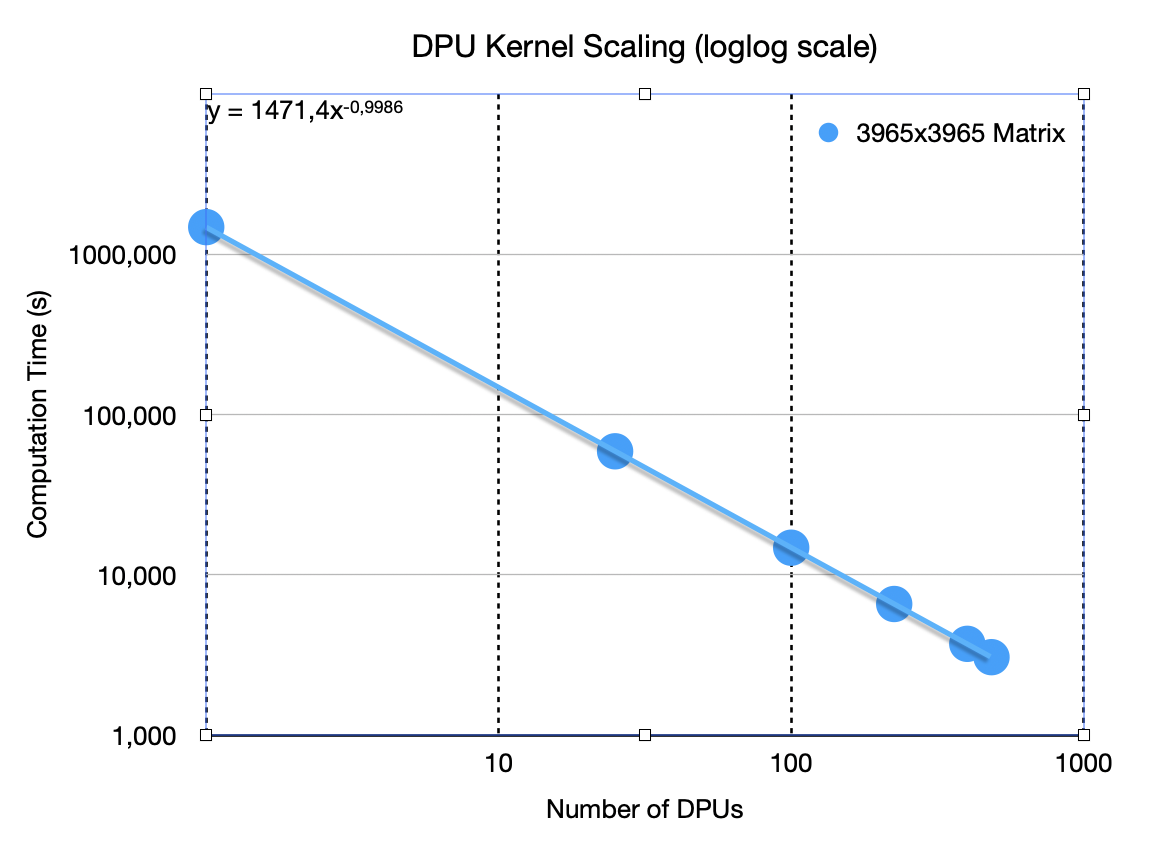
For a single run of the kernel without accounting for data transfer and setup overheads we achieved the following performance scaling as we increased the number of DPUs:
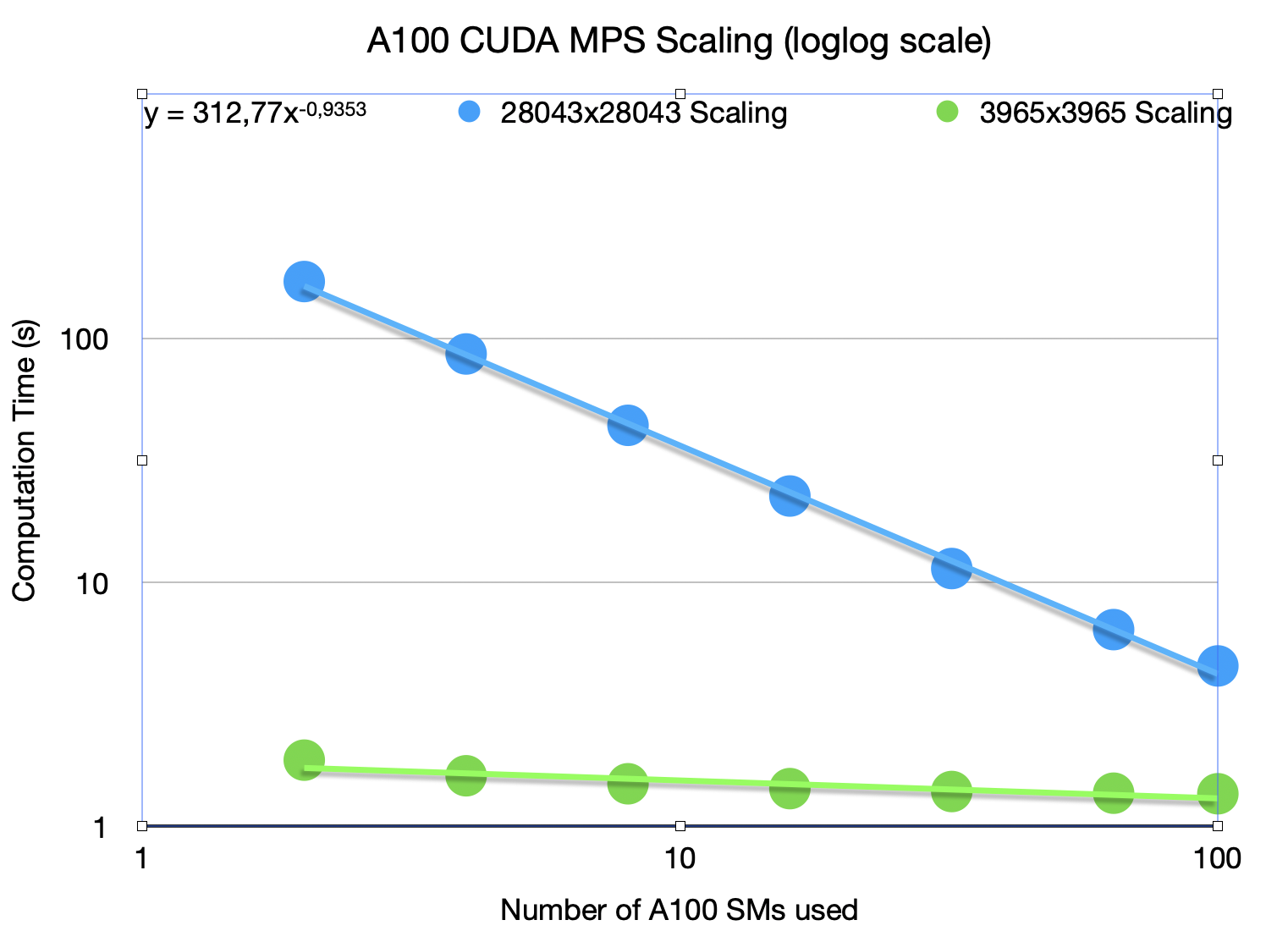
For comparison we tried measuring scaling on an NVIDIA A100 GPU by changing the numbers of SMs used for computation using the same benchmark and achieved the following performance scaling:
Prerequisites
- Git LFS: Required for downloading the UPMEM SDK tarball
- CMake: Version 3.20 or higher
- Python: Python 3.7 or higher with
pyyamlpackage - UPMEM SDK: Version 2023.2.0 (included via Git LFS)
- Docker (optional): For containerized builds and testing
Getting Started
Git LFS Setup
This repository uses Git Large File Storage (LFS) to manage the UPMEM SDK tarball (lib/upmem.tar.gz). You must have Git LFS installed and configured before cloning or pulling the repository.
Install Git LFS
macOS:
brew install git-lfs
Ubuntu/Debian:
sudo apt-get install git-lfs
Initialize Git LFS
After installing Git LFS, initialize it:
git lfs install
Clone the Repository
If you haven't cloned yet:
git clone <repository-url>
cd pim-matmul-benchmarks
If you've already cloned without Git LFS:
git lfs fetch
git lfs pull
Verify that the UPMEM SDK was downloaded correctly:
ls -lh lib/upmem.tar.gz # Should show actual file size (~100MB+), not a few KB
Building with Docker
Docker provides a consistent build environment with all dependencies pre-configured.
Build the Docker Image
docker-compose build dev
Interactive Development Environment
Start an interactive shell with the project mounted:
docker-compose run --rm dev
Inside the container, source the environment and build:
source /opt/upmem-2023.2.0-Linux-x86_64/upmem_env.sh simulator
source /workspace/source.me
mkdir -p build
cmake -S . -B build
make -C build all
One-Step Build
Build the entire project in one command:
docker-compose run --rm build
Run Unit Tests
Execute all unit tests:
docker-compose run --rm unittest
Docker Compose Services
- dev: Interactive development environment with full project access
- build: Automated build service that compiles the project
- unittest: Runs all unit tests via CTest
Building with CMake Directly
For native builds on your host system, follow these steps.
1. Install System Dependencies
Ubuntu/Debian:
sudo apt-get update
sudo apt-get install -y build-essential cmake git-lfs \
    python3 python3-pip doxygen \
    libelf-dev libnuma-dev libgomp1 \
    pkg-config gdb
macOS:
brew install cmake git-lfs python doxygen pkg-config
3. Set Up Python Environment
# Source the project environment script
source source.me

# Or manually set up Python environment
python3 -m venv scripts/pim-matmul-env
source scripts/pim-matmul-env/bin/activate
pip install --upgrade pip
pip install pyyaml
4. Configure and Build
# Configure the project
mkdir -p build
cmake -S . -B build

# Build all targets
make -C build all

# Or use CMake directly
cmake --build build

# Build specific targets
make -C build pim_matmul        # Build library only
make -C build tests             # Build tests only
make -C build benchmarks        # Build benchmarks only
5. Run Tests
# Run all tests
cd build
ctest --output-on-failure -V

# Run specific test
./tests/test_matrix_create_from_2d_array_and_free
CMake Configuration Options
Customize the build with CMake options:
cmake -S . -B build \
  -DBUILD_TESTS=ON \                    # Enable/disable tests (default: ON)
  -DBUILD_BENCHMARKS=ON \                # Enable/disable benchmarks (default: ON)
  -DPARAMS_FILE=path/to/params.yaml \    # Custom params file
  -DCMAKE_BUILD_TYPE=Release             # Release or Debug (default: Debug)
Integration Guide
To integrate this PIM matrix multiplication framework into your existing CMake-based project:
Method 1: Add as Subdirectory
-
Add the project as a subdirectory (e.g., via git submodule or copying):
git submodule add <repository-url> external/pim-matmul-benchmarks -
In your project's CMakeLists.txt, add:
# Add PIM matmul subdirectory add_subdirectory(external/pim-matmul-benchmarks) # Link your target to the PIM library target_link_libraries(your_target PRIVATE pim_matmul) -
Ensure UPMEM SDK is configured in your environment before running CMake:
export PKG_CONFIG_PATH="/opt/upmem-2023.2.0-Linux-x86_64/share/pkgconfig:${PKG_CONFIG_PATH}"
export PATH="/opt/upmem-2023.2.0-Linux-x86_64/bin:${PATH}"
source /opt/upmem-2023.2.0-Linux-x86_64/upmem_env.sh simulator
Method 2: Install and Use find_package
-
Build and install the library:
cd pim-matmul-benchmarks mkdir -p build && cd build cmake -S .. -B . -DCMAKE_INSTALL_PREFIX=/usr/local make install -
In your project's CMakeLists.txt:
find_package(pim_matmul REQUIRED)
target_link_libraries(your_target PRIVATE pim_matmul)
Using the API
Include the necessary headers in your code:
#include "matrix.h"
#include "pim_matrix_multiplication_frame.h"

// Your code here
Matrix* matrixA = matrix_create_from_row_major_array(...);
Matrix* matrixB = matrix_create_from_row_major_array(...);
// Perform PIM multiplication...
Key Integration Considerations
-
UPMEM SDK Dependency: Ensure the UPMEM SDK is installed and environment variables are set before building your project.
-
DPU Binary Path: The framework automatically builds and embeds the DPU kernel binary path. If you need a custom DPU binary:
cmake -DPIM_MATMUL_DPU_BINARY_PATH=/path/to/your/dpu/binary ... -
Runtime Parameters: Customize runtime behavior via
defn/params.yamlor provide your own:cmake -DPARAMS_FILE=/path/to/your/params.yaml ... -
Include Directories: The library automatically exports these include directories:
src/- Core library headerscommon/- Common utilities and helperslib/simplepim/- SimplePIM library
-
Required Libraries: The framework links against:
- UPMEM DPU libraries (via
dpu-pkg-config) - Math library (
-lm)
- UPMEM DPU libraries (via
Documentation
-
API Documentation: Refer to the inline documentation in header files or generate Doxygen docs:
doxygen Doxyfile -
Build Targets: View available make targets:
make help # If using the project's Makefile -
Examples: See
benchmarks/directory for usage examples:1gb_square_benchmark.c- Large square matrix multiplicationback_to_back_multiplication_benchmark.c- Sequential multiplicationstest_from_file.c- Loading matrices from files
License
See LICENSE for details.
Roadmap
Optimising Sustained Performance - the performance achieved when considering the entire end-to-end execution time, including data transfers and setup overheads. This is crucial for real-world applications where the total time to solution matters more than just the raw computation speed.
- Creating an optimized DPU kernel and host routines that parallelize the computation with data transfers between host and DPUs, overlapping communication and computation to minimize idle time.
- As some of the previous works outline - the performance of PIM-based solutions can be significantly impacted by the overhead of data transfers between the host and DPUs. To address this, we will explore techniques to overlap communication and computation, such as using asynchronous data transfers and double buffering, to ensure that the DPUs are kept busy while data is being transferred.
- This will hopefully lead to a more accurate representation of the performance benefits of PIM for matrix multiplication in real-world scenarios, where the total execution time is a critical factor and lay the groundwork for further optimizations and improvements in the future. Tests show the scaling of this metric on the current implementation is not ideal, and we will explore various techniques to improve it.
Application Specific optimizations - tailoring the matrix multiplication implementation to specific application domains, such as deep learning or scientific computing, where certain patterns of matrix operations are common. This could involve optimizing for specific matrix sizes, sparsity patterns, or data types that are prevalent in these applications.
Acknowledgements
Contributors

192 commits
Similar repos


Languages
C
54.2%
C++
23.2%
Python
11.3%
Shell
8.4%
CMake
2.0%
A reference implementation of Matrix Multiplication algorithms for ML on UPMEM PIM - a processing-in-memory platform
C
1
192 commits
updated Mar 9, 2026
README
PIM Matrix Multiplication Benchmarks
This project provides a reference implementation of matrix multiplication using Processing-In-Memory (PIM) capabilities of UPMEM DPUs. To that end it implements a matrix Tiling Schema and a host program to orchestrate the distributed computation across DPUs.
The project also includes a set of benchmarks and unit tests to validate the implementation, a CMake-based build system for easy compilation and integration, and a Docker Compose setup for consistent development and testing environments. One of the goals for the project is to be easily integrated into other CMake-based projects, so the library is designed to be modular and reusable.
Possible application domains for this project include deep learning, scientific computing, and any other domain that relies heavily on matrix operations. By leveraging the computational capabilities of DPUs, this project aims to provide significant performance improvements for matrix multiplication tasks, which are fundamental to many applications in these domains.
It could be used to serve as a backend for higher-level libraries or frameworks such as TensorFlow or PyTorch that require efficient matrix multiplication, or as a standalone library for applications that need to perform large-scale matrix operations.
It is important to note that this project is a reference implementation and may not be optimized for all use cases. Future work could include further optimizations, support for additional matrix operations, and integration with other libraries and frameworks.
While the raw performance of this implementation does not match the performance of highly optimized GPU-based libraries, it serves as a starting point for exploring the potential of PIM for matrix multiplication and provides a foundation for future optimizations and improvements. This project focuses on demonstrating the scaling potential of PIM for matrix multiplication, and the performance results should be interpreted in that context. The goal is to show how performance can improve as we scale up the number of DPUs, rather than achieving the highest possible performance on a single DPU or a small number of DPUs.
It can be used as a reference for researchers and developers interested in exploring the potential of PIM for matrix multiplication, and as a starting point for further optimizations and improvements in this area.
Table of Contents
- Architecture Overview
- Prerequisites
- Getting Started
- Integration Guide
- Documentation
- Roadmap
- Acknowledgements
Architecture Overview
This project is designed as a host-orchestrated PIM compute pipeline for GEMM-style workloads.
It combines explicit host-side scheduling with DPU-local tiled compute so teams can benchmark scaling, prototype optimizations quickly, and integrate into larger ML/HPC stacks with minimal friction.
Layered Architecture
-
Host Application Layer
- Benchmarks/tests and external applications construct matrices and invoke the PIM API.
- Responsible for experiment orchestration, iteration loops, and timing breakdowns.
-
Host Runtime & Orchestration Layer
pim_matrix_multiplication_frame_tstores execution metadata: DPU set, offsets, tile geometry, data types, and validity state.- Computes padding/alignment and memory frame layout per DPU.
- Splits input matrices into DPU-targeted submatrices, converts to tiled format, and schedules transfers.
-
Host↔DPU Contract Layer
dpu_pim_matrix_multiply_kernel_arguments_tdefines the binary ABI between host and kernel.- Encodes MRAM offsets, aligned dimensions, original dimensions, tile sizes, and type sizes.
- Enables a single kernel implementation to handle multiple matrix shapes safely.
-
DPU Kernel Execution Layer
- Tile-based GEMM kernel with tasklet specialization:
- tasklet 0 for DMA/load-store orchestration,
- remaining tasklets for compute.
- Uses barriers, semaphores, and ping-pong buffers to coordinate transfer and compute phases.
- Tile-based GEMM kernel with tasklet specialization:
-
Result Assembly Layer
- Host retrieves tiled per-DPU outputs, reconstructs global matrix via row/column joins, then crops to original dimensions.
How Data Is Split Across Multiple DPUs
For an input multiplication $C = A \times B$ where:
- $A \in \mathbb{Z}^{M \times K}$
- $B \in \mathbb{Z}^{K \times N}$
- $C \in \mathbb{Z}^{M \times N}$
the host maps DPUs as a 2D logical grid:
- row partitions =
work_group_size - column partitions =
num_work_groups - total DPUs =
work_group_size * num_work_groups
Each DPU is responsible for one output block $C_{r,c}$ and receives:
- one row-slice of A: approximately $\frac{M}{\text{work group size}} \times K$
- one column-slice of B: approximately $K \times \frac{N}{\text{num work groups}}$
So instead of multiplying full-size matrices on every device, each DPU multiplies a much smaller pair of submatrices. In practice, dimensions are padded/aligned (work-group split, 8-byte alignment, then tile alignment), but the effective compute region still corresponds to that reduced block shape.
Why this reduces per-device workload
- Per-DPU output footprint drops from $M \times N$ to roughly: $$\frac{M}{\text{work group size}} \times \frac{N}{\text{num work groups}}$$
- Per-DPU input footprint also shrinks by distributing rows of $A$ and columns of $B$.
- The inner $K$ accumulation remains local inside each DPU for correctness of each output block.
How the full result is reconstructed
- Host fetches each DPU's partial result block from MRAM.
- Blocks in the same row partition are joined by columns.
- The resulting row-strips are joined by rows.
- Final matrix is cropped back to the original $(M \times N)$ shape (removing alignment padding).
This guarantees that distributed block computations produce the same complete result as a monolithic multiplication, while reducing memory and compute pressure on each individual DPU. Furthermore it doesn't require any inter-DPU communication since each DPU computes an independent output block, making it a good fit for the UPMEM architecture.
Architecture Diagram
flowchart TB
      A[Host App / Benchmarks<br>Matrix creation, experiment loops, timing] --> B[Frame Orchestrator<br>create_pim_matrix_multiplication_frame]
      B --> C[Partition + Align + Tile<br>row/col split, padding, transpose matrix2]
      C --> D[Host↔DPU ABI<br>MATRIX_MULTIPLY_ARGUMENTS]
      D --> E[DPU MRAM Transfers<br>dpu_prepare_xfer + dpu_push_xfer]
      E --> F[DPU Kernel<br>Tile GEMM, tasklet parallelism]
      F --> G[DMA/Compute Coordination<br>barrier + semaphore + ping-pong buffers]
      G --> H[Result Tiles in MRAM]
      H --> I[Host Retrieval + Reassembly<br>join tiles, extract original shape]
      I --> J[Output Matrix + Metrics]

      K[(Research Guidance<br>Target-aware GEMM<br>MLP In-Memory<br>System-level PIM analysis)] -. informs .-> B
      K -. informs .-> C
      K -. informs .-> G
Core Data Structures and Why They Matter
-
Matrix- Generic host-side matrix abstraction with split/join/transpose/tile conversion helpers.
- Enables clean preprocessing and postprocessing without leaking DPU details to application code.
-
pim_matrix_multiplication_frame_t- Captures the full execution plan (work-group topology, tile geometry, MRAM layout, data widths).
- Keeps repeated runs efficient by reusing orchestration metadata.
-
dpu_pim_matrix_multiply_kernel_arguments_t- Stable, explicit ABI for safe kernel launches.
- Preserves correctness on boundary tiles by carrying both aligned and original dimensions.
-
Kernel-local WRAM ping-pong buffers (
matrix1_wram[2],matrix2_wram[2],result_wram[2])- Fundamental building block for overlapping data movement and compute.
- Reduces idle cycles and supports sustained throughput as problem size and DPU count grow.
Performance
For a single run of the kernel without accounting for data transfer and setup overheads we achieved the following performance scaling as we increased the number of DPUs:
For comparison we tried measuring scaling on an NVIDIA A100 GPU by changing the numbers of SMs used for computation using the same benchmark and achieved the following performance scaling:
Prerequisites
- Git LFS: Required for downloading the UPMEM SDK tarball
- CMake: Version 3.20 or higher
- Python: Python 3.7 or higher with
pyyamlpackage - UPMEM SDK: Version 2023.2.0 (included via Git LFS)
- Docker (optional): For containerized builds and testing
Getting Started
Git LFS Setup
This repository uses Git Large File Storage (LFS) to manage the UPMEM SDK tarball (lib/upmem.tar.gz). You must have Git LFS installed and configured before cloning or pulling the repository.
Install Git LFS
macOS:
brew install git-lfs
Ubuntu/Debian:
sudo apt-get install git-lfs
Initialize Git LFS
After installing Git LFS, initialize it:
git lfs install
Clone the Repository
If you haven't cloned yet:
git clone <repository-url>
cd pim-matmul-benchmarks
If you've already cloned without Git LFS:
git lfs fetch
git lfs pull
Verify that the UPMEM SDK was downloaded correctly:
ls -lh lib/upmem.tar.gz # Should show actual file size (~100MB+), not a few KB
Building with Docker
Docker provides a consistent build environment with all dependencies pre-configured.
Build the Docker Image
docker-compose build dev
Interactive Development Environment
Start an interactive shell with the project mounted:
docker-compose run --rm dev
Inside the container, source the environment and build:
source /opt/upmem-2023.2.0-Linux-x86_64/upmem_env.sh simulator
source /workspace/source.me
mkdir -p build
cmake -S . -B build
make -C build all
One-Step Build
Build the entire project in one command:
docker-compose run --rm build
Run Unit Tests
Execute all unit tests:
docker-compose run --rm unittest
Docker Compose Services
- dev: Interactive development environment with full project access
- build: Automated build service that compiles the project
- unittest: Runs all unit tests via CTest
Building with CMake Directly
For native builds on your host system, follow these steps.
1. Install System Dependencies
Ubuntu/Debian:
sudo apt-get update
sudo apt-get install -y build-essential cmake git-lfs \
    python3 python3-pip doxygen \
    libelf-dev libnuma-dev libgomp1 \
    pkg-config gdb
macOS:
brew install cmake git-lfs python doxygen pkg-config
3. Set Up Python Environment
# Source the project environment script
source source.me

# Or manually set up Python environment
python3 -m venv scripts/pim-matmul-env
source scripts/pim-matmul-env/bin/activate
pip install --upgrade pip
pip install pyyaml
4. Configure and Build
# Configure the project
mkdir -p build
cmake -S . -B build

# Build all targets
make -C build all

# Or use CMake directly
cmake --build build

# Build specific targets
make -C build pim_matmul        # Build library only
make -C build tests             # Build tests only
make -C build benchmarks        # Build benchmarks only
5. Run Tests
# Run all tests
cd build
ctest --output-on-failure -V

# Run specific test
./tests/test_matrix_create_from_2d_array_and_free
CMake Configuration Options
Customize the build with CMake options:
cmake -S . -B build \
  -DBUILD_TESTS=ON \                    # Enable/disable tests (default: ON)
  -DBUILD_BENCHMARKS=ON \                # Enable/disable benchmarks (default: ON)
  -DPARAMS_FILE=path/to/params.yaml \    # Custom params file
  -DCMAKE_BUILD_TYPE=Release             # Release or Debug (default: Debug)
Integration Guide
To integrate this PIM matrix multiplication framework into your existing CMake-based project:
Method 1: Add as Subdirectory
-
Add the project as a subdirectory (e.g., via git submodule or copying):
git submodule add <repository-url> external/pim-matmul-benchmarks -
In your project's CMakeLists.txt, add:
# Add PIM matmul subdirectory add_subdirectory(external/pim-matmul-benchmarks) # Link your target to the PIM library target_link_libraries(your_target PRIVATE pim_matmul) -
Ensure UPMEM SDK is configured in your environment before running CMake:
export PKG_CONFIG_PATH="/opt/upmem-2023.2.0-Linux-x86_64/share/pkgconfig:${PKG_CONFIG_PATH}"
export PATH="/opt/upmem-2023.2.0-Linux-x86_64/bin:${PATH}"
source /opt/upmem-2023.2.0-Linux-x86_64/upmem_env.sh simulator
Method 2: Install and Use find_package
-
Build and install the library:
cd pim-matmul-benchmarks mkdir -p build && cd build cmake -S .. -B . -DCMAKE_INSTALL_PREFIX=/usr/local make install -
In your project's CMakeLists.txt:
find_package(pim_matmul REQUIRED)
target_link_libraries(your_target PRIVATE pim_matmul)
Using the API
Include the necessary headers in your code:
#include "matrix.h"
#include "pim_matrix_multiplication_frame.h"

// Your code here
Matrix* matrixA = matrix_create_from_row_major_array(...);
Matrix* matrixB = matrix_create_from_row_major_array(...);
// Perform PIM multiplication...
Key Integration Considerations
-
UPMEM SDK Dependency: Ensure the UPMEM SDK is installed and environment variables are set before building your project.
-
DPU Binary Path: The framework automatically builds and embeds the DPU kernel binary path. If you need a custom DPU binary:
cmake -DPIM_MATMUL_DPU_BINARY_PATH=/path/to/your/dpu/binary ... -
Runtime Parameters: Customize runtime behavior via
defn/params.yamlor provide your own:cmake -DPARAMS_FILE=/path/to/your/params.yaml ... -
Include Directories: The library automatically exports these include directories:
src/- Core library headerscommon/- Common utilities and helperslib/simplepim/- SimplePIM library
-
Required Libraries: The framework links against:
- UPMEM DPU libraries (via
dpu-pkg-config) - Math library (
-lm)
- UPMEM DPU libraries (via
Documentation
-
API Documentation: Refer to the inline documentation in header files or generate Doxygen docs:
doxygen Doxyfile -
Build Targets: View available make targets:
make help # If using the project's Makefile -
Examples: See
benchmarks/directory for usage examples:1gb_square_benchmark.c- Large square matrix multiplicationback_to_back_multiplication_benchmark.c- Sequential multiplicationstest_from_file.c- Loading matrices from files
License
See LICENSE for details.
Roadmap
Optimising Sustained Performance - the performance achieved when considering the entire end-to-end execution time, including data transfers and setup overheads. This is crucial for real-world applications where the total time to solution matters more than just the raw computation speed.
- Creating an optimized DPU kernel and host routines that parallelize the computation with data transfers between host and DPUs, overlapping communication and computation to minimize idle time.
- As some of the previous works outline - the performance of PIM-based solutions can be significantly impacted by the overhead of data transfers between the host and DPUs. To address this, we will explore techniques to overlap communication and computation, such as using asynchronous data transfers and double buffering, to ensure that the DPUs are kept busy while data is being transferred.
- This will hopefully lead to a more accurate representation of the performance benefits of PIM for matrix multiplication in real-world scenarios, where the total execution time is a critical factor and lay the groundwork for further optimizations and improvements in the future. Tests show the scaling of this metric on the current implementation is not ideal, and we will explore various techniques to improve it.
Application Specific optimizations - tailoring the matrix multiplication implementation to specific application domains, such as deep learning or scientific computing, where certain patterns of matrix operations are common. This could involve optimizing for specific matrix sizes, sparsity patterns, or data types that are prevalent in these applications.
Acknowledgements
Similar repos
Contributors
192 commits
Languages
C
54.2%
C++
23.2%
Python
11.3%
Shell
8.4%
CMake
2.0%