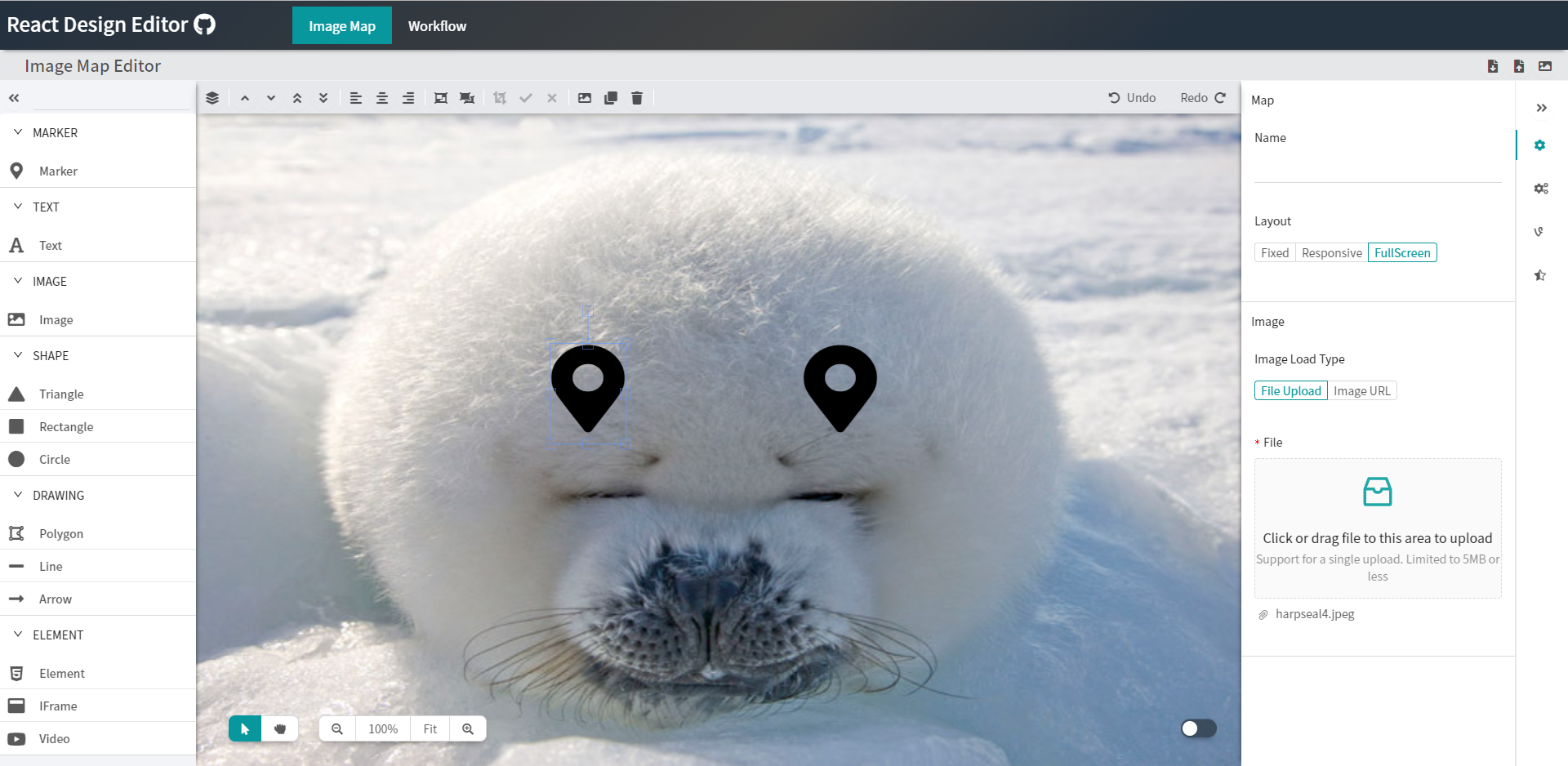
React Design Editor has started to developed direct manipulation of editable design tools like Powerpoint, We've developed it with reactjs, ant.design, fabricjs
See the code

React Design Editor is a module for React, written in Javascript/Typescript which provides two primary features:
The module primarily uses the Ant Design, Fabric.js and React libraries, but a full list of required dependencies can be found below.
Try it out today - the project is being continually developed to support a variety of different functions.
Run npm install react-design-editor or yarn add react-design-editor
Import the bundled editor stylesheet from your app entry:
import 'react-design-editor/react-design-editor.css';
Then import the components you need from the package entry.
git clone https://github.com/salgum1114/react-design-editor.gitnpm install or yarnnpm start or yarn starthttp://localhost:4000Library builds run with Vite only:
npm run build:demo builds the demo app into docsnpm run build:lib builds the package into dist and emits declarationsnpm run serve previews the demo build locallyThe published package provides the Canvas component and its canvas handlers. Toolbars, palettes and property panels shown in the demo can be built around this component as needed.
import { useRef } from 'react';
import { Canvas, type CanvasInstance } from 'react-design-editor';
import 'react-design-editor/react-design-editor.css';

export default function DesignCanvas() {
	const canvasRef = useRef<CanvasInstance | null>(null);

	const addRectangle = () => {
		canvasRef.current?.handler.add({
			type: 'rect',
			name: 'Rectangle',
			width: 160,
			height: 90,
			fill: '#5ee0bd',
			rx: 8,
			ry: 8,
		});
	};

	const saveCanvas = () => {
		const objects = canvasRef.current?.handler.exportJSON() ?? [];
		localStorage.setItem('design', JSON.stringify(objects));
	};

	const loadCanvas = async () => {
		const saved = localStorage.getItem('design');
		if (saved) {
			await canvasRef.current?.handler.importJSON(JSON.parse(saved));
		}
	};

	return (
		<div>
			<button type="button" onClick={addRectangle}>Add rectangle</button>
			<button type="button" onClick={saveCanvas}>Save</button>
			<button type="button" onClick={loadCanvas}>Load</button>

			<Canvas
				ref={canvasRef}
				style={{ width: '100%', height: 600 }}
				canvasOption={{ backgroundColor: '#f4f7f9' }}
				workareaOption={{
					width: 800,
					height: 500,
					backgroundColor: '#ffffff',
				}}
				canvasActions={{
					clipboard: true,
					transaction: true,
				}}
				onSelect={object => {
					console.log('Selected object:', object);
				}}
			/>
		</div>
	);
}
Use canvasRef.current.handler to add or remove objects, change the selection, control zoom, run undo/redo operations and import or export canvas data. The parent element or the style prop must provide a visible height when responsive sizing is enabled.







| Dependency | License(s) |
|---|---|
| React | MIT |
| Ant Design | MIT |
| Fabric.js | MIT |
| MediaElement.js | MIT |
| Monaco Editor | MIT |
| interact.js | MIT |
| anime.js | MIT |
| Vite | MIT |
| fontawesome5 | Icons (CC BY 4.0), Fonts (SIL OFL 1.1), Code (MIT) |
Overall
Maintained
Code review
Latest release
Releases this year
261 followers · starred Mar 2021
117 followers · starred Jan 2019
77 followers · starred Jun 2025
34 followers · starred Jun 2021
React Design Editor has started to developed direct manipulation of editable design tools like Powerpoint, We've developed it with reactjs, ant.design, fabricjs
See the code
React Design Editor is a module for React, written in Javascript/Typescript which provides two primary features:
The module primarily uses the Ant Design, Fabric.js and React libraries, but a full list of required dependencies can be found below.
Try it out today - the project is being continually developed to support a variety of different functions.
Run npm install react-design-editor or yarn add react-design-editor
Import the bundled editor stylesheet from your app entry:
import 'react-design-editor/react-design-editor.css';
Then import the components you need from the package entry.
git clone https://github.com/salgum1114/react-design-editor.gitnpm install or yarnnpm start or yarn starthttp://localhost:4000Library builds run with Vite only:
npm run build:demo builds the demo app into docsnpm run build:lib builds the package into dist and emits declarationsnpm run serve previews the demo build locallyThe published package provides the Canvas component and its canvas handlers. Toolbars, palettes and property panels shown in the demo can be built around this component as needed.
import { useRef } from 'react';
import { Canvas, type CanvasInstance } from 'react-design-editor';
import 'react-design-editor/react-design-editor.css';

export default function DesignCanvas() {
	const canvasRef = useRef<CanvasInstance | null>(null);

	const addRectangle = () => {
		canvasRef.current?.handler.add({
			type: 'rect',
			name: 'Rectangle',
			width: 160,
			height: 90,
			fill: '#5ee0bd',
			rx: 8,
			ry: 8,
		});
	};

	const saveCanvas = () => {
		const objects = canvasRef.current?.handler.exportJSON() ?? [];
		localStorage.setItem('design', JSON.stringify(objects));
	};

	const loadCanvas = async () => {
		const saved = localStorage.getItem('design');
		if (saved) {
			await canvasRef.current?.handler.importJSON(JSON.parse(saved));
		}
	};

	return (
		<div>
			<button type="button" onClick={addRectangle}>Add rectangle</button>
			<button type="button" onClick={saveCanvas}>Save</button>
			<button type="button" onClick={loadCanvas}>Load</button>

			<Canvas
				ref={canvasRef}
				style={{ width: '100%', height: 600 }}
				canvasOption={{ backgroundColor: '#f4f7f9' }}
				workareaOption={{
					width: 800,
					height: 500,
					backgroundColor: '#ffffff',
				}}
				canvasActions={{
					clipboard: true,
					transaction: true,
				}}
				onSelect={object => {
					console.log('Selected object:', object);
				}}
			/>
		</div>
	);
}
Use canvasRef.current.handler to add or remove objects, change the selection, control zoom, run undo/redo operations and import or export canvas data. The parent element or the style prop must provide a visible height when responsive sizing is enabled.
| Dependency | License(s) |
|---|---|
| React | MIT |
| Ant Design | MIT |
| Fabric.js | MIT |
| MediaElement.js | MIT |
| Monaco Editor | MIT |
| interact.js | MIT |
| anime.js | MIT |
| Vite | MIT |
| fontawesome5 | Icons (CC BY 4.0), Fonts (SIL OFL 1.1), Code (MIT) |
Overall
Maintained
Code review
Latest release
Releases this year
261 followers · starred Mar 2021
117 followers · starred Jan 2019
77 followers · starred Jun 2025
34 followers · starred Jun 2021