
Transform your 3D texturing workflow with the power of generative AI, directly within Blender!
Python
920
189 commits
updated Jul 7, 2026
README
StableGen: AI-Powered 3D Generation & Texturing in Blender ✨



Create 3D assets from images and prompts, then texture and refine them - all inside Blender.
StableGen is an open-source Blender addon that brings generative AI into your 3D workflow. Generate fully textured 3D meshes from a single image or text prompt via TRELLIS.2, then texture and refine them - or any existing model - using SDXL, FLUX.1-dev, or Qwen Image Edit through a flexible ComfyUI backend.
Table of Contents
🌟 Key Features
StableGen brings AI-powered 3D generation and texturing directly into Blender:
- 🧊 TRELLIS.2: Image & Prompt to 3D:
- Generate fully textured 3D meshes from a single reference image or text prompt using Microsoft's TRELLIS.2 (4B-parameter model).
- Multiple resolution modes: 512, 1024, 1024 Cascade (recommended), and 1536 Cascade for maximum geometric detail.
- Flexible texture pipeline: Use TRELLIS.2's native PBR textures, or automatically texture the generated mesh with SDXL, FLUX.1-dev, or Qwen Image Edit for higher-quality diffusion textures.
- Preview Gallery: Generate multiple candidate images with different seeds and pick the best before committing to 3D generation.
- Smart mesh handling: Auto-recovery from mesh corruption, configurable decimation/remeshing, import scaling, and studio lighting setup.
- VRAM-conscious: disk offloading, configurable attention backend
- Powered by ComfyUI-TRELLIS2 (installable via
installer.py).
- 🖨️ 3D Printing & Slicing Suite:
- Export textured meshes directly into a multi-color format (3MF/STL) compatible with OrcaSlicer, Bambu Studio, and PrusaSlicer.
- Physical Color Mixing Solver: Optimizes filament mixtures using Kubelka-Munk Theory (evaluating absorption $K$ and scattering $S$ coefficients).
- Speckle Bleed Prevention: A one-sided saturation-difference penalty prevents pigments from bleeding as dither speckles into highly saturated regions.
- FDM Banding Culling: Vectorized 8% threshold pruning filters out minor filament demands to keep layers clean.
- Viewport Slices Preview: Projects and dithers color layers onto a flat-shaded preview mesh (
SG_SlicedPreview) directly inside the Blender viewport. - Requires enabling "Enable 3D Print Exporter Tab" in Addon Preferences.
- 📂 Folder Batching for Image-to-3D:
- Point StableGen at a directory of reference images to generate and texture multiple 3D assets in a single unattended run.
- Auto-Baking on Completion: Automatically run texture baking (resolution, ORM packing, normal conventions) after each model is generated.
- Scene Isolation: Automatically hides pre-existing assets during each generation stage to prevent texture bleed and projection contamination.
- Batch Performance Log: Writes execution durations (Shape, Texture, Bake, and Total time) and success/error status reports to
stablegen_batch_log.json.
- 🌍 Scene-Wide Multi-Mesh Texturing:
- Don't just texture one mesh at a time! StableGen is designed to apply textures to all mesh objects in your scene simultaneously from your defined camera viewpoints. Alternatively, you can choose to texture only selected objects.
- Achieve a cohesive look across entire environments or collections of assets in a single generation pass.
- Ideal for concept art, look development for complex scenes, and batch-texturing asset libraries.
- 🎨 Multi-View Consistency:
- Sequential Mode: Generates textures viewpoint by viewpoint on each mesh, using inpainting and visibility masks for high consistency across complex surfaces.
- Grid Mode: Processes multiple viewpoints for all meshes simultaneously for faster previews. Includes an optional refinement pass.
- Sophisticated weighted blending ensures smooth transitions between views.
- 📷 Advanced Camera Placement:
- 7 placement strategies: Orbit Ring, Fan Arc, Hemisphere, PCA-Axis, Normal-Weighted K-means, Greedy Occlusion Coverage, and Interactive Visibility-Weighted placement.
- Per-camera optimal aspect ratios - each camera gets its own resolution computed from the mesh's silhouette, so no pixels are wasted on letterboxing.
- Unlimited cameras - no more 8-camera limit.
- Camera generation order - drag-and-drop reorder list with 6 preset strategies to control the processing order in Sequential mode.
- Camera cloning, mirroring, and floating viewport prompt labels.
- 🎯 Local Edit Mode:
- Point cameras at specific areas to modify - new texture blends seamlessly over the original using angle-based and vignette-based feathering.
- Separate angle ramp and silhouette edge feathering controls for precise blending.
- Works with all architectures (SDXL, Flux, Qwen Image Edit).
- 📐 Precise Geometric Control with ControlNet:
- Leverage multiple ControlNet units (Depth, Canny, Normal) simultaneously to ensure generated textures respect your model's geometry.
- Fine-tune strength, start/end steps for each ControlNet unit.
- Supports custom ControlNet model mapping.
- 🖌️ Powerful Style Guidance with IPAdapter:
- Use external reference images to guide the style, mood, and content of your textures with IPAdapter.
- Employ IPAdapter without an reference image for enhanced consistency in multi-view generation modes.
- Control IPAdapter strength, weight type, and active steps.
- ⚙️ Flexible ComfyUI Backend:
- Connects to your existing ComfyUI installation, allowing you to use your preferred SDXL checkpoints, custom LoRAs, and the new Qwen Image Edit workflow alongside experimental FLUX.1-dev support.
- Offloads heavy computation to the ComfyUI server, keeping Blender mostly responsive.
- ✨ Advanced Inpainting & Refinement:
- Refine Mode (Img2Img): Re-style, enhance, or add detail to existing textures (StableGen generated or otherwise) using an image-to-image process.
- Local Edit Mode: Selectively modify specific areas while preserving the rest, with independent angle and vignette feathering controls.
- UV Inpaint Mode: Intelligently fills untextured areas directly on your model's UV map using surrounding texture context.
- Color Matching: Match each generated view's colors to the current texture before blending, using multiple algorithms (MKL, Reinhard, Histogram, MVGD).
- 🛠️ Integrated Workflow Tools:
- Camera Setup: Quickly add and arrange multiple cameras with 7 placement strategies, per-camera aspect ratios, interactive occlusion preview, and customizable generation order.
- Auto-Aspect Camera Framing: Dynamically apply auto-aspect ratio and optimal framing to cameras.
- SketchUp DAE Optimization: Clean SketchUp Collada DAE imports with triangle fan fixes and interior face removal.
- Run Local Post-Processing: Decimate, solidify, or retopologize meshes locally.
- View-Specific Prompts: Assign unique text prompts to individual camera viewpoints for targeted details.
- Texture Baking: Convert complex procedural StableGen materials into standard UV image textures. "Flatten for Refine" option lets you bake and continue editing.
- Debug Tools: Visualize projection coverage, UV alignment, and weight blending without running AI generation.
- HDRI Setup, Modifier Application, Curve Conversion, GIF/MP4 Export & Reproject.**
- 📋 Preset System:
- Get started quickly with built-in presets for common scenarios (e.g., "Default", "Characters", "Quick Draft").
- Save and manage your own custom parameter configurations for repeatable workflows.
🚀 Showcase Gallery
See what StableGen can do!
Tip: Refresh the page to synchronize all GIF animations.
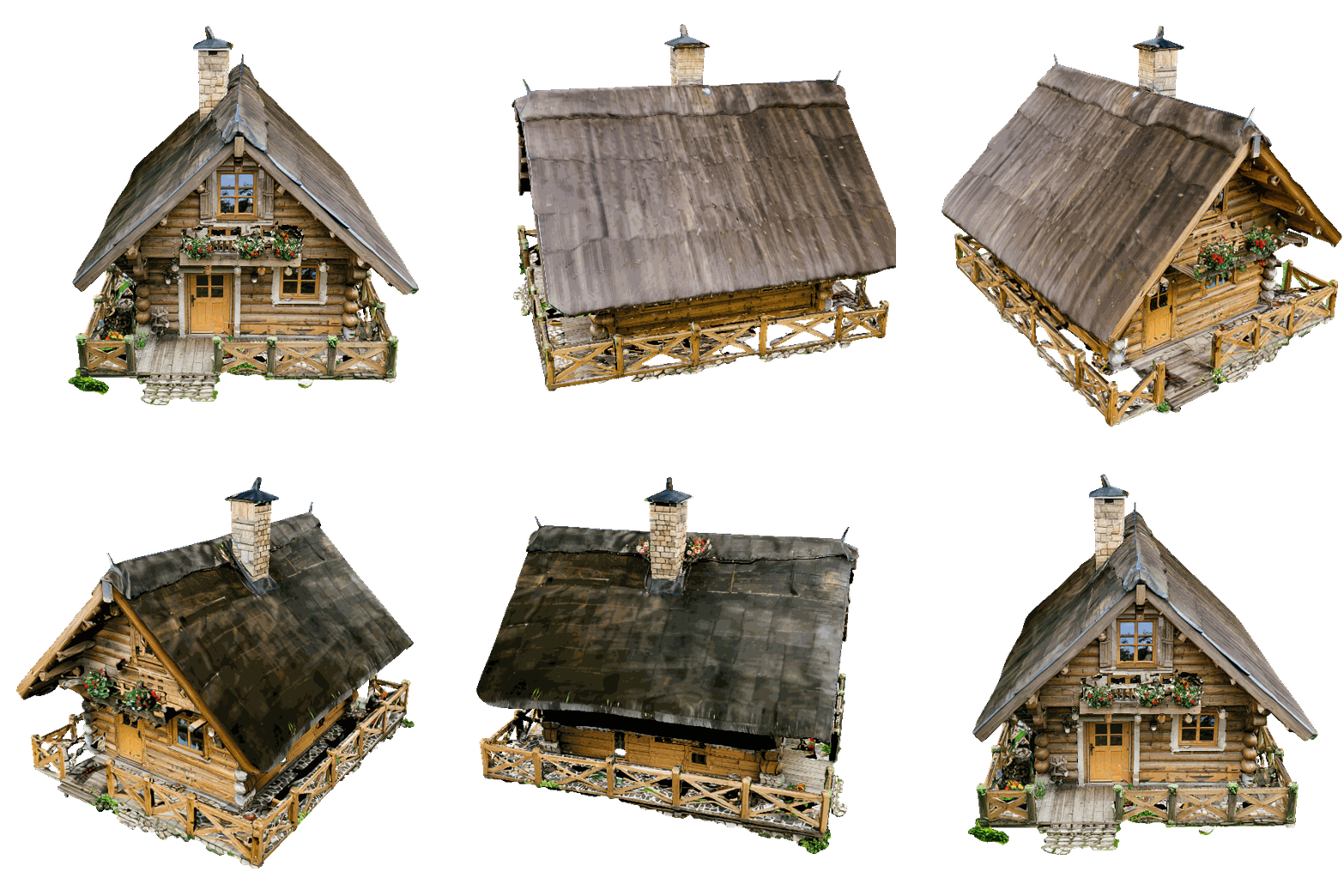
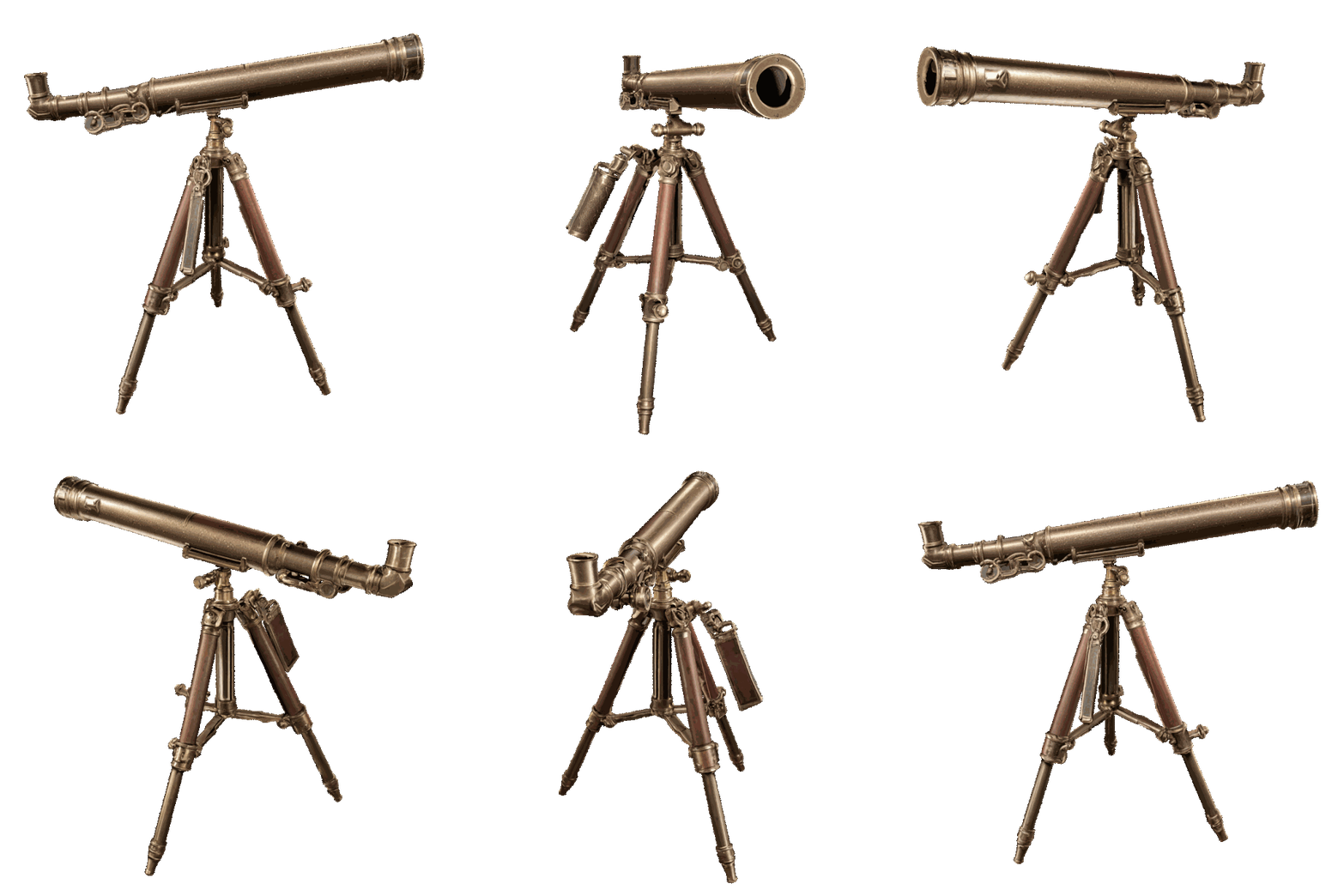
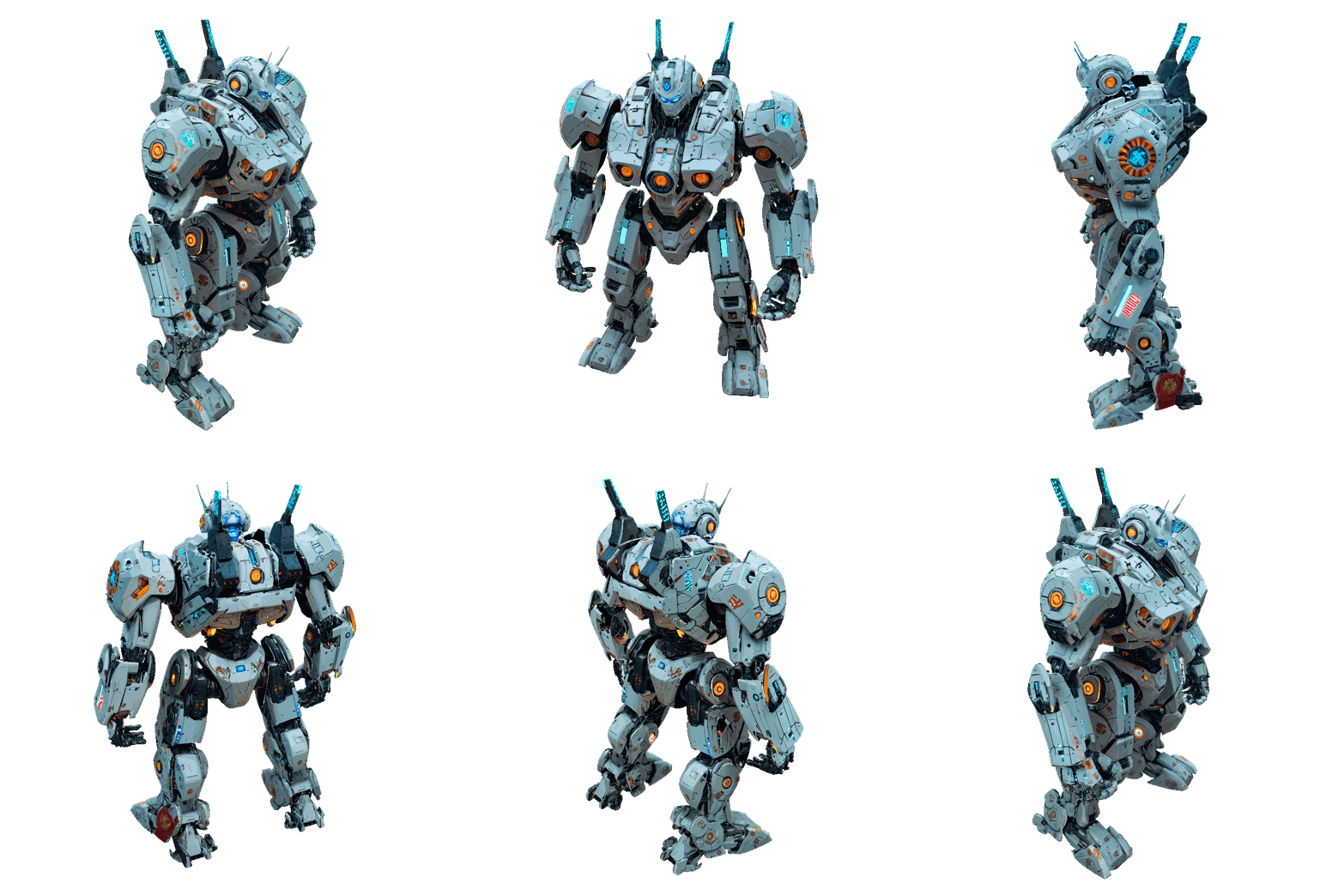
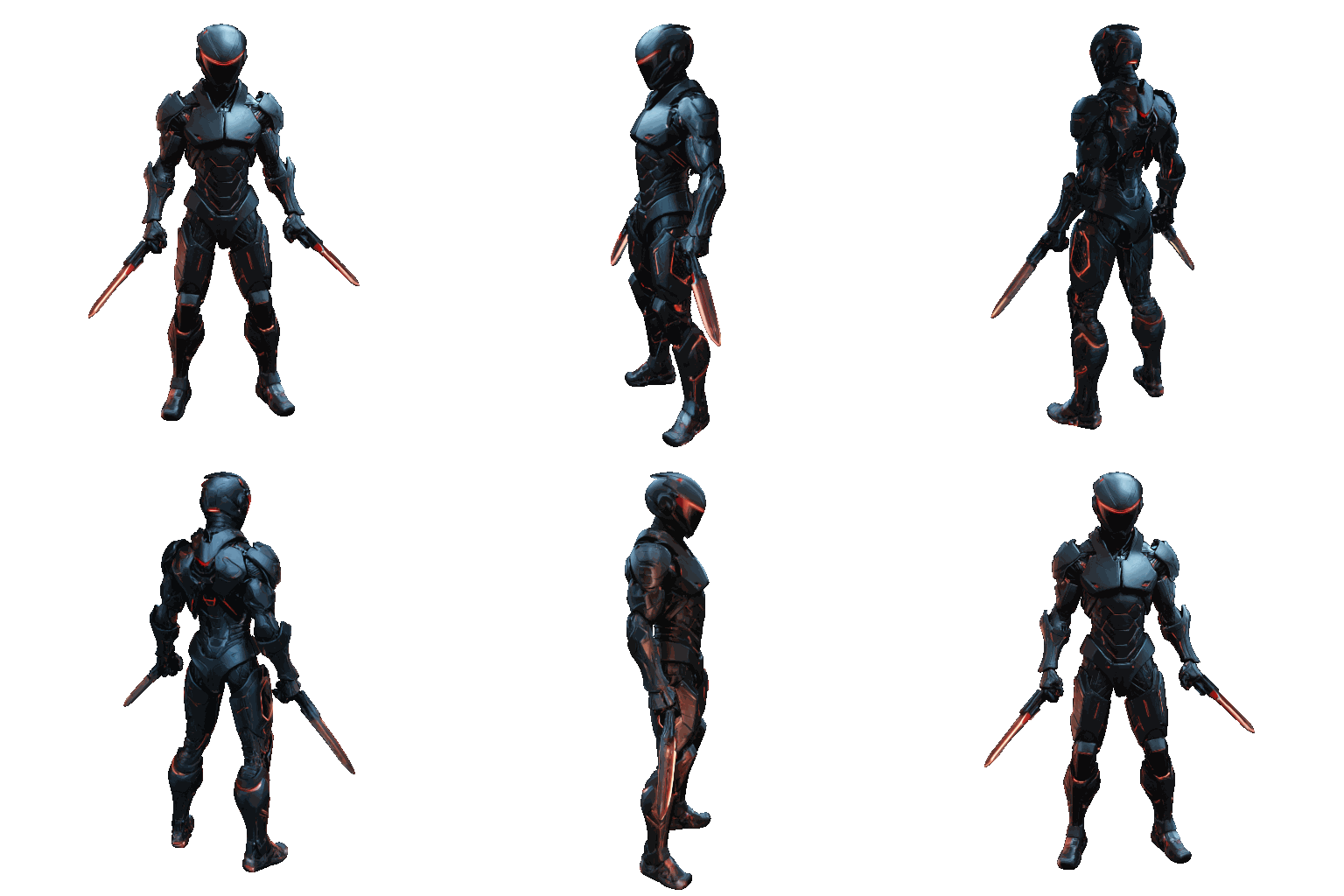
Showcase 1: Text-to-3D (SDXL)
Assets generated entirely from a text prompt using the TRELLIS.2 pipeline with SDXL-based texturing.
| Dragon | Wizard | Hut |
|---|---|---|
 |  |  |
| Telescope | Robot | Cyber Ninja |
 |  |  |
Prompts used
- Dragon: "fantasy dragon"
- Wizard: "wizard character, intricate embroidered purple and gold robes, pointed hat, wooden staff with glowing crystal, leather belt with pouches, fantasy character concept art, 4k"
- Hut: "house, small house, cozy, wooden, hut"
- Telescope: "antique brass telescope, tarnished patina with bright spots from handling, leather grip wrap, extended sections, mahogany tripod, product photography, 4k"
- Robot: "giant robot, mecha, cyberpunk style, sci-fi, white body, intricate details, neon accents"
- Cyber Ninja: "full body character, neutral pose, cyber-ninja, futuristic assassin, matte black carbon fiber stealth suit, hexagonal weave pattern, faceless helmet, glowing red neon visor slit, metallic silver shoulder armor, cyberpunk aesthetic, high contrast materials, unreal engine 5 render"
Showcase 2: Text-to-3D (Qwen)
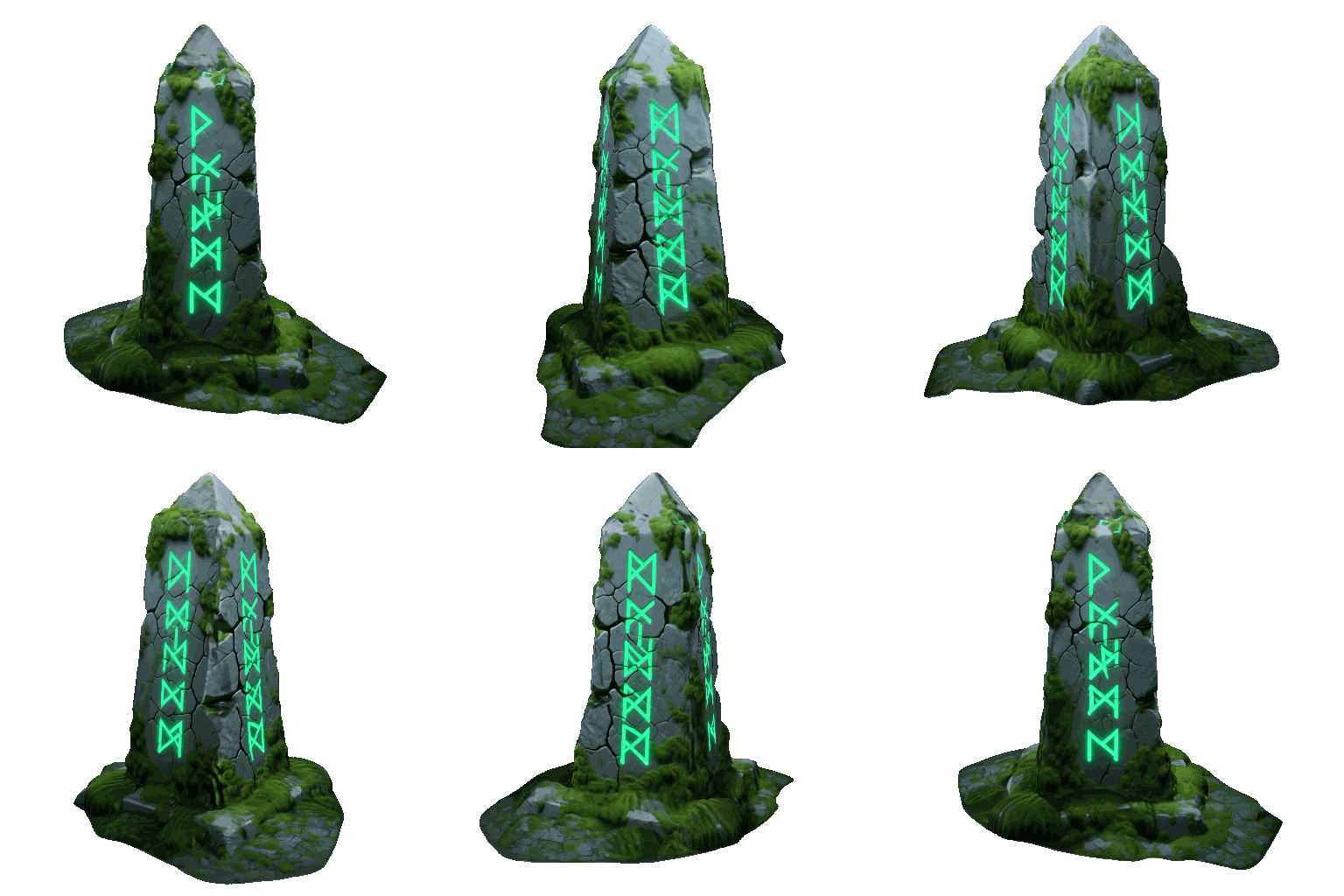
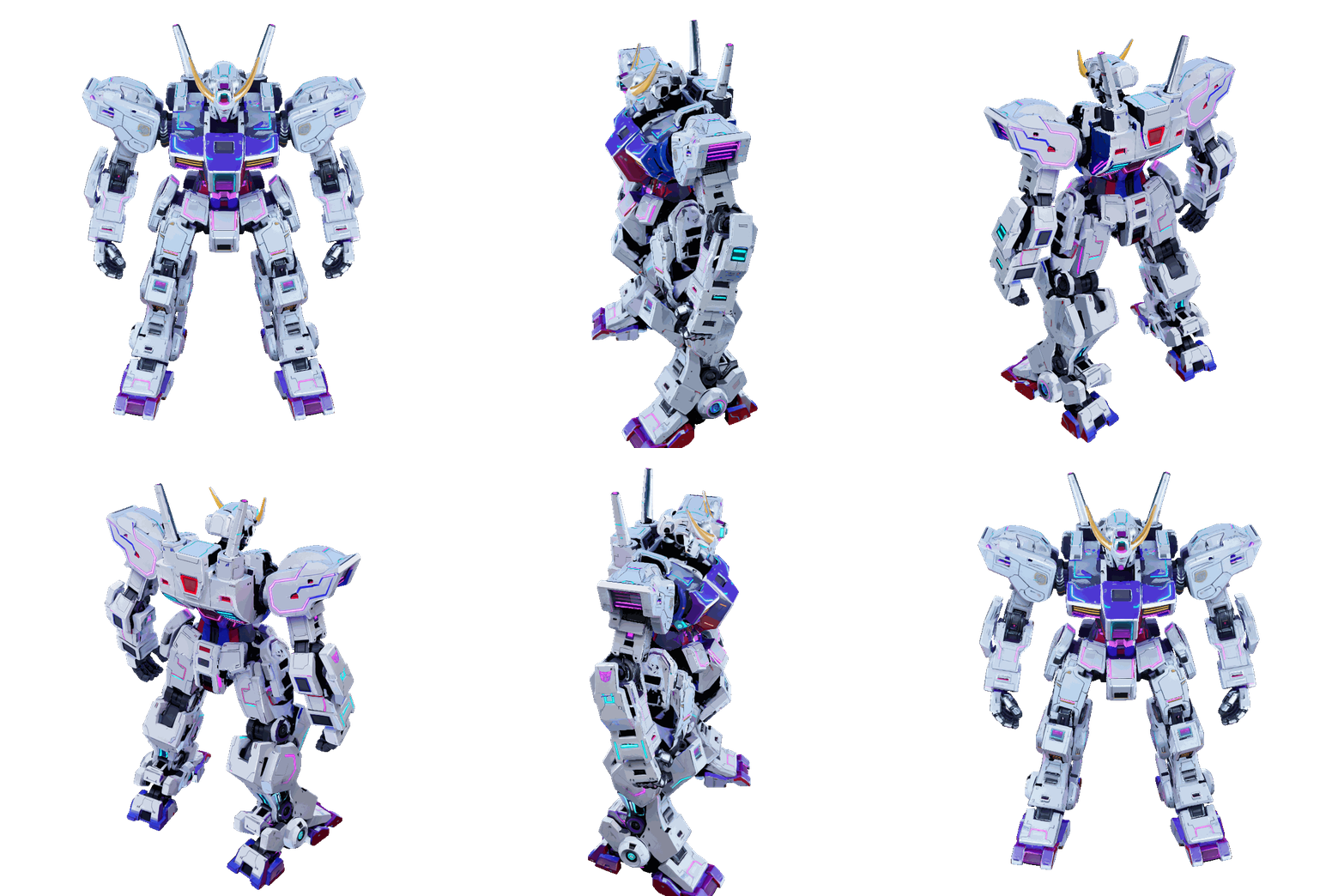
Text-to-3D via TRELLIS.2 with Qwen Image Edit texturing - well-suited for stylized objects and crisp details.
| Barrel | Chest | Crate |
|---|---|---|
 |  |  |
| Obelisk | Robot | Tree Stump |
 |  |  |
Prompts used
- Barrel: "A chunky, stylized wooden barrel bound by thick, oversized iron hoops. The wood has deep, exaggerated hand-carved grooves"
- Chest: "A highly detailed wooden treasure chest bound in heavy, dark iron. The chest is slightly open, revealing a pile of glowing gold coins inside. The wood is old and splintered, and the iron has patches of orange rust."
- Crate: "A yellow industrial hazmat shipping crate. On the side, there is a large, highly legible warning label that says "DANGER: BIOHAZARD" in bold black letters. The crate has a digital keypad on the front and two red oxygen tanks strapped to the left side."
- Obelisk: "An ancient, monolithic stone obelisk covered in glowing green runic carvings. The grey stone is deeply cracked from age and covered in patches of thick, fuzzy green moss."
- Robot: "giant robot, mecha, cyberpunk style, sci-fi, white body, intricate details, neon accents"
- Tree Stump: "A mystical, ancient gnarled tree stump with exposed, twisting roots. Growing out of the top is a cluster of translucent, glowing bioluminescent blue mushrooms and delicate, thin fern leaves. Fantasy RPG asset, hand-painted texture style mixed with photorealism, highly detailed."
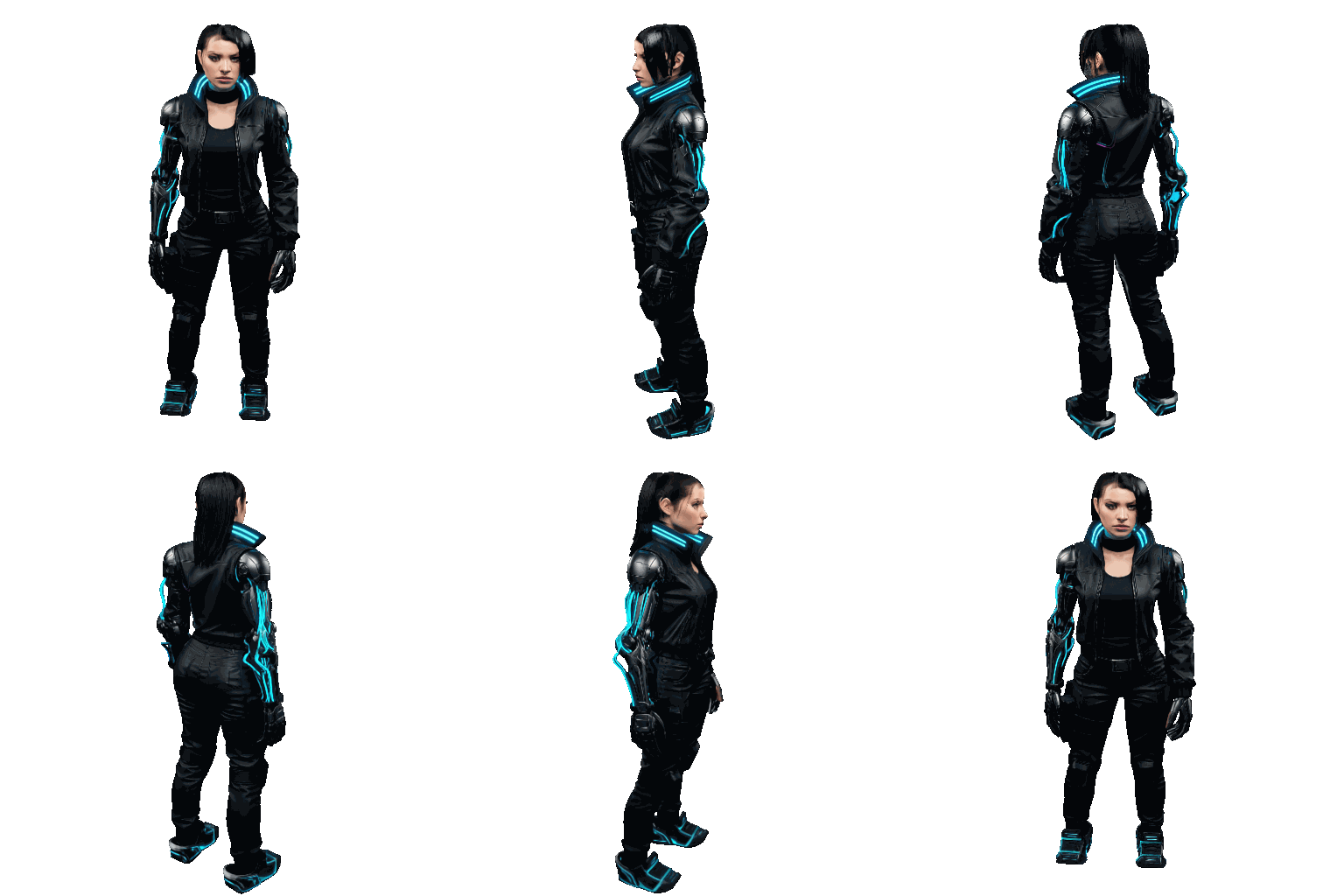
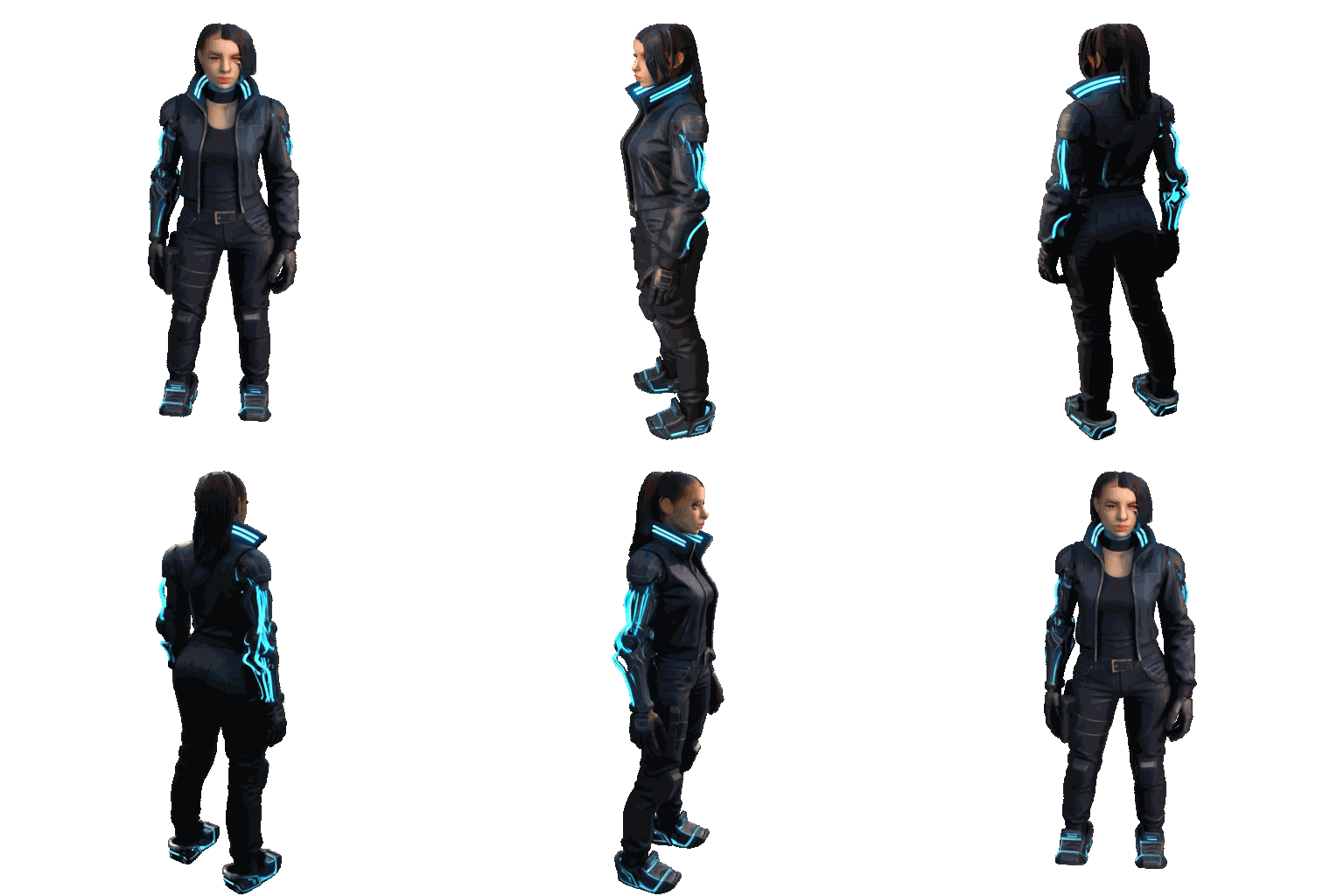
Showcase 3: PBR Comparison
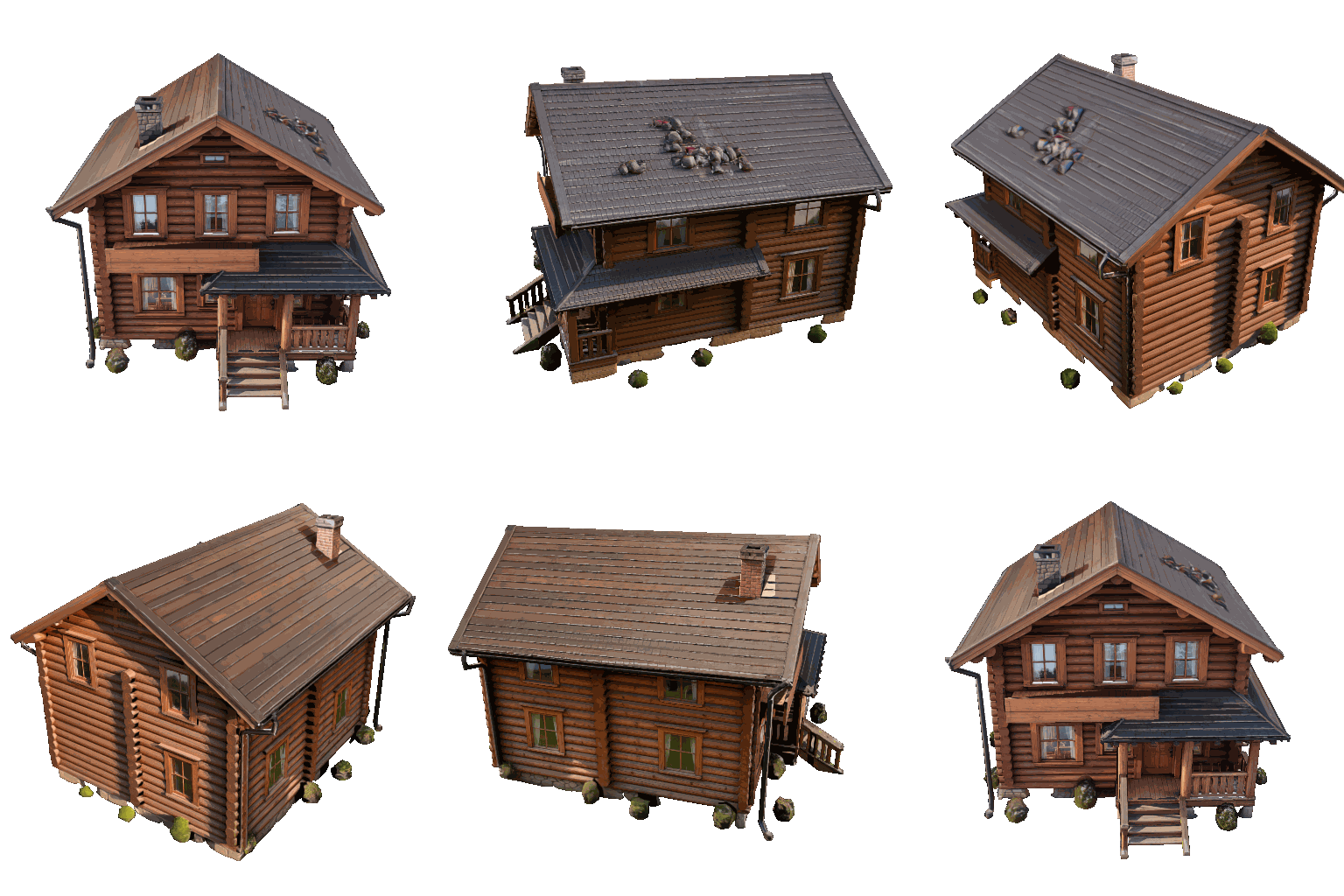
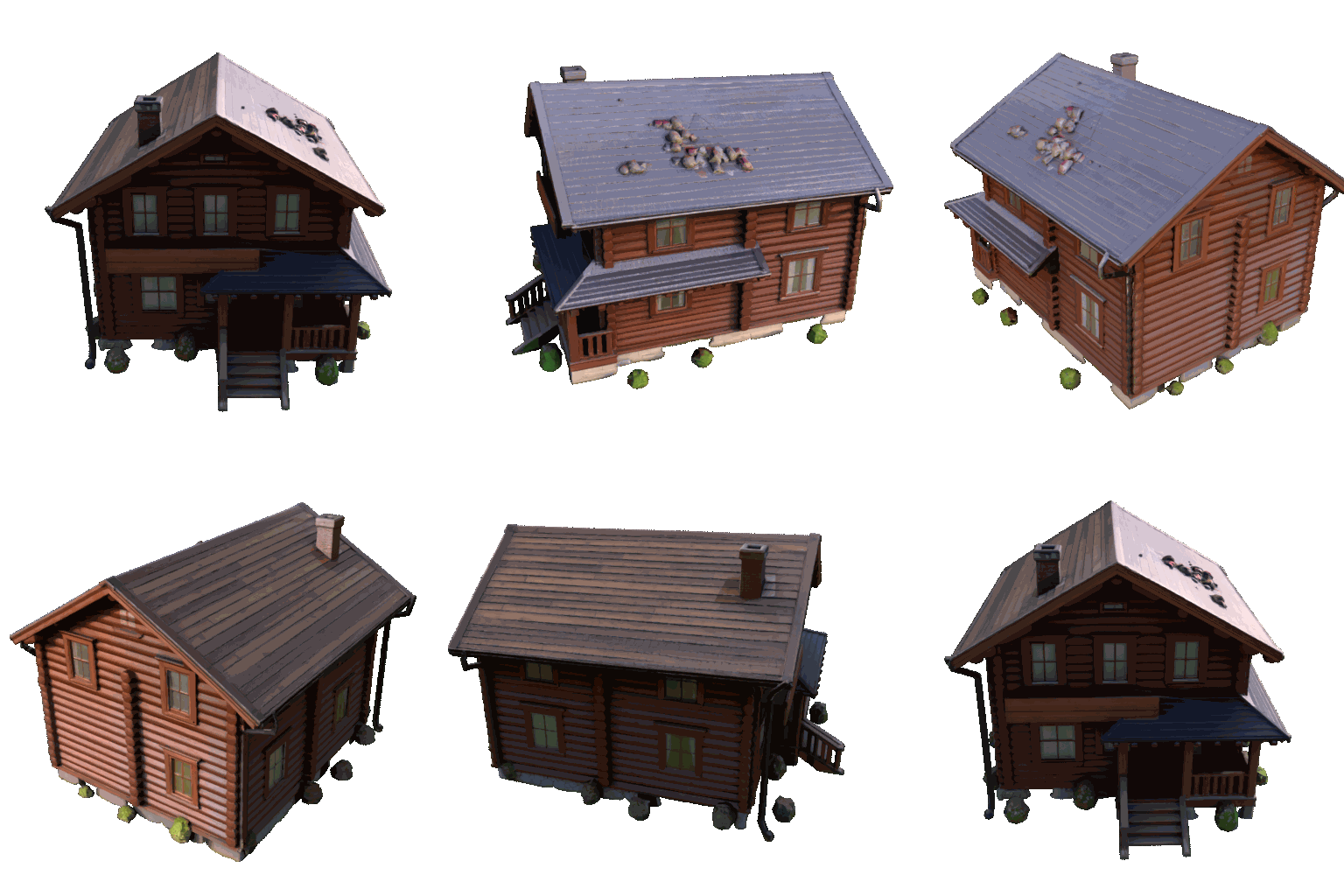
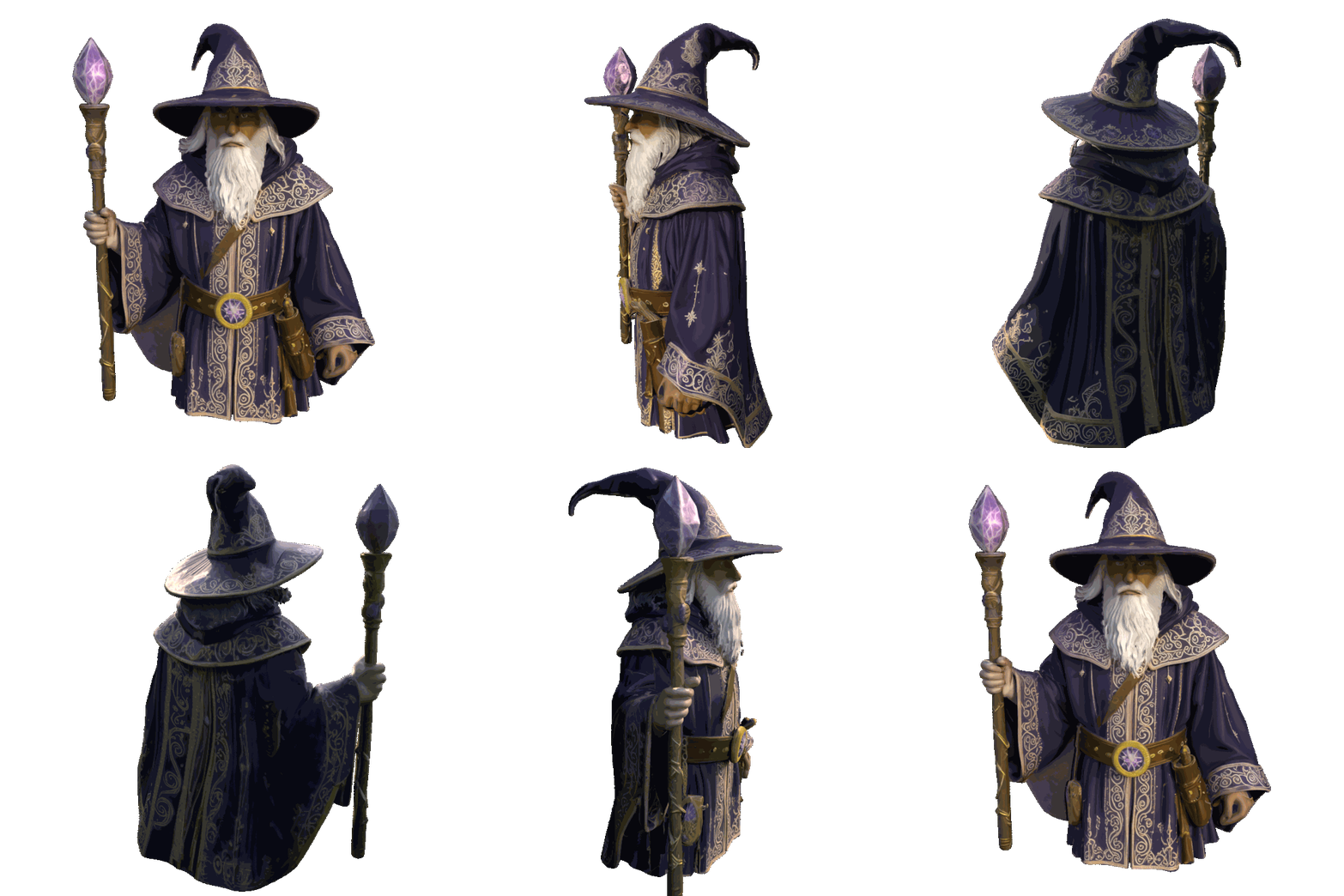
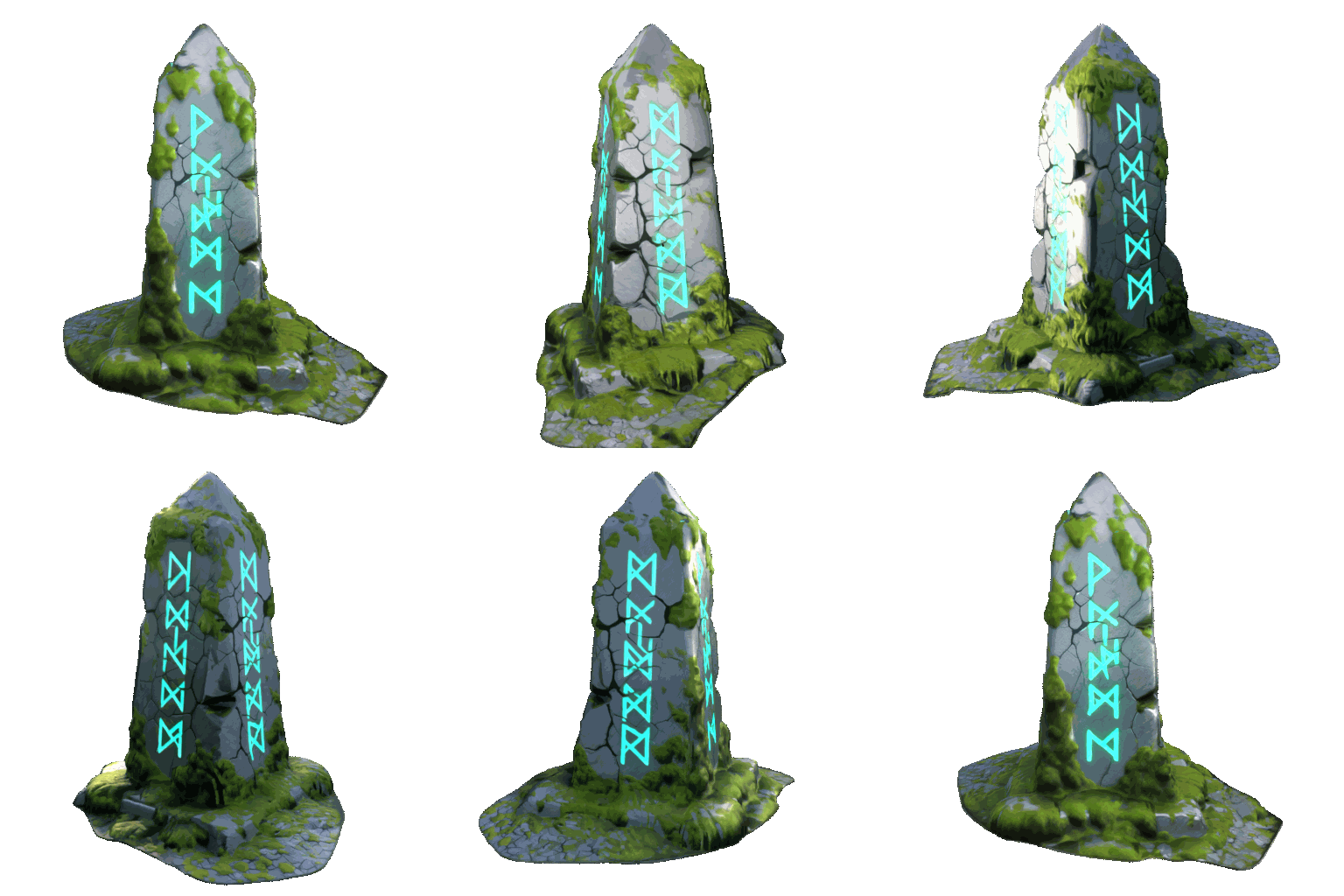
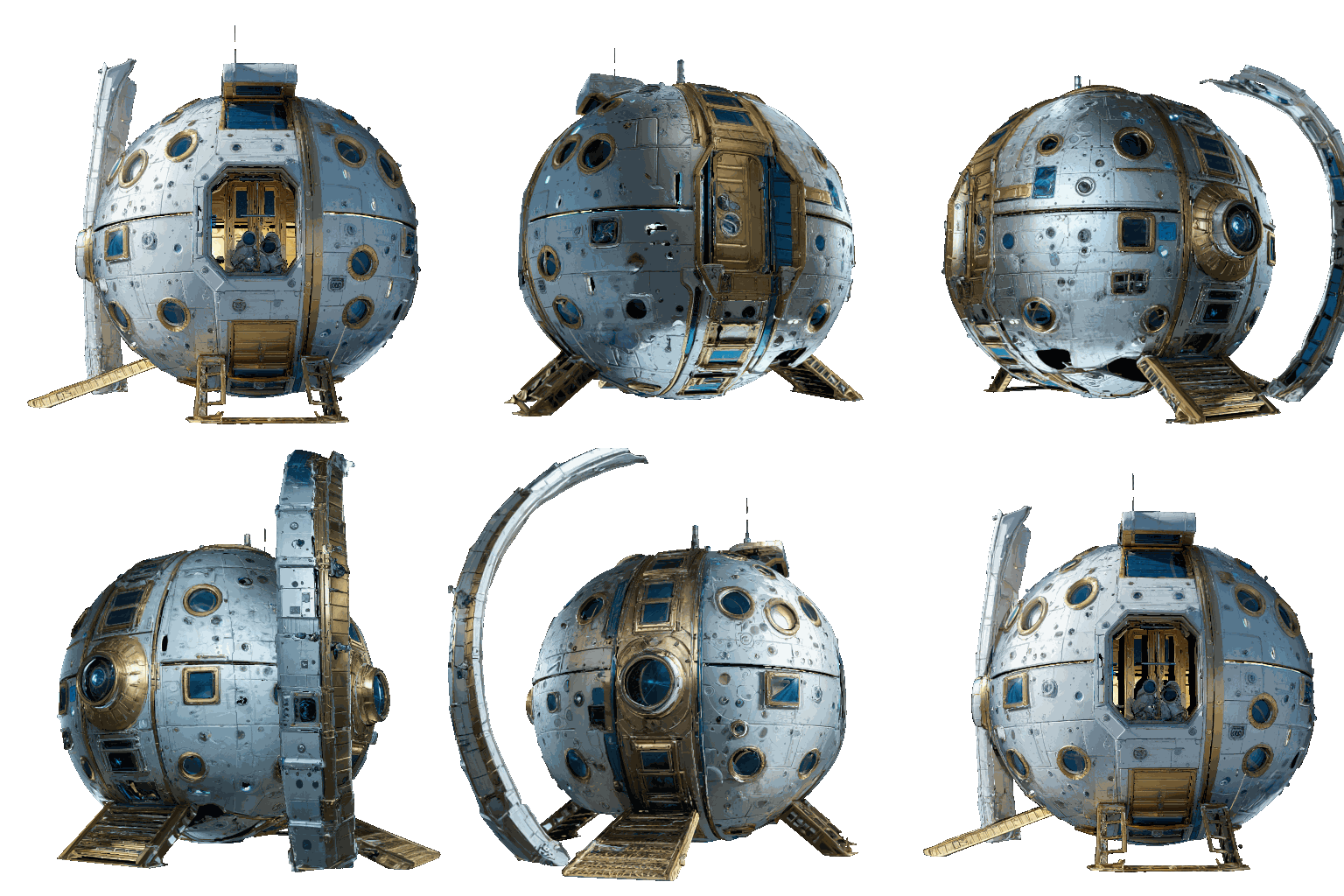
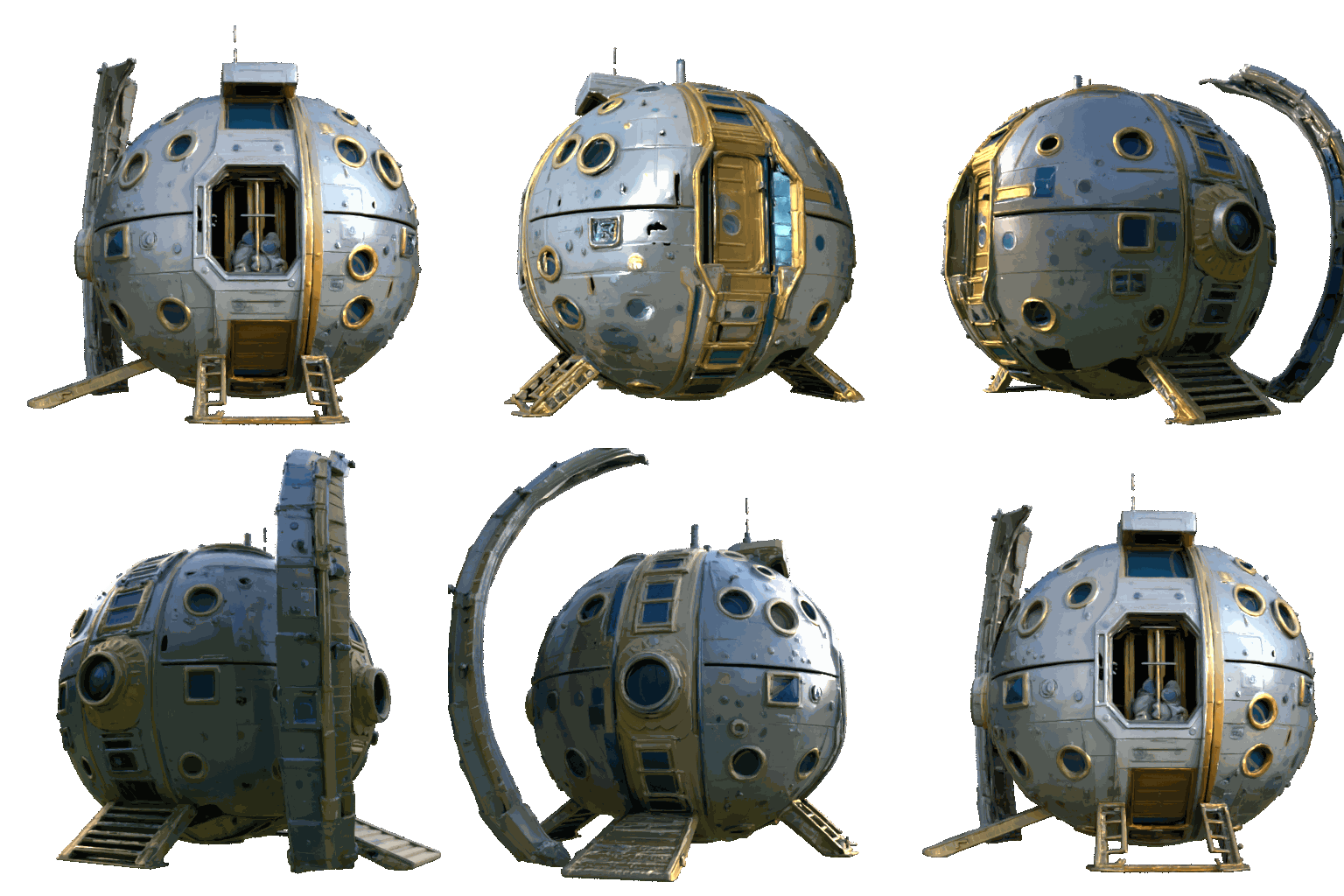
PBR material maps (roughness, metallic, normal) can be generated via Marigold decomposition. Each pair shows the same object without and with PBR materials.
| House | House (PBR) | Wizard | Wizard (PBR) |
|---|---|---|---|
 |  | |  |
| Chest | Chest (PBR) | Obelisk | Obelisk (PBR) |
|  | |  |
| Lunar Habitat | Lunar Habitat (PBR) | Scavenger | Scavenger (PBR) |
 |  | 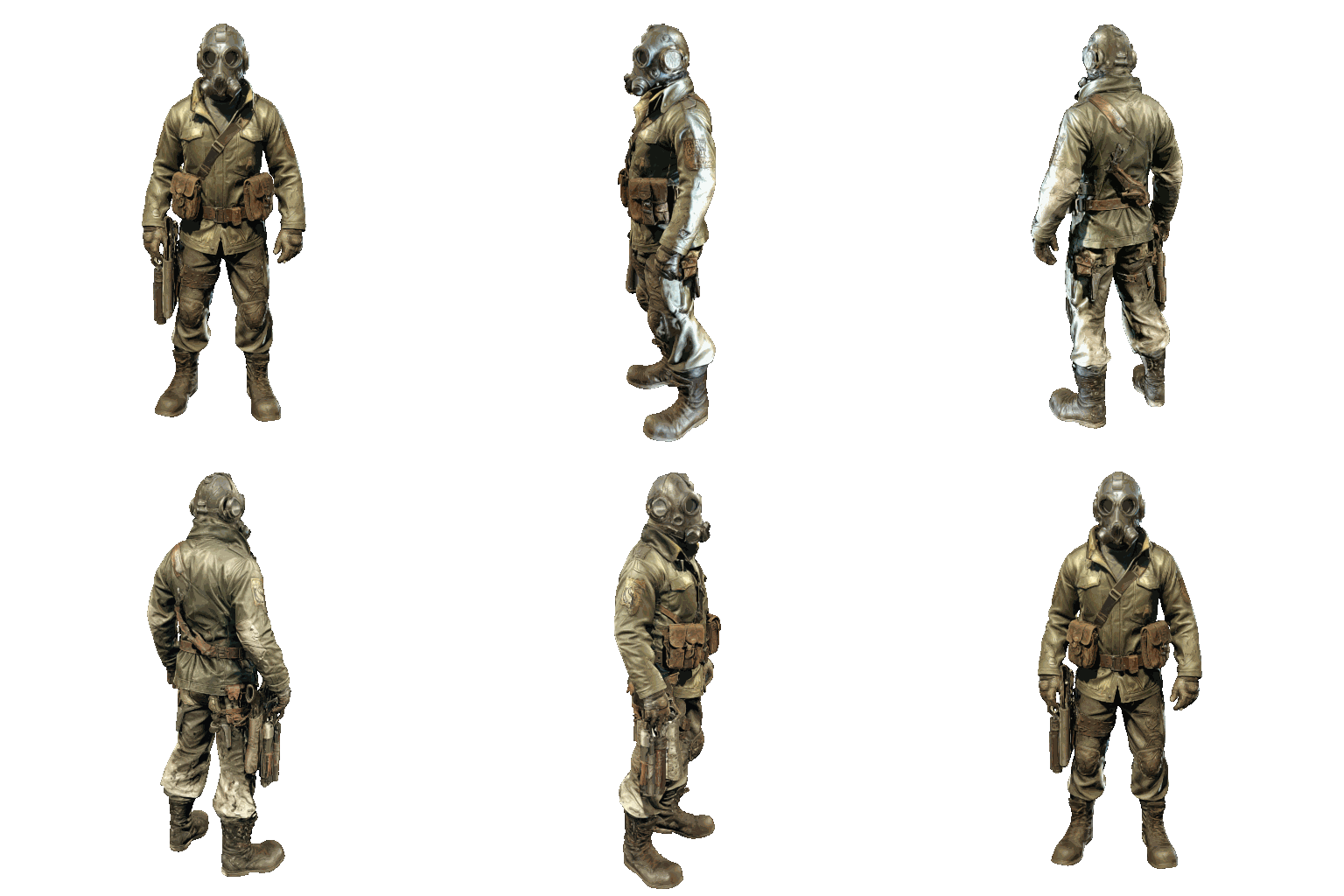 | 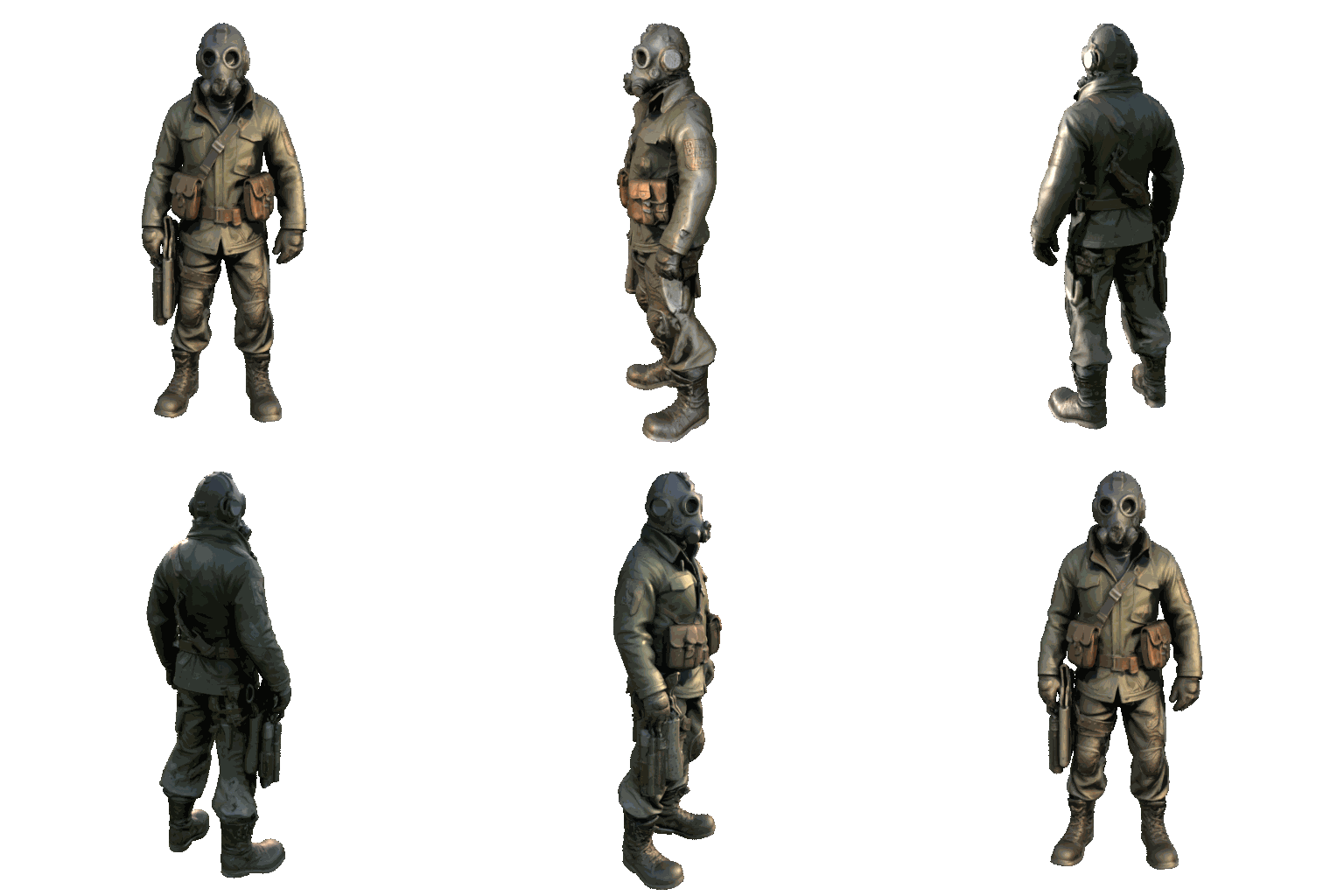 |
| Shaman | Shaman (PBR) | Cyberpunk Woman | Cyberpunk Woman (PBR) |
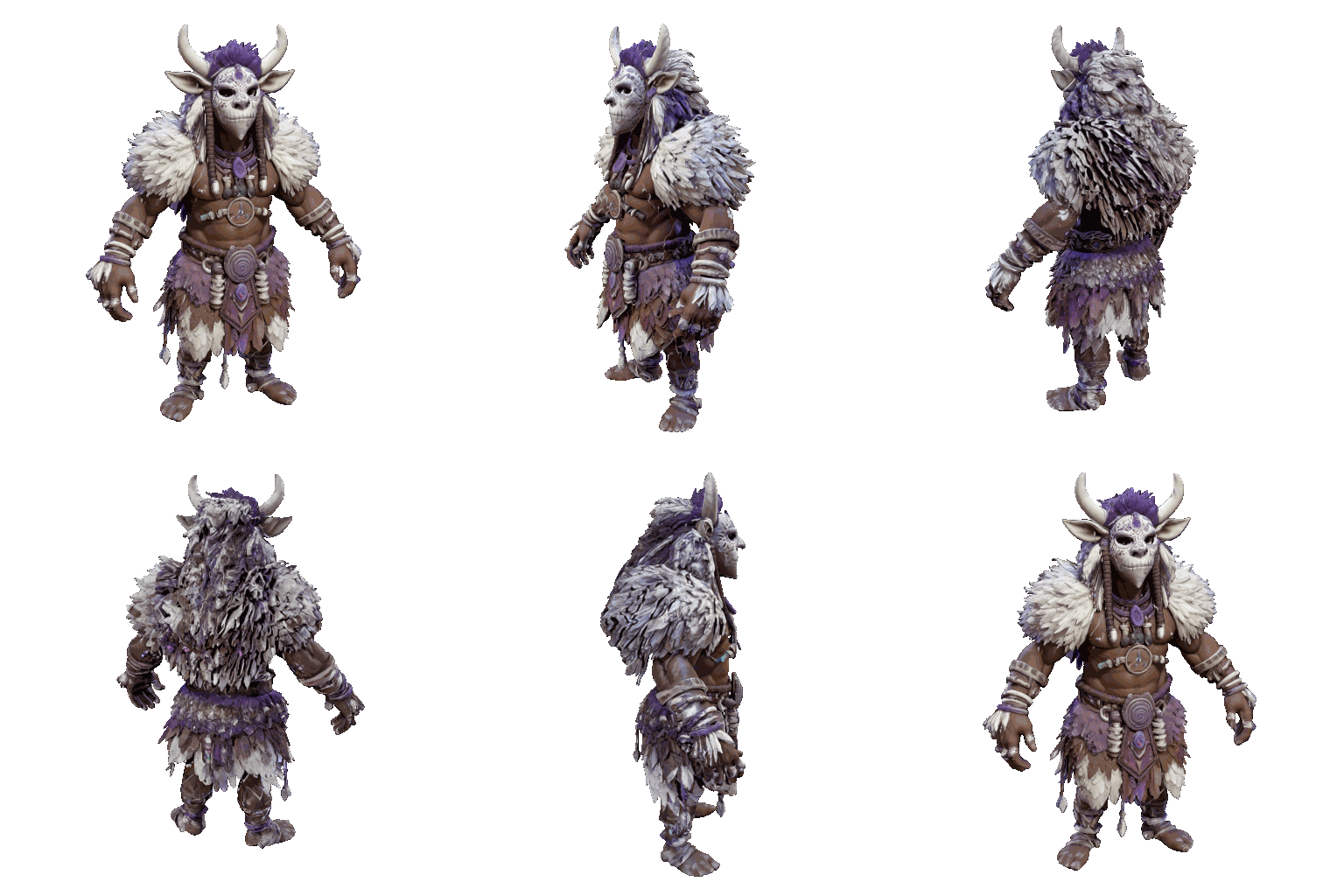 | 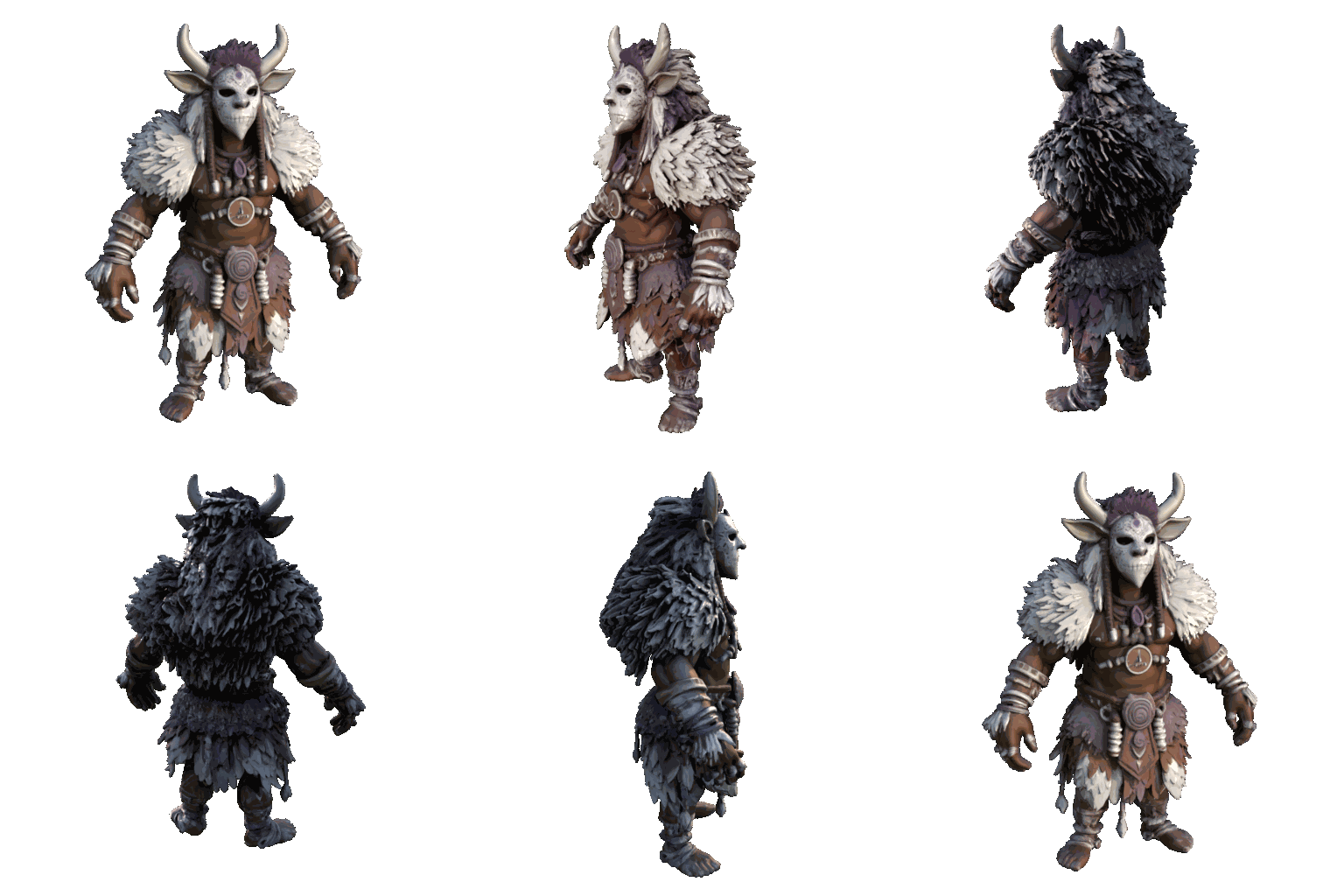 |  |  |
| Crate | Crate (PBR) | Tree Stump | Tree Stump (PBR) |
|  | |  |
Prompts used
- House (Qwen): "house, small house, cozy, wooden, hut"
- Wizard (SDXL): "wizard character, intricate embroidered purple and gold robes, pointed hat, wooden staff with glowing crystal, leather belt with pouches, fantasy character concept art, 4k"
- Chest (Qwen): "A highly detailed wooden treasure chest bound in heavy, dark iron. The chest is slightly open, revealing a pile of glowing gold coins inside. The wood is old and splintered, and the iron has patches of orange rust."
- Obelisk (Qwen): "An ancient, monolithic stone obelisk covered in glowing green runic carvings. The grey stone is deeply cracked from age and covered in patches of thick, fuzzy green moss."
- Lunar Habitat (SDXL): "futuristic lunar habitat module, domed cylinder base building, pristine white composite panels, high gloss reflections, gold foil wrapped pipes, circular metal airlock door, glowing blue exterior floodlights, sci-fi base architecture, clean PBR textures, hard surface modeling, 8k"
- Scavenger (SDXL): "full body character, A-pose, post-apocalyptic scavenger, oil-stained olive green military jacket, tattered clothing, rusty street sign armor, dirty leather belts, scratched welding mask, wasteland survivalist, grunge textures, heavy weathering, fallout style character asset"
- Shaman (SDXL): "full body character, A-pose, tribal shaman, rough woven brown wool, thick white animal fur, carved white bone mask, glowing purple magical runes, bare arms, fantasy RPG character class, organic textures, highly detailed displacement map, ZBrush sculpt style"
- Cyberpunk Woman (Qwen): "A futuristic cyberpunk female mercenary standing in a neutral pose. She has a robotic left arm made of black metal and glowing blue wires. She wears a tactical jacket made of synthetic material with glowing LED strips on the collar and futuristic sneakers."
- Crate (Qwen): "A yellow industrial hazmat shipping crate. On the side, there is a large, highly legible warning label that says "DANGER: BIOHAZARD" in bold black letters. The crate has a digital keypad on the front and two red oxygen tanks strapped to the left side."
- Tree Stump (Qwen): "A mystical, ancient gnarled tree stump with exposed, twisting roots. Growing out of the top is a cluster of translucent, glowing bioluminescent blue mushrooms and delicate, thin fern leaves. Fantasy RPG asset, hand-painted texture style mixed with photorealism, highly detailed."
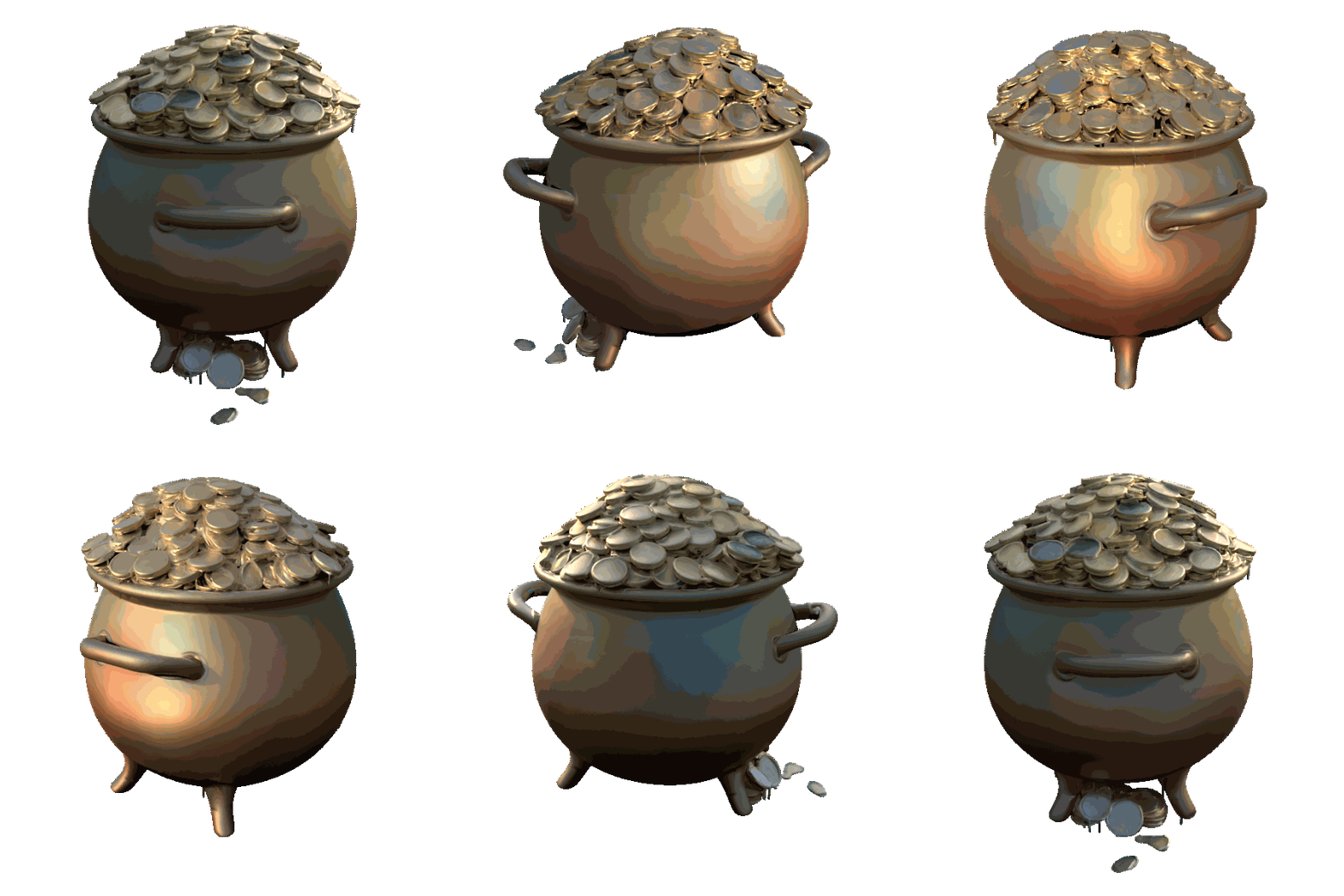
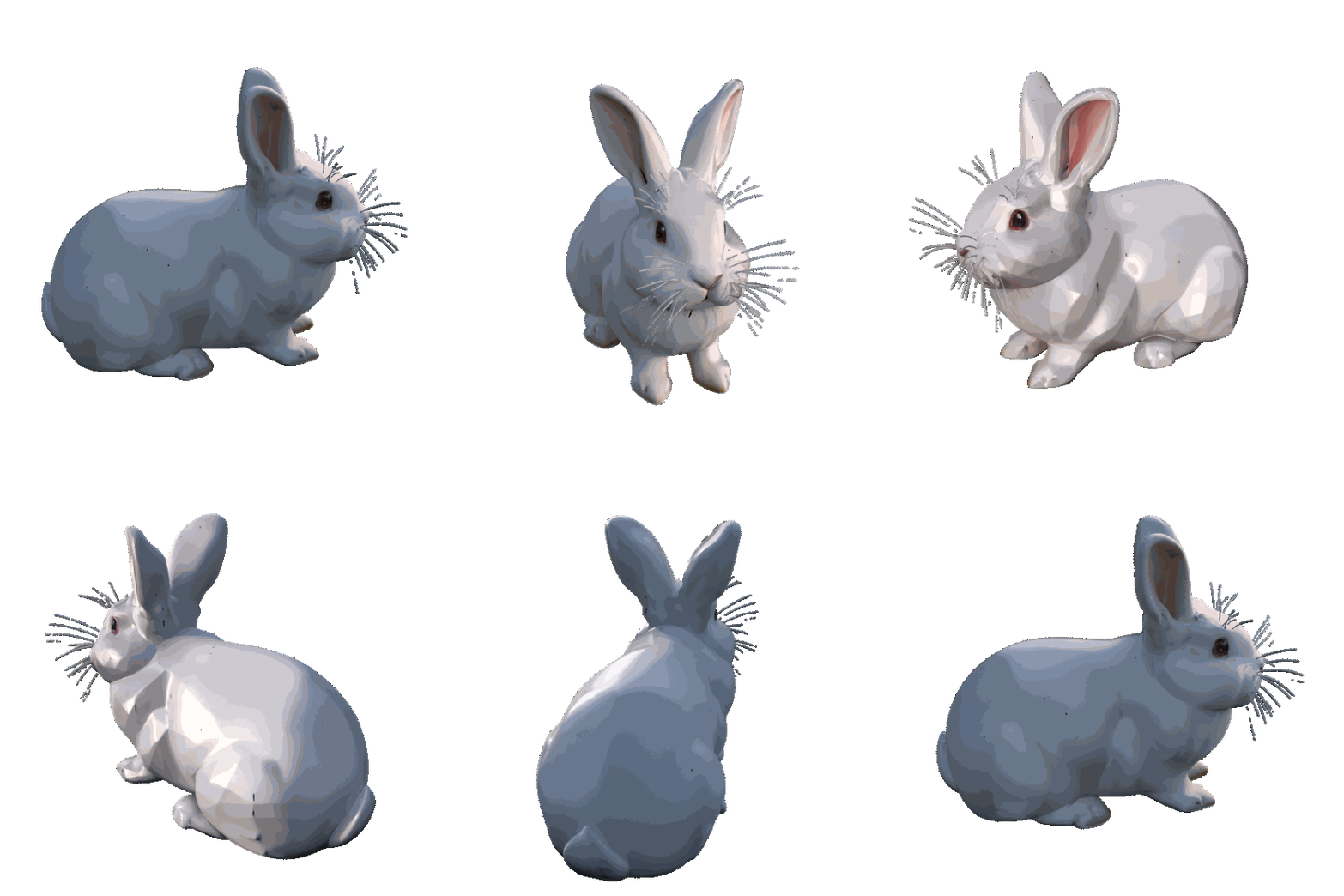
Showcase 4: PBR Gallery
A selection of assets with PBR materials enabled, demonstrating realistic surface response under varying lighting.
| Pot of Gold | Astrolabe | Tree Stump |
|---|---|---|
 |  | |
| Rabbit | Crate | Obelisk (Qwen) |
 | | |
Prompts used
- Pot of Gold: "pot of gold"
- Astrolabe: "A highly detailed, antique steampunk astrolabe resting on a rough-hewn wooden pedestal. The astrolabe features gleaming polished brass rings, tarnished copper gears, and a faceted glass crystal in the center. Studio lighting, photorealistic, 8k resolution, intricate mechanical details, isolated on a solid background."
- Tree Stump: "A mystical, ancient gnarled tree stump with exposed, twisting roots. Growing out of the top is a cluster of translucent, glowing bioluminescent blue mushrooms and delicate, thin fern leaves. Fantasy RPG asset, hand-painted texture style mixed with photorealism, highly detailed."
- Rabbit: "a white rabbit"
- Crate: "A yellow industrial hazmat shipping crate. On the side, there is a large, highly legible warning label that says "DANGER: BIOHAZARD" in bold black letters. The crate has a digital keypad on the front and two red oxygen tanks strapped to the left side."
- Obelisk (Qwen): "An ancient, monolithic stone obelisk covered in glowing green runic carvings. The grey stone is deeply cracked from age and covered in patches of thick, fuzzy green moss."
Showcase 5: Head Stylization (Texturing Only)
Texturing an existing model using prompts and style guidance from an IPAdapter image reference.
3D Model Source: "Brown" by ucupumar - Available at: BlendSwap (Blend #15262)
| Untextured Model | Generated | Generated | Generated (with a reference image) |
|---|---|---|---|
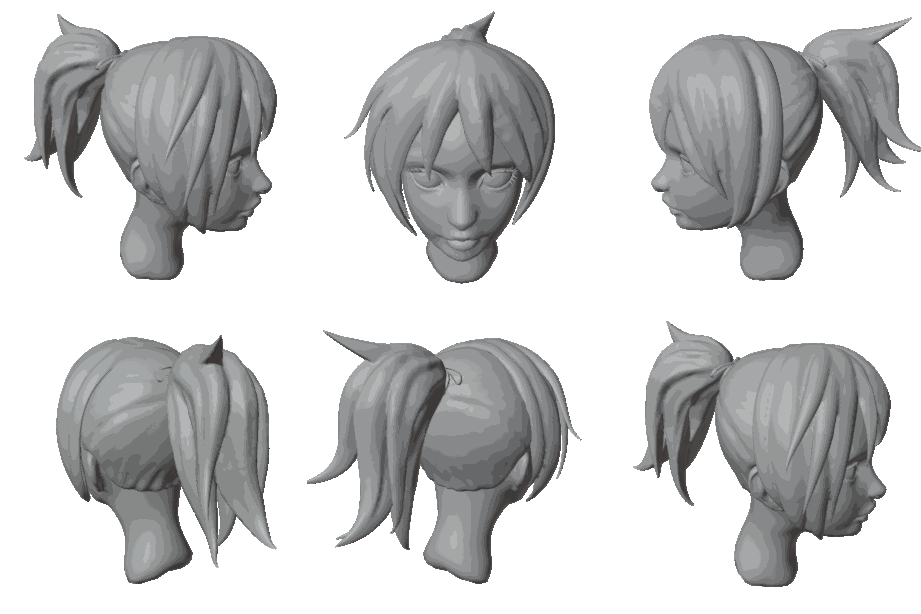 | 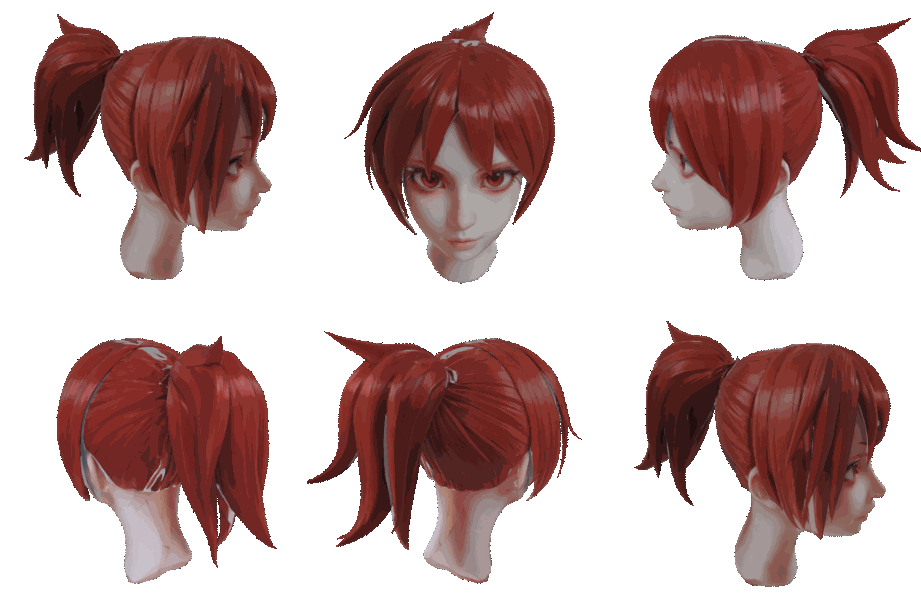 | 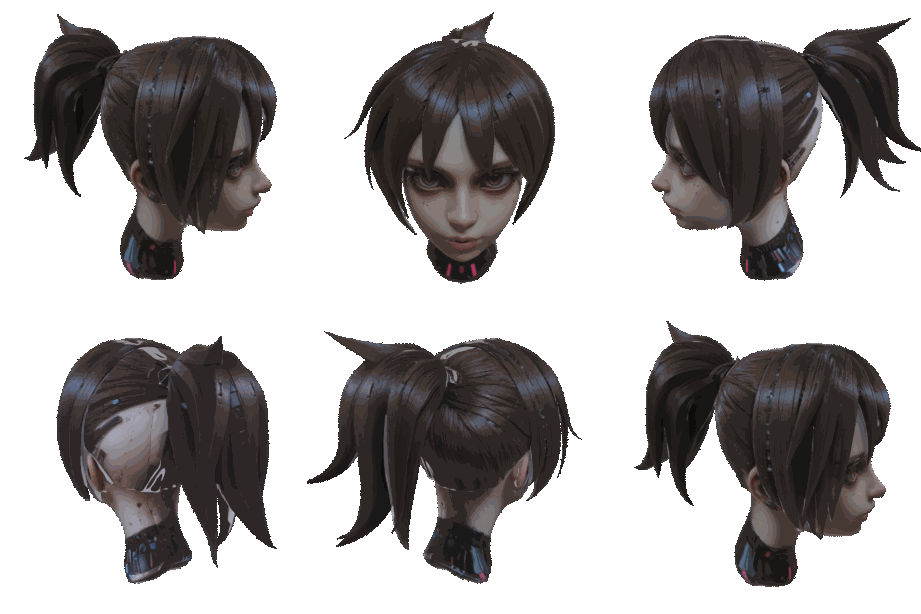 | 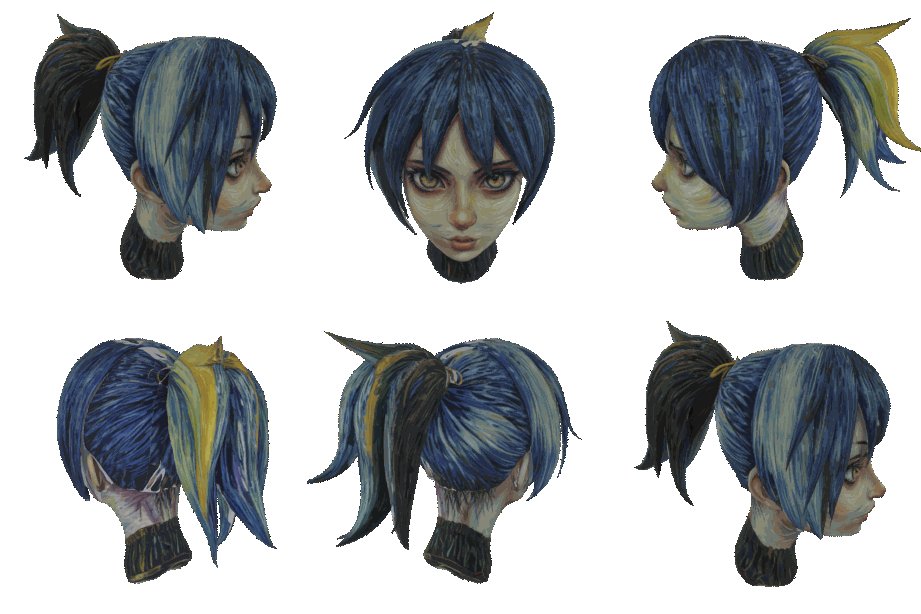 |
| Base Untextured Model | Red Hair | Cyberpunk | Artistic Style |
Prompts used
- Red Hair: "anime girl head, red hair"
- Cyberpunk: "girl head, brown hair, cyberpunk style, realistic"
- Artistic Style: "anime girl head, artistic style" (style guided by IPAdapter reference image shown below)
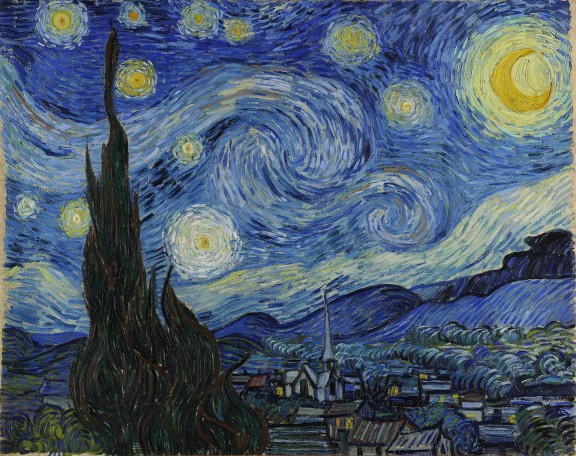
Reference: "The Starry Night" by Vincent van Gogh (used to guide the "Artistic Style" variant)
Showcase 6: Car Texturing (Texturing Only)
Texturing a car model using different prompts to achieve various visual styles.
3D Model Source: "Pontiac GTO 67" by thecali - Available at: BlendSwap (Blend #13575)
| Untextured Model | Generated | Generated | Generated |
|---|---|---|---|
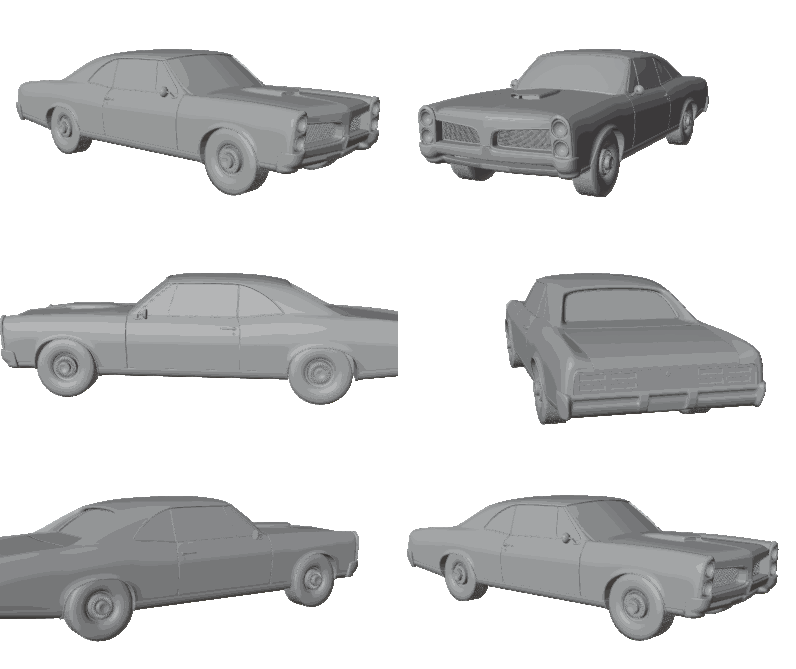 | 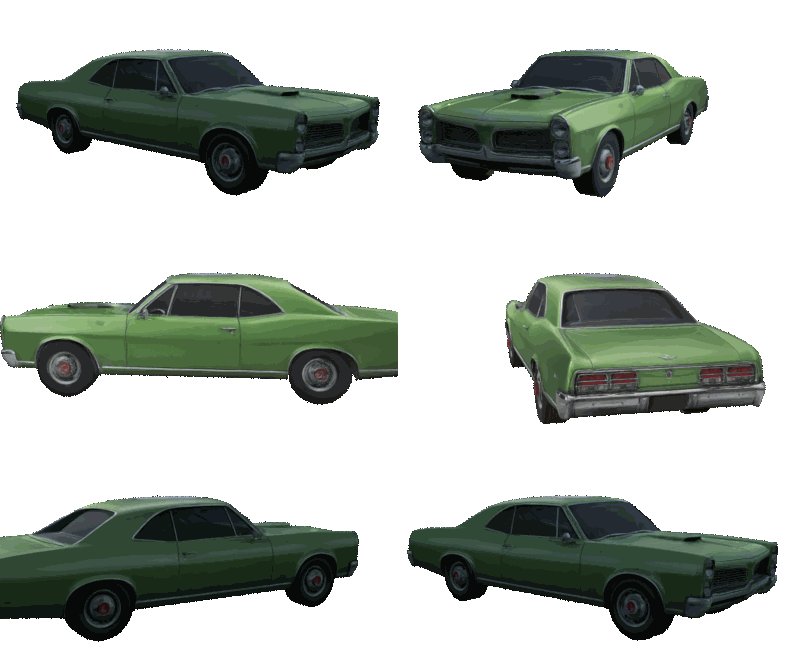 | 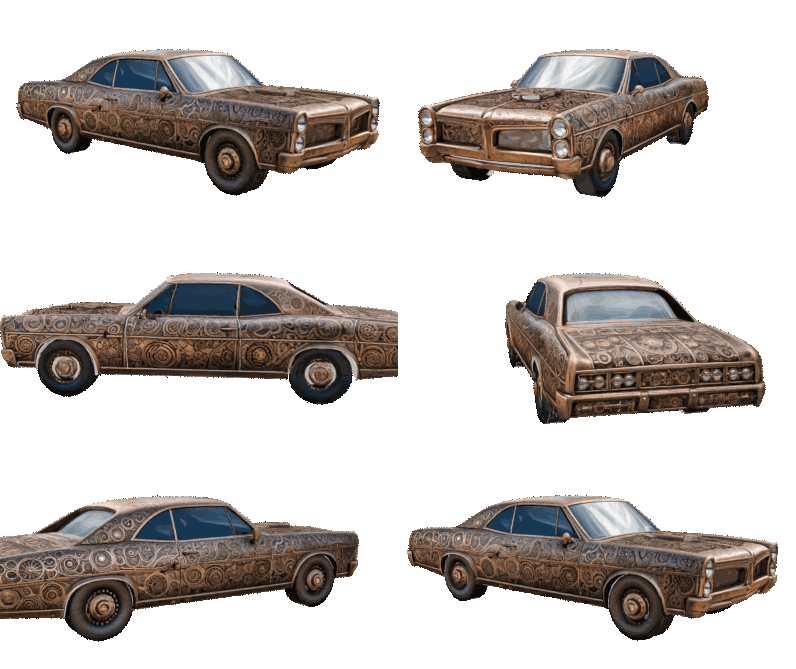 | 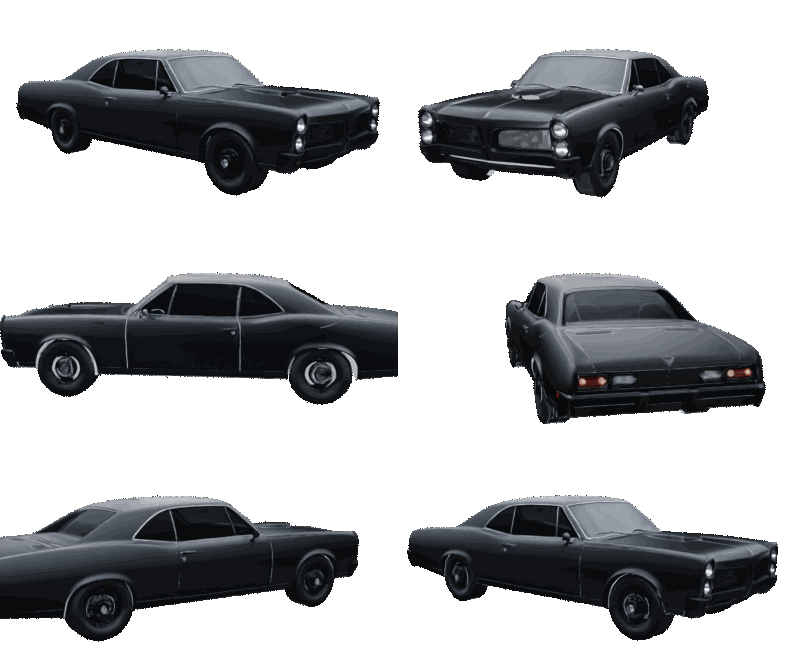 |
| Base Untextured Model | Green | Steampunk | Stealth Black |
Prompts used
- Green: "green car"
- Steampunk: "steampunk style car"
- Stealth Black: "stealth black car"
Showcase 7: Scene Texturing (Texturing Only)
Texturing a complex scene consisting of many mesh objects.
3D Model Source: "Subway Station Entrance" by argonius - Available at: BlendSwap (Blend #19305)
| Untextured Scene | Generated | Generated | Generated |
|---|---|---|---|
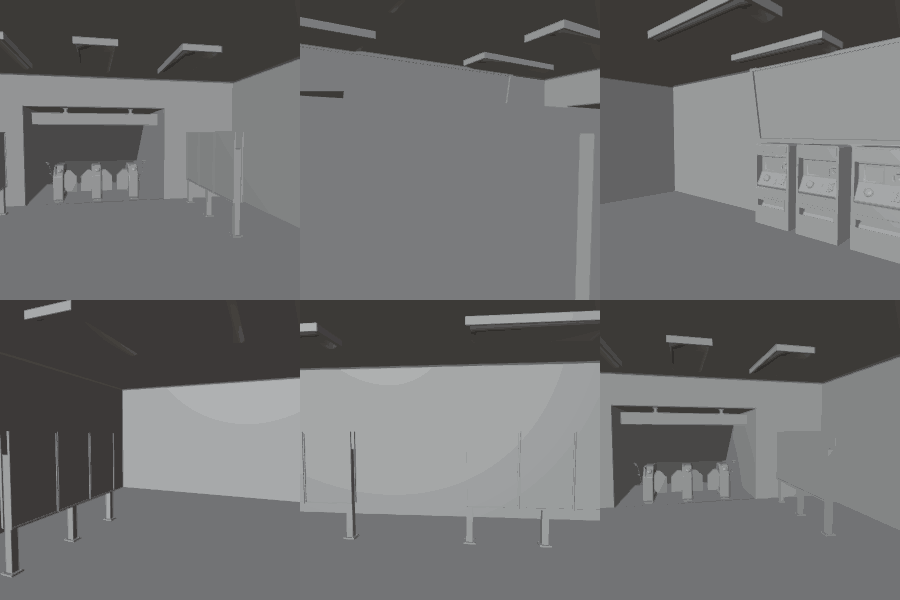 | 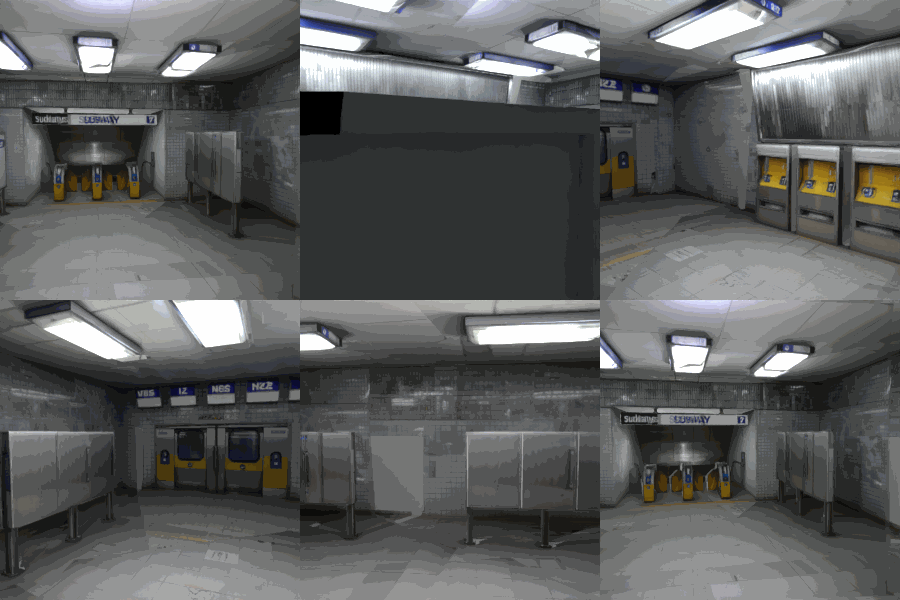 | 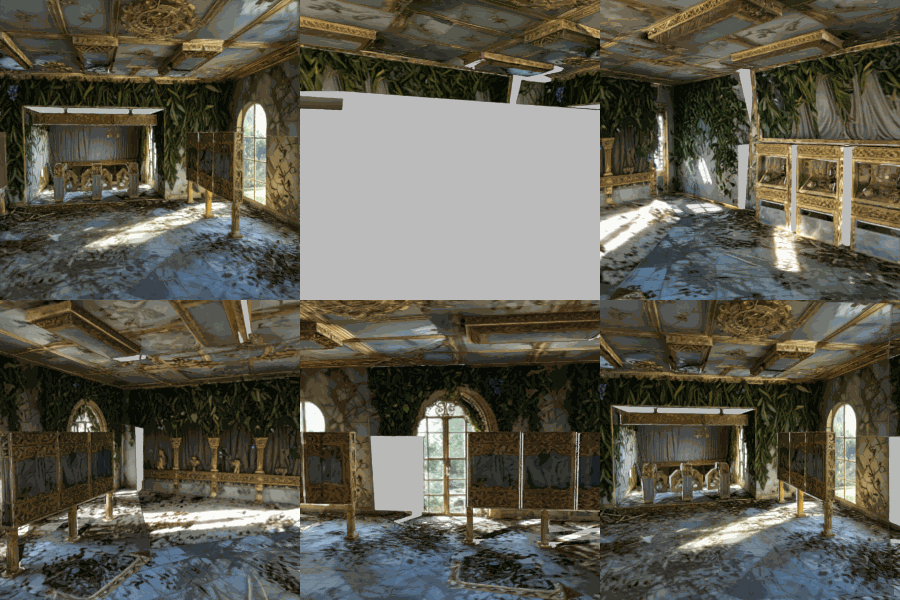 | 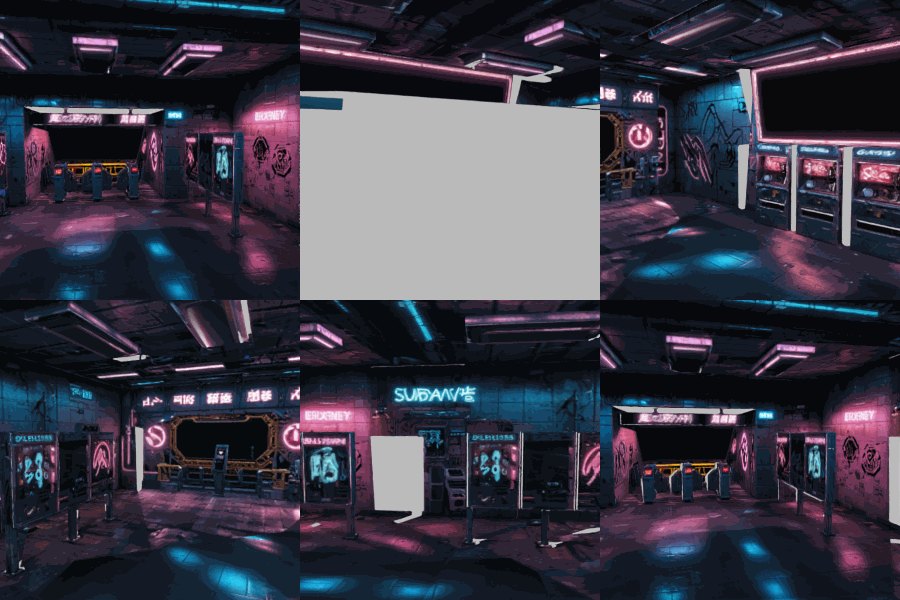 |
| Base Untextured Scene | Subway Station | Fantasy Palace | Cyberpunk |
Prompts used
- Subway Station: "subway station"
- Fantasy Palace: "an overgrown fantasy palace interior, gold elements"
- Cyberpunk: "subway station, cyberpunk style, neon lit"
🛠️ How It Works (A Glimpse)
StableGen acts as an intuitive interface within Blender that communicates with a ComfyUI backend.
- You set up your scene and parameters in the StableGen panel.
- StableGen prepares necessary data (like ControlNet inputs from camera views).
- It constructs a workflow and sends it to your ComfyUI server.
- ComfyUI processes the request using your selected diffusion models.
- Generated images are sent back to Blender.
- StableGen applies these images as textures to your models using sophisticated projection and blending techniques.
💻 System Requirements
- Blender: Version 4.2 – 4.5 (OSL projection) or Blender 5.1+ (GPU-accelerated projection via native Raycast nodes). Blender 5.0 is not supported (OSL is broken and native Raycast was not yet available).
- Operating System: Windows 10/11, Linux, or macOS (Apple Silicon).
- GPU: NVIDIA GPU with CUDA is recommended for ComfyUI. For further details, check ComfyUI's github page: https://github.com/comfyanonymous/ComfyUI.
- At least 8 GB of VRAM is required to run SDXL at a usable speed; plan for 16 GB or more when running FLUX.1-dev or the Qwen-Image-Edit pipeline.
- ComfyUI: A working installation of ComfyUI. StableGen uses this as its backend.
- Python: Version 3.x (usually comes with Blender, but Python 3 is needed for the
installer.pyscript). - Git: Required by the
installer.pyscript. - Disk Space: Significant free space for ComfyUI, AI models (10GB to 50GB+), and generated textures.
⚙️ Installation
Setting up StableGen involves installing ComfyUI, then StableGen's dependencies into ComfyUI using our installer script, and finally installing the StableGen plugin in Blender.
Follow the step‑by‑step instructions below to install StableGen.
If you’d rather watch, Polynox provides a concise video walkthrough:
StableGen Installation & Basic Usage Video Tutorial
Step 1: Install ComfyUI (If not already installed)
StableGen relies on a working ComfyUI installation as its backend. This can be done on a separate machine if desired.
If you wish to use a separate machine for the backend, do step 1 and 2 there.
- If you don't have ComfyUI, please follow the official ComfyUI installation guide: https://github.com/comfyanonymous/ComfyUI#installing.
- Install ComfyUI in a dedicated directory. We'll refer to this as
<YourComfyUIDirectory>. - Ensure you can run ComfyUI and it's functioning correctly before proceeding.
- Install ComfyUI in a dedicated directory. We'll refer to this as
Step 2: Install Dependencies (Custom Nodes & AI Models) - Automated (Recommended)
The installer.py script (found in this repository) automates the download and placement of required ComfyUI custom nodes and core AI models into your <YourComfyUIDirectory>.
Prerequisites for the installer:
- Python 3.
- Git installed and accessible in your system's PATH.
- The path to your ComfyUI installation (
<YourComfyUIDirectory>). - Required Python packages for the script:
requestsandtqdm. Install them via pip:pip install requests tqdm
Running the Installer:
- Download/Locate the Installer: Get
installer.pyfrom this GitHub repository. - Execute the Script:
- Open your system's terminal or command prompt.
- Navigate to the directory containing
installer.py. - Run the script:
Replacepython installer.py <YourComfyUIDirectory><YourComfyUIDirectory>with the actual path. If omitted, the script will prompt for it.
- Follow On-Screen Instructions:
- The script will display a menu of installation packages. Choose the option(s) that match the features you need.
- It will download and place files into the correct subdirectories of
<YourComfyUIDirectory>.
Installer Packages Overview:
| # | Package | What it enables | Size |
|---|---|---|---|
| 1 | Minimal Core | Basic SDXL texturing (bring your own checkpoint + ControlNets) | ~7.3 GB |
| 2 | Core + Preset Essentials | All built-in presets work out of the box | ~9.8 GB |
| 3 | Recommended Full SDXL Setup | SDXL texturing + PBR decomposition (no checkpoint) | ~19.3 GB |
| 4 | Complete SDXL + RealVisXL | Everything in #3 plus a ready-to-use checkpoint | ~26.3 GB |
| 5 | Qwen Core | Qwen Image Edit texturing architecture | ~20.3 GB |
| 6 | Qwen + Lightning LoRAs | Qwen with additional Lightning LoRAs | ~22.6 GB |
| 7 | Qwen Nunchaku | Qwen with Int4 quantized Nunchaku model (lower VRAM) | ~33.0 GB |
| 8 | TRELLIS.2 | Image/text-to-3D mesh generation (~5 GB install + ~15.4 GB models on first use) | ~20.4 GB |
| 9 | Marigold IID | PBR decomposition node (models auto-download on first use) | ~0.01 GB |
| 10 | StableDelight | Specular-free albedo for PBR (includes model download) | ~3.3 GB |
| 11 | FLUX.2 Klein (experimental) | Klein texturing architecture (~13 GB VRAM required) | ~12.4 GB |
Common setups:
- Full 3D asset generation (SDXL): Options 3 + 8 (or 4 + 8 with a checkpoint included)
- Full 3D asset generation (Qwen): Options 6 + 8
- Texturing only (SDXL): Option 3 (or 4)
- Texturing only (Qwen): Option 5 (or 6/7)
- Add PBR to any setup: Options 9 + 10 (included in options 3 and 4)
Note: TRELLIS.2 and Marigold IID download additional models automatically on first use via HuggingFace. The sizes shown above include these first-use downloads. Expect the initial run to take longer.
- Restart ComfyUI: If ComfyUI was running, restart it to load new custom nodes.
(For manual dependency installation-including FLUX.1-dev and Qwen Image Edit setups-see docs/MANUAL_INSTALLATION.md.)
Step 3: Install StableGen Blender Plugin
- Go to the Releases page of this repository.
- Download the latest
StableGen.zipfile. - In Blender, go to
Edit > Preferences > Add-ons > Install.... - Navigate to and select the downloaded
StableGen.zipfile. - Enable the "StableGen" addon (search for "StableGen" and check the box).
Step 4: Configure StableGen Plugin in Blender
- In Blender, go to
Edit > Preferences > Add-ons. - Find "StableGen" and expand its preferences.
- Set the following paths:
- Output Directory: Choose a folder where StableGen will save generated images.
- Server Address: Ensure this matches your ComfyUI server (default
127.0.0.1:8188). - Review ControlNet Mapping if using custom named ControlNet models.
- Enable online access in Blender if not enabled already. Select
Edit -> Preferencesfrom the topbar of Blender. Then navigate toSystem -> Networkand check the boxEnable Online Access. While StableGen does not require internet access, this is added to respect Blender add-on guidelines, as there are still network calls being made locally.
🚀 Quick Start Guide
Texturing an Existing Model
Here’s how to get your first texture generated with StableGen:
- Start ComfyUI Server: Make sure it's running in the background.
- Open Blender & Prepare Scene:
- Have a mesh object ready (e.g., the default Cube).
- Ensure the StableGen addon is enabled and configured (see Step 4 above).
- Access StableGen Panel: Press
Nin the 3D Viewport, go to the "StableGen" tab. - Add Cameras (Recommended for Multi-View):
- Select your object.
- In the StableGen panel, click "Add Cameras". Choose
Objectas center type. Adjust interactively if needed, then confirm.
- Set Basic Parameters:
- Prompt: Type a description (e.g., "ancient stone wall with moss").
- Architecture: Pick the diffusion family (
SDXL,Flux 1, orQwen Image Edit) that matches the workflow you set up. - Checkpoint: Select a checkpoint or GGUF file suited to the chosen architecture (e.g.,
sdxl_base_1.0orQwen-Image-Edit-2509-Q3_K_M.gguf). - Preset: Choose a preset and apply it.
DefaultorCharactersare good starting points.
- Hit Generate! Click the main "Generate" button.
- Observe: Watch the progress in the panel and the ComfyUI console. Your object should update with the new texture! Output files will be in your specified "Output Directory".
- By default, the generated texture will only be visible in the Rendered viewport shading mode (CYCLES Render Engine).
Generating a 3D Model with TRELLIS.2
Follow these steps to generate a fully textured 3D mesh from a text prompt or reference image using the TRELLIS.2 pipeline:
- Prerequisites: Make sure you have the TRELLIS.2 dependencies installed (see Installation - Step 2) and that your hardware meets the System Requirements.
- Choose a Preset: Select and apply one of the (MESH + TEXTURE) labeled presets:
- SDXL - best for creative, prompt-driven workflows.
- Qwen Image Edit - well-suited for stylized generations, legible text, and specific details. Particularly effective for image-to-3D workflows (turning a picture into a 3D model).
- Hover over any preset in Blender for a detailed description of what it does.
- Alternatively, use the TRELLIS.2 (MESH ONLY) preset if you only need the generated mesh without automatic texturing.
- Select Input Mode: Set the
Generate fromfield toPromptfor text-to-3D, orImageto use a reference image. - Provide Input: Write a descriptive prompt or load a reference image.
- (Optional) Enable PBR: Turn on PBR generation under Advanced Parameters → Output & Material Settings to produce physically-based material maps (roughness, metallic, normal).
- Generate: Click the main Generate button and wait for the process to complete.
- (Optional) Refine the Result: Adjust per-camera prompts and regenerate specific views, or switch to Local Edit mode (a preset is available) for targeted touch-ups.
Exporting for a Game Engine:
- Bake Textures: You will most likely need to toggle UV unwrapping (within the
Bake Texturesoperator) - theSmart UV Projectmode works well in most cases. - Export: Use the built-in export tool
Export for Game Engineor export manually from Blender.
📖 Usage & Parameters Overview
StableGen provides a comprehensive interface for AI-powered 3D asset generation and texturing, from mesh creation to final PBR export. Here's an overview of the main sections and tools available in the StableGen panel:
Primary Actions & Scene Setup
These are the main operational buttons and initial setup tools, generally found near the top of the StableGen panel:
- Generate / Cancel Generation (Main Button): Starts either 3D mesh generation (TRELLIS.2 pipeline) or texture generation for existing mesh objects, depending on the current mode. While processing, the button changes to "Cancel Generation." Progress bars (overall, phase, and per-step) appear below this button during generation.
- Bake Textures: Converts the dynamic, multi-projection material into a single, standard UV-mapped image texture per object. Also bakes PBR maps (albedo, roughness, metallic, normal, height, AO, emission) if PBR decomposition was enabled. Defaults to Smart UV Project unwrapping. Essential for exporting to game engines.
- Add Cameras: Set up multiple viewpoints using one of 7 placement strategies - from simple orbit rings to geometry-aware occlusion-optimized placement with per-camera aspect ratios. Use the interactive preview to fine-tune placement before confirming.
- Collect Camera Prompts: Cycles through all cameras in your scene, allowing you to type a specific descriptive text prompt for each viewpoint (e.g., "front view," "close-up on face"). These per-camera prompts are used in conjunction with the main prompt if
Use camera promptsis enabled inViewpoint Blending Settings.
Preset Management
- Located prominently in the UI, this system allows you to:
- Select a Preset: Choose from 30+ built-in presets organized across 4 architecture groups (SDXL/FLUX.1, Qwen Image Edit, FLUX.2 Klein, TRELLIS.2 Pipeline), or select
Customto use your current settings. - Preset Diff Preview: When hovering or selecting a preset, StableGen shows which parameters differ from your current settings and what they will change to.
- Apply Preset: If you modify a stock preset, this button applies its original values.
- Save Preset / Delete Preset: Save your current configuration as a named preset or remove a custom preset. ControlNet and LoRA include toggles let you choose what to save.
- Select a Preset: Choose from 30+ built-in presets organized across 4 architecture groups (SDXL/FLUX.1, Qwen Image Edit, FLUX.2 Klein, TRELLIS.2 Pipeline), or select
Main Parameters
These are your primary controls for defining the generation:
- Prompt: The main text description of the texture (or 3D asset) you want to generate.
- Checkpoint: Select the base SDXL checkpoint (for SDXL/FLUX architectures).
- Architecture: Choose between
SDXL,Flux 1,Qwen Image Edit, andFLUX.2 Klein(experimental) model architectures. For 3D mesh generation, use the TRELLIS.2 pipeline presets. - Generation Mode: Defines the core strategy for texturing:
Generate Separately: Each viewpoint generates independently.Generate Sequentially: Viewpoints generate one by one, using inpainting from previous views for consistency.Generate Using Grid: Combines all views into a grid for a single generation pass, with an optional refinement step.Refine/Restyle Texture (Img2Img): Uses the current texture as input for an image-to-image process.Local Edit: Selectively modify specific areas by pointing cameras at them - new texture blends over the original with feathered edges.UV Inpaint Missing Areas: Fills untextured areas on a UV map via inpainting.
- Target Objects: Choose whether to texture all visible mesh objects or only selected ones.
Advanced Parameters (Collapsible Sections)
Click the arrow next to each title to expand and access detailed settings:
- Core Generation Settings: Control diffusion basics like Seed, Steps, CFG, Negative Prompt, Sampler, Scheduler and Clip Skip.
- LoRA Management: Add and configure LoRAs (Low-Rank Adaptation) for additional style or content guidance. You can set the model and clip strength for each LoRA.
- Viewpoint Blending Settings: Manage how textures from different camera views are combined, including camera-specific prompts, discard angles, blending weight exponents, camera generation order, and post-generation exponent reset.
- Output & Material Settings: Define fallback color, material properties (BSDF), automatic resolution scaling, and options for baking textures during generation which enables generating with more than 8 viewpoints.
- Image Guidance (IPAdapter & ControlNet): Configure IPAdapter for style transfer using external images and set up multiple ControlNet units (Depth, Canny, etc.) for precise structural control.
- Inpainting Options: Fine-tune masking and blending for
SequentialandUV Inpaintmodes (e.g., differential diffusion, mask blurring/growing). - Generation Mode Specifics: Parameters unique to the selected Generation Mode, like refinement options for Grid mode or IPAdapter consistency settings for Sequential/Separate/Refine modes.
- PBR Decomposition: Enable PBR material extraction after texturing. Toggle individual map types (albedo, roughness, metallic, normal, height, AO, emission), choose albedo source, and configure tiled super-resolution. Only shown when the required Marigold/StableDelight nodes are available on the server.
- TRELLIS.2 Settings: Configure 3D mesh generation - resolution mode, decimation, remeshing, import scale, shading mode, texture mode (Native/SDXL/FLUX/Qwen/Klein), preview gallery seed count, and camera placement strategy for texturing.
Integrated Workflow Tools (Bottom Section)
A collection of utilities to further support your workflow:
- Scene Queue: Queue multiple assets for unattended batch processing. Add items with prompt and label, reorder, retry on failure. Supports both texturing and TRELLIS.2 pipelines with optional auto GIF export after each item. (Must be enabled in Addon Preferences).
- 3D Print Exporter: Export models to slicer-ready multi-color 3MF files with custom filament spools, a physical color solver, and dither slice preview. (Must be enabled in Addon Preferences).
- Run Local Post-Processing: Decimate, solidify, or retopologize meshes locally.
- Apply Auto Aspect: Dynamically frame and aspect-scale selected cameras.
- Switch Material: For selected objects with multiple material slots, quickly set a material at a specific index as the active one.
- Add HDRI Light: Prompts for an HDRI image file and sets it up as the world lighting, providing realistic illumination for your scene.
- Apply All Modifiers: Iterates through all mesh objects in the scene, applies their modifier stacks, and converts geometry instances into real mesh data. Helps prepare models for texturing.
- Convert Curves to Mesh: Converts any selected curve objects into mesh objects, which is necessary before StableGen can texture them.
- Export Orbit GIF/MP4: Creates an animated GIF and MP4 of the active object with the camera orbiting around it. Configurable duration, FPS, resolution, render engine (Workbench/Eevee/Cycles), and HDRI environment modes.
- Reproject Images: Re-applies previously generated textures using the latest Viewpoint Blending Settings. Allows tweaking texture blending without full regeneration.
- Mirror Reproject: Mirrors the last projection camera and image across an axis, then reprojects. Useful for symmetric objects.
Experiment with these settings and tools to achieve a vast range of effects and control! Remember that the optimal parameters can vary greatly depending on the model, subject matter, and desired artistic style.
📁 Output Directory Structure
StableGen organizes the generated files within the Output Directory specified in your addon preferences. For each generation session, a new timestamped folder is created, helping you keep track of different iterations. The structure for each session (revision) is as follows:
<Output Directory>/<SceneName>/(Based on your.blendfile name, or scene name if unsaved)<YYYY-MM-DDTHH-MM-SS>/(Timestamp of generation start - this is the main revision directory)generated/(Main output textures from each camera/viewpoint before being applied or baked)controlnet/(Intermediate ControlNet input images)depth/(Depth pass renders)canny/(Renders processed using Canny edge decetor)normal/(Normal pass renders)
baked/(Textures baked onto UV maps using the standaloneBake Texturestool, exported.glbfiles from theExport for Game Enginetool)generated_baked/(Textures baked as part of the generation process if "Bake Textures While Generating" is enabled)inpaint/(Files related to inpainting processes, e.g., forSequential mode)render/(Renders of previous state used as context for inpainting)visibility/(Visibility masks used as masks during the inpainting)
uv_inpaint/(Files specific to the UV Inpaint mode)uv_visibility/(Visibility masks generated on UVs for UV inpainting)
misc/(Other temporary or miscellaneous files, e.g., renders made for Canny edge detection input).gif/.mp4(If theExport GIF/MP4tool is used, these files are saved directly into the timestamped revision directory)prompt.json(The last generated workflow to be used in ComfyUI)
🤔 Troubleshooting
Encountering issues? Here are some common fixes. Always check the Blender System Console (Window > Toggle System Console) AND the ComfyUI server console for error messages.
- StableGen Panel Not Showing: Ensure the addon is installed and enabled in Blender's preferences.
- "Cannot generate..." on Generate Button: Check Addon Preferences:
Output DirectoryandServer Addressmust be correctly set. The server also has to be reachable. - Connection Issues with ComfyUI:
- Make sure your ComfyUI server is running.
- Verify the
Server Addressin StableGen preferences. - Check firewall settings.
- Models Not Found (Error in ComfyUI Console):
- Run the
installer.pyscript. - Manually ensure models are in the correct subfolders of
<YourComfyUIDirectory>/models/(e.g.,checkpoints/,controlnet/,loras/,ipadapter/,clip_vision/,clip/,vae/,unet/). - Restart ComfyUI after adding new models or custom nodes.
- Run the
- GPU Out Of Memory (OOM):
- Enable
Auto Rescale ResolutioninAdvanced Parameters>Output & Material Settingsif disabled. - Try lower bake resolutions if baking.
- Close other GPU-intensive applications.
- Enable
- Textures not visible after generation completes:
- Switch to Rendered viewport shading (top right corner, fourth "sphere" icon)
- Textures not affected by your lighting setup:
- Enable
Apply BSDFinAdvanced Parameters > Output & Material Settingsand regenerate.
- Enable
- Poor Texture Quality/Artifacts:
- Try using the provided presets.
- Adjust prompts and negative prompts.
- Experiment with different Generation Modes.
Sequentialwith IPAdapter is often good for consistency. - Ensure adequate camera coverage and appropriate
Discard-Over Angle. - Fine-tune ControlNet strength. Too low might ignore geometry; too high might yield flat results.
- For
Sequentialmode, check inpainting and visibility mask settings.
- All Visible Meshes Textured: StableGen textures all visible mesh objects by default. You can set
Target ObjectstoSelectedto only texture selected objects.
🤝 Contributing
We welcome contributions! Whether it's bug reports, feature suggestions, code contributions, or new presets, please feel free to open an issue or a pull request.
📜 License
StableGen is released under the GNU General Public License v3.0. See the LICENSE file for details.
Third-Party Licenses: TRELLIS.2 Image-to-3D
Note: This section applies only to the TRELLIS.2 Image-to-3D feature. StableGen's standard texturing pipelines (SDXL, FLUX.1-dev, Qwen Image Edit) do not use any of the libraries listed below and are unaffected by these licensing restrictions.
The TRELLIS.2 feature relies on several third-party components, each with its own license. Users should be aware of these licenses, particularly the non-commercial restrictions on certain NVIDIA libraries used in the TRELLIS.2 textured output pipeline.
| Component | License | Commercial Use Permitted? |
|---|---|---|
| TRELLIS.2 (Microsoft) | MIT | ✅ Yes |
| TRELLIS.2-4B model weights | MIT | ✅ Yes |
| ComfyUI-TRELLIS2 | MIT | ✅ Yes |
| DINOv3 (Meta, image conditioning) | DINOv3 License | ✅ Yes |
| BiRefNet (background removal) | MIT | ✅ Yes |
| FlexGEMM (sparse convolutions) | MIT | ✅ Yes |
| CuMesh (mesh operations) | MIT | ✅ Yes |
| O-Voxel (voxel processing, part of TRELLIS.2) | MIT | ✅ Yes |
| nvdiffrast (NVIDIA) | NVIDIA Source Code License | ❌ Non-commercial only |
| nvdiffrec (NVIDIA) | NVIDIA Source Code License | ❌ Non-commercial only |
Important: The NVIDIA libraries (nvdiffrast and nvdiffrec) are only used when the TRELLIS.2 Texture Mode is set to "Native (TRELLIS.2)" - specifically for UV rasterization and PBR texture baking. Their license restricts usage to "research or evaluation purposes only and not for any direct or indirect monetary gain" (Section 3.3). Only NVIDIA and its affiliates may use these libraries commercially.
All other TRELLIS.2 modes do not introduce licensing restrictions:
- Shape-only mode ("None") - does not use nvdiffrast/nvdiffrec. All other pipeline components are permissively licensed (MIT/Apache 2.0 + DINOv3 License).
- Projection-based texture modes ("SDXL", "Qwen Image Edit", ...) - do not use nvdiffrast/nvdiffrec. The licensing terms of the selected diffusion model apply as usual (e.g., FLUX.1-dev has its own license terms separate from the TRELLIS.2 pipeline).
If you require commercial use of the "Native (TRELLIS.2)" texture mode, consider contacting NVIDIA regarding commercial licensing for nvdiffrast/nvdiffrec.
🙏 Acknowledgements
StableGen builds upon the fantastic work of many individuals and communities. Our sincere thanks go to:
- Academic Roots: This plugin originated as a Bachelor's Thesis by Ondřej Sakala at the Czech Technical University in Prague (Faculty of Information Technology), supervised by Ing. Radek Richtr, Ph.D.
- Full thesis available at: https://dspace.cvut.cz/handle/10467/123567
- Core Technologies & Communities:
- Inspired by following Blender Addons:
- Pioneering Research: We are indebted to the researchers behind key advancements that power StableGen. The following list highlights some of the foundational and influential works in diffusion models, AI-driven control, and 3D texturing (links to arXiv pre-prints):
- Diffusion Models:
- Ho et al. (2020), Denoising Diffusion Probabilistic Models - 2006.11239
- Rombach et al. (2022), Latent Diffusion Models (Stable Diffusion) - 2112.10752
- AI Control Mechanisms:
- Zhang et al. (2023), ControlNet - 2302.05543
- Ye et al. (2023), IP-Adapter - 2308.06721
- Key 3D Texture Synthesis Papers:
- Chen et al. (2023), Text2Tex - 2303.11396
- Richardson et al. (2023), TEXTure - 2302.01721
- Zeng et al. (2023), Paint3D - 2312.13913
- Le et al. (2024), EucliDreamer - 2311.15573
- Ceylan et al. (2024), MatAtlas - 2404.02899
- Other Influential Works:
- Siddiqui et al. (2022), Texturify - 2204.02411
- Bokhovkin et al. (2023), Mesh2Tex - 2304.05868
- Levin & Fried (2024), Differential Diffusion - 2306.00950
- Diffusion Models:
The open spirit of the AI and open-source communities is what makes projects like StableGen possible.
💡 List of planned features
Here are some features we plan to implement in the future (in no particular order):
- Upscaling: Support for upscaling generated textures.
- Custom VAE, CLIP model selection: Ability to select custom VAE and CLIP models in addition to custom ControlNet and LoRA models.
- Refine mode improvements: Features like brush based inpainting.
- Brush-based inpainting: Paint masks directly on the viewport for targeted local edits.
- Better remeshing for TRELLIS.2: Implementing more advanced remeshing techniques to improve the quality of generated meshes.
If you have any suggestions, please feel free to open an issue!
📧 Contact
Ondřej Sakala
- Email:
sakalaondrej@gmail.com - X/Twitter:
@sakalond
Last Updated: June 12, 2026
Contributors


Similar repos


Languages
Python
100.0%
Transform your 3D texturing workflow with the power of generative AI, directly within Blender!
Python
920
189 commits
updated Jul 7, 2026
README
StableGen: AI-Powered 3D Generation & Texturing in Blender ✨
Create 3D assets from images and prompts, then texture and refine them - all inside Blender.
StableGen is an open-source Blender addon that brings generative AI into your 3D workflow. Generate fully textured 3D meshes from a single image or text prompt via TRELLIS.2, then texture and refine them - or any existing model - using SDXL, FLUX.1-dev, or Qwen Image Edit through a flexible ComfyUI backend.
Table of Contents
🌟 Key Features
StableGen brings AI-powered 3D generation and texturing directly into Blender:
- 🧊 TRELLIS.2: Image & Prompt to 3D:
- Generate fully textured 3D meshes from a single reference image or text prompt using Microsoft's TRELLIS.2 (4B-parameter model).
- Multiple resolution modes: 512, 1024, 1024 Cascade (recommended), and 1536 Cascade for maximum geometric detail.
- Flexible texture pipeline: Use TRELLIS.2's native PBR textures, or automatically texture the generated mesh with SDXL, FLUX.1-dev, or Qwen Image Edit for higher-quality diffusion textures.
- Preview Gallery: Generate multiple candidate images with different seeds and pick the best before committing to 3D generation.
- Smart mesh handling: Auto-recovery from mesh corruption, configurable decimation/remeshing, import scaling, and studio lighting setup.
- VRAM-conscious: disk offloading, configurable attention backend
- Powered by ComfyUI-TRELLIS2 (installable via
installer.py).
- 🖨️ 3D Printing & Slicing Suite:
- Export textured meshes directly into a multi-color format (3MF/STL) compatible with OrcaSlicer, Bambu Studio, and PrusaSlicer.
- Physical Color Mixing Solver: Optimizes filament mixtures using Kubelka-Munk Theory (evaluating absorption $K$ and scattering $S$ coefficients).
- Speckle Bleed Prevention: A one-sided saturation-difference penalty prevents pigments from bleeding as dither speckles into highly saturated regions.
- FDM Banding Culling: Vectorized 8% threshold pruning filters out minor filament demands to keep layers clean.
- Viewport Slices Preview: Projects and dithers color layers onto a flat-shaded preview mesh (
SG_SlicedPreview) directly inside the Blender viewport. - Requires enabling "Enable 3D Print Exporter Tab" in Addon Preferences.
- 📂 Folder Batching for Image-to-3D:
- Point StableGen at a directory of reference images to generate and texture multiple 3D assets in a single unattended run.
- Auto-Baking on Completion: Automatically run texture baking (resolution, ORM packing, normal conventions) after each model is generated.
- Scene Isolation: Automatically hides pre-existing assets during each generation stage to prevent texture bleed and projection contamination.
- Batch Performance Log: Writes execution durations (Shape, Texture, Bake, and Total time) and success/error status reports to
stablegen_batch_log.json.
- 🌍 Scene-Wide Multi-Mesh Texturing:
- Don't just texture one mesh at a time! StableGen is designed to apply textures to all mesh objects in your scene simultaneously from your defined camera viewpoints. Alternatively, you can choose to texture only selected objects.
- Achieve a cohesive look across entire environments or collections of assets in a single generation pass.
- Ideal for concept art, look development for complex scenes, and batch-texturing asset libraries.
- 🎨 Multi-View Consistency:
- Sequential Mode: Generates textures viewpoint by viewpoint on each mesh, using inpainting and visibility masks for high consistency across complex surfaces.
- Grid Mode: Processes multiple viewpoints for all meshes simultaneously for faster previews. Includes an optional refinement pass.
- Sophisticated weighted blending ensures smooth transitions between views.
- 📷 Advanced Camera Placement:
- 7 placement strategies: Orbit Ring, Fan Arc, Hemisphere, PCA-Axis, Normal-Weighted K-means, Greedy Occlusion Coverage, and Interactive Visibility-Weighted placement.
- Per-camera optimal aspect ratios - each camera gets its own resolution computed from the mesh's silhouette, so no pixels are wasted on letterboxing.
- Unlimited cameras - no more 8-camera limit.
- Camera generation order - drag-and-drop reorder list with 6 preset strategies to control the processing order in Sequential mode.
- Camera cloning, mirroring, and floating viewport prompt labels.
- 🎯 Local Edit Mode:
- Point cameras at specific areas to modify - new texture blends seamlessly over the original using angle-based and vignette-based feathering.
- Separate angle ramp and silhouette edge feathering controls for precise blending.
- Works with all architectures (SDXL, Flux, Qwen Image Edit).
- 📐 Precise Geometric Control with ControlNet:
- Leverage multiple ControlNet units (Depth, Canny, Normal) simultaneously to ensure generated textures respect your model's geometry.
- Fine-tune strength, start/end steps for each ControlNet unit.
- Supports custom ControlNet model mapping.
- 🖌️ Powerful Style Guidance with IPAdapter:
- Use external reference images to guide the style, mood, and content of your textures with IPAdapter.
- Employ IPAdapter without an reference image for enhanced consistency in multi-view generation modes.
- Control IPAdapter strength, weight type, and active steps.
- ⚙️ Flexible ComfyUI Backend:
- Connects to your existing ComfyUI installation, allowing you to use your preferred SDXL checkpoints, custom LoRAs, and the new Qwen Image Edit workflow alongside experimental FLUX.1-dev support.
- Offloads heavy computation to the ComfyUI server, keeping Blender mostly responsive.
- ✨ Advanced Inpainting & Refinement:
- Refine Mode (Img2Img): Re-style, enhance, or add detail to existing textures (StableGen generated or otherwise) using an image-to-image process.
- Local Edit Mode: Selectively modify specific areas while preserving the rest, with independent angle and vignette feathering controls.
- UV Inpaint Mode: Intelligently fills untextured areas directly on your model's UV map using surrounding texture context.
- Color Matching: Match each generated view's colors to the current texture before blending, using multiple algorithms (MKL, Reinhard, Histogram, MVGD).
- 🛠️ Integrated Workflow Tools:
- Camera Setup: Quickly add and arrange multiple cameras with 7 placement strategies, per-camera aspect ratios, interactive occlusion preview, and customizable generation order.
- Auto-Aspect Camera Framing: Dynamically apply auto-aspect ratio and optimal framing to cameras.
- SketchUp DAE Optimization: Clean SketchUp Collada DAE imports with triangle fan fixes and interior face removal.
- Run Local Post-Processing: Decimate, solidify, or retopologize meshes locally.
- View-Specific Prompts: Assign unique text prompts to individual camera viewpoints for targeted details.
- Texture Baking: Convert complex procedural StableGen materials into standard UV image textures. "Flatten for Refine" option lets you bake and continue editing.
- Debug Tools: Visualize projection coverage, UV alignment, and weight blending without running AI generation.
- HDRI Setup, Modifier Application, Curve Conversion, GIF/MP4 Export & Reproject.**
- 📋 Preset System:
- Get started quickly with built-in presets for common scenarios (e.g., "Default", "Characters", "Quick Draft").
- Save and manage your own custom parameter configurations for repeatable workflows.
🚀 Showcase Gallery
See what StableGen can do!
Tip: Refresh the page to synchronize all GIF animations.
Showcase 1: Text-to-3D (SDXL)
Assets generated entirely from a text prompt using the TRELLIS.2 pipeline with SDXL-based texturing.
| Dragon | Wizard | Hut |
|---|---|---|
| | |
| Telescope | Robot | Cyber Ninja |
| | |
Prompts used
- Dragon: "fantasy dragon"
- Wizard: "wizard character, intricate embroidered purple and gold robes, pointed hat, wooden staff with glowing crystal, leather belt with pouches, fantasy character concept art, 4k"
- Hut: "house, small house, cozy, wooden, hut"
- Telescope: "antique brass telescope, tarnished patina with bright spots from handling, leather grip wrap, extended sections, mahogany tripod, product photography, 4k"
- Robot: "giant robot, mecha, cyberpunk style, sci-fi, white body, intricate details, neon accents"
- Cyber Ninja: "full body character, neutral pose, cyber-ninja, futuristic assassin, matte black carbon fiber stealth suit, hexagonal weave pattern, faceless helmet, glowing red neon visor slit, metallic silver shoulder armor, cyberpunk aesthetic, high contrast materials, unreal engine 5 render"
Showcase 2: Text-to-3D (Qwen)
Text-to-3D via TRELLIS.2 with Qwen Image Edit texturing - well-suited for stylized objects and crisp details.
| Barrel | Chest | Crate |
|---|---|---|
| | |
| Obelisk | Robot | Tree Stump |
| | |
Prompts used
- Barrel: "A chunky, stylized wooden barrel bound by thick, oversized iron hoops. The wood has deep, exaggerated hand-carved grooves"
- Chest: "A highly detailed wooden treasure chest bound in heavy, dark iron. The chest is slightly open, revealing a pile of glowing gold coins inside. The wood is old and splintered, and the iron has patches of orange rust."
- Crate: "A yellow industrial hazmat shipping crate. On the side, there is a large, highly legible warning label that says "DANGER: BIOHAZARD" in bold black letters. The crate has a digital keypad on the front and two red oxygen tanks strapped to the left side."
- Obelisk: "An ancient, monolithic stone obelisk covered in glowing green runic carvings. The grey stone is deeply cracked from age and covered in patches of thick, fuzzy green moss."
- Robot: "giant robot, mecha, cyberpunk style, sci-fi, white body, intricate details, neon accents"
- Tree Stump: "A mystical, ancient gnarled tree stump with exposed, twisting roots. Growing out of the top is a cluster of translucent, glowing bioluminescent blue mushrooms and delicate, thin fern leaves. Fantasy RPG asset, hand-painted texture style mixed with photorealism, highly detailed."
Showcase 3: PBR Comparison
PBR material maps (roughness, metallic, normal) can be generated via Marigold decomposition. Each pair shows the same object without and with PBR materials.
| House | House (PBR) | Wizard | Wizard (PBR) |
|---|---|---|---|
| | | |
| Chest | Chest (PBR) | Obelisk | Obelisk (PBR) |
| | | |
| Lunar Habitat | Lunar Habitat (PBR) | Scavenger | Scavenger (PBR) |
| | | |
| Shaman | Shaman (PBR) | Cyberpunk Woman | Cyberpunk Woman (PBR) |
| | | |
| Crate | Crate (PBR) | Tree Stump | Tree Stump (PBR) |
| | | |
Prompts used
- House (Qwen): "house, small house, cozy, wooden, hut"
- Wizard (SDXL): "wizard character, intricate embroidered purple and gold robes, pointed hat, wooden staff with glowing crystal, leather belt with pouches, fantasy character concept art, 4k"
- Chest (Qwen): "A highly detailed wooden treasure chest bound in heavy, dark iron. The chest is slightly open, revealing a pile of glowing gold coins inside. The wood is old and splintered, and the iron has patches of orange rust."
- Obelisk (Qwen): "An ancient, monolithic stone obelisk covered in glowing green runic carvings. The grey stone is deeply cracked from age and covered in patches of thick, fuzzy green moss."
- Lunar Habitat (SDXL): "futuristic lunar habitat module, domed cylinder base building, pristine white composite panels, high gloss reflections, gold foil wrapped pipes, circular metal airlock door, glowing blue exterior floodlights, sci-fi base architecture, clean PBR textures, hard surface modeling, 8k"
- Scavenger (SDXL): "full body character, A-pose, post-apocalyptic scavenger, oil-stained olive green military jacket, tattered clothing, rusty street sign armor, dirty leather belts, scratched welding mask, wasteland survivalist, grunge textures, heavy weathering, fallout style character asset"
- Shaman (SDXL): "full body character, A-pose, tribal shaman, rough woven brown wool, thick white animal fur, carved white bone mask, glowing purple magical runes, bare arms, fantasy RPG character class, organic textures, highly detailed displacement map, ZBrush sculpt style"
- Cyberpunk Woman (Qwen): "A futuristic cyberpunk female mercenary standing in a neutral pose. She has a robotic left arm made of black metal and glowing blue wires. She wears a tactical jacket made of synthetic material with glowing LED strips on the collar and futuristic sneakers."
- Crate (Qwen): "A yellow industrial hazmat shipping crate. On the side, there is a large, highly legible warning label that says "DANGER: BIOHAZARD" in bold black letters. The crate has a digital keypad on the front and two red oxygen tanks strapped to the left side."
- Tree Stump (Qwen): "A mystical, ancient gnarled tree stump with exposed, twisting roots. Growing out of the top is a cluster of translucent, glowing bioluminescent blue mushrooms and delicate, thin fern leaves. Fantasy RPG asset, hand-painted texture style mixed with photorealism, highly detailed."
Showcase 4: PBR Gallery
A selection of assets with PBR materials enabled, demonstrating realistic surface response under varying lighting.
| Pot of Gold | Astrolabe | Tree Stump |
|---|---|---|
| | |
| Rabbit | Crate | Obelisk (Qwen) |
| | |
Prompts used
- Pot of Gold: "pot of gold"
- Astrolabe: "A highly detailed, antique steampunk astrolabe resting on a rough-hewn wooden pedestal. The astrolabe features gleaming polished brass rings, tarnished copper gears, and a faceted glass crystal in the center. Studio lighting, photorealistic, 8k resolution, intricate mechanical details, isolated on a solid background."
- Tree Stump: "A mystical, ancient gnarled tree stump with exposed, twisting roots. Growing out of the top is a cluster of translucent, glowing bioluminescent blue mushrooms and delicate, thin fern leaves. Fantasy RPG asset, hand-painted texture style mixed with photorealism, highly detailed."
- Rabbit: "a white rabbit"
- Crate: "A yellow industrial hazmat shipping crate. On the side, there is a large, highly legible warning label that says "DANGER: BIOHAZARD" in bold black letters. The crate has a digital keypad on the front and two red oxygen tanks strapped to the left side."
- Obelisk (Qwen): "An ancient, monolithic stone obelisk covered in glowing green runic carvings. The grey stone is deeply cracked from age and covered in patches of thick, fuzzy green moss."
Showcase 5: Head Stylization (Texturing Only)
Texturing an existing model using prompts and style guidance from an IPAdapter image reference.
3D Model Source: "Brown" by ucupumar - Available at: BlendSwap (Blend #15262)
| Untextured Model | Generated | Generated | Generated (with a reference image) |
|---|---|---|---|
| | | |
| Base Untextured Model | Red Hair | Cyberpunk | Artistic Style |
Prompts used
- Red Hair: "anime girl head, red hair"
- Cyberpunk: "girl head, brown hair, cyberpunk style, realistic"
- Artistic Style: "anime girl head, artistic style" (style guided by IPAdapter reference image shown below)
Reference: "The Starry Night" by Vincent van Gogh (used to guide the "Artistic Style" variant)
Showcase 6: Car Texturing (Texturing Only)
Texturing a car model using different prompts to achieve various visual styles.
3D Model Source: "Pontiac GTO 67" by thecali - Available at: BlendSwap (Blend #13575)
| Untextured Model | Generated | Generated | Generated |
|---|---|---|---|
| | | |
| Base Untextured Model | Green | Steampunk | Stealth Black |
Prompts used
- Green: "green car"
- Steampunk: "steampunk style car"
- Stealth Black: "stealth black car"
Showcase 7: Scene Texturing (Texturing Only)
Texturing a complex scene consisting of many mesh objects.
3D Model Source: "Subway Station Entrance" by argonius - Available at: BlendSwap (Blend #19305)
| Untextured Scene | Generated | Generated | Generated |
|---|---|---|---|
| | | |
| Base Untextured Scene | Subway Station | Fantasy Palace | Cyberpunk |
Prompts used
- Subway Station: "subway station"
- Fantasy Palace: "an overgrown fantasy palace interior, gold elements"
- Cyberpunk: "subway station, cyberpunk style, neon lit"
🛠️ How It Works (A Glimpse)
StableGen acts as an intuitive interface within Blender that communicates with a ComfyUI backend.
- You set up your scene and parameters in the StableGen panel.
- StableGen prepares necessary data (like ControlNet inputs from camera views).
- It constructs a workflow and sends it to your ComfyUI server.
- ComfyUI processes the request using your selected diffusion models.
- Generated images are sent back to Blender.
- StableGen applies these images as textures to your models using sophisticated projection and blending techniques.
💻 System Requirements
- Blender: Version 4.2 – 4.5 (OSL projection) or Blender 5.1+ (GPU-accelerated projection via native Raycast nodes). Blender 5.0 is not supported (OSL is broken and native Raycast was not yet available).
- Operating System: Windows 10/11, Linux, or macOS (Apple Silicon).
- GPU: NVIDIA GPU with CUDA is recommended for ComfyUI. For further details, check ComfyUI's github page: https://github.com/comfyanonymous/ComfyUI.
- At least 8 GB of VRAM is required to run SDXL at a usable speed; plan for 16 GB or more when running FLUX.1-dev or the Qwen-Image-Edit pipeline.
- ComfyUI: A working installation of ComfyUI. StableGen uses this as its backend.
- Python: Version 3.x (usually comes with Blender, but Python 3 is needed for the
installer.pyscript). - Git: Required by the
installer.pyscript. - Disk Space: Significant free space for ComfyUI, AI models (10GB to 50GB+), and generated textures.
⚙️ Installation
Setting up StableGen involves installing ComfyUI, then StableGen's dependencies into ComfyUI using our installer script, and finally installing the StableGen plugin in Blender.
Follow the step‑by‑step instructions below to install StableGen.
If you’d rather watch, Polynox provides a concise video walkthrough:
StableGen Installation & Basic Usage Video Tutorial
Step 1: Install ComfyUI (If not already installed)
StableGen relies on a working ComfyUI installation as its backend. This can be done on a separate machine if desired.
If you wish to use a separate machine for the backend, do step 1 and 2 there.
- If you don't have ComfyUI, please follow the official ComfyUI installation guide: https://github.com/comfyanonymous/ComfyUI#installing.
- Install ComfyUI in a dedicated directory. We'll refer to this as
<YourComfyUIDirectory>. - Ensure you can run ComfyUI and it's functioning correctly before proceeding.
- Install ComfyUI in a dedicated directory. We'll refer to this as
Step 2: Install Dependencies (Custom Nodes & AI Models) - Automated (Recommended)
The installer.py script (found in this repository) automates the download and placement of required ComfyUI custom nodes and core AI models into your <YourComfyUIDirectory>.
Prerequisites for the installer:
- Python 3.
- Git installed and accessible in your system's PATH.
- The path to your ComfyUI installation (
<YourComfyUIDirectory>). - Required Python packages for the script:
requestsandtqdm. Install them via pip:pip install requests tqdm
Running the Installer:
- Download/Locate the Installer: Get
installer.pyfrom this GitHub repository. - Execute the Script:
- Open your system's terminal or command prompt.
- Navigate to the directory containing
installer.py. - Run the script:
Replacepython installer.py <YourComfyUIDirectory><YourComfyUIDirectory>with the actual path. If omitted, the script will prompt for it.
- Follow On-Screen Instructions:
- The script will display a menu of installation packages. Choose the option(s) that match the features you need.
- It will download and place files into the correct subdirectories of
<YourComfyUIDirectory>.
Installer Packages Overview:
| # | Package | What it enables | Size |
|---|---|---|---|
| 1 | Minimal Core | Basic SDXL texturing (bring your own checkpoint + ControlNets) | ~7.3 GB |
| 2 | Core + Preset Essentials | All built-in presets work out of the box | ~9.8 GB |
| 3 | Recommended Full SDXL Setup | SDXL texturing + PBR decomposition (no checkpoint) | ~19.3 GB |
| 4 | Complete SDXL + RealVisXL | Everything in #3 plus a ready-to-use checkpoint | ~26.3 GB |
| 5 | Qwen Core | Qwen Image Edit texturing architecture | ~20.3 GB |
| 6 | Qwen + Lightning LoRAs | Qwen with additional Lightning LoRAs | ~22.6 GB |
| 7 | Qwen Nunchaku | Qwen with Int4 quantized Nunchaku model (lower VRAM) | ~33.0 GB |
| 8 | TRELLIS.2 | Image/text-to-3D mesh generation (~5 GB install + ~15.4 GB models on first use) | ~20.4 GB |
| 9 | Marigold IID | PBR decomposition node (models auto-download on first use) | ~0.01 GB |
| 10 | StableDelight | Specular-free albedo for PBR (includes model download) | ~3.3 GB |
| 11 | FLUX.2 Klein (experimental) | Klein texturing architecture (~13 GB VRAM required) | ~12.4 GB |
Common setups:
- Full 3D asset generation (SDXL): Options 3 + 8 (or 4 + 8 with a checkpoint included)
- Full 3D asset generation (Qwen): Options 6 + 8
- Texturing only (SDXL): Option 3 (or 4)
- Texturing only (Qwen): Option 5 (or 6/7)
- Add PBR to any setup: Options 9 + 10 (included in options 3 and 4)
Note: TRELLIS.2 and Marigold IID download additional models automatically on first use via HuggingFace. The sizes shown above include these first-use downloads. Expect the initial run to take longer.
- Restart ComfyUI: If ComfyUI was running, restart it to load new custom nodes.
(For manual dependency installation-including FLUX.1-dev and Qwen Image Edit setups-see docs/MANUAL_INSTALLATION.md.)
Step 3: Install StableGen Blender Plugin
- Go to the Releases page of this repository.
- Download the latest
StableGen.zipfile. - In Blender, go to
Edit > Preferences > Add-ons > Install.... - Navigate to and select the downloaded
StableGen.zipfile. - Enable the "StableGen" addon (search for "StableGen" and check the box).
Step 4: Configure StableGen Plugin in Blender
- In Blender, go to
Edit > Preferences > Add-ons. - Find "StableGen" and expand its preferences.
- Set the following paths:
- Output Directory: Choose a folder where StableGen will save generated images.
- Server Address: Ensure this matches your ComfyUI server (default
127.0.0.1:8188). - Review ControlNet Mapping if using custom named ControlNet models.
- Enable online access in Blender if not enabled already. Select
Edit -> Preferencesfrom the topbar of Blender. Then navigate toSystem -> Networkand check the boxEnable Online Access. While StableGen does not require internet access, this is added to respect Blender add-on guidelines, as there are still network calls being made locally.
🚀 Quick Start Guide
Texturing an Existing Model
Here’s how to get your first texture generated with StableGen:
- Start ComfyUI Server: Make sure it's running in the background.
- Open Blender & Prepare Scene:
- Have a mesh object ready (e.g., the default Cube).
- Ensure the StableGen addon is enabled and configured (see Step 4 above).
- Access StableGen Panel: Press
Nin the 3D Viewport, go to the "StableGen" tab. - Add Cameras (Recommended for Multi-View):
- Select your object.
- In the StableGen panel, click "Add Cameras". Choose
Objectas center type. Adjust interactively if needed, then confirm.
- Set Basic Parameters:
- Prompt: Type a description (e.g., "ancient stone wall with moss").
- Architecture: Pick the diffusion family (
SDXL,Flux 1, orQwen Image Edit) that matches the workflow you set up. - Checkpoint: Select a checkpoint or GGUF file suited to the chosen architecture (e.g.,
sdxl_base_1.0orQwen-Image-Edit-2509-Q3_K_M.gguf). - Preset: Choose a preset and apply it.
DefaultorCharactersare good starting points.
- Hit Generate! Click the main "Generate" button.
- Observe: Watch the progress in the panel and the ComfyUI console. Your object should update with the new texture! Output files will be in your specified "Output Directory".
- By default, the generated texture will only be visible in the Rendered viewport shading mode (CYCLES Render Engine).
Generating a 3D Model with TRELLIS.2
Follow these steps to generate a fully textured 3D mesh from a text prompt or reference image using the TRELLIS.2 pipeline:
- Prerequisites: Make sure you have the TRELLIS.2 dependencies installed (see Installation - Step 2) and that your hardware meets the System Requirements.
- Choose a Preset: Select and apply one of the (MESH + TEXTURE) labeled presets:
- SDXL - best for creative, prompt-driven workflows.
- Qwen Image Edit - well-suited for stylized generations, legible text, and specific details. Particularly effective for image-to-3D workflows (turning a picture into a 3D model).
- Hover over any preset in Blender for a detailed description of what it does.
- Alternatively, use the TRELLIS.2 (MESH ONLY) preset if you only need the generated mesh without automatic texturing.
- Select Input Mode: Set the
Generate fromfield toPromptfor text-to-3D, orImageto use a reference image. - Provide Input: Write a descriptive prompt or load a reference image.
- (Optional) Enable PBR: Turn on PBR generation under Advanced Parameters → Output & Material Settings to produce physically-based material maps (roughness, metallic, normal).
- Generate: Click the main Generate button and wait for the process to complete.
- (Optional) Refine the Result: Adjust per-camera prompts and regenerate specific views, or switch to Local Edit mode (a preset is available) for targeted touch-ups.
Exporting for a Game Engine:
- Bake Textures: You will most likely need to toggle UV unwrapping (within the
Bake Texturesoperator) - theSmart UV Projectmode works well in most cases. - Export: Use the built-in export tool
Export for Game Engineor export manually from Blender.
📖 Usage & Parameters Overview
StableGen provides a comprehensive interface for AI-powered 3D asset generation and texturing, from mesh creation to final PBR export. Here's an overview of the main sections and tools available in the StableGen panel:
Primary Actions & Scene Setup
These are the main operational buttons and initial setup tools, generally found near the top of the StableGen panel:
- Generate / Cancel Generation (Main Button): Starts either 3D mesh generation (TRELLIS.2 pipeline) or texture generation for existing mesh objects, depending on the current mode. While processing, the button changes to "Cancel Generation." Progress bars (overall, phase, and per-step) appear below this button during generation.
- Bake Textures: Converts the dynamic, multi-projection material into a single, standard UV-mapped image texture per object. Also bakes PBR maps (albedo, roughness, metallic, normal, height, AO, emission) if PBR decomposition was enabled. Defaults to Smart UV Project unwrapping. Essential for exporting to game engines.
- Add Cameras: Set up multiple viewpoints using one of 7 placement strategies - from simple orbit rings to geometry-aware occlusion-optimized placement with per-camera aspect ratios. Use the interactive preview to fine-tune placement before confirming.
- Collect Camera Prompts: Cycles through all cameras in your scene, allowing you to type a specific descriptive text prompt for each viewpoint (e.g., "front view," "close-up on face"). These per-camera prompts are used in conjunction with the main prompt if
Use camera promptsis enabled inViewpoint Blending Settings.
Preset Management
- Located prominently in the UI, this system allows you to:
- Select a Preset: Choose from 30+ built-in presets organized across 4 architecture groups (SDXL/FLUX.1, Qwen Image Edit, FLUX.2 Klein, TRELLIS.2 Pipeline), or select
Customto use your current settings. - Preset Diff Preview: When hovering or selecting a preset, StableGen shows which parameters differ from your current settings and what they will change to.
- Apply Preset: If you modify a stock preset, this button applies its original values.
- Save Preset / Delete Preset: Save your current configuration as a named preset or remove a custom preset. ControlNet and LoRA include toggles let you choose what to save.
- Select a Preset: Choose from 30+ built-in presets organized across 4 architecture groups (SDXL/FLUX.1, Qwen Image Edit, FLUX.2 Klein, TRELLIS.2 Pipeline), or select
Main Parameters
These are your primary controls for defining the generation:
- Prompt: The main text description of the texture (or 3D asset) you want to generate.
- Checkpoint: Select the base SDXL checkpoint (for SDXL/FLUX architectures).
- Architecture: Choose between
SDXL,Flux 1,Qwen Image Edit, andFLUX.2 Klein(experimental) model architectures. For 3D mesh generation, use the TRELLIS.2 pipeline presets. - Generation Mode: Defines the core strategy for texturing:
Generate Separately: Each viewpoint generates independently.Generate Sequentially: Viewpoints generate one by one, using inpainting from previous views for consistency.Generate Using Grid: Combines all views into a grid for a single generation pass, with an optional refinement step.Refine/Restyle Texture (Img2Img): Uses the current texture as input for an image-to-image process.Local Edit: Selectively modify specific areas by pointing cameras at them - new texture blends over the original with feathered edges.UV Inpaint Missing Areas: Fills untextured areas on a UV map via inpainting.
- Target Objects: Choose whether to texture all visible mesh objects or only selected ones.
Advanced Parameters (Collapsible Sections)
Click the arrow next to each title to expand and access detailed settings:
- Core Generation Settings: Control diffusion basics like Seed, Steps, CFG, Negative Prompt, Sampler, Scheduler and Clip Skip.
- LoRA Management: Add and configure LoRAs (Low-Rank Adaptation) for additional style or content guidance. You can set the model and clip strength for each LoRA.
- Viewpoint Blending Settings: Manage how textures from different camera views are combined, including camera-specific prompts, discard angles, blending weight exponents, camera generation order, and post-generation exponent reset.
- Output & Material Settings: Define fallback color, material properties (BSDF), automatic resolution scaling, and options for baking textures during generation which enables generating with more than 8 viewpoints.
- Image Guidance (IPAdapter & ControlNet): Configure IPAdapter for style transfer using external images and set up multiple ControlNet units (Depth, Canny, etc.) for precise structural control.
- Inpainting Options: Fine-tune masking and blending for
SequentialandUV Inpaintmodes (e.g., differential diffusion, mask blurring/growing). - Generation Mode Specifics: Parameters unique to the selected Generation Mode, like refinement options for Grid mode or IPAdapter consistency settings for Sequential/Separate/Refine modes.
- PBR Decomposition: Enable PBR material extraction after texturing. Toggle individual map types (albedo, roughness, metallic, normal, height, AO, emission), choose albedo source, and configure tiled super-resolution. Only shown when the required Marigold/StableDelight nodes are available on the server.
- TRELLIS.2 Settings: Configure 3D mesh generation - resolution mode, decimation, remeshing, import scale, shading mode, texture mode (Native/SDXL/FLUX/Qwen/Klein), preview gallery seed count, and camera placement strategy for texturing.
Integrated Workflow Tools (Bottom Section)
A collection of utilities to further support your workflow:
- Scene Queue: Queue multiple assets for unattended batch processing. Add items with prompt and label, reorder, retry on failure. Supports both texturing and TRELLIS.2 pipelines with optional auto GIF export after each item. (Must be enabled in Addon Preferences).
- 3D Print Exporter: Export models to slicer-ready multi-color 3MF files with custom filament spools, a physical color solver, and dither slice preview. (Must be enabled in Addon Preferences).
- Run Local Post-Processing: Decimate, solidify, or retopologize meshes locally.
- Apply Auto Aspect: Dynamically frame and aspect-scale selected cameras.
- Switch Material: For selected objects with multiple material slots, quickly set a material at a specific index as the active one.
- Add HDRI Light: Prompts for an HDRI image file and sets it up as the world lighting, providing realistic illumination for your scene.
- Apply All Modifiers: Iterates through all mesh objects in the scene, applies their modifier stacks, and converts geometry instances into real mesh data. Helps prepare models for texturing.
- Convert Curves to Mesh: Converts any selected curve objects into mesh objects, which is necessary before StableGen can texture them.
- Export Orbit GIF/MP4: Creates an animated GIF and MP4 of the active object with the camera orbiting around it. Configurable duration, FPS, resolution, render engine (Workbench/Eevee/Cycles), and HDRI environment modes.
- Reproject Images: Re-applies previously generated textures using the latest Viewpoint Blending Settings. Allows tweaking texture blending without full regeneration.
- Mirror Reproject: Mirrors the last projection camera and image across an axis, then reprojects. Useful for symmetric objects.
Experiment with these settings and tools to achieve a vast range of effects and control! Remember that the optimal parameters can vary greatly depending on the model, subject matter, and desired artistic style.
📁 Output Directory Structure
StableGen organizes the generated files within the Output Directory specified in your addon preferences. For each generation session, a new timestamped folder is created, helping you keep track of different iterations. The structure for each session (revision) is as follows:
<Output Directory>/<SceneName>/(Based on your.blendfile name, or scene name if unsaved)<YYYY-MM-DDTHH-MM-SS>/(Timestamp of generation start - this is the main revision directory)generated/(Main output textures from each camera/viewpoint before being applied or baked)controlnet/(Intermediate ControlNet input images)depth/(Depth pass renders)canny/(Renders processed using Canny edge decetor)normal/(Normal pass renders)
baked/(Textures baked onto UV maps using the standaloneBake Texturestool, exported.glbfiles from theExport for Game Enginetool)generated_baked/(Textures baked as part of the generation process if "Bake Textures While Generating" is enabled)inpaint/(Files related to inpainting processes, e.g., forSequential mode)render/(Renders of previous state used as context for inpainting)visibility/(Visibility masks used as masks during the inpainting)
uv_inpaint/(Files specific to the UV Inpaint mode)uv_visibility/(Visibility masks generated on UVs for UV inpainting)
misc/(Other temporary or miscellaneous files, e.g., renders made for Canny edge detection input).gif/.mp4(If theExport GIF/MP4tool is used, these files are saved directly into the timestamped revision directory)prompt.json(The last generated workflow to be used in ComfyUI)
🤔 Troubleshooting
Encountering issues? Here are some common fixes. Always check the Blender System Console (Window > Toggle System Console) AND the ComfyUI server console for error messages.
- StableGen Panel Not Showing: Ensure the addon is installed and enabled in Blender's preferences.
- "Cannot generate..." on Generate Button: Check Addon Preferences:
Output DirectoryandServer Addressmust be correctly set. The server also has to be reachable. - Connection Issues with ComfyUI:
- Make sure your ComfyUI server is running.
- Verify the
Server Addressin StableGen preferences. - Check firewall settings.
- Models Not Found (Error in ComfyUI Console):
- Run the
installer.pyscript. - Manually ensure models are in the correct subfolders of
<YourComfyUIDirectory>/models/(e.g.,checkpoints/,controlnet/,loras/,ipadapter/,clip_vision/,clip/,vae/,unet/). - Restart ComfyUI after adding new models or custom nodes.
- Run the
- GPU Out Of Memory (OOM):
- Enable
Auto Rescale ResolutioninAdvanced Parameters>Output & Material Settingsif disabled. - Try lower bake resolutions if baking.
- Close other GPU-intensive applications.
- Enable
- Textures not visible after generation completes:
- Switch to Rendered viewport shading (top right corner, fourth "sphere" icon)
- Textures not affected by your lighting setup:
- Enable
Apply BSDFinAdvanced Parameters > Output & Material Settingsand regenerate.
- Enable
- Poor Texture Quality/Artifacts:
- Try using the provided presets.
- Adjust prompts and negative prompts.
- Experiment with different Generation Modes.
Sequentialwith IPAdapter is often good for consistency. - Ensure adequate camera coverage and appropriate
Discard-Over Angle. - Fine-tune ControlNet strength. Too low might ignore geometry; too high might yield flat results.
- For
Sequentialmode, check inpainting and visibility mask settings.
- All Visible Meshes Textured: StableGen textures all visible mesh objects by default. You can set
Target ObjectstoSelectedto only texture selected objects.
🤝 Contributing
We welcome contributions! Whether it's bug reports, feature suggestions, code contributions, or new presets, please feel free to open an issue or a pull request.
📜 License
StableGen is released under the GNU General Public License v3.0. See the LICENSE file for details.
Third-Party Licenses: TRELLIS.2 Image-to-3D
Note: This section applies only to the TRELLIS.2 Image-to-3D feature. StableGen's standard texturing pipelines (SDXL, FLUX.1-dev, Qwen Image Edit) do not use any of the libraries listed below and are unaffected by these licensing restrictions.
The TRELLIS.2 feature relies on several third-party components, each with its own license. Users should be aware of these licenses, particularly the non-commercial restrictions on certain NVIDIA libraries used in the TRELLIS.2 textured output pipeline.
| Component | License | Commercial Use Permitted? |
|---|---|---|
| TRELLIS.2 (Microsoft) | MIT | ✅ Yes |
| TRELLIS.2-4B model weights | MIT | ✅ Yes |
| ComfyUI-TRELLIS2 | MIT | ✅ Yes |
| DINOv3 (Meta, image conditioning) | DINOv3 License | ✅ Yes |
| BiRefNet (background removal) | MIT | ✅ Yes |
| FlexGEMM (sparse convolutions) | MIT | ✅ Yes |
| CuMesh (mesh operations) | MIT | ✅ Yes |
| O-Voxel (voxel processing, part of TRELLIS.2) | MIT | ✅ Yes |
| nvdiffrast (NVIDIA) | NVIDIA Source Code License | ❌ Non-commercial only |
| nvdiffrec (NVIDIA) | NVIDIA Source Code License | ❌ Non-commercial only |
Important: The NVIDIA libraries (nvdiffrast and nvdiffrec) are only used when the TRELLIS.2 Texture Mode is set to "Native (TRELLIS.2)" - specifically for UV rasterization and PBR texture baking. Their license restricts usage to "research or evaluation purposes only and not for any direct or indirect monetary gain" (Section 3.3). Only NVIDIA and its affiliates may use these libraries commercially.
All other TRELLIS.2 modes do not introduce licensing restrictions:
- Shape-only mode ("None") - does not use nvdiffrast/nvdiffrec. All other pipeline components are permissively licensed (MIT/Apache 2.0 + DINOv3 License).
- Projection-based texture modes ("SDXL", "Qwen Image Edit", ...) - do not use nvdiffrast/nvdiffrec. The licensing terms of the selected diffusion model apply as usual (e.g., FLUX.1-dev has its own license terms separate from the TRELLIS.2 pipeline).
If you require commercial use of the "Native (TRELLIS.2)" texture mode, consider contacting NVIDIA regarding commercial licensing for nvdiffrast/nvdiffrec.
🙏 Acknowledgements
StableGen builds upon the fantastic work of many individuals and communities. Our sincere thanks go to:
- Academic Roots: This plugin originated as a Bachelor's Thesis by Ondřej Sakala at the Czech Technical University in Prague (Faculty of Information Technology), supervised by Ing. Radek Richtr, Ph.D.
- Full thesis available at: https://dspace.cvut.cz/handle/10467/123567
- Core Technologies & Communities:
- Inspired by following Blender Addons:
- Pioneering Research: We are indebted to the researchers behind key advancements that power StableGen. The following list highlights some of the foundational and influential works in diffusion models, AI-driven control, and 3D texturing (links to arXiv pre-prints):
- Diffusion Models:
- Ho et al. (2020), Denoising Diffusion Probabilistic Models - 2006.11239
- Rombach et al. (2022), Latent Diffusion Models (Stable Diffusion) - 2112.10752
- AI Control Mechanisms:
- Zhang et al. (2023), ControlNet - 2302.05543
- Ye et al. (2023), IP-Adapter - 2308.06721
- Key 3D Texture Synthesis Papers:
- Chen et al. (2023), Text2Tex - 2303.11396
- Richardson et al. (2023), TEXTure - 2302.01721
- Zeng et al. (2023), Paint3D - 2312.13913
- Le et al. (2024), EucliDreamer - 2311.15573
- Ceylan et al. (2024), MatAtlas - 2404.02899
- Other Influential Works:
- Siddiqui et al. (2022), Texturify - 2204.02411
- Bokhovkin et al. (2023), Mesh2Tex - 2304.05868
- Levin & Fried (2024), Differential Diffusion - 2306.00950
- Diffusion Models:
The open spirit of the AI and open-source communities is what makes projects like StableGen possible.
💡 List of planned features
Here are some features we plan to implement in the future (in no particular order):
- Upscaling: Support for upscaling generated textures.
- Custom VAE, CLIP model selection: Ability to select custom VAE and CLIP models in addition to custom ControlNet and LoRA models.
- Refine mode improvements: Features like brush based inpainting.
- Brush-based inpainting: Paint masks directly on the viewport for targeted local edits.
- Better remeshing for TRELLIS.2: Implementing more advanced remeshing techniques to improve the quality of generated meshes.
If you have any suggestions, please feel free to open an issue!
📧 Contact
Ondřej Sakala
- Email:
sakalaondrej@gmail.com - X/Twitter:
@sakalond
Last Updated: June 12, 2026
Similar repos
Contributors
Languages
Python
100.0%