
Standalone, local Image to 3D using opensource 3D models
Python
4
26 commits
updated Aug 16, 2026
README
Image To 3D
Image To 3D turns images into local 3D assets without opening ComfyUI. The project is now organized around three supported 3D model families: Hunyuan3D, TripoSplat, and TRELLIS.2.
| Backend | Output type | Status |
|---|---|---|
| Hunyuan3D 2.1 | Mesh/PBR GLB, mesh-only GLB, texture-only GLB | Integrated |
| TripoSplat | Gaussian splats and point-cloud-style exports | Supported model family; Tauri backend integration next |
| TRELLIS.2 4B | O-Voxel/PBR GLB | Experimental integration |
Example Output
| Shade smooth off | Shade smooth on |
|---|---|
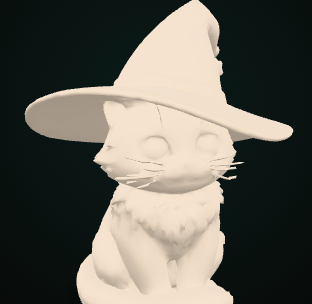 | 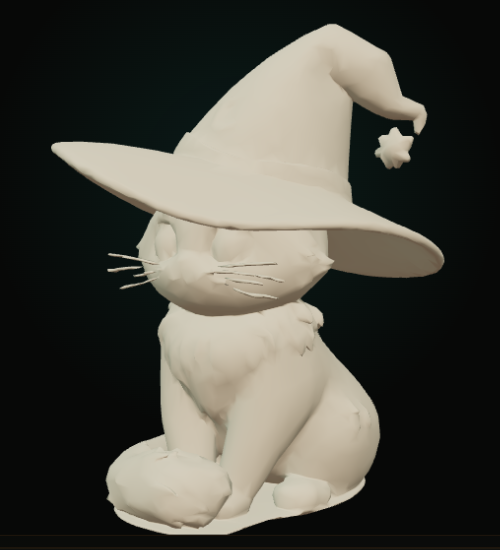 |
| Original face shading exposes the low-poly facets. | Blender-style vertex-normal shading softens the surface without increasing the polygon count. |
Both previews use the same generated mesh with approximately 9k triangles.
Textured Cel Preview
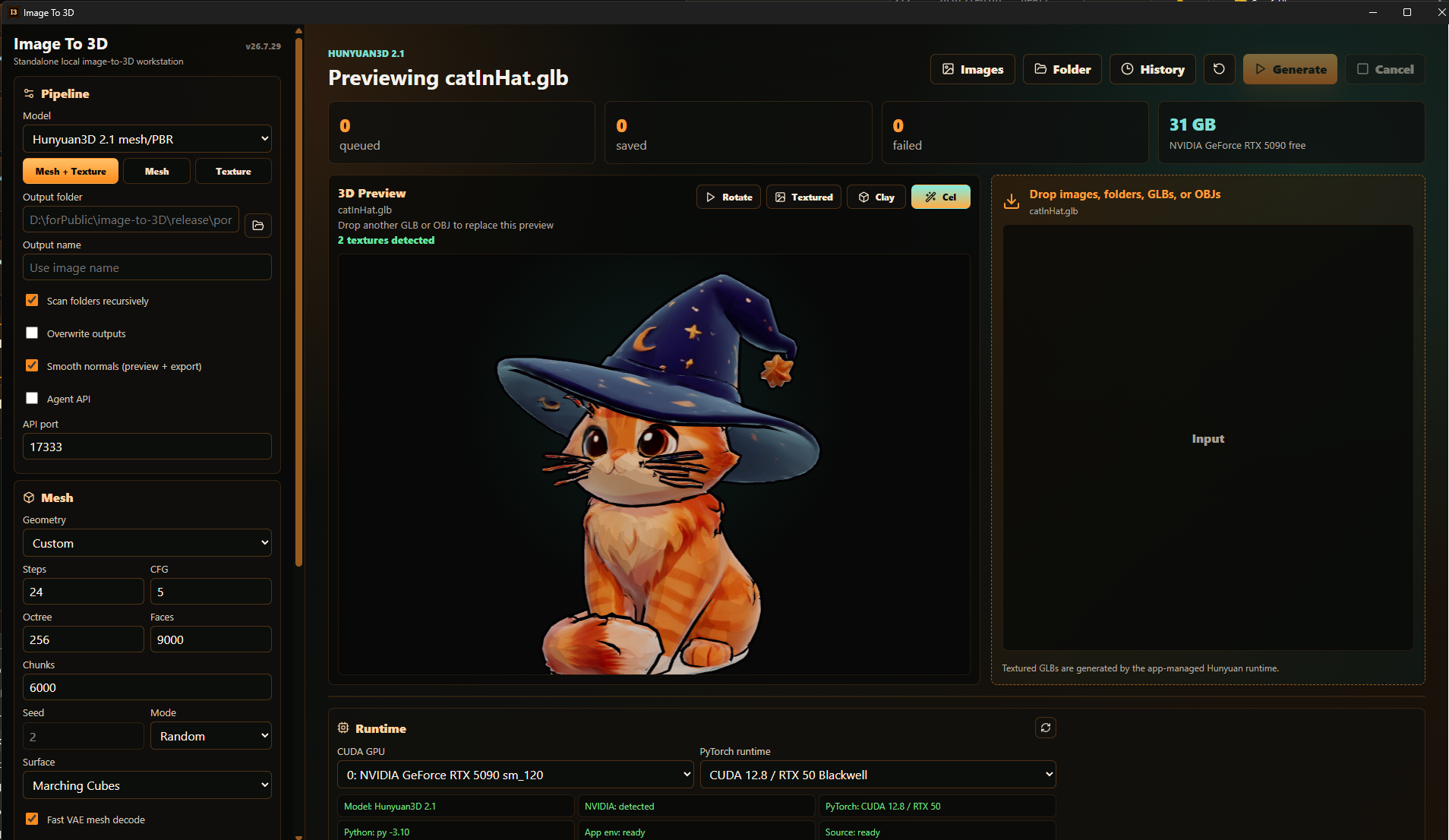
A 9k-face Hunyuan3D mesh shown in the built-in Three.js viewer with smooth normals, four-band Cel lighting, rim light, and ink-style contours.
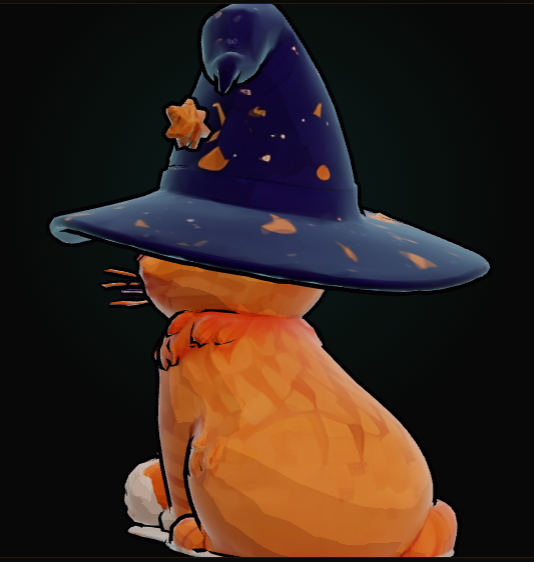
Rear detail showing how the Cel shader preserves the generated color texture while simplifying the lighting and outlining the silhouette.
The app is designed for NVIDIA GPUs. Hunyuan3D and TRELLIS.2 are large CUDA workloads, and TripoSplat is also GPU-oriented; CPU generation is not a supported target.
For Humans
Use the app like a normal desktop tool.
-
Run the portable app:
release\portable\image-to-3d.exeOr run the installer:
release\installer\Image To 3D_26.7.29_x64-setup.exe -
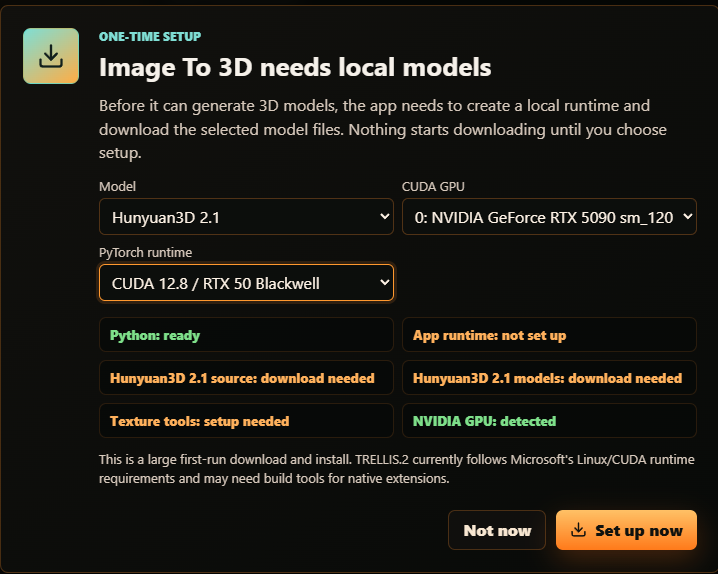
On first launch, the app checks what is already installed. If setup is needed, it asks before downloading models or installing packages.
-
Add an image or a folder of images. You can also drop a
.glb,.gltf, or.objfile into the window to preview it without starting a generation job. Dropping another model replaces the current preview.A
.glbcan contain its materials and texture images inside the single GLB file, so an adjacent JPG is not required when the textures are embedded. OBJ uses separate sidecar files: keep its.mtland referenced JPG/PNG textures beside the.obj. The app loads the matching MTL and base-color texture automatically and lets you switch the preview betweenTexturedandClay. GLB previews also offerCel, which uses smooth normals, stepped lighting, rim light, and silhouette contours. UsePause/Rotateto stop or resume the turntable.Shade smooth (preview + texture/export)updates the viewer immediately, uses smooth vertex-normal conditioning during Hunyuan texturing, and writes recalculated normals into generated GLBs. -
Pick the CUDA GPU and PyTorch runtime in the Runtime panel if you have more than one NVIDIA GPU.
CUDA 12.4 / stableis the default and is known to work on cards like the RTX 3090.CUDA 12.8 / RTX 50 Blackwellis intended for RTX 50-series cards such as the RTX 5090.- When an RTX 50-series card is detected, the app recommends CUDA 12.8 before setup or generation.
Auto choose compatible GPUuses the best compatible card for the installed runtime.
-
Choose a model backend:
Hunyuan3D 2.1supports mesh, mesh + texture, and texture-only workflows.TripoSplatcreates Gaussian splat outputs rather than polygon meshes. It is the splat-focused path for viewers and tools that understand native splat formats.TRELLIS.2 4Bgenerates a textured GLB through Microsoft's official TRELLIS.2 pipeline and currently follows its Linux/CUDA/native-extension requirements.
TRELLIS.2 also depends on gated Hugging Face models. Before choosing
Preparefor TRELLIS.2, sign in to Hugging Face with the account you use for the app and accept/request access for every required repo:microsoft/TRELLIS.2-4B: https://huggingface.co/microsoft/TRELLIS.2-4Bfacebook/dinov3-vitl16-pretrain-lvd1689m: https://huggingface.co/facebook/dinov3-vitl16-pretrain-lvd1689mbriaai/RMBG-2.0: https://huggingface.co/briaai/RMBG-2.0
RMBG-2.0is required too; TRELLIS.2 uses it for background removal before reconstruction, so Prepare can still be blocked even after TRELLIS.2 and DINOv3 are accepted.If the app cannot access one of these gated repos, Prepare will stop with the exact link to accept. Use your own authorized Hugging Face token, for example through
HF_TOKENorHUGGING_FACE_HUB_TOKEN, when running the app or the headless runner. -
For Hunyuan, choose a mode:
Mesh + Texturecreates a textured GLB.Mesh onlycreates a faster mesh preview GLB.Texture onlytextures an existing.glb,.gltf,.obj, or.ply.
-
Pick geometry detail or TRELLIS resolution:
Low polyis the default and targets about 5k faces.Mediumtargets about 20k faces.Hightargets about 50k faces.
TRELLIS.2 also has backend-specific presets:
Preview / game-readyuses the 512 pipeline, 20k faces, and a 1024 texture.Standarduses the 1024 cascade, 100k faces, and a 2048 texture.Qualityuses 25 sampling steps, 200k faces, and a 2048 texture.High-polykeeps up to 500k faces with a 4096 texture.
TRELLIS subject cropping is enabled by default so a small subject is cropped before the official pipeline downsizes the full image. Exported GLBs are normalized to opaque materials and receive configurable UV-atlas gutter padding to reduce transparency artifacts and dark seams.
-
Generated GLBs go into an
outputfolder beside the running app by default. If you choose a different output folder, the app remembers it.
Hunyuan performance and VRAM guidance
View resolution is the size of every camera image processed by the Hunyuan
texture model (six views by default). It is separate from Final texture, which
controls the exported texture atlas. Increasing view resolution from 512 to
1024 doubles both dimensions, so the texture model processes four times as many
pixels and can take substantially more time and VRAM.
Start with:
View resolution: 512Final texture: 2048Low poly: about 5k faces
As one RTX 5090 / CUDA 12.8 reference run, Hunyuan shape generation used about 11 GB of VRAM and geometry generation plus reduction took roughly 30 seconds. The 512 texture-view stage used about 9.6 GB of VRAM. The complete job took 2m 04s, including 36.2s for texture generation. Treat these as observations, not requirements or guarantees; GPU model, drivers, input, face target, texture steps, and view count all affect memory use and runtime.
The app keeps loaded models warm after generation for faster follow-up jobs. Use
Unload in the Runtime panel when you want to release GPU memory.
The History view retains generation manifests across app restarts. Each
manifest records inputs, outputs, settings, per-image results, stage timings,
and elapsed time. After a preset completes successfully, its measured average
appears under the TRELLIS preset selector.
ComfyUI is not required. The app manages its own Python runtime, backend source folders, model cache, and texture tools in app data.
After the rename to Image To 3D, an existing install may still use the legacy
%APPDATA%\public.image.to.hunyuan3d data folder. That is intentional: the app
reuses the old folder when it is already present so large model downloads do not
have to be repeated.
If you want an AI agent to control the app while the GUI is open, enable the
Agent API checkbox in the Pipeline panel. Most people can leave it off.
For AI Agents
This repo is a Tauri 2 + React desktop app with a Python worker. Do not create
or commit a project .venv; the app creates its managed runtime under app data.
Managed app data contains:
python-env*- app-owned Python environments for selected PyTorch runtime profiles.runtime\Hunyuan3D-2.1- downloaded Hunyuan source.runtime\TRELLIS.2- downloaded TRELLIS.2 source.runtime\ComfyUI-Hunyuan3d-2-1-wheels- Windows texture wheel source.models- Hugging Face model cache.jobs- per-run job files and temporary meshes.
Hunyuan preparation downloads/installs:
- Hunyuan source from
Tencent-Hunyuan/Hunyuan3D-2.1. - PyTorch CUDA wheels for Python 3.10-3.12.
- Curated Hunyuan inference dependencies.
- Prebuilt Windows texture wheels from
visualbruno/ComfyUI-Hunyuan3d-2-1. - Model weights from
tencent/Hunyuan3D-2.1. - Texture conditioning from
facebook/dinov2-giant. RealESRGAN_x4plus.pthfor texture enhancement.
TRELLIS.2 preparation downloads/installs:
- TRELLIS.2 source from
microsoft/TRELLIS.2. - Model weights from
microsoft/TRELLIS.2-4B. - Image conditioning weights from gated
facebook/dinov3-vitl16-pretrain-lvd1689m. - Background removal weights from gated
briaai/RMBG-2.0. - Basic TRELLIS.2 Python dependencies plus native extensions used by the official pipeline, including O-Voxel.
If an existing install was prepared before the shared Hunyuan/TRELLIS dependency
repair, run Prepare again for the selected backend. The app intentionally uses a
new runtime marker so the managed Python env can be repaired instead of reusing a
broken transformers/diffusers mix.
The TRELLIS GLB inspection/padding update adds pygltflib to its managed
environment. Existing TRELLIS installs therefore need one additional Prepare
run; existing model downloads are reused.
The gated Hugging Face dependencies are downloaded only after the user has accepted their upstream access terms with their own Hugging Face account/token. Do not bundle or redistribute gated model weights in app releases unless you have explicit permission and the license/access terms allow it.
TripoSplat preparation downloads/installs:
- Model weights from
VAST-AI/TripoSplat. - TripoSplat pipeline code and dependencies for Gaussian splat generation.
- Native
.splat/.plystyle outputs, with point-cloud conversions where broader 3D-tool compatibility is needed.
The app intentionally skips full upstream demo/API/training dependencies such as Gradio, FastAPI, Blender Python, Cupy, and Deepspeed.
Runtime profiles:
cu124installstorch==2.5.1+cu124,torchvision==0.20.1+cu124,torchaudio==2.5.1+cu124. This is the known-good default for RTX 30/40-series cards and falls back to compatible GPUs when a newer card is not supported.cu128installstorch==2.7.1+cu128,torchvision==0.22.1+cu128,torchaudio==2.7.1+cu128. This is intended for RTX 50 / Blackwell GPUs.
Choosing a different CUDA GPU does not delete files or reinstall packages; the
worker only points CUDA at the selected card. Changing the PyTorch runtime
profile and choosing Prepare installs or reuses the managed Python environment
for that profile. Runtime profiles can live side by side, and Reset Env
removes only the selected Python runtime environment; models and outputs stay
untouched.
Generation logs include per-item elapsed time, coarse mesh timing, and texture stage timings for mesh prep, UV unwrap, view render, multiview diffusion, RealESRGAN enhancement, bake, inpaint, OBJ export, and GLB export.
Build And Release
Prerequisites:
- Node.js 20.19+ or 22.12+
- Rust toolchain for Tauri builds
- Python 3.10, 3.11, or 3.12 available to the app
- NVIDIA GPU drivers with
nvidia-smi
Install dependencies:
npm install
Run the desktop app in development:
npm run tauri:dev
Build and publish the standardized local release folders:
npm run release:build
Release outputs:
release\portable\image-to-3d.exerelease\installer\Image To 3D_26.7.29_x64-setup.exe
Headless Runner
Use the headless runner when the GUI should not be part of the automation flow:
py -3 python\ih3d_headless.py --fast-preview D:\images\chair.png
Equivalent npm wrapper:
npm run headless -- --fast-preview D:\images\chair.png
The runner uses the same managed runtime and model cache as the GUI. It streams JSON worker events to stdout.
Useful flags:
--model-backend hunyuanor--model-backend trellis2selects the backend.--trellis-preset preview|standard|quality|highpoly|customselects a named TRELLIS quality profile.--fast-previewuses faster mesh-only settings.--cuda-device 1selects a specific NVIDIA GPU index.--runtime-profile cu128installs/uses the CUDA 12.8 RTX 50-series profile.--mode meshTexturecreates mesh and texture.--mode meshOnlycreates a faster mesh preview.--mode textureOnly --mesh-input-path D:\mesh\source.glbtextures an existing mesh.--output-dir D:\modelschooses the output folder.--output-name chair-testchooses the output basename.--overwritereplaces an existing output with the same name.
Local Agent API
The GUI exposes a local-only Agent API when the user enables Agent API in the
Pipeline panel. The same API can be started on app launch by setting:
$env:I3D_AGENT_API = '1'
.\release\portable\image-to-3d.exe
Automation can also start it explicitly by writing
release\portable\output\agent-api-autostart.json before launching the app:
{
  "enabled": true,
  "port": 17333
}
The default port is 17333. Change it in the Pipeline panel, or set
I3D_AGENT_API_PORT when using environment auto-start. The legacy
IH3D_AGENT_API and IH3D_AGENT_API_PORT names are still accepted for old
automation.
Default base URL:
http://127.0.0.1:17333
Endpoints:
GET /healthGET /openapi.jsonGET /statusGET /historyGET /runtimeGET /vramPOST /preparePOST /reset-runtimePOST /unload-modelsPOST /open-output-folderPOST /open-runtime-folderPOST /open-pathPOST /open-containing-folderPOST /generatePOST /cancel
Use /runtime?modelBackend=trellis2&runtimeProfile=cu128 to check a specific
backend/profile. /status includes activeJob while work is running and
lastJob after completion, including the final status, message, outputs,
failedCount, and totalCount fields.
The /generate endpoint accepts the same important settings the UI exposes.
Agents may send partial options; missing values are filled from app defaults.
Mode values:
meshTexture- Mesh + Texture.meshOnly- Mesh only.textureOnly- Texture only.
Common options:
modelBackendcudaDeviceruntimeProfileoutputDiroutputNamemeshInputPathoverwritemeshDetailmeshStepsmeshGuidancemeshSeedmeshSeedModeoctreeResolutionnumChunksreduceFacesmaxFacessmoothNormalstextureViewSizetextureStepstextureGuidancetextureSizetextureSeedtextureSeedModetrellisResolutiontrellisPresettrellisAutocroptrellisForceOpaquetrellisAtlasPaddingtrellisSparseStepstrellisSparseGuidancetrellisShapeStepstrellisShapeGuidancetrellisTextureStepstrellisTextureGuidancetrellisDecimationTargettrellisTextureSizetrellisRemeshtrellisExportWebp
Geometry presets:
meshDetail = 'low'targets about 5k faces and is the default.meshDetail = 'medium'targets about 20k faces.meshDetail = 'high'targets about 50k faces.
Hunyuan applies the target through maxFaces when reduceFaces is enabled.
TRELLIS.2 applies the target through trellisDecimationTarget.
Example fast mesh preview request:
Invoke-RestMethod -Method Post -Uri http://127.0.0.1:17333/generate -ContentType 'application/json' -Body (@{
  paths = @('D:\images\chair.png')
  options = @{
    mode = 'meshOnly'
    cudaDevice = 'auto'
    runtimeProfile = 'cu124'
    outputDir = 'D:\models'
    outputName = 'chair-preview'
    overwrite = $true
    meshDetail = 'low'
  }
} | ConvertTo-Json -Depth 6)
Example full mesh + texture request:
Invoke-RestMethod -Method Post -Uri http://127.0.0.1:17333/generate -ContentType 'application/json' -Body (@{
  paths = @('D:\images\chair.png')
  options = @{
    mode = 'meshTexture'
    cudaDevice = '0'
    runtimeProfile = 'cu128'
    outputDir = 'D:\models'
    outputName = 'chair-textured'
  }
} | ConvertTo-Json -Depth 6)
Example TRELLIS.2 textured GLB request:
Invoke-RestMethod -Method Post -Uri http://127.0.0.1:17333/generate -ContentType 'application/json' -Body (@{
  paths = @('D:\images\chair.png')
  options = @{
    modelBackend = 'trellis2'
    cudaDevice = '0'
    runtimeProfile = 'cu128'
    outputDir = 'D:\models'
    outputName = 'chair-trellis'
    trellisTextureSteps = 12
    trellisExportWebp = $true
  }
} | ConvertTo-Json -Depth 6)
Git Hygiene
Do not commit generated builds, local dependencies, app-managed Python environments, downloaded source archives, model weights, copied GLBs, job files, test output, or installer files.
The .gitignore covers:
node_modulesdistreleasesrc-tauri/target- local Python caches
- generated mesh/model files
- app runtime/model/output folders
- test input/output folders
- installer files
Texture Note
The supplied ComfyUI workflow, Jun-2.1_TextureUpscaleWithAuraSR.json, was used
as a reference for the intended product flow: mesh, multiview texture, upscale,
bake, inpaint, GLB.
The standalone worker currently uses Tencent's direct Hunyuan3D 2.1 Python API for shape and PBR texture generation. AuraSR-specific parity is tracked as a follow-up because the standalone app should not depend on ComfyUI custom node loading.
Roadmap
- Add explicit
/capabilitiesand/settingsendpoints for richer agent discovery. - Add low-VRAM presets once they are validated.
- Add richer texture controls where Tencent's direct API exposes them.
- Add AuraSR-style optional view upscaling without requiring ComfyUI.
- Add thumbnails and turntable previews to the retained job history.
Third-Party Notices
See THIRD_PARTY_NOTICES.md for attribution covering the TRELLIS subject crop,
UV-atlas padding, export inspection, preset, and manifest work adapted from
dotneet/image-to-3d.
Contributors

26 commits
Similar repos



Languages
Python
39.2%
TypeScript
30.3%
Rust
26.4%
CSS
3.3%
Standalone, local Image to 3D using opensource 3D models
Python
4
26 commits
updated Aug 16, 2026
README
Image To 3D
Image To 3D turns images into local 3D assets without opening ComfyUI. The project is now organized around three supported 3D model families: Hunyuan3D, TripoSplat, and TRELLIS.2.
| Backend | Output type | Status |
|---|---|---|
| Hunyuan3D 2.1 | Mesh/PBR GLB, mesh-only GLB, texture-only GLB | Integrated |
| TripoSplat | Gaussian splats and point-cloud-style exports | Supported model family; Tauri backend integration next |
| TRELLIS.2 4B | O-Voxel/PBR GLB | Experimental integration |
Example Output
| Shade smooth off | Shade smooth on |
|---|---|
| |
| Original face shading exposes the low-poly facets. | Blender-style vertex-normal shading softens the surface without increasing the polygon count. |
Both previews use the same generated mesh with approximately 9k triangles.
Textured Cel Preview
A 9k-face Hunyuan3D mesh shown in the built-in Three.js viewer with smooth normals, four-band Cel lighting, rim light, and ink-style contours.
Rear detail showing how the Cel shader preserves the generated color texture while simplifying the lighting and outlining the silhouette.
The app is designed for NVIDIA GPUs. Hunyuan3D and TRELLIS.2 are large CUDA workloads, and TripoSplat is also GPU-oriented; CPU generation is not a supported target.
For Humans
Use the app like a normal desktop tool.
-
Run the portable app:
release\portable\image-to-3d.exeOr run the installer:
release\installer\Image To 3D_26.7.29_x64-setup.exe -
On first launch, the app checks what is already installed. If setup is needed, it asks before downloading models or installing packages.
-
Add an image or a folder of images. You can also drop a
.glb,.gltf, or.objfile into the window to preview it without starting a generation job. Dropping another model replaces the current preview.A
.glbcan contain its materials and texture images inside the single GLB file, so an adjacent JPG is not required when the textures are embedded. OBJ uses separate sidecar files: keep its.mtland referenced JPG/PNG textures beside the.obj. The app loads the matching MTL and base-color texture automatically and lets you switch the preview betweenTexturedandClay. GLB previews also offerCel, which uses smooth normals, stepped lighting, rim light, and silhouette contours. UsePause/Rotateto stop or resume the turntable.Shade smooth (preview + texture/export)updates the viewer immediately, uses smooth vertex-normal conditioning during Hunyuan texturing, and writes recalculated normals into generated GLBs. -
Pick the CUDA GPU and PyTorch runtime in the Runtime panel if you have more than one NVIDIA GPU.
CUDA 12.4 / stableis the default and is known to work on cards like the RTX 3090.CUDA 12.8 / RTX 50 Blackwellis intended for RTX 50-series cards such as the RTX 5090.- When an RTX 50-series card is detected, the app recommends CUDA 12.8 before setup or generation.
Auto choose compatible GPUuses the best compatible card for the installed runtime.
-
Choose a model backend:
Hunyuan3D 2.1supports mesh, mesh + texture, and texture-only workflows.TripoSplatcreates Gaussian splat outputs rather than polygon meshes. It is the splat-focused path for viewers and tools that understand native splat formats.TRELLIS.2 4Bgenerates a textured GLB through Microsoft's official TRELLIS.2 pipeline and currently follows its Linux/CUDA/native-extension requirements.
TRELLIS.2 also depends on gated Hugging Face models. Before choosing
Preparefor TRELLIS.2, sign in to Hugging Face with the account you use for the app and accept/request access for every required repo:microsoft/TRELLIS.2-4B: https://huggingface.co/microsoft/TRELLIS.2-4Bfacebook/dinov3-vitl16-pretrain-lvd1689m: https://huggingface.co/facebook/dinov3-vitl16-pretrain-lvd1689mbriaai/RMBG-2.0: https://huggingface.co/briaai/RMBG-2.0
RMBG-2.0is required too; TRELLIS.2 uses it for background removal before reconstruction, so Prepare can still be blocked even after TRELLIS.2 and DINOv3 are accepted.If the app cannot access one of these gated repos, Prepare will stop with the exact link to accept. Use your own authorized Hugging Face token, for example through
HF_TOKENorHUGGING_FACE_HUB_TOKEN, when running the app or the headless runner. -
For Hunyuan, choose a mode:
Mesh + Texturecreates a textured GLB.Mesh onlycreates a faster mesh preview GLB.Texture onlytextures an existing.glb,.gltf,.obj, or.ply.
-
Pick geometry detail or TRELLIS resolution:
Low polyis the default and targets about 5k faces.Mediumtargets about 20k faces.Hightargets about 50k faces.
TRELLIS.2 also has backend-specific presets:
Preview / game-readyuses the 512 pipeline, 20k faces, and a 1024 texture.Standarduses the 1024 cascade, 100k faces, and a 2048 texture.Qualityuses 25 sampling steps, 200k faces, and a 2048 texture.High-polykeeps up to 500k faces with a 4096 texture.
TRELLIS subject cropping is enabled by default so a small subject is cropped before the official pipeline downsizes the full image. Exported GLBs are normalized to opaque materials and receive configurable UV-atlas gutter padding to reduce transparency artifacts and dark seams.
-
Generated GLBs go into an
outputfolder beside the running app by default. If you choose a different output folder, the app remembers it.
Hunyuan performance and VRAM guidance
View resolution is the size of every camera image processed by the Hunyuan
texture model (six views by default). It is separate from Final texture, which
controls the exported texture atlas. Increasing view resolution from 512 to
1024 doubles both dimensions, so the texture model processes four times as many
pixels and can take substantially more time and VRAM.
Start with:
View resolution: 512Final texture: 2048Low poly: about 5k faces
As one RTX 5090 / CUDA 12.8 reference run, Hunyuan shape generation used about 11 GB of VRAM and geometry generation plus reduction took roughly 30 seconds. The 512 texture-view stage used about 9.6 GB of VRAM. The complete job took 2m 04s, including 36.2s for texture generation. Treat these as observations, not requirements or guarantees; GPU model, drivers, input, face target, texture steps, and view count all affect memory use and runtime.
The app keeps loaded models warm after generation for faster follow-up jobs. Use
Unload in the Runtime panel when you want to release GPU memory.
The History view retains generation manifests across app restarts. Each
manifest records inputs, outputs, settings, per-image results, stage timings,
and elapsed time. After a preset completes successfully, its measured average
appears under the TRELLIS preset selector.
ComfyUI is not required. The app manages its own Python runtime, backend source folders, model cache, and texture tools in app data.
After the rename to Image To 3D, an existing install may still use the legacy
%APPDATA%\public.image.to.hunyuan3d data folder. That is intentional: the app
reuses the old folder when it is already present so large model downloads do not
have to be repeated.
If you want an AI agent to control the app while the GUI is open, enable the
Agent API checkbox in the Pipeline panel. Most people can leave it off.
For AI Agents
This repo is a Tauri 2 + React desktop app with a Python worker. Do not create
or commit a project .venv; the app creates its managed runtime under app data.
Managed app data contains:
python-env*- app-owned Python environments for selected PyTorch runtime profiles.runtime\Hunyuan3D-2.1- downloaded Hunyuan source.runtime\TRELLIS.2- downloaded TRELLIS.2 source.runtime\ComfyUI-Hunyuan3d-2-1-wheels- Windows texture wheel source.models- Hugging Face model cache.jobs- per-run job files and temporary meshes.
Hunyuan preparation downloads/installs:
- Hunyuan source from
Tencent-Hunyuan/Hunyuan3D-2.1. - PyTorch CUDA wheels for Python 3.10-3.12.
- Curated Hunyuan inference dependencies.
- Prebuilt Windows texture wheels from
visualbruno/ComfyUI-Hunyuan3d-2-1. - Model weights from
tencent/Hunyuan3D-2.1. - Texture conditioning from
facebook/dinov2-giant. RealESRGAN_x4plus.pthfor texture enhancement.
TRELLIS.2 preparation downloads/installs:
- TRELLIS.2 source from
microsoft/TRELLIS.2. - Model weights from
microsoft/TRELLIS.2-4B. - Image conditioning weights from gated
facebook/dinov3-vitl16-pretrain-lvd1689m. - Background removal weights from gated
briaai/RMBG-2.0. - Basic TRELLIS.2 Python dependencies plus native extensions used by the official pipeline, including O-Voxel.
If an existing install was prepared before the shared Hunyuan/TRELLIS dependency
repair, run Prepare again for the selected backend. The app intentionally uses a
new runtime marker so the managed Python env can be repaired instead of reusing a
broken transformers/diffusers mix.
The TRELLIS GLB inspection/padding update adds pygltflib to its managed
environment. Existing TRELLIS installs therefore need one additional Prepare
run; existing model downloads are reused.
The gated Hugging Face dependencies are downloaded only after the user has accepted their upstream access terms with their own Hugging Face account/token. Do not bundle or redistribute gated model weights in app releases unless you have explicit permission and the license/access terms allow it.
TripoSplat preparation downloads/installs:
- Model weights from
VAST-AI/TripoSplat. - TripoSplat pipeline code and dependencies for Gaussian splat generation.
- Native
.splat/.plystyle outputs, with point-cloud conversions where broader 3D-tool compatibility is needed.
The app intentionally skips full upstream demo/API/training dependencies such as Gradio, FastAPI, Blender Python, Cupy, and Deepspeed.
Runtime profiles:
cu124installstorch==2.5.1+cu124,torchvision==0.20.1+cu124,torchaudio==2.5.1+cu124. This is the known-good default for RTX 30/40-series cards and falls back to compatible GPUs when a newer card is not supported.cu128installstorch==2.7.1+cu128,torchvision==0.22.1+cu128,torchaudio==2.7.1+cu128. This is intended for RTX 50 / Blackwell GPUs.
Choosing a different CUDA GPU does not delete files or reinstall packages; the
worker only points CUDA at the selected card. Changing the PyTorch runtime
profile and choosing Prepare installs or reuses the managed Python environment
for that profile. Runtime profiles can live side by side, and Reset Env
removes only the selected Python runtime environment; models and outputs stay
untouched.
Generation logs include per-item elapsed time, coarse mesh timing, and texture stage timings for mesh prep, UV unwrap, view render, multiview diffusion, RealESRGAN enhancement, bake, inpaint, OBJ export, and GLB export.
Build And Release
Prerequisites:
- Node.js 20.19+ or 22.12+
- Rust toolchain for Tauri builds
- Python 3.10, 3.11, or 3.12 available to the app
- NVIDIA GPU drivers with
nvidia-smi
Install dependencies:
npm install
Run the desktop app in development:
npm run tauri:dev
Build and publish the standardized local release folders:
npm run release:build
Release outputs:
release\portable\image-to-3d.exerelease\installer\Image To 3D_26.7.29_x64-setup.exe
Headless Runner
Use the headless runner when the GUI should not be part of the automation flow:
py -3 python\ih3d_headless.py --fast-preview D:\images\chair.png
Equivalent npm wrapper:
npm run headless -- --fast-preview D:\images\chair.png
The runner uses the same managed runtime and model cache as the GUI. It streams JSON worker events to stdout.
Useful flags:
--model-backend hunyuanor--model-backend trellis2selects the backend.--trellis-preset preview|standard|quality|highpoly|customselects a named TRELLIS quality profile.--fast-previewuses faster mesh-only settings.--cuda-device 1selects a specific NVIDIA GPU index.--runtime-profile cu128installs/uses the CUDA 12.8 RTX 50-series profile.--mode meshTexturecreates mesh and texture.--mode meshOnlycreates a faster mesh preview.--mode textureOnly --mesh-input-path D:\mesh\source.glbtextures an existing mesh.--output-dir D:\modelschooses the output folder.--output-name chair-testchooses the output basename.--overwritereplaces an existing output with the same name.
Local Agent API
The GUI exposes a local-only Agent API when the user enables Agent API in the
Pipeline panel. The same API can be started on app launch by setting:
$env:I3D_AGENT_API = '1'
.\release\portable\image-to-3d.exe
Automation can also start it explicitly by writing
release\portable\output\agent-api-autostart.json before launching the app:
{
  "enabled": true,
  "port": 17333
}
The default port is 17333. Change it in the Pipeline panel, or set
I3D_AGENT_API_PORT when using environment auto-start. The legacy
IH3D_AGENT_API and IH3D_AGENT_API_PORT names are still accepted for old
automation.
Default base URL:
http://127.0.0.1:17333
Endpoints:
GET /healthGET /openapi.jsonGET /statusGET /historyGET /runtimeGET /vramPOST /preparePOST /reset-runtimePOST /unload-modelsPOST /open-output-folderPOST /open-runtime-folderPOST /open-pathPOST /open-containing-folderPOST /generatePOST /cancel
Use /runtime?modelBackend=trellis2&runtimeProfile=cu128 to check a specific
backend/profile. /status includes activeJob while work is running and
lastJob after completion, including the final status, message, outputs,
failedCount, and totalCount fields.
The /generate endpoint accepts the same important settings the UI exposes.
Agents may send partial options; missing values are filled from app defaults.
Mode values:
meshTexture- Mesh + Texture.meshOnly- Mesh only.textureOnly- Texture only.
Common options:
modelBackendcudaDeviceruntimeProfileoutputDiroutputNamemeshInputPathoverwritemeshDetailmeshStepsmeshGuidancemeshSeedmeshSeedModeoctreeResolutionnumChunksreduceFacesmaxFacessmoothNormalstextureViewSizetextureStepstextureGuidancetextureSizetextureSeedtextureSeedModetrellisResolutiontrellisPresettrellisAutocroptrellisForceOpaquetrellisAtlasPaddingtrellisSparseStepstrellisSparseGuidancetrellisShapeStepstrellisShapeGuidancetrellisTextureStepstrellisTextureGuidancetrellisDecimationTargettrellisTextureSizetrellisRemeshtrellisExportWebp
Geometry presets:
meshDetail = 'low'targets about 5k faces and is the default.meshDetail = 'medium'targets about 20k faces.meshDetail = 'high'targets about 50k faces.
Hunyuan applies the target through maxFaces when reduceFaces is enabled.
TRELLIS.2 applies the target through trellisDecimationTarget.
Example fast mesh preview request:
Invoke-RestMethod -Method Post -Uri http://127.0.0.1:17333/generate -ContentType 'application/json' -Body (@{
  paths = @('D:\images\chair.png')
  options = @{
    mode = 'meshOnly'
    cudaDevice = 'auto'
    runtimeProfile = 'cu124'
    outputDir = 'D:\models'
    outputName = 'chair-preview'
    overwrite = $true
    meshDetail = 'low'
  }
} | ConvertTo-Json -Depth 6)
Example full mesh + texture request:
Invoke-RestMethod -Method Post -Uri http://127.0.0.1:17333/generate -ContentType 'application/json' -Body (@{
  paths = @('D:\images\chair.png')
  options = @{
    mode = 'meshTexture'
    cudaDevice = '0'
    runtimeProfile = 'cu128'
    outputDir = 'D:\models'
    outputName = 'chair-textured'
  }
} | ConvertTo-Json -Depth 6)
Example TRELLIS.2 textured GLB request:
Invoke-RestMethod -Method Post -Uri http://127.0.0.1:17333/generate -ContentType 'application/json' -Body (@{
  paths = @('D:\images\chair.png')
  options = @{
    modelBackend = 'trellis2'
    cudaDevice = '0'
    runtimeProfile = 'cu128'
    outputDir = 'D:\models'
    outputName = 'chair-trellis'
    trellisTextureSteps = 12
    trellisExportWebp = $true
  }
} | ConvertTo-Json -Depth 6)
Git Hygiene
Do not commit generated builds, local dependencies, app-managed Python environments, downloaded source archives, model weights, copied GLBs, job files, test output, or installer files.
The .gitignore covers:
node_modulesdistreleasesrc-tauri/target- local Python caches
- generated mesh/model files
- app runtime/model/output folders
- test input/output folders
- installer files
Texture Note
The supplied ComfyUI workflow, Jun-2.1_TextureUpscaleWithAuraSR.json, was used
as a reference for the intended product flow: mesh, multiview texture, upscale,
bake, inpaint, GLB.
The standalone worker currently uses Tencent's direct Hunyuan3D 2.1 Python API for shape and PBR texture generation. AuraSR-specific parity is tracked as a follow-up because the standalone app should not depend on ComfyUI custom node loading.
Roadmap
- Add explicit
/capabilitiesand/settingsendpoints for richer agent discovery. - Add low-VRAM presets once they are validated.
- Add richer texture controls where Tencent's direct API exposes them.
- Add AuraSR-style optional view upscaling without requiring ComfyUI.
- Add thumbnails and turntable previews to the retained job history.
Third-Party Notices
See THIRD_PARTY_NOTICES.md for attribution covering the TRELLIS subject crop,
UV-atlas padding, export inspection, preset, and manifest work adapted from
dotneet/image-to-3d.
Similar repos
Contributors
26 commits
Languages
Python
39.2%
TypeScript
30.3%
Rust
26.4%
CSS
3.3%