Local Kubernetes on Apple's container framework - every node is its own lightweight VM. Metrics, storage, and LoadBalancer included.
See the code
Local Kubernetes clusters where every node is its own lightweight VM.
Native on Apple silicon: fast everyday clusters on apple/container, plus opt-in real Apple GPU clusters through krunkit and Venus. No Docker Desktop. No Lima. No QEMU.






kiac is listed in the CNCF Cloud Native Landscape under Platform / Certified Kubernetes - Installer.

brew install --cask saiyam1814/tap/kiac
kiac create cluster --workers 2
Running a local Kubernetes cluster on a Mac has always meant a quiet compromise. Your "nodes" were containers sharing one kernel inside one hidden Linux VM, all pretending to be separate machines. It worked until you tried to test a node failure, or kubectl top, or a type: LoadBalancer service, and the illusion cracked.
A Kubernetes node wants to be a machine: its own kernel, its own kubelet, its own cgroups, its own IP that can come and go on its own. kiac gives every node exactly that by booting each one as its own lightweight virtual machine on Apple's native runtime. The result is a local cluster that behaves like a real one, created with a single command in a couple of minutes.
When Apple shipped container 1.0, most people read it as "Docker, but from Apple." It is something more interesting underneath: every container is its own lightweight virtual machine.
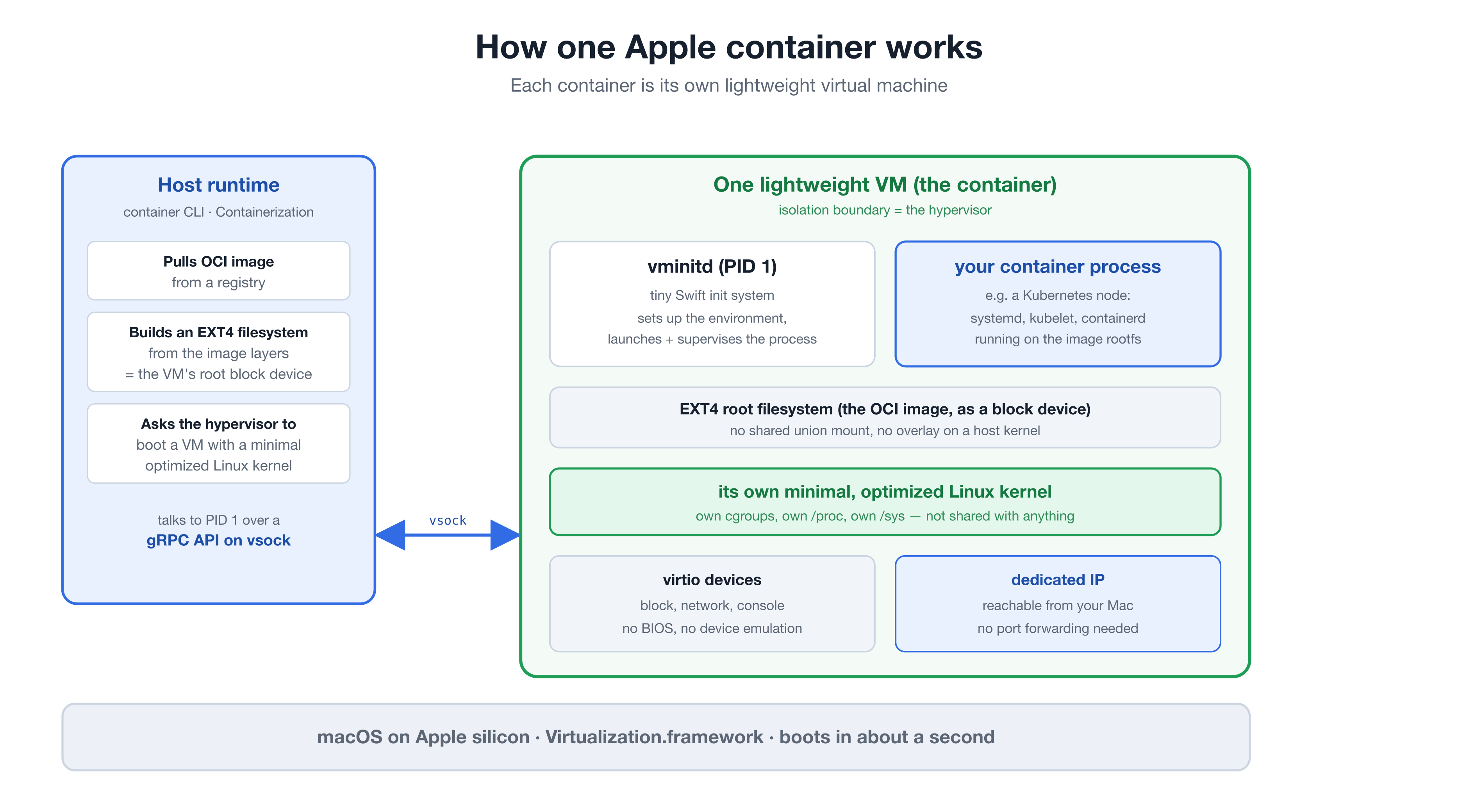
The Containerization framework boots a separate, minimal Linux VM for each container on Apple's Virtualization.framework:
vminitd is PID 1. A tiny Swift init system comes up first, then launches and supervises your process. The host drives it through a gRPC API over vsock.You get the developer experience of containers with the isolation boundary of a virtual machine. That combination is exactly what a Kubernetes node wants.
When local Kubernetes tools run "nodes" as Docker containers, those nodes are processes sharing one Linux kernel, separated only by namespaces. Namespaces are a software boundary inside a single shared kernel. With kiac, the boundary between nodes is the hypervisor itself.
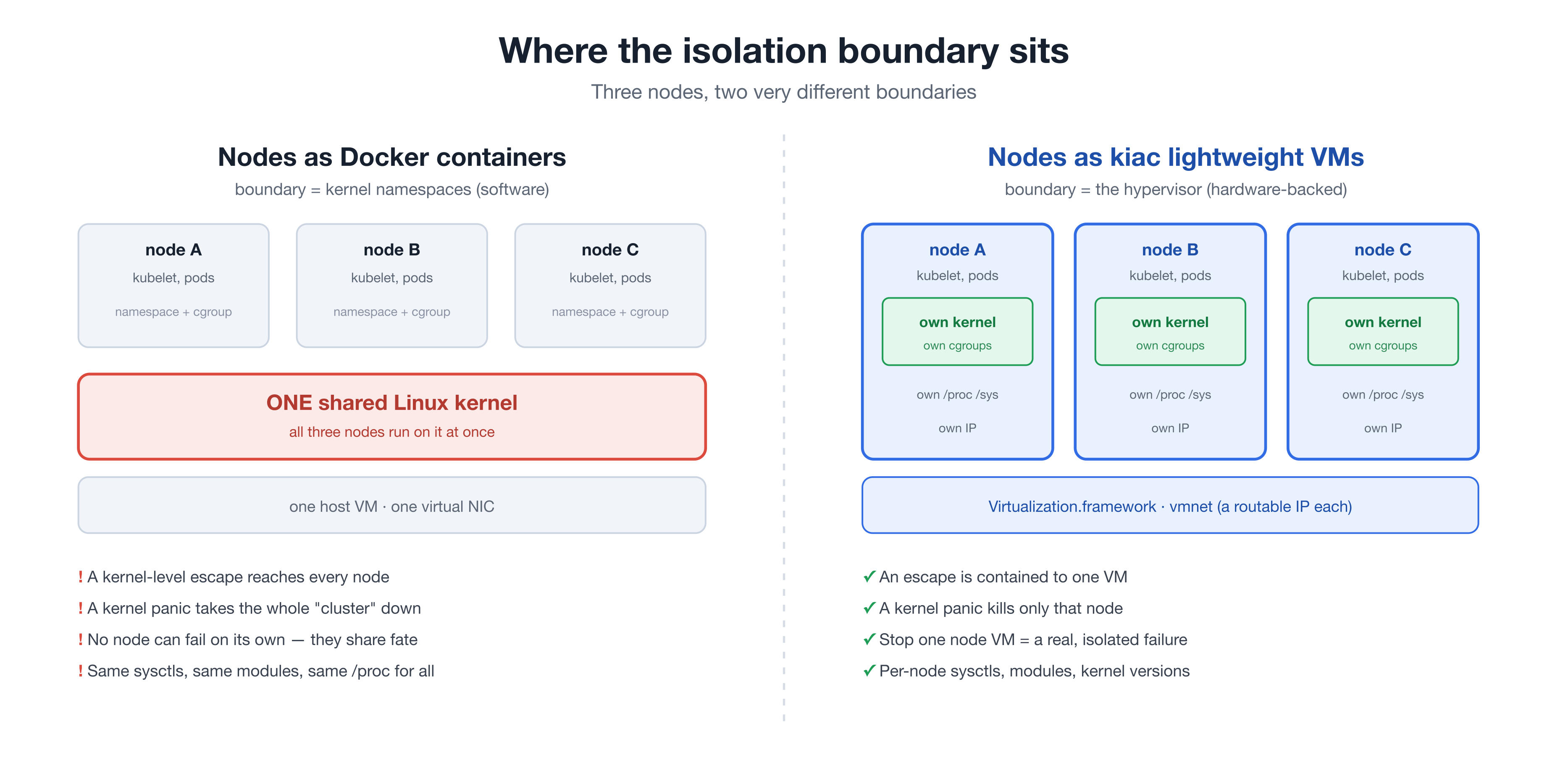
That difference is not academic. It changes what the cluster can actually do:
/proc, /sys, modules, and sysctls. Node-level behavior is real, not simulated.Containers are great for packaging software, and kiac depends on them. The point is narrower: when the workload you are isolating is itself a machine, a machine-grade boundary is the right tool.
kubectl top nodes works the moment the cluster is up. metrics-server ships preconfigured.volumeClaimTemplates work immediately.--mount options expose macOS directories at matching paths in every kubeadm or k3s node, ready for Kubernetes hostPath volumes.type: LoadBalancer works — kiac-lb ships by default: a tiny systemd loop inside the control-plane VM assigns node IPs to Services in about two seconds, shares one IP across Services when ports don't collide, and heals itself after node restarts. No pods, no webhooks, no <pending>, no tunnels.--workers N gives a real topology: scheduling, cross-node pod networking, node failures you can practice on.kindest/node by default, or --distro k3s for rancher/k3s under a lightweight supervisor in every VM: sqlite datastore, a 2-node cluster in 22-54 seconds, about 3.7GB of host memory total.--cni cilium --kernel full downloads a published, sha-pinned kernel build (VXLAN, eBPF, br_netfilter) and drives the official Cilium installer. Cross-node pod traffic runs at ~285MB/s and Mac-to-pod at ~1GB/s on Cilium's vxlan datapath.--gpu-workers N creates krunkit-backed worker VMs with the Mac's Apple GPU exposed through virtio-gpu/Venus. Kubernetes advertises only the honest kiac.dev/gpu resource through a device plugin or DRA; kiac gpu bench proves the Vulkan path with a pinned llama.cpp workload and can compare it with native Metal.kiac resume cluster restarts kubeadm or k3s VMs after a host reboot and heals every stale control-plane, node, kubeconfig, and networking address. It is idempotent and upgrades existing k3s clusters in place.--observability installs Prometheus and Grafana on a real LoadBalancer IP, with Cluster Overview and Nodes dashboards already provisioned.--ip-family dual (or ipv6) gives pods, Services, and nodes real IPv6, with kube-proxy programming IPv6 ClusterIP/NodePort/LoadBalancer rules on the full kernel. kiac-lb hands out both families, the edge proxy fixes v6 large uploads too, and kiac resume heals both. See docs/design/ipv6-dual-stack.md.--gateway installs the Gateway API CRDs and Traefik with a ready-to-use GatewayClass and Gateway, so an HTTPRoute works out of the box.kiac stop node / kiac start node stop and restart a real node VM: NotReady detection, eviction, rescheduling, rejoin.kiac verify cluster checks the VM, Kubernetes, pod network, DNS, storage, metrics, edge proxy, LoadBalancer, Gateway, observability, and host API paths without changing the cluster. JSON output is stable for automation; kiac support bundle writes a bounded, redacted archive for issue reports.kiac create cluster --config cluster.yaml describes the whole cluster in one file; explicit flags override it.kiac ui opens a local web console: cluster cards, live resource bars, node stop/start buttons, Grafana and Gateway links, a create form, and a per-cluster kubectl Console drawer (loopback-only, no shell). Works on every distro. Same engine as the CLI.kubectlGPU clusters additionally require krunkit 1.3.2+ and vmnet-helper 0.13.0+. These are loaded only when --gpu-workers is used, so ordinary cluster startup and resource use are unchanged.
brew install --cask saiyam1814/tap/kiac
# With Go
go install github.com/saiyam1814/kiac@latest

# From source
git clone https://github.com/saiyam1814/kiac && cd kiac && make build
Every release includes SHA-256 checksums and an SPDX SBOM. GitHub also signs build provenance for each artifact, and published releases are immutable.
gh release download vX.Y.Z --repo saiyam1814/kiac --dir kiac-release
(cd kiac-release && shasum -a 256 -c checksums.txt)
gh attestation verify kiac-release/kiac_X.Y.Z_darwin_arm64.tar.gz --repo saiyam1814/kiac
gh release verify vX.Y.Z --repo saiyam1814/kiac
kiac doctor                                  # check your setup
kiac create cluster --name dev --workers 2   # 1 control plane + 2 workers
⬢ kiac · Kubernetes in Apple Containers
 ✓ Preflight checks (0.3s)
 ✓ Pulling node image kindest/node:v1.37.0 (8.4s)
 ✓ Booting 3 node VM(s) (9.8s)
 ✓ Initializing Kubernetes control plane (49.6s)
 ✓ Joining 2 worker(s) (13.5s)
 ✓ Installing CNI (kindnet) (0.4s)
 ✓ Installing addons (storage, metrics-server) (0.5s)
 ✓ Installing LoadBalancer (kiac-lb) (1.1s)
 ✓ Waiting for nodes to be Ready (10.7s)
 ✓ Labeling LoadBalancer primary node (0.3s)
 ✓ Installing edge proxy (large upload fix) (0.8s)
 ✓ Writing kubeconfig (0.2s)

Cluster "dev" is ready in 1m35s. Every node is its own lightweight VM.
The kubeconfig is merged into ~/.kube/config as context kiac-dev (your existing config is backed up to ~/.kube/config.kiac.bak the first time).
# k3s nodes: supervised rancher/k3s in every VM, a 2-node cluster in under a minute
kiac create cluster --name quick --distro k3s --workers 1

# Cilium with eBPF on the full node kernel (needs the Cilium CLI: brew install cilium-cli)
kiac create cluster --name ebpf --workers 2 --cni cilium --kernel full
--kernel full downloads a published, sha-pinned kernel build once (cached in ~/.kiac/kernels) and boots every node on it. A full Cilium cluster with --observability --gateway comes up in about 1m37s.
kiac create cluster --name dev --workers 2 --observability --gateway
One command later you have Grafana at port 3000 on a real LoadBalancer IP (anonymous admin, local-only, two dashboards already provisioned) and a Gateway serving HTTP on port 80, also on a LoadBalancer IP. Point an HTTPRoute at parentRefs: [{name: kiac, namespace: kiac-gateway}] and it routes with zero extra setup; see examples/gateway-api-lab.md, examples/observability-lab.md, and examples/httproute.yaml. The same two flags work on kubeadm, k3s, and Cilium clusters.
brew tap libkrun/krun
brew trust libkrun/krun
brew install krunkit

# vmnet-helper on macOS 26+
brew tap nirs/vmnet-helper
brew trust nirs/vmnet-helper
brew install vmnet-helper
kiac gpu doctor
kiac create cluster --name gpu-lab --distro k3s --workers 1 \
  --gpu-workers 1 --gpu-resource-driver dra
kubectl apply -f examples/gpu-vulkan.yaml
kubectl logs -f pod/kiac-gpu-vulkan
On macOS 14 or 15, install vmnet-helper with its upstream installer and sudoers setup instead of Homebrew. If krunkit was previously installed from slp/krunkit or slp/krun, remove that legacy tap first by following the current driver migration instructions. Kiac still recognizes a working legacy slp/krun renderer installation, but new installs should use libkrun/krun.
A GPU cluster uses krunkit for its complete VM topology so every node shares one reliable network. Only -gpu-N workers publish a schedulable GPU resource and mount /dev/dri into GPU pods; ordinary clusters continue to use the faster apple/container backend. LoadBalancer Services, Gateway API, observability, storage, node stop/start, resume, verify, and support bundles use the same Kiac lifecycle paths.
This is real Apple GPU access through virtio-gpu/Venus and Vulkan, not CUDA compatibility. Krunkit currently exposes Venus to every VM in a GPU cluster, but Kiac publishes schedulable inventory and mounts /dev/dri into allocated workloads only for -gpu-N workers. Kiac does not advertise nvidia.com/gpu, and CUDA, NVML, nvidia-smi, Metal, and MLX are unavailable inside Linux pods. Follow the complete GPU and inference lab for DRA memory requests, pinned inference workloads, compatibility rewrites, and a native Metal-versus-Venus benchmark.
kiac gpu bench uses four CPU threads for both backends and records the reported llama.cpp build IDs, GPU identity, and timing variability. The host binary is not version-pinned: differing build IDs mean the comparison cannot isolate virtualization overhead. Each run owns a temporary, uniquely labelled pod in the default namespace; cleanup does not target another run's pod.
This example installs Portainer Community Edition as an optional application inside a kiac Kubernetes cluster. Portainer is not bundled with kiac and adds nothing to normal cluster startup or idle resource use. Community Edition does not require a license key; Portainer Business Edition does.
./examples/portainer.sh up
./examples/portainer.sh verify
./examples/portainer.sh cleanup
The script pins Portainer CE 2.39.5 and chart 239.5.0, waits for its PVC and LoadBalancer address, authenticates with the generated admin credential, registers the kiac cluster in Portainer, and reads the cluster's nodes through Portainer's Kubernetes API proxy. The complete workflow was rerun against the released kiac v0.5.0; see Run Portainer CE on kiac or examples/portainer-lab.md.
This example installs open-source Rancher Manager on a dedicated kiac cluster. Rancher is optional and requires no license key. The script uses kiac's Gateway API addon, generates local TLS and protected bootstrap credentials, and keeps Rancher's cluster-wide resources inside an isolated cluster with unambiguous cleanup.
./examples/rancher.sh up
./examples/rancher.sh verify
./examples/rancher.sh cleanup
Rancher Manager and its stable chart are pinned to 2.14.3 on Kubernetes 1.34. The verifier reaches the dashboard through the HTTPS Gateway, authenticates to the live API, confirms the server version, waits for Rancher's local cluster to become active, and lists its node. See Run Rancher on kiac or examples/rancher-lab.md.
The integration labs also cover Gateway API, observability, k8gb failover, OpenChoreo, node failure, and reboot recovery.
$ kubectl get nodes -o wide
NAME                     STATUS   ROLES           VERSION   INTERNAL-IP    KERNEL-VERSION    CONTAINER-RUNTIME
kiac-dev-control-plane   Ready    control-plane   v1.37.0   192.168.64.2   6.12.28 (arm64)   containerd://2.3.1
kiac-dev-worker-1        Ready    <none>          v1.37.0   192.168.64.3   6.12.28 (arm64)   containerd://2.3.1
kiac-dev-worker-2        Ready    <none>          v1.37.0   192.168.64.4   6.12.28 (arm64)   containerd://2.3.1

$ kubectl top nodes
NAME                     CPU(cores)   CPU(%)   MEMORY(bytes)   MEMORY(%)
kiac-dev-control-plane   269m         5%       828Mi           20%
kiac-dev-worker-1        35m          0%       288Mi           7%
kiac-dev-worker-2        52m          1%       359Mi           9%

$ kubectl expose deploy web --port=80 --type=LoadBalancer
$ kubectl get svc web
NAME   TYPE           EXTERNAL-IP    PORT(S)        AGE
web    LoadBalancer   192.168.64.3   80:30495/TCP   15s
$ curl http://192.168.64.3       # HTTP 200, straight from your Mac
kiac doctor                                  # check your setup
kiac doctor --fix                            # ...and auto-start the container service
kiac create cluster                          # single node, everything included
kiac create cluster --name dev --workers 2   # 1 control plane + 2 workers
kiac create cluster --k8s-version 1.34       # pick your Kubernetes (kubeadm 1.32-1.37 pinned)
kiac create cluster --distro k3s --workers 1 # rancher/k3s nodes: sqlite datastore, up in under a minute
kiac create cluster --distro k3s --k3s-controlplane-arg=--tls-san --k3s-controlplane-arg=api.dev.test # append custom k3s server args
kiac create cluster --cni cilium --kernel full --workers 2   # Cilium eBPF on the full node kernel
kiac create cluster --cni flannel --kernel full --workers 2  # flannel VXLAN on the full node kernel, no host CLI needed
kiac create cluster --distro k3s --workers 1 --gpu-workers 1 --gpu-resource-driver dra # real Apple GPU worker (alpha)
kiac create cluster --config cluster.yaml    # declarative; explicit flags override the file (see examples/cluster.yaml)
kiac create cluster --mount type=bind,source="$PWD",target=/workspace,readonly # host directory in every node
kiac create cluster -p 127.0.0.1:8080:80    # publish localhost:8080 to control-plane VM port 80 (NodePorts on workers are still direct-IP only)
kiac ui                                      # local web console: manage clusters, kubectl Console per cluster
kiac get clusters                            # -o wide for versions/age, -o json for scripts
kiac get nodes --name dev
kiac stop node worker-1 --name dev           # real node failure: NotReady, eviction, rescheduling
kiac start node worker-1 --name dev          # node rejoins; idempotent
kiac resume cluster --name dev               # bring a cluster back after a host reboot; idempotent
kiac verify cluster --name dev               # read-only end-to-end health checks
kiac verify cluster --name dev -o json       # stable schema + nonzero exit on required failures
kiac support bundle --name dev               # redacted diagnostic archive for an issue
kiac gpu doctor                              # check the optional krunkit/Venus toolchain
kiac gpu status --name gpu-lab               # inspect GPU nodes, resources, and driver health
kiac gpu bench --name gpu-lab                # compare pinned Venus inference with host Metal
kiac gpu values vllm                         # print scheduling values, with compatibility caveats
kiac gpu compat enable --name gpu-lab --namespace demo # opt-in legacy resource rewrite
container build -t myapp:dev .               # build with apple/container
kiac load image myapp:dev --name dev         # push it into every node
kiac completion zsh                          # bash|zsh|fish|powershell; see kiac completion -h
kiac delete cluster --name dev
One honest caveat is tracked upstream in apple/container's vmnet layer: after kiac stop node + kiac start node, new TCP connections from your Mac to that one restarted VM can drop. In-cluster traffic keeps working, reboot plus kiac resume is unaffected, and the default edge proxy handles the separate large-upload TSO path for NodePort and LoadBalancer traffic. Details and workarounds live in the docs troubleshooting page.
Full guides and command reference live on the docs site.
create cluster, delete cluster, get clusters, and get nodes reject extra positional arguments. Select a cluster with --name where supported, for example kiac delete cluster --name dev, rather than kiac delete cluster dev. Creation requires a positive --wait duration. K3s also accepts full release versions such as v1.36.4+k3s1 or v1.36.4-k3s1, preserving an explicit K3s build revision.
create cluster| Flag | Default | Description |
|---|---|---|
--name | dev | cluster name |
--workers | 0 | worker count; control plane is untainted when 0 |
--gpu-workers | 0 | real Apple GPU workers (alpha); switches the complete cluster topology to krunkit while only -gpu-N workers publish GPU inventory |
--gpu-image | fedora-44 | verified GPU VM base image alias or a local raw ARM64 cloud-disk path |
--gpu-disk-size | 20G | persistent disk size for each krunkit-backed node |
--gpu-resource-driver | device-plugin | Kubernetes resource publication: device-plugin, or dra on Kubernetes 1.36+ |
--k8s-version | distro latest | Kubernetes minor; kubeadm defaults to 1.37 (pins 1.32-1.37), k3s defaults to 1.37 (pins 1.32-1.37) |
--distro | kubeadm | kubeadm or k3s; ordinary k3s replaces Flannel with kindnet, while GPU k3s uses bundled Flannel on krunkit's capable kernel; --cni does not apply to k3s |
--image | resolved from --k8s-version | explicit node image override |
--cni | kindnet | kubeadm pod network: kindnet, cilium, flannel, or none; Cilium needs the host CLI and, on ordinary apple/container clusters, --kernel full; Flannel (v0.28.9 embedded, VXLAN, no host CLI) needs --kernel full and is not available on GPU clusters. Only Cilium enforces NetworkPolicy |
--kernel | Apple's stock kernel | full downloads the published kiac kernel (VXLAN, Geneve, br_netfilter, eBPF, WireGuard; sha-pinned, cached in ~/.kiac/kernels), or pass a path to a kernel Image |
--dns | runtime default | nameserver IPs for the node VMs, repeatable up to 3 (resolv.conf's own limit); given, it replaces the runtime's default resolv.conf entirely rather than adding to it |
--mount | bind a host directory into every node VM; repeat type=bind,source=/host/path,target=/node/path[,readonly]. Explicit CLI mounts replace config-file mounts | |
-p, --publish | publish host traffic to the control-plane VM only using [host-ip:]host-port:container-port[/protocol]; omitted host IP binds all IPv4 interfaces, so use 127.0.0.1 for loopback only; repeatable; does not add API-server TLS SANs | |
--k3s-controlplane-arg | extra k3s server argv token; repeatable (--distro k3s only). Values are only minimally validated and conflicting flags can break the cluster | |
--k3s-worker-arg | extra k3s agent argv token; repeatable (--distro k3s only). Values are only minimally validated and conflicting flags can break the cluster | |
--cpus | 4 | vCPUs per node VM |
--memory | 2G | memory per worker VM (idle workers use a few hundred MB) |
--cp-memory | 4G | memory for the control-plane VM (etcd, apiserver, and on single-node clusters every addon) |
--no-metrics | false | skip metrics-server |
--no-storage | false | skip the local-path default StorageClass |
--ip-family | ipv4 | address families: ipv4, dual (IPv4+IPv6), or ipv6 (v6-primary, kubeadm only). Non-ipv4 auto-selects --kernel full and needs macOS 26+ |
--no-lb | false | skip kiac-lb (type: LoadBalancer support) |
--no-edge-proxy | false | skip the node-local edge proxy that fixes large TCP uploads through NodePorts and LoadBalancers |
--observability | false | install Prometheus + Grafana + node-exporter; Grafana uses a LoadBalancer IP or ClusterIP with --no-lb |
--gateway | false | install Gateway API CRDs + Traefik with a ready-to-use GatewayClass and Gateway |
--config | cluster config YAML (see examples/cluster.yaml); flags set explicitly on the command line override file values (--kernel is flag-only) | |
--wait | 5m | positive timeout for each readiness step, including CNI installation; zero and negative values are rejected |
--publish is supported on ordinary apple/container clusters and forwards only to the control-plane VM. Publishing port 6443 does not add certificate SANs. For kubeadm, a client connecting through a published endpoint can retain verified TLS by setting tls-server-name to the existing certificate identity kiac-<name>-control-plane, while retaining the generated CA and client credentials. The generated kubeconfig still uses the node address; changing its endpoint is a separate client configuration step.
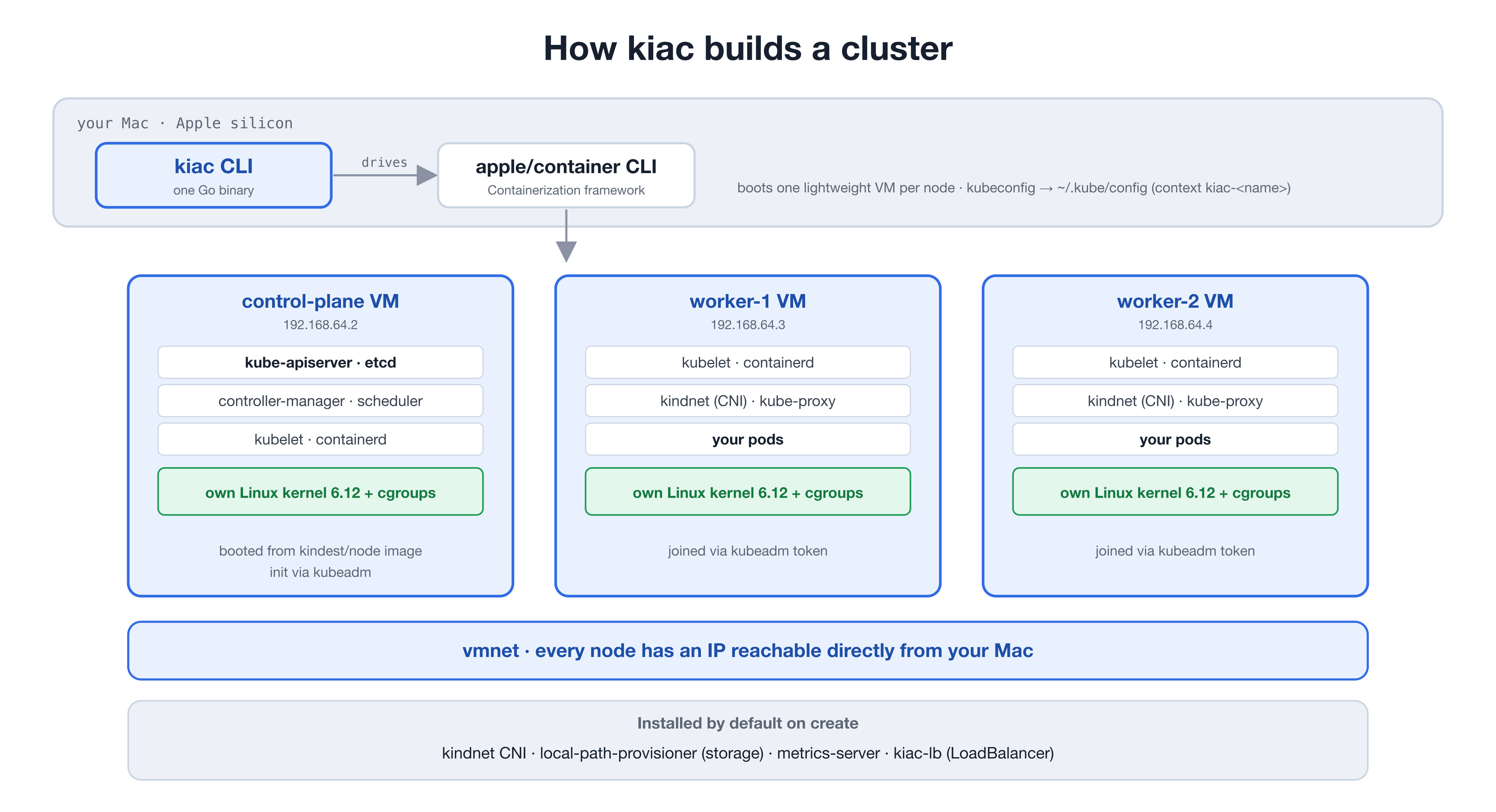
For ordinary clusters, Kiac drives the apple/container CLI to boot one lightweight VM per node from the standard kindest/node image (systemd, containerd, kubeadm preinstalled), initializes the control plane with kubeadm, joins workers over the vmnet network, and installs the selected CNI and addons. With --distro k3s, the VMs run rancher/k3s under a lightweight supervisor instead. --kernel full boots apple/container nodes on a published kernel build with the features overlay and eBPF CNIs need.
On systemd-backed nodes, kiac resume cluster repairs stale edge-proxy API credentials without replacing the tunnel token. Healthy proxies with current credentials stay running; interrupted updates remain retryable. Support bundles collect these proxies' journald logs, while ordinary K3s proxies keep their file-based logs.
GPU mode is deliberately opt-in. When --gpu-workers is nonzero, Kiac builds the complete cluster on krunkit and vmnet-helper so control-plane, ordinary-worker, and GPU-worker traffic stays on one reliable VM network. Only -gpu-N workers expose /dev/dri to selected pods and publish kiac.dev/gpu, through either a device plugin or Kubernetes DRA. The same cluster manager owns inventory, delete, stop/start, resume, networking, storage, LoadBalancer, Gateway, observability, verify, and support operations across both backends. Neither mode touches the Docker socket, so Kiac coexists with Docker Desktop, Rancher Desktop, kind, and k3d.
Host bind mounts use ordinary container run, not container machine; /Users is therefore not shared automatically. A configured mount is attached independently to every node and remains attached when that container is stopped and started or resumed. See Storage & metrics for the required Kubernetes hostPath layer and security implications.
Issues and PRs are welcome, from typo fixes to new addons. A good way in: try the configs in examples/, read the docs site, and open an issue for anything that surprised you. If you want to build something bigger, open an issue first so we can agree on the shape.
kiac stands on other people's work: the apple/container and Containerization teams at Apple built the everyday runtime; Akihiro Suda's kina proved Kubernetes on apple/container was viable; and the node experience reuses the kindest/node image from the kind project. Real Apple GPU nodes build on libkrun, krunkit, vmnet-helper, virglrenderer, Mesa's Venus driver, and MoltenVK.
228 followers · starred Jun 2026
7,182 followers · starred Jun 2026
8,275 followers · starred Jul 2026
1,041 followers · starred Jun 2026
Local Kubernetes on Apple's container framework - every node is its own lightweight VM. Metrics, storage, and LoadBalancer included.
See the code
Local Kubernetes clusters where every node is its own lightweight VM.
Native on Apple silicon: fast everyday clusters on apple/container, plus opt-in real Apple GPU clusters through krunkit and Venus. No Docker Desktop. No Lima. No QEMU.
kiac is listed in the CNCF Cloud Native Landscape under Platform / Certified Kubernetes - Installer.
brew install --cask saiyam1814/tap/kiac
kiac create cluster --workers 2
Running a local Kubernetes cluster on a Mac has always meant a quiet compromise. Your "nodes" were containers sharing one kernel inside one hidden Linux VM, all pretending to be separate machines. It worked until you tried to test a node failure, or kubectl top, or a type: LoadBalancer service, and the illusion cracked.
A Kubernetes node wants to be a machine: its own kernel, its own kubelet, its own cgroups, its own IP that can come and go on its own. kiac gives every node exactly that by booting each one as its own lightweight virtual machine on Apple's native runtime. The result is a local cluster that behaves like a real one, created with a single command in a couple of minutes.
When Apple shipped container 1.0, most people read it as "Docker, but from Apple." It is something more interesting underneath: every container is its own lightweight virtual machine.
The Containerization framework boots a separate, minimal Linux VM for each container on Apple's Virtualization.framework:
vminitd is PID 1. A tiny Swift init system comes up first, then launches and supervises your process. The host drives it through a gRPC API over vsock.You get the developer experience of containers with the isolation boundary of a virtual machine. That combination is exactly what a Kubernetes node wants.
When local Kubernetes tools run "nodes" as Docker containers, those nodes are processes sharing one Linux kernel, separated only by namespaces. Namespaces are a software boundary inside a single shared kernel. With kiac, the boundary between nodes is the hypervisor itself.
That difference is not academic. It changes what the cluster can actually do:
/proc, /sys, modules, and sysctls. Node-level behavior is real, not simulated.Containers are great for packaging software, and kiac depends on them. The point is narrower: when the workload you are isolating is itself a machine, a machine-grade boundary is the right tool.
kubectl top nodes works the moment the cluster is up. metrics-server ships preconfigured.volumeClaimTemplates work immediately.--mount options expose macOS directories at matching paths in every kubeadm or k3s node, ready for Kubernetes hostPath volumes.type: LoadBalancer works — kiac-lb ships by default: a tiny systemd loop inside the control-plane VM assigns node IPs to Services in about two seconds, shares one IP across Services when ports don't collide, and heals itself after node restarts. No pods, no webhooks, no <pending>, no tunnels.--workers N gives a real topology: scheduling, cross-node pod networking, node failures you can practice on.kindest/node by default, or --distro k3s for rancher/k3s under a lightweight supervisor in every VM: sqlite datastore, a 2-node cluster in 22-54 seconds, about 3.7GB of host memory total.--cni cilium --kernel full downloads a published, sha-pinned kernel build (VXLAN, eBPF, br_netfilter) and drives the official Cilium installer. Cross-node pod traffic runs at ~285MB/s and Mac-to-pod at ~1GB/s on Cilium's vxlan datapath.--gpu-workers N creates krunkit-backed worker VMs with the Mac's Apple GPU exposed through virtio-gpu/Venus. Kubernetes advertises only the honest kiac.dev/gpu resource through a device plugin or DRA; kiac gpu bench proves the Vulkan path with a pinned llama.cpp workload and can compare it with native Metal.kiac resume cluster restarts kubeadm or k3s VMs after a host reboot and heals every stale control-plane, node, kubeconfig, and networking address. It is idempotent and upgrades existing k3s clusters in place.--observability installs Prometheus and Grafana on a real LoadBalancer IP, with Cluster Overview and Nodes dashboards already provisioned.--ip-family dual (or ipv6) gives pods, Services, and nodes real IPv6, with kube-proxy programming IPv6 ClusterIP/NodePort/LoadBalancer rules on the full kernel. kiac-lb hands out both families, the edge proxy fixes v6 large uploads too, and kiac resume heals both. See docs/design/ipv6-dual-stack.md.--gateway installs the Gateway API CRDs and Traefik with a ready-to-use GatewayClass and Gateway, so an HTTPRoute works out of the box.kiac stop node / kiac start node stop and restart a real node VM: NotReady detection, eviction, rescheduling, rejoin.kiac verify cluster checks the VM, Kubernetes, pod network, DNS, storage, metrics, edge proxy, LoadBalancer, Gateway, observability, and host API paths without changing the cluster. JSON output is stable for automation; kiac support bundle writes a bounded, redacted archive for issue reports.kiac create cluster --config cluster.yaml describes the whole cluster in one file; explicit flags override it.kiac ui opens a local web console: cluster cards, live resource bars, node stop/start buttons, Grafana and Gateway links, a create form, and a per-cluster kubectl Console drawer (loopback-only, no shell). Works on every distro. Same engine as the CLI.kubectlGPU clusters additionally require krunkit 1.3.2+ and vmnet-helper 0.13.0+. These are loaded only when --gpu-workers is used, so ordinary cluster startup and resource use are unchanged.
brew install --cask saiyam1814/tap/kiac
# With Go
go install github.com/saiyam1814/kiac@latest

# From source
git clone https://github.com/saiyam1814/kiac && cd kiac && make build
Every release includes SHA-256 checksums and an SPDX SBOM. GitHub also signs build provenance for each artifact, and published releases are immutable.
gh release download vX.Y.Z --repo saiyam1814/kiac --dir kiac-release
(cd kiac-release && shasum -a 256 -c checksums.txt)
gh attestation verify kiac-release/kiac_X.Y.Z_darwin_arm64.tar.gz --repo saiyam1814/kiac
gh release verify vX.Y.Z --repo saiyam1814/kiac
kiac doctor                                  # check your setup
kiac create cluster --name dev --workers 2   # 1 control plane + 2 workers
⬢ kiac · Kubernetes in Apple Containers
 ✓ Preflight checks (0.3s)
 ✓ Pulling node image kindest/node:v1.37.0 (8.4s)
 ✓ Booting 3 node VM(s) (9.8s)
 ✓ Initializing Kubernetes control plane (49.6s)
 ✓ Joining 2 worker(s) (13.5s)
 ✓ Installing CNI (kindnet) (0.4s)
 ✓ Installing addons (storage, metrics-server) (0.5s)
 ✓ Installing LoadBalancer (kiac-lb) (1.1s)
 ✓ Waiting for nodes to be Ready (10.7s)
 ✓ Labeling LoadBalancer primary node (0.3s)
 ✓ Installing edge proxy (large upload fix) (0.8s)
 ✓ Writing kubeconfig (0.2s)

Cluster "dev" is ready in 1m35s. Every node is its own lightweight VM.
The kubeconfig is merged into ~/.kube/config as context kiac-dev (your existing config is backed up to ~/.kube/config.kiac.bak the first time).
# k3s nodes: supervised rancher/k3s in every VM, a 2-node cluster in under a minute
kiac create cluster --name quick --distro k3s --workers 1

# Cilium with eBPF on the full node kernel (needs the Cilium CLI: brew install cilium-cli)
kiac create cluster --name ebpf --workers 2 --cni cilium --kernel full
--kernel full downloads a published, sha-pinned kernel build once (cached in ~/.kiac/kernels) and boots every node on it. A full Cilium cluster with --observability --gateway comes up in about 1m37s.
kiac create cluster --name dev --workers 2 --observability --gateway
One command later you have Grafana at port 3000 on a real LoadBalancer IP (anonymous admin, local-only, two dashboards already provisioned) and a Gateway serving HTTP on port 80, also on a LoadBalancer IP. Point an HTTPRoute at parentRefs: [{name: kiac, namespace: kiac-gateway}] and it routes with zero extra setup; see examples/gateway-api-lab.md, examples/observability-lab.md, and examples/httproute.yaml. The same two flags work on kubeadm, k3s, and Cilium clusters.
brew tap libkrun/krun
brew trust libkrun/krun
brew install krunkit

# vmnet-helper on macOS 26+
brew tap nirs/vmnet-helper
brew trust nirs/vmnet-helper
brew install vmnet-helper
kiac gpu doctor
kiac create cluster --name gpu-lab --distro k3s --workers 1 \
  --gpu-workers 1 --gpu-resource-driver dra
kubectl apply -f examples/gpu-vulkan.yaml
kubectl logs -f pod/kiac-gpu-vulkan
On macOS 14 or 15, install vmnet-helper with its upstream installer and sudoers setup instead of Homebrew. If krunkit was previously installed from slp/krunkit or slp/krun, remove that legacy tap first by following the current driver migration instructions. Kiac still recognizes a working legacy slp/krun renderer installation, but new installs should use libkrun/krun.
A GPU cluster uses krunkit for its complete VM topology so every node shares one reliable network. Only -gpu-N workers publish a schedulable GPU resource and mount /dev/dri into GPU pods; ordinary clusters continue to use the faster apple/container backend. LoadBalancer Services, Gateway API, observability, storage, node stop/start, resume, verify, and support bundles use the same Kiac lifecycle paths.
This is real Apple GPU access through virtio-gpu/Venus and Vulkan, not CUDA compatibility. Krunkit currently exposes Venus to every VM in a GPU cluster, but Kiac publishes schedulable inventory and mounts /dev/dri into allocated workloads only for -gpu-N workers. Kiac does not advertise nvidia.com/gpu, and CUDA, NVML, nvidia-smi, Metal, and MLX are unavailable inside Linux pods. Follow the complete GPU and inference lab for DRA memory requests, pinned inference workloads, compatibility rewrites, and a native Metal-versus-Venus benchmark.
kiac gpu bench uses four CPU threads for both backends and records the reported llama.cpp build IDs, GPU identity, and timing variability. The host binary is not version-pinned: differing build IDs mean the comparison cannot isolate virtualization overhead. Each run owns a temporary, uniquely labelled pod in the default namespace; cleanup does not target another run's pod.
This example installs Portainer Community Edition as an optional application inside a kiac Kubernetes cluster. Portainer is not bundled with kiac and adds nothing to normal cluster startup or idle resource use. Community Edition does not require a license key; Portainer Business Edition does.
./examples/portainer.sh up
./examples/portainer.sh verify
./examples/portainer.sh cleanup
The script pins Portainer CE 2.39.5 and chart 239.5.0, waits for its PVC and LoadBalancer address, authenticates with the generated admin credential, registers the kiac cluster in Portainer, and reads the cluster's nodes through Portainer's Kubernetes API proxy. The complete workflow was rerun against the released kiac v0.5.0; see Run Portainer CE on kiac or examples/portainer-lab.md.
This example installs open-source Rancher Manager on a dedicated kiac cluster. Rancher is optional and requires no license key. The script uses kiac's Gateway API addon, generates local TLS and protected bootstrap credentials, and keeps Rancher's cluster-wide resources inside an isolated cluster with unambiguous cleanup.
./examples/rancher.sh up
./examples/rancher.sh verify
./examples/rancher.sh cleanup
Rancher Manager and its stable chart are pinned to 2.14.3 on Kubernetes 1.34. The verifier reaches the dashboard through the HTTPS Gateway, authenticates to the live API, confirms the server version, waits for Rancher's local cluster to become active, and lists its node. See Run Rancher on kiac or examples/rancher-lab.md.
The integration labs also cover Gateway API, observability, k8gb failover, OpenChoreo, node failure, and reboot recovery.
$ kubectl get nodes -o wide
NAME                     STATUS   ROLES           VERSION   INTERNAL-IP    KERNEL-VERSION    CONTAINER-RUNTIME
kiac-dev-control-plane   Ready    control-plane   v1.37.0   192.168.64.2   6.12.28 (arm64)   containerd://2.3.1
kiac-dev-worker-1        Ready    <none>          v1.37.0   192.168.64.3   6.12.28 (arm64)   containerd://2.3.1
kiac-dev-worker-2        Ready    <none>          v1.37.0   192.168.64.4   6.12.28 (arm64)   containerd://2.3.1

$ kubectl top nodes
NAME                     CPU(cores)   CPU(%)   MEMORY(bytes)   MEMORY(%)
kiac-dev-control-plane   269m         5%       828Mi           20%
kiac-dev-worker-1        35m          0%       288Mi           7%
kiac-dev-worker-2        52m          1%       359Mi           9%

$ kubectl expose deploy web --port=80 --type=LoadBalancer
$ kubectl get svc web
NAME   TYPE           EXTERNAL-IP    PORT(S)        AGE
web    LoadBalancer   192.168.64.3   80:30495/TCP   15s
$ curl http://192.168.64.3       # HTTP 200, straight from your Mac
kiac doctor                                  # check your setup
kiac doctor --fix                            # ...and auto-start the container service
kiac create cluster                          # single node, everything included
kiac create cluster --name dev --workers 2   # 1 control plane + 2 workers
kiac create cluster --k8s-version 1.34       # pick your Kubernetes (kubeadm 1.32-1.37 pinned)
kiac create cluster --distro k3s --workers 1 # rancher/k3s nodes: sqlite datastore, up in under a minute
kiac create cluster --distro k3s --k3s-controlplane-arg=--tls-san --k3s-controlplane-arg=api.dev.test # append custom k3s server args
kiac create cluster --cni cilium --kernel full --workers 2   # Cilium eBPF on the full node kernel
kiac create cluster --cni flannel --kernel full --workers 2  # flannel VXLAN on the full node kernel, no host CLI needed
kiac create cluster --distro k3s --workers 1 --gpu-workers 1 --gpu-resource-driver dra # real Apple GPU worker (alpha)
kiac create cluster --config cluster.yaml    # declarative; explicit flags override the file (see examples/cluster.yaml)
kiac create cluster --mount type=bind,source="$PWD",target=/workspace,readonly # host directory in every node
kiac create cluster -p 127.0.0.1:8080:80    # publish localhost:8080 to control-plane VM port 80 (NodePorts on workers are still direct-IP only)
kiac ui                                      # local web console: manage clusters, kubectl Console per cluster
kiac get clusters                            # -o wide for versions/age, -o json for scripts
kiac get nodes --name dev
kiac stop node worker-1 --name dev           # real node failure: NotReady, eviction, rescheduling
kiac start node worker-1 --name dev          # node rejoins; idempotent
kiac resume cluster --name dev               # bring a cluster back after a host reboot; idempotent
kiac verify cluster --name dev               # read-only end-to-end health checks
kiac verify cluster --name dev -o json       # stable schema + nonzero exit on required failures
kiac support bundle --name dev               # redacted diagnostic archive for an issue
kiac gpu doctor                              # check the optional krunkit/Venus toolchain
kiac gpu status --name gpu-lab               # inspect GPU nodes, resources, and driver health
kiac gpu bench --name gpu-lab                # compare pinned Venus inference with host Metal
kiac gpu values vllm                         # print scheduling values, with compatibility caveats
kiac gpu compat enable --name gpu-lab --namespace demo # opt-in legacy resource rewrite
container build -t myapp:dev .               # build with apple/container
kiac load image myapp:dev --name dev         # push it into every node
kiac completion zsh                          # bash|zsh|fish|powershell; see kiac completion -h
kiac delete cluster --name dev
One honest caveat is tracked upstream in apple/container's vmnet layer: after kiac stop node + kiac start node, new TCP connections from your Mac to that one restarted VM can drop. In-cluster traffic keeps working, reboot plus kiac resume is unaffected, and the default edge proxy handles the separate large-upload TSO path for NodePort and LoadBalancer traffic. Details and workarounds live in the docs troubleshooting page.
Full guides and command reference live on the docs site.
create cluster, delete cluster, get clusters, and get nodes reject extra positional arguments. Select a cluster with --name where supported, for example kiac delete cluster --name dev, rather than kiac delete cluster dev. Creation requires a positive --wait duration. K3s also accepts full release versions such as v1.36.4+k3s1 or v1.36.4-k3s1, preserving an explicit K3s build revision.
create cluster| Flag | Default | Description |
|---|---|---|
--name | dev | cluster name |
--workers | 0 | worker count; control plane is untainted when 0 |
--gpu-workers | 0 | real Apple GPU workers (alpha); switches the complete cluster topology to krunkit while only -gpu-N workers publish GPU inventory |
--gpu-image | fedora-44 | verified GPU VM base image alias or a local raw ARM64 cloud-disk path |
--gpu-disk-size | 20G | persistent disk size for each krunkit-backed node |
--gpu-resource-driver | device-plugin | Kubernetes resource publication: device-plugin, or dra on Kubernetes 1.36+ |
--k8s-version | distro latest | Kubernetes minor; kubeadm defaults to 1.37 (pins 1.32-1.37), k3s defaults to 1.37 (pins 1.32-1.37) |
--distro | kubeadm | kubeadm or k3s; ordinary k3s replaces Flannel with kindnet, while GPU k3s uses bundled Flannel on krunkit's capable kernel; --cni does not apply to k3s |
--image | resolved from --k8s-version | explicit node image override |
--cni | kindnet | kubeadm pod network: kindnet, cilium, flannel, or none; Cilium needs the host CLI and, on ordinary apple/container clusters, --kernel full; Flannel (v0.28.9 embedded, VXLAN, no host CLI) needs --kernel full and is not available on GPU clusters. Only Cilium enforces NetworkPolicy |
--kernel | Apple's stock kernel | full downloads the published kiac kernel (VXLAN, Geneve, br_netfilter, eBPF, WireGuard; sha-pinned, cached in ~/.kiac/kernels), or pass a path to a kernel Image |
--dns | runtime default | nameserver IPs for the node VMs, repeatable up to 3 (resolv.conf's own limit); given, it replaces the runtime's default resolv.conf entirely rather than adding to it |
--mount | bind a host directory into every node VM; repeat type=bind,source=/host/path,target=/node/path[,readonly]. Explicit CLI mounts replace config-file mounts | |
-p, --publish | publish host traffic to the control-plane VM only using [host-ip:]host-port:container-port[/protocol]; omitted host IP binds all IPv4 interfaces, so use 127.0.0.1 for loopback only; repeatable; does not add API-server TLS SANs | |
--k3s-controlplane-arg | extra k3s server argv token; repeatable (--distro k3s only). Values are only minimally validated and conflicting flags can break the cluster | |
--k3s-worker-arg | extra k3s agent argv token; repeatable (--distro k3s only). Values are only minimally validated and conflicting flags can break the cluster | |
--cpus | 4 | vCPUs per node VM |
--memory | 2G | memory per worker VM (idle workers use a few hundred MB) |
--cp-memory | 4G | memory for the control-plane VM (etcd, apiserver, and on single-node clusters every addon) |
--no-metrics | false | skip metrics-server |
--no-storage | false | skip the local-path default StorageClass |
--ip-family | ipv4 | address families: ipv4, dual (IPv4+IPv6), or ipv6 (v6-primary, kubeadm only). Non-ipv4 auto-selects --kernel full and needs macOS 26+ |
--no-lb | false | skip kiac-lb (type: LoadBalancer support) |
--no-edge-proxy | false | skip the node-local edge proxy that fixes large TCP uploads through NodePorts and LoadBalancers |
--observability | false | install Prometheus + Grafana + node-exporter; Grafana uses a LoadBalancer IP or ClusterIP with --no-lb |
--gateway | false | install Gateway API CRDs + Traefik with a ready-to-use GatewayClass and Gateway |
--config | cluster config YAML (see examples/cluster.yaml); flags set explicitly on the command line override file values (--kernel is flag-only) | |
--wait | 5m | positive timeout for each readiness step, including CNI installation; zero and negative values are rejected |
--publish is supported on ordinary apple/container clusters and forwards only to the control-plane VM. Publishing port 6443 does not add certificate SANs. For kubeadm, a client connecting through a published endpoint can retain verified TLS by setting tls-server-name to the existing certificate identity kiac-<name>-control-plane, while retaining the generated CA and client credentials. The generated kubeconfig still uses the node address; changing its endpoint is a separate client configuration step.
For ordinary clusters, Kiac drives the apple/container CLI to boot one lightweight VM per node from the standard kindest/node image (systemd, containerd, kubeadm preinstalled), initializes the control plane with kubeadm, joins workers over the vmnet network, and installs the selected CNI and addons. With --distro k3s, the VMs run rancher/k3s under a lightweight supervisor instead. --kernel full boots apple/container nodes on a published kernel build with the features overlay and eBPF CNIs need.
On systemd-backed nodes, kiac resume cluster repairs stale edge-proxy API credentials without replacing the tunnel token. Healthy proxies with current credentials stay running; interrupted updates remain retryable. Support bundles collect these proxies' journald logs, while ordinary K3s proxies keep their file-based logs.
GPU mode is deliberately opt-in. When --gpu-workers is nonzero, Kiac builds the complete cluster on krunkit and vmnet-helper so control-plane, ordinary-worker, and GPU-worker traffic stays on one reliable VM network. Only -gpu-N workers expose /dev/dri to selected pods and publish kiac.dev/gpu, through either a device plugin or Kubernetes DRA. The same cluster manager owns inventory, delete, stop/start, resume, networking, storage, LoadBalancer, Gateway, observability, verify, and support operations across both backends. Neither mode touches the Docker socket, so Kiac coexists with Docker Desktop, Rancher Desktop, kind, and k3d.
Host bind mounts use ordinary container run, not container machine; /Users is therefore not shared automatically. A configured mount is attached independently to every node and remains attached when that container is stopped and started or resumed. See Storage & metrics for the required Kubernetes hostPath layer and security implications.
Issues and PRs are welcome, from typo fixes to new addons. A good way in: try the configs in examples/, read the docs site, and open an issue for anything that surprised you. If you want to build something bigger, open an issue first so we can agree on the shape.
kiac stands on other people's work: the apple/container and Containerization teams at Apple built the everyday runtime; Akihiro Suda's kina proved Kubernetes on apple/container was viable; and the node experience reuses the kindest/node image from the kind project. Real Apple GPU nodes build on libkrun, krunkit, vmnet-helper, virglrenderer, Mesa's Venus driver, and MoltenVK.
228 followers · starred Jun 2026
7,182 followers · starred Jun 2026
8,275 followers · starred Jul 2026
1,041 followers · starred Jun 2026