The native UI for Apple Containers and (o)MLX sandboxes, written in swift as a replacement for docker desktop
See the code


brew install orchard
Orchard is a native (Swift) macOS application for managing containers, machines and local AI models using Apple's container tooling.
It gives you a desktop experience that complements the container command-line interface.
Thousands of installations and starred by engineers from Apple, Microsoft, NVIDIA, IBM, Stripe, Cisco, LinkedIn, Uber, Vercel & more - see who's adopting Orchard
Orchard wires local MLX models into Apple containers. Inference runs on your Mac's GPU (container VMs have no GPU access) and containers reach it with no hand-configured networking.
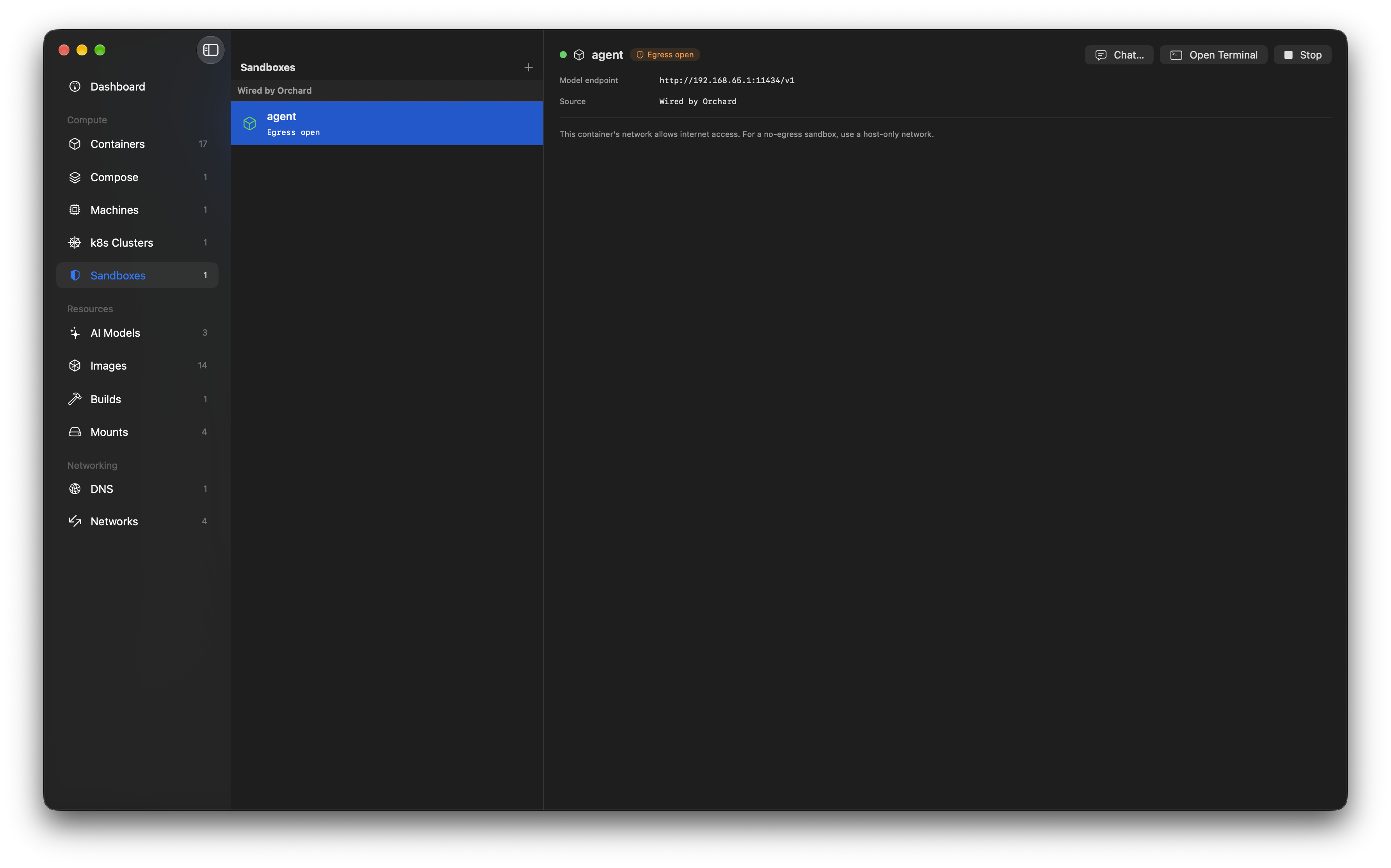
mlx_lm.server instances from the app - with process supervision, crash surfacing and logsOPENAI_BASE_URL at create time, so containerised apps just use the OpenAI SDKSee the Local AI guide for a full walkthrough and a runnable quick start.
Orchard manages Apple container machines natively: persistent, stateful Linux VMs you can create, configure, run and monitor without leaving the app or dropping to the CLI.
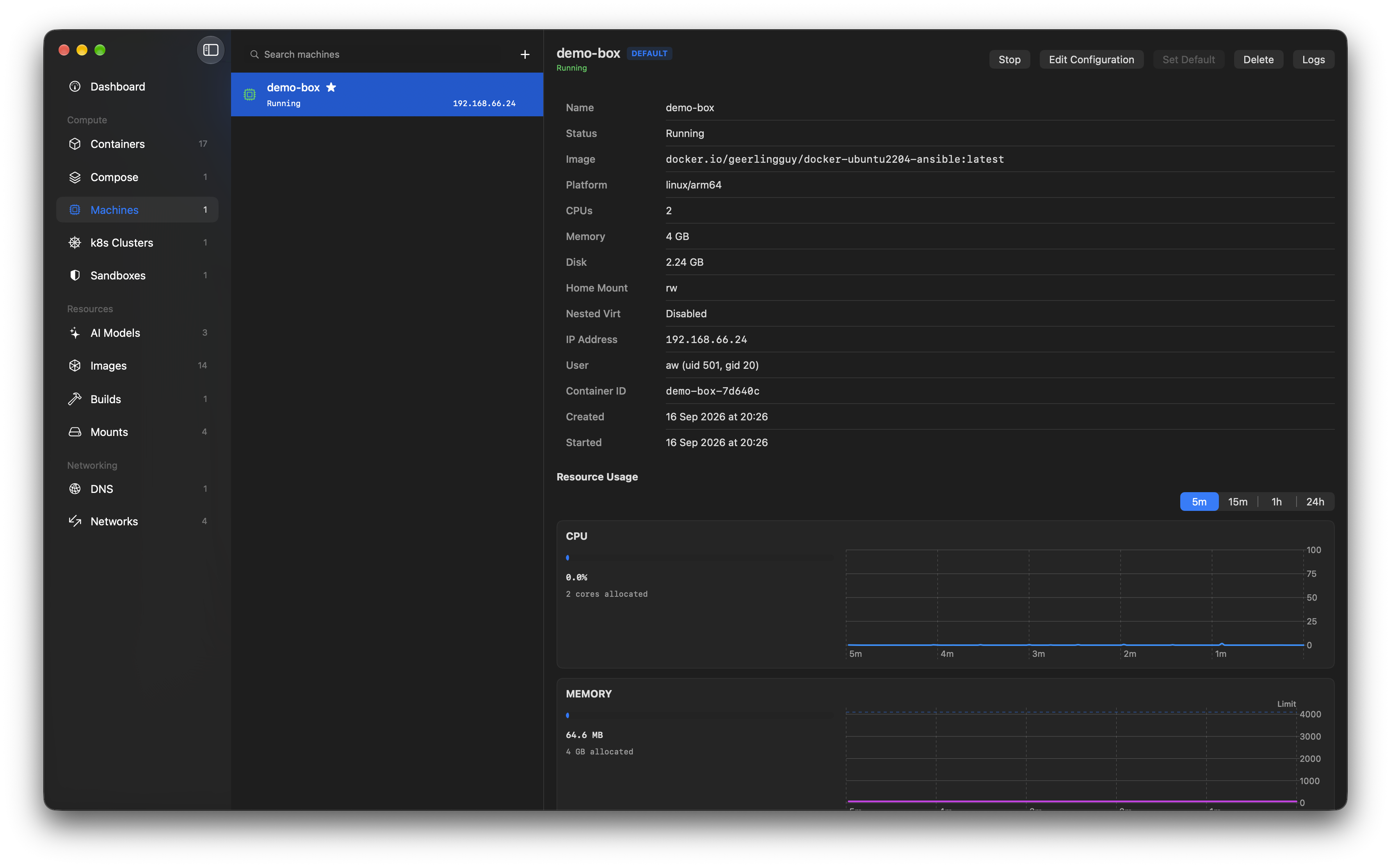
Machines are driven over Apple's native XPC API (MachineAPIClient), not by shelling out. See the Container Machines guide for a full walkthrough and the pitfalls to avoid.
Orchard manages local Kubernetes clusters built on Apple container's k8s plugin (container 1.2.2+): cluster nodes are grouped, inspectable and one click from a working kubectl.
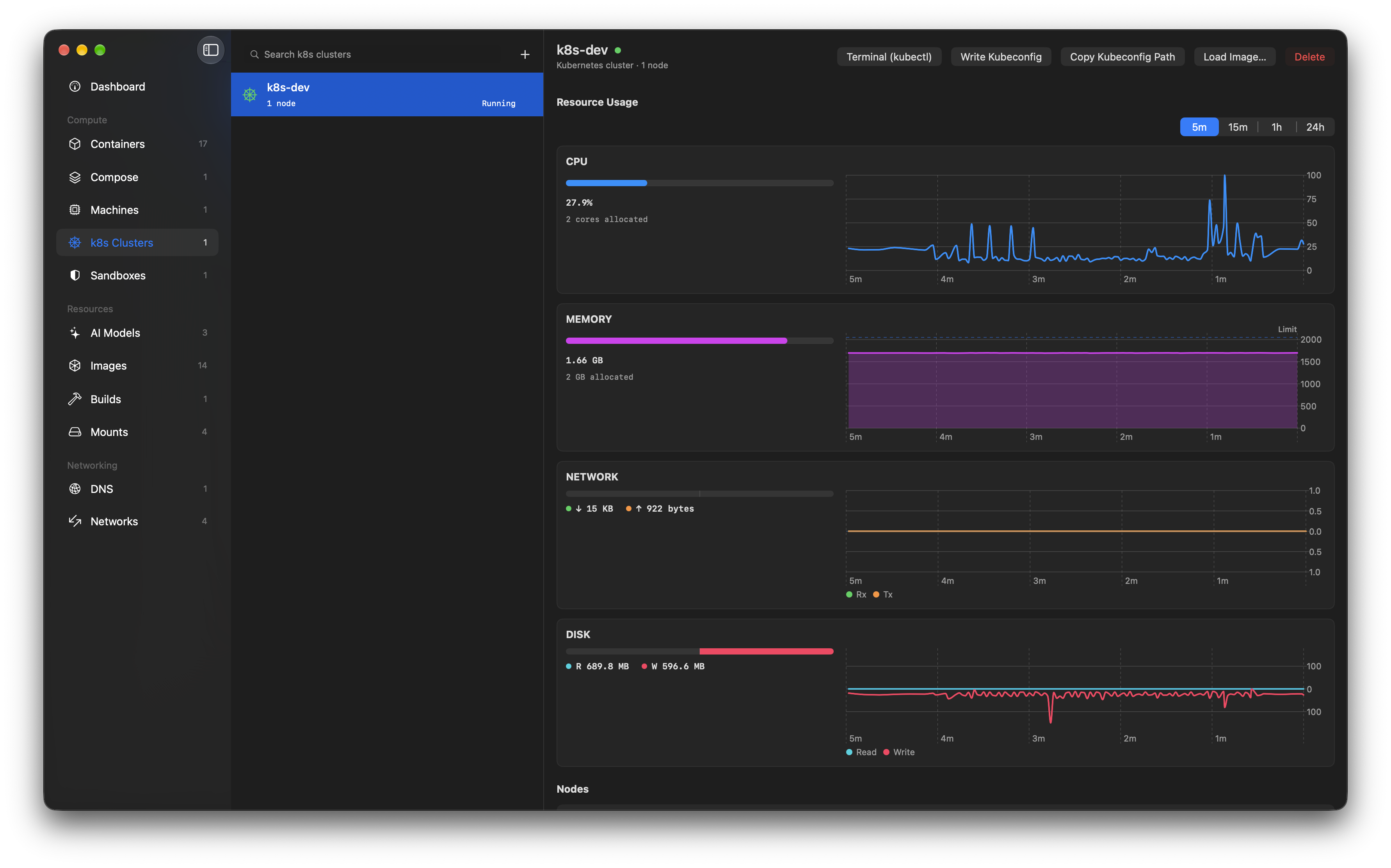
Deploying workloads stays with the tools you know - kubectl, k9s, Lens - Orchard hands you a configured context and gets out of the way. See the Kubernetes Clusters guide for a walkthrough.
Orchard runs compose projects on Apple's container runtime: point it at a compose.yaml and bring the whole stack up in dependency order, or take it down again.
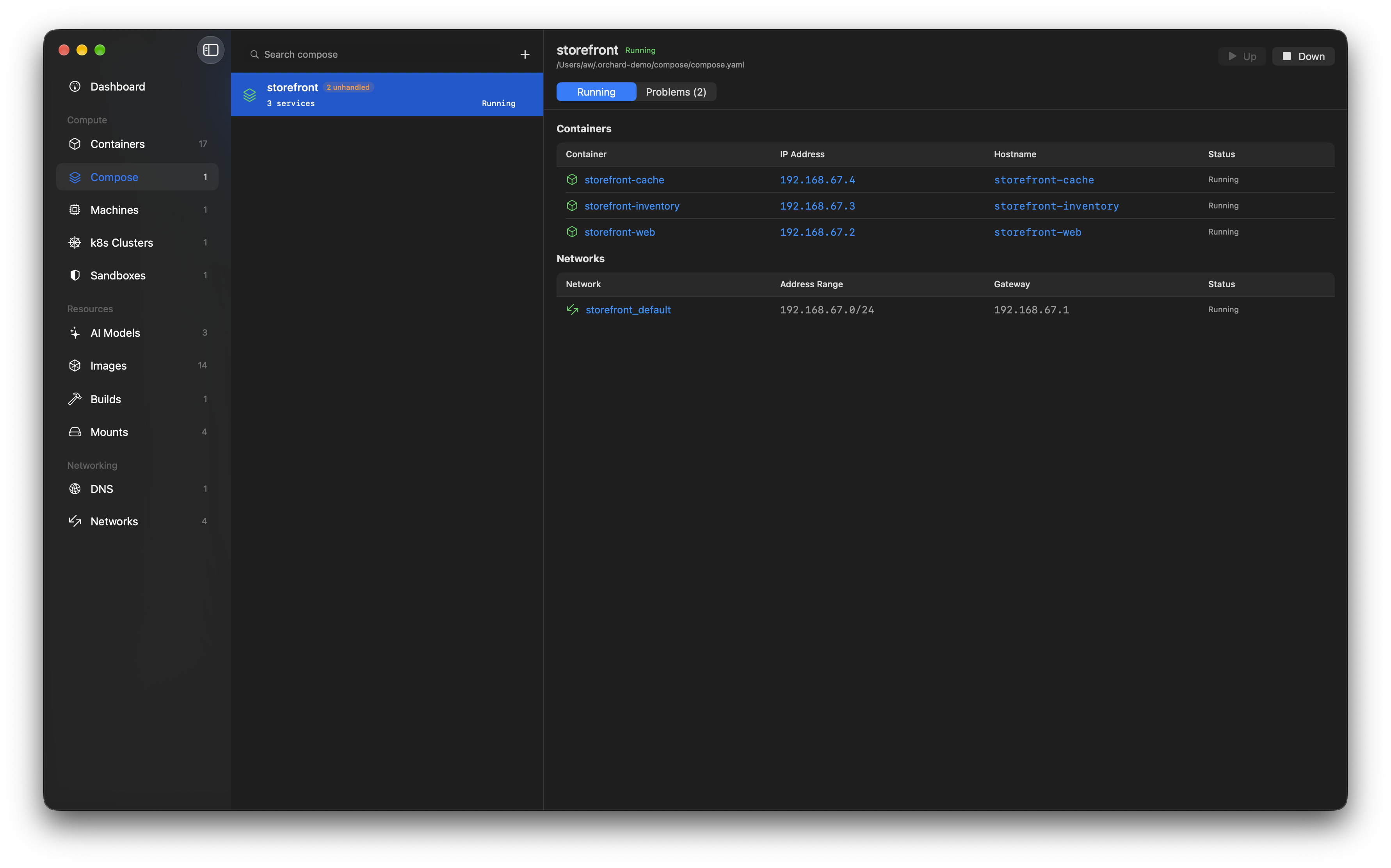
up compares each service against a hash stamped on the container it produced, then creates, starts, leaves alone, recreates or removes each one accordingly, listing every step as it happens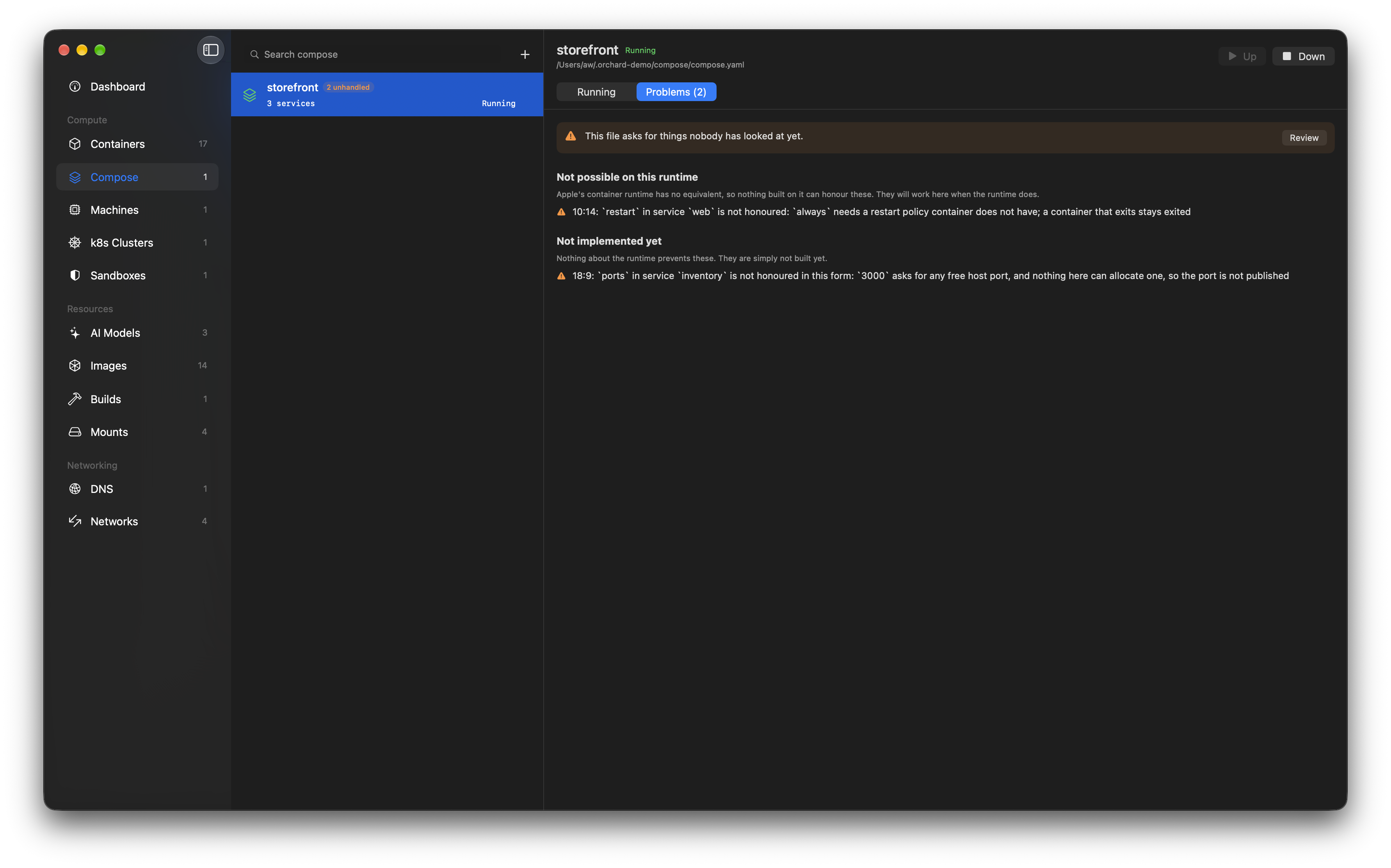
Nothing in your file is quietly dropped. Anything that cannot be honoured is listed before the first run, split into what the runtime makes impossible and what simply is not built yet, each with the line it sits on. The project goes on showing that afterwards, and a file that grows a new unhandled key is put back in front of you before the next up rather than waved through on an older answer.
The planning behind the tab is compose, a standalone open-source Swift package that also backs the container compose CLI plugin, so the terminal and the window cannot drift apart:
container compose up
Orchard links the package directly and runs the resulting plans over XPC, so it never needs the plugin installed. The Compose tab offers to install it anyway, because container's own installer clears the plugin directory on every upgrade: installing fetches the latest release, unpacks it and puts the files where the CLI looks, showing each step before it asks for an administrator password.
There is no Orchard-specific logic in the package, so other tools can build on it too. See compose.andon.dev for the syntax it supports, install instructions and the current state of coverage.
Two limitations are worth stating up front: without health reporting in the runtime, up starts dependencies before dependents but does not wait for them to become ready, and hostnames have to be unique across every container on the machine, so a service answers to <project>-<service> rather than to its service name.
up working out what changed from the containers themselves. Anything the file asks for that cannot be honoured is listed before the first run, with the line it sits on, and stays listed on the project afterwards, all of it planned by the open-source compose package that also backs the container compose CLI pluginorchard:// URLs jump to any tab or resource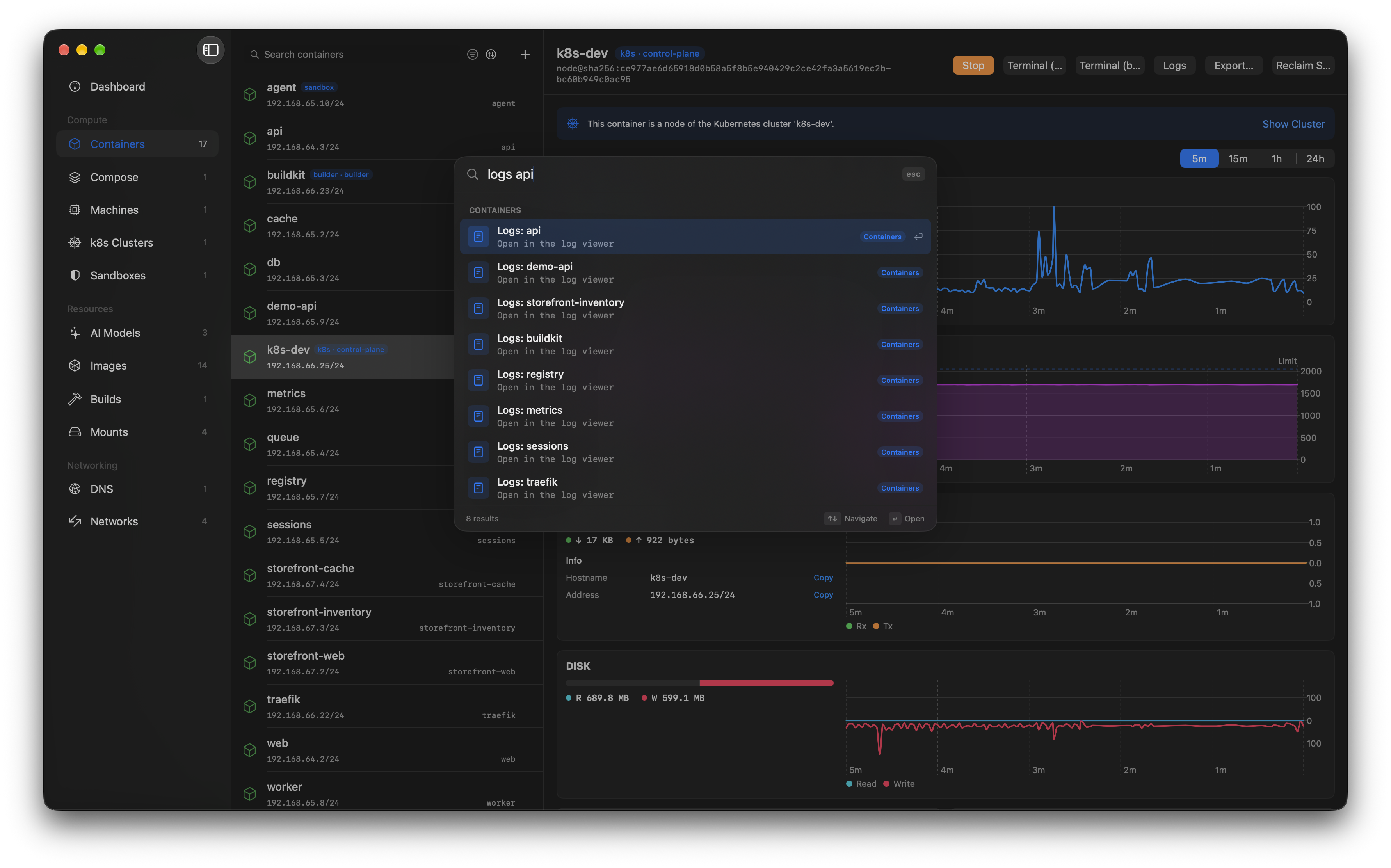
Press Cmd+K anywhere and type: results rank with real fuzzy matching across containers, images, mounts, machines, k8s clusters, AI models, sandboxes, DNS domains and networks. Verbs work too - "stop db" stops the container, "logs api" opens the log viewer, "console web" drops you into a shell - and the actions section covers running containers, pulling images, and starting or stopping the container system itself.
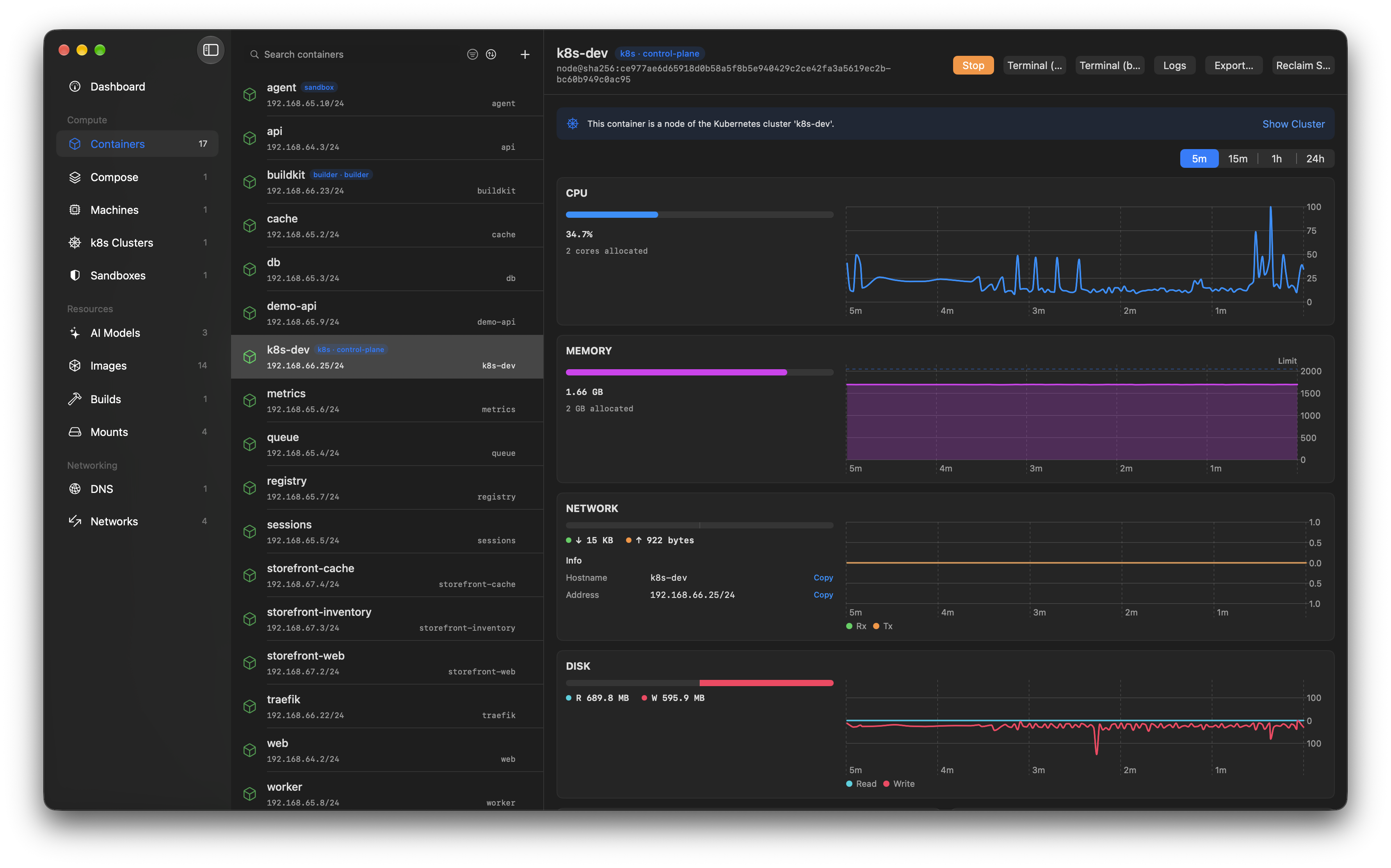
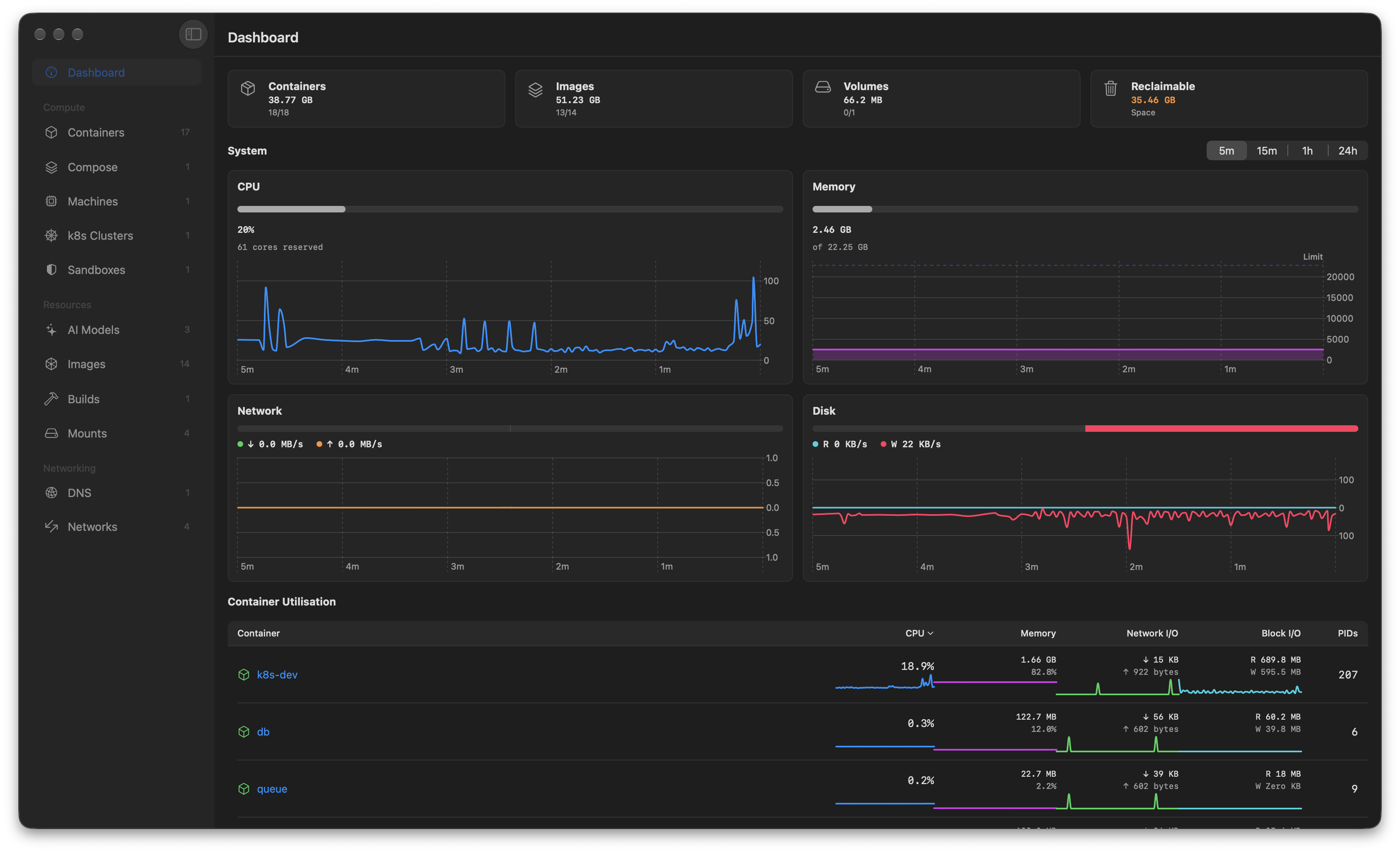
Per-container detail with CPU, memory, network and disk over time, cross-links to the cluster or sandbox a container belongs to, and one-click terminal and log access. (The system-wide dashboard above is the default view when the app opens, summing usage across every container with headline disk-usage tiles and live sparklines.)
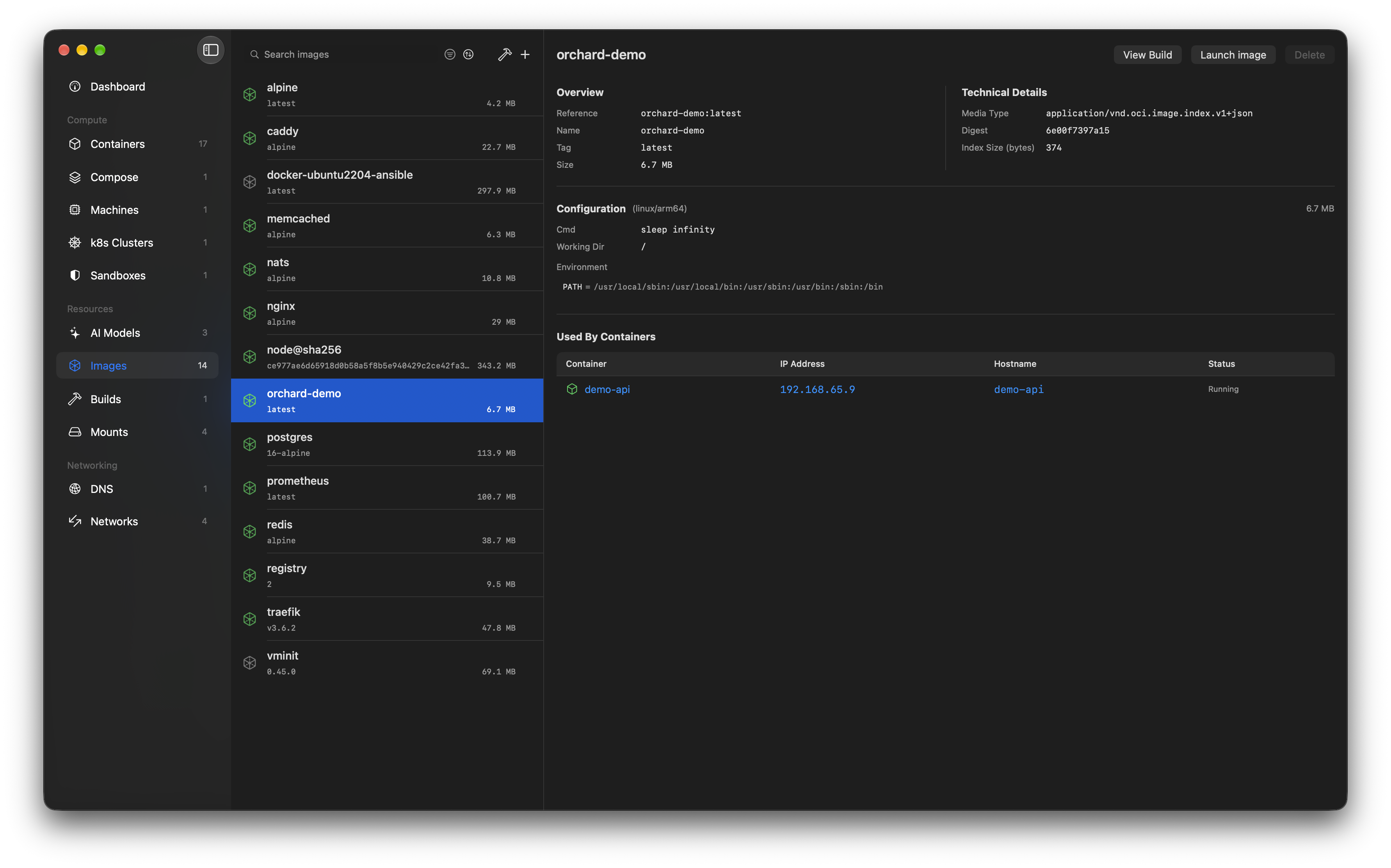
Browse, pull, and delete container images. Search Docker Hub directly from the app - pulls show live download progress with byte and blob counts - and inspect image metadata without dropping to the CLI.
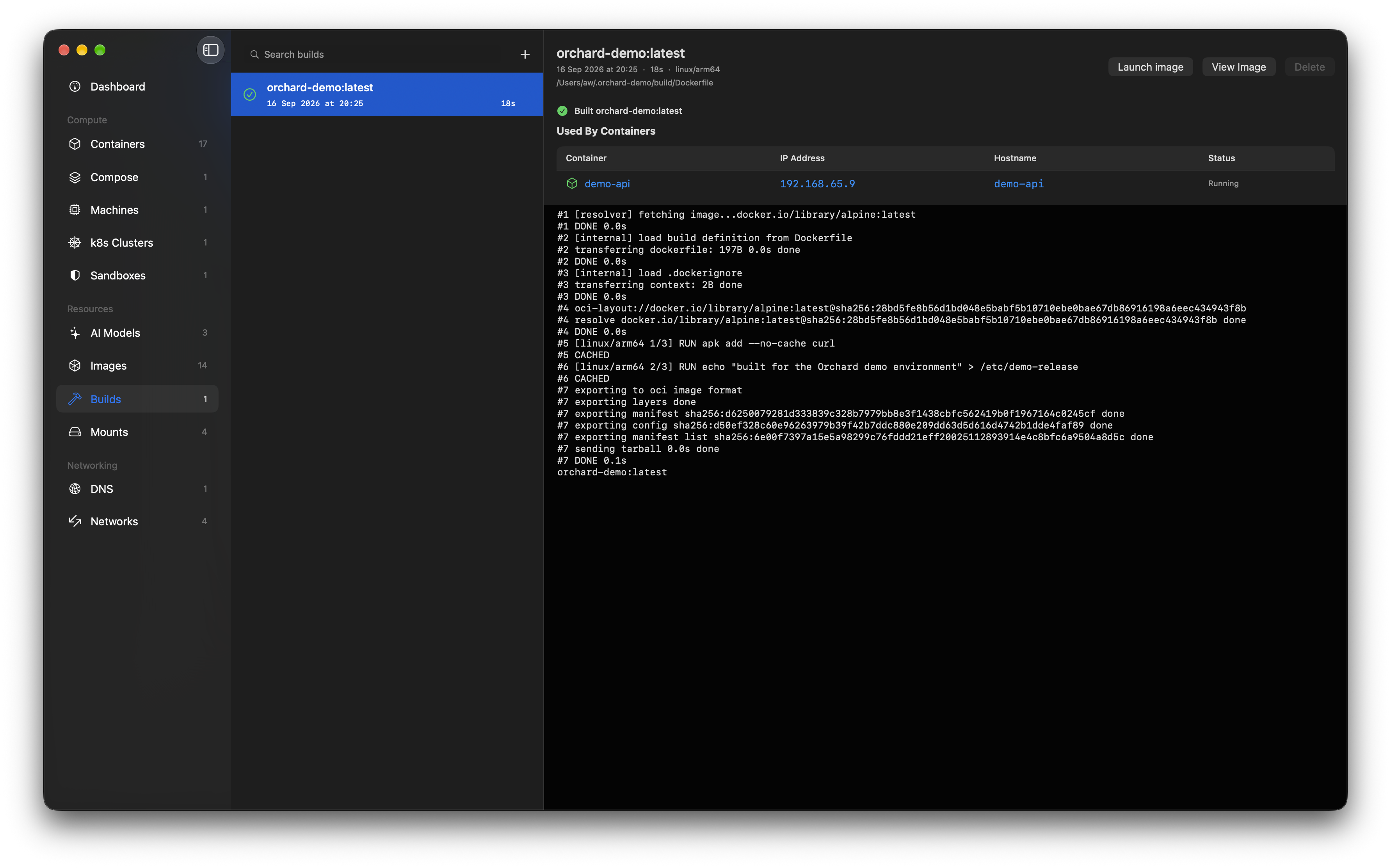
Build images from any Dockerfile (the hammer on the Images tab, or + on Builds): pick the file, name the image, choose arm64 or amd64, and watch the BuildKit log stream live. Every build Orchard starts is recorded in the Builds tab - records and logs survive restarts - with cancel for in-flight builds, and a completed build cross-links both ways: launch the image, jump to it in Images, or click straight through to the containers running it. Builds run concurrently, and closing the sheet never kills one.
Orchard registers the orchard:// URL scheme, so scripts, docs, and other tools can link straight into the app:
| URL | Opens |
|---|---|
orchard://<tab> | Any sidebar tab, e.g. orchard://dashboard, orchard://builds |
orchard://container/<id> | A container's detail |
orchard://image/<reference> | An image (slashes in the reference are fine: orchard://image/docker.io/library/nginx:latest) |
orchard://machine/<id> | A container machine |
orchard://mount/<id> | A mount |
orchard://dns/<domain> | A DNS domain |
orchard://network/<id> | A network |
A resource link whose target is still loading selects it as soon as it appears, and a noun without an identifier (orchard://container) falls back to its tab. Try it: open orchard://builds.
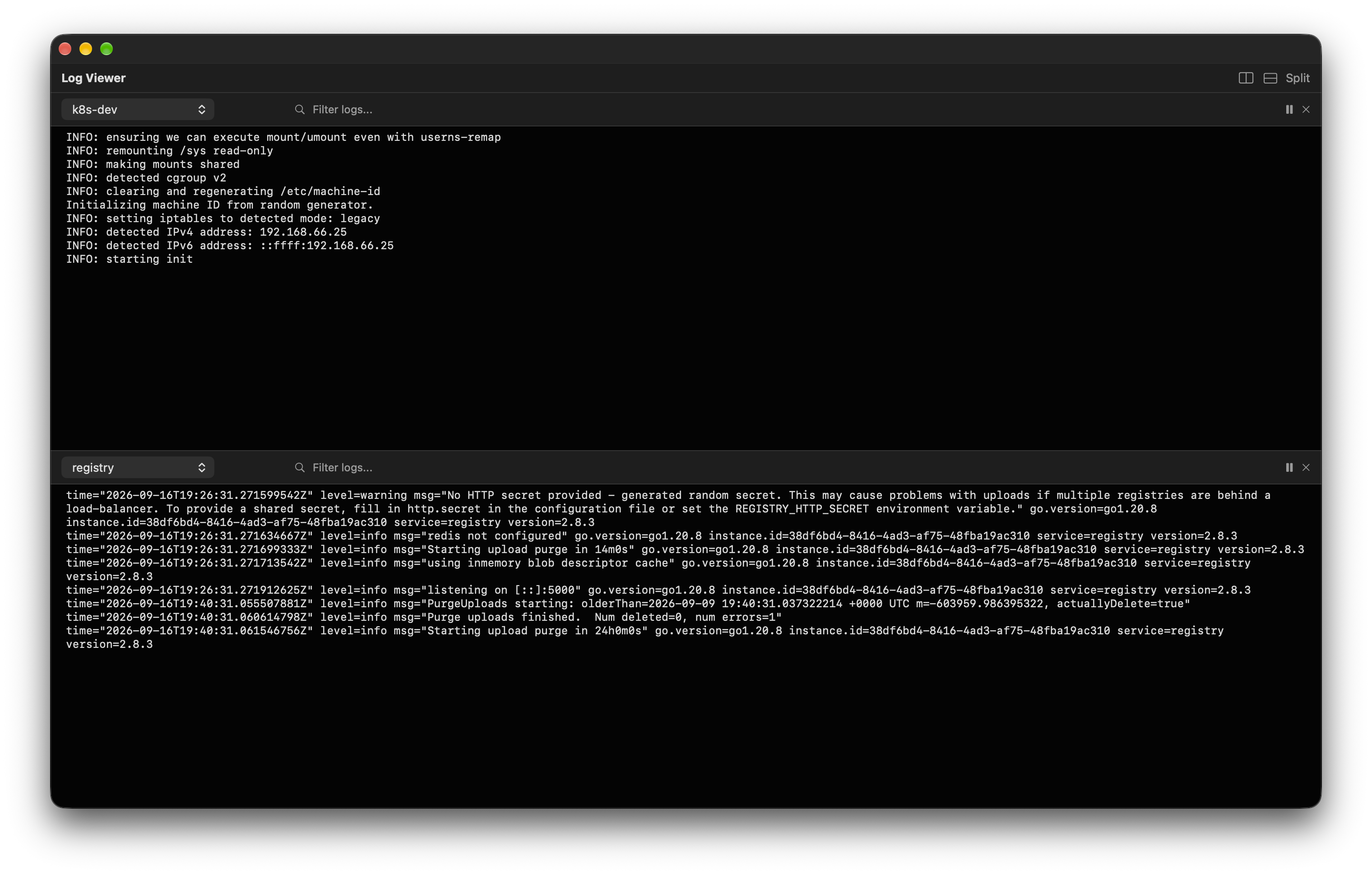
Stream logs from multiple containers side by side. Split panes, filter by text, and use per-container colour coding to keep output readable when debugging across services.
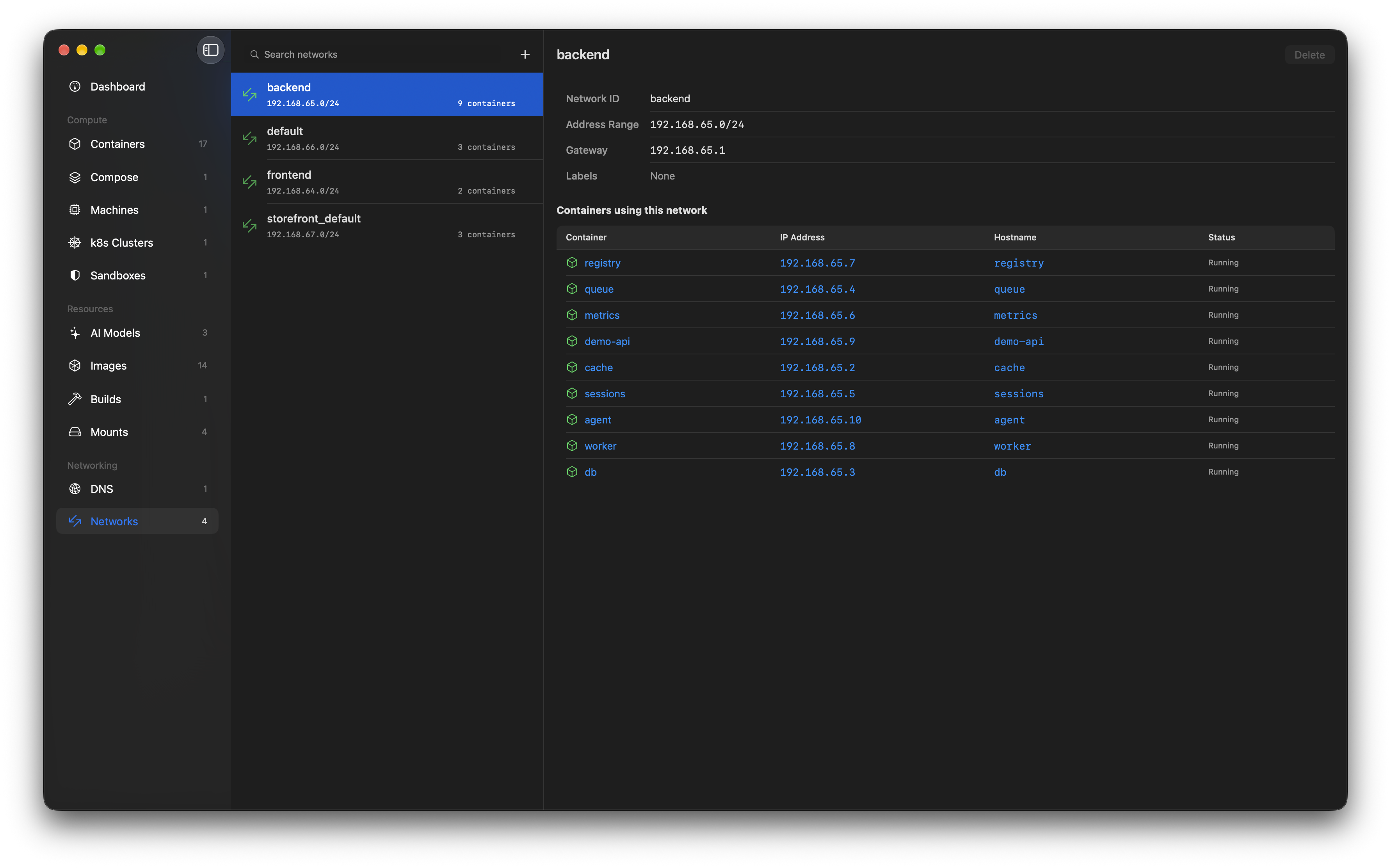
Manage networks and DNS domains without touching the CLI - see every container's IP address and hostname at a glance, set the default DNS domain, and create or remove domains and networks. A domain can also point at your Mac's localhost, so containers reach services running on the host by name.
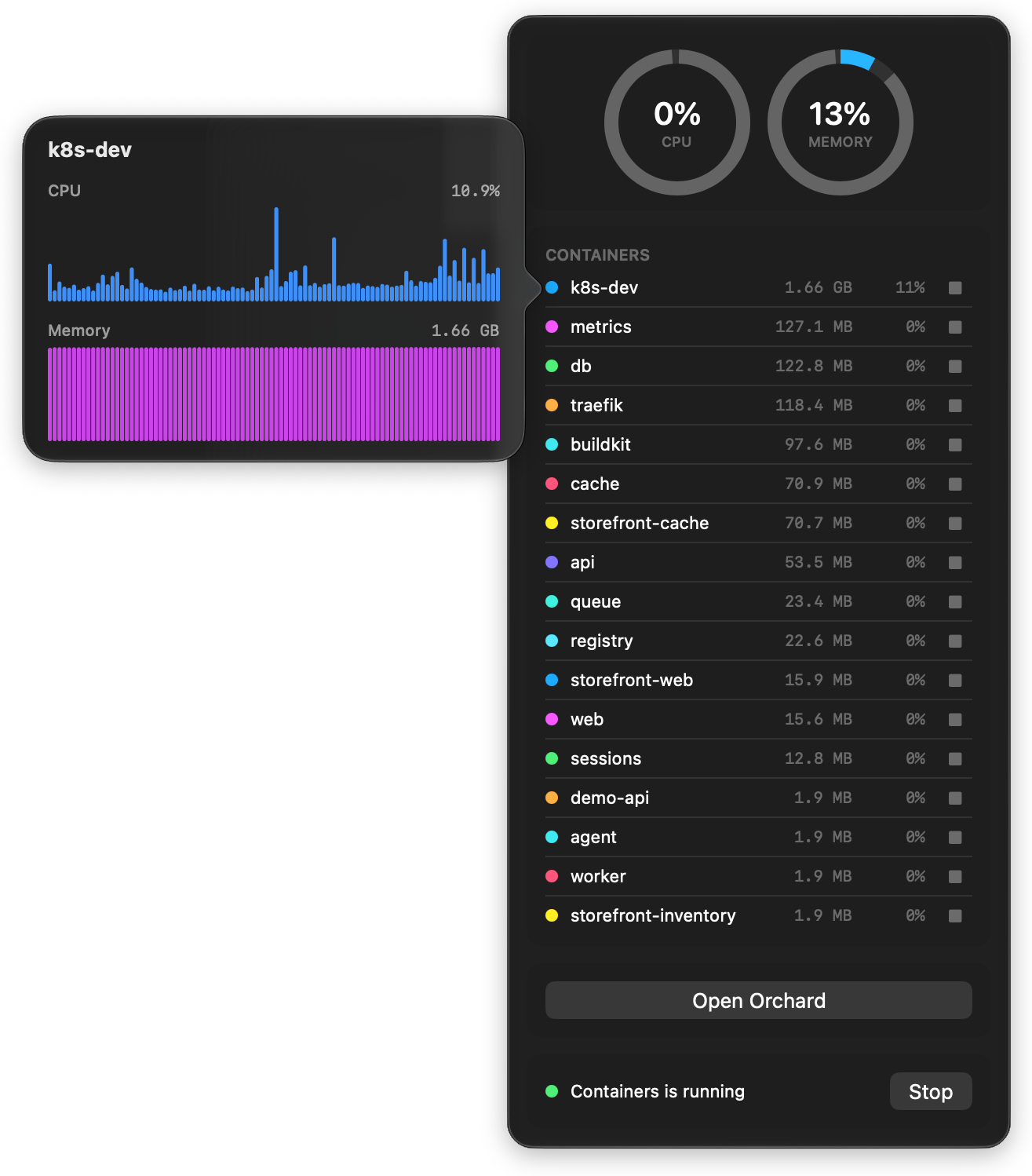
Keep an eye on things from the menu bar: CPU and memory usage rings across all running containers, a per-container list with start/stop controls, and one-click access back to the app.
Orchard isn't the only way to work with Apple's container runtime:
| Capability | Orchard | Podman Desktop | container CLI |
|---|---|---|---|
Purpose-built for apple/container | ✅ | ➖ 1 | ✅ |
| Native macOS app | ✅ 2 | ❌ 3 | ❌ |
| Native XPC integration (no CLI shelling) | ✅ | ❌ 4 | ✅ |
| Container machines (native XPC) | ✅ | ❌ | ✅ |
Kubernetes clusters on apple/container | ✅ | ❌ | ✅ |
Compose projects on apple/container | ✅ | ❌ 10 | ➖ 11 |
| Local AI models & agent sandboxes | ✅ | ❌ | ❌ |
| Command palette (fuzzy search + actions) | ✅ | ➖ 9 | ❌ |
| Signed & notarized | ✅ | ✅ | ✅ |
| Multi-pane log viewer | ✅ | ➖ | ➖ 5 |
| Live container stats (CPU/mem/net/disk) | ✅ | ✅ | ➖ |
| Network, DNS & builder management | ✅ | ➖ | ✅ |
| Focused, lightweight footprint | ✅ | ❌ 6 | ✅ |
| Open source | ✅ 7 | ✅ 8 | ✅ 8 |
✅ full support · ➖ partial or indirect · ❌ not available
apple/container.compose plugin, which Orchard links as a package rather than shelling out to.Orchard is the native, purpose-built choice: a lightweight Swift app focused solely on giving Apple's container a first-class desktop experience, rather than a heavyweight cross-platform tool that supports it as one runtime among many. (Note: OrbStack and Docker Desktop are separate container runtimes and don't manage apple/container - see Choosing a runtime below.)
Being native goes beyond the UI: Orchard talks to the container daemon over the same typed XPC API the container CLI uses internally, rather than spawning the CLI and parsing its output. That means structured data instead of screen-scraping (no breakage when CLI wording changes), no child processes on every refresh, real log streams feeding the multi-pane viewer, and typed errors instead of exit codes.
The table above compares apps that manage Apple's container runtime. OrbStack and Docker Desktop are a different decision: they're separate container runtimes with their own apps. If you're choosing a stack rather than a frontend:
Orchard + apple/container | OrbStack | Docker Desktop | |
|---|---|---|---|
| Isolation model | VM per container | Shared VM & kernel 1 | Shared VM & kernel |
| Built on Apple's Virtualization.framework | ✅ | ➖ 2 | ❌ |
| Native macOS app | ✅ | ✅ | ❌ 3 |
| Docker API & ecosystem compatibility | ➖ 4 | ✅ | ✅ |
| Kubernetes | ✅ multi-node 5 | ➖ single-node | ➖ single-node |
| Local AI models & agent sandboxes | ✅ | ❌ | ➖ 6 |
| Free for commercial use | ✅ | ❌ 7 | ➖ 8 |
| Open source | ✅ MIT + Apache-2.0 | ❌ 9 | ➖ 10 |
container k8s plugin (control plane + workers).Different trade-offs, honestly stated: OrbStack and Docker Desktop win on Docker ecosystem compatibility today. Orchard's stack wins on isolation, openness, and being built the way Apple builds things.
Orchard communicates with the container daemon primarily through the ContainerAPIClient Swift library (from apple/container) over XPC - typed Swift APIs for containers, images, networks, stats, logs, and system health, with no CLI process spawning or output parsing on this path. Every operation the API exposes goes over XPC; the remaining CLI-backed operations are the exceptions noted below.
A small number of operations still use the container CLI via Foundation.Process, each for a structural reason rather than convenience: system start/stop/restart (the daemon is registered with launchd - there is nothing to XPC to until it's running), builder lifecycle (the API exposes no builder surface; the CLI orchestrates it client-side), system properties (a local defaults store, not an API), DNS domain create/delete (requires root, so it runs the CLI under administrator privileges), and kernel selection (installing the recommended kernel provisions it - an operation the API doesn't expose as a single call).
You can install Orchard via homebrew or via a prebuilt release package. You can also download the source and build it yourself!
Every release is code-signed with a registered Apple Developer ID and notarized by Apple, so it installs and launches cleanly with no Gatekeeper "unidentified developer" warning.
brew install orchard
.dmg file and drag Orchard to your Applications foldergit clone https://github.com/andrew-waters/orchard.git
cd orchard
open Orchard.xcodeproj
The project uses Swift Package Manager for dependencies. Xcode will resolve the apple/container package automatically on first build.
Orchard is installed hundreds of times a month via Homebrew - see the live install stats - and has been starred by engineers from Apple, Microsoft, NVIDIA, IBM, Stripe, Cisco, LinkedIn, Uber, GitHub, Red Hat, SUSE, Amazon, VMware, Siemens, Hitachi, Alibaba, Tencent, MongoDB, Honeycomb, Automattic, Vercel and across the wider cloud-native community.
Using Orchard at your company or in your day-to-day workflow? We'd love to hear about it - add yourself to ADOPTERS.md with a quick pull request.
This project is licensed under the MIT License - see the LICENSE file for details.
(top 24 of 51)
4,253 followers · starred Dec 2025
1,983 followers · starred Aug 2026
606 followers · starred Apr 2026
579 followers · starred Aug 2026
The native UI for Apple Containers and (o)MLX sandboxes, written in swift as a replacement for docker desktop
See the code
brew install orchard
Orchard is a native (Swift) macOS application for managing containers, machines and local AI models using Apple's container tooling.
It gives you a desktop experience that complements the container command-line interface.
Thousands of installations and starred by engineers from Apple, Microsoft, NVIDIA, IBM, Stripe, Cisco, LinkedIn, Uber, Vercel & more - see who's adopting Orchard
Orchard wires local MLX models into Apple containers. Inference runs on your Mac's GPU (container VMs have no GPU access) and containers reach it with no hand-configured networking.
mlx_lm.server instances from the app - with process supervision, crash surfacing and logsOPENAI_BASE_URL at create time, so containerised apps just use the OpenAI SDKSee the Local AI guide for a full walkthrough and a runnable quick start.
Orchard manages Apple container machines natively: persistent, stateful Linux VMs you can create, configure, run and monitor without leaving the app or dropping to the CLI.
Machines are driven over Apple's native XPC API (MachineAPIClient), not by shelling out. See the Container Machines guide for a full walkthrough and the pitfalls to avoid.
Orchard manages local Kubernetes clusters built on Apple container's k8s plugin (container 1.2.2+): cluster nodes are grouped, inspectable and one click from a working kubectl.
Deploying workloads stays with the tools you know - kubectl, k9s, Lens - Orchard hands you a configured context and gets out of the way. See the Kubernetes Clusters guide for a walkthrough.
Orchard runs compose projects on Apple's container runtime: point it at a compose.yaml and bring the whole stack up in dependency order, or take it down again.
up compares each service against a hash stamped on the container it produced, then creates, starts, leaves alone, recreates or removes each one accordingly, listing every step as it happens
Nothing in your file is quietly dropped. Anything that cannot be honoured is listed before the first run, split into what the runtime makes impossible and what simply is not built yet, each with the line it sits on. The project goes on showing that afterwards, and a file that grows a new unhandled key is put back in front of you before the next up rather than waved through on an older answer.
The planning behind the tab is compose, a standalone open-source Swift package that also backs the container compose CLI plugin, so the terminal and the window cannot drift apart:
container compose up
Orchard links the package directly and runs the resulting plans over XPC, so it never needs the plugin installed. The Compose tab offers to install it anyway, because container's own installer clears the plugin directory on every upgrade: installing fetches the latest release, unpacks it and puts the files where the CLI looks, showing each step before it asks for an administrator password.
There is no Orchard-specific logic in the package, so other tools can build on it too. See compose.andon.dev for the syntax it supports, install instructions and the current state of coverage.
Two limitations are worth stating up front: without health reporting in the runtime, up starts dependencies before dependents but does not wait for them to become ready, and hostnames have to be unique across every container on the machine, so a service answers to <project>-<service> rather than to its service name.
up working out what changed from the containers themselves. Anything the file asks for that cannot be honoured is listed before the first run, with the line it sits on, and stays listed on the project afterwards, all of it planned by the open-source compose package that also backs the container compose CLI pluginorchard:// URLs jump to any tab or resource
Press Cmd+K anywhere and type: results rank with real fuzzy matching across containers, images, mounts, machines, k8s clusters, AI models, sandboxes, DNS domains and networks. Verbs work too - "stop db" stops the container, "logs api" opens the log viewer, "console web" drops you into a shell - and the actions section covers running containers, pulling images, and starting or stopping the container system itself.
Per-container detail with CPU, memory, network and disk over time, cross-links to the cluster or sandbox a container belongs to, and one-click terminal and log access. (The system-wide dashboard above is the default view when the app opens, summing usage across every container with headline disk-usage tiles and live sparklines.)
Browse, pull, and delete container images. Search Docker Hub directly from the app - pulls show live download progress with byte and blob counts - and inspect image metadata without dropping to the CLI.
Build images from any Dockerfile (the hammer on the Images tab, or + on Builds): pick the file, name the image, choose arm64 or amd64, and watch the BuildKit log stream live. Every build Orchard starts is recorded in the Builds tab - records and logs survive restarts - with cancel for in-flight builds, and a completed build cross-links both ways: launch the image, jump to it in Images, or click straight through to the containers running it. Builds run concurrently, and closing the sheet never kills one.
Orchard registers the orchard:// URL scheme, so scripts, docs, and other tools can link straight into the app:
| URL | Opens |
|---|---|
orchard://<tab> | Any sidebar tab, e.g. orchard://dashboard, orchard://builds |
orchard://container/<id> | A container's detail |
orchard://image/<reference> | An image (slashes in the reference are fine: orchard://image/docker.io/library/nginx:latest) |
orchard://machine/<id> | A container machine |
orchard://mount/<id> | A mount |
orchard://dns/<domain> | A DNS domain |
orchard://network/<id> | A network |
A resource link whose target is still loading selects it as soon as it appears, and a noun without an identifier (orchard://container) falls back to its tab. Try it: open orchard://builds.
Stream logs from multiple containers side by side. Split panes, filter by text, and use per-container colour coding to keep output readable when debugging across services.
Manage networks and DNS domains without touching the CLI - see every container's IP address and hostname at a glance, set the default DNS domain, and create or remove domains and networks. A domain can also point at your Mac's localhost, so containers reach services running on the host by name.
Keep an eye on things from the menu bar: CPU and memory usage rings across all running containers, a per-container list with start/stop controls, and one-click access back to the app.
Orchard isn't the only way to work with Apple's container runtime:
| Capability | Orchard | Podman Desktop | container CLI |
|---|---|---|---|
Purpose-built for apple/container | ✅ | ➖ 1 | ✅ |
| Native macOS app | ✅ 2 | ❌ 3 | ❌ |
| Native XPC integration (no CLI shelling) | ✅ | ❌ 4 | ✅ |
| Container machines (native XPC) | ✅ | ❌ | ✅ |
Kubernetes clusters on apple/container | ✅ | ❌ | ✅ |
Compose projects on apple/container | ✅ | ❌ 10 | ➖ 11 |
| Local AI models & agent sandboxes | ✅ | ❌ | ❌ |
| Command palette (fuzzy search + actions) | ✅ | ➖ 9 | ❌ |
| Signed & notarized | ✅ | ✅ | ✅ |
| Multi-pane log viewer | ✅ | ➖ | ➖ 5 |
| Live container stats (CPU/mem/net/disk) | ✅ | ✅ | ➖ |
| Network, DNS & builder management | ✅ | ➖ | ✅ |
| Focused, lightweight footprint | ✅ | ❌ 6 | ✅ |
| Open source | ✅ 7 | ✅ 8 | ✅ 8 |
✅ full support · ➖ partial or indirect · ❌ not available
apple/container.compose plugin, which Orchard links as a package rather than shelling out to.Orchard is the native, purpose-built choice: a lightweight Swift app focused solely on giving Apple's container a first-class desktop experience, rather than a heavyweight cross-platform tool that supports it as one runtime among many. (Note: OrbStack and Docker Desktop are separate container runtimes and don't manage apple/container - see Choosing a runtime below.)
Being native goes beyond the UI: Orchard talks to the container daemon over the same typed XPC API the container CLI uses internally, rather than spawning the CLI and parsing its output. That means structured data instead of screen-scraping (no breakage when CLI wording changes), no child processes on every refresh, real log streams feeding the multi-pane viewer, and typed errors instead of exit codes.
The table above compares apps that manage Apple's container runtime. OrbStack and Docker Desktop are a different decision: they're separate container runtimes with their own apps. If you're choosing a stack rather than a frontend:
Orchard + apple/container | OrbStack | Docker Desktop | |
|---|---|---|---|
| Isolation model | VM per container | Shared VM & kernel 1 | Shared VM & kernel |
| Built on Apple's Virtualization.framework | ✅ | ➖ 2 | ❌ |
| Native macOS app | ✅ | ✅ | ❌ 3 |
| Docker API & ecosystem compatibility | ➖ 4 | ✅ | ✅ |
| Kubernetes | ✅ multi-node 5 | ➖ single-node | ➖ single-node |
| Local AI models & agent sandboxes | ✅ | ❌ | ➖ 6 |
| Free for commercial use | ✅ | ❌ 7 | ➖ 8 |
| Open source | ✅ MIT + Apache-2.0 | ❌ 9 | ➖ 10 |
container k8s plugin (control plane + workers).Different trade-offs, honestly stated: OrbStack and Docker Desktop win on Docker ecosystem compatibility today. Orchard's stack wins on isolation, openness, and being built the way Apple builds things.
Orchard communicates with the container daemon primarily through the ContainerAPIClient Swift library (from apple/container) over XPC - typed Swift APIs for containers, images, networks, stats, logs, and system health, with no CLI process spawning or output parsing on this path. Every operation the API exposes goes over XPC; the remaining CLI-backed operations are the exceptions noted below.
A small number of operations still use the container CLI via Foundation.Process, each for a structural reason rather than convenience: system start/stop/restart (the daemon is registered with launchd - there is nothing to XPC to until it's running), builder lifecycle (the API exposes no builder surface; the CLI orchestrates it client-side), system properties (a local defaults store, not an API), DNS domain create/delete (requires root, so it runs the CLI under administrator privileges), and kernel selection (installing the recommended kernel provisions it - an operation the API doesn't expose as a single call).
You can install Orchard via homebrew or via a prebuilt release package. You can also download the source and build it yourself!
Every release is code-signed with a registered Apple Developer ID and notarized by Apple, so it installs and launches cleanly with no Gatekeeper "unidentified developer" warning.
brew install orchard
.dmg file and drag Orchard to your Applications foldergit clone https://github.com/andrew-waters/orchard.git
cd orchard
open Orchard.xcodeproj
The project uses Swift Package Manager for dependencies. Xcode will resolve the apple/container package automatically on first build.
Orchard is installed hundreds of times a month via Homebrew - see the live install stats - and has been starred by engineers from Apple, Microsoft, NVIDIA, IBM, Stripe, Cisco, LinkedIn, Uber, GitHub, Red Hat, SUSE, Amazon, VMware, Siemens, Hitachi, Alibaba, Tencent, MongoDB, Honeycomb, Automattic, Vercel and across the wider cloud-native community.
Using Orchard at your company or in your day-to-day workflow? We'd love to hear about it - add yourself to ADOPTERS.md with a quick pull request.
This project is licensed under the MIT License - see the LICENSE file for details.
(top 24 of 51)
4,253 followers · starred Dec 2025
1,983 followers · starred Aug 2026
606 followers · starred Apr 2026
579 followers · starred Aug 2026





