Review a running web app in a browser with a feedback bar across the top, and
hand what you wrote to Claude.
gloss open <url> opens the page in a Chromium window with the Gloss bar over
it. The reviewer writes comments in the bar and presses Submit to send
them to Claude as a round. Claude applies them and the window reloads with its
summary of what changed. This repeats until the reviewer presses Approve.
Gloss never fixes anything itself. It is the channel between the reviewer and
whatever runs Claude (Claude Code, or Reeve). The agent drives the session
with four short commands: gloss wait for the reviewer's verdict, gloss working and gloss ready either side of its changes, and gloss close. The
Claude Code plugin in this repo runs that loop for you.
Install
With Homebrew:
brew install ryanbrunner/tap/gloss
gloss install-chromium            # once: about 150 MB
gloss install-chromium downloads the Chromium that Gloss's own Playwright
drives, so the browser always matches it.
From a checkout
Node 22.12 or later.
npm install
node bin/gloss.js install-chromium   # once: about 150 MB
npm link                             # optional: puts `gloss` on your PATH
Without npm link, run it as node bin/gloss.js … or npm run gloss -- ….
The Claude Code plugin
The repo is a Claude Code plugin marketplace. With gloss on your PATH:
From a checkout, /plugin marketplace add /path/to/gloss works too.
Then /gloss http://localhost:3000 opens the page and loops: it waits for
your round, marks itself working, applies the comments, says it is ready
with a summary, and waits again, until you approve.
Commands
gloss open <url> [--name N]    show <url> in the Gloss window, starting a session if there is none
gloss status [--name N] [--json]   exit 0 and say where the session is and its phase, or exit 1 if there is none
gloss close [--name N]         end the session and close its window
gloss install-chromium         download the Chromium Gloss drives, once
gloss --version                print Gloss's version

gloss wait [--name N]          block until the reviewer submits or approves; print the verdict as JSON
gloss working [message]        the bar says Claude is working, with the message; the reviewer cannot submit
gloss ready [summary]          reload the window, show the summary, and hand the next round to the reviewer
gloss wait prints one JSON document on stdout and nothing else, described
in docs/verdict.md. Only exit 0 with "approved": true
is approval. Exit 1 with nothing on stdout means no verdict: no session, or
the window was closed or the session ended while it waited. Asked again
before working or ready, it prints the same round, so after a round the
next command is gloss working, not gloss wait.
A round goes: the reviewer submits (submitted), the agent runs gloss working (working), then gloss ready (back to reviewing, one round
on). Approve ends it (approved).
gloss open returns as soon as the window is up (within 15 seconds) and
prints the session's address. Run it again from the same directory and it
moves the same window to the new URL. Closing the window ends the session too.
There is one session per working directory. --name gives a directory more
than one.
Where things live
~/.gloss/sessions/<id>.json: the running session's pid, port and token.
The id is a hash of the directory and --name. It is outside the repo, so
a session never dirties a worktree.
~/.gloss/logs/<id>.log: the session process's output.
Set GLOSS_HOME to move both.
The session API
The session serves a small HTTP API on 127.0.0.1 only. Every request needs
the token from the state file:
the verdict, or {pending: true} after N seconds (at most 30); 409 while working, 410 once the session is ending
POST /api/working
{message}: the agent has the round
POST /api/ready
{summary}: the agent is done; reloads every page
POST /api/navigate
{url}: move the window
POST /api/close
end the session
round is the round being written now. phase is reviewing, submitted,
working or approved. A comment's sentIn is the round it went out in, or
null while it is unsent. A pinned comment's pin has the element's selector,
tag, text, box and the viewport, and the path of its screenshot.
The bar
Type a comment and press Enter or Add. Shift+Enter adds a new line.
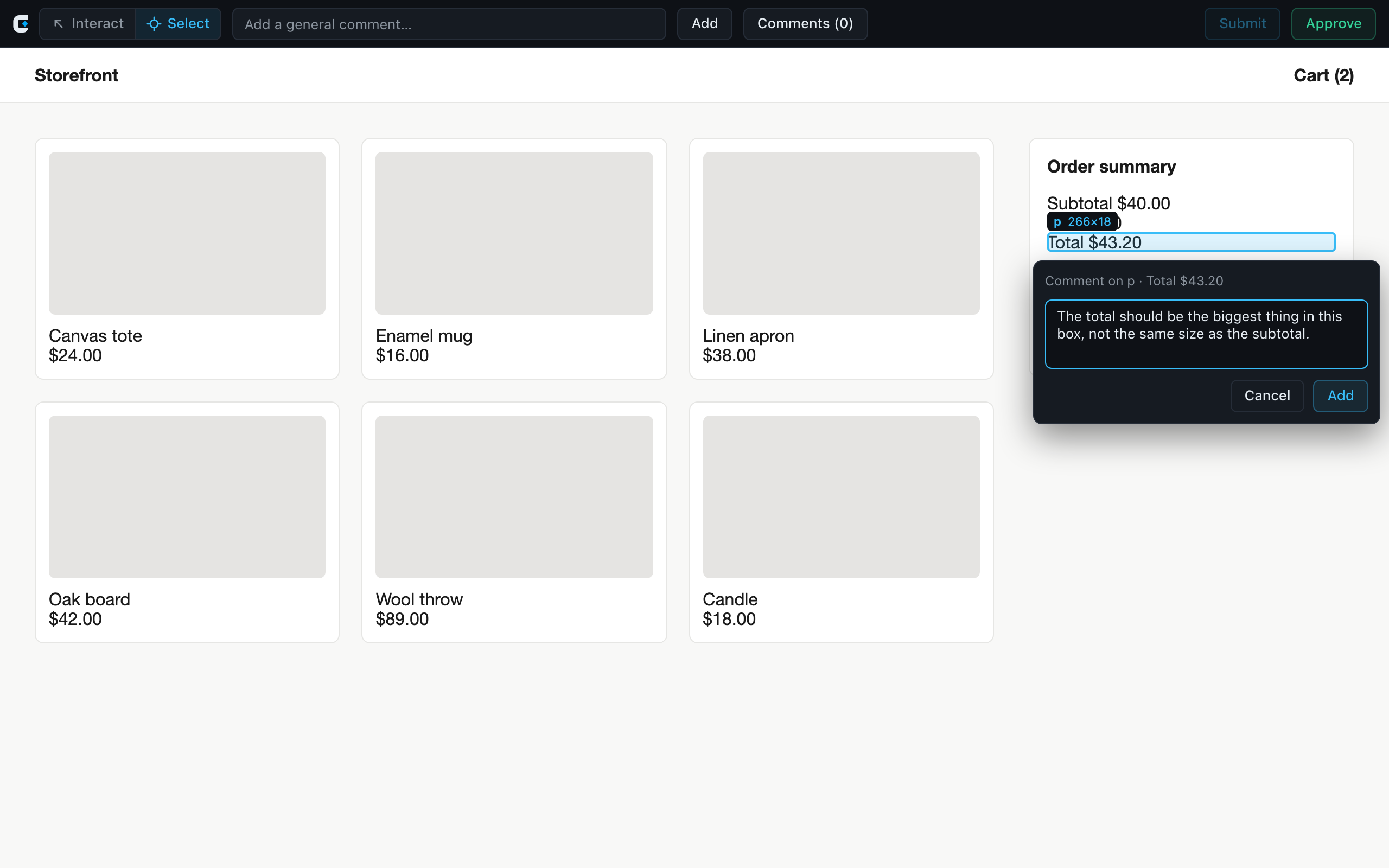
Interact and Select, beside the round, are the tools. In Interact
the page works as usual. In Select, the page's links and buttons do nothing:
the element under the pointer is outlined, with its tag and size, and a
click opens a comment box beside it, headed with the element's tag and text.
Enter or Add pins the comment to the element; the session keeps a
selector for it and a screenshot of it, taken with the outline and markers
hidden. Select stays on after Add or Cancel, for the next element, until
you press Escape (which closes an open box first) or Interact. On a phone
the tools are one crosshair button that turns Select on and off. They are
disabled once the review is approved.
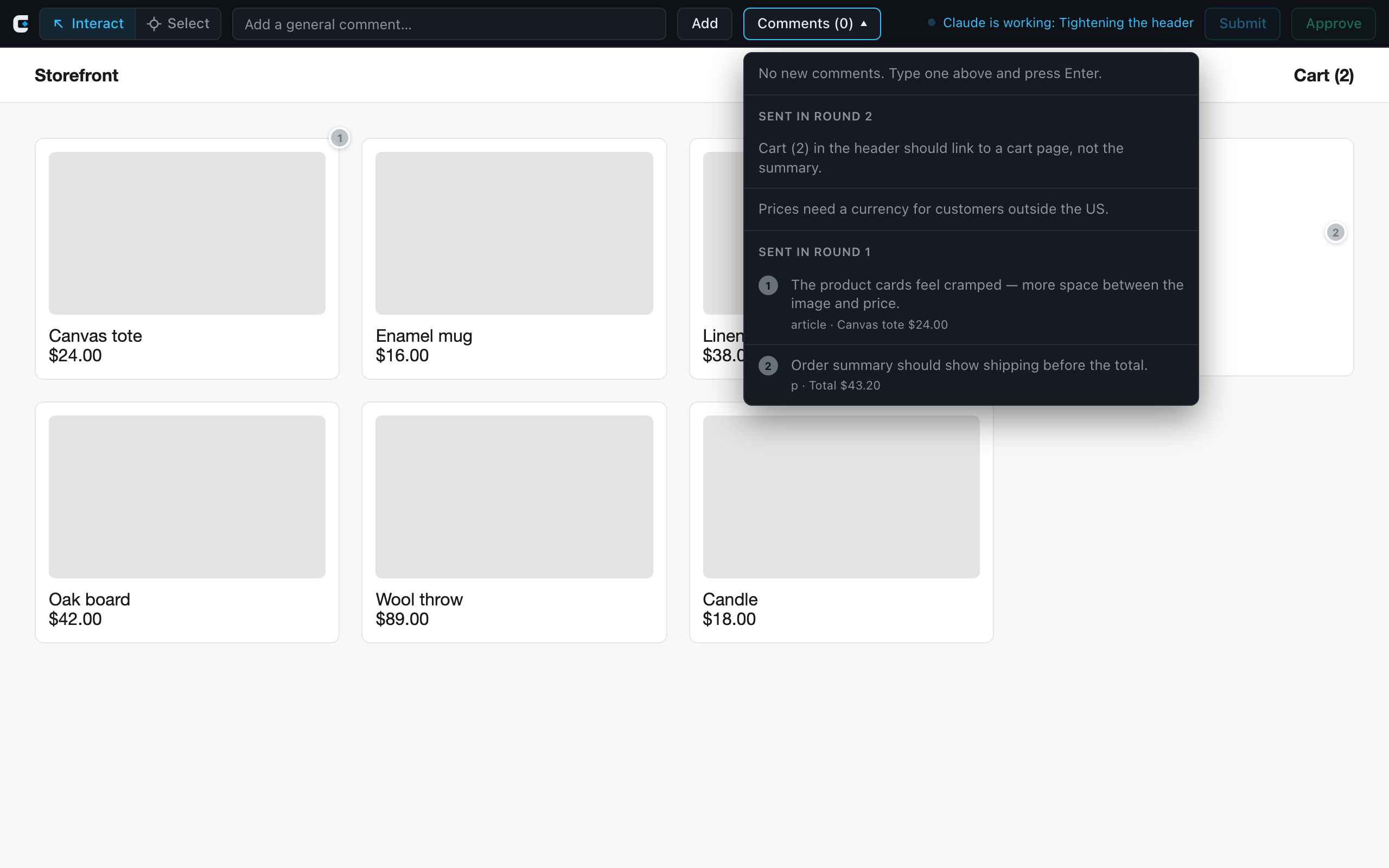
Each pinned comment gets a numbered marker on its element's top right
corner, which follows it as the page scrolls; hover it to see the comment
and outline the element. The list shows the same number with the element's
tag and text. A marker for an unsent comment stays where the element was if
its selector stops finding it. Once a round is sent, its markers are dimmed,
and shown only where the selector still finds a visible element.
Comments (n) counts the comments not yet sent. The list shows those
first, each with a delete button, then every earlier round under "Sent in
round N", dimmed and read-only, so you can check what was asked.
Submit sends the unsent comments as a round. It is disabled when there
is nothing new, and while the round is with Claude.
Approve ends the review. With unsent comments, it asks first, in the
bar: "Approve and discard N unsent comments?" Discard & approve deletes
them for good (they never reach Claude, and there is no undo); Cancel
leaves everything as it was.
The status beside the buttons says where the round is: "Sent round N,
waiting for Claude", "Claude is working: …", Claude's summary once it is
ready, or "Approved". On a phone it sits in a line under the bar.
Comments belong to the session, not the page, so they survive a reload and
every tab shows the same list.
The bar lives in a shadow root on one <gloss-bar> element on <html>. Page
CSS cannot reach into it and its CSS cannot leak out. The changes to the
page's own styles are html { margin-top: 44px }, which pushes the page down
below the bar, and 44px added to the page's own scroll-padding-top, so an
anchor jump lands below the bar and any sticky header the page allows for.
Fixed and sticky elements placed from the top of the viewport, such as a
header, are moved down by the same 44px.
Known gaps
Layouts sized to 100vh overflow by 44px.
A fixed or sticky element inside a web component's shadow root is not
moved, and sits under the bar.
An element inside a web component's shadow root is pinned as the
component itself.
A pin's selector is the path to the element when it was picked
(#summary > p:nth-of-type(3)). After the agent's changes it may find a
different element, and a sent pin's dimmed marker then sits on that one.
The window is Chrome for Testing, not your own browser: it has no profile,
logins or extensions.
The page under review shares a JavaScript realm with the bar. It is the
code the agent is editing, so it must not be able to approve. Submit and
Approve act only on trusted clicks. The session refuses changes from frames
and from pages that are not http or https. Before any page script runs, the
init script takes the binding off window, puts a sealed stand-in over
Playwright's binding controller, and hides the raw DevTools binding. It
also stops sending if the page has patched JSON.stringify, or put a
toJSON or index setter on the prototypes. scripts/spikes/loop-check.ts
checks each of these. They depend on Playwright internals, and a page
determined enough to patch other builtins on the call path may still find
a way in. The real fix is running the bar in an isolated world.
Why Playwright, not a proxy or an iframe
To pin comments to elements, the bar needs to reach the page's DOM.
A cross-origin iframe can't do that, and X-Frame-Options or a CSP can refuse
framing altogether. That leaves two choices: a proxy that injects the bar
into the HTML it serves, or a browser that injects it for us. Gloss drives
Chromium with Playwright, and registers the bar with addInitScript and
exposeBinding on the browser context:
The page is untouched. It loads from its real origin. A proxy would
have to decompress and rewrite HTML and absolute URLs, relay the dev
server's HMR websocket, strip CSP and frame headers, and keep cookies and
redirects from escaping to the real origin.
A strict CSP doesn't stop it. Init scripts run whatever the page's CSP
says. The bar's styles are constructed stylesheets rather than <style>
tags, and it talks to the session through the exposed binding rather than
fetch, so neither style-src nor connect-src gets in the way.
It follows you. New tabs, client-side navigation and full reloads all
get the bar again.
HTTPS dev hosts load, with ignoreHTTPSErrors, as in Reeve's screenshots.
The cost is the Chromium download and a window that isn't your everyday
browser. If Chromium is missing, gloss open exits 1 and says to run
gloss install-chromium.
Development
npm test              # unit tests
npm run typecheck
npm run dev -- -port 4400
npm run schema        # rewrite schema/verdict.v1.json from src/verdict.ts
npx tsx scripts/spikes/open-check.ts   # end to end, headless; needs Chromium
npx tsx scripts/spikes/loop-check.ts   # the review loop: rounds, working, ready, approve, no-verdict cases
npx tsx scripts/spikes/nav-check.ts    # links, forms, client nav, X-Frame-Options: DENY
CI runs all three spikes on every push and pull request, in
.github/workflows/ci.yml. It also installs the packed tarball the way
Homebrew does and runs it on node 22 and 26, and lints the formula.
docs/releasing.md covers releases.
npm run dev serves a fixture storefront to point gloss open at. It also
reads --port and PORT. Query flags make each state of the bar reachable
by URL, using the same bar with its comments kept in the page. &pins=N pins
the first N comments, sent ones first, and &pick=N picks the Nth of the
same elements; both take numbers, since a selector's # would end the query:
URL
/
the storefront, no bar
/?gloss
the bar, empty
/?gloss&seed=2&list
two comments, with the list open
/?gloss&sent=3&seed=1&list
three comments sent over two rounds, one new
/?gloss&phase=submitted&sent=2
round 1 sent, waiting for Claude
/?gloss&phase=working&msg=…
Claude working, with its message
/?gloss&summary=…&sent=2
back with the reviewer, showing Claude's summary
/?gloss&seed=2&confirm
the discard-and-approve prompt
/?gloss&phase=approved&sent=2
approved
/?gloss&select
Select mode, nothing picked
/?gloss&select&pick=2
Select mode, commenting on the order total
/?gloss&seed=3&pins=3
three comments pinned to storefront elements, with markers
/?gloss&sent=2&seed=1&pins=3
two sent pins, dimmed, beside a new one
/?fixed
a position: fixed header
/?csp
served with a strict Content-Security-Policy
Two environment variables exist for the spike: GLOSS_HEADLESS=1 runs the
session's Chromium headless, and GLOSS_CDP_PORT opens a DevTools port on it
so the spike can look inside the window.
Review a running web app in a browser with a feedback bar across the top, and
hand what you wrote to Claude.
gloss open <url> opens the page in a Chromium window with the Gloss bar over
it. The reviewer writes comments in the bar and presses Submit to send
them to Claude as a round. Claude applies them and the window reloads with its
summary of what changed. This repeats until the reviewer presses Approve.
Gloss never fixes anything itself. It is the channel between the reviewer and
whatever runs Claude (Claude Code, or Reeve). The agent drives the session
with four short commands: gloss wait for the reviewer's verdict, gloss working and gloss ready either side of its changes, and gloss close. The
Claude Code plugin in this repo runs that loop for you.
Install
With Homebrew:
brew install ryanbrunner/tap/gloss
gloss install-chromium            # once: about 150 MB
gloss install-chromium downloads the Chromium that Gloss's own Playwright
drives, so the browser always matches it.
From a checkout
Node 22.12 or later.
npm install
node bin/gloss.js install-chromium   # once: about 150 MB
npm link                             # optional: puts `gloss` on your PATH
Without npm link, run it as node bin/gloss.js … or npm run gloss -- ….
The Claude Code plugin
The repo is a Claude Code plugin marketplace. With gloss on your PATH:
From a checkout, /plugin marketplace add /path/to/gloss works too.
Then /gloss http://localhost:3000 opens the page and loops: it waits for
your round, marks itself working, applies the comments, says it is ready
with a summary, and waits again, until you approve.
Commands
gloss open <url> [--name N]    show <url> in the Gloss window, starting a session if there is none
gloss status [--name N] [--json]   exit 0 and say where the session is and its phase, or exit 1 if there is none
gloss close [--name N]         end the session and close its window
gloss install-chromium         download the Chromium Gloss drives, once
gloss --version                print Gloss's version

gloss wait [--name N]          block until the reviewer submits or approves; print the verdict as JSON
gloss working [message]        the bar says Claude is working, with the message; the reviewer cannot submit
gloss ready [summary]          reload the window, show the summary, and hand the next round to the reviewer
gloss wait prints one JSON document on stdout and nothing else, described
in docs/verdict.md. Only exit 0 with "approved": true
is approval. Exit 1 with nothing on stdout means no verdict: no session, or
the window was closed or the session ended while it waited. Asked again
before working or ready, it prints the same round, so after a round the
next command is gloss working, not gloss wait.
A round goes: the reviewer submits (submitted), the agent runs gloss working (working), then gloss ready (back to reviewing, one round
on). Approve ends it (approved).
gloss open returns as soon as the window is up (within 15 seconds) and
prints the session's address. Run it again from the same directory and it
moves the same window to the new URL. Closing the window ends the session too.
There is one session per working directory. --name gives a directory more
than one.
Where things live
~/.gloss/sessions/<id>.json: the running session's pid, port and token.
The id is a hash of the directory and --name. It is outside the repo, so
a session never dirties a worktree.
~/.gloss/logs/<id>.log: the session process's output.
Set GLOSS_HOME to move both.
The session API
The session serves a small HTTP API on 127.0.0.1 only. Every request needs
the token from the state file:
the verdict, or {pending: true} after N seconds (at most 30); 409 while working, 410 once the session is ending
POST /api/working
{message}: the agent has the round
POST /api/ready
{summary}: the agent is done; reloads every page
POST /api/navigate
{url}: move the window
POST /api/close
end the session
round is the round being written now. phase is reviewing, submitted,
working or approved. A comment's sentIn is the round it went out in, or
null while it is unsent. A pinned comment's pin has the element's selector,
tag, text, box and the viewport, and the path of its screenshot.
The bar
Type a comment and press Enter or Add. Shift+Enter adds a new line.
Interact and Select, beside the round, are the tools. In Interact
the page works as usual. In Select, the page's links and buttons do nothing:
the element under the pointer is outlined, with its tag and size, and a
click opens a comment box beside it, headed with the element's tag and text.
Enter or Add pins the comment to the element; the session keeps a
selector for it and a screenshot of it, taken with the outline and markers
hidden. Select stays on after Add or Cancel, for the next element, until
you press Escape (which closes an open box first) or Interact. On a phone
the tools are one crosshair button that turns Select on and off. They are
disabled once the review is approved.
Each pinned comment gets a numbered marker on its element's top right
corner, which follows it as the page scrolls; hover it to see the comment
and outline the element. The list shows the same number with the element's
tag and text. A marker for an unsent comment stays where the element was if
its selector stops finding it. Once a round is sent, its markers are dimmed,
and shown only where the selector still finds a visible element.
Comments (n) counts the comments not yet sent. The list shows those
first, each with a delete button, then every earlier round under "Sent in
round N", dimmed and read-only, so you can check what was asked.
Submit sends the unsent comments as a round. It is disabled when there
is nothing new, and while the round is with Claude.
Approve ends the review. With unsent comments, it asks first, in the
bar: "Approve and discard N unsent comments?" Discard & approve deletes
them for good (they never reach Claude, and there is no undo); Cancel
leaves everything as it was.
The status beside the buttons says where the round is: "Sent round N,
waiting for Claude", "Claude is working: …", Claude's summary once it is
ready, or "Approved". On a phone it sits in a line under the bar.
Comments belong to the session, not the page, so they survive a reload and
every tab shows the same list.
The bar lives in a shadow root on one <gloss-bar> element on <html>. Page
CSS cannot reach into it and its CSS cannot leak out. The changes to the
page's own styles are html { margin-top: 44px }, which pushes the page down
below the bar, and 44px added to the page's own scroll-padding-top, so an
anchor jump lands below the bar and any sticky header the page allows for.
Fixed and sticky elements placed from the top of the viewport, such as a
header, are moved down by the same 44px.
Known gaps
Layouts sized to 100vh overflow by 44px.
A fixed or sticky element inside a web component's shadow root is not
moved, and sits under the bar.
An element inside a web component's shadow root is pinned as the
component itself.
A pin's selector is the path to the element when it was picked
(#summary > p:nth-of-type(3)). After the agent's changes it may find a
different element, and a sent pin's dimmed marker then sits on that one.
The window is Chrome for Testing, not your own browser: it has no profile,
logins or extensions.
The page under review shares a JavaScript realm with the bar. It is the
code the agent is editing, so it must not be able to approve. Submit and
Approve act only on trusted clicks. The session refuses changes from frames
and from pages that are not http or https. Before any page script runs, the
init script takes the binding off window, puts a sealed stand-in over
Playwright's binding controller, and hides the raw DevTools binding. It
also stops sending if the page has patched JSON.stringify, or put a
toJSON or index setter on the prototypes. scripts/spikes/loop-check.ts
checks each of these. They depend on Playwright internals, and a page
determined enough to patch other builtins on the call path may still find
a way in. The real fix is running the bar in an isolated world.
Why Playwright, not a proxy or an iframe
To pin comments to elements, the bar needs to reach the page's DOM.
A cross-origin iframe can't do that, and X-Frame-Options or a CSP can refuse
framing altogether. That leaves two choices: a proxy that injects the bar
into the HTML it serves, or a browser that injects it for us. Gloss drives
Chromium with Playwright, and registers the bar with addInitScript and
exposeBinding on the browser context:
The page is untouched. It loads from its real origin. A proxy would
have to decompress and rewrite HTML and absolute URLs, relay the dev
server's HMR websocket, strip CSP and frame headers, and keep cookies and
redirects from escaping to the real origin.
A strict CSP doesn't stop it. Init scripts run whatever the page's CSP
says. The bar's styles are constructed stylesheets rather than <style>
tags, and it talks to the session through the exposed binding rather than
fetch, so neither style-src nor connect-src gets in the way.
It follows you. New tabs, client-side navigation and full reloads all
get the bar again.
HTTPS dev hosts load, with ignoreHTTPSErrors, as in Reeve's screenshots.
The cost is the Chromium download and a window that isn't your everyday
browser. If Chromium is missing, gloss open exits 1 and says to run
gloss install-chromium.
Development
npm test              # unit tests
npm run typecheck
npm run dev -- -port 4400
npm run schema        # rewrite schema/verdict.v1.json from src/verdict.ts
npx tsx scripts/spikes/open-check.ts   # end to end, headless; needs Chromium
npx tsx scripts/spikes/loop-check.ts   # the review loop: rounds, working, ready, approve, no-verdict cases
npx tsx scripts/spikes/nav-check.ts    # links, forms, client nav, X-Frame-Options: DENY
CI runs all three spikes on every push and pull request, in
.github/workflows/ci.yml. It also installs the packed tarball the way
Homebrew does and runs it on node 22 and 26, and lints the formula.
docs/releasing.md covers releases.
npm run dev serves a fixture storefront to point gloss open at. It also
reads --port and PORT. Query flags make each state of the bar reachable
by URL, using the same bar with its comments kept in the page. &pins=N pins
the first N comments, sent ones first, and &pick=N picks the Nth of the
same elements; both take numbers, since a selector's # would end the query:
URL
/
the storefront, no bar
/?gloss
the bar, empty
/?gloss&seed=2&list
two comments, with the list open
/?gloss&sent=3&seed=1&list
three comments sent over two rounds, one new
/?gloss&phase=submitted&sent=2
round 1 sent, waiting for Claude
/?gloss&phase=working&msg=…
Claude working, with its message
/?gloss&summary=…&sent=2
back with the reviewer, showing Claude's summary
/?gloss&seed=2&confirm
the discard-and-approve prompt
/?gloss&phase=approved&sent=2
approved
/?gloss&select
Select mode, nothing picked
/?gloss&select&pick=2
Select mode, commenting on the order total
/?gloss&seed=3&pins=3
three comments pinned to storefront elements, with markers
/?gloss&sent=2&seed=1&pins=3
two sent pins, dimmed, beside a new one
/?fixed
a position: fixed header
/?csp
served with a strict Content-Security-Policy
Two environment variables exist for the spike: GLOSS_HEADLESS=1 runs the
session's Chromium headless, and GLOSS_CDP_PORT opens a DevTools port on it
so the spike can look inside the window.