Usernetes deploys a Kubernetes cluster without requiring root privileges on the host, so as to mitigate potential container-breakout vulnerabilities.
Two deployment modes are supported:
kind and Rootless minikube,
but Usernetes supports creating a cluster with multiple hosts.hostUsers: false).gen1 branch, 2018-2023):
The original Usernetes, implemented in the style of "Kubernetes The Hard Way".
This generation was hard to use due to lack of support for kubeadm.gen2 branch, 2023-2026):
Switched to Kubernetes-in-Docker mode for simplicity. This switch enabled supporting kubeadm.[!NOTE] The documentation below is for the Kubernetes-in-Docker mode. See
./kubernetesfor the Kubernetes-in-Kubernetes mode.
| Host operating system | Minimum version |
|---|---|
| Ubuntu (recommended) | 22.04 |
| Rocky Linux | 9 |
| AlmaLinux | 9 |
| Fedora | (?) |
| Container Engine | Minimum version |
|---|---|
| Rootless Docker (recommended) | v20.10 |
| Rootless Podman | v4.x |
| Rootless nerdctl | v1.6 |
curl -o install.sh -fsSL https://get.docker.com
sudo sh install.sh
dockerd-rootless-setuptool.sh install
sudo loginctl enable-linger $(whoami)
sudo mkdir -p /etc/systemd/system/[email protected]

sudo tee /etc/systemd/system/[email protected]/delegate.conf <<EOF >/dev/null
[Service]
Delegate=cpu cpuset io memory pids
EOF

sudo systemctl daemon-reload
sudo tee /etc/modules-load.d/usernetes.conf <<EOF >/dev/null
br_netfilter
vxlan
EOF

sudo systemctl restart systemd-modules-load.service
sudo tee /etc/sysctl.d/99-usernetes.conf <<EOF >/dev/null
net.ipv4.conf.default.rp_filter = 2
EOF

sudo sysctl --system
# Podman v5
mkdir -p "$HOME/.config/containers/containers.conf.d"
cat <<EOF >"$HOME/.config/containers/containers.conf.d/slirp4netns.conf"
[network]
# change the network mode from pasta to slirp4netns
default_rootless_network_cmd="slirp4netns"
EOF
# Podman v6
mkdir -p "$HOME/.config/containers/containers.conf.d"
cat <<EOF >"$HOME/.config/containers/containers.conf.d/pasta.conf"
[network]
default_rootless_network_cmd="pasta"
# change the port forwarder from rootlessport to pasta
rootless_port_forwarder="pasta"
# use a dedicated address (same as the slirp4netns default) instead of
# copying the host's IP address, so that connections to the host's IP
# address from inside the namespace are routed out to the host
pasta_options=["-a", "10.0.2.100", "-n", "24", "-g", "10.0.2.2"]
EOF
Use scripts in ./init-host for automating these steps.
See make help.
# Bootstrap a cluster
make up
make kubeadm-init
make install-cni

# Enable kubectl
make kubeconfig
export KUBECONFIG=$(pwd)/kubeconfig
kubectl get pods -A

# Multi-host
make join-command
scp join-command another-host:~/usernetes
ssh another-host make -C ~/usernetes up kubeadm-join
make sync-external-ip

# Debug
make logs
make shell
make kubeadm-reset
make down-v
kubectl taint nodes --all node-role.kubernetes.io/control-plane-
The container engine defaults to Docker.
To change the container engine, set export CONTAINER_ENGINE=podman or export CONTAINER_ENGINE=nerdctl.
The CNI defaults to Flannel.
To use Calico (VXLAN mode), set export CNI=calico before running
make up and make install-cni.
With Podman's rootlessport port forwarder (Podman v4, and v5 with
slirp4netns), also set export CALICO_VXLAN_IIFNAME=lo before make up:
the forwarded VXLAN packets arrive on lo rather than eth0.
The following environment variables are recognized:
| Name | Type | Default value |
|---|---|---|
CONTAINER_ENGINE | String | automatically resolved to "docker", "podman", or "nerdctl" |
CNI | String | "flannel" ("flannel" or "calico"; has to be set on make up) |
HOST_IP | String | automatically resolved to the host's IP address |
NODE_NAME | String | "u7s-" + the host's hostname |
NODE_SUBNET | String | "10.100.%d.0/24" (%d is computed from the hash of the hostname) |
PORT_ETCD | Integer | 2379 |
PORT_KUBELET | Integer | 10250 |
PORT_FLANNEL | Integer | 8472 |
PORT_CALICO | Integer | 4789 |
PORT_CALICO_TYPHA | Integer | 5473 (host port only; the container port is fixed) |
CALICO_VXLAN_IIFNAME | String | "eth0" (interface on which forwarded Calico VXLAN packets arrive in the node; "lo" for Podman's rootlessport; has to be set on make up) |
PORT_KUBE_APISERVER | Integer | 6443 |
POD_SUBNET | String | "10.244.0.0/16" |
SERVICE_SUBNET | String | "10.96.0.0/16" |
docker-compose.yaml for exposing additional node ports.hostPath mounts. Edit docker-compose.yaml for mounting additional files.nfs do not work.When CONTAINER_ENGINE is set to nerdctl, bypass4netns can be enabled for accelerating connect(2) syscalls.
The acceleration currently does not apply to VXLAN packets.
containerd-rootless-setuptool.sh install-bypass4netnsd
export CONTAINER_ENGINE=nerdctl
make up
[!NOTE]
The support for bypass4netns is still experimental
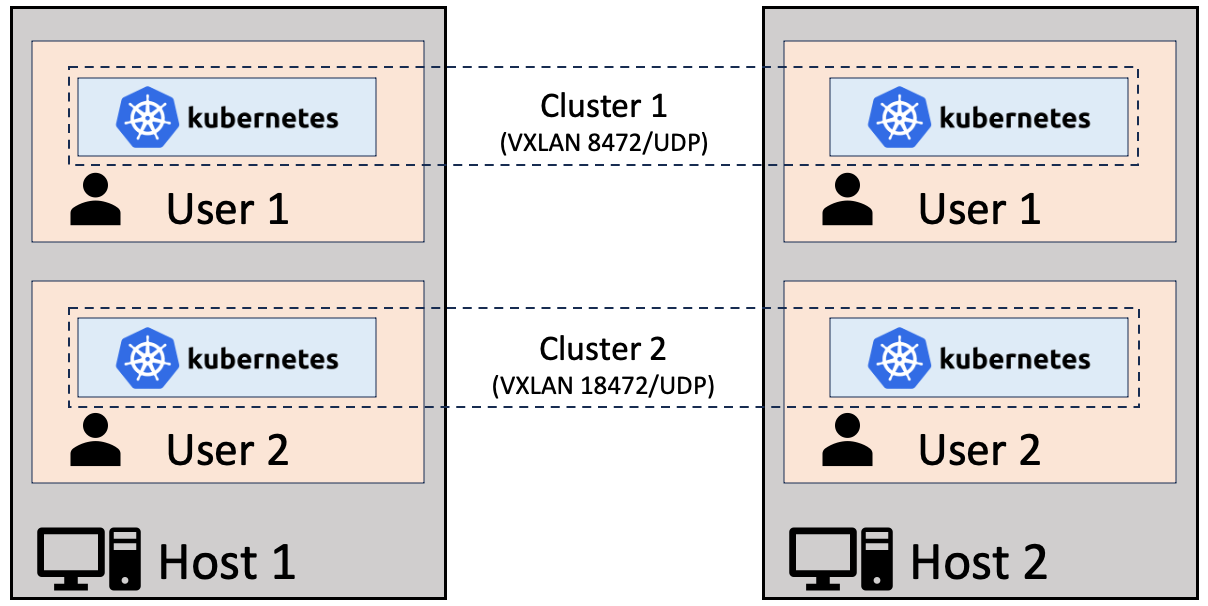
Multiple users on the hosts may create their own instances of Usernetes, but the port numbers have to be changed to avoid conflicts.
# Default: 2379
export PORT_ETCD=12379
# Default: 10250
export PORT_KUBELET=20250
# Default: 8472
export PORT_FLANNEL=18472
# Default: 4789
export PORT_CALICO=14789
# Default: 5473. Multiple Calico instances cannot share a host, as the
# container port of Typha is not configurable; setting this just avoids
# conflicting with the Typha port of another (Calico) instance.
export PORT_CALICO_TYPHA=15473
# Default: 6443
export PORT_KUBE_APISERVER=16443

make up
Although Usernetes is designed to be used with Rootless Docker, it should work with the regular "rootful" Docker too.
This might be useful for some people who are looking for "multi-host" version of kind and minikube.
(top 24 of 34)
1,983 followers · starred Jul 2018
891 followers · starred Feb 2019
1,036 followers · starred Jul 2018
970 followers · starred Sep 2018
Usernetes deploys a Kubernetes cluster without requiring root privileges on the host, so as to mitigate potential container-breakout vulnerabilities.
Two deployment modes are supported:
kind and Rootless minikube,
but Usernetes supports creating a cluster with multiple hosts.hostUsers: false).gen1 branch, 2018-2023):
The original Usernetes, implemented in the style of "Kubernetes The Hard Way".
This generation was hard to use due to lack of support for kubeadm.gen2 branch, 2023-2026):
Switched to Kubernetes-in-Docker mode for simplicity. This switch enabled supporting kubeadm.[!NOTE] The documentation below is for the Kubernetes-in-Docker mode. See
./kubernetesfor the Kubernetes-in-Kubernetes mode.
| Host operating system | Minimum version |
|---|---|
| Ubuntu (recommended) | 22.04 |
| Rocky Linux | 9 |
| AlmaLinux | 9 |
| Fedora | (?) |
| Container Engine | Minimum version |
|---|---|
| Rootless Docker (recommended) | v20.10 |
| Rootless Podman | v4.x |
| Rootless nerdctl | v1.6 |
curl -o install.sh -fsSL https://get.docker.com
sudo sh install.sh
dockerd-rootless-setuptool.sh install
sudo loginctl enable-linger $(whoami)
sudo mkdir -p /etc/systemd/system/[email protected]

sudo tee /etc/systemd/system/[email protected]/delegate.conf <<EOF >/dev/null
[Service]
Delegate=cpu cpuset io memory pids
EOF

sudo systemctl daemon-reload
sudo tee /etc/modules-load.d/usernetes.conf <<EOF >/dev/null
br_netfilter
vxlan
EOF

sudo systemctl restart systemd-modules-load.service
sudo tee /etc/sysctl.d/99-usernetes.conf <<EOF >/dev/null
net.ipv4.conf.default.rp_filter = 2
EOF

sudo sysctl --system
# Podman v5
mkdir -p "$HOME/.config/containers/containers.conf.d"
cat <<EOF >"$HOME/.config/containers/containers.conf.d/slirp4netns.conf"
[network]
# change the network mode from pasta to slirp4netns
default_rootless_network_cmd="slirp4netns"
EOF
# Podman v6
mkdir -p "$HOME/.config/containers/containers.conf.d"
cat <<EOF >"$HOME/.config/containers/containers.conf.d/pasta.conf"
[network]
default_rootless_network_cmd="pasta"
# change the port forwarder from rootlessport to pasta
rootless_port_forwarder="pasta"
# use a dedicated address (same as the slirp4netns default) instead of
# copying the host's IP address, so that connections to the host's IP
# address from inside the namespace are routed out to the host
pasta_options=["-a", "10.0.2.100", "-n", "24", "-g", "10.0.2.2"]
EOF
Use scripts in ./init-host for automating these steps.
See make help.
# Bootstrap a cluster
make up
make kubeadm-init
make install-cni

# Enable kubectl
make kubeconfig
export KUBECONFIG=$(pwd)/kubeconfig
kubectl get pods -A

# Multi-host
make join-command
scp join-command another-host:~/usernetes
ssh another-host make -C ~/usernetes up kubeadm-join
make sync-external-ip

# Debug
make logs
make shell
make kubeadm-reset
make down-v
kubectl taint nodes --all node-role.kubernetes.io/control-plane-
The container engine defaults to Docker.
To change the container engine, set export CONTAINER_ENGINE=podman or export CONTAINER_ENGINE=nerdctl.
The CNI defaults to Flannel.
To use Calico (VXLAN mode), set export CNI=calico before running
make up and make install-cni.
With Podman's rootlessport port forwarder (Podman v4, and v5 with
slirp4netns), also set export CALICO_VXLAN_IIFNAME=lo before make up:
the forwarded VXLAN packets arrive on lo rather than eth0.
The following environment variables are recognized:
| Name | Type | Default value |
|---|---|---|
CONTAINER_ENGINE | String | automatically resolved to "docker", "podman", or "nerdctl" |
CNI | String | "flannel" ("flannel" or "calico"; has to be set on make up) |
HOST_IP | String | automatically resolved to the host's IP address |
NODE_NAME | String | "u7s-" + the host's hostname |
NODE_SUBNET | String | "10.100.%d.0/24" (%d is computed from the hash of the hostname) |
PORT_ETCD | Integer | 2379 |
PORT_KUBELET | Integer | 10250 |
PORT_FLANNEL | Integer | 8472 |
PORT_CALICO | Integer | 4789 |
PORT_CALICO_TYPHA | Integer | 5473 (host port only; the container port is fixed) |
CALICO_VXLAN_IIFNAME | String | "eth0" (interface on which forwarded Calico VXLAN packets arrive in the node; "lo" for Podman's rootlessport; has to be set on make up) |
PORT_KUBE_APISERVER | Integer | 6443 |
POD_SUBNET | String | "10.244.0.0/16" |
SERVICE_SUBNET | String | "10.96.0.0/16" |
docker-compose.yaml for exposing additional node ports.hostPath mounts. Edit docker-compose.yaml for mounting additional files.nfs do not work.When CONTAINER_ENGINE is set to nerdctl, bypass4netns can be enabled for accelerating connect(2) syscalls.
The acceleration currently does not apply to VXLAN packets.
containerd-rootless-setuptool.sh install-bypass4netnsd
export CONTAINER_ENGINE=nerdctl
make up
[!NOTE]
The support for bypass4netns is still experimental
Multiple users on the hosts may create their own instances of Usernetes, but the port numbers have to be changed to avoid conflicts.
# Default: 2379
export PORT_ETCD=12379
# Default: 10250
export PORT_KUBELET=20250
# Default: 8472
export PORT_FLANNEL=18472
# Default: 4789
export PORT_CALICO=14789
# Default: 5473. Multiple Calico instances cannot share a host, as the
# container port of Typha is not configurable; setting this just avoids
# conflicting with the Typha port of another (Calico) instance.
export PORT_CALICO_TYPHA=15473
# Default: 6443
export PORT_KUBE_APISERVER=16443

make up
Although Usernetes is designed to be used with Rootless Docker, it should work with the regular "rootful" Docker too.
This might be useful for some people who are looking for "multi-host" version of kind and minikube.
(top 24 of 34)
1,983 followers · starred Jul 2018
891 followers · starred Feb 2019
1,036 followers · starred Jul 2018
970 followers · starred Sep 2018