Ultra-lightweight Kubernetes
See the codeAnywhere you'd run Docker or Podman, you can now run Kubernetes. Ultra-lightweight, OCI-compliant, single-node Kubernetes, under 200 MB RAM. No etcd. No clustering overhead.
Standard Kubernetes is built for multi-node clusters, and a lot of the real world runs on single nodes. Edge devices. Factory gateways. Developer laptops. Remote site hardware. IoT controllers. The millions of machines that have been running Docker or Podman because standing up a full cluster was overhead that couldn't be justified for a single workload host.
That creates a gap. You either run Docker and give up the Kubernetes ecosystem entirely, or you run K3s or MicroK8s and accept that you're carrying clustering machinery you'll never use. KubeSolo closes the gap by taking a different starting position: remove the clustering code rather than disable it.
The result is full Kubernetes, complete API, full control loop, full ecosystem compatibility, with a RAM footprint under 200 MB, optimized for flash storage, and an install that takes under 60 seconds on hardware from a Raspberry Pi to an industrial gateway.
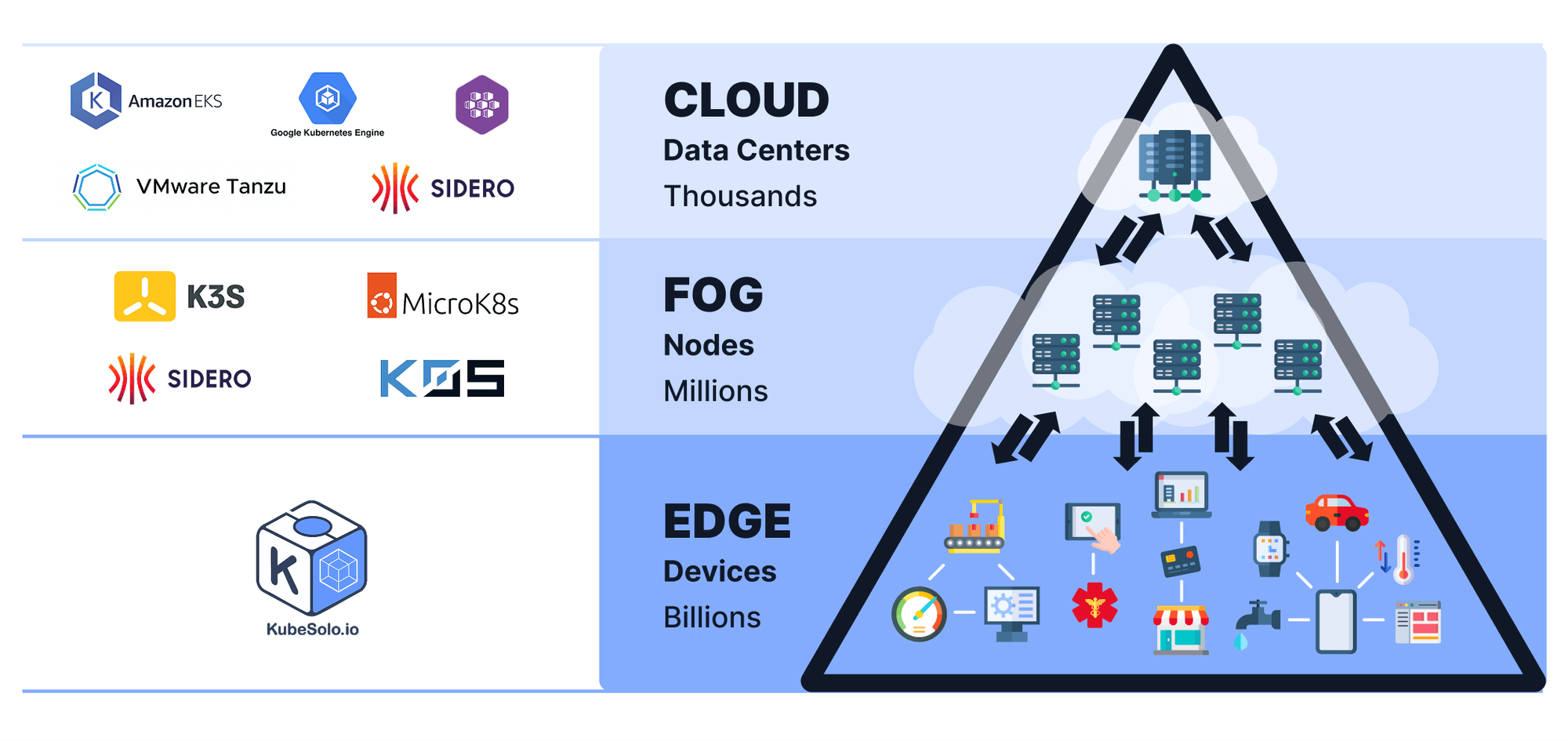
KubeSolo takes Kubernetes and removes everything that only makes sense when there's more than one node: etcd quorum logic, leader election, multi-node networking overlays, control plane distribution. None of it is present, not disabled, removed.
What remains is a full Kubernetes control loop running in a single process. The API server, controller manager, and kubelet all run together. Your existing manifests, Helm charts, and CRDs work without modification.
The design target is anywhere you would have previously reached for Docker or Podman: edge devices, factory hardware, developer laptops, remote sites, IoT gateways, kiosk machines. Same OCI images, better runtime, full ecosystem.
KubeSolo bundles the following technologies together into a single cohesive distribution:
It is packaged as a single binary with minimal OS dependencies (a sane kernel and cgroup mounts), secure defaults tuned for lightweight environments, and all required components bundled for offline operation.
KubeSolo's footprint sits under 200 MB RAM because clustering machinery is absent, not dormant. Most lightweight Kubernetes distributions slim down a full distribution; the multi-node code is still there, just inactive. KubeSolo starts from the other end: everything that requires more than one node has been removed.
Three specific design decisions contribute to the smaller footprint:
NodeSetter, a lightweight mutating admission webhook built into KubeSolo that sets spec.nodeName on every new pod, without the full scheduling machineryThe practical result is a full Kubernetes control loop that runs comfortably on devices with 512 MB of RAM, on flash storage, and in air-gapped environments.
KubeSolo ships in two variants to suit different deployment environments:
| Variant | Binary size | Internet required | Use when |
|---|---|---|---|
| Online (default) | Smaller | Yes | Devices with reliable internet access where binary size matters more than offline capability |
| Offline | Larger | No | Air-gapped environments, factory floors, edge devices with intermittent or no connectivity |
The offline variant bundles all required container images, CNI plugins, and runtime dependencies directly in the binary. Nothing needs to be fetched from the internet at install or runtime. The online variant pulls container images from public registries at startup, keeping the binary smaller at the cost of requiring internet access.
The default installer downloads the online variant. If your devices are air-gapped or have unreliable internet access, use the offline variant.
[!WARNING] Ensure that no container engine (e.g., Docker, Podman, containerd) is installed or active on the target system prior to proceeding. This includes any background services or residual installations that could interfere with KubeSolo networking. The installer refuses to continue if Docker is installed or running.
The one exception is deliberate: KubeSolo can attach to a host-managed containerd or CRI-O instead of running its own, by setting
runtime.endpoint(for exampleunix:///run/containerd/containerd.sock). The host then provides the runtime, the OCI runtime, the CNI plugin binaries and the sandbox image.
Supported platforms: ARM · ARM64 · x86_64 · RISC-V 64
Step 1, Install: Run the install script with sudo. KubeSolo starts as a systemd service.
The installer detects your architecture and libc automatically. Choose the variant that matches your environment:
Online (default, smaller binary, pulls container images from registries at startup):
curl -sfL https://get.kubesolo.io | sudo sh -
Offline (larger binary with all images bundled, no internet required at runtime):
curl -sfL https://get.kubesolo.io | KUBESOLO_OFFLINE=true sudo -E sh -
Air-gapped (no internet on the target machine at all):
# On a connected Linux machine with the same architecture and libc as the target, download the offline bundle
curl -sfL https://get.kubesolo.io | sh -s -- --offline --download-only=/tmp/kubesolo-bundle

# Transfer the files to the target machine, then install
sudo sh install.sh --offline-install=<archive.tar.gz>
The bundle matches the OS, architecture and libc of the machine that downloads it, so a bundle downloaded on macOS, or on a glibc host for an Alpine (musl) target, won't work. In that case download the matching -offline archive from the releases page.
The installer writes your settings to /etc/kubesolo/config.yaml. Every installer flag is listed in the install script flags reference. Unreleased changes from the develop branch are served from https://get-dev.kubesolo.io; don't use it in production.
The installer also detects your libc variant:
Step 2, Set up kubectl: Copy the admin kubeconfig from /var/lib/kubesolo/pki/admin/admin.kubeconfig to the machine where kubectl is installed, then set the context:
kubectl config use-context kubernetes-admin@kubesolo
kubectl get nodes
# You should see a single node in Ready state
Step 3, Deploy your first workload:
kubectl apply -f https://raw.githubusercontent.com/portainer/kubesolo/develop/examples/mosquitto.yaml
kubectl get all -n mosquitto
Note: If you're running KubeSolo on a device with less than 512 MB of RAM, interact with the cluster using an externally installed kubectl.
kubesoloctl is a single, dependency-free binary that manages the full KubeSolo lifecycle — install, upgrade, reset, uninstall, and kubeconfig wiring — and adds a container mode for running KubeSolo on macOS, Windows (WSL2), or any Linux host with a container engine. It's the recommended way to spin up KubeSolo for local development and CI.
Download the binary for your platform from the releases page (kubesoloctl-<os>-<arch>), put it on your PATH, then:
# Linux host (runs as a system service):
sudo kubesoloctl install

# Container mode — macOS / WSL2 / Linux dev (requires a container engine):
kubesoloctl install --run-mode=container

# Then, regardless of mode:
kubectl get nodes --watch
install runs pre-flight checks, starts KubeSolo, and merges the admin kubeconfig into ~/.kube/config automatically. In container mode you can publish workload ports just like Kind:
kubesoloctl install --run-mode=container --container-ports=9001,8080:80,9000-9100
For the full command reference, run modes, container-port syntax, multi-instance usage, and offline bundles, see the kubesoloctl guide.
For detailed installation instructions including support for industrial devices, embedded systems, different init systems, and custom configurations, see the Installation Guide.
The installation guide covers:
KubeSolo reads its settings from /etc/kubesolo/config.yaml:
apiVersion: kubesolo.io/v1alpha1
kind: Config

network:
  nodeIP: 10.0.0.5
portainer:
  edgeID: "..."
  edgeKey: "..."
d2k:
  enabled: true
Anything omitted falls back to its default. Settings are read at startup, so a change takes effect on restart.
kubesoloctl config get                              # show everything
sudo kubesoloctl config set network.nodeIP 10.0.0.5 # change one setting
sudo kubesoloctl config edit                        # open in $EDITOR
kubesoloctl config schema                           # every setting and its default (YAML)
KubeSolo can also serve the file over a unix socket, so it can be managed programmatically.
Run the binary with the flags your service currently passes, plus
--print-config, and save the result:
sudo kubesolo <current flags> --print-config | sudo tee /etc/kubesolo/config.yaml
kubesoloctl upgrade does this for you.
Deprecated. Command-line flags still work and still override the configuration file, so existing installs keep running, but no new flags will be added and new settings are configurable only through the file. Each flag and its
KUBESOLO_*environment variable is listed against its setting in the flag-to-setting table. Flags for the install script are in the installer flags reference.
Two flags are not settings and have no equivalent in the file: --config, which
names it, and --print-config, which prints the resolved document and exits.
Example:
To connect KubeSolo to Portainer as an Edge agent, pass the Edge ID and key to the installer. They are written to portainer.edgeID and portainer.edgeKey in the configuration file:
curl -sfL https://get.kubesolo.io | KUBESOLO_PORTAINER_EDGE_ID=your-portainer-edge-id KUBESOLO_PORTAINER_EDGE_KEY=your-portainer-edge-key sudo -E sh
On an existing install, set them in the file instead and restart:
sudo kubesoloctl config set portainer.edgeID your-portainer-edge-id
sudo kubesoloctl config set portainer.edgeKey your-portainer-edge-key
Full documentation is at kubesolo.io. The guides in this repository:
Installing
install.sh flag, install channels, air-gapped bundlesConfiguring
Monitoring
metrics.enabled: true to serve Prometheus metrics for the control plane at /metrics on 127.0.0.1:9105 (change with metrics.bindAddress). It is off by default.Using a host container runtime
By default KubeSolo runs its own embedded containerd. Set runtime.endpoint (flag --container-runtime-endpoint) to a host-managed containerd or CRI-O socket, such as unix:///run/crio/crio.sock, and KubeSolo attaches to it instead. The host is then responsible for the runtime, the OCI runtime, the CNI plugin binaries and the sandbox image.
go.mod)To build for multiple architectures, install the required cross-compilation toolchains:
sudo make install-cross-compilers
This installs (on Debian/Ubuntu, via apt-get):
gcc-aarch64-linux-gnu (for ARM64)gcc-x86-64-linux-gnu (for AMD64)gcc-arm-linux-gnueabihf (for ARM/ARMHF)gcc-riscv64-linux-gnu (for RISCV64)Build for your current platform (outputs to ./dist/kubesolo):
make build
Build for specific architectures using environment variables:
# Build for ARM64
make build GOARCH=arm64

# Build for AMD64
make build GOARCH=amd64

# Build for ARM (ARMHF)
make build GOARCH=arm

# Build for RISCV64
make build GOARCH=riscv64
For Alpine Linux compatibility, build musl-compatible static binaries:
# Install musl cross-compilers (one-time setup)
sudo make install-musl-cross-compilers

# Build musl binary for specific architecture
make build-musl GOARCH=amd64
make build-musl GOARCH=arm64
make build-musl GOARCH=arm
make build-musl GOARCH=riscv64

# Build all supported musl architectures
make build-all-musl
install-musl-cross-compilers installs musl-tools and the musl.cc toolchains for amd64, arm64, arm (musleabihf) and riscv64.
The offline variant embeds every container image. Build it with make build-offline (glibc) or make build-musl-offline (musl); both take the same GOARCH and OUTPUT variables.
kubesoloctl is pure Go (CGO_ENABLED=0), so it needs no cross-compiler and one binary per architecture runs on both glibc and musl:
# Linux, host architecture (outputs to ./dist/kubesoloctl-<os>-<arch>)
make build-kubesoloctl

# Another platform
make build-kubesoloctl GOOS=darwin GOARCH=arm64

# All released targets: linux amd64/arm64/arm/riscv64, darwin amd64/arm64
make build-kubesoloctl-all
Specify a custom output path using the OUTPUT variable:
# Custom filename
make build OUTPUT=./kubesolo-custom

# Platform-specific naming
make build GOARCH=arm OUTPUT=./dist/kubesolo-arm

# Different directory
make build OUTPUT=./bin/kubesolo
# Build ARM binary with custom name
make build GOARCH=arm OUTPUT=./dist/kubesolo-linux-arm

# Build AMD64 binary for CI/CD
make build GOARCH=amd64 OUTPUT=./artifacts/kubesolo-linux-amd64
For development and testing, you can run KubeSolo directly without building:
# Download dependencies first (only needed once)
make deps

# Run KubeSolo in development mode
make dev
GitHub Issues, submit issues and feature requests.
GitHub, browse source, open pull requests, and contribute.
Security issues in KubeSolo can be reported by sending an email to [email protected].
KubeSolo and the KubeSolo logo are trademarks of Portainer.io Limited. Released under the MIT license.
421 followers · starred May 2025
105 followers · starred Jun 2025
738 followers · starred Jul 2026
412 followers · starred Jun 2025
Ultra-lightweight Kubernetes
See the codeAnywhere you'd run Docker or Podman, you can now run Kubernetes. Ultra-lightweight, OCI-compliant, single-node Kubernetes, under 200 MB RAM. No etcd. No clustering overhead.
Standard Kubernetes is built for multi-node clusters, and a lot of the real world runs on single nodes. Edge devices. Factory gateways. Developer laptops. Remote site hardware. IoT controllers. The millions of machines that have been running Docker or Podman because standing up a full cluster was overhead that couldn't be justified for a single workload host.
That creates a gap. You either run Docker and give up the Kubernetes ecosystem entirely, or you run K3s or MicroK8s and accept that you're carrying clustering machinery you'll never use. KubeSolo closes the gap by taking a different starting position: remove the clustering code rather than disable it.
The result is full Kubernetes, complete API, full control loop, full ecosystem compatibility, with a RAM footprint under 200 MB, optimized for flash storage, and an install that takes under 60 seconds on hardware from a Raspberry Pi to an industrial gateway.
KubeSolo takes Kubernetes and removes everything that only makes sense when there's more than one node: etcd quorum logic, leader election, multi-node networking overlays, control plane distribution. None of it is present, not disabled, removed.
What remains is a full Kubernetes control loop running in a single process. The API server, controller manager, and kubelet all run together. Your existing manifests, Helm charts, and CRDs work without modification.
The design target is anywhere you would have previously reached for Docker or Podman: edge devices, factory hardware, developer laptops, remote sites, IoT gateways, kiosk machines. Same OCI images, better runtime, full ecosystem.
KubeSolo bundles the following technologies together into a single cohesive distribution:
It is packaged as a single binary with minimal OS dependencies (a sane kernel and cgroup mounts), secure defaults tuned for lightweight environments, and all required components bundled for offline operation.
KubeSolo's footprint sits under 200 MB RAM because clustering machinery is absent, not dormant. Most lightweight Kubernetes distributions slim down a full distribution; the multi-node code is still there, just inactive. KubeSolo starts from the other end: everything that requires more than one node has been removed.
Three specific design decisions contribute to the smaller footprint:
NodeSetter, a lightweight mutating admission webhook built into KubeSolo that sets spec.nodeName on every new pod, without the full scheduling machineryThe practical result is a full Kubernetes control loop that runs comfortably on devices with 512 MB of RAM, on flash storage, and in air-gapped environments.
KubeSolo ships in two variants to suit different deployment environments:
| Variant | Binary size | Internet required | Use when |
|---|---|---|---|
| Online (default) | Smaller | Yes | Devices with reliable internet access where binary size matters more than offline capability |
| Offline | Larger | No | Air-gapped environments, factory floors, edge devices with intermittent or no connectivity |
The offline variant bundles all required container images, CNI plugins, and runtime dependencies directly in the binary. Nothing needs to be fetched from the internet at install or runtime. The online variant pulls container images from public registries at startup, keeping the binary smaller at the cost of requiring internet access.
The default installer downloads the online variant. If your devices are air-gapped or have unreliable internet access, use the offline variant.
[!WARNING] Ensure that no container engine (e.g., Docker, Podman, containerd) is installed or active on the target system prior to proceeding. This includes any background services or residual installations that could interfere with KubeSolo networking. The installer refuses to continue if Docker is installed or running.
The one exception is deliberate: KubeSolo can attach to a host-managed containerd or CRI-O instead of running its own, by setting
runtime.endpoint(for exampleunix:///run/containerd/containerd.sock). The host then provides the runtime, the OCI runtime, the CNI plugin binaries and the sandbox image.
Supported platforms: ARM · ARM64 · x86_64 · RISC-V 64
Step 1, Install: Run the install script with sudo. KubeSolo starts as a systemd service.
The installer detects your architecture and libc automatically. Choose the variant that matches your environment:
Online (default, smaller binary, pulls container images from registries at startup):
curl -sfL https://get.kubesolo.io | sudo sh -
Offline (larger binary with all images bundled, no internet required at runtime):
curl -sfL https://get.kubesolo.io | KUBESOLO_OFFLINE=true sudo -E sh -
Air-gapped (no internet on the target machine at all):
# On a connected Linux machine with the same architecture and libc as the target, download the offline bundle
curl -sfL https://get.kubesolo.io | sh -s -- --offline --download-only=/tmp/kubesolo-bundle

# Transfer the files to the target machine, then install
sudo sh install.sh --offline-install=<archive.tar.gz>
The bundle matches the OS, architecture and libc of the machine that downloads it, so a bundle downloaded on macOS, or on a glibc host for an Alpine (musl) target, won't work. In that case download the matching -offline archive from the releases page.
The installer writes your settings to /etc/kubesolo/config.yaml. Every installer flag is listed in the install script flags reference. Unreleased changes from the develop branch are served from https://get-dev.kubesolo.io; don't use it in production.
The installer also detects your libc variant:
Step 2, Set up kubectl: Copy the admin kubeconfig from /var/lib/kubesolo/pki/admin/admin.kubeconfig to the machine where kubectl is installed, then set the context:
kubectl config use-context kubernetes-admin@kubesolo
kubectl get nodes
# You should see a single node in Ready state
Step 3, Deploy your first workload:
kubectl apply -f https://raw.githubusercontent.com/portainer/kubesolo/develop/examples/mosquitto.yaml
kubectl get all -n mosquitto
Note: If you're running KubeSolo on a device with less than 512 MB of RAM, interact with the cluster using an externally installed kubectl.
kubesoloctl is a single, dependency-free binary that manages the full KubeSolo lifecycle — install, upgrade, reset, uninstall, and kubeconfig wiring — and adds a container mode for running KubeSolo on macOS, Windows (WSL2), or any Linux host with a container engine. It's the recommended way to spin up KubeSolo for local development and CI.
Download the binary for your platform from the releases page (kubesoloctl-<os>-<arch>), put it on your PATH, then:
# Linux host (runs as a system service):
sudo kubesoloctl install

# Container mode — macOS / WSL2 / Linux dev (requires a container engine):
kubesoloctl install --run-mode=container

# Then, regardless of mode:
kubectl get nodes --watch
install runs pre-flight checks, starts KubeSolo, and merges the admin kubeconfig into ~/.kube/config automatically. In container mode you can publish workload ports just like Kind:
kubesoloctl install --run-mode=container --container-ports=9001,8080:80,9000-9100
For the full command reference, run modes, container-port syntax, multi-instance usage, and offline bundles, see the kubesoloctl guide.
For detailed installation instructions including support for industrial devices, embedded systems, different init systems, and custom configurations, see the Installation Guide.
The installation guide covers:
KubeSolo reads its settings from /etc/kubesolo/config.yaml:
apiVersion: kubesolo.io/v1alpha1
kind: Config

network:
  nodeIP: 10.0.0.5
portainer:
  edgeID: "..."
  edgeKey: "..."
d2k:
  enabled: true
Anything omitted falls back to its default. Settings are read at startup, so a change takes effect on restart.
kubesoloctl config get                              # show everything
sudo kubesoloctl config set network.nodeIP 10.0.0.5 # change one setting
sudo kubesoloctl config edit                        # open in $EDITOR
kubesoloctl config schema                           # every setting and its default (YAML)
KubeSolo can also serve the file over a unix socket, so it can be managed programmatically.
Run the binary with the flags your service currently passes, plus
--print-config, and save the result:
sudo kubesolo <current flags> --print-config | sudo tee /etc/kubesolo/config.yaml
kubesoloctl upgrade does this for you.
Deprecated. Command-line flags still work and still override the configuration file, so existing installs keep running, but no new flags will be added and new settings are configurable only through the file. Each flag and its
KUBESOLO_*environment variable is listed against its setting in the flag-to-setting table. Flags for the install script are in the installer flags reference.
Two flags are not settings and have no equivalent in the file: --config, which
names it, and --print-config, which prints the resolved document and exits.
Example:
To connect KubeSolo to Portainer as an Edge agent, pass the Edge ID and key to the installer. They are written to portainer.edgeID and portainer.edgeKey in the configuration file:
curl -sfL https://get.kubesolo.io | KUBESOLO_PORTAINER_EDGE_ID=your-portainer-edge-id KUBESOLO_PORTAINER_EDGE_KEY=your-portainer-edge-key sudo -E sh
On an existing install, set them in the file instead and restart:
sudo kubesoloctl config set portainer.edgeID your-portainer-edge-id
sudo kubesoloctl config set portainer.edgeKey your-portainer-edge-key
Full documentation is at kubesolo.io. The guides in this repository:
Installing
install.sh flag, install channels, air-gapped bundlesConfiguring
Monitoring
metrics.enabled: true to serve Prometheus metrics for the control plane at /metrics on 127.0.0.1:9105 (change with metrics.bindAddress). It is off by default.Using a host container runtime
By default KubeSolo runs its own embedded containerd. Set runtime.endpoint (flag --container-runtime-endpoint) to a host-managed containerd or CRI-O socket, such as unix:///run/crio/crio.sock, and KubeSolo attaches to it instead. The host is then responsible for the runtime, the OCI runtime, the CNI plugin binaries and the sandbox image.
go.mod)To build for multiple architectures, install the required cross-compilation toolchains:
sudo make install-cross-compilers
This installs (on Debian/Ubuntu, via apt-get):
gcc-aarch64-linux-gnu (for ARM64)gcc-x86-64-linux-gnu (for AMD64)gcc-arm-linux-gnueabihf (for ARM/ARMHF)gcc-riscv64-linux-gnu (for RISCV64)Build for your current platform (outputs to ./dist/kubesolo):
make build
Build for specific architectures using environment variables:
# Build for ARM64
make build GOARCH=arm64

# Build for AMD64
make build GOARCH=amd64

# Build for ARM (ARMHF)
make build GOARCH=arm

# Build for RISCV64
make build GOARCH=riscv64
For Alpine Linux compatibility, build musl-compatible static binaries:
# Install musl cross-compilers (one-time setup)
sudo make install-musl-cross-compilers

# Build musl binary for specific architecture
make build-musl GOARCH=amd64
make build-musl GOARCH=arm64
make build-musl GOARCH=arm
make build-musl GOARCH=riscv64

# Build all supported musl architectures
make build-all-musl
install-musl-cross-compilers installs musl-tools and the musl.cc toolchains for amd64, arm64, arm (musleabihf) and riscv64.
The offline variant embeds every container image. Build it with make build-offline (glibc) or make build-musl-offline (musl); both take the same GOARCH and OUTPUT variables.
kubesoloctl is pure Go (CGO_ENABLED=0), so it needs no cross-compiler and one binary per architecture runs on both glibc and musl:
# Linux, host architecture (outputs to ./dist/kubesoloctl-<os>-<arch>)
make build-kubesoloctl

# Another platform
make build-kubesoloctl GOOS=darwin GOARCH=arm64

# All released targets: linux amd64/arm64/arm/riscv64, darwin amd64/arm64
make build-kubesoloctl-all
Specify a custom output path using the OUTPUT variable:
# Custom filename
make build OUTPUT=./kubesolo-custom

# Platform-specific naming
make build GOARCH=arm OUTPUT=./dist/kubesolo-arm

# Different directory
make build OUTPUT=./bin/kubesolo
# Build ARM binary with custom name
make build GOARCH=arm OUTPUT=./dist/kubesolo-linux-arm

# Build AMD64 binary for CI/CD
make build GOARCH=amd64 OUTPUT=./artifacts/kubesolo-linux-amd64
For development and testing, you can run KubeSolo directly without building:
# Download dependencies first (only needed once)
make deps

# Run KubeSolo in development mode
make dev
GitHub Issues, submit issues and feature requests.
GitHub, browse source, open pull requests, and contribute.
Security issues in KubeSolo can be reported by sending an email to [email protected].
KubeSolo and the KubeSolo logo are trademarks of Portainer.io Limited. Released under the MIT license.
421 followers · starred May 2025
105 followers · starred Jun 2025
738 followers · starred Jul 2026
412 followers · starred Jun 2025



