
Create and manage a persistent single-node kubeadm cluster that stays reachable when its host moves between networks.
Python
1
19 commits
updated Sep 5, 2026
See what people are saying
README


Persistent kubeadm for machines that move.




Your kubeadm cluster should not break because you changed Wi-Fi. kuiqctl
creates a persistent single-node Kubernetes cluster on Debian or Ubuntu with a
stable internal node identity, so it can remain usable when the host moves
between LANs or receives a different DHCP address.
kubeadm + containerd + Calico. No VM. No containerized Kubernetes nodes.
[!IMPORTANT] kuiqctl is an early-stage
v0.1project. It is intended for a single Linux host, not a high-availability or multi-node production control plane.
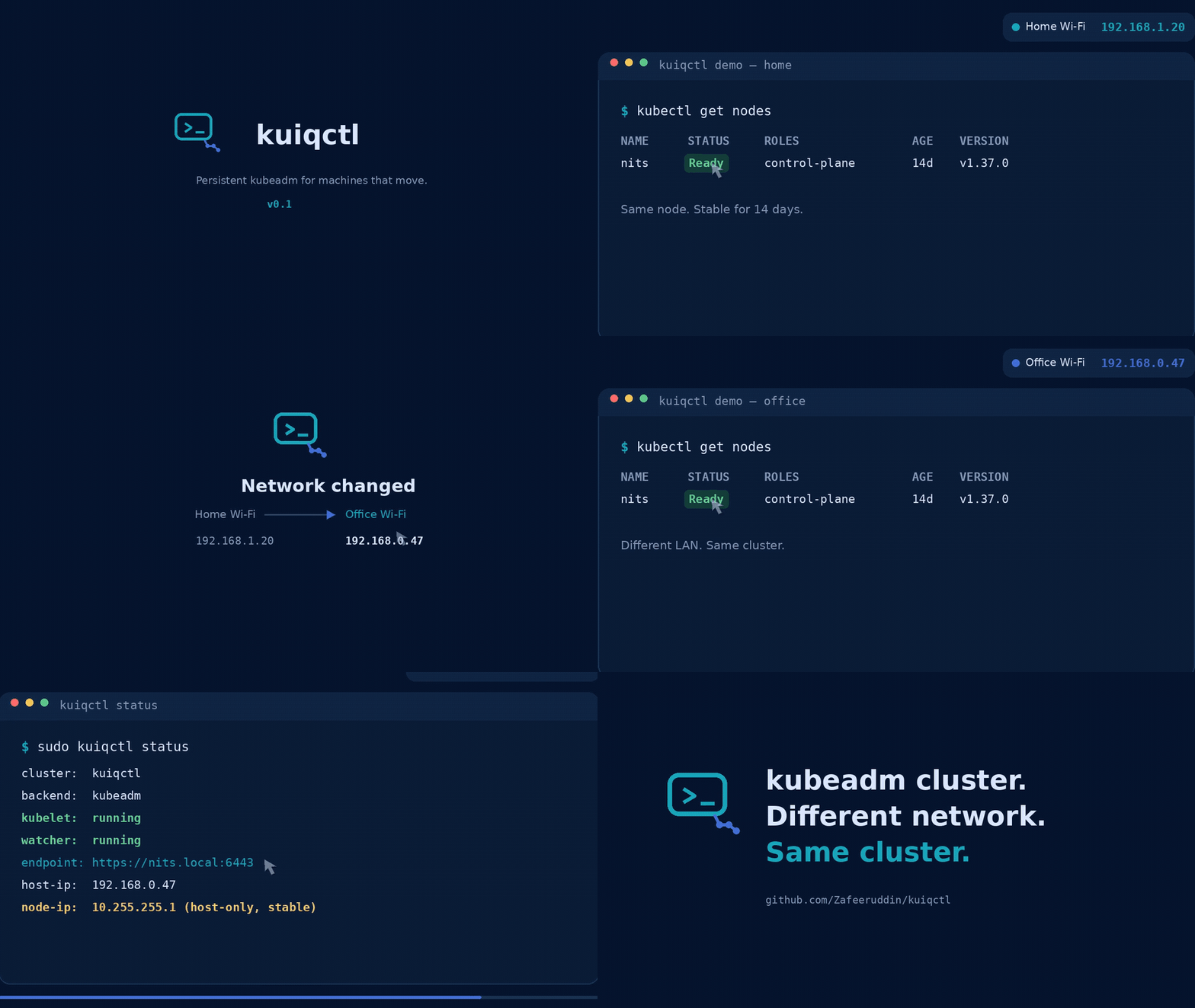
See it survive a network change
⬇ Download the full-quality MP4
Changing LAN IP
        ↓
hostname resolves to the current address
        ↓
Kubernetes continues using its stable internal node identity
        ↓
cluster remains Ready
Quick start
git clone --branch v0.1.0 --depth 1 https://github.com/Zafeeruddin/kuiqctl.git
cd kuiqctl
sudo ./install.sh
kuiqctl --version
sudo kuiqctl create
kubectl get nodes
After creation, kuiqctl installs the administrator kubeconfig at
~/.kube/config for the user who invoked sudo. If that file already exists,
the new cluster is merged into it so other contexts are preserved. The
local default uses the stable loopback endpoint so host-side kubectl does not
depend on DNS or proxy bypass settings. The kuiqctl kubeconfig command remains
available for exporting a roaming-endpoint configuration to another path.
install.sh installs the CLI at /usr/local/bin/kuiqctl, configuration at
/etc/kuiqctl/config.json, and the network watcher as a systemd service. After
installation, kuiqctl can be run from any directory.
Requires a Debian or Ubuntu host using systemd, root access through sudo, and
an internet connection for Kubernetes packages and container images.
The tagged clone above is the simplest versioned installation. Starting with
the next release, GitHub Releases will also contain a versioned install archive
and matching .sha256 file. Download both, verify with sha256sum --check,
extract the archive, and run its install.sh. Clone the default branch only
when testing unreleased development work.
Why not minikube, kind, or k3s?
These projects solve different problems. kuiqctl makes sense when you specifically want upstream kubeadm running directly on a persistent Linux host whose LAN address can change.
| Tool | Primary use | How Kubernetes runs |
|---|---|---|
| kind | Testing and CI | Kubernetes nodes inside containers |
| minikube | Local development and learning | VM, container, or bare-metal driver |
| k3s | Lightweight edge, homelab, and IoT clusters | k3s distribution |
| kuiqctl | Persistent Linux host that moves between networks | kubeadm directly on the host |
kuiqctl is not a general replacement for those tools. Choose it when the combination of upstream kubeadm, host-native services, persistence, and a changing network address is the point.
Recreate or remove the cluster
Recreate the cluster from scratch:
sudo kuiqctl recreate --yes
Remove the cluster while preserving the installed packages and kuiqctl configuration:
sudo kuiqctl remove --yes
Both commands permanently delete workloads, Kubernetes objects, and local
etcd data. The required --yes flag prevents accidental resets.
Other useful commands:
sudo kuiqctl preflight
sudo kuiqctl status
sudo kuiqctl doctor
journalctl -u kuiqctl-agent.service -f
Uninstall kuiqctl
Remove the cluster first, then run the uninstall script from the same tagged source or release archive that was used for installation:
sudo kuiqctl remove --yes
sudo ./uninstall.sh
The script refuses to continue while Kubernetes cluster markers remain. It
removes the kuiqctl CLI, agent unit, and kuiqctl-owned runtime files, but keeps
/etc/kuiqctl/config.json by default. Use sudo ./uninstall.sh --purge-config
to remove that file too. It does not uninstall Kubernetes packages or
containerd, restore containerd configuration, or delete unrelated CNI/runtime
state.
Architecture
Cluster lifecycle
flowchart TD
    User[Operator] --> CLI[kuiqctl]
    CLI --> Lock[Host lifecycle lock]
    Lock --> Host[Prepare host]
    Host --> Packages[kubeadm + kubelet + kubectl]
    Host --> Runtime[containerd + systemd cgroups]
    Host --> Kernel[Kernel modules + sysctl + swap]

    Packages --> Preflight[Artifact preflight]
    Runtime --> Preflight
    Preflight --> DNS[Check route and DNS]
    Preflight --> Images[Pre-pull Kubernetes and Calico images]
    Preflight --> Manifest[Cache pinned Calico manifest]

    DNS --> Init[kubeadm init]
    Images --> Init
    Manifest --> Init
    Init --> CNI[Install Calico]
    CNI --> Ready[Wait for API and Node Ready]
    Ready --> Agent[kuiqctl systemd watcher]
For recreate, host and artifact preparation completes before the old cluster
is reset. DNS, routing, proxy, registry, authentication, package, or download
failures therefore stop before destructive reset.
Roaming network design
flowchart LR
    subgraph Clients[Current LAN]
        Home[Home client\n192.168.1.0/24]
        Office[Office client\n192.168.0.0/24]
    end

    Home --> Name[hostname.local:6443]
    Office --> Name
    Name -->|mDNS / Avahi| DHCP[Current DHCP address]
    DHCP --> API[kube-apiserver]

    subgraph Host[Kubernetes host]
        Stable[Stable loopback identity\n10.255.255.1/32]
        API --> Stable
        Stable --> Etcd[local etcd]
        Stable --> Kubelet[kubelet]
        Stable --> Calico[Calico node identity]
        Watcher[kuiqctl-agent] --> Stable
    end
Remote kubectl clients use the stable <hostname>.local TLS name, which mDNS
maps to the machine's current LAN address. Internally, kubeadm, etcd, kubelet,
and Calico use the host-only stable_node_ip. Moving between LANs therefore
does not leave control-plane components bound to an old DHCP address.
This follows kubeadm's
controlPlaneEndpoint
model: a stable IP address or DNS name represents the control plane instead of
the host's current interface address.
Some managed, corporate, and guest networks block mDNS or isolate clients. On
those networks, configure endpoint as a routed DNS name, Tailscale MagicDNS
name, or another stable hostname.
Configuration
The default configuration is installed at /etc/kuiqctl/config.json:
{
  "cluster_name": "kuiqctl",
  "endpoint": "",
  "kubernetes_minor": "1.37",
  "calico_version": "v3.32.1",
  "image_repository": "registry.k8s.io",
  "pod_cidr": "10.244.0.0/16",
  "service_cidr": "10.96.0.0/12",
  "stable_node_ip": "10.255.255.1",
  "allowed_client_cidrs": [
    "192.168.0.0/24",
    "192.168.1.0/24"
  ],
  "network_poll_seconds": 15
}
An empty endpoint becomes <hostname>.local. Change the configuration before
creating the first cluster. Pod, Service, stable-node, and allowed-client
networks are checked for overlaps.
Set image_repository when Kubernetes control-plane images must come from a
corporate mirror. Configure containerd registry mirrors and credentials as
usual when Calico images must also be mirrored.
What kuiqctl changes on the host
install.sh installs /usr/local/bin/kuiqctl, the
kuiqctl-agent.service systemd unit, and a public configuration file at
/etc/kuiqctl/config.json. It preserves an existing config and keeps a backup
when migrating the older project format.
During create or recreate, kuiqctl makes these host-level changes:
- Adds the Kubernetes apt signing key and minor-version repository under
/etc/apt/keyringsand/etc/apt/sources.list.d, then installs and holdskubeadm,kubelet,kubectl, andcri-toolsat matching versions. - Reuses an existing containerd, including Docker's
containerd.io, when one is installed. Otherwise it installs Debian/Ubuntu'scontainerdpackage. Before generating a containerd config it saves the existing config once as/etc/containerd/config.toml.before-kuiqctl, enables systemd cgroups, and enables/restarts containerd. - Installs and enables
avahi-daemonwhen the endpoint uses.local. - Loads
overlayandbr_netfilter, writes/etc/modules-load.d/kuiqctl.confand/etc/sysctl.d/99-kuiqctl.conf, and enables bridge filtering and IPv4 forwarding. - Disables active swap. It does not edit
/etc/fstab; the network watcher keeps swap disabled while installed and running. - Adds
stable_node_ip/32to loopback and enables thekuiqctl-agent.servicewatcher so the address survives service restarts and the current LAN address can change. - Writes generated kubeadm input to
/etc/kubernetes/kuiqctl-kubeadm.yaml. kubeadm then owns its normal state under/etc/kubernetes,/var/lib/etcd, and/var/lib/kubelet. - Installs or merges the cluster credentials into
~/.kube/configfor the user who invokedsudo, with user ownership and restrictive permissions. - Caches the pinned Calico manifest at
/var/cache/kuiqctl/calico.yamland installs Calico's normal Kubernetes and CNI state. - When UFW is active, adds TCP/6443 allow rules for each configured
allowed_client_cidrsentry. It does not enable UFW. - Uses
/run/kuiqctl/primary-ipfor watcher state and/run/lock/kuiqctl.lockto serialize lifecycle operations.
kuiqctl remove --yes resets kubeadm/etcd state, removes the Calico files and
interfaces it manages, removes the stable loopback address, and disables the
kubelet and watcher. It deliberately preserves installed packages and holds,
the Kubernetes apt repository/key, containerd and its config/backup, Avahi,
UFW rules, kuiqctl's CLI/service/config, cached manifest, and host module/sysctl
files. This makes recreation and inspection possible without silently undoing
shared host configuration.
Creation and safety workflow
Before kubeadm init, kuiqctl:
- Acquires a host-visible lock to reject concurrent lifecycle operations.
- Rejects existing or partial cluster state during
create. - Installs matching kubeadm, kubelet, kubectl, and cri-tools packages.
- Reuses Docker's
containerd.iowhen present instead of installing the conflicting Ubuntucontainerdpackage. - Configures containerd, kernel modules, forwarding, and swap.
- Uses the exact installed Kubernetes patch version.
- Checks the default IPv4 route and required DNS names.
- Caches the Calico manifest and pre-pulls all required images.
- Validates the generated kubeadm v1beta4 configuration.
- Initializes Kubernetes, installs Calico, and waits for readiness.
create also checks ports 6443, 10257, 10259, 2379, and 2380. Existing state or
occupied control-plane ports produce a concise message directing the operator
to sudo kuiqctl recreate --yes.
During recreate, kuiqctl stops kubelet, resets every detected CRI socket
(including older CRI-O installations), and force-removes any CRI workloads that
survive kubeadm's best-effort reset. Non-control-plane sandboxes are removed
first while the old API is still available, allowing Calico CNI teardown to
complete. It then terminates verified stale Kubernetes components still holding
their reserved ports, removes owned CNI state, and waits for all control-plane
ports to close before initializing the replacement cluster. Processes that do
not match the expected Kubernetes component are never killed automatically.
The destructive confirmation flag is accepted on either side of the command:
sudo kuiqctl recreate --yes and sudo kuiqctl --yes recreate are equivalent.
Troubleshooting
Use preflight before creating a cluster; it intentionally rejects existing
Kubernetes state. Use doctor to troubleshoot a cluster that is already
created:
sudo kuiqctl preflight
sudo kuiqctl status
sudo kuiqctl doctor
doctor checks the configuration, services, loopback identity, current LAN
address, roaming endpoint and mDNS, API readiness, node readiness/InternalIP,
and Calico health. Important failures return a non-zero status and include a
suggested next command. An unavailable .local resolution path is reported as
a warning because some networks intentionally block mDNS.
For network or registry failures:
ip -4 route
resolvectl status
resolvectl query registry.k8s.io
For occupied ports or stale control-plane processes:
sudo ss -ltnp
sudo journalctl -u kubelet -u containerd -n 200
sudo crictl --runtime-endpoint unix:///run/containerd/containerd.sock ps -a
Artifact failures are reported before cluster reset and classified as DNS, routing, timeout, proxy/firewall, authentication, or registry failures.
Current limitations
- Single-node only; this is not a high-availability control plane.
- IPv4 only.
- Debian/Ubuntu hosts using systemd are currently supported.
.localendpoints depend on mDNS being available on the client network.- Remote workers require a routed stable control-plane endpoint and network design; the local loopback identity alone is not reachable from another host.
Implementation
The orchestration workflow is implemented in the repository's kuiqctl Python
executable and does not depend on Ansible:
prepare_host()installs and configures host dependencies.write_kubeadm_config()generates kubeadm v1beta4 configuration.prepare_creation_artifacts()validates and caches external dependencies.initialize_cluster()runs kubeadm, installs Calico, and verifies readiness.reset_cluster()removes kubeadm and kuiqctl-owned CNI state.create()andrecreate()enforce the safe lifecycle ordering.
This is a quick single-host cluster, not a high-availability control plane. A host failure stops the cluster.
Similar repos


Languages
Python
92.5%
Shell
7.5%
Create and manage a persistent single-node kubeadm cluster that stays reachable when its host moves between networks.
Python
1
19 commits
updated Sep 5, 2026
See what people are saying
README
Persistent kubeadm for machines that move.
Your kubeadm cluster should not break because you changed Wi-Fi. kuiqctl
creates a persistent single-node Kubernetes cluster on Debian or Ubuntu with a
stable internal node identity, so it can remain usable when the host moves
between LANs or receives a different DHCP address.
kubeadm + containerd + Calico. No VM. No containerized Kubernetes nodes.
[!IMPORTANT] kuiqctl is an early-stage
v0.1project. It is intended for a single Linux host, not a high-availability or multi-node production control plane.
See it survive a network change
⬇ Download the full-quality MP4
Changing LAN IP
        ↓
hostname resolves to the current address
        ↓
Kubernetes continues using its stable internal node identity
        ↓
cluster remains Ready
Quick start
git clone --branch v0.1.0 --depth 1 https://github.com/Zafeeruddin/kuiqctl.git
cd kuiqctl
sudo ./install.sh
kuiqctl --version
sudo kuiqctl create
kubectl get nodes
After creation, kuiqctl installs the administrator kubeconfig at
~/.kube/config for the user who invoked sudo. If that file already exists,
the new cluster is merged into it so other contexts are preserved. The
local default uses the stable loopback endpoint so host-side kubectl does not
depend on DNS or proxy bypass settings. The kuiqctl kubeconfig command remains
available for exporting a roaming-endpoint configuration to another path.
install.sh installs the CLI at /usr/local/bin/kuiqctl, configuration at
/etc/kuiqctl/config.json, and the network watcher as a systemd service. After
installation, kuiqctl can be run from any directory.
Requires a Debian or Ubuntu host using systemd, root access through sudo, and
an internet connection for Kubernetes packages and container images.
The tagged clone above is the simplest versioned installation. Starting with
the next release, GitHub Releases will also contain a versioned install archive
and matching .sha256 file. Download both, verify with sha256sum --check,
extract the archive, and run its install.sh. Clone the default branch only
when testing unreleased development work.
Why not minikube, kind, or k3s?
These projects solve different problems. kuiqctl makes sense when you specifically want upstream kubeadm running directly on a persistent Linux host whose LAN address can change.
| Tool | Primary use | How Kubernetes runs |
|---|---|---|
| kind | Testing and CI | Kubernetes nodes inside containers |
| minikube | Local development and learning | VM, container, or bare-metal driver |
| k3s | Lightweight edge, homelab, and IoT clusters | k3s distribution |
| kuiqctl | Persistent Linux host that moves between networks | kubeadm directly on the host |
kuiqctl is not a general replacement for those tools. Choose it when the combination of upstream kubeadm, host-native services, persistence, and a changing network address is the point.
Recreate or remove the cluster
Recreate the cluster from scratch:
sudo kuiqctl recreate --yes
Remove the cluster while preserving the installed packages and kuiqctl configuration:
sudo kuiqctl remove --yes
Both commands permanently delete workloads, Kubernetes objects, and local
etcd data. The required --yes flag prevents accidental resets.
Other useful commands:
sudo kuiqctl preflight
sudo kuiqctl status
sudo kuiqctl doctor
journalctl -u kuiqctl-agent.service -f
Uninstall kuiqctl
Remove the cluster first, then run the uninstall script from the same tagged source or release archive that was used for installation:
sudo kuiqctl remove --yes
sudo ./uninstall.sh
The script refuses to continue while Kubernetes cluster markers remain. It
removes the kuiqctl CLI, agent unit, and kuiqctl-owned runtime files, but keeps
/etc/kuiqctl/config.json by default. Use sudo ./uninstall.sh --purge-config
to remove that file too. It does not uninstall Kubernetes packages or
containerd, restore containerd configuration, or delete unrelated CNI/runtime
state.
Architecture
Cluster lifecycle
flowchart TD
    User[Operator] --> CLI[kuiqctl]
    CLI --> Lock[Host lifecycle lock]
    Lock --> Host[Prepare host]
    Host --> Packages[kubeadm + kubelet + kubectl]
    Host --> Runtime[containerd + systemd cgroups]
    Host --> Kernel[Kernel modules + sysctl + swap]

    Packages --> Preflight[Artifact preflight]
    Runtime --> Preflight
    Preflight --> DNS[Check route and DNS]
    Preflight --> Images[Pre-pull Kubernetes and Calico images]
    Preflight --> Manifest[Cache pinned Calico manifest]

    DNS --> Init[kubeadm init]
    Images --> Init
    Manifest --> Init
    Init --> CNI[Install Calico]
    CNI --> Ready[Wait for API and Node Ready]
    Ready --> Agent[kuiqctl systemd watcher]
For recreate, host and artifact preparation completes before the old cluster
is reset. DNS, routing, proxy, registry, authentication, package, or download
failures therefore stop before destructive reset.
Roaming network design
flowchart LR
    subgraph Clients[Current LAN]
        Home[Home client\n192.168.1.0/24]
        Office[Office client\n192.168.0.0/24]
    end

    Home --> Name[hostname.local:6443]
    Office --> Name
    Name -->|mDNS / Avahi| DHCP[Current DHCP address]
    DHCP --> API[kube-apiserver]

    subgraph Host[Kubernetes host]
        Stable[Stable loopback identity\n10.255.255.1/32]
        API --> Stable
        Stable --> Etcd[local etcd]
        Stable --> Kubelet[kubelet]
        Stable --> Calico[Calico node identity]
        Watcher[kuiqctl-agent] --> Stable
    end
Remote kubectl clients use the stable <hostname>.local TLS name, which mDNS
maps to the machine's current LAN address. Internally, kubeadm, etcd, kubelet,
and Calico use the host-only stable_node_ip. Moving between LANs therefore
does not leave control-plane components bound to an old DHCP address.
This follows kubeadm's
controlPlaneEndpoint
model: a stable IP address or DNS name represents the control plane instead of
the host's current interface address.
Some managed, corporate, and guest networks block mDNS or isolate clients. On
those networks, configure endpoint as a routed DNS name, Tailscale MagicDNS
name, or another stable hostname.
Configuration
The default configuration is installed at /etc/kuiqctl/config.json:
{
  "cluster_name": "kuiqctl",
  "endpoint": "",
  "kubernetes_minor": "1.37",
  "calico_version": "v3.32.1",
  "image_repository": "registry.k8s.io",
  "pod_cidr": "10.244.0.0/16",
  "service_cidr": "10.96.0.0/12",
  "stable_node_ip": "10.255.255.1",
  "allowed_client_cidrs": [
    "192.168.0.0/24",
    "192.168.1.0/24"
  ],
  "network_poll_seconds": 15
}
An empty endpoint becomes <hostname>.local. Change the configuration before
creating the first cluster. Pod, Service, stable-node, and allowed-client
networks are checked for overlaps.
Set image_repository when Kubernetes control-plane images must come from a
corporate mirror. Configure containerd registry mirrors and credentials as
usual when Calico images must also be mirrored.
What kuiqctl changes on the host
install.sh installs /usr/local/bin/kuiqctl, the
kuiqctl-agent.service systemd unit, and a public configuration file at
/etc/kuiqctl/config.json. It preserves an existing config and keeps a backup
when migrating the older project format.
During create or recreate, kuiqctl makes these host-level changes:
- Adds the Kubernetes apt signing key and minor-version repository under
/etc/apt/keyringsand/etc/apt/sources.list.d, then installs and holdskubeadm,kubelet,kubectl, andcri-toolsat matching versions. - Reuses an existing containerd, including Docker's
containerd.io, when one is installed. Otherwise it installs Debian/Ubuntu'scontainerdpackage. Before generating a containerd config it saves the existing config once as/etc/containerd/config.toml.before-kuiqctl, enables systemd cgroups, and enables/restarts containerd. - Installs and enables
avahi-daemonwhen the endpoint uses.local. - Loads
overlayandbr_netfilter, writes/etc/modules-load.d/kuiqctl.confand/etc/sysctl.d/99-kuiqctl.conf, and enables bridge filtering and IPv4 forwarding. - Disables active swap. It does not edit
/etc/fstab; the network watcher keeps swap disabled while installed and running. - Adds
stable_node_ip/32to loopback and enables thekuiqctl-agent.servicewatcher so the address survives service restarts and the current LAN address can change. - Writes generated kubeadm input to
/etc/kubernetes/kuiqctl-kubeadm.yaml. kubeadm then owns its normal state under/etc/kubernetes,/var/lib/etcd, and/var/lib/kubelet. - Installs or merges the cluster credentials into
~/.kube/configfor the user who invokedsudo, with user ownership and restrictive permissions. - Caches the pinned Calico manifest at
/var/cache/kuiqctl/calico.yamland installs Calico's normal Kubernetes and CNI state. - When UFW is active, adds TCP/6443 allow rules for each configured
allowed_client_cidrsentry. It does not enable UFW. - Uses
/run/kuiqctl/primary-ipfor watcher state and/run/lock/kuiqctl.lockto serialize lifecycle operations.
kuiqctl remove --yes resets kubeadm/etcd state, removes the Calico files and
interfaces it manages, removes the stable loopback address, and disables the
kubelet and watcher. It deliberately preserves installed packages and holds,
the Kubernetes apt repository/key, containerd and its config/backup, Avahi,
UFW rules, kuiqctl's CLI/service/config, cached manifest, and host module/sysctl
files. This makes recreation and inspection possible without silently undoing
shared host configuration.
Creation and safety workflow
Before kubeadm init, kuiqctl:
- Acquires a host-visible lock to reject concurrent lifecycle operations.
- Rejects existing or partial cluster state during
create. - Installs matching kubeadm, kubelet, kubectl, and cri-tools packages.
- Reuses Docker's
containerd.iowhen present instead of installing the conflicting Ubuntucontainerdpackage. - Configures containerd, kernel modules, forwarding, and swap.
- Uses the exact installed Kubernetes patch version.
- Checks the default IPv4 route and required DNS names.
- Caches the Calico manifest and pre-pulls all required images.
- Validates the generated kubeadm v1beta4 configuration.
- Initializes Kubernetes, installs Calico, and waits for readiness.
create also checks ports 6443, 10257, 10259, 2379, and 2380. Existing state or
occupied control-plane ports produce a concise message directing the operator
to sudo kuiqctl recreate --yes.
During recreate, kuiqctl stops kubelet, resets every detected CRI socket
(including older CRI-O installations), and force-removes any CRI workloads that
survive kubeadm's best-effort reset. Non-control-plane sandboxes are removed
first while the old API is still available, allowing Calico CNI teardown to
complete. It then terminates verified stale Kubernetes components still holding
their reserved ports, removes owned CNI state, and waits for all control-plane
ports to close before initializing the replacement cluster. Processes that do
not match the expected Kubernetes component are never killed automatically.
The destructive confirmation flag is accepted on either side of the command:
sudo kuiqctl recreate --yes and sudo kuiqctl --yes recreate are equivalent.
Troubleshooting
Use preflight before creating a cluster; it intentionally rejects existing
Kubernetes state. Use doctor to troubleshoot a cluster that is already
created:
sudo kuiqctl preflight
sudo kuiqctl status
sudo kuiqctl doctor
doctor checks the configuration, services, loopback identity, current LAN
address, roaming endpoint and mDNS, API readiness, node readiness/InternalIP,
and Calico health. Important failures return a non-zero status and include a
suggested next command. An unavailable .local resolution path is reported as
a warning because some networks intentionally block mDNS.
For network or registry failures:
ip -4 route
resolvectl status
resolvectl query registry.k8s.io
For occupied ports or stale control-plane processes:
sudo ss -ltnp
sudo journalctl -u kubelet -u containerd -n 200
sudo crictl --runtime-endpoint unix:///run/containerd/containerd.sock ps -a
Artifact failures are reported before cluster reset and classified as DNS, routing, timeout, proxy/firewall, authentication, or registry failures.
Current limitations
- Single-node only; this is not a high-availability control plane.
- IPv4 only.
- Debian/Ubuntu hosts using systemd are currently supported.
.localendpoints depend on mDNS being available on the client network.- Remote workers require a routed stable control-plane endpoint and network design; the local loopback identity alone is not reachable from another host.
Implementation
The orchestration workflow is implemented in the repository's kuiqctl Python
executable and does not depend on Ansible:
prepare_host()installs and configures host dependencies.write_kubeadm_config()generates kubeadm v1beta4 configuration.prepare_creation_artifacts()validates and caches external dependencies.initialize_cluster()runs kubeadm, installs Calico, and verifies readiness.reset_cluster()removes kubeadm and kuiqctl-owned CNI state.create()andrecreate()enforce the safe lifecycle ordering.
This is a quick single-host cluster, not a high-availability control plane. A host failure stops the cluster.
Similar repos
Languages
Python
92.5%
Shell
7.5%