Pocket spectrum analyzer + multimode radio + signal decoder on a Raspberry Pi Zero 2 W and RTL-SDR, used from your phone's browser. Sweep 0.5–1766 MHz, tap a signal to hear it, identify digital modes, decode pagers, APRS, sensors and ADS-B, record, scan and watch 24/7. Offline, receive-only, EN/ES.
JavaScript
9
23 commits
updated Oct 18, 2026
A pocket spectrum analyzer, multimode radio and signal decoder — built from a Raspberry Pi Zero 2 W and an RTL-SDR, used from your phone.





📦 Install · ✨ Features · 🧪 Try without hardware · 📚 Docs · 🇪🇸 Leer en español
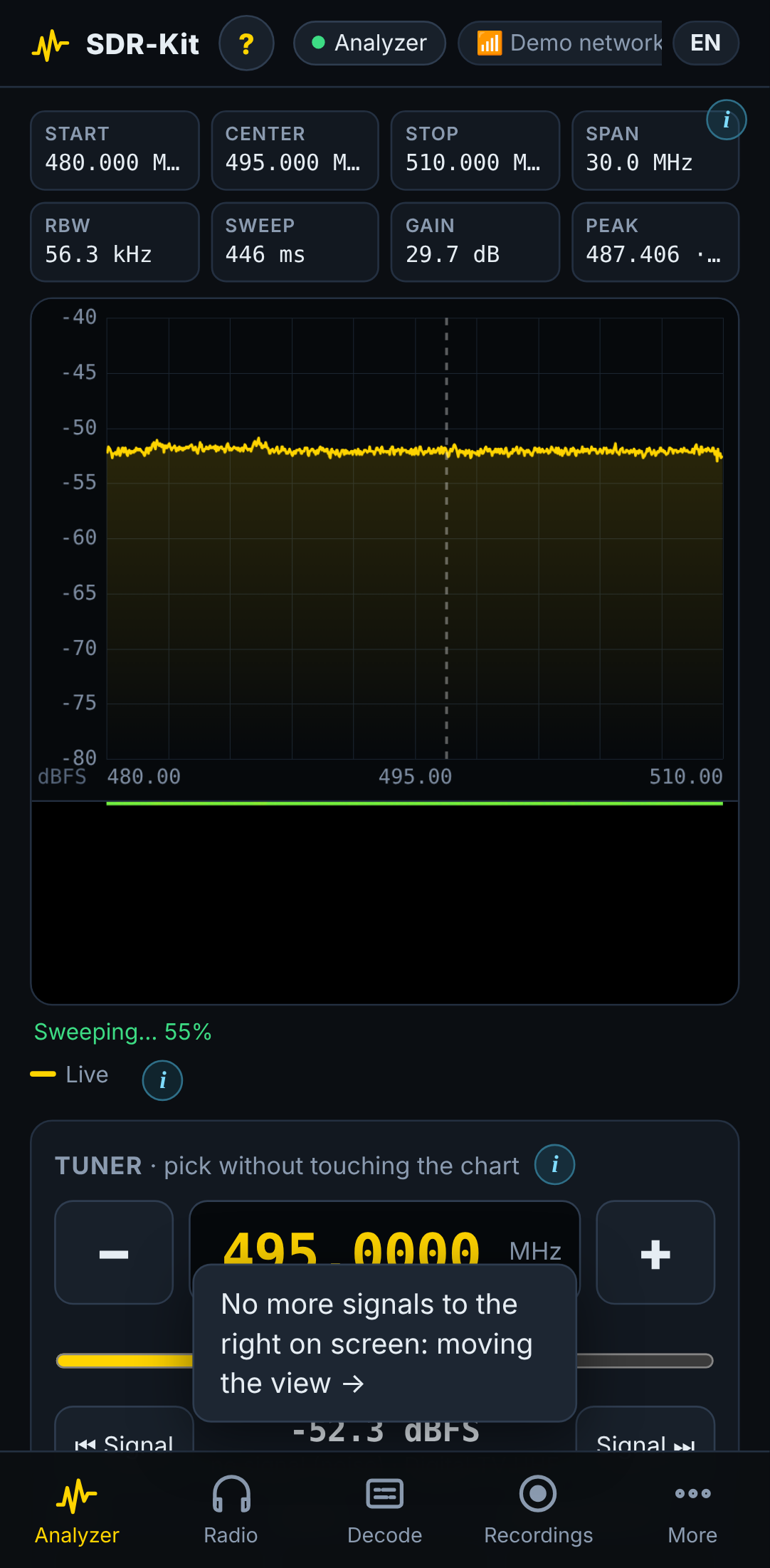
SDR-Kit turns ~US$90 of off-the-shelf parts into a field instrument in the spirit of the tinySA: sweep the spectrum from 0.5 to 1766 MHz, find a signal, tap once to listen to it, identify what it is, decode it, record it — all from a phone browser, with no app to install and no internet required. At home it joins your WiFi; in the field it creates its own hotspot; anywhere else it is one Tailscale hop away.
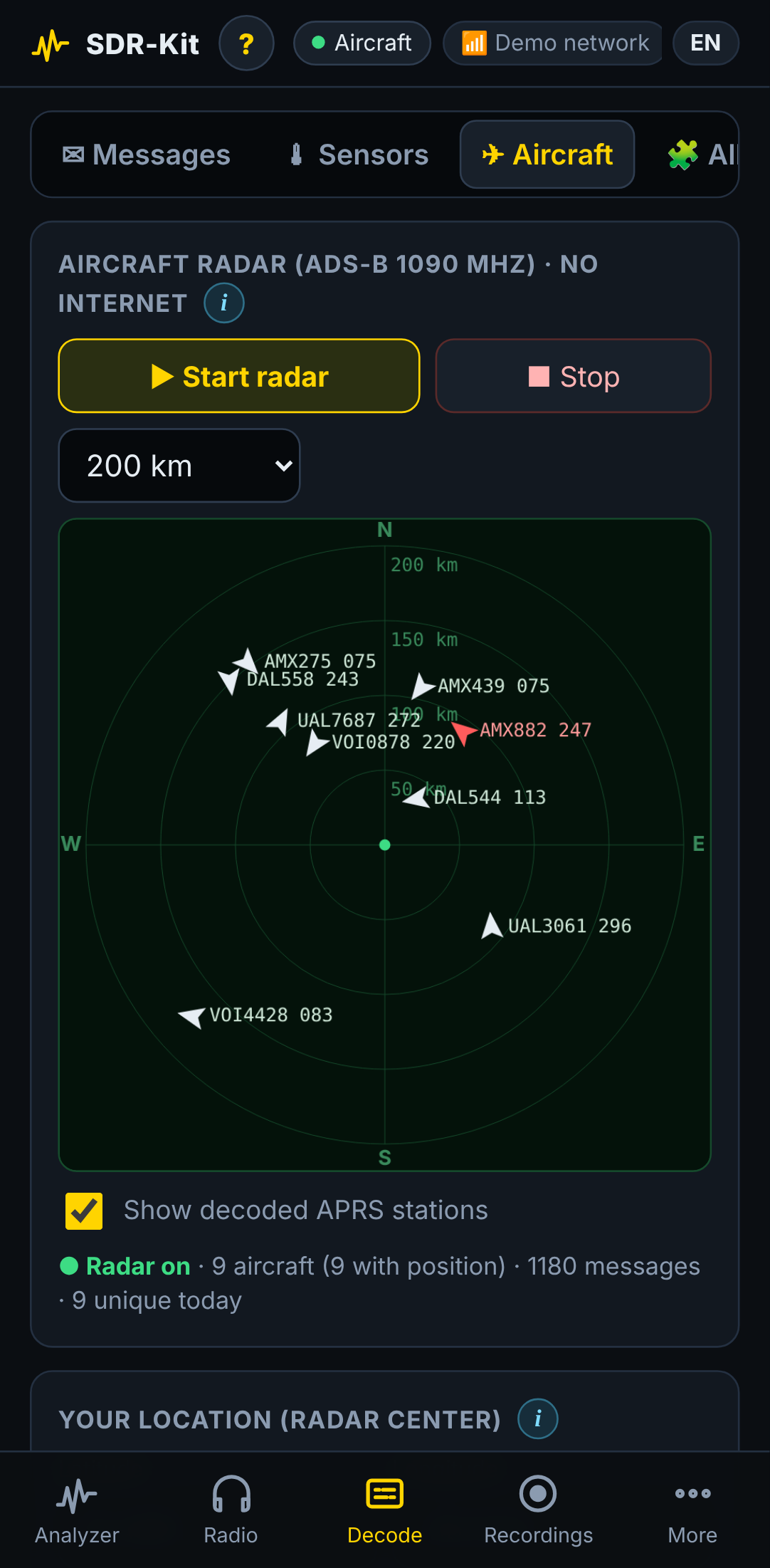
[!NOTE] No hardware yet? Try the panel on any computer with demo mode:
pip install numpy && python3 files/sdrkit_server.py --demo --port 8080→ http://localhost:8080
[!TIP] In a hurry? Flash the Pi, SSH in and run one line — jump to the 3-minute version.
| 🔌 One-command install | 🛟 Self-rollback updates | ⓘ Help everywhere | 🌍 EN + ES | 🔒 Offline & private |
|---|---|---|---|---|
curl … | sudo bash | breaks → restores itself | on every control | panel, installer, CLI | no cloud, no telemetry |
Highlights · At a glance · Hardware · Installation · Updates · Demo · Languages · How it works · Docs · Roadmap · Contributing · Legal
📈 Spectrum analyzer
|
📻 Radio
|
🔓 Decoders
|
flowchart LR
  P["📱 Phone<br/>spectrum · waterfall<br/>audio · help"] <-->|"WiFi · hotspot · Tailscale"| Z["🥧 Raspberry Pi Zero 2 W<br/>SDR-Kit + OpenWebRX+"] <-->|"USB"| R["📡 RTL-SDR<br/>0.5–1766 MHz"]
| You want to… | Where | Powered by |
|---|---|---|
| See what is on the air | Analyzer tab | built-in sweeps |
| Listen to a signal | tap it → Radio | built-in demodulators |
| Know what a signal is | auto-recognition | built-in classifier |
| Read pagers / APRS / EAS | Decode tab | multimon-ng |
| Read sensors (433/868/915 MHz) | Decode tab | rtl_433 |
| Track aircraft offline | Radar | dump1090 |
| Hear digital voice (DMR, P25, M17…) | Radio → Digital | DSD-FME (optional) |
| FT8, WSPR, SSTV, ACARS… | Advanced receiver | OpenWebRX+ |
| Part | Recommended | ≈ Price |
|---|---|---|
| 🥧 Computer | Raspberry Pi Zero 2 W | US$15 |
| 📡 SDR | RTL-SDR Blog V4 (kit with the adjustable dipole antennas) | US$40 |
| 💾 Storage | 32 GB microSD, A1/A2 (SanDisk, Samsung) | US$8 |
| 🔋 Power | 10 000–20 000 mAh power bank (5 V / 2.4 A) + short, thick micro-USB cable | US$20 |
| 🔌 Adapter | Short micro-USB OTG → USB-A adapter (+ a short USB extension with ferrite) | US$5 |
Runtime is about 6–10 h on a 10 000 mAh bank.
| Extra | What it adds |
|---|---|
| HackRF One | Sweeps from 1 to 6000 MHz (experimental, auto-detected) |
| AMBE3000 USB stick | Hardware vocoder for licensed digital voice via OpenWebRX+ |
| Discone antenna | Wideband reception for scanning |
| Second RTL-SDR | Dedicated dongle for aircraft radar or sensors |
Details and wiring: docs/hardware.md.
# 1) Flash Raspberry Pi OS Lite 64-bit (hostname: sdrpi, WiFi 2.4 GHz, SSH on)
# 2) SSH into the Pi:
ssh <user>@sdrpi.local
# 3) Install (20–45 min, reboots by itself):
curl -fsSL https://raw.githubusercontent.com/romartak/sdrkit/main/get.sh | sudo bash
# 4) Open http://sdrpi.local on your phone
flowchart LR
  A["1️⃣ Flash<br/>Pi OS Lite 64-bit"] --> B["2️⃣ Boot & SSH<br/>sdrpi.local"]
  B --> C["3️⃣ One command<br/>get.sh"]
  C --> D["4️⃣ Answer 3 questions<br/>language · passwords"]
  D --> E["☕ Wait 20–45 min<br/>auto-reboot"]
  E --> F["5️⃣ Open the panel<br/>📱 phone"]
Open Raspberry Pi Imager.
Device: Raspberry Pi Zero 2 W · OS: Raspberry Pi OS Lite (64-bit) (Trixie recommended, Bookworm works).
Click Edit settings and set:
| Setting | Value |
|---|---|
| Hostname | sdrpi |
| Username / password | your choice (you will use them for SSH) |
| WiFi | your home network, 2.4 GHz, and your country |
| Services | ✅ Enable SSH |
Write the card, put it in the Pi and power it on. First boot takes ~2 minutes.
ssh <your-user>@sdrpi.local
[!NOTE] If
sdrpi.localdoes not resolve (some Windows/Android setups), find the Pi's IP in your router and use that.
curl -fsSL https://raw.githubusercontent.com/romartak/sdrkit/main/get.sh | sudo bash
The installer asks only a few things:
| Question | Notes |
|---|---|
| 🌍 Language | English or Spanish (installer and sdrkit command) |
| 📶 Hotspot password | For the WiFi the Pi creates (SDR-Pi) — at least 8 characters, no " |
| 🔑 Panel password | For the web panel and OpenWebRX+ — at least 4 characters, no " |
| 🎙️ Digital voice (DSD-FME)? | Default no — it shows the codec patent notice first |
Then it installs everything and reboots on its own. Don't unplug it.
| # | Step | What happens |
|---|---|---|
| 1 | Preparing the system | Swap to 1 GB, WiFi country, apt update |
| 2 | Base packages | Python, NumPy, rtl-sdr, avahi, git… |
| 3 | RTL-SDR driver | Blacklists DVB-T modules; builds the Blog driver on Bookworm |
| 4 | OpenWebRX+ | Adds its repository and the available decoders |
| 5 | Digital voice | Only if accepted: builds mbelib + DSD-FME (30–50 min) |
| 6 | SDR-Kit panel | Installs to /opt/sdrkit, the sdrkit command and services |
| 7 | WiFi hotspot | Automatic hotspot + known networks + watchdog |
| 8 | Power & microSD care | Bluetooth off, logs in RAM, fewer SD writes |
| 9 | Tailscale | Optional remote access |
| 10 | Starting services | Health check: panel answers, RTL-SDR on USB |
| 11 | Done | Prints addresses, records the version, reboots in 15 s |
Full detail: docs/installation.md.
You can copy the kit onto the card and install from there. See docs/installation.md.
| Where you are | How to connect | Address |
|---|---|---|
| 🏠 At home | Phone and Pi on the same WiFi | http://sdrpi.local |
| 🏕️ In the field | Join the WiFi SDR-Pi | http://192.168.4.1 |
| 🌐 Anywhere | Tailscale on the Pi and the phone | http://sdrpi |
Tip: use your browser's Add to Home screen to install it like an app.
sdrkit doctor                  # full check-up: ✔/✖ and what to do about each failure
sudo sdrkit backup             # save your settings and memories (restore with: sudo sdrkit restore FILE)
sdrpi.local.sudo bash /opt/sdrkit-src/install.sh.More: docs/troubleshooting.md.
Check the OTG adapter and cable (use a short, thick one), then run lsusb — you should see 0bda:2838
or 0bda:2832. A weak power bank is the usual culprit.
sudo sdrkit update # shows what changed, asks, installs
…or tap More → System → Check for updates. Your settings, recordings and memories are never touched; new
settings are merged in automatically. After installing, SDR-Kit checks that the panel answers — if it does
not, it rolls back to the previous version by itself. sudo sdrkit rollback goes back by hand.
Details: docs/updating.md.
flowchart LR
  U["sudo sdrkit update"] --> S["Show changes"] --> I["Install"] --> H{"Panel<br/>answers?"}
  H -- "✅ yes" --> OK["New version"]
  H -- "❌ no" --> R["↩️ Automatic rollback"]
The demo mode simulates an RTL-SDR with real, decodable signals — POCSAG pagers, APRS packets, an M17 digital-voice call, DMR-like and NXDN-like 4FSK, FM broadcast — so you can explore every screen on a laptop:
git clone https://github.com/romartak/sdrkit.git && cd sdrkit
pip install numpy                                   # apt install multimon-ng to decode the demo pagers/APRS
python3 files/sdrkit_server.py --demo --port 8080   # → http://localhost:8080
Recorded straight from the demo panel on a phone-sized screen:
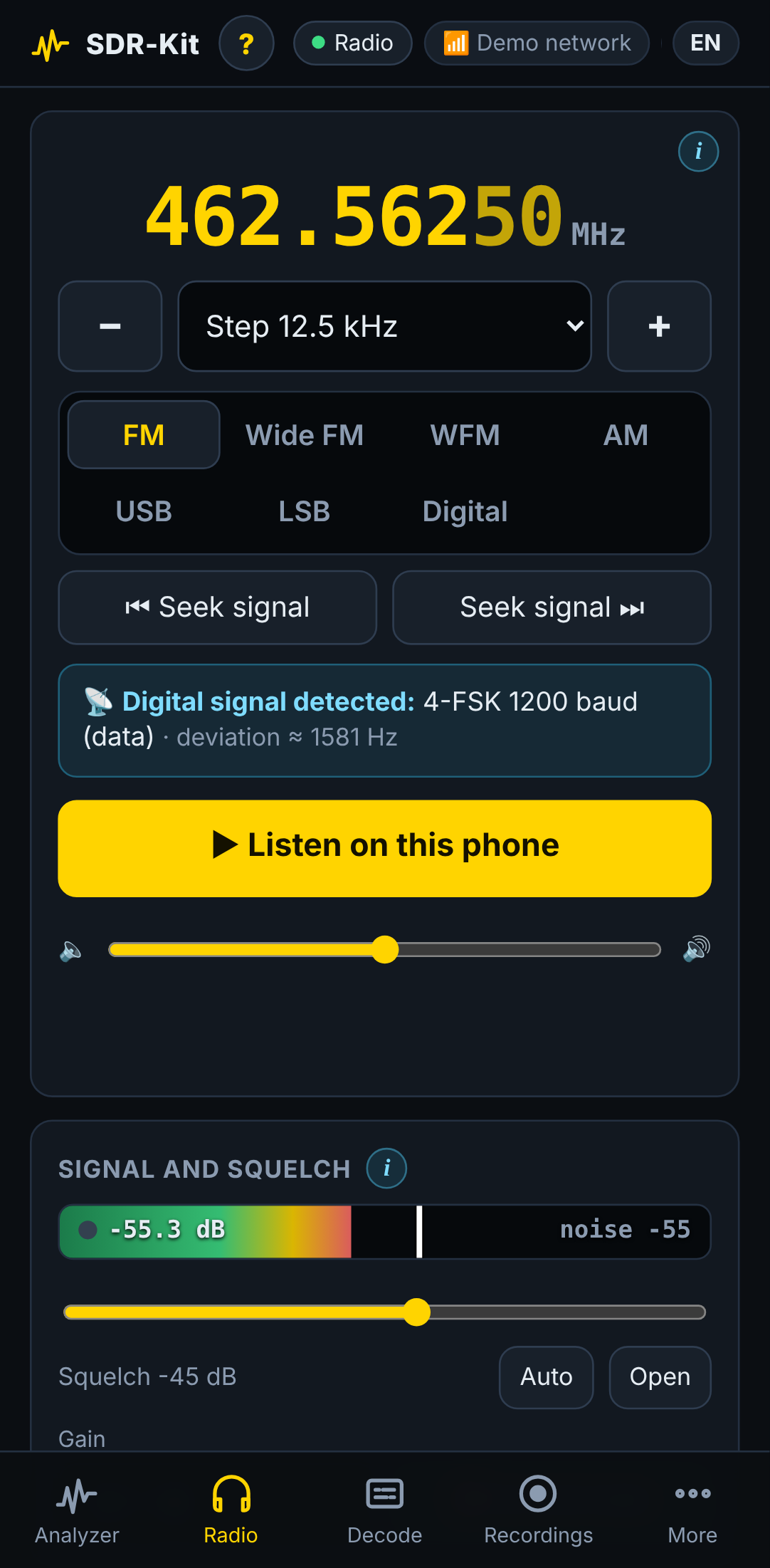
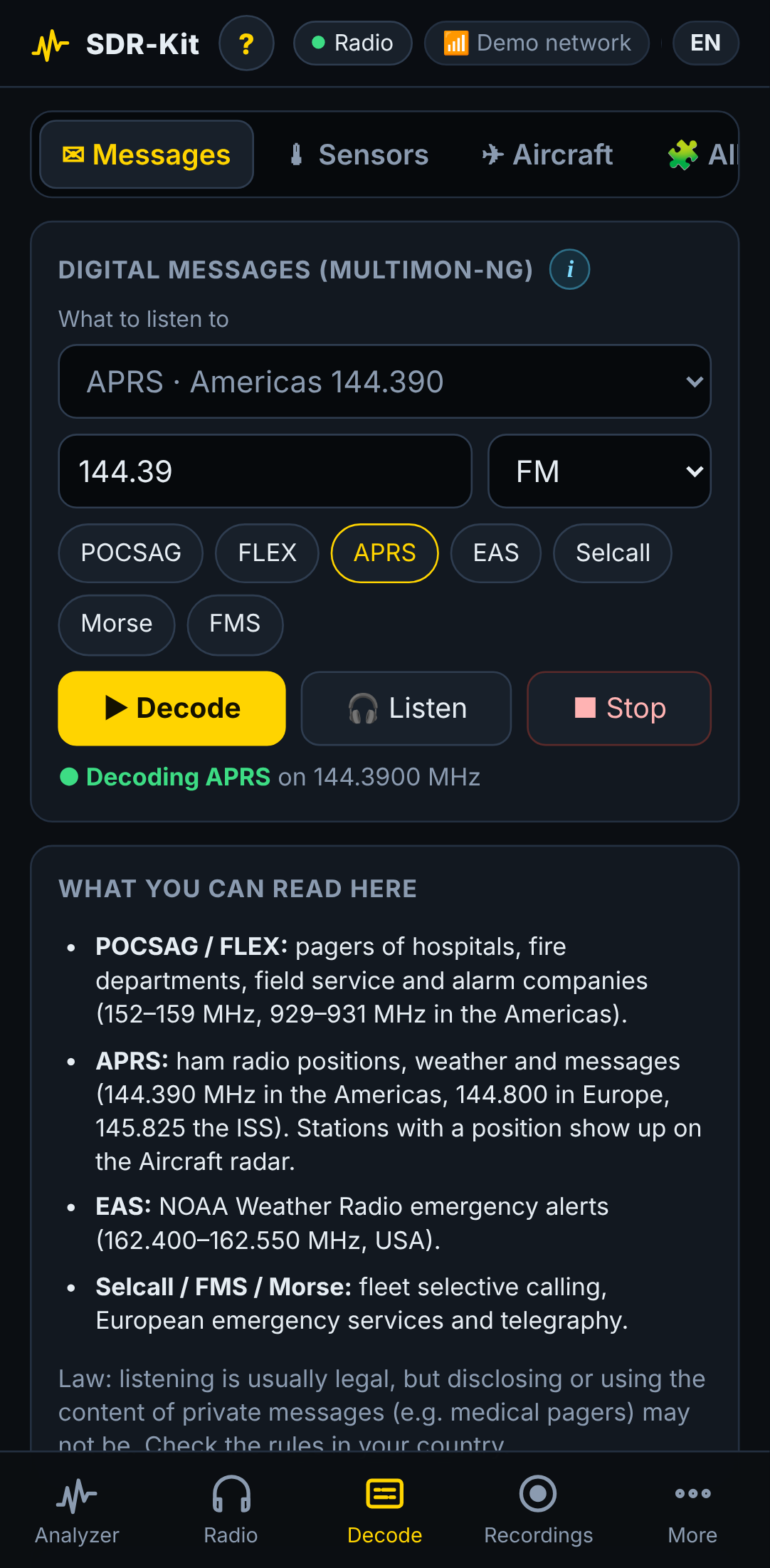
| Spectrum analyzer | Radio | Aircraft radar (ADS-B) | Pager messages |
|---|---|---|---|
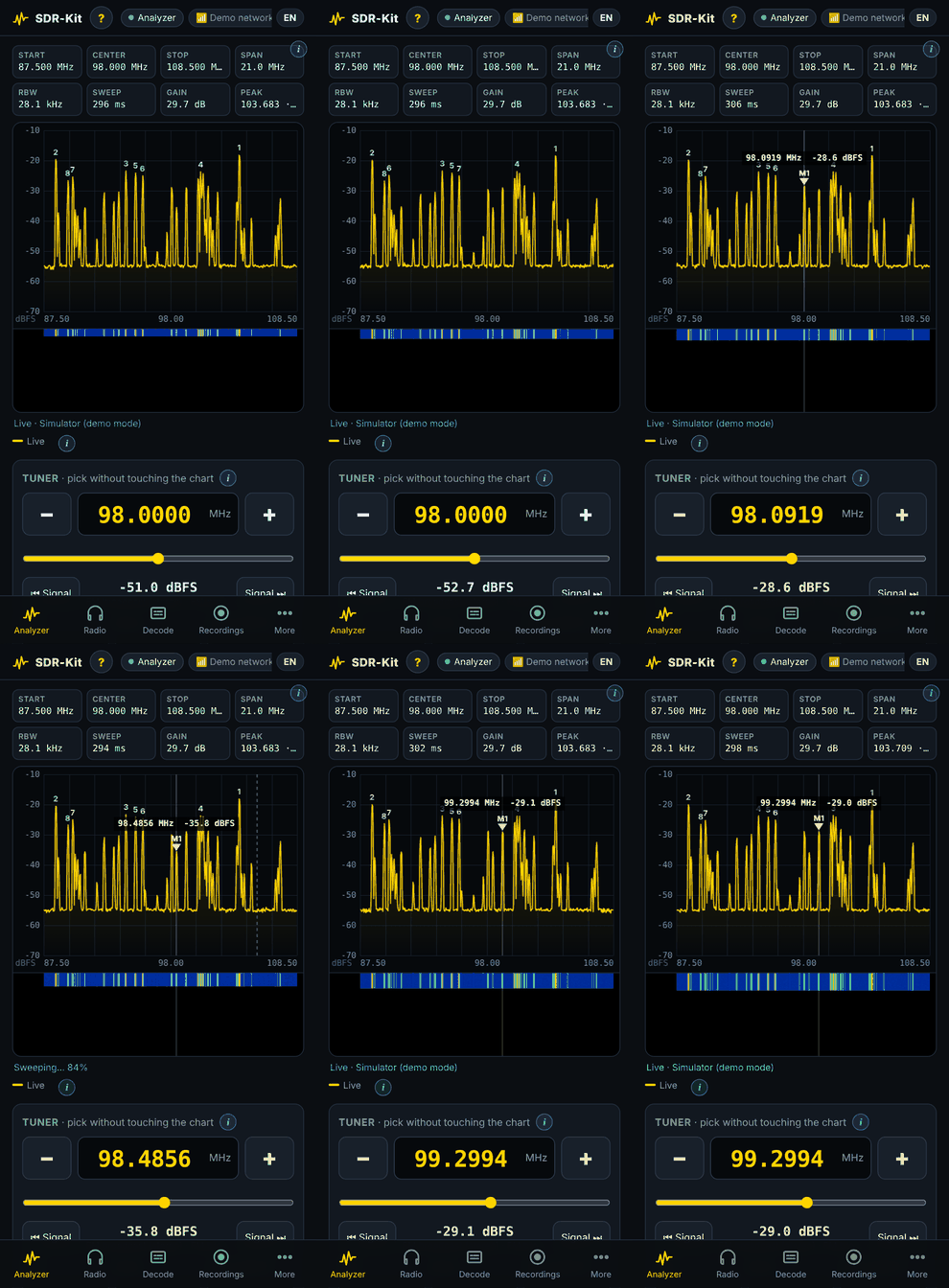 | 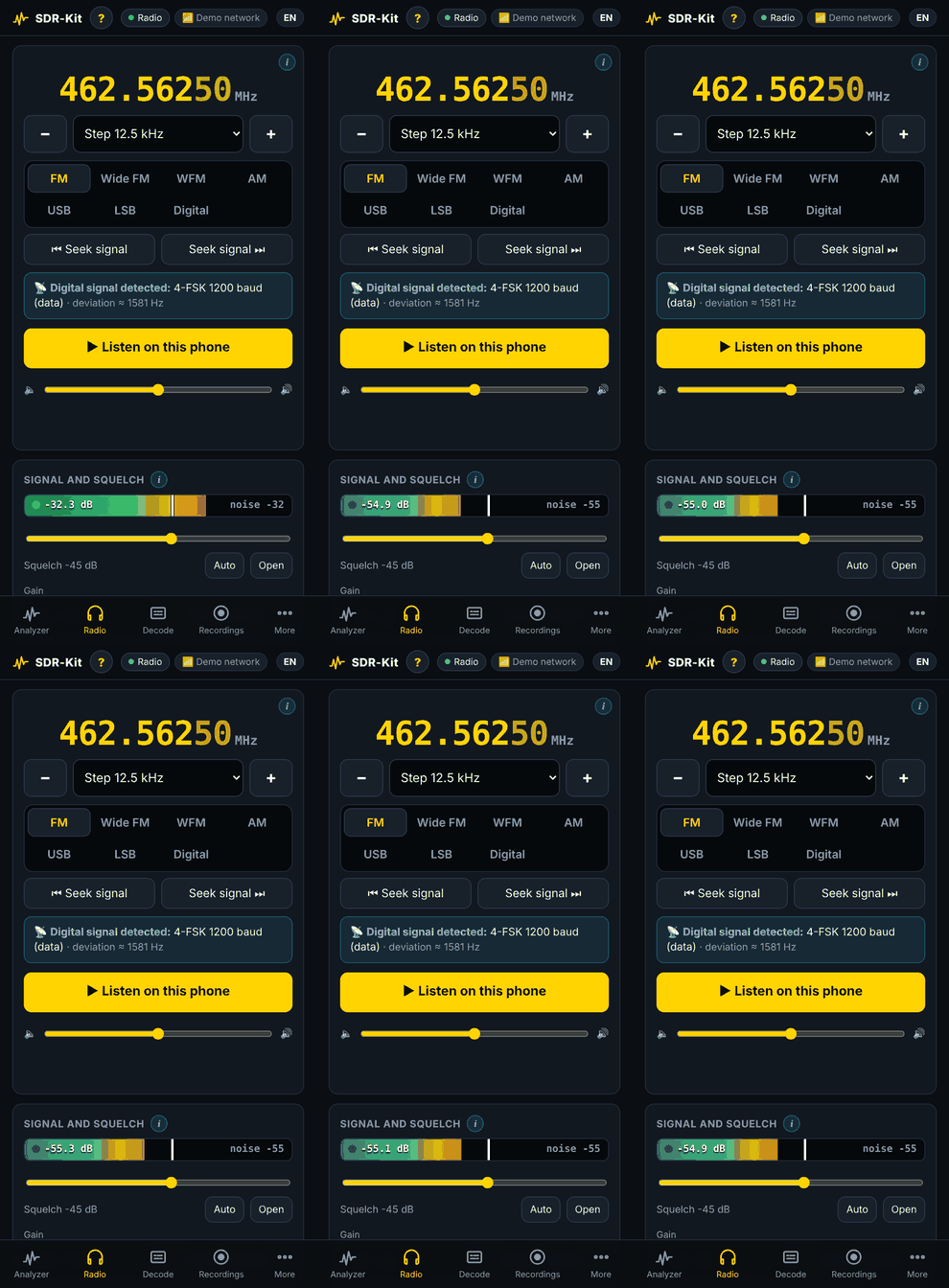 | 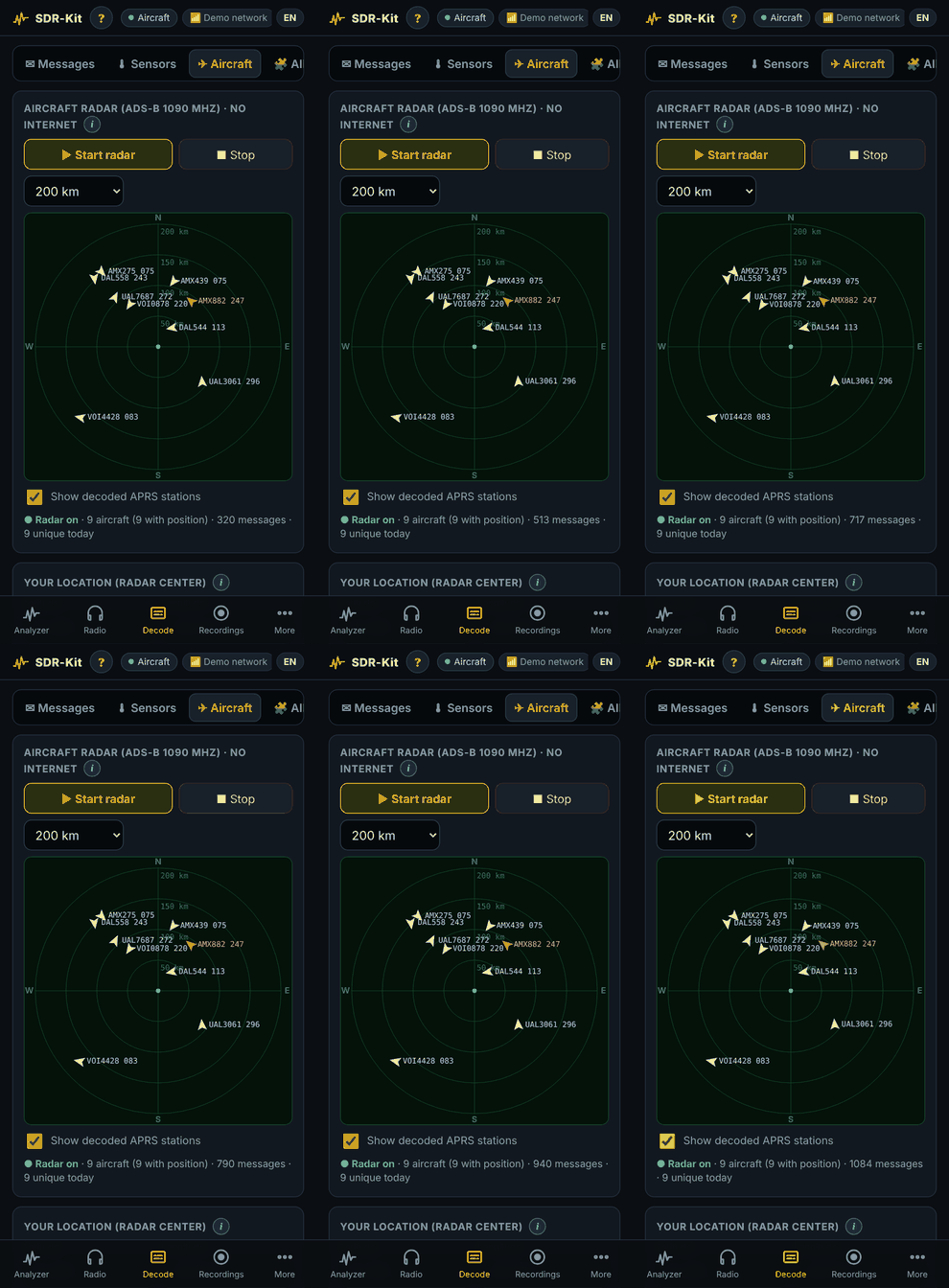 | 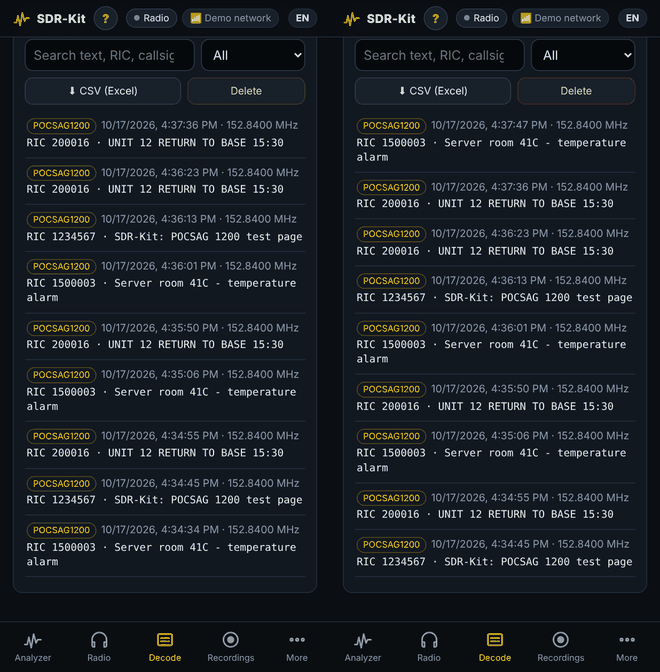 |
| sweep 87.5–108.5 MHz, tap ⏭ to jump to the next station | tune, see the signal and the detected mode, listen on the phone | aircraft around you, no internet | decoded live as they arrive |
Regenerate them with tools/gifs.mjs + tools/make_gifs.py.
The whole kit is bilingual: panel, help, frequency guide, antenna tools, installer and CLI. The panel follows your browser's language; switch any time with the EN / ES chip in the header or in More → System. Adding a language is a catalog file away — see docs/development.md.
flowchart LR
  phone["📱 Phone browser<br/>panel · EN/ES"] <-- "HTTP + Server-Sent Events<br/>hotspot · home WiFi · Tailscale" --> server
  subgraph pi["Raspberry Pi Zero 2 W"]
    server["sdrkit_server.py<br/>web panel · API · sweeps"]
    radio["sdrkit_radio.py<br/>demodulators · tones · DTMF<br/>recorder · scanner"]
    decoders["sdrkit_decoders.py<br/>multimon-ng · DSD-FME<br/>rtl_433 · dump1090 · classifier"]
    owrx["OpenWebRX+<br/>(advanced receiver)"]
    server --> radio --> decoders
    server --> decoders
  end
  sdr["📡 RTL-SDR Blog V4"] -- USB --> server
  server -. hands the dongle over .-> owrx
A single Python process owns the dongle and switches it between the analyzer, the radio and the external decoders on demand; the browser draws the spectrum and waterfall from compact JSON frames pushed over Server-Sent Events and plays 16-bit PCM audio streamed over HTTP through Web Audio. No cloud, no accounts, no telemetry. Deep dive: docs/architecture.md · HTTP API: docs/api.md.
| Hardware | Bill of materials, power, assembly |
| Installation | Flashing, one-line install, offline install, first connection |
| User guide | Every tab and control |
| Digital voice | DMR, P25, D-Star, Fusion, NXDN, dPMR, M17 |
| Antennas | Lengths per band, placement, cable loss |
| Updating | Updates, rollback, test branches |
| Troubleshooting · FAQ | Symptoms → causes → fixes |
| Architecture · API · Configuration | For tinkerers |
| Development | Demo mode, tests, translations, releases |
| Guía en español | La guía completa en español |
Bug reports, ideas, translations and pull requests are welcome — read CONTRIBUTING.md and the Code of Conduct. Every change runs through CI: unit tests for the DSP and decoders, an end-to-end decode of real POCSAG and APRS signals, translation checks and a browser test in both languages.
[!IMPORTANT] SDR-Kit is receive-only. Listening is legal in most countries, but disclosing or using the content of private communications may not be — know your local law. Encrypted traffic is never decrypted.
The optional digital-voice decoder (DSD-FME + mbelib) implements patented AMBE/IMBE vocoders, so the installer leaves it off unless you explicitly opt in. See docs/legal.md.
Built on the shoulders of OpenWebRX+, rtl-sdr and the RTL-SDR Blog drivers, rtl_433, dump1090, multimon-ng, DSD-FME, mbelib, codec2 and the M17 Project, and inspired by the wonderful tinySA. The curated list of related projects in docs/resources.md was put together with the help of RFSec-ToolKit by @cn0xroot (雪碧 / 0x0root).
MIT © romartak and SDR-Kit contributors. Third-party programs installed by the kit keep their own licenses.
Pocket spectrum analyzer + multimode radio + signal decoder on a Raspberry Pi Zero 2 W and RTL-SDR, used from your phone's browser. Sweep 0.5–1766 MHz, tap a signal to hear it, identify digital modes, decode pagers, APRS, sensors and ADS-B, record, scan and watch 24/7. Offline, receive-only, EN/ES.
JavaScript
9
23 commits
updated Oct 18, 2026
A pocket spectrum analyzer, multimode radio and signal decoder — built from a Raspberry Pi Zero 2 W and an RTL-SDR, used from your phone.
📦 Install · ✨ Features · 🧪 Try without hardware · 📚 Docs · 🇪🇸 Leer en español
SDR-Kit turns ~US$90 of off-the-shelf parts into a field instrument in the spirit of the tinySA: sweep the spectrum from 0.5 to 1766 MHz, find a signal, tap once to listen to it, identify what it is, decode it, record it — all from a phone browser, with no app to install and no internet required. At home it joins your WiFi; in the field it creates its own hotspot; anywhere else it is one Tailscale hop away.
[!NOTE] No hardware yet? Try the panel on any computer with demo mode:
pip install numpy && python3 files/sdrkit_server.py --demo --port 8080→ http://localhost:8080
[!TIP] In a hurry? Flash the Pi, SSH in and run one line — jump to the 3-minute version.
| 🔌 One-command install | 🛟 Self-rollback updates | ⓘ Help everywhere | 🌍 EN + ES | 🔒 Offline & private |
|---|---|---|---|---|
curl … | sudo bash | breaks → restores itself | on every control | panel, installer, CLI | no cloud, no telemetry |
Highlights · At a glance · Hardware · Installation · Updates · Demo · Languages · How it works · Docs · Roadmap · Contributing · Legal
📈 Spectrum analyzer
|
📻 Radio
|
🔓 Decoders
|
flowchart LR
  P["📱 Phone<br/>spectrum · waterfall<br/>audio · help"] <-->|"WiFi · hotspot · Tailscale"| Z["🥧 Raspberry Pi Zero 2 W<br/>SDR-Kit + OpenWebRX+"] <-->|"USB"| R["📡 RTL-SDR<br/>0.5–1766 MHz"]
| You want to… | Where | Powered by |
|---|---|---|
| See what is on the air | Analyzer tab | built-in sweeps |
| Listen to a signal | tap it → Radio | built-in demodulators |
| Know what a signal is | auto-recognition | built-in classifier |
| Read pagers / APRS / EAS | Decode tab | multimon-ng |
| Read sensors (433/868/915 MHz) | Decode tab | rtl_433 |
| Track aircraft offline | Radar | dump1090 |
| Hear digital voice (DMR, P25, M17…) | Radio → Digital | DSD-FME (optional) |
| FT8, WSPR, SSTV, ACARS… | Advanced receiver | OpenWebRX+ |
| Part | Recommended | ≈ Price |
|---|---|---|
| 🥧 Computer | Raspberry Pi Zero 2 W | US$15 |
| 📡 SDR | RTL-SDR Blog V4 (kit with the adjustable dipole antennas) | US$40 |
| 💾 Storage | 32 GB microSD, A1/A2 (SanDisk, Samsung) | US$8 |
| 🔋 Power | 10 000–20 000 mAh power bank (5 V / 2.4 A) + short, thick micro-USB cable | US$20 |
| 🔌 Adapter | Short micro-USB OTG → USB-A adapter (+ a short USB extension with ferrite) | US$5 |
Runtime is about 6–10 h on a 10 000 mAh bank.
| Extra | What it adds |
|---|---|
| HackRF One | Sweeps from 1 to 6000 MHz (experimental, auto-detected) |
| AMBE3000 USB stick | Hardware vocoder for licensed digital voice via OpenWebRX+ |
| Discone antenna | Wideband reception for scanning |
| Second RTL-SDR | Dedicated dongle for aircraft radar or sensors |
Details and wiring: docs/hardware.md.
# 1) Flash Raspberry Pi OS Lite 64-bit (hostname: sdrpi, WiFi 2.4 GHz, SSH on)
# 2) SSH into the Pi:
ssh <user>@sdrpi.local
# 3) Install (20–45 min, reboots by itself):
curl -fsSL https://raw.githubusercontent.com/romartak/sdrkit/main/get.sh | sudo bash
# 4) Open http://sdrpi.local on your phone
flowchart LR
  A["1️⃣ Flash<br/>Pi OS Lite 64-bit"] --> B["2️⃣ Boot & SSH<br/>sdrpi.local"]
  B --> C["3️⃣ One command<br/>get.sh"]
  C --> D["4️⃣ Answer 3 questions<br/>language · passwords"]
  D --> E["☕ Wait 20–45 min<br/>auto-reboot"]
  E --> F["5️⃣ Open the panel<br/>📱 phone"]
Open Raspberry Pi Imager.
Device: Raspberry Pi Zero 2 W · OS: Raspberry Pi OS Lite (64-bit) (Trixie recommended, Bookworm works).
Click Edit settings and set:
| Setting | Value |
|---|---|
| Hostname | sdrpi |
| Username / password | your choice (you will use them for SSH) |
| WiFi | your home network, 2.4 GHz, and your country |
| Services | ✅ Enable SSH |
Write the card, put it in the Pi and power it on. First boot takes ~2 minutes.
ssh <your-user>@sdrpi.local
[!NOTE] If
sdrpi.localdoes not resolve (some Windows/Android setups), find the Pi's IP in your router and use that.
curl -fsSL https://raw.githubusercontent.com/romartak/sdrkit/main/get.sh | sudo bash
The installer asks only a few things:
| Question | Notes |
|---|---|
| 🌍 Language | English or Spanish (installer and sdrkit command) |
| 📶 Hotspot password | For the WiFi the Pi creates (SDR-Pi) — at least 8 characters, no " |
| 🔑 Panel password | For the web panel and OpenWebRX+ — at least 4 characters, no " |
| 🎙️ Digital voice (DSD-FME)? | Default no — it shows the codec patent notice first |
Then it installs everything and reboots on its own. Don't unplug it.
| # | Step | What happens |
|---|---|---|
| 1 | Preparing the system | Swap to 1 GB, WiFi country, apt update |
| 2 | Base packages | Python, NumPy, rtl-sdr, avahi, git… |
| 3 | RTL-SDR driver | Blacklists DVB-T modules; builds the Blog driver on Bookworm |
| 4 | OpenWebRX+ | Adds its repository and the available decoders |
| 5 | Digital voice | Only if accepted: builds mbelib + DSD-FME (30–50 min) |
| 6 | SDR-Kit panel | Installs to /opt/sdrkit, the sdrkit command and services |
| 7 | WiFi hotspot | Automatic hotspot + known networks + watchdog |
| 8 | Power & microSD care | Bluetooth off, logs in RAM, fewer SD writes |
| 9 | Tailscale | Optional remote access |
| 10 | Starting services | Health check: panel answers, RTL-SDR on USB |
| 11 | Done | Prints addresses, records the version, reboots in 15 s |
Full detail: docs/installation.md.
You can copy the kit onto the card and install from there. See docs/installation.md.
| Where you are | How to connect | Address |
|---|---|---|
| 🏠 At home | Phone and Pi on the same WiFi | http://sdrpi.local |
| 🏕️ In the field | Join the WiFi SDR-Pi | http://192.168.4.1 |
| 🌐 Anywhere | Tailscale on the Pi and the phone | http://sdrpi |
Tip: use your browser's Add to Home screen to install it like an app.
sdrkit doctor                  # full check-up: ✔/✖ and what to do about each failure
sudo sdrkit backup             # save your settings and memories (restore with: sudo sdrkit restore FILE)
sdrpi.local.sudo bash /opt/sdrkit-src/install.sh.More: docs/troubleshooting.md.
Check the OTG adapter and cable (use a short, thick one), then run lsusb — you should see 0bda:2838
or 0bda:2832. A weak power bank is the usual culprit.
sudo sdrkit update # shows what changed, asks, installs
…or tap More → System → Check for updates. Your settings, recordings and memories are never touched; new
settings are merged in automatically. After installing, SDR-Kit checks that the panel answers — if it does
not, it rolls back to the previous version by itself. sudo sdrkit rollback goes back by hand.
Details: docs/updating.md.
flowchart LR
  U["sudo sdrkit update"] --> S["Show changes"] --> I["Install"] --> H{"Panel<br/>answers?"}
  H -- "✅ yes" --> OK["New version"]
  H -- "❌ no" --> R["↩️ Automatic rollback"]
The demo mode simulates an RTL-SDR with real, decodable signals — POCSAG pagers, APRS packets, an M17 digital-voice call, DMR-like and NXDN-like 4FSK, FM broadcast — so you can explore every screen on a laptop:
git clone https://github.com/romartak/sdrkit.git && cd sdrkit
pip install numpy                                   # apt install multimon-ng to decode the demo pagers/APRS
python3 files/sdrkit_server.py --demo --port 8080   # → http://localhost:8080
Recorded straight from the demo panel on a phone-sized screen:
| Spectrum analyzer | Radio | Aircraft radar (ADS-B) | Pager messages |
|---|---|---|---|
| | | |
| sweep 87.5–108.5 MHz, tap ⏭ to jump to the next station | tune, see the signal and the detected mode, listen on the phone | aircraft around you, no internet | decoded live as they arrive |
Regenerate them with tools/gifs.mjs + tools/make_gifs.py.
The whole kit is bilingual: panel, help, frequency guide, antenna tools, installer and CLI. The panel follows your browser's language; switch any time with the EN / ES chip in the header or in More → System. Adding a language is a catalog file away — see docs/development.md.
flowchart LR
  phone["📱 Phone browser<br/>panel · EN/ES"] <-- "HTTP + Server-Sent Events<br/>hotspot · home WiFi · Tailscale" --> server
  subgraph pi["Raspberry Pi Zero 2 W"]
    server["sdrkit_server.py<br/>web panel · API · sweeps"]
    radio["sdrkit_radio.py<br/>demodulators · tones · DTMF<br/>recorder · scanner"]
    decoders["sdrkit_decoders.py<br/>multimon-ng · DSD-FME<br/>rtl_433 · dump1090 · classifier"]
    owrx["OpenWebRX+<br/>(advanced receiver)"]
    server --> radio --> decoders
    server --> decoders
  end
  sdr["📡 RTL-SDR Blog V4"] -- USB --> server
  server -. hands the dongle over .-> owrx
A single Python process owns the dongle and switches it between the analyzer, the radio and the external decoders on demand; the browser draws the spectrum and waterfall from compact JSON frames pushed over Server-Sent Events and plays 16-bit PCM audio streamed over HTTP through Web Audio. No cloud, no accounts, no telemetry. Deep dive: docs/architecture.md · HTTP API: docs/api.md.
| Hardware | Bill of materials, power, assembly |
| Installation | Flashing, one-line install, offline install, first connection |
| User guide | Every tab and control |
| Digital voice | DMR, P25, D-Star, Fusion, NXDN, dPMR, M17 |
| Antennas | Lengths per band, placement, cable loss |
| Updating | Updates, rollback, test branches |
| Troubleshooting · FAQ | Symptoms → causes → fixes |
| Architecture · API · Configuration | For tinkerers |
| Development | Demo mode, tests, translations, releases |
| Guía en español | La guía completa en español |
Bug reports, ideas, translations and pull requests are welcome — read CONTRIBUTING.md and the Code of Conduct. Every change runs through CI: unit tests for the DSP and decoders, an end-to-end decode of real POCSAG and APRS signals, translation checks and a browser test in both languages.
[!IMPORTANT] SDR-Kit is receive-only. Listening is legal in most countries, but disclosing or using the content of private communications may not be — know your local law. Encrypted traffic is never decrypted.
The optional digital-voice decoder (DSD-FME + mbelib) implements patented AMBE/IMBE vocoders, so the installer leaves it off unless you explicitly opt in. See docs/legal.md.
Built on the shoulders of OpenWebRX+, rtl-sdr and the RTL-SDR Blog drivers, rtl_433, dump1090, multimon-ng, DSD-FME, mbelib, codec2 and the M17 Project, and inspired by the wonderful tinySA. The curated list of related projects in docs/resources.md was put together with the help of RFSec-ToolKit by @cn0xroot (雪碧 / 0x0root).
MIT © romartak and SDR-Kit contributors. Third-party programs installed by the kit keep their own licenses.





