
Physical AI skills for coding agents, with field-tested robotics guidance, the robium-ai CLI, and a learning engine.
See the codeSee what people are saying
README

Physical AI skills for coding agents
Robium gives Claude Code, Codex, Gemini CLI, and Cursor field-tested robotics skills, troubleshooting guidance, and runnable reference applications. Start with a working robot, then ask your agent to adapt it.





Introducing Robium
https://github.com/user-attachments/assets/90eed7a7-d240-4e64-bd2a-6a7d6290be46
Install
You need Node.js 18+, Git, and at least one supported coding agent.
npx robium-ai setup
npx robium-ai doctor
Setup detects your agents and asks where to create the workspace. To install for one agent or choose the location up front:
npx robium-ai setup --agent codex
npx robium-ai setup --dir ~/projects/my-robotics
This is an editable install, not a hidden package snapshot. Setup creates ordinary Git checkouts and connects your agent to them:
~/robium-workspace/       # default; location and name are your choice
├── robium/               # editable skills and plugin source
└── robium-apps/          # runnable reference applications
Run npx robium-ai workspace anytime to find them. After editing or manually
updating Robium, run npx robium-ai setup again and restart your agent so its
integration refreshes.
Install skills only
To add Robium's skills to an existing project with the skills CLI, run:
npx skills add robium-ai/robium
Choose skills interactively, or select them by name:
npx skills add robium-ai/robium --skill ros2 gazebo mujoco
This installs the skill instructions and their supporting files. For the
complete Robium workspace, reference applications, and plugin integration,
use npx robium-ai setup above.
Try a working robot
Restart your agent after setup, open it in a folder where it may work, and paste one of these prompts. Robium will inspect the matching reference app, check the prerequisites, and aim for a visible result before suggesting custom work.
Map and navigate a simulated home
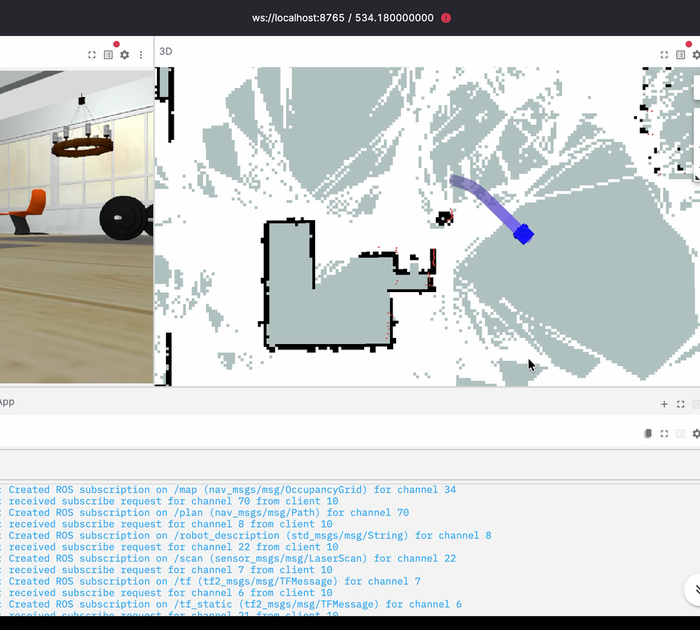
Map a simulated house with ROS 2, Gazebo, and SLAM, then navigate the robot to a goal.
This uses the stable robot-navigation example with ROS 2, Nav2, Gazebo, and a
bundled browser viewer. Docker with Compose v2 is required. A successful first
run creates and saves a map, localizes the robot on it, and reaches a navigation
goal.
To run the example directly instead:
npx robium-ai app doctor robot-navigation
npx robium-ai app run robot-navigation
Run a pretrained two-arm policy
Help me run a pretrained policy that transfers a cube between two simulated robot arms.
This uses the official ACT checkpoint in act-aloha-cube-transfer. There is no
training step and no dedicated GPU is required. The first run prepares the
locked environment and downloads the pinned model; success means the viewer
opens, real inference runs, and the default cube-transfer result is reported.
npx robium-ai app doctor act-aloha-cube-transfer
npx robium-ai app run act-aloha-cube-transfer
The native path is tested on Apple Silicon. Ask your agent to check the app README before using another platform.
Build a robot assistant
Help me build a simulated robot assistant that understands what it sees and follows natural-language instructions.
This starts from silly-turtlebot: a camera-equipped TurtleBot simulation with
guarded navigation tools. It requires Docker and your own authorized Gemini
Robotics access. Live model calls may cost money, so Robium checks access before
starting and will not present a mock run as a live result.
More applications and hosted demos are at robium.ai and in robium-apps.
Make it yours
Keep the shipped examples clean and create an editable derivative in your own
my-apps/ directory:
npx robium-ai app new my-navigation --from robot-navigation
Then open that new app with your coding agent and describe one change. Robium will reuse the proven environment and test shape instead of rebuilding the whole stack from scratch.
Useful commands:
npx robium-ai app list              # browse every reference app
npx robium-ai skills nav            # search the skill catalog
npx robium-ai update --check        # check upstream without changing files
npx robium-ai update                # update clean main branches safely
What is included
- Skills for ROS 2, Nav2, Gazebo, MuJoCo, Isaac Sim/Lab, LeRobot, robot data, visualization, testing, and deployment.
- An architect that selects a compatible reference app and proves the smallest useful robot behavior first.
- Capture and learning tools that turn verified build findings into better guidance without requiring raw agent transcripts.
- A zero-dependency CLI for setup, diagnosis, updates, skills, and application lifecycle commands.
See the CLI guide for host-specific setup and update behavior, or CONTRIBUTING.md to improve a skill. Questions are welcome on Discord and in GitHub Discussions.
License
Similar repos


Physical AI skills for coding agents, with field-tested robotics guidance, the robium-ai CLI, and a learning engine.
See the codeSee what people are saying
README
Physical AI skills for coding agents
Robium gives Claude Code, Codex, Gemini CLI, and Cursor field-tested robotics skills, troubleshooting guidance, and runnable reference applications. Start with a working robot, then ask your agent to adapt it.
Introducing Robium
https://github.com/user-attachments/assets/90eed7a7-d240-4e64-bd2a-6a7d6290be46
Install
You need Node.js 18+, Git, and at least one supported coding agent.
npx robium-ai setup
npx robium-ai doctor
Setup detects your agents and asks where to create the workspace. To install for one agent or choose the location up front:
npx robium-ai setup --agent codex
npx robium-ai setup --dir ~/projects/my-robotics
This is an editable install, not a hidden package snapshot. Setup creates ordinary Git checkouts and connects your agent to them:
~/robium-workspace/       # default; location and name are your choice
├── robium/               # editable skills and plugin source
└── robium-apps/          # runnable reference applications
Run npx robium-ai workspace anytime to find them. After editing or manually
updating Robium, run npx robium-ai setup again and restart your agent so its
integration refreshes.
Install skills only
To add Robium's skills to an existing project with the skills CLI, run:
npx skills add robium-ai/robium
Choose skills interactively, or select them by name:
npx skills add robium-ai/robium --skill ros2 gazebo mujoco
This installs the skill instructions and their supporting files. For the
complete Robium workspace, reference applications, and plugin integration,
use npx robium-ai setup above.
Try a working robot
Restart your agent after setup, open it in a folder where it may work, and paste one of these prompts. Robium will inspect the matching reference app, check the prerequisites, and aim for a visible result before suggesting custom work.
Map and navigate a simulated home
Map a simulated house with ROS 2, Gazebo, and SLAM, then navigate the robot to a goal.
This uses the stable robot-navigation example with ROS 2, Nav2, Gazebo, and a
bundled browser viewer. Docker with Compose v2 is required. A successful first
run creates and saves a map, localizes the robot on it, and reaches a navigation
goal.
To run the example directly instead:
npx robium-ai app doctor robot-navigation
npx robium-ai app run robot-navigation
Run a pretrained two-arm policy
Help me run a pretrained policy that transfers a cube between two simulated robot arms.
This uses the official ACT checkpoint in act-aloha-cube-transfer. There is no
training step and no dedicated GPU is required. The first run prepares the
locked environment and downloads the pinned model; success means the viewer
opens, real inference runs, and the default cube-transfer result is reported.
npx robium-ai app doctor act-aloha-cube-transfer
npx robium-ai app run act-aloha-cube-transfer
The native path is tested on Apple Silicon. Ask your agent to check the app README before using another platform.
Build a robot assistant
Help me build a simulated robot assistant that understands what it sees and follows natural-language instructions.
This starts from silly-turtlebot: a camera-equipped TurtleBot simulation with
guarded navigation tools. It requires Docker and your own authorized Gemini
Robotics access. Live model calls may cost money, so Robium checks access before
starting and will not present a mock run as a live result.
More applications and hosted demos are at robium.ai and in robium-apps.
Make it yours
Keep the shipped examples clean and create an editable derivative in your own
my-apps/ directory:
npx robium-ai app new my-navigation --from robot-navigation
Then open that new app with your coding agent and describe one change. Robium will reuse the proven environment and test shape instead of rebuilding the whole stack from scratch.
Useful commands:
npx robium-ai app list              # browse every reference app
npx robium-ai skills nav            # search the skill catalog
npx robium-ai update --check        # check upstream without changing files
npx robium-ai update                # update clean main branches safely
What is included
- Skills for ROS 2, Nav2, Gazebo, MuJoCo, Isaac Sim/Lab, LeRobot, robot data, visualization, testing, and deployment.
- An architect that selects a compatible reference app and proves the smallest useful robot behavior first.
- Capture and learning tools that turn verified build findings into better guidance without requiring raw agent transcripts.
- A zero-dependency CLI for setup, diagnosis, updates, skills, and application lifecycle commands.
See the CLI guide for host-specific setup and update behavior, or CONTRIBUTING.md to improve a skill. Questions are welcome on Discord and in GitHub Discussions.