Implementation of Active Flow Expansion (ActFlow), preprint: https://arxiv.org/abs/2606.08802
Python
25
25 commits
updated Jun 27, 2026
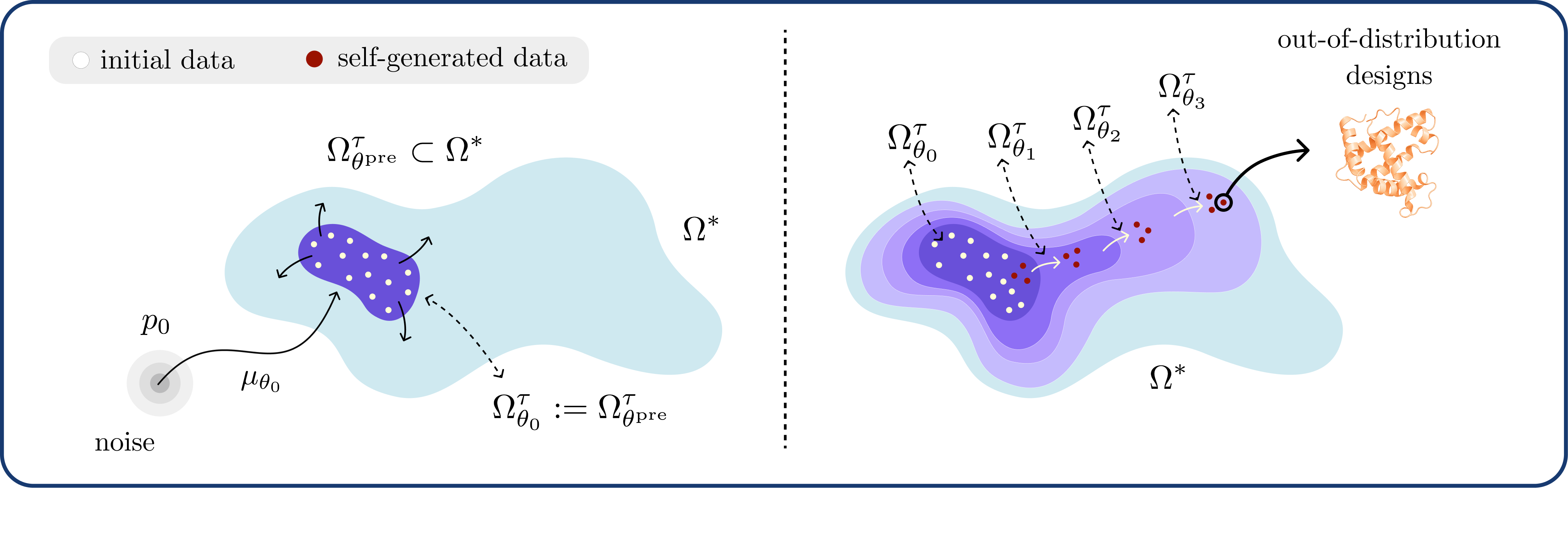
Towards efficient continued pre-training beyond the data via self-expansion. Molecular, peptide, and protein sequence design, are covered within different repo branches.
First you need to install pixi:
wget -qO- https://pixi.sh/install.sh | sh
Then you can install the dependencies for this project:
pixi install
If you want to start a shell with this environment, you can run:
pixi shell
However, for batchjobs, you need to use pixi run to execute commands in the environment, e.g.:
pixi run python -m adm.task_agnostic toy --dir experiments/toy
Recommended: Always use pixi run, because it makes sure you are using the latest installed packages.
Recommended: Use a scratch disk for the experiments, e.g., by setting --dir /cluster/scratch/<username>/adm/toy for the toy experiment, because the experiment directories can get quite large.
pixi run python -m adm.task_agnostic <problem_setup> <uncertainty_estimator> --dir <experiment_dir> <other_args>
For <problem_setup>, currently supported options are toy, qm9, geom_drugs, and stable_diffusion. For <uncertainty_estimator>, currently supported options are gp (Gaussian process) and ensemble (ensemble of 5 MLPs with 3 hidden layers, 100 activations each). They all define their own arguments as well, which you can see by running:
pixi run python -m adm.task_agnostic <problem_setup> <uncertainty_estimator> --help
--no_uncertainty: This flag disables uncertainty estimation and maximization, resulting in the Recursive Sampling (with verifier) scheme.--no_verifier: This flag disables the verifier, resulting in the Recursive Sampling (without verifier) scheme in combination with --no_uncertainty.Recommended: For any problem setup, first run the above two to get baseline results. --no_uncertainty can also be used to dial in the verifier function or other parts of your problem setup, such that you can differentiate between problems arising from expansion or the problem setup itself.
All uncertainty estimators take features from the score network as input at a specified timestep (--feat_timestep). The weight given to the uncertainty estimator is set by --dps_weight, where we use Diffusion Posterior Sampling (DPS; https://arxiv.org/abs/2209.14687) to find high-uncertainty samples.
--feat_timestep: This option specifies the timestep from which features are obtained for the GP. For QM9, 0.9 works best, but this might be different for other problem setups. Recommended: Start from 0.9 and try different values to see what works best for your problem setup.--dps_weight: This option specifies the weight of the uncertainty reward for Diffusion Posterior Sampling (DPS). Higher values will lead to more exploration, but also leads to lower validity. Recommended: Start from 10 and try different values to see what works best for your problem setup.--gp_kernel: This option specifies the kernel for the uncertainty estimation. Supported options are rbf and linear.--gp_lengthscale: If you set --gp_kernel to rbf, this option specifies the lengthscale for the RBF kernel. This controls how much you believe the generative model generalizes from a data point.Here we use an ensemble defined over the input space of score network activations. We use the same ensemble architecture as in Active Learning-Assisted Directed Evolution (ALDE; https://www.nature.com/articles/s41467-025-55987-8).
--sample_batch_size: This option specifies the batch size for sampling. Setting it to a lower value reduces VRAM usage but increases runtime. For our purposes, this should be lower than what would be possible for normal inference due to running DPS. Recommended: Try to find the maximum value that would fit in your VRAM so you can maximally make use of parallelization. For Stable Diffusion, this value is 2 on a 24GB VRAM GPU.--ft_batch_size: This option specifies the batch size for fine-tuning. Setting it to a lower value reduces VRAM usage but increases stochasticity in the gradients. Recommended: Try to find the maximum value that would fit in your VRAM. For Stable Diffusion, this value is 4 on a 24GB VRAM GPU.--ft_accumulate_steps: This option specifies the number of steps for gradient accumulation during fine-tuning. By making use of this, we can get a bigger effective batch size for fine-tuning without increasing VRAM usage. For example, if you set --ft_batch_size to 4 and --ft_accumulate_steps to 4, you get an effective batch size of 16. Recommended: Make sure that the effective batch size is at least 32.--ft_steps: This option specifies the number of fine-tuning steps with the data collected thus far. Note that the effective number of steps is ft_steps / ft_accumulate_steps.--eval_samples: Number of samples to use for evaluation during training. Defaults to 0.--eval_every: This option specifies how often to run evaluation during training, in terms of iterations.--ft_lr: This option specifies the learning rate when fine-tuning on new samples. Recommended: Use the same learning rate as was used in pre-training. Lower it if you see overfitting.--ft_weight_decay: This option specifies the weight decay of AdamW when fine-tuning on new samples. Recommended: If you use LoRA (e.g., Stable Diffusion), set this fairly high at around 1e-1 or 1e-2. Otherwise, do not use this, as you will only drift further from the pre-trained weights then.--ft_min_dataset_size: This option specifies the minimum dataset size before starting fine-tuning. In other words, it specifies how many samples we take from the prior before starting the expansion process. Setting it to a higher value could lead to less mode forgetting. Recommended: Start from 1024 and try higher values if you see mode forgetting.To evaluate the final model, you can run (make sure to set --ckpt base_model.pt to use the expanded model instead of the pre-trained model):
pixi run python -m adm.evaluation.sample_many <experiment_dir> <other_args>
This script will generate many samples from the generative model. Alternatively, you can run:
pixi run python -m adm.evaluation.sample_many_valids <experiment_dir> <other_args>
This script will keep sampling until the number of specified valid samples are sampled (instead of sampling both invalid and valid ones). This is important for metrics such as Vendi diversity that need a constant number of samples.
Then to evaluate the samples, you can run:
pixi run python -m adm.evaluation.eval_samples <experiment_dir> <sample_dir> [--do_global_metrics] [--do_sample_metrics]
This will evaluate the samples using the specified global and sample metrics for the problem setup. You can specify which to do using the flags --do_global_metrics and --do_sample_metrics. For example, for the QM9 problem setup, it computes the Vendi diversity over all samples and GFN2-xTB properties.
This repository abstracts away the interface with the specific problem at hand (e.g. protein sequence generation, unconditional molecular sequence & structure generation) into a ProblemSetup (see adm/setups/problem_setup.py). A ProblemSetup allows the user to define the base flow model, validity function, problem-relevant metrics, pre/post-processing functions and other important logic all in a centralised package. We have defined different problem setups in this repository corresponding to different applications (e.g. molecules/proteins). In order to separate dependencies each is defined in its own respective branch. To use each one, first check out the relevant branch and then use the CLI defined above. To define your own Problem Setup for your own application see the section below.
To define a new problem setup to run task-agnostic or task-directed expansion on, you only need to inherit the ProblemSetup[D] in adm/setups/problem_setup.py and implement the abstract methods. You can then run expansion on your problem setup by using the command line interface described below, and passing the name of your problem setup as an argument. This requires some knowledge of the diffusiongym package, so it is recommended to start with reading the documentation and looking at the existing problem setups for examples.
Implementation of Active Flow Expansion (ActFlow), preprint: https://arxiv.org/abs/2606.08802
Python
25
25 commits
updated Jun 27, 2026
Towards efficient continued pre-training beyond the data via self-expansion. Molecular, peptide, and protein sequence design, are covered within different repo branches.
First you need to install pixi:
wget -qO- https://pixi.sh/install.sh | sh
Then you can install the dependencies for this project:
pixi install
If you want to start a shell with this environment, you can run:
pixi shell
However, for batchjobs, you need to use pixi run to execute commands in the environment, e.g.:
pixi run python -m adm.task_agnostic toy --dir experiments/toy
Recommended: Always use pixi run, because it makes sure you are using the latest installed packages.
Recommended: Use a scratch disk for the experiments, e.g., by setting --dir /cluster/scratch/<username>/adm/toy for the toy experiment, because the experiment directories can get quite large.
pixi run python -m adm.task_agnostic <problem_setup> <uncertainty_estimator> --dir <experiment_dir> <other_args>
For <problem_setup>, currently supported options are toy, qm9, geom_drugs, and stable_diffusion. For <uncertainty_estimator>, currently supported options are gp (Gaussian process) and ensemble (ensemble of 5 MLPs with 3 hidden layers, 100 activations each). They all define their own arguments as well, which you can see by running:
pixi run python -m adm.task_agnostic <problem_setup> <uncertainty_estimator> --help
--no_uncertainty: This flag disables uncertainty estimation and maximization, resulting in the Recursive Sampling (with verifier) scheme.--no_verifier: This flag disables the verifier, resulting in the Recursive Sampling (without verifier) scheme in combination with --no_uncertainty.Recommended: For any problem setup, first run the above two to get baseline results. --no_uncertainty can also be used to dial in the verifier function or other parts of your problem setup, such that you can differentiate between problems arising from expansion or the problem setup itself.
All uncertainty estimators take features from the score network as input at a specified timestep (--feat_timestep). The weight given to the uncertainty estimator is set by --dps_weight, where we use Diffusion Posterior Sampling (DPS; https://arxiv.org/abs/2209.14687) to find high-uncertainty samples.
--feat_timestep: This option specifies the timestep from which features are obtained for the GP. For QM9, 0.9 works best, but this might be different for other problem setups. Recommended: Start from 0.9 and try different values to see what works best for your problem setup.--dps_weight: This option specifies the weight of the uncertainty reward for Diffusion Posterior Sampling (DPS). Higher values will lead to more exploration, but also leads to lower validity. Recommended: Start from 10 and try different values to see what works best for your problem setup.--gp_kernel: This option specifies the kernel for the uncertainty estimation. Supported options are rbf and linear.--gp_lengthscale: If you set --gp_kernel to rbf, this option specifies the lengthscale for the RBF kernel. This controls how much you believe the generative model generalizes from a data point.Here we use an ensemble defined over the input space of score network activations. We use the same ensemble architecture as in Active Learning-Assisted Directed Evolution (ALDE; https://www.nature.com/articles/s41467-025-55987-8).
--sample_batch_size: This option specifies the batch size for sampling. Setting it to a lower value reduces VRAM usage but increases runtime. For our purposes, this should be lower than what would be possible for normal inference due to running DPS. Recommended: Try to find the maximum value that would fit in your VRAM so you can maximally make use of parallelization. For Stable Diffusion, this value is 2 on a 24GB VRAM GPU.--ft_batch_size: This option specifies the batch size for fine-tuning. Setting it to a lower value reduces VRAM usage but increases stochasticity in the gradients. Recommended: Try to find the maximum value that would fit in your VRAM. For Stable Diffusion, this value is 4 on a 24GB VRAM GPU.--ft_accumulate_steps: This option specifies the number of steps for gradient accumulation during fine-tuning. By making use of this, we can get a bigger effective batch size for fine-tuning without increasing VRAM usage. For example, if you set --ft_batch_size to 4 and --ft_accumulate_steps to 4, you get an effective batch size of 16. Recommended: Make sure that the effective batch size is at least 32.--ft_steps: This option specifies the number of fine-tuning steps with the data collected thus far. Note that the effective number of steps is ft_steps / ft_accumulate_steps.--eval_samples: Number of samples to use for evaluation during training. Defaults to 0.--eval_every: This option specifies how often to run evaluation during training, in terms of iterations.--ft_lr: This option specifies the learning rate when fine-tuning on new samples. Recommended: Use the same learning rate as was used in pre-training. Lower it if you see overfitting.--ft_weight_decay: This option specifies the weight decay of AdamW when fine-tuning on new samples. Recommended: If you use LoRA (e.g., Stable Diffusion), set this fairly high at around 1e-1 or 1e-2. Otherwise, do not use this, as you will only drift further from the pre-trained weights then.--ft_min_dataset_size: This option specifies the minimum dataset size before starting fine-tuning. In other words, it specifies how many samples we take from the prior before starting the expansion process. Setting it to a higher value could lead to less mode forgetting. Recommended: Start from 1024 and try higher values if you see mode forgetting.To evaluate the final model, you can run (make sure to set --ckpt base_model.pt to use the expanded model instead of the pre-trained model):
pixi run python -m adm.evaluation.sample_many <experiment_dir> <other_args>
This script will generate many samples from the generative model. Alternatively, you can run:
pixi run python -m adm.evaluation.sample_many_valids <experiment_dir> <other_args>
This script will keep sampling until the number of specified valid samples are sampled (instead of sampling both invalid and valid ones). This is important for metrics such as Vendi diversity that need a constant number of samples.
Then to evaluate the samples, you can run:
pixi run python -m adm.evaluation.eval_samples <experiment_dir> <sample_dir> [--do_global_metrics] [--do_sample_metrics]
This will evaluate the samples using the specified global and sample metrics for the problem setup. You can specify which to do using the flags --do_global_metrics and --do_sample_metrics. For example, for the QM9 problem setup, it computes the Vendi diversity over all samples and GFN2-xTB properties.
This repository abstracts away the interface with the specific problem at hand (e.g. protein sequence generation, unconditional molecular sequence & structure generation) into a ProblemSetup (see adm/setups/problem_setup.py). A ProblemSetup allows the user to define the base flow model, validity function, problem-relevant metrics, pre/post-processing functions and other important logic all in a centralised package. We have defined different problem setups in this repository corresponding to different applications (e.g. molecules/proteins). In order to separate dependencies each is defined in its own respective branch. To use each one, first check out the relevant branch and then use the CLI defined above. To define your own Problem Setup for your own application see the section below.
To define a new problem setup to run task-agnostic or task-directed expansion on, you only need to inherit the ProblemSetup[D] in adm/setups/problem_setup.py and implement the abstract methods. You can then run expansion on your problem setup by using the command line interface described below, and passing the name of your problem setup as an argument. This requires some knowledge of the diffusiongym package, so it is recommended to start with reading the documentation and looking at the existing problem setups for examples.



