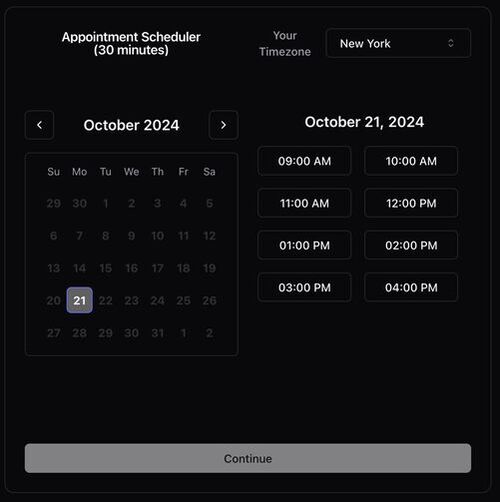
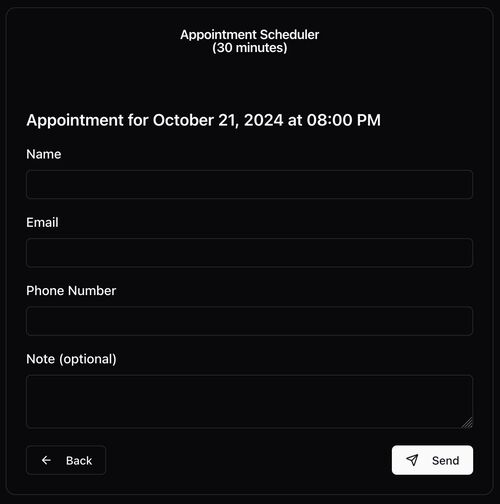
Free to host calendar availability picker - open-source cal.com / calendly alternative built on Google-Apps-Script for Gmail users. Built with modern technologies like React, TypeScript, Shadcn/UI, and Vite. https://someday-demo.vercel.app
See the code

Free to host calendar availability picker - open-source cal.com / calendly alternative built on Google-Apps-Script for Gmail users.
https://someday-demo.vercel.app/
Someday is a simple, open-source scheduling tool designed specifically for Gmail users. Uses Google Apps Scripts to host and clasp to manage. Built with modern technologies like React, TypeScript, Shadcn/UI, and Vite. A simple alternative to traditional scheduling apps like Calendly.
Change the following variables in backend/src/app.ts to customize your availability settings:
// backend/src/app.ts
const CALENDAR = "primary";
const TIME_ZONE = "America/New_York";
const WORKDAYS = [1, 2, 3, 4, 5];
const WORKHOURS = {
  start: 9,
  end: 13,
};
const TIMESLOT_DURATION = 30;
Google apps script has a banner that says "This application was created by a Google Apps Script user", to remove you can host the html file yourself and embed the script as an iframe
Use the hosted-iframe-example.html file, github pages is a good option for this, add your script url to the iframe src
cd ./frontendnpm installnpm run devfrontend/hooks/useGoogleTimeSlots.tsyou may need to sign out of all accounts, and only into your target account
Install clasp:
clasp globally using npm:
npm install -g @google/clasp@^2.5.0
Login with clasp:
clasp login
Remove Existing Configuration (if necessary):
.clasp.json file:
rm .clasp.json
Enable Apps Script API:
Create a New Project:
clasp create --type webapp
Deploy the Script:
npm run deploy
Access the Web App:
Authorize the Web App: (!!! IMPORTANT !!!)
clasp open to open the editordist/app.gsfetchAvailability then hit runCalendar Access:
CALENDAR variable in backend/src/app.tsclasp opennpm run deploy - build and delpoy
npm run build - build only
undeployall.sh - undeploy all versions of the script
deployments.sh - list all deployments web-urls
clasp open - open the script editor
Open a pull request or issue to contribute to Someday. welcoming all contributions, including bug fixes, feature requests, and documentation improvements.
MIT
503 followers · starred Nov 2024
5,629 followers · starred Nov 2024
5,133 followers · starred Nov 2024
1,027 followers · starred Feb 2025
Free to host calendar availability picker - open-source cal.com / calendly alternative built on Google-Apps-Script for Gmail users. Built with modern technologies like React, TypeScript, Shadcn/UI, and Vite. https://someday-demo.vercel.app
See the code
Free to host calendar availability picker - open-source cal.com / calendly alternative built on Google-Apps-Script for Gmail users.
https://someday-demo.vercel.app/
Someday is a simple, open-source scheduling tool designed specifically for Gmail users. Uses Google Apps Scripts to host and clasp to manage. Built with modern technologies like React, TypeScript, Shadcn/UI, and Vite. A simple alternative to traditional scheduling apps like Calendly.
Change the following variables in backend/src/app.ts to customize your availability settings:
// backend/src/app.ts
const CALENDAR = "primary";
const TIME_ZONE = "America/New_York";
const WORKDAYS = [1, 2, 3, 4, 5];
const WORKHOURS = {
  start: 9,
  end: 13,
};
const TIMESLOT_DURATION = 30;
Google apps script has a banner that says "This application was created by a Google Apps Script user", to remove you can host the html file yourself and embed the script as an iframe
Use the hosted-iframe-example.html file, github pages is a good option for this, add your script url to the iframe src
cd ./frontendnpm installnpm run devfrontend/hooks/useGoogleTimeSlots.tsyou may need to sign out of all accounts, and only into your target account
Install clasp:
clasp globally using npm:
npm install -g @google/clasp@^2.5.0
Login with clasp:
clasp login
Remove Existing Configuration (if necessary):
.clasp.json file:
rm .clasp.json
Enable Apps Script API:
Create a New Project:
clasp create --type webapp
Deploy the Script:
npm run deploy
Access the Web App:
Authorize the Web App: (!!! IMPORTANT !!!)
clasp open to open the editordist/app.gsfetchAvailability then hit runCalendar Access:
CALENDAR variable in backend/src/app.tsclasp opennpm run deploy - build and delpoy
npm run build - build only
undeployall.sh - undeploy all versions of the script
deployments.sh - list all deployments web-urls
clasp open - open the script editor
Open a pull request or issue to contribute to Someday. welcoming all contributions, including bug fixes, feature requests, and documentation improvements.
MIT
503 followers · starred Nov 2024
5,629 followers · starred Nov 2024
5,133 followers · starred Nov 2024
1,027 followers · starred Feb 2025



