
This is a computer adaptation of Game of Ur, written in C++ using SDL and OpenGL.
C++
2
365 commits
updated Oct 5, 2026
See what people are saying
README
Game of Ur Project
Project Description
Introduction
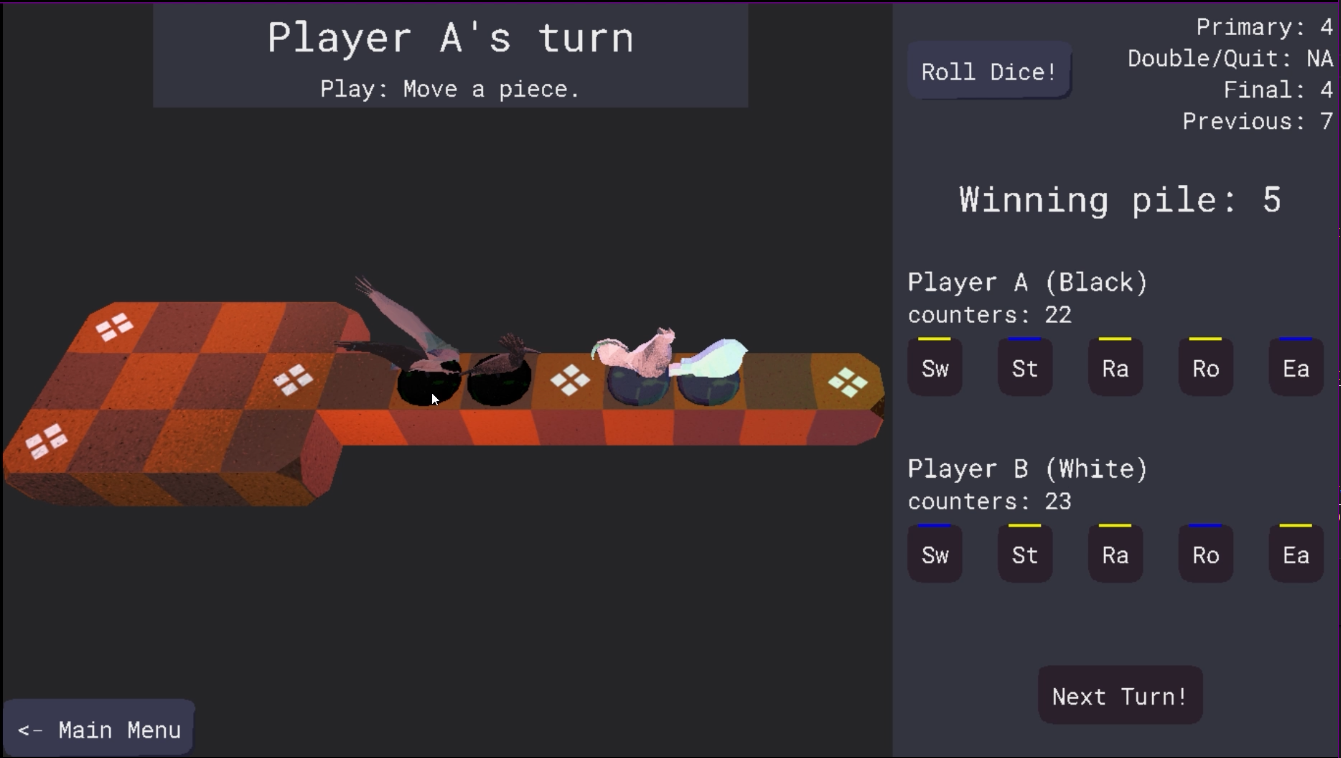
This is a computer adaptation of Game of Ur, written in C++ mainly using SDL and OpenGL, and built on top of the ToyMaker game engine.
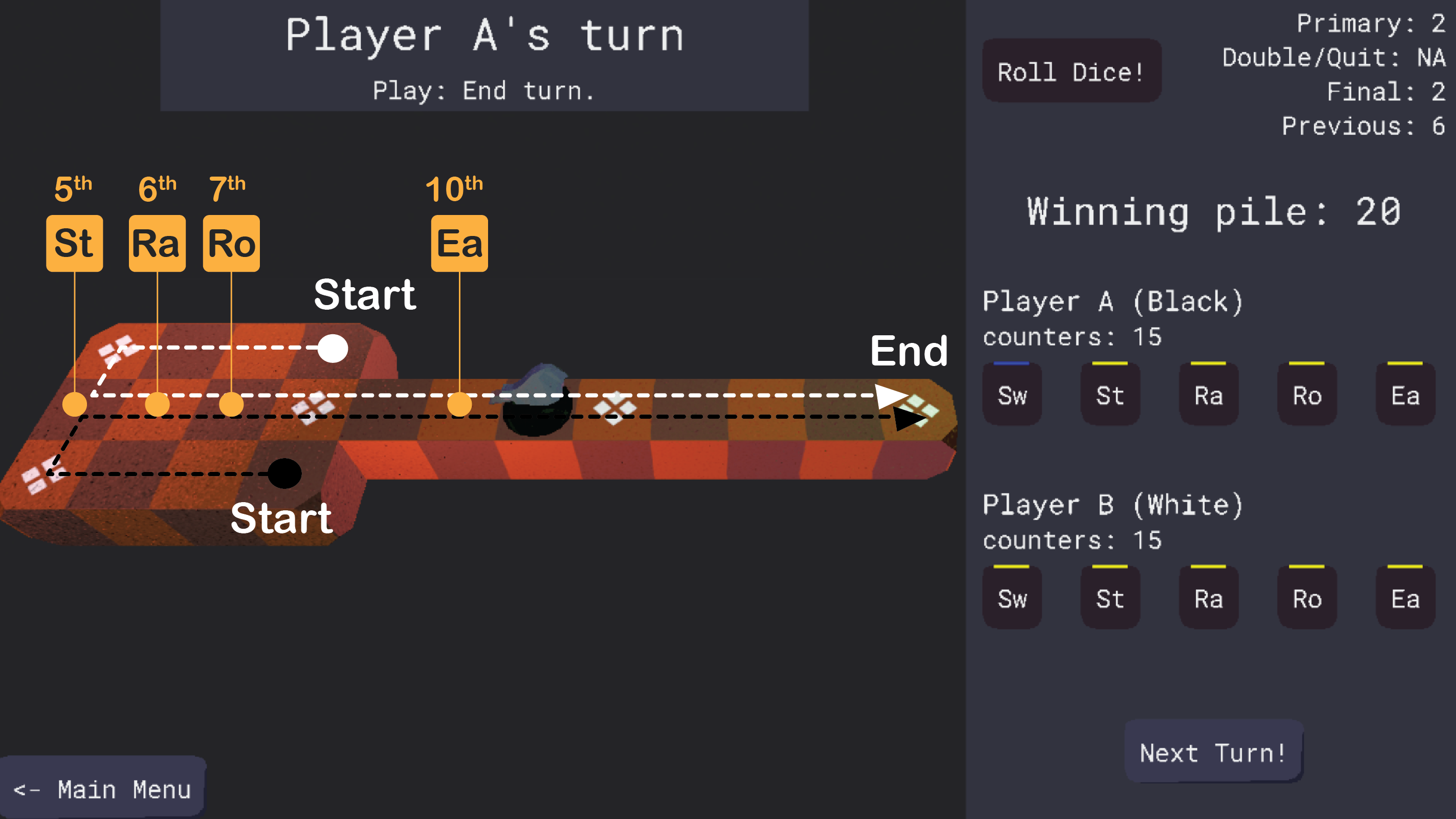
Game of Ur is a competitive, two-player board game. The player who moves all 5 of their pieces to the end of the course first, wins the game. The variant implemented in this adaptation is based on a paper by Irving Finkel. See the game design document for more information.
Documentation
Documentation for this game and its engine is available on this project's github pages.
Motivation
I spent 2023-2024 studying C++, OpenGL, SDL, and 3D graphics by following the tutorials on learncpp, Lazy Foo, and Learn OpenGL among others. With this project, I hope to both cement and demonstrate my newly acquired skills.
I decided against making an original game because I wanted to focus on the technical aspects of game development, and not on game design. Adapting an existing game seemed like a good way to limit the scope of my first project.
Installation
On Debian (Linux)
[!CAUTION]
This game requires packages that are only available on the "sid"/unstable distribution of Debian. Instructions for installing those packages go beyond the scope of this document, and are not advised for inexperienced Debian users.
Until those packages make it to one of the mainstream Debian distributions, it would be preferable to build Game of Ur and its dependencies from source. Instructions for that can be found under section "Building from source."
-
Follow the instructions here to install the ToyMaker package, which Game of Ur depends on.
-
Download the latest Debian build of the game (ending in
.deb) from here. -
Install the game using
apt.
sudo apt install ./game-of-ur_0.4.2_amd64.deb
- Run the game.
game-of-ur
On Arch (Linux)
The installation process here is identical to the one for installing AUR packages.
-
Follow the instructions here to install the ToyMaker package, which Game of Ur depends on.
-
Unpack the latest Arch build of the game, downloaded from here.
tar -xvf game-of-ur-0.4.2-x86_64-arch.tar.gz
- Now enter the
game-of-urpackage directory.
cd ../game-of-ur-0.4.2-x86_64-arch
- Run
makepkgto build the game-of-ur package. On success, this should produce a file namedgame-of-ur-0.4.2-1-x86_64.pkg.tar.zst.
makepkg
- Use
pacmanto install the package.
pacman -U game-of-ur-0.4.2-1-x86_64.pkg.tar.zst
- Run the game.
game-of-ur
On Windows
Simply download the Windows ZIP file from the latest release. Extract
the games files to a location of your choice, then double click on the game-of-ur.exe file in the extracted folder.
Building from source
Requirements
This project uses CMake for its build system, so make sure to have that installed.
On your platform, download the following packages and place them somewhere discoverable by your compiler toolchain.
-
MinGW-w64 -- For the C++ standard library headers, and for the compiler toolchain for building native Windows applications.
-
SDL -- For abstracting away platform specific tasks, like requesting a window for the application.
-
SDL Image -- For loading of images in various formats.
-
SDL TTF -- For loading and rendering fonts.
-
GLEW -- For exposing OpenGL functionality available on this platform.
-
Nlohmann JSON -- For serialization/deserialization of data to and from JSON.
-
GLM -- For linear algebra functions resembling those in GLSL, and for quaternion math.
-
Assimp -- For importing assets of various kinds, mainly 3D models.
-
ToyMaker -- For the engine/framework this game is built on.
If you'd like to generate and tinker with the documentation generated for the project, also install Doxygen.
Finally, clone this repository, or download its snapshot.
Compiling
-
Enter the root directory of the project (the same one where README.md and LICENSE.txt are found).
-
Run
cmake . -B build/ -DCMAKE_BUILD_TYPE=Debugto initialize the build directory. -
Change to the build directory using
cd build, then runcmake --build .to build the Debug version of the project. -
Run the (debug build of the) game using the generated
Game_Of_Ur.exefile in the build folder.
Goals
- Stylized 3D graphics
- Offline multiplayer
- AI opponent
- Music and sound effects
Tutorialization(I'm very very tired)- Playable on Windows
- Playable on Linux (Arch, Debian)
Playable on Android(Maybe some day)- Itch.io release
Play Store release(Maybe a day long after the other days)- Code Documentation
Contributing
I'm not planning to accept contributions to this project any time soon. Feel free to fork the project and make it your own, though!
LICENSE
raynmetal/game-of-ur is distributed under the terms of the MIT License.
This program makes extensive use of the following libraries:
Along with the following sounds, courtesy freesound.org:
- Melancholic piano music.mp3 by ZHRØ | License: Creative Commons 0
- box_drag.wav by X3msnake | License: Creative Commons 0
- Teeth clack 1 by hollandm | License: Creative Commons 0
- Door Handle Wood Clack.aif by RutgerMuller | License: Creative Commons 0
- Dice.mp3 by AbdrTar | License: Creative Commons 0


This is a computer adaptation of Game of Ur, written in C++ using SDL and OpenGL.
C++
2
365 commits
updated Oct 5, 2026
See what people are saying
README
Game of Ur Project
Project Description
Introduction
This is a computer adaptation of Game of Ur, written in C++ mainly using SDL and OpenGL, and built on top of the ToyMaker game engine.
Game of Ur is a competitive, two-player board game. The player who moves all 5 of their pieces to the end of the course first, wins the game. The variant implemented in this adaptation is based on a paper by Irving Finkel. See the game design document for more information.
Documentation
Documentation for this game and its engine is available on this project's github pages.
Motivation
I spent 2023-2024 studying C++, OpenGL, SDL, and 3D graphics by following the tutorials on learncpp, Lazy Foo, and Learn OpenGL among others. With this project, I hope to both cement and demonstrate my newly acquired skills.
I decided against making an original game because I wanted to focus on the technical aspects of game development, and not on game design. Adapting an existing game seemed like a good way to limit the scope of my first project.
Installation
On Debian (Linux)
[!CAUTION]
This game requires packages that are only available on the "sid"/unstable distribution of Debian. Instructions for installing those packages go beyond the scope of this document, and are not advised for inexperienced Debian users.
Until those packages make it to one of the mainstream Debian distributions, it would be preferable to build Game of Ur and its dependencies from source. Instructions for that can be found under section "Building from source."
-
Follow the instructions here to install the ToyMaker package, which Game of Ur depends on.
-
Download the latest Debian build of the game (ending in
.deb) from here. -
Install the game using
apt.
sudo apt install ./game-of-ur_0.4.2_amd64.deb
- Run the game.
game-of-ur
On Arch (Linux)
The installation process here is identical to the one for installing AUR packages.
-
Follow the instructions here to install the ToyMaker package, which Game of Ur depends on.
-
Unpack the latest Arch build of the game, downloaded from here.
tar -xvf game-of-ur-0.4.2-x86_64-arch.tar.gz
- Now enter the
game-of-urpackage directory.
cd ../game-of-ur-0.4.2-x86_64-arch
- Run
makepkgto build the game-of-ur package. On success, this should produce a file namedgame-of-ur-0.4.2-1-x86_64.pkg.tar.zst.
makepkg
- Use
pacmanto install the package.
pacman -U game-of-ur-0.4.2-1-x86_64.pkg.tar.zst
- Run the game.
game-of-ur
On Windows
Simply download the Windows ZIP file from the latest release. Extract
the games files to a location of your choice, then double click on the game-of-ur.exe file in the extracted folder.
Building from source
Requirements
This project uses CMake for its build system, so make sure to have that installed.
On your platform, download the following packages and place them somewhere discoverable by your compiler toolchain.
-
MinGW-w64 -- For the C++ standard library headers, and for the compiler toolchain for building native Windows applications.
-
SDL -- For abstracting away platform specific tasks, like requesting a window for the application.
-
SDL Image -- For loading of images in various formats.
-
SDL TTF -- For loading and rendering fonts.
-
GLEW -- For exposing OpenGL functionality available on this platform.
-
Nlohmann JSON -- For serialization/deserialization of data to and from JSON.
-
GLM -- For linear algebra functions resembling those in GLSL, and for quaternion math.
-
Assimp -- For importing assets of various kinds, mainly 3D models.
-
ToyMaker -- For the engine/framework this game is built on.
If you'd like to generate and tinker with the documentation generated for the project, also install Doxygen.
Finally, clone this repository, or download its snapshot.
Compiling
-
Enter the root directory of the project (the same one where README.md and LICENSE.txt are found).
-
Run
cmake . -B build/ -DCMAKE_BUILD_TYPE=Debugto initialize the build directory. -
Change to the build directory using
cd build, then runcmake --build .to build the Debug version of the project. -
Run the (debug build of the) game using the generated
Game_Of_Ur.exefile in the build folder.
Goals
- Stylized 3D graphics
- Offline multiplayer
- AI opponent
- Music and sound effects
Tutorialization(I'm very very tired)- Playable on Windows
- Playable on Linux (Arch, Debian)
Playable on Android(Maybe some day)- Itch.io release
Play Store release(Maybe a day long after the other days)- Code Documentation
Contributing
I'm not planning to accept contributions to this project any time soon. Feel free to fork the project and make it your own, though!
LICENSE
raynmetal/game-of-ur is distributed under the terms of the MIT License.
This program makes extensive use of the following libraries:
Along with the following sounds, courtesy freesound.org:
- Melancholic piano music.mp3 by ZHRØ | License: Creative Commons 0
- box_drag.wav by X3msnake | License: Creative Commons 0
- Teeth clack 1 by hollandm | License: Creative Commons 0
- Door Handle Wood Clack.aif by RutgerMuller | License: Creative Commons 0
- Dice.mp3 by AbdrTar | License: Creative Commons 0