Effects and animation library for Ratatui applications
Rust
1,308
692 commits
updated Sep 6, 2026






An effects and animation library for Ratatui applications. Build complex animations by composing and layering simple effects, bringing smooth transitions and visual polish to the terminal.
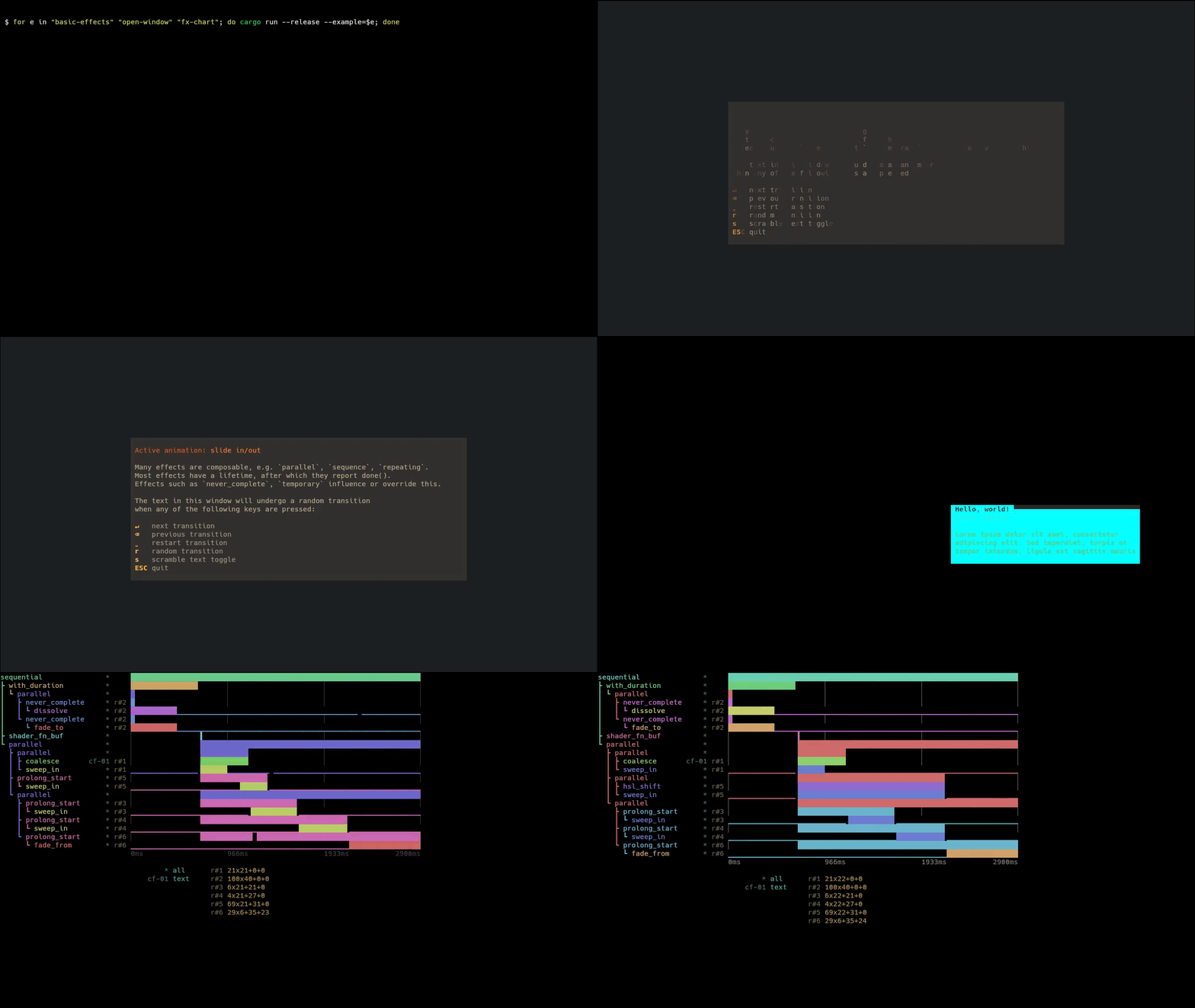
Try exabind - experience tachyonfx in your browser without installing anything!
Add tachyonfx to your Cargo.toml:
cargo add tachyonfx
Create your first effect:
use std::{io, time::Instant};

use ratatui::{crossterm::event, prelude::*, widgets::Paragraph};
use tachyonfx::{fx, EffectManager, Interpolation};

fn main() -> io::Result<()> {
    let mut terminal = ratatui::init();
    let mut effects: EffectManager<()> = EffectManager::default();

    // Add a simple fade-in effect
    let fx = fx::fade_to(Color::Cyan, Color::Gray, (1_000, Interpolation::SineIn));
    effects.add_effect(fx);

    let mut last_frame = Instant::now();
    loop {
        let elapsed = last_frame.elapsed();
        last_frame = Instant::now();

        terminal.draw(|frame| {
            let screen_area = frame.area();

            // Render your content
            let text = Paragraph::new("Hello, TachyonFX!").alignment(Alignment::Center);
            frame.render_widget(text, screen_area);

            // Apply effects
            effects.process_effects(elapsed.into(), frame.buffer_mut(), screen_area);
        })?;

        // Exit on any key press
        if event::poll(std::time::Duration::from_millis(16))? {
            if let event::Event::Key(_) = event::read()? {
                break;
            }
        }
    }

    ratatui::restore();
    Ok(())
}
Explore the examples to see effects in action:
# Basic effects showcase
cargo run -p basic-effects

# Minimal setup example
cargo run -p minimal

# Interactive effect registry demo
cargo run -p effect-registry

# Complete effect showcase
cargo run -p effect-showcase

# Tweening examples
cargo run -p tweens
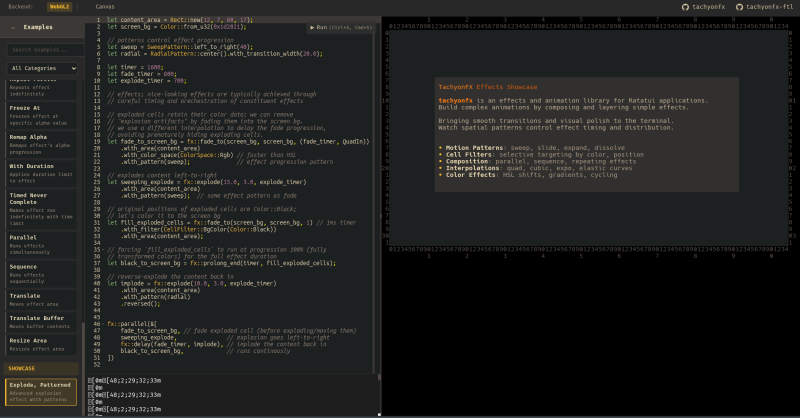
TachyonFX FTL is a browser-based editor for creating and tweaking effects in real-time, using the Effect DSL (don't worry, it mimics rust syntax).
// Create a fade-in effect
let mut fade = fx::fade_from(Color::Black, Color::White,
    EffectTimer::from_ms(500, QuadOut));

// Apply to red text only
fade.set_cell_filter(CellFilter::FgColor(Color::Red));

// In your render loop
fade.process(delta_time, buf, area);
// Run multiple effects in parallel
let effects = fx::parallel(&[
    fx::fade_from_fg(Color::Red, 500),
    fx::sweep_in(Motion::LeftToRight, 10, 0, Color::Black, 800),
]);

// Or sequence them
let effects = fx::sequence(&[
    fx::fade_from_fg(Color::Black, 300),
    fx::coalesce(500),
]);
Apply spatial patterns to control how effects spread:
// Radial dissolve from center
let effect = fx::dissolve(800)
    .with_pattern(RadialPattern::center());

// Diagonal fade with transition width
let effect = fx::fade_to_fg(Color::Cyan, 1000)
    .with_pattern(
        DiagonalPattern::top_left_to_bottom_right()
            .with_transition_width(3.0)
    );
Create effects from strings at runtime:
use tachyonfx::dsl::EffectDsl;

let effect = EffectDsl::new()
    .compiler()
    .compile("fx::dissolve(500)")
    .expect("valid effect");
Below is a non-exhaustive list of built-in effects.
Transform colors over time for smooth transitions.
fade_from / fade_to — Transition colorsfade_from_fg / fade_to_fg — Foreground color transitionspaint / paint_fg / paint_bg — Paint cells with a color over timehsl_shift / hsl_shift_fg — Animate through HSL color spacesaturate / saturate_fg — Adjust color saturationlighten / lighten_fg — Increase lightness toward whitedarken / darken_fg — Decrease lightness toward blackAnimate text and cell positions for dynamic content.
coalesce / coalesce_from — Text materialization effectsdissolve / dissolve_to — Text dissolution effectsevolve / evolve_into / evolve_from — Character evolution through symbol setsslide_in / slide_out — Directional sliding animationssweep_in / sweep_out — Color sweep transitionsexplode — Particle dispersion effectexpand — Bidirectional expansion from centerstretch — Unidirectional stretching with block charactersFine-tune timing and behavior.
parallel — Run multiple effects simultaneouslysequence — Chain effects one after anotherrepeat / repeating — Loop effects with optional limits or indefinitelyping_pong — Play forward then reversedelay / sleep — Add pauses before or during effectsprolong_start / prolong_end — Extend effect durationfreeze_at — Freeze effect at specific transition pointremap_alpha — Remap effect progress to smaller rangerun_once — Ensure effect runs exactly oncenever_complete / timed_never_complete — Run indefinitely (with optional time limit)consume_tick — Minimal single-frame delaywith_duration — Override effect durationControl how effects spread and progress across the terminal.
RadialPattern — Expand outward from center pointDiamondPattern — Manhattan distance-based diamond revealsSpiralPattern — Spiral arm reveals with configurable arm countDiagonalPattern — Sweep across diagonallyCheckerboardPattern — Alternate cell-by-cell in grid patternSweepPattern — Linear progression in cardinal directionsWavePattern — Wave interference patterns with FM/AM modulationCoalescePattern / DissolvePattern — Organic, randomized revealsCombinedPattern — Combine patterns with multiply, max, min, averageBlendPattern — Crossfade between two patterns over effect lifetimeInvertedPattern — Invert any pattern's outputTransform positions and layout.
translate — Move content by offsettranslate_buf — Copy and move buffer contentApply effects selectively:
// Only apply to cells with specific colors
fx::dissolve(500)
    .with_filter(CellFilter::FgColor(Color::Red))

// Target specific regions
let filter = CellFilter::AllOf(vec![
    CellFilter::Outer(Margin::new(1, 1)),
    CellFilter::Text,
]);
Create your own effects:
fx::effect_fn(state, timer, |state, context, cell_iter| {
    // Your custom effect logic
    timer.progress()
})
Alternatively, implement the Shader trait and use it together with .into_effect().
The DSL supports:
effect_fn, effect_fn_buf, offscreen_buffer, translate_buf)let expr = r#"
let duration = 300;
fx::sequence(&[
fx::fade_from(black, white, duration),
fx::dissolve(duration)
.with_pattern(RadialPattern::center())
])
"#;
std — Standard library support (enabled by default)dsl — Effect DSL support (enabled by default)ratatui-next-cell — Compatibility marker for Ratatui cell diffing changes.sendable — Make effects Send (but not Sync)std-duration — Use std::time::Duration instead of 32-bit custom typewasm — WebAssembly compatibilityContributions welcome! Please check existing issues or create new ones to discuss changes.
MIT License - see LICENSE for details.
(top 24 of 41)
2,201 followers · starred Jun 2024
305 followers · starred Jun 2024
30,138 followers · starred Jun 2024
445 followers · starred Nov 2024
Effects and animation library for Ratatui applications
Rust
1,308
692 commits
updated Sep 6, 2026
An effects and animation library for Ratatui applications. Build complex animations by composing and layering simple effects, bringing smooth transitions and visual polish to the terminal.
Try exabind - experience tachyonfx in your browser without installing anything!
Add tachyonfx to your Cargo.toml:
cargo add tachyonfx
Create your first effect:
use std::{io, time::Instant};

use ratatui::{crossterm::event, prelude::*, widgets::Paragraph};
use tachyonfx::{fx, EffectManager, Interpolation};

fn main() -> io::Result<()> {
    let mut terminal = ratatui::init();
    let mut effects: EffectManager<()> = EffectManager::default();

    // Add a simple fade-in effect
    let fx = fx::fade_to(Color::Cyan, Color::Gray, (1_000, Interpolation::SineIn));
    effects.add_effect(fx);

    let mut last_frame = Instant::now();
    loop {
        let elapsed = last_frame.elapsed();
        last_frame = Instant::now();

        terminal.draw(|frame| {
            let screen_area = frame.area();

            // Render your content
            let text = Paragraph::new("Hello, TachyonFX!").alignment(Alignment::Center);
            frame.render_widget(text, screen_area);

            // Apply effects
            effects.process_effects(elapsed.into(), frame.buffer_mut(), screen_area);
        })?;

        // Exit on any key press
        if event::poll(std::time::Duration::from_millis(16))? {
            if let event::Event::Key(_) = event::read()? {
                break;
            }
        }
    }

    ratatui::restore();
    Ok(())
}
Explore the examples to see effects in action:
# Basic effects showcase
cargo run -p basic-effects

# Minimal setup example
cargo run -p minimal

# Interactive effect registry demo
cargo run -p effect-registry

# Complete effect showcase
cargo run -p effect-showcase

# Tweening examples
cargo run -p tweens
TachyonFX FTL is a browser-based editor for creating and tweaking effects in real-time, using the Effect DSL (don't worry, it mimics rust syntax).
// Create a fade-in effect
let mut fade = fx::fade_from(Color::Black, Color::White,
    EffectTimer::from_ms(500, QuadOut));

// Apply to red text only
fade.set_cell_filter(CellFilter::FgColor(Color::Red));

// In your render loop
fade.process(delta_time, buf, area);
// Run multiple effects in parallel
let effects = fx::parallel(&[
    fx::fade_from_fg(Color::Red, 500),
    fx::sweep_in(Motion::LeftToRight, 10, 0, Color::Black, 800),
]);

// Or sequence them
let effects = fx::sequence(&[
    fx::fade_from_fg(Color::Black, 300),
    fx::coalesce(500),
]);
Apply spatial patterns to control how effects spread:
// Radial dissolve from center
let effect = fx::dissolve(800)
    .with_pattern(RadialPattern::center());

// Diagonal fade with transition width
let effect = fx::fade_to_fg(Color::Cyan, 1000)
    .with_pattern(
        DiagonalPattern::top_left_to_bottom_right()
            .with_transition_width(3.0)
    );
Create effects from strings at runtime:
use tachyonfx::dsl::EffectDsl;

let effect = EffectDsl::new()
    .compiler()
    .compile("fx::dissolve(500)")
    .expect("valid effect");
Below is a non-exhaustive list of built-in effects.
Transform colors over time for smooth transitions.
fade_from / fade_to — Transition colorsfade_from_fg / fade_to_fg — Foreground color transitionspaint / paint_fg / paint_bg — Paint cells with a color over timehsl_shift / hsl_shift_fg — Animate through HSL color spacesaturate / saturate_fg — Adjust color saturationlighten / lighten_fg — Increase lightness toward whitedarken / darken_fg — Decrease lightness toward blackAnimate text and cell positions for dynamic content.
coalesce / coalesce_from — Text materialization effectsdissolve / dissolve_to — Text dissolution effectsevolve / evolve_into / evolve_from — Character evolution through symbol setsslide_in / slide_out — Directional sliding animationssweep_in / sweep_out — Color sweep transitionsexplode — Particle dispersion effectexpand — Bidirectional expansion from centerstretch — Unidirectional stretching with block charactersFine-tune timing and behavior.
parallel — Run multiple effects simultaneouslysequence — Chain effects one after anotherrepeat / repeating — Loop effects with optional limits or indefinitelyping_pong — Play forward then reversedelay / sleep — Add pauses before or during effectsprolong_start / prolong_end — Extend effect durationfreeze_at — Freeze effect at specific transition pointremap_alpha — Remap effect progress to smaller rangerun_once — Ensure effect runs exactly oncenever_complete / timed_never_complete — Run indefinitely (with optional time limit)consume_tick — Minimal single-frame delaywith_duration — Override effect durationControl how effects spread and progress across the terminal.
RadialPattern — Expand outward from center pointDiamondPattern — Manhattan distance-based diamond revealsSpiralPattern — Spiral arm reveals with configurable arm countDiagonalPattern — Sweep across diagonallyCheckerboardPattern — Alternate cell-by-cell in grid patternSweepPattern — Linear progression in cardinal directionsWavePattern — Wave interference patterns with FM/AM modulationCoalescePattern / DissolvePattern — Organic, randomized revealsCombinedPattern — Combine patterns with multiply, max, min, averageBlendPattern — Crossfade between two patterns over effect lifetimeInvertedPattern — Invert any pattern's outputTransform positions and layout.
translate — Move content by offsettranslate_buf — Copy and move buffer contentApply effects selectively:
// Only apply to cells with specific colors
fx::dissolve(500)
    .with_filter(CellFilter::FgColor(Color::Red))

// Target specific regions
let filter = CellFilter::AllOf(vec![
    CellFilter::Outer(Margin::new(1, 1)),
    CellFilter::Text,
]);
Create your own effects:
fx::effect_fn(state, timer, |state, context, cell_iter| {
    // Your custom effect logic
    timer.progress()
})
Alternatively, implement the Shader trait and use it together with .into_effect().
The DSL supports:
effect_fn, effect_fn_buf, offscreen_buffer, translate_buf)let expr = r#"
let duration = 300;
fx::sequence(&[
fx::fade_from(black, white, duration),
fx::dissolve(duration)
.with_pattern(RadialPattern::center())
])
"#;
std — Standard library support (enabled by default)dsl — Effect DSL support (enabled by default)ratatui-next-cell — Compatibility marker for Ratatui cell diffing changes.sendable — Make effects Send (but not Sync)std-duration — Use std::time::Duration instead of 32-bit custom typewasm — WebAssembly compatibilityContributions welcome! Please check existing issues or create new ones to discuss changes.
MIT License - see LICENSE for details.
(top 24 of 41)
2,201 followers · starred Jun 2024
305 followers · starred Jun 2024
30,138 followers · starred Jun 2024
445 followers · starred Nov 2024



