Deploy workloads from Git to large fleets of Kubernetes clusters
See the code




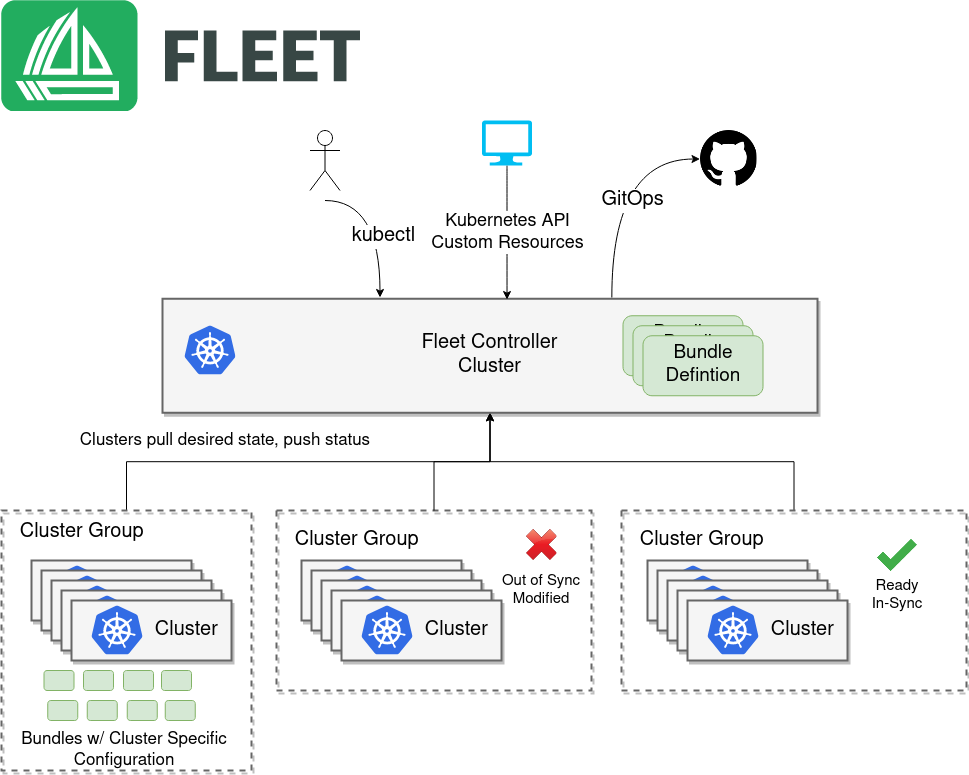
Fleet is GitOps and HelmOps at scale. Fleet is designed to manage multiple clusters. It's also lightweight enough that it works great for a single cluster too, but it really shines when you get to a large scale. By large scale we mean either a lot of clusters, a lot of deployments, or a lot of teams in a single organization.
Fleet can manage deployments from git of raw Kubernetes YAML, Helm charts, or Kustomize or any combination of the three. Regardless of the source all resources are dynamically turned into Helm charts and Helm is used as the engine to deploy everything in the cluster. This gives a high degree of control, consistency, and auditability. Fleet focuses not only on the ability to scale, but to give one a high degree of control and visibility to exactly what is installed on the cluster.
For more information, have a look at Fleet's documentation.
Get helm if you don't have it. Helm 3 is just a CLI and won't do bad insecure
things to your cluster.
For instance, using Homebrew:
brew install helm
Install the Fleet Helm charts (there's two because we separate out CRDs for ultimate flexibility.)
helm -n cattle-fleet-system install --create-namespace --wait \
    fleet-crd https://github.com/rancher/fleet/releases/download/v0.16.2/fleet-crd-0.16.2.tgz
helm -n cattle-fleet-system install --create-namespace --wait \
    fleet https://github.com/rancher/fleet/releases/download/v0.16.2/fleet-0.16.2.tgz
Change spec.repo to your git repo of choice. Kubernetes manifest files that should
be deployed should be in /manifests in your repo.
cat > example.yaml << "EOF"
apiVersion: fleet.cattle.io/v1alpha1
kind: GitRepo
metadata:
  name: sample
  # This namespace is special and auto-wired to deploy to the local cluster
  namespace: fleet-local
spec:
  # Everything from this repo will be run in this cluster. You trust me right?
  repo: "https://github.com/rancher/fleet-examples"
  paths:
  - simple
EOF

kubectl apply -f example.yaml
Get status of what Fleet is doing:
kubectl -n fleet-local get fleet
You should see something like this get created in your cluster.
kubectl get deploy frontend
NAME       READY   UP-TO-DATE   AVAILABLE   AGE
frontend   3/3     3            3           116m
Enjoy and read the docs.

For developer and maintainer documentation, see DEVELOPING.md.
Overall
Maintained
Code review
Go module
Latest release
Releases this year
282 followers · starred Apr 2020
247 followers · starred May 2023
73 followers · starred Dec 2021
34 followers · starred Aug 2023
Deploy workloads from Git to large fleets of Kubernetes clusters
See the code
Fleet is GitOps and HelmOps at scale. Fleet is designed to manage multiple clusters. It's also lightweight enough that it works great for a single cluster too, but it really shines when you get to a large scale. By large scale we mean either a lot of clusters, a lot of deployments, or a lot of teams in a single organization.
Fleet can manage deployments from git of raw Kubernetes YAML, Helm charts, or Kustomize or any combination of the three. Regardless of the source all resources are dynamically turned into Helm charts and Helm is used as the engine to deploy everything in the cluster. This gives a high degree of control, consistency, and auditability. Fleet focuses not only on the ability to scale, but to give one a high degree of control and visibility to exactly what is installed on the cluster.
For more information, have a look at Fleet's documentation.
Get helm if you don't have it. Helm 3 is just a CLI and won't do bad insecure
things to your cluster.
For instance, using Homebrew:
brew install helm
Install the Fleet Helm charts (there's two because we separate out CRDs for ultimate flexibility.)
helm -n cattle-fleet-system install --create-namespace --wait \
    fleet-crd https://github.com/rancher/fleet/releases/download/v0.16.2/fleet-crd-0.16.2.tgz
helm -n cattle-fleet-system install --create-namespace --wait \
    fleet https://github.com/rancher/fleet/releases/download/v0.16.2/fleet-0.16.2.tgz
Change spec.repo to your git repo of choice. Kubernetes manifest files that should
be deployed should be in /manifests in your repo.
cat > example.yaml << "EOF"
apiVersion: fleet.cattle.io/v1alpha1
kind: GitRepo
metadata:
  name: sample
  # This namespace is special and auto-wired to deploy to the local cluster
  namespace: fleet-local
spec:
  # Everything from this repo will be run in this cluster. You trust me right?
  repo: "https://github.com/rancher/fleet-examples"
  paths:
  - simple
EOF

kubectl apply -f example.yaml
Get status of what Fleet is doing:
kubectl -n fleet-local get fleet
You should see something like this get created in your cluster.
kubectl get deploy frontend
NAME       READY   UP-TO-DATE   AVAILABLE   AGE
frontend   3/3     3            3           116m
Enjoy and read the docs.
For developer and maintainer documentation, see DEVELOPING.md.
Overall
Maintained
Code review
Go module
Latest release
Releases this year
282 followers · starred Apr 2020
247 followers · starred May 2023
73 followers · starred Dec 2021
34 followers · starred Aug 2023