Build and deploy docker images to Kubernetes using git push
Go
3,848
158 commits
updated Aug 31, 2023

Gitkube is a tool for building and deploying Docker images on Kubernetes using git push.
After a simple initial setup, users can simply keep git push-ing their repos to build and deploy to Kubernetes automatically.

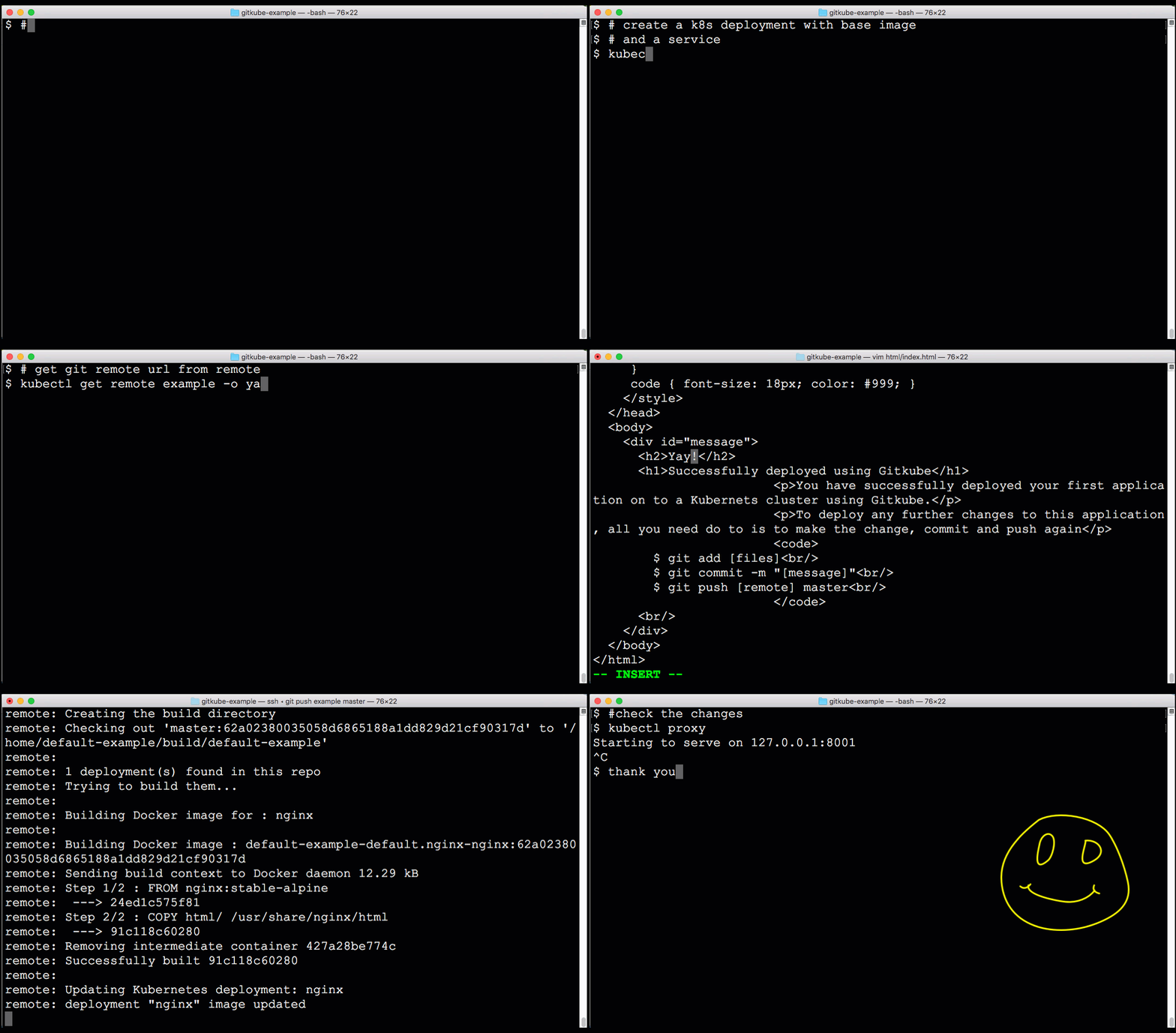
Gitkube will run on any Kubernetes vendor/distribution AS IS. In case you find any difficulties in the setup, please comment on #33
kubectl create -f https://raw.githubusercontent.com/hasura/gitkube/master/manifests/gitkube-setup.yaml

#expose gitkubed service
kubectl --namespace kube-system expose deployment gitkubed --type=LoadBalancer --name=gitkubed
Install Gitkube CLI:
curl https://raw.githubusercontent.com/hasura/gitkube/master/gimme.sh | bash
scoop install gitkube
Or download the latest release and add it to your PATH.
Use Gitkube CLI to install Gitkube on the cluster:
gitkube install
git pushgit push <remote> masterUser should have a git repo with source code and a Dockerfile. User should also create a base K8s deployment for the application.
A Remote resource consists of 3 parts:
git push.Here is a typical spec for a Remote:
apiVersion: gitkube.sh/v1alpha1
kind: Remote
metadata:
  name: sampleremote
  namespace: default
spec:

# Insert ssh-keys for allowing users to git push
  authorizedKeys:
  - "ssh-rsa your-ssh-public-key"

# Provide registry details: https://github.com/hasura/gitkube/blob/master/docs/registry.md
  registry:
    url: "docker.io/user"
    credentials:
      secretRef: regsecret                # Name of docker-registry secret

# Define deployment rules
  deployments:
  - name: www                             # Name of K8s deployment which is updated on git push
    containers:
    - name: www                           # Name of container in the deployment which is built during git push
      path: example/www                   # Docker build context path in the git repo
      dockerfile: example/www/Dockerfile  # Location of Dockerfile for the source code
Once a Remote is created, it gets a git remote URL which you can find in its status spec
$ kubectl get remote sampleremote -o yaml
...
status:
  remoteUrl: ssh://default-sampleremote@35.225.226.96/~/git/default-sampleremote
  remoteUrlDesc: ""
Add the generated remoteUrl in git
$ git remote add sampleremote ssh://default-sampleremote@35.225.226.96/~/git/default-sampleremote
And finally, git push
$ git push sampleremote master
Follow this example repo for more workflows with gitkube.
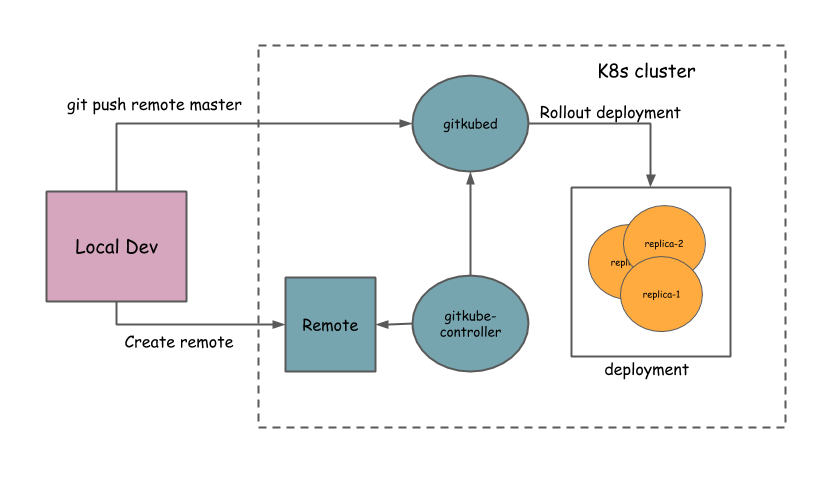
Gitkube has three components:
Gitkube is an open source project licensed under Apache License 2.0
Contributions are welcome.
Join the Gitkube channel in the Kubernetes Slack group

This project has come out of the work at hasura.io. Current maintainers @Tirumarai, @shahidh_k.
Follow @gitkube to stay updated.
Gitkube logo concept and design by Samudra Gupta.
Overall
Maintained
Code review
Go module
Latest release
Releases this year
(top 24 of 31)
501 followers · starred Mar 2018
8,914 followers · starred May 2018
12,947 followers · starred Aug 2025
407 followers · starred Nov 2018
Build and deploy docker images to Kubernetes using git push
Go
3,848
158 commits
updated Aug 31, 2023
Gitkube is a tool for building and deploying Docker images on Kubernetes using git push.
After a simple initial setup, users can simply keep git push-ing their repos to build and deploy to Kubernetes automatically.
Gitkube will run on any Kubernetes vendor/distribution AS IS. In case you find any difficulties in the setup, please comment on #33
kubectl create -f https://raw.githubusercontent.com/hasura/gitkube/master/manifests/gitkube-setup.yaml

#expose gitkubed service
kubectl --namespace kube-system expose deployment gitkubed --type=LoadBalancer --name=gitkubed
Install Gitkube CLI:
curl https://raw.githubusercontent.com/hasura/gitkube/master/gimme.sh | bash
scoop install gitkube
Or download the latest release and add it to your PATH.
Use Gitkube CLI to install Gitkube on the cluster:
gitkube install
git pushgit push <remote> masterUser should have a git repo with source code and a Dockerfile. User should also create a base K8s deployment for the application.
A Remote resource consists of 3 parts:
git push.Here is a typical spec for a Remote:
apiVersion: gitkube.sh/v1alpha1
kind: Remote
metadata:
  name: sampleremote
  namespace: default
spec:

# Insert ssh-keys for allowing users to git push
  authorizedKeys:
  - "ssh-rsa your-ssh-public-key"

# Provide registry details: https://github.com/hasura/gitkube/blob/master/docs/registry.md
  registry:
    url: "docker.io/user"
    credentials:
      secretRef: regsecret                # Name of docker-registry secret

# Define deployment rules
  deployments:
  - name: www                             # Name of K8s deployment which is updated on git push
    containers:
    - name: www                           # Name of container in the deployment which is built during git push
      path: example/www                   # Docker build context path in the git repo
      dockerfile: example/www/Dockerfile  # Location of Dockerfile for the source code
Once a Remote is created, it gets a git remote URL which you can find in its status spec
$ kubectl get remote sampleremote -o yaml
...
status:
  remoteUrl: ssh://default-sampleremote@35.225.226.96/~/git/default-sampleremote
  remoteUrlDesc: ""
Add the generated remoteUrl in git
$ git remote add sampleremote ssh://default-sampleremote@35.225.226.96/~/git/default-sampleremote
And finally, git push
$ git push sampleremote master
Follow this example repo for more workflows with gitkube.
Gitkube has three components:
Gitkube is an open source project licensed under Apache License 2.0
Contributions are welcome.
Join the Gitkube channel in the Kubernetes Slack group
This project has come out of the work at hasura.io. Current maintainers @Tirumarai, @shahidh_k.
Follow @gitkube to stay updated.
Gitkube logo concept and design by Samudra Gupta.
Overall
Maintained
Code review
Go module
Latest release
Releases this year
(top 24 of 31)
501 followers · starred Mar 2018
8,914 followers · starred May 2018
12,947 followers · starred Aug 2025
407 followers · starred Nov 2018