

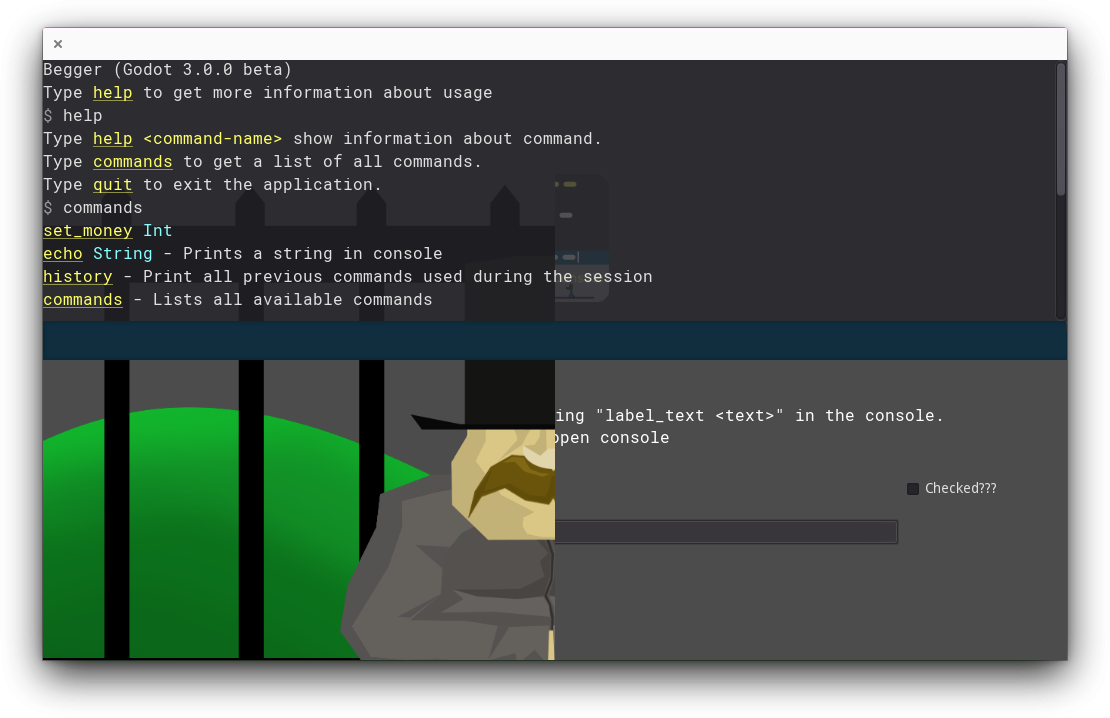
In-game console for Godot, which could be easily extended with new commands.
Creating custom commands with add_command.
Autocomplete with TAB keyboard key.
Writing to console using write and write_line methods. You can also use BB codes.
(Is also printed to engine output)
Session command history (using UP and DOWN keyboard arrows).
Console.gd line 30 the current NUMBER to an positive integer value)
29: var History = preload('Misc/History.gd').new(NUMBER)FuncRef support with Godot >=3.2 (can be used as a command target).
addons/@quentincaffeino/*, addons/quentincaffeino/*.Project > Project Settings > Plugins, search for quentincaffeino-console and check the Enable checkbox.quentincaffeino_console_toggle action)../addons/@quentincaffeino and ./addons/quentincaffeino into your projects addons folder.So you will have this structure:
res://
├── addons
│   ├── @quentincaffeino
│   ├── quentincaffeino
│   ├── ...
Project > Project Settings > Plugins, search for quentincaffeino-console and check the Enable checkbox.quentincaffeino_console_toggle action).Usage we will get:
$ sayHello "Adam Smith"
Hello Adam Smith!
# Function that will be called by our command
func print_hello(name = ''):
	Console.write_line('Hello ' + name + '!')

func _ready():
	# Registering command
	# 1. argument is command name
	# 2. arg. is target (target could be a funcref)
	# 3. arg. is target name (name is not required if it is the same as first arg or target is a funcref)
	Console.add_command('sayHello', self, 'print_hello')\
		.set_description('Prints "Hello %name%!"')\
		.add_argument('name', TYPE_STRING)\
		.register()
// Function that will be called by our command
public string PrintHello(string name = null) {
	GD.Print("Hello " + name + "!");
	return "test";
}

public override void _Ready()
{
	// Registering command
	// 1. argument is command name
	// 2. arg. is target (target could be a funcref)
	// 3. arg. is target name (name is not required if it is the same as first arg or target is a funcref)
	(((GetNode("/root/Console").Call("add_command", "sayHello", this, "PrintHello") as Godot.Object)
		.Call("set_description", "prints \"hello %name%!\"") as Godot.Object)
		.Call("add_argument", "name", Variant.Type.String) as Godot.Object)
		.Call("register");
}
Console checkbox from the addon tab you will want to enable CSharpConsole via the plugin checkboxExample:
public override void _Ready()
{
    _wrapper = GetTree().Root.GetNode<Console>("CSharpConsole");
    _wrapper.AddCommand("sayHello", this, nameof(PrintHello))
            .SetDescription("prints \"hello %name%!\"")
            .AddArgument("name", Variant.Type.String)
            .Register();
}

public void PrintHello(string name = null) {
    GD.Print($"Hello {name}!");
}
Thanks goes to these wonderful people (emoji key):
This project follows the all-contributors specification. Contributions of any kind welcome!
Licensed under the MIT license, see LICENSE.md for more information.
66 followers · starred Mar 2018
58 followers · starred Jan 2021
77 followers · starred Oct 2022
165 followers · starred Feb 2019
In-game console for Godot, which could be easily extended with new commands.
Creating custom commands with add_command.
Autocomplete with TAB keyboard key.
Writing to console using write and write_line methods. You can also use BB codes.
(Is also printed to engine output)
Session command history (using UP and DOWN keyboard arrows).
Console.gd line 30 the current NUMBER to an positive integer value)
29: var History = preload('Misc/History.gd').new(NUMBER)FuncRef support with Godot >=3.2 (can be used as a command target).
addons/@quentincaffeino/*, addons/quentincaffeino/*.Project > Project Settings > Plugins, search for quentincaffeino-console and check the Enable checkbox.quentincaffeino_console_toggle action)../addons/@quentincaffeino and ./addons/quentincaffeino into your projects addons folder.So you will have this structure:
res://
├── addons
│   ├── @quentincaffeino
│   ├── quentincaffeino
│   ├── ...
Project > Project Settings > Plugins, search for quentincaffeino-console and check the Enable checkbox.quentincaffeino_console_toggle action).Usage we will get:
$ sayHello "Adam Smith"
Hello Adam Smith!
# Function that will be called by our command
func print_hello(name = ''):
	Console.write_line('Hello ' + name + '!')

func _ready():
	# Registering command
	# 1. argument is command name
	# 2. arg. is target (target could be a funcref)
	# 3. arg. is target name (name is not required if it is the same as first arg or target is a funcref)
	Console.add_command('sayHello', self, 'print_hello')\
		.set_description('Prints "Hello %name%!"')\
		.add_argument('name', TYPE_STRING)\
		.register()
// Function that will be called by our command
public string PrintHello(string name = null) {
	GD.Print("Hello " + name + "!");
	return "test";
}

public override void _Ready()
{
	// Registering command
	// 1. argument is command name
	// 2. arg. is target (target could be a funcref)
	// 3. arg. is target name (name is not required if it is the same as first arg or target is a funcref)
	(((GetNode("/root/Console").Call("add_command", "sayHello", this, "PrintHello") as Godot.Object)
		.Call("set_description", "prints \"hello %name%!\"") as Godot.Object)
		.Call("add_argument", "name", Variant.Type.String) as Godot.Object)
		.Call("register");
}
Console checkbox from the addon tab you will want to enable CSharpConsole via the plugin checkboxExample:
public override void _Ready()
{
    _wrapper = GetTree().Root.GetNode<Console>("CSharpConsole");
    _wrapper.AddCommand("sayHello", this, nameof(PrintHello))
            .SetDescription("prints \"hello %name%!\"")
            .AddArgument("name", Variant.Type.String)
            .Register();
}

public void PrintHello(string name = null) {
    GD.Print($"Hello {name}!");
}
Thanks goes to these wonderful people (emoji key):
This project follows the all-contributors specification. Contributions of any kind welcome!
Licensed under the MIT license, see LICENSE.md for more information.
66 followers · starred Mar 2018
58 followers · starred Jan 2021
77 followers · starred Oct 2022
165 followers · starred Feb 2019



