
A job scheduler with retries, alerts, saved run history, workflows, and dashboards for single machines and clusters.
See the codeSee what people are saying
README












/ kraahn-stuh-bl /
cronstable is a feature-rich job scheduler and simple workflow orchestrator for anything from a single machine to a cluster, built with efficiency, security, and stability in mind. It runs your commands on a schedule, defined in YAML or loaded from an existing crontab, and adds retries, alerts, saved run history, workflows, and dashboards for the web, the terminal, and iOS.
Why cronstable?
Scheduling
- YAML and classic crontab files: define jobs in YAML, or load an existing crontab (see classic crontab files).
- Business-day and hashed schedules: run on the last weekday of the month
or the third Friday, and spread a fleet's jobs across the hour with
H(see schedules). - Second-level schedules and time zones: run jobs as often as every second, and evaluate each job's schedule in any time zone (see second-level schedules and time zones).
- iCal calendar export: subscribe to upcoming runs in your calendar app, or view them in the dashboard's week calendar (see calendar export).
- Schedule introspection: ask why a job did or didn't run at a given moment, and get a field-by-field answer from the scheduler's own match test. Collision heatmaps, duplicate detection, and slot suggestions help you place new jobs (see schedule introspection).
- Schedule linting: catch schedules that can never run, uneven intervals, and times that daylight saving time skips or repeats (see schedule linting).
Failure handling
- Retries with backoff: retry failed runs with exponential backoff, and choose whether a nonzero exit status or output on stderr or stdout counts as a failure (see failure detection and retries).
- Result verification: check a job's output before recording success or starting downstream tasks (see result verification).
- Alerts: report failures through Sentry, email, Slack-compatible webhooks, shell commands, and the Windows Event Log (see reporting).
- End-to-end encrypted push notifications: send alerts to the iOS app that only paired devices can decrypt (see push notifications).
- Late-run detection: alert when a run is missing, late, or running too long, and mark the job as overdue in the dashboards (see late-run detection).
Durability and orchestration
- Opt-in durable state: keep run history and pending retries across restarts, catch up missed runs, and give job commands shared storage, locks, and idempotency keys (see durable state).
- Durable workflows: run tasks as a directed acyclic graph (DAG) with dependencies, data sharing, dynamic fan-out, sensors, and approval gates (see workflow orchestration).
- Selective workflow recovery: retry failed tasks or replay failed dates while reusing successful results (see workflow recovery).
- Shared resource pools: limit capacity across jobs and workflow tasks, with priority queues and deadlines (see resource pools).
Observability and control
- Web, terminal, and iOS dashboards: follow live logs, review history, control jobs and workflows, and monitor the cluster.
- HTTP API: read job status and history, and start, cancel, or pause jobs (see HTTP API).
- Runtime pause and resume: pause scheduled runs for maintenance without editing configuration (see pausing jobs).
- Prometheus and statsd metrics: track outcomes, durations, retries, and cluster health (see metrics).
- Per-job resource monitoring: track CPU time and peak memory across each job's process tree (see resource monitoring).
- Built-in TLS: serve the API over HTTPS, optionally require client certificates, and rotate certificates without a restart (see TLS and client certificates).
- MCP server: let AI agents inspect jobs and debug schedules, read-only by default, with optional control (see MCP).
Fleets
- Opt-in clustering and leader election: coordinate which replica runs scheduled jobs through a Kubernetes Lease, an etcd lease, a shared filesystem, or mutual TLS between peers (see clustering and leader election).
- Job-set ID: compare configuration fingerprints to detect drift between replicas (see job-set ID).
Deployment
- Prebuilt releases: container images in eight variants, and self-contained binaries for Linux, macOS, Windows, FreeBSD, OpenBSD, NetBSD, and illumos (see installation).
- Built for restricted containers: run as a non-root user with a read-only root filesystem and restricted Kubernetes security settings (see production container deployment).
- Native Windows support: run as a Windows service, install with WinGet or an MSI, and import Task Scheduler tasks (see Windows).
Quick start
Install cronstable with pipx, or with
pip install cronstable inside a virtual environment. For Docker, Homebrew,
WinGet, and standalone binaries, see installation.
pipx install cronstable
Create a cronstable.yaml file with your first job:
jobs:
  - name: hello
    command: echo hello from cronstable
    schedule: "* * * * *"        # every minute
    captureStdout: true

web:
  listen:
    - http://127.0.0.1:8080      # optional: the REST API and dashboard
Start the scheduler. It runs in the foreground:
cronstable -c cronstable.yaml
Open http://127.0.0.1:8080/ to watch the hello job's output in the
dashboard. The job runs once a minute, and schedules use UTC
unless a job sets a time zone. cronstable picks up changes to
the file within a minute, so you can add jobs without restarting it.
Four short tutorials build on this configuration:
- Retry failed jobs, and alert when the retries fail.
- Survive restarts and catch up missed runs.
- Chain tasks into a durable workflow with an approval gate.
- Coordinate two replicas with leader election.
To follow your jobs from a phone, pair the iOS app from the dashboard. To see every feature at once, start the nine-node grand tour from a clone of this repository:
docker compose -f example/grand-tour/docker-compose.yml up --build
To run an existing crontab exported with crontab -l, pass the file to -c:
cronstable -c my.crontab. A system crontab such as /etc/crontab has an
extra user column, so convert its entries to YAML (see
classic crontab files).
Installation
cronstable aims to run on as many platforms and CPU architectures as possible. Every release publishes Linux container images, standalone binaries for Linux, macOS, Windows, FreeBSD, OpenBSD, NetBSD, and illumos, packages for Linux and FreeBSD, and Windows installers. If your platform or architecture is missing, open an issue or send a pull request (see CONTRIBUTING.md).
Run with Docker
Every release publishes multi-architecture images to the GitHub Container
Registry (ghcr.io/ptweezy/cronstable) and Docker Hub (ptweezy/cronstable).
Mount your configuration file and start the container:
docker run --rm -p 8080:8080 \
  -v "$PWD/cronstable.yaml:/etc/cronstable.d/cronstable.yaml:ro" \
  ghcr.io/ptweezy/cronstable:latest
Inside a container, the dashboard must listen on all interfaces, so change the
quick start's listener to http://0.0.0.0:8080. Before you expose it beyond
your machine, set an authentication token.
The default image is based on Debian slim and supports seven Linux platforms:
amd64, arm64, 386, arm/v7, ppc64le, s390x, and riscv64. It runs
as a non-root user and reads its configuration from /etc/cronstable.d. Each
release also publishes Alpine, Ubuntu, RHEL (UBI), Fedora, openSUSE, Amazon
Linux, and distroless variants, tagged with a -<distro> suffix such as
latest-alpine. Every variant also has -amd64v3 tags, such as
latest-amd64v3, for x86-64-v3 CPUs. For each
variant's platforms, see
installation in the
wiki.
In production, pin a release version instead of latest. For a hardened
Kubernetes or Docker setup, see
production container deployment.
Install using pip
cronstable requires Python 3.10 or later. Install it in a virtual environment:
pip install cronstable
Or let pipx create an isolated environment for you:
pipx install cronstable
Optional extras install the dependencies of specific features: push for
push notifications, discovery for
LAN discovery,
kubernetes for the official Kubernetes client library, and speedups for
uvloop, orjson, and isal. For example, run pip install "cronstable[push]". On a
system with an older Python, use a
standalone binary.
Install using Homebrew or WinGet
Homebrew and WinGet install prebuilt releases, so you don't need Python. On macOS or Linux, use Homebrew:
brew install ptweezy/tap/cronstable
On Windows, use WinGet:
winget install ptweezy.cronstable
Upgrade later with brew upgrade cronstable or
winget upgrade ptweezy.cronstable.
WinGet runs a signed setup program that installs the per-machine MSI. Approve
the administrator prompt, then open a new shell so that cronstable is on your
PATH. The installer registers the Windows service without starting it, and
creates a configuration directory that only SYSTEM and Administrators can
write. The service starts at the next boot and runs no jobs until you add
configuration. For catalog availability and how to switch from a portable
install, see the
WinGet installation guide.
Install a standalone binary
Every release attaches self-contained binaries that embed Python, so the target
system doesn't need it. Download one from the
releases page, or use
curl:
# For an x86-64 Linux CPU with glibc. Use amd64v3 instead of amd64 on
# x86-64-v3 CPUs, and append -musl on Alpine.
curl -fsSL -o cronstable \
  https://github.com/ptweezy/cronstable/releases/latest/download/cronstable-linux-amd64
chmod +x cronstable
./cronstable --version
Releases include these builds:
- Linux: glibc and musl builds for
amd64,amd64v3,arm64,i686,armv7,armv6,ppc64le,s390x,riscv64, andloong64, plus glibc builds formips64leandarmel - macOS:
amd64,amd64v3, andarm64, signed and notarized by Apple - Windows:
amd64,amd64v3,arm64, andi686 - FreeBSD:
amd64,amd64v3, andarm64 - OpenBSD, NetBSD, and illumos:
amd64andamd64v3 - Packages:
.deb,.rpm, Alpine.apk, and FreeBSD.pkg
The amd64, amd64v3, arm64, and s390x glibc builds need only glibc 2.17,
so they run on RHEL 7 and later. The ppc64le build needs glibc 2.28 (RHEL 8
and later). The .deb and .rpm packages also install a systemd unit and a
starter configuration in /etc/cronstable.d. They don't start the service;
run systemctl enable --now cronstable when your configuration is ready.
Windows builds come in four formats:
cronstable-windows-<arch>-setup.exe: a signed setup program foramd64,amd64v3, andarm64that installs the MSI. WinGet runs this setup.cronstable-windows-<arch>.exe: a single-file executable.cronstable-windows-<arch>.zip: a one-directory build that extracts to a singlecronstablefolder and can host the Windows service.cronstable-windows-<arch>.msi: a machine-wide installer that registers the service, for deployment through Group Policy, Intune, or SCCM (see Windows MSI).
At startup, a standalone binary unpacks its embedded Python runtime into a
temporary directory, so on a read-only root filesystem it needs a small
writable, executable temporary mount. The container images, pip installs, and
the Windows .zip and .msi builds don't unpack anything at startup. For a
tmpfs or emptyDir recipe, the full asset table, and the other install
methods (ubi, mise, and Nix), see
installation in the
wiki.
Choose an x86-64 build
Every x86-64 binary, package, and Docker image comes in two builds:
amd64v3(recommended for compatible CPUs): uses an optimized embedded Python runtime and requires the full x86-64-v3 feature set, as on Intel Haswell and newer Core and Xeon CPUs, or AMD Excavator and Zen.amd64(compatibility build): runs on any x86-64 CPU. Choose it when the CPU or VM doesn't expose x86-64-v3, or when you're unsure.
Homebrew and WinGet install the amd64 builds. For the exact feature list,
see
CPU requirements.
Web dashboard

Web UI tour.
The daemon serves the built-in web dashboard at / on each http:// and
https:// listener. It's one self-contained page, with no build step and no
external requests, served under a strict Content Security Policy. To turn it
on, add a web listener, as in the quick start:
web:
  listen:
    - http://127.0.0.1:8080
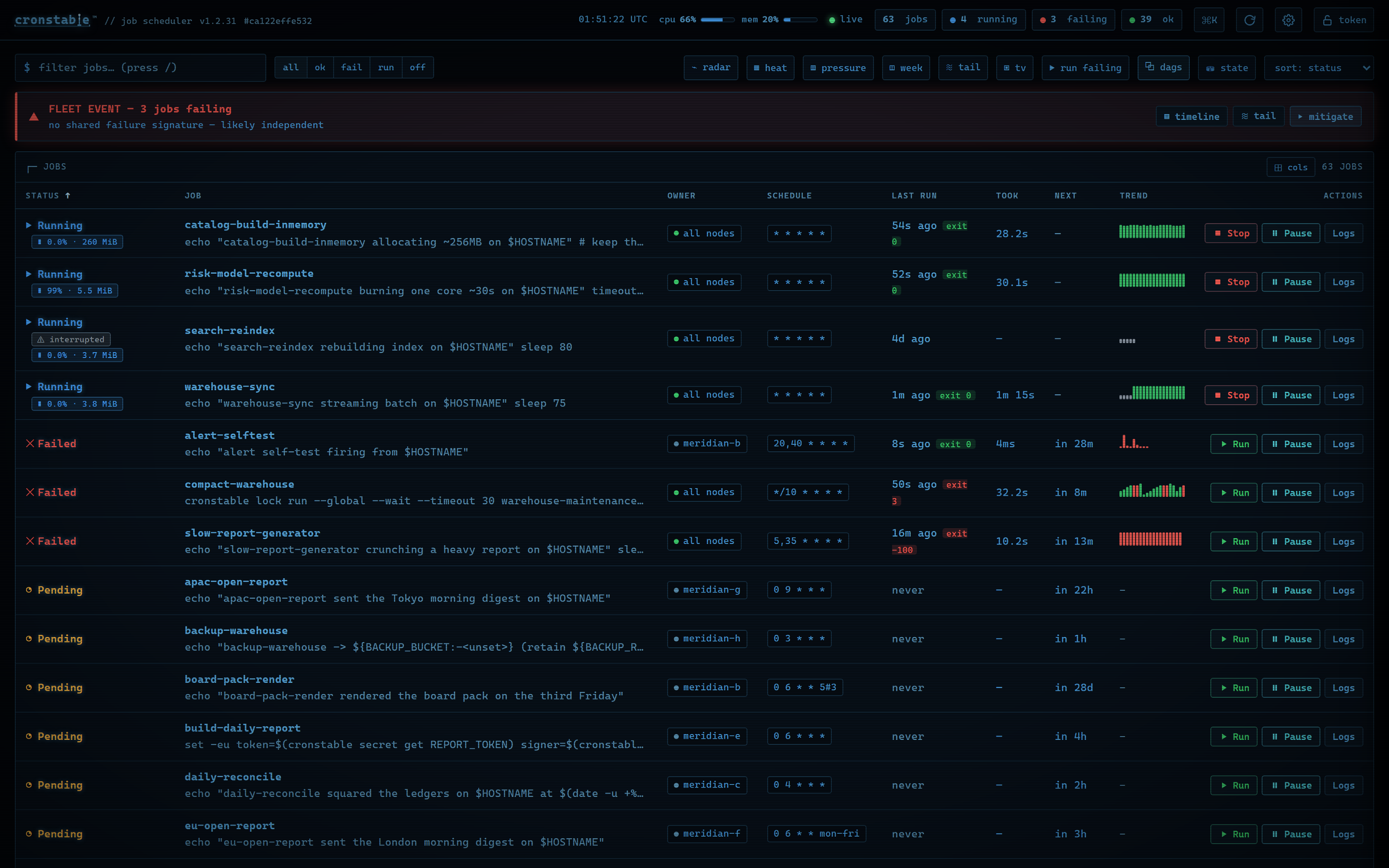
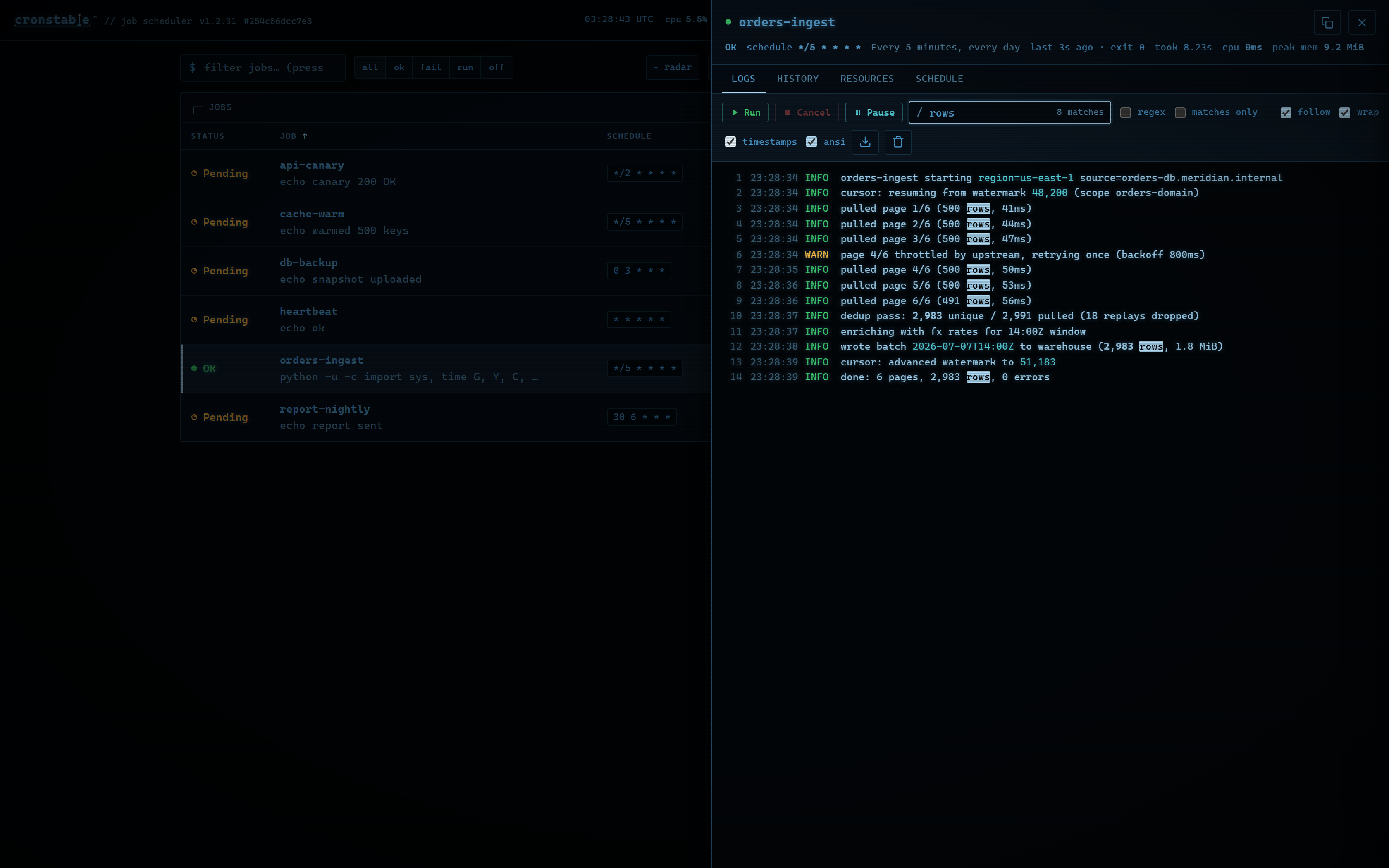
The overview shows each job's status, upcoming runs, recent outcomes, and, when monitoring is on, resource usage. Open a job to follow its logs, review its run history, or inspect its schedule. You can also:
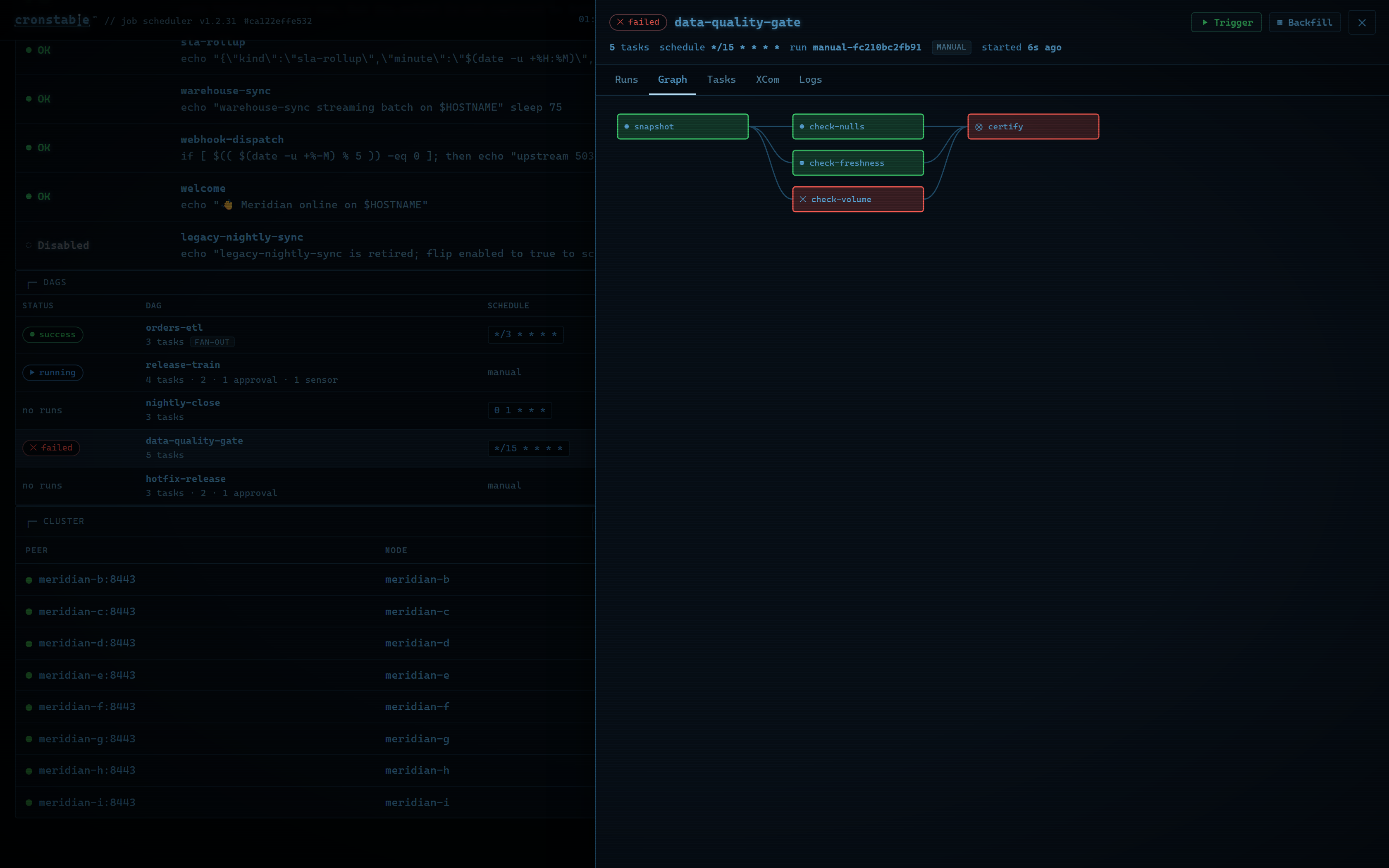
- Trigger workflows, follow their task graphs, and approve or reject approval gates.
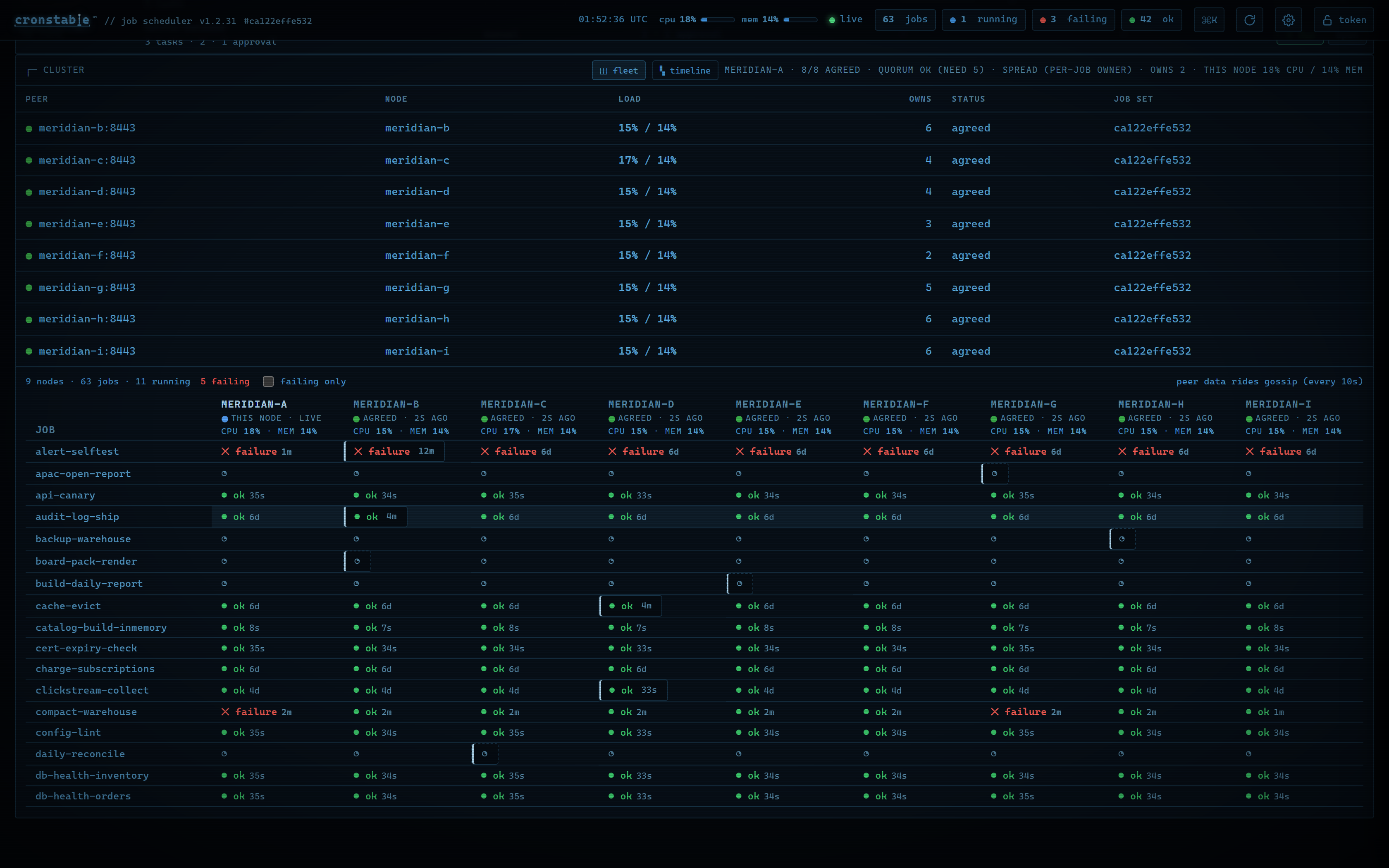
- Inspect cluster health and compare each job's runs across nodes.
- Investigate failures with an incident timeline and merged live logs.
- Use the wallboard, the activity heatmap, and the durable state inspector.
| Live logs | Workflow task graph | Fleet view |
|---|---|---|
 |  |  |
Press Ctrl-K or ⌘K for the command palette, ? for shortcuts, or Enter
to open the selected job. The dashboard has ten themes, adjustable fonts and UI
scale, color-vision-safe palettes, and reduced-motion support. It shows status
with text and symbols as well as color.
Run history and captured output stay in memory unless you enable the
durable state store,
which keeps run history across restarts. To also keep each run's captured
output, set archiveOutput: true on the job or under defaults:. For every
panel, shortcut, and setting, see the
web dashboard guide.
To try the dashboard with a varied set of demo jobs, run this command from a clone of this repository, and then open http://localhost:8080/:
docker compose up
The example gallery has larger setups, including a three-node cluster and the nine-node grand tour.
Terminal dashboard
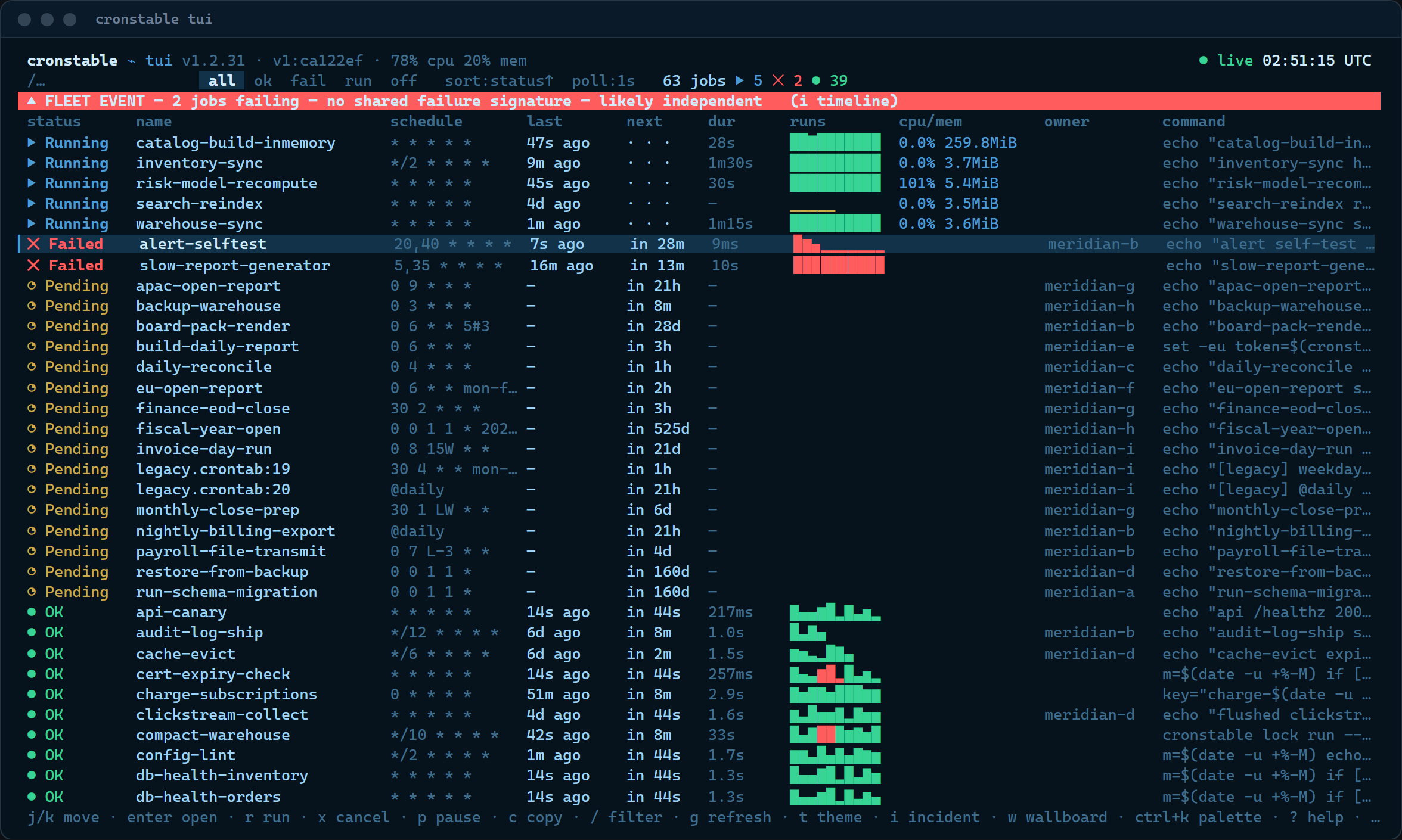
The cronstable tui command brings the dashboard to your terminal, including
over SSH and in tmux. It's a client of the same HTTP API, uses the web
dashboard's keyboard shortcuts, and has job logs, history, workflows, cluster
views, and incident tools.
cronstable tui                              # local daemon on port 8080
cronstable tui --url http://prod-node:8080  # remote daemon
cronstable tui --tv                         # open the wallboard
If the daemon requires a token, set the
CRONSTABLE_WEB_TOKEN environment variable, or name another variable with
--token-env. Use --job to open a job's details at startup, or --ascii
when your terminal font lacks the status symbols. For all options, panels, and
themes, see the
terminal dashboard guide.
iOS app
Cronstable for iPhone and iPad
The on-call companion and native dashboard for your cronstable servers.
The app connects directly to your servers over the LAN, Tailscale, or HTTPS, and receives encrypted push alerts. It needs no account or sign-up, has no analytics or ads, and keeps access tokens in the device Keychain.
The app includes these features:
- Alerts for failed runs, SLA breaches, workflow failures, and approval gates. Each alert is sealed to the device's key before it leaves your server, and you can approve or reject a gate from the lock screen.
- The jobs board, run history, live log tails, workflow runs, run trends, CPU and memory charts, and node and cluster views.
- Schedule tools: pressure heatmaps, duplicate detection, a cron expression sandbox, and an answer to "why did this run?"
- Home Screen widgets for fleet health, and your job schedule as a calendar subscription.
Push notifications are optional. Without the push reporter, the app polls
your servers directly, every 1 to 300 seconds.
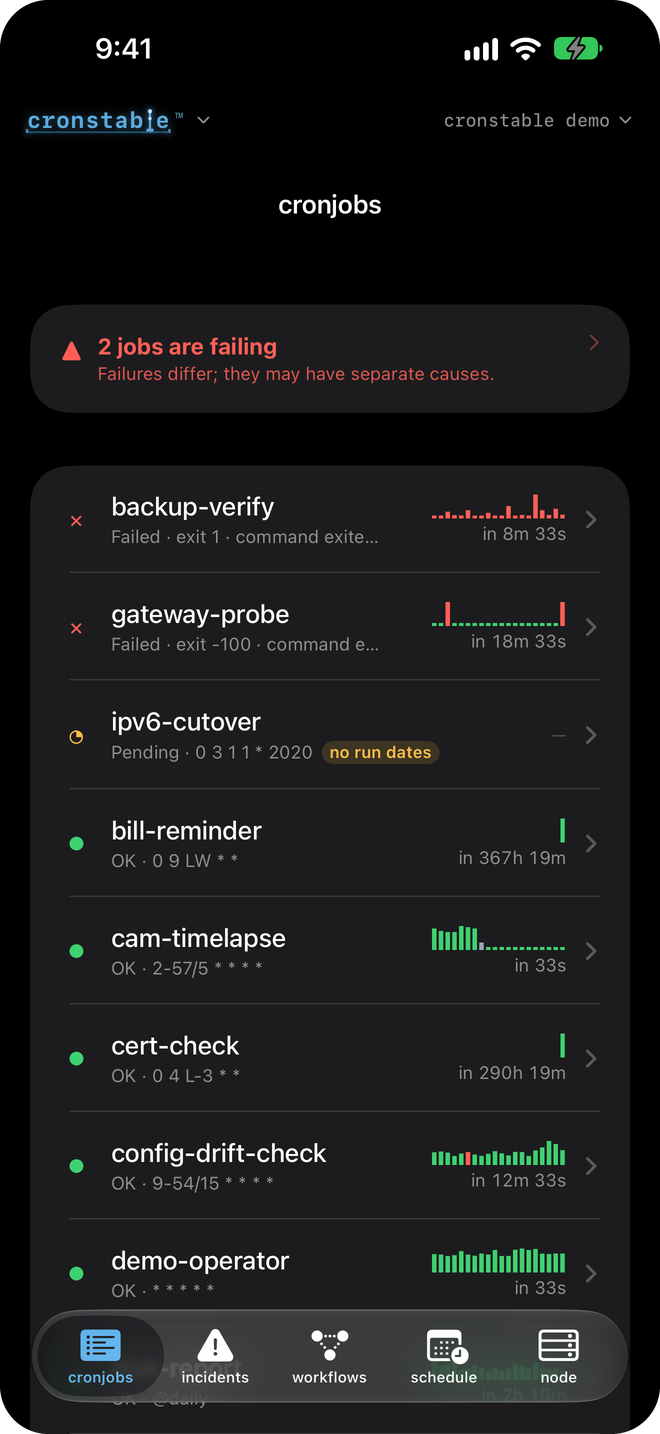
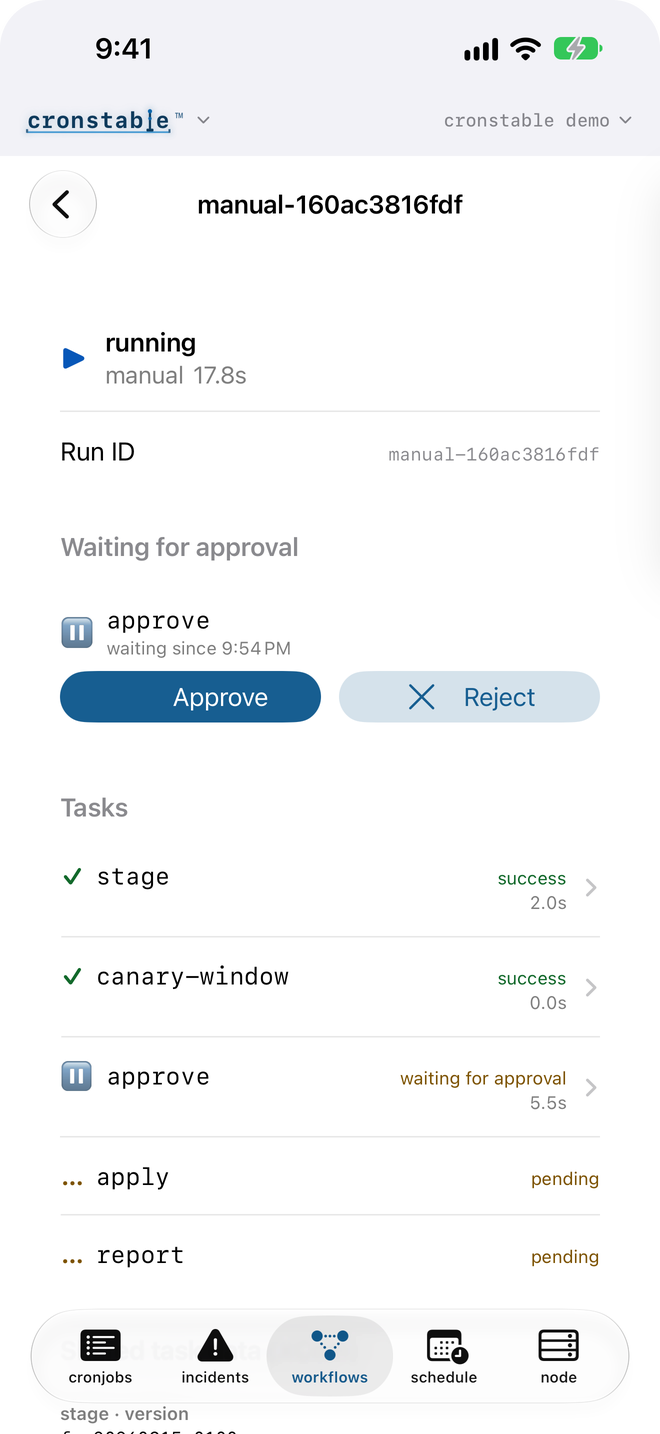
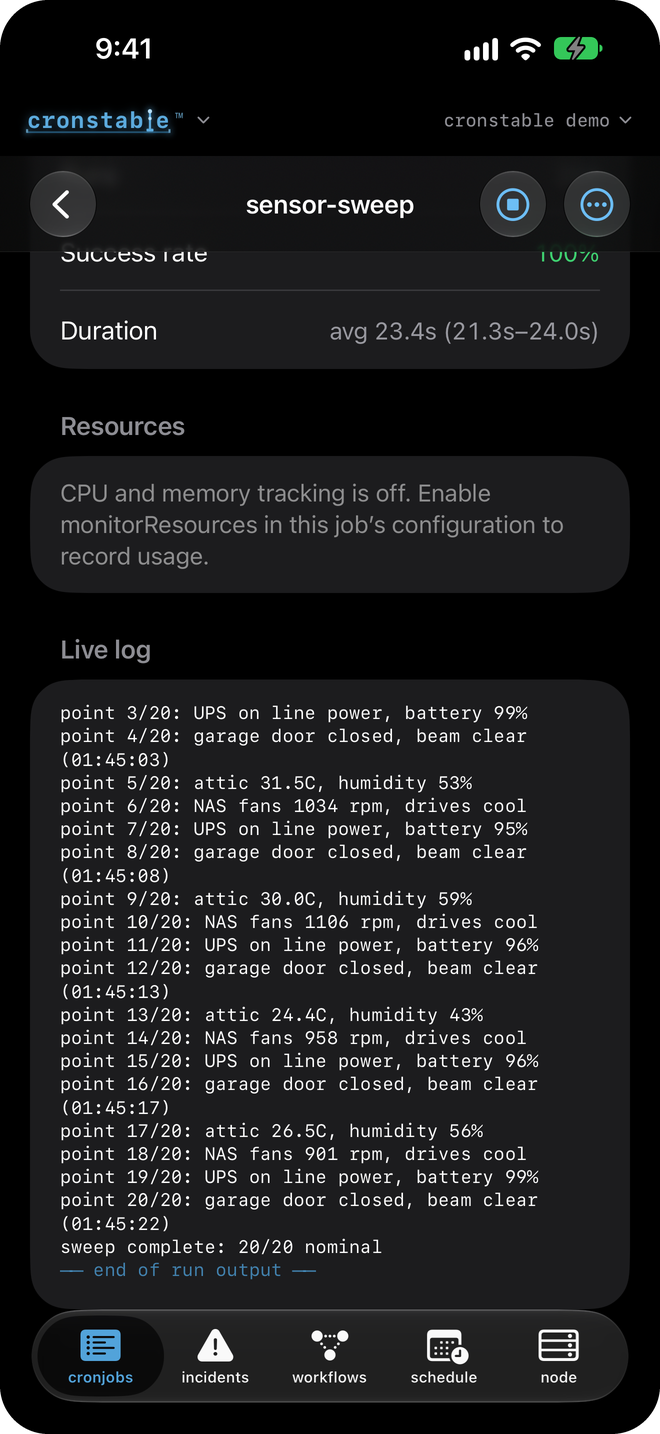
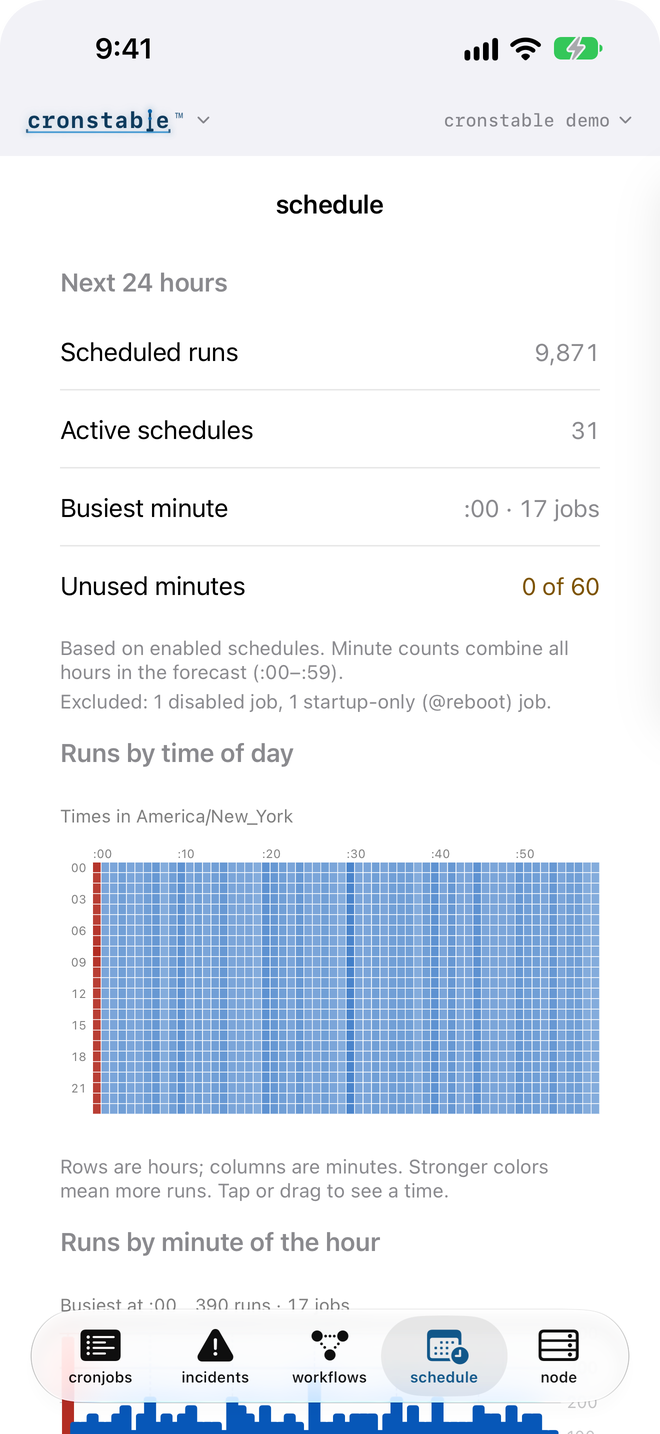
Jobs board · Approval gates · Live log tail · Schedule pressure
To connect the app to a server, follow these steps:
- Install Cronstable from the App Store.
- Enable the HTTP API on an address that your phone can reach,
such as a LAN, Tailscale, or HTTPS address, and
require a token. A phone can't reach
127.0.0.1. - Open the web dashboard at that address.
- In the command palette (
Ctrl-Kor⌘K) or in settings, select Pair a device. - Scan the QR code with the phone's camera, or tap Scan QR code in the app. The QR code contains the page's address and its access token, so pair over HTTPS or a trusted network, and give the phone a scoped token instead of the all-scopes token.
- To get lock-screen alerts, enable the
pushreporter.
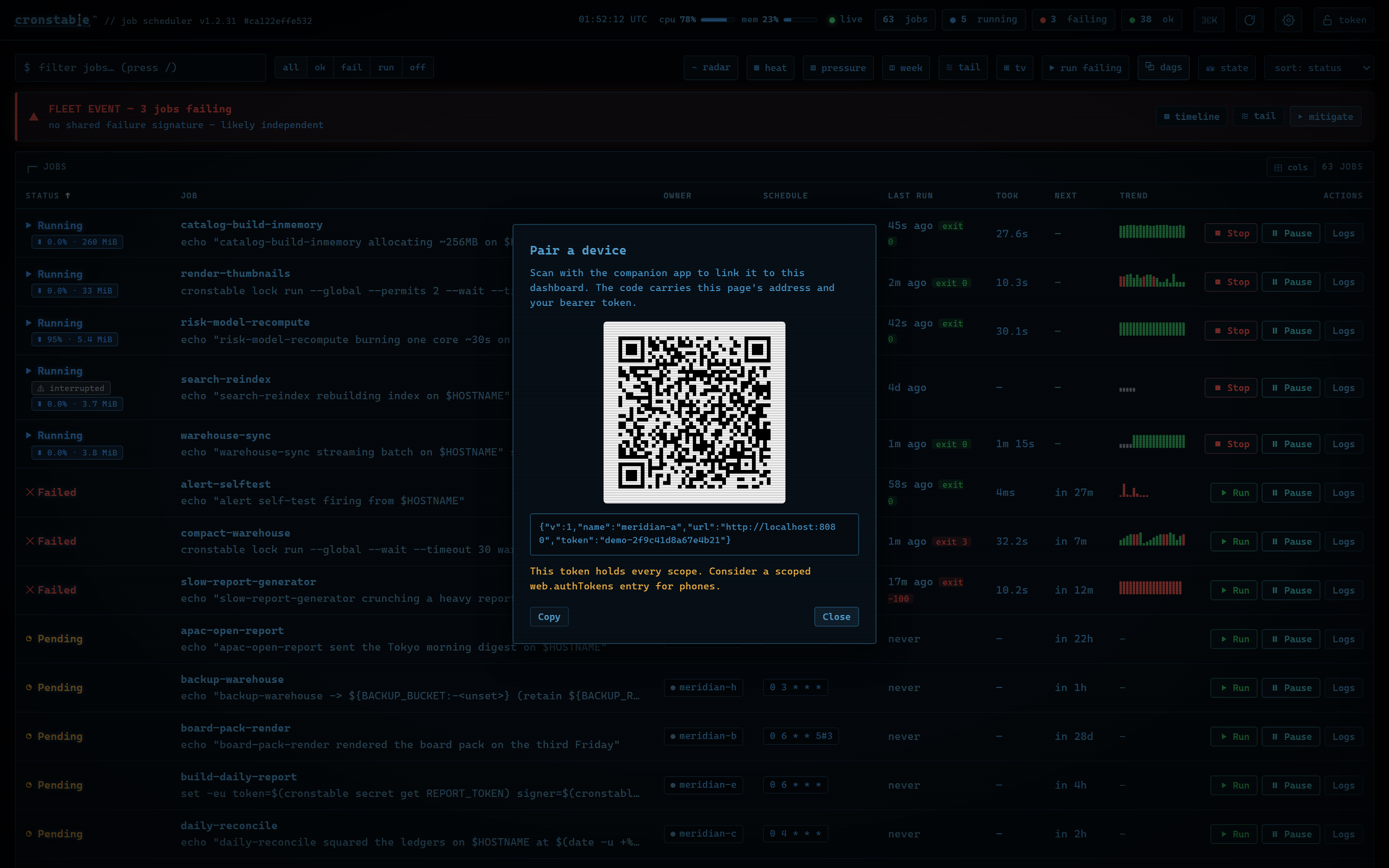
The QR code is a deep link. If the app isn't installed, scanning it opens a page that explains how to get the app.
To let the app find the daemon without a typed address, install the
discovery extra and set web.bonjour: true. The daemon then advertises the
API as a _cronstable._tcp mDNS service on the local network, and the app
lists it under Find nearby servers (see
LAN discovery). To
explore the app before you set up a server, tap Try the demo on the welcome
screen to connect to a live sample fleet.
The app is optional. The web and terminal dashboards, the API, and every other reporter work without it.
Pair from the terminal
To pair on a server that runs the API without the dashboard page
(web.ui: false), or from a shell with no browser, run cronstable pair. It
prints the same QR code in the terminal:
export CRONSTABLE_WEB_TOKEN=phone-token-value          # the token the phone gets
cronstable pair                                        # local daemon on port 8080
cronstable pair --public-url https://cron.example.net  # the address the phone uses
The code contains the token that the command presents, so give the command the
phone's scoped token.
When --url is a loopback address, the command puts the host's LAN address in
the code if the daemon answers there. Pass --public-url when the phone uses
another address, such as a reverse proxy's. In the
terminal dashboard, Pair a device (QR) in the
command palette shows the same code. For the options and the terminal size the
code needs, see
pairing from the terminal.
Tutorials
These four short walkthroughs build on the quick start
configuration. Each example passes cronstable --validate-config: add it to
your quick start file and replace the example commands with your own. Each
tutorial links to the wiki page that covers its topic in full.
Tutorial 1: Retry failed jobs and alert when retries fail
This example retries a failed job with exponential backoff, and it posts to a Slack channel only if the job still fails after its last retry:
jobs:
  - name: nightly-backup
    command: /usr/local/bin/backup --incremental
    schedule: "0 3 * * *"
    captureStderr: true            # include stderr in the report
    onFailure:
      retry:
        maximumRetries: 5
        initialDelay: 5            # waits 5s, 10s, 20s, 40s, then 80s
        maximumDelay: 300          # no single wait exceeds 300s
        backoffMultiplier: 2
    onPermanentFailure:            # fires once, after the last retry fails
      report:
        webhook:
          url:
            fromEnvVar: SLACK_WEBHOOK_URL
By default, a job fails when it exits with a nonzero status or writes to a
captured stderr. To change that for a job, use
failsWhen. The webhook's default body is
Slack-compatible, and Mattermost and Teams accept it as is. Email, Sentry, and
shell command reports each take one more block. Email and Sentry reports use
Jinja2 templates over the run's name, output, and exit code, and a shell
command receives the same details as CRONSTABLE_* environment variables. For
details, see
failure detection and retries
and reporting in the
wiki.
Tutorial 2: Survive restarts, catch up what was missed
By default, cronstable keeps no state across restarts. To handle a deploy or a
reboot in the middle of a schedule, add a state: block:
state:
  path: ./cronstable-state         # a local directory, or a shared mount for a fleet

jobs:
  - name: hourly-invoice-emit
    command: python -m billing.emit_hourly
    schedule: "0 * * * *"
    onMissed: run-all              # replay each hour missed while the daemon was down
    startingDeadlineSeconds: 21600 # skip missed runs older than 6 hours
    onFailure:
      retry:
        maximumRetries: 10
        initialDelay: 30
        maximumDelay: 600
        backoffMultiplier: 2
Setting state.path alone has these effects:
- Run history survives restarts, and the dashboard reloads it.
- Pending retries resume at their original deadlines.
@rebootruns once per boot instead of once per daemon start.- Prometheus counters keep their values across restarts.
The onMissed setting adds catch-up. run-once combines any number of missed
runs into one launch, and run-all replays each missed run.
startingDeadlineSeconds limits how old a missed run can be. Catch-up applies
after a restart, and also when the daemon resumes after system sleep or a long
stall.
The same store gives job commands persistent storage and coordination tools
through a loopback endpoint: key-value storage, cursors, fleet-wide locks,
idempotency keys, artifacts, and run-scoped secrets. Commands use them through
the cronstable state, cursor, lock, idempotent, artifact, and
secret subcommands. For details, see
durable state.
Tutorial 3: Your first DAG, a durable pipeline
A dags: block defines a durable workflow as a directed acyclic graph (DAG) of
tasks. This example runs a build, waits for a person to approve it, and then
publishes:
state:
  path: ./cronstable-state         # DAGs live on the state store

dags:
  - name: release-train            # no schedule: manual-only
    tasks:
      - id: build
        command: make dist
      - id: approve
        type: approval             # waits for approval
        dependsOn:
          - build
      - id: publish
        dependsOn:
          - approve
        command: make publish
        retries: 2                 # task-level retries, DAG-owned
        retryDelaySeconds: 60
Trigger the DAG and approve the gate, or click Approve in the dashboard's DAG drawer instead:
curl -X POST http://127.0.0.1:8080/dags/release-train/trigger
# -> {"dag": "release-train", "runKey": "manual-..."}
curl -X POST http://127.0.0.1:8080/dags/release-train/runs/<runKey>/tasks/approve/decision \
     -H 'Content-Type: application/json' -d '{"decision": "approve", "by": "alice"}'
The state store records workflow progress, so the daemon can resume a run after a restart. Across a fleet, a lease coordinates which node advances each run. Recovery can retry an interrupted task even if its earlier process is still running, so make task side effects safe to repeat, for example with an idempotency key.
Scheduled DAGs also support catch-up and backfill over a date range. Tasks
can pass data with cronstable xcom push and cronstable xcom pull, fan out
over a list that an upstream task produced, and poll for conditions with
type: sensor. For details, see
orchestration and DAGs.
Tutorial 4: Coordinate two replicas
Run the same configuration on two or more hosts that share a POSIX mount. The hosts elect a leader through a fenced lease file, without certificates or a coordination service. The mount must support locks across hosts, and every host must keep its clock synchronized with NTP:
state:
  path: /mnt/shared/cronstable/state  # optional: durable state shared by the fleet

cluster:
  backend: filesystem
  filesystem:
    path: /mnt/shared/cronstable      # the mount is the election store
  electLeader: true                   # each node is named by its hostname

jobs:
  - name: charge-subscriptions
    command: python -m billing.charge
    schedule: "0 6 * * *"
    clusterPolicy: Leader             # the default: only the leader runs it
Only the elected leader starts scheduled Leader jobs. If the leader stops, a
follower can take over after the lease is released or expires, provided it can
reach the shared mount. The lease coordinates which node can start jobs; it
doesn't make job side effects exactly-once. Each job's clusterPolicy sets its
behavior when leadership can't be confirmed:
Leader: skips scheduled runs.PreferLeader: allows runs when the coordination store is unreachable, so multiple replicas can run the same job.EveryNode: runs the job on every node, for work that belongs on each node.
Without a shared mount, use another backend: gossip elects a leader over
mutual TLS with no shared store, kubernetes uses a coordination.k8s.io
Lease, and etcd uses a lease-bound key. To spread job ownership across the
fleet, use the gossip backend with distribution: spread. For details, see
clustering and leader election.
Example gallery
Every example in
example/ is a
self-contained, annotated project that you can run from a clone of this
repository. Each Compose file is in its example's folder, except for demo,
which uses the root docker-compose.yml. The following table lists the main
examples:
| Example | One command | What it shows |
|---|---|---|
demo | docker compose up | The dashboard playground: varied jobs, live logs, retries, a long-running job, and an on-demand job. |
grand-tour | docker compose -f example/grand-tour/docker-compose.yml up --build | Everything at once: a 9-node mTLS cluster, shared durable state, five DAG patterns, second-level probes, and all five cross-platform reporters connected to live sinks. |
cluster | docker compose -f example/cluster/docker-compose.yml up | A 3-node gossip cluster: peer attestation, quorum, leader election, and live failover. |
cluster-large | docker compose -f example/cluster-large/docker-compose.yml up | A 10-node, CPU-heavy fleet for watching distribution: spread and the load meters. |
dag | cronstable -c example/dag | Orchestration on a single node: dependencies, XCom, fan-out, a sensor, and an approval gate. |
dag-cluster | docker compose -f example/dag-cluster/docker-compose.yml up | DAGs coordinating across three nodes on one shared store, with leases and crash recovery. |
job-state | cronstable -c example/job-state | The state primitives for jobs: key-value storage, cursors, locks, idempotency keys, artifacts, and secrets. |
mcp | docker compose -f example/mcp/docker-compose.yml up --build | The MCP server: an AI agent (Claude, Cursor, Copilot) observing and driving the scheduler over POST /mcp, or the cronstable mcp stdio bridge. |
pulse-monitor | docker compose -f example/pulse-monitor/docker-compose.yml up | Second-level scheduling as a real-time uptime and SLA monitor. |
pulse-cluster | docker compose -f example/pulse-cluster/docker-compose.yml up | The same probes spread across a 3-node cluster with leader election. |
zen-demo | docker compose -f example/zen-demo/docker-compose.yml up | A deliberately calm board, for the wallboard's zen screensaver. |
crontab | cronstable -c example/crontab | Five-field user crontabs alongside YAML jobs. |
kubernetes | kubectl apply -f example/kubernetes/deployment.yaml | Leader election through a coordination.k8s.io/v1 Lease. |
etcd | docker compose -f example/etcd/docker-compose.yml up | Leader election through an etcd lease, over plain HTTP. |
docker | docker build -t cronstable-example example/docker | The minimal "add cronstable to your own image" recipe. |
Configuration
Configuration basics
cronstable reads its configuration from YAML files. Pass a file or a directory
with -c:
cronstable -c /etc/cronstable.d
From a directory, cronstable reads every *.yaml and *.yml file and every
classic crontab (*.crontab, *.cron, or a file named crontab), and skips
names that start with _ or .. Without -c, cronstable reads
/etc/cronstable.d on POSIX systems (for Windows, see Windows).
cronstable init writes a commented starter configuration to that default
location, which needs root; cronstable init DIRECTORY writes it elsewhere.
cronstable runs in the foreground and logs to stdout and stderr, so run it
under a supervisor such as systemd or a container runtime. About once a minute,
it checks the configuration for changes and applies them without a restart. To
reload immediately, send it SIGHUP. If a changed configuration is invalid,
cronstable logs the error and keeps running the previous jobs. To check a
configuration without starting the scheduler, run
cronstable --validate-config -c <path>.
Each job needs a name, a command, and a schedule. This job runs every 5
minutes:
jobs:
  - name: test-01
    command: echo "foobar"
    shell: /bin/bash
    schedule: "*/5 * * * *"
A string command runs through a shell: /bin/sh by default, or the job's
shell, which is /bin/bash in the preceding example. A list command runs
directly, without a shell, and each item becomes one argument:
jobs:
  - name: test-01
    command:
      - echo
      - foobar
    schedule: "*/5 * * * *"
For every option, see the configuration reference.
Schedules
A string schedule uses crontab syntax, which cronstable's built-in cron
engine parses. It accepts five, six, or seven fields:
- Five fields:
minute hour day-of-month month day-of-week, as in classic cron. - Six fields: the classic five, plus a trailing
year. - Seven fields: a leading
second, the classic five, and a trailingyear(see second-level schedules).
Fields accept ranges, steps, lists, names such as jan and mon, and
Quartz's ? on its own in a day field. cronstable also supports these forms:
Lalone in the day-of-month field for the month's last day, andL5in the day-of-week field for the month's last Friday.- Business-day forms:
LWfor the month's last weekday,L-3for three days before the month's last day,15Wfor the weekday nearest the 15th, and5#3for the third Friday (see business-day schedules). H, which picks a stable value from a hash of the job's name, so a fleet of hourly jobs spreads across the hour instead of all starting at:00(see hashed schedules).- Nicknames such as
@hourlyand@daily, and@reboot, which runs the job once when cronstable starts.
A six-field expression reads its sixth field as a year. If that field can't be
a year, as in a Quartz expression that ends in ?, cronstable reports an error
that explains how to convert it. A Quartz expression that ends in *, such as
0 15 10 * * *, is valid but means something else here, so check converted
expressions with GET /schedule/preview. For the full syntax, see
schedules and time zones.
The schedule option can also be an object. This job runs every 5 minutes on
July 19 each year:
jobs:
  - name: test-01
    command: echo "foobar"
    schedule:
      minute: "*/5"
      dayOfMonth: 19
      month: 7
      dayOfWeek: "*"
Second-level schedules
Schedules have one-minute granularity by default. To run a job at one-second
granularity, write a seven-field crontab string whose first field is the
second, or use the object form with a second: property. Both of these jobs
run every 15 seconds, at seconds 0, 15, 30, and 45 of every minute:
jobs:
  - name: every-15s-string
    command: echo "tick"
    schedule: "*/15 * * * * * *"   # 7 fields: the leading field is seconds
  - name: every-15s-object
    command: echo "tick"
    schedule:
      second: "*/15"
The seconds field accepts the same syntax as the other fields, so
second: "*" runs a job every second. While any enabled job uses seconds, the
scheduler wakes once per second instead of once per minute, and minute-level
jobs still run once in their scheduled minute. Second-level schedules are
available only in YAML; classic crontab files keep
cron's five fields.
For a runnable example, see
example/pulse-monitor,
a small uptime and SLA monitor that probes a service every few seconds, and its
three-node version,
example/pulse-cluster.
Time zones
cronstable interprets schedules in UTC by default. To interpret a job's
schedule in a specific time zone, set timezone. The following job runs every
day at 19:27 in Los Angeles:
jobs:
  - name: test-01
    command: echo "hello"
    schedule: "27 19 * * *"
    timezone: America/Los_Angeles
    captureStdout: true
To use the machine's local time instead, set utc: false.
Job environment
To set environment variables for the command, use the environment option. To
load them from a file, use env_file:
jobs:
  - name: test-01
    command: echo "foobar"
    shell: /bin/bash
    schedule: "*/5 * * * *"
    env_file: .env
    environment:
      - key: PATH
        value: /bin:/usr/bin
The file contains one KEY=VALUE pair per line. cronstable ignores empty lines
and lines that start with #. Variables in the environment option override
variables from env_file.
Classic crontab files
cronstable reads five-field user crontabs in the classic Vixie format. Export
your crontab and pass the file to -c:
crontab -l > my.crontab
cronstable -c my.crontab
System crontabs such as /etc/crontab and files in /etc/cron.d contain an
extra user column that cronstable doesn't parse. To preserve per-job users,
convert these entries to YAML and set each job's
user field. If all jobs should run as the
daemon's user, remove the user column from a copy of the file instead.
You can also put files named *.crontab, *.cron, or crontab in a
configuration directory next to YAML files, or load them with
include. For example, a user crontab can contain:
SHELL=/bin/bash
PATH=/usr/local/bin:/usr/bin:/bin

# m h dom mon dow command
*/15 * * * *  /usr/local/bin/backup --incremental
30 4 * * mon-fri  /usr/local/bin/report --daily
@daily  /usr/local/bin/rotate-logs
0 0 * * *  pg_dump mydb > /backup/mydb-$(date +\%F).sql
Comments, NAME=value environment lines, nicknames such as @reboot and
@daily, and \% escapes all work as described in man 5 crontab. An
environment line applies to the entries after it, and cronstable honors SHELL
and CRON_TZ. Each entry becomes an ordinary cronstable job named
<file>:<line>, with cronstable's standard defaults rather than an emulation
of cron's environment:
- Schedules run in UTC unless the crontab sets
CRON_TZ. - A run fails when it exits with a nonzero status or writes to stderr.
cronstable doesn't send
MAILTOmail. - An unescaped
%, which cron passes to the command as standard input, causes an error when the file loads.\%still produces a literal%.
To give an entry retries, reporting, timeouts, or any other per-job option,
move it to YAML. For the full mapping and every difference from cron, see
classic crontabs
in the wiki. For a runnable example, see
example/crontab,
a configuration directory that combines a crontab with YAML jobs and the
dashboard.
Defaults
A defaults section sets default values for the jobs in the same file, and
each job can override them:
defaults:
  environment:
    - key: PATH
      value: /bin:/usr/bin
  shell: /bin/bash
  utc: false

jobs:
  - name: test-01
    command: echo "foobar"         # runs with /bin/bash
    schedule: "*/5 * * * *"
  - name: test-02
    command: echo "zbr"
    shell: /bin/sh                 # overrides the default shell
    schedule: "*/5 * * * *"
In a configuration directory, each file's defaults section applies only to the
jobs in that file. To share defaults across files, use includes.
Includes
The include option takes a list of files, which cronstable parses and merges
into the current configuration. It's how several files share defaults and
other settings. For example, this is the main configuration:
include:
  - _inc.yaml

jobs:
  - name: my-job
    ...
The shared defaults live in _inc.yaml:
defaults:
  shell: /bin/bash
  onPermanentFailure:
    report:
      sentry:
        ...
A directory load skips files whose names start with _, so _inc.yaml applies
only where a file includes it. For the merge rules, see
includes, defaults, and multi-file config.
Environment variable interpolation
Any string value in the configuration can read cronstable's environment
variables with ${VAR}, or with ${VAR:-default} to set a fallback. One
configuration file can then serve many environments without a wrapper script
that templates it. To write a literal $, use $$.
Interpolation runs after the file is validated, so it works in any string
field, such as a listen address, a state path, a time zone, or a webhook URL.
If a ${VAR} is unset and has no default, cronstable reports a configuration
error that names the variable, and cronstable --validate-config catches it.
web:
  listen:
    - "http://0.0.0.0:${WEB_PORT:-8080}"   # port from the environment, default 8080
state:
  path: ${STATE_DIR}                       # required: unset fails --validate-config
jobs:
  - name: rollup-${REGION}                 # required, like STATE_DIR
    command: run-rollup                     # ${VAR} in a command is left for the shell
    schedule:
      minute: "0"
    timezone: ${TZ:-UTC}
cronstable doesn't interpolate the command and shell of jobs and reporters,
so the shell expands their ${VAR} references at run time against the job's
own environment, not the daemon's. It also leaves the logging section for
Python's logging.config. For the full rules, including how interpolation
affects the job-set ID, see
environment variable interpolation.
Disable a job
Jobs are enabled by default. To disable a job, add enabled: false. cronstable
validates disabled jobs but doesn't run them.
jobs:
  - name: test-01
    enabled: false                 # skipped until you set this to true
    command: echo "foobar"
    shell: /bin/bash
    schedule: "* * * * *"
Custom logging
To customize cronstable's own logs, add a logging section in the format of
Python's
logging.config dictionary schema.
For example, the following configuration adds a timestamp to each log line:
logging:
  version: 1
  disable_existing_loggers: false
  formatters:
    simple:
      format: '%(asctime)s [%(processName)s/%(threadName)s] %(levelname)s (%(name)s): %(message)s'
      datefmt: '%Y-%m-%d %H:%M:%S'
  handlers:
    console:
      class: logging.StreamHandler
      level: DEBUG
      formatter: simple
      stream: ext://sys.stdout
  root:
    level: INFO
    handlers:
      - console
For more, see logging configuration.
Schedule introspection
cronstable answers questions about its own schedule. Each of these features has its own wiki page:
- Why didn't it run:
GET /schedule/why?job=<name>&at=<timestamp>shows, field by field, how the scheduler's match test evaluates one job at one moment. For a job scheduled0 9 * * mon,fri, asking about a Tuesday at 09:00 returns"matches": falsewithday-of-weekas the failed field, plus the job's nearest runs before and after that moment (Why Didn't It Run?). - Schedule linting: when cronstable loads the configuration, it flags valid
expressions that probably don't mean what they say. Examples include an
expression with no future occurrence, a schedule that sets both day of month
and day of week,
*/nsteps that don't divide evenly, and wall-clock times that daylight saving time skips or repeats. Findings appear on/jobsand/status, andGET /schedule/previewchecks any expression before it becomes a job (Schedule Linting). - Schedule pressure:
GET /schedule/pressuregroups the next 24 hours of scheduled runs into a collision heatmap, which both dashboards display (Schedule Pressure). - Duplicate detection:
GET /schedule/duplicatesgroups jobs whose schedules run at exactly the same times, even when the expressions are written differently (Duplicate Schedule Detection). - Suggest a slot:
GET /schedule/suggestrecommends the least busy time for a new job, based on the fleet's actual runs (Suggest a Slot).
Job behavior
Failure detection and retries
By default, a run fails when the process exits with a nonzero status, or when it
writes to stderr, which cronstable captures unless the job sets
captureStderr: false. To change what counts as a failure, set the Boolean
fields of the job's failsWhen option:
| Field | Default | When true |
|---|---|---|
nonzeroReturn | true | A nonzero exit status fails the run. |
producesStderr | true | Output on a captured stderr fails the run. |
producesStdout | false | Output on a captured stdout fails the run. |
always | false | Every run fails, whatever its exit status or output. |
A retry block inside onFailure retries a failed run with exponential
backoff. The onPermanentFailure hook runs only after the last retry fails:
jobs:
  - name: test-01
    command: |
      echo "hello" 1>&2
      exit 10
    schedule:
      minute: "*/10"
    captureStderr: true
    onFailure:
      retry:
        maximumRetries: 10
        initialDelay: 1
        maximumDelay: 30
        backoffMultiplier: 2
    onPermanentFailure:
      report:
        mail:
          from: cron@example.com
          to: ops@example.com
          smtpHost: 127.0.0.1
The first retry waits initialDelay seconds, and each later wait is multiplied
by backoffMultiplier, up to maximumDelay. To retry forever, set
maximumRetries: -1, for example to restart a long-running @reboot process
whenever it fails. Pending retries stay in memory unless you configure a
state: section, which lets them resume after a restart. To check a job's
output before recording success, see
result verification.
For details, see
failure detection and retries
in the wiki.
Late-run detection (SLA monitoring)
Failure hooks only see runs that happened. To detect runs that are late,
missing, or taking too long, add an sla: block. Each job can set up to three
independent thresholds, and an in-process monitor checks them once per minute.
When a threshold is breached, the onLate hook runs once. It takes the same
report block as onFailure:
jobs:
  - name: nightly-etl
    command: python -m etl.run
    schedule: "0 4 * * *"
    sla:
      maxTimeSinceSuccessSeconds: 129600   # no success for 36 hours
      lateAfterSeconds: 900                # a due run hasn't started within 15 minutes
      maxRuntimeSeconds: 7200              # a run is still going after 2 hours
    onLate:
      report:
        webhook:
          url:
            fromEnvVar: SLACK_WEBHOOK_URL
Each breach produces one report, not one per minute. When the check clears,
cronstable logs a recovery line and sends no report. maxRuntimeSeconds only
observes a run and never stops it; to enforce a limit, use
executionTimeout. The monitor skips paused and disabled
jobs. Under leader election, only the node that owns the job checks it, so each
breach sends a single alert.
Breaches appear as an OVERDUE badge in both dashboards, as an sla object
on GET /jobs, and as the cronstable_job_late{job_name, check} and
cronstable_job_sla_breaches_total{job_name, check} metrics. The monitor runs
inside the daemon, so it can't report that the daemon itself has stopped; pair
it with an external Prometheus staleness alert. For details, see
late-run detection
in the wiki.
Concurrency
If a job is still running when its next run is due, concurrencyPolicy
decides what happens:
Allow(default): starts the new run alongside the running one.Forbid: skips the new run.Replace: cancels the running job and starts the new run in its place.
The policy applies on each node. On a cluster that shares a state: store, set
concurrencyScope: cluster to apply Forbid and Replace across nodes. To
limit how many runs of several jobs can happen at once, use a
resource pool. For
details, see
concurrency and timeouts.
Execution timeout
To stop a job after a set number of seconds, set executionTimeout. When
cronstable stops a job, it first asks the job to exit, waits up to
killTimeout seconds (30 by default), and then forces it to stop. On POSIX
systems, the request is SIGTERM to the job's process group, followed by
SIGKILL. On Windows, it's CTRL_BREAK_EVENT, followed by ending the job's
process tree. The same steps apply when concurrencyPolicy: Replace or a
cancel request stops a job.
The following job would take 10 seconds to finish. After one second,
cronstable sends SIGTERM to its process group. The shell and its sleep
child both ignore the signal, so cronstable sends SIGKILL half a second
later:
jobs:
  - name: test-03
    command: |
      trap '' TERM
      echo "starting..."
      sleep 10
      echo "all done."
    schedule:
      minute: "*"
    captureStderr: true
    executionTimeout: 1            # in seconds
    killTimeout: 0.5
Run as another user or group
The user field sets the user (UID or username) that a job's process runs as,
and the group field sets the group (GID or group name). If you set only
user, the group defaults to that user's primary group. For example:
jobs:
  - name: test-03
    command: id
    schedule:
      minute: "*"
    captureStderr: true
    user: www-data
To switch users, cronstable must run as root. This feature relies on setuid
and setgid, so it's available only on POSIX systems. On Windows, cronstable
rejects a job that sets user or group with a configuration error.
Working directory
By default, a job starts in cronstable's own working directory. To start it in
a different directory, set workingDirectory. This matters most on Windows,
where an elevated console starts the daemon in the system directory, so
relative paths in a script resolve to the wrong place. It's the equivalent of
the Start in box on a Task Scheduler action.
jobs:
  - name: nightly-import
    command: import.bat
    schedule:
      minute: "0"
      hour: "2"
    workingDirectory: C:\jobs\importer
cronstable expands ~ and ${VAR} in the path and makes it absolute when it
loads the configuration. The operating system checks that the directory exists
when the job starts, so a missing directory fails only that run instead of
rejecting the whole configuration. You can also set workingDirectory in a
defaults: block and on a DAG task. For details, see
commands and environment.
Process priority
The priority option sets a job's CPU scheduling priority relative to the
other processes on the machine: idle, below-normal, normal (the default),
above-normal, or high.
jobs:
  - name: nightly-reindex
    command: reindex.sh
    schedule:
      minute: "0"
      hour: "3"
    priority: idle
On POSIX systems, cronstable renices the job's process group right after it
starts the job: idle is nice 19, and high is nice -10. Raising the priority
requires privileges; if the change is denied, the job runs at its inherited
priority. On Windows, the level becomes the process's priority class. Child
processes inherit a lowered priority on both platforms, but on Windows, the
children of an above-normal or high job start at normal priority. The
default, normal, leaves the inherited priority unchanged. For details, see
commands and environment.
Resource monitoring
To find out which jobs use the most CPU and memory, turn on per-job resource
accounting. Set monitorResources: true on a job, as in the following example,
or under defaults: to cover every job:
jobs:
  - name: nightly-model-refresh
    command: python -m models.refresh
    schedule: "0 4 * * *"
    monitorResources: true
While the job runs, cronstable uses psutil
to sample its whole process tree, including child processes. When the run ends,
cronstable records its total CPU time and peak resident memory. The dashboard
shows the numbers live on the job's row, per run in the History tab, and as
charts in the Resources tab. They also appear in GET /jobs/{name}/runs, in
Prometheus metrics such as cronstable_job_cpu_seconds_total, and in report
templates, so a failure alert can show how large the run was. With a
state store, they
survive restarts.
Resource monitoring only observes: it never changes whether a run succeeds or fails. It's off by default and adds no overhead when it's off. Because the numbers are sampled, figures for short runs are approximate. To tune the sampling interval and chart history, or to monitor DAG tasks and whole nodes, see resource monitoring.
Reporting and metrics
Reporting
cronstable has six built-in reporters: sentry, mail, shell, webhook
(Slack-compatible with no extra configuration), push (see
push notifications), and eventlog (see
Windows Event Log). Each reporter can run on the
onFailure, onPermanentFailure, onSuccess, and onLate hooks. The mail
subject and body and the Sentry body are Jinja2 templates that can use the
run's outcome and captured output. Secrets such as DSNs, passwords, and webhook
URLs can come from value, fromFile, or fromEnvVar:
jobs:
  - name: test-01
    command: |
      echo "hello" 1>&2
      exit 10
    schedule:
      minute: "*/2"
    captureStderr: true
    onFailure:
      report:
        sentry:
          dsn:
            fromEnvVar: SENTRY_DSN
        mail:
          from: cron@example.com
          to: ops@example.com
          smtpHost: 127.0.0.1
          subject: Cron job '{{name}}' failed
          body: |
            {{stderr}}
            (exit code: {{exit_code}})
        shell:
          shell: /bin/bash
          command: echo "Error code $CRONSTABLE_RETCODE"
        webhook:
          url:
            fromEnvVar: SLACK_WEBHOOK_URL
A report includes the output streams that the job captures. captureStderr is
on by default, and captureStdout is off. For the capture options, including
the streamPrefix line prefix, see
output capturing.
For every reporter's options, including HTML mail, Sentry fingerprints, webhook
examples for other services, the template variables, and the shell reporter's
CRONSTABLE_* environment variables, see
reporting in the wiki.
Push notifications
The push reporter sends end-to-end encrypted alerts to devices paired with the
iOS app. Before an alert leaves your server, the daemon seals it to
the device's public key. Where the platform supports it, the seal uses X-Wing,
a post-quantum hybrid of ML-KEM-768 and X25519; elsewhere it uses an X25519
sealed box. The hosted relay forwards each alert to the Apple Push Notification
service (APNs) and sees only ciphertext and routing metadata. It never sees job
names, hostnames, or log lines.
The reporter needs three things: the push extra
(pip install "cronstable[push]"), a daemon-wide push: section, and push
enabled on a reporting hook. If a configuration enables push without the extra
or the push: section, cronstable refuses to start instead of dropping alerts:
push:
  relay:
    url: https://relay.cronstable.com/
  devicesFile: /var/lib/cronstable/devices.json

defaults:
  onFailure:
    report:
      push:
        enabled: true
If you configure a state: section, you can omit devicesFile. The durable
store then keeps the pairings, and every node that shares it sees them. To pair
a device, follow the steps in iOS app. For the report options,
pairing through the API, revocation, size limits, and the relay trust model,
see push notifications
in the wiki.
Windows Event Log
On Windows, the eventlog reporter writes each outcome to the Application
event log, which Event Viewer, Windows Event Forwarding, SCOM, and SIEM
connectors read. It needs no extra. Each record has a stable event ID and a
fixed set of insertion strings for rules to match:
defaults:
  onFailure:
    report:
      eventlog:
        enabled: true
Get-WinEvent -FilterHashtable @{ LogName = 'Application'; ProviderName = 'cronstable'; ID = 1001, 1002 }
Jobs use event IDs 1000 (succeeded), 1001 (failed), 1002 (failed permanently),
and 1003 (overdue). Daemon and orchestration events use 1010 and 1011.
cronstable writes as an unregistered event source, so Event Viewer adds a
generic "description cannot be found" note to the rendered text. The XML view,
Get-WinEvent, forwarding, and SIEM connectors read every field normally. On
other platforms, the reporter does nothing, and cronstable says so once when it
loads the configuration. For the field tables and how to register the source,
see Windows Event Log
in the wiki.
Metrics
When the HTTP API is enabled, GET /metrics serves built-in
Prometheus metrics, so you don't need an exporter sidecar. They cover job run
outcomes, duration histograms, retries, next-run times, configuration reload
health, and cluster and leader election state, in both the Prometheus text
format and OpenMetrics. For the full metric reference, scrape configuration,
and example alert rules, see
metrics with Prometheus.
The daemon can also push per-job metrics to statsd:
jobs:
  - name: test01
    command: echo "hello"
    schedule: "* * * * *"
    statsd:
      host: my-statsd.example.com
      port: 8125
      prefix: my.cron.jobs.prefix.test01
With this configuration, cronstable sends the following metrics over UDP to the
statsd server at my-statsd.example.com:8125:
my.cron.jobs.prefix.test01.start:1|g  # sent when the job starts
my.cron.jobs.prefix.test01.stop:1|g   # the rest are sent when the job stops
my.cron.jobs.prefix.test01.success:1|g
my.cron.jobs.prefix.test01.duration:3|ms
For details, see metrics with statsd.
HTTP API
To control cronstable remotely, add a web section with one or more listeners:
web:
  listen:
    - http://127.0.0.1:8080
    - unix:///tmp/cronstable.sock
Every listen address needs a scheme: http://, https:// (see
TLS and client certificates), or unix://,
which Windows doesn't support. The same listeners serve the
web dashboard; to serve only the API, set web.ui: false.
The API covers these areas:
- The daemon: version, status, summary, metrics, and job-set ID
- Jobs: start, cancel, pause and resume, run history, live log tails over server-sent events (SSE), and resources
- Schedules: preview, pressure, duplicates, suggest, and why
- DAGs
- The durable state store
- Push device pairing
- The cluster and fleet views
- An iCal feed of upcoming runs
For example, the following HTTPie command pauses a job for a two-hour maintenance window:
$ http post http://127.0.0.1:8080/jobs/test-02/pause durationSeconds:=7200 note="db migration"
HTTP/1.1 200 OK

{"paused": {"since": "2026-07-19T14:00:00+00:00", "until": "2026-07-19T16:00:00+00:00", "note": "db migration", "by": "api", "channel": "api"}}
The HTTP API reference in the wiki documents every endpoint, with its request and response shapes. The repository also includes a machine-readable OpenAPI specification.
Authentication
By default, the API is unauthenticated: anyone who can reach a listener can call
every endpoint except POST /shutdown, which always requires a token. A
loopback address keeps other machines out, but every local account on the host
can still reach it. To require a bearer token, set web.authToken:
web:
  listen:
    - http://0.0.0.0:8080
  authToken:
    fromEnvVar: CRONSTABLE_WEB_TOKEN
Clients send the token in an Authorization: Bearer <token> header. The
dashboard page loads without a token, then prompts for one and keeps it only in
that browser tab. cronstable tui and cronstable mcp read it from the
CRONSTABLE_WEB_TOKEN environment variable. For narrower credentials, such as
a view-only token for a wallboard, add
scoped tokens.
To turn the dashboard into a public read-only board, add view to
web.anonymousScopes alongside the tokens:
web:
  listen:
    - http://0.0.0.0:8080
  authToken:
    fromEnvVar: CRONSTABLE_WEB_TOKEN
  anonymousScopes:
    - view
Requests without credentials then get the view scope, the dashboard skips the
token prompt and shows a view-only interface, and every route that changes
state still requires a token. For details, see
public read-only access.
TLS and client certificates
The web.listen option also accepts https:// addresses, which use the
certificate and key from a web.tls block. Each listener keeps its own
transport, so one daemon can serve the same API and dashboard in plaintext on
loopback and over TLS on a routable interface. unix:// listeners are always
plaintext; the socket's own permissions (socketMode) control access.
web:
  listen:
    - http://127.0.0.1:8080                       # loopback, plaintext
    - https://0.0.0.0:8443                        # served with the material below
  tls:
    cert: /etc/cronstable/web.pem
    key:  /etc/cronstable/web.key
    clientCa: /etc/cronstable/callers-ca.pem      # optional: require client certificates
To require mutual TLS, which authenticates clients as well as encrypting
connections, set clientCa. Web certificates rotate in place without a daemon
restart. The cronstable tui and cronstable mcp clients take matching
--cacert, --client-cert, --client-key, and --insecure flags. For how
to issue the certificates, the mTLS trust model and how it combines with
web.authToken, and how rotation works, see
listener TLS in the
wiki.
Replicas
Job-set ID
The job-set ID is a fingerprint of the set of jobs that a cronstable instance runs. Two instances have the same ID exactly when they run the same set of jobs, so replicas deployed from one configuration can compare IDs to confirm that none has drifted.
cronstable computes the ID from each job's effective configuration, after
merging defaults. The ID doesn't depend on job order, on whether a setting is
written inline or in a defaults block, or on whether a schedule is written as
an object or as the equivalent crontab string. It covers every field that
affects behavior, such as command, schedule, shell, retry and reporting
policy, timezone, and enabled. It never includes secret values or
environment values (only variable names), so it's safe to log and serve. It
also leaves out per-host values such as workingDirectory. Because it reflects
platform-dependent defaults, such as the default shell, compare only instances
that run on the same platform.
You can get the ID in three ways:
-
The CLI prints the ID and exits, which is useful in scripts and health checks:
$ cronstable -c /etc/cronstable.d --job-set-id v1:b834d7565aee0da50cd017f666651a5ba3b2e6b161daf0cb6e430f23f51ce90b -
GET /job-set-idon the HTTP API returns it, as JSON if you sendAccept: application/json. The dashboard header shows it too. -
cronstable logs the ID at startup, and again whenever a configuration reload changes it.
For everything the fingerprint covers and why, see job-set ID in the wiki.
Clustering and leader election
By default, cronstable runs as a single instance, and every replica runs every
job. An optional cluster section lets several replicas coordinate. With the
default gossip backend, each node serves a small GET /peer endpoint over
mutual TLS and polls its configured peers. The nodes compare
job-set IDs to confirm that they run the same set of jobs, which
is called cluster peer attestation. With electLeader: true, the nodes also use
that attestation to elect a leader, which requires a quorum:
cluster:
  listen: "0.0.0.0:8443"          # the mTLS listener for this node
  tls:
    ca:   /etc/cronstable/cluster-ca.pem   # trust anchor for peer certificates
    cert: /etc/cronstable/this-node.pem    # this node's certificate
    key:  /etc/cronstable/this-node.key
  peers:
    - host: cronstable-b.internal:8443
    - host: cronstable-c.internal:8443
  nodeName: cronstable-a          # optional; defaults to the system hostname
  electLeader: true               # observe-only if false (the default)
Each node independently chooses as leader the member with the lowest
nodeName among the members that it sees agreeing on the job-set ID, and only
when those members form a quorum (a strict majority) of the cluster. Because
peer views can differ or become stale, multiple nodes can consider themselves
leader, so the gossip election is best effort: it can duplicate or skip runs
during failures or changes in cluster membership.
To coordinate leadership through a shared lease, set cluster.backend to
kubernetes (a coordination.k8s.io/v1 Lease), etcd (a lease-bound key), or
filesystem (a shared mount with locks across hosts and bounded clock skew, as
in tutorial 4). These backends fence
leadership while the coordination store is reachable. Jobs can still miss runs,
and the lease doesn't make their side effects exactly-once. Each job's
clusterPolicy (Leader, PreferLeader, or EveryNode) sets its behavior
when leadership can't be confirmed, as tutorial 4 describes.
The GET /cluster endpoint returns the current view: members, the elected
leader, quorum, and any conflicts, and the dashboard shows the same view in a
panel. For the trust model, quorum math, sizing guidance,
distribution: spread load balancing, and the lease backends, see the
clustering and leader election
guide in the wiki. To watch an election live, try a cluster from the
example gallery.
Production container deployment
In its default stateless configuration, the cronstable container needs no
writable filesystem paths. The daemon reads its configuration and secrets and
writes its output to stdout and stderr. It can run as a non-root user with the
RuntimeDefault seccomp profile, a read-only root filesystem, all Linux
capabilities dropped, and configuration and secret volumes mounted with an
fsGroup.
Mount writable storage for the optional features you enable:
- Durable state needs a writable directory at
state.pathfor history, retries, workflows, and any archived output. - Filesystem clustering needs a writable shared directory at
cluster.filesystem.paththat supports locks across hosts. - Push device pairing needs a writable directory containing
push.devicesFile, or a writable state store whendevicesFileis omitted. - A
unix://web listener needs a writable directory for its socket. - The standalone binary needs a writable, executable temporary directory (see install a standalone binary). The container images and pip installations don't need one.
Job commands and custom file logging can also need writable paths or additional permissions. Per-job user and group switching requires root.
The published images (ghcr.io/ptweezy/cronstable and
docker.io/ptweezy/cronstable) run as non-root, with cronstable as the
entrypoint and -c /etc/cronstable.d as the default command. Mount your configuration
read-only, and provide writable mounts for the features and jobs that need them.
For deployment examples, including a Kubernetes Deployment with a restricted
security context, baking configuration into your own image, and health checks,
see
production deployment
in the wiki.
Windows
cronstable runs natively on Windows (x64, ARM64, and 32-bit x86). Install it with WinGet, with pip, or from the Windows builds on the releases page, which don't need Python. Scheduling, reporting, retries, the HTTP API, and the dashboards work the same as on POSIX systems. These details differ:
-
Default configuration location: without
-c, cronstable uses the machine-wide%ProgramData%\cronstabledirectory when it contains configuration, and otherwise the per-user%APPDATA%\cronstabledirectory.cronstable initwrites a commented starter configuration to whichever applies. -
Default shell: a string
commandwithout ashellruns through the native command processor (%ComSpec%, which iscmd.exe). You can also setshell: cmdorshell: powershell, or passcommandas a list to bypass the shell:jobs: - name: powershell-job command: - powershell - -Command - Get-Date schedule: "*/5 * * * *" captureStdout: true -
Graceful shutdown: press
Ctrl-Cto stop cronstable after the running jobs finish, the same asSIGTERMon POSIX. Each job runs in its own console process group, so the keystroke never reaches the jobs themselves. Closing the console window or shutting down the machine also lets running jobs finish, within the few seconds that Windows allows. Signing out doesn't stop the daemon. To stop a daemon that has no console, call the authenticatedPOST /shutdownroute. -
Unsupported options: Windows has no
setuidorsetgidequivalent, so cronstable rejects per-jobuserandgroupsettings with a configuration error. It also skipsunix://web listeners with a warning; use anhttp://listener instead.
For everything else that differs, see running on Windows in the wiki.
Windows service
cronstable service install -c C:\ProgramData\cronstable registers the
scheduler with the Service Control Manager (SCM). The service starts at boot,
runs whether or not anyone is signed in, appears in services.msc, and uses the
Windows recovery actions. When you stop the service, it lets running jobs finish
first. cronstable service reload rereads the configuration immediately, like
SIGHUP on POSIX.
The single-file .exe can't host a service, because its bootloader runs the
program in a child process that the SCM never sees; service install reports
this. To run as a service, install with pip or pipx, or use the one-directory
.zip or the MSI. To run the single-file .exe unattended, start it at boot
from Task Scheduler instead (see the
Task Scheduler recipe).
For details, see
Windows Service.
Import from Task Scheduler
cronstable import-taskscheduler tasks.xml -o jobs.yaml converts exported Task
Scheduler tasks into cronstable jobs. It maps time, calendar, and boot triggers;
Exec actions; working directories; execution time limits; instance policy;
and priority. It lists everything it can't convert, with the reason, instead of
dropping it. On a whole-machine export, that list is long, because most tasks
on a stock Windows installation are COM handlers or event-driven internals
rather than schedules. Exporting a task leaves it registered, so disable or
remove the original task after you migrate it, or it runs in both schedulers.
For details, see
Importing from Task Scheduler.
Documentation map
Every feature has its own page in the wiki, and the wiki's sidebar is the full index. Good places to start are Installation, the Configuration Reference, the Command-Line Reference, the Web Dashboard tour, and Troubleshooting.
Contributing and license
Bug reports, feature ideas, and pull requests are welcome, including ones written with AI help. For the development setup, the Developer Certificate of Origin (DCO) sign-off, and how to open a pull request, see CONTRIBUTING.md. For how releases work, see Release Pipeline. The performance benchmarks compare speed and memory use against the latest release on every commit to catch regressions before release.
cronstable's development relies on AI agents. The maintainer reviews every change before it merges, and each change must pass the test suite and its coverage floor. The project judges each contribution by the work itself, whatever tools produced it (see AI use).
Report security vulnerabilities privately, not in a public issue. SECURITY.md describes the disclosure process, what's in scope (including the hosted relay and the public demo), and what to expect.
cronstable is MIT-licensed; for how the repository's licensing is organized, see LICENSING.md. The MIT License covers the code, not the brand: cronstable™ and the cronstable logo are trademarks of Parker Loflin (see TRADEMARKS.md). The rendered logo artwork is also excluded from the MIT grant, but the code that draws it is MIT-licensed (see brand assets).
cronstable is a fork of yacron by Gustavo Carneiro, and it continues development from yacron version 0.19.
Significant stargazers

101 followers · starred Jul 2026
Similar repos


A job scheduler with retries, alerts, saved run history, workflows, and dashboards for single machines and clusters.
See the codeSee what people are saying
README
/ kraahn-stuh-bl /
cronstable is a feature-rich job scheduler and simple workflow orchestrator for anything from a single machine to a cluster, built with efficiency, security, and stability in mind. It runs your commands on a schedule, defined in YAML or loaded from an existing crontab, and adds retries, alerts, saved run history, workflows, and dashboards for the web, the terminal, and iOS.
Why cronstable?
Scheduling
- YAML and classic crontab files: define jobs in YAML, or load an existing crontab (see classic crontab files).
- Business-day and hashed schedules: run on the last weekday of the month
or the third Friday, and spread a fleet's jobs across the hour with
H(see schedules). - Second-level schedules and time zones: run jobs as often as every second, and evaluate each job's schedule in any time zone (see second-level schedules and time zones).
- iCal calendar export: subscribe to upcoming runs in your calendar app, or view them in the dashboard's week calendar (see calendar export).
- Schedule introspection: ask why a job did or didn't run at a given moment, and get a field-by-field answer from the scheduler's own match test. Collision heatmaps, duplicate detection, and slot suggestions help you place new jobs (see schedule introspection).
- Schedule linting: catch schedules that can never run, uneven intervals, and times that daylight saving time skips or repeats (see schedule linting).
Failure handling
- Retries with backoff: retry failed runs with exponential backoff, and choose whether a nonzero exit status or output on stderr or stdout counts as a failure (see failure detection and retries).
- Result verification: check a job's output before recording success or starting downstream tasks (see result verification).
- Alerts: report failures through Sentry, email, Slack-compatible webhooks, shell commands, and the Windows Event Log (see reporting).
- End-to-end encrypted push notifications: send alerts to the iOS app that only paired devices can decrypt (see push notifications).
- Late-run detection: alert when a run is missing, late, or running too long, and mark the job as overdue in the dashboards (see late-run detection).
Durability and orchestration
- Opt-in durable state: keep run history and pending retries across restarts, catch up missed runs, and give job commands shared storage, locks, and idempotency keys (see durable state).
- Durable workflows: run tasks as a directed acyclic graph (DAG) with dependencies, data sharing, dynamic fan-out, sensors, and approval gates (see workflow orchestration).
- Selective workflow recovery: retry failed tasks or replay failed dates while reusing successful results (see workflow recovery).
- Shared resource pools: limit capacity across jobs and workflow tasks, with priority queues and deadlines (see resource pools).
Observability and control
- Web, terminal, and iOS dashboards: follow live logs, review history, control jobs and workflows, and monitor the cluster.
- HTTP API: read job status and history, and start, cancel, or pause jobs (see HTTP API).
- Runtime pause and resume: pause scheduled runs for maintenance without editing configuration (see pausing jobs).
- Prometheus and statsd metrics: track outcomes, durations, retries, and cluster health (see metrics).
- Per-job resource monitoring: track CPU time and peak memory across each job's process tree (see resource monitoring).
- Built-in TLS: serve the API over HTTPS, optionally require client certificates, and rotate certificates without a restart (see TLS and client certificates).
- MCP server: let AI agents inspect jobs and debug schedules, read-only by default, with optional control (see MCP).
Fleets
- Opt-in clustering and leader election: coordinate which replica runs scheduled jobs through a Kubernetes Lease, an etcd lease, a shared filesystem, or mutual TLS between peers (see clustering and leader election).
- Job-set ID: compare configuration fingerprints to detect drift between replicas (see job-set ID).
Deployment
- Prebuilt releases: container images in eight variants, and self-contained binaries for Linux, macOS, Windows, FreeBSD, OpenBSD, NetBSD, and illumos (see installation).
- Built for restricted containers: run as a non-root user with a read-only root filesystem and restricted Kubernetes security settings (see production container deployment).
- Native Windows support: run as a Windows service, install with WinGet or an MSI, and import Task Scheduler tasks (see Windows).
Quick start
Install cronstable with pipx, or with
pip install cronstable inside a virtual environment. For Docker, Homebrew,
WinGet, and standalone binaries, see installation.
pipx install cronstable
Create a cronstable.yaml file with your first job:
jobs:
  - name: hello
    command: echo hello from cronstable
    schedule: "* * * * *"        # every minute
    captureStdout: true

web:
  listen:
    - http://127.0.0.1:8080      # optional: the REST API and dashboard
Start the scheduler. It runs in the foreground:
cronstable -c cronstable.yaml
Open http://127.0.0.1:8080/ to watch the hello job's output in the
dashboard. The job runs once a minute, and schedules use UTC
unless a job sets a time zone. cronstable picks up changes to
the file within a minute, so you can add jobs without restarting it.
Four short tutorials build on this configuration:
- Retry failed jobs, and alert when the retries fail.
- Survive restarts and catch up missed runs.
- Chain tasks into a durable workflow with an approval gate.
- Coordinate two replicas with leader election.
To follow your jobs from a phone, pair the iOS app from the dashboard. To see every feature at once, start the nine-node grand tour from a clone of this repository:
docker compose -f example/grand-tour/docker-compose.yml up --build
To run an existing crontab exported with crontab -l, pass the file to -c:
cronstable -c my.crontab. A system crontab such as /etc/crontab has an
extra user column, so convert its entries to YAML (see
classic crontab files).
Installation
cronstable aims to run on as many platforms and CPU architectures as possible. Every release publishes Linux container images, standalone binaries for Linux, macOS, Windows, FreeBSD, OpenBSD, NetBSD, and illumos, packages for Linux and FreeBSD, and Windows installers. If your platform or architecture is missing, open an issue or send a pull request (see CONTRIBUTING.md).
Run with Docker
Every release publishes multi-architecture images to the GitHub Container
Registry (ghcr.io/ptweezy/cronstable) and Docker Hub (ptweezy/cronstable).
Mount your configuration file and start the container:
docker run --rm -p 8080:8080 \
  -v "$PWD/cronstable.yaml:/etc/cronstable.d/cronstable.yaml:ro" \
  ghcr.io/ptweezy/cronstable:latest
Inside a container, the dashboard must listen on all interfaces, so change the
quick start's listener to http://0.0.0.0:8080. Before you expose it beyond
your machine, set an authentication token.
The default image is based on Debian slim and supports seven Linux platforms:
amd64, arm64, 386, arm/v7, ppc64le, s390x, and riscv64. It runs
as a non-root user and reads its configuration from /etc/cronstable.d. Each
release also publishes Alpine, Ubuntu, RHEL (UBI), Fedora, openSUSE, Amazon
Linux, and distroless variants, tagged with a -<distro> suffix such as
latest-alpine. Every variant also has -amd64v3 tags, such as
latest-amd64v3, for x86-64-v3 CPUs. For each
variant's platforms, see
installation in the
wiki.
In production, pin a release version instead of latest. For a hardened
Kubernetes or Docker setup, see
production container deployment.
Install using pip
cronstable requires Python 3.10 or later. Install it in a virtual environment:
pip install cronstable
Or let pipx create an isolated environment for you:
pipx install cronstable
Optional extras install the dependencies of specific features: push for
push notifications, discovery for
LAN discovery,
kubernetes for the official Kubernetes client library, and speedups for
uvloop, orjson, and isal. For example, run pip install "cronstable[push]". On a
system with an older Python, use a
standalone binary.
Install using Homebrew or WinGet
Homebrew and WinGet install prebuilt releases, so you don't need Python. On macOS or Linux, use Homebrew:
brew install ptweezy/tap/cronstable
On Windows, use WinGet:
winget install ptweezy.cronstable
Upgrade later with brew upgrade cronstable or
winget upgrade ptweezy.cronstable.
WinGet runs a signed setup program that installs the per-machine MSI. Approve
the administrator prompt, then open a new shell so that cronstable is on your
PATH. The installer registers the Windows service without starting it, and
creates a configuration directory that only SYSTEM and Administrators can
write. The service starts at the next boot and runs no jobs until you add
configuration. For catalog availability and how to switch from a portable
install, see the
WinGet installation guide.
Install a standalone binary
Every release attaches self-contained binaries that embed Python, so the target
system doesn't need it. Download one from the
releases page, or use
curl:
# For an x86-64 Linux CPU with glibc. Use amd64v3 instead of amd64 on
# x86-64-v3 CPUs, and append -musl on Alpine.
curl -fsSL -o cronstable \
  https://github.com/ptweezy/cronstable/releases/latest/download/cronstable-linux-amd64
chmod +x cronstable
./cronstable --version
Releases include these builds:
- Linux: glibc and musl builds for
amd64,amd64v3,arm64,i686,armv7,armv6,ppc64le,s390x,riscv64, andloong64, plus glibc builds formips64leandarmel - macOS:
amd64,amd64v3, andarm64, signed and notarized by Apple - Windows:
amd64,amd64v3,arm64, andi686 - FreeBSD:
amd64,amd64v3, andarm64 - OpenBSD, NetBSD, and illumos:
amd64andamd64v3 - Packages:
.deb,.rpm, Alpine.apk, and FreeBSD.pkg
The amd64, amd64v3, arm64, and s390x glibc builds need only glibc 2.17,
so they run on RHEL 7 and later. The ppc64le build needs glibc 2.28 (RHEL 8
and later). The .deb and .rpm packages also install a systemd unit and a
starter configuration in /etc/cronstable.d. They don't start the service;
run systemctl enable --now cronstable when your configuration is ready.
Windows builds come in four formats:
cronstable-windows-<arch>-setup.exe: a signed setup program foramd64,amd64v3, andarm64that installs the MSI. WinGet runs this setup.cronstable-windows-<arch>.exe: a single-file executable.cronstable-windows-<arch>.zip: a one-directory build that extracts to a singlecronstablefolder and can host the Windows service.cronstable-windows-<arch>.msi: a machine-wide installer that registers the service, for deployment through Group Policy, Intune, or SCCM (see Windows MSI).
At startup, a standalone binary unpacks its embedded Python runtime into a
temporary directory, so on a read-only root filesystem it needs a small
writable, executable temporary mount. The container images, pip installs, and
the Windows .zip and .msi builds don't unpack anything at startup. For a
tmpfs or emptyDir recipe, the full asset table, and the other install
methods (ubi, mise, and Nix), see
installation in the
wiki.
Choose an x86-64 build
Every x86-64 binary, package, and Docker image comes in two builds:
amd64v3(recommended for compatible CPUs): uses an optimized embedded Python runtime and requires the full x86-64-v3 feature set, as on Intel Haswell and newer Core and Xeon CPUs, or AMD Excavator and Zen.amd64(compatibility build): runs on any x86-64 CPU. Choose it when the CPU or VM doesn't expose x86-64-v3, or when you're unsure.
Homebrew and WinGet install the amd64 builds. For the exact feature list,
see
CPU requirements.
Web dashboard
Web UI tour.
The daemon serves the built-in web dashboard at / on each http:// and
https:// listener. It's one self-contained page, with no build step and no
external requests, served under a strict Content Security Policy. To turn it
on, add a web listener, as in the quick start:
web:
  listen:
    - http://127.0.0.1:8080
The overview shows each job's status, upcoming runs, recent outcomes, and, when monitoring is on, resource usage. Open a job to follow its logs, review its run history, or inspect its schedule. You can also:
- Trigger workflows, follow their task graphs, and approve or reject approval gates.
- Inspect cluster health and compare each job's runs across nodes.
- Investigate failures with an incident timeline and merged live logs.
- Use the wallboard, the activity heatmap, and the durable state inspector.
| Live logs | Workflow task graph | Fleet view |
|---|---|---|
| | |
Press Ctrl-K or ⌘K for the command palette, ? for shortcuts, or Enter
to open the selected job. The dashboard has ten themes, adjustable fonts and UI
scale, color-vision-safe palettes, and reduced-motion support. It shows status
with text and symbols as well as color.
Run history and captured output stay in memory unless you enable the
durable state store,
which keeps run history across restarts. To also keep each run's captured
output, set archiveOutput: true on the job or under defaults:. For every
panel, shortcut, and setting, see the
web dashboard guide.
To try the dashboard with a varied set of demo jobs, run this command from a clone of this repository, and then open http://localhost:8080/:
docker compose up
The example gallery has larger setups, including a three-node cluster and the nine-node grand tour.
Terminal dashboard
The cronstable tui command brings the dashboard to your terminal, including
over SSH and in tmux. It's a client of the same HTTP API, uses the web
dashboard's keyboard shortcuts, and has job logs, history, workflows, cluster
views, and incident tools.
cronstable tui                              # local daemon on port 8080
cronstable tui --url http://prod-node:8080  # remote daemon
cronstable tui --tv                         # open the wallboard
If the daemon requires a token, set the
CRONSTABLE_WEB_TOKEN environment variable, or name another variable with
--token-env. Use --job to open a job's details at startup, or --ascii
when your terminal font lacks the status symbols. For all options, panels, and
themes, see the
terminal dashboard guide.
iOS app
Cronstable for iPhone and iPad
The on-call companion and native dashboard for your cronstable servers.
The app connects directly to your servers over the LAN, Tailscale, or HTTPS, and receives encrypted push alerts. It needs no account or sign-up, has no analytics or ads, and keeps access tokens in the device Keychain.
The app includes these features:
- Alerts for failed runs, SLA breaches, workflow failures, and approval gates. Each alert is sealed to the device's key before it leaves your server, and you can approve or reject a gate from the lock screen.
- The jobs board, run history, live log tails, workflow runs, run trends, CPU and memory charts, and node and cluster views.
- Schedule tools: pressure heatmaps, duplicate detection, a cron expression sandbox, and an answer to "why did this run?"
- Home Screen widgets for fleet health, and your job schedule as a calendar subscription.
Push notifications are optional. Without the push reporter, the app polls
your servers directly, every 1 to 300 seconds.
Jobs board · Approval gates · Live log tail · Schedule pressure
To connect the app to a server, follow these steps:
- Install Cronstable from the App Store.
- Enable the HTTP API on an address that your phone can reach,
such as a LAN, Tailscale, or HTTPS address, and
require a token. A phone can't reach
127.0.0.1. - Open the web dashboard at that address.
- In the command palette (
Ctrl-Kor⌘K) or in settings, select Pair a device. - Scan the QR code with the phone's camera, or tap Scan QR code in the app. The QR code contains the page's address and its access token, so pair over HTTPS or a trusted network, and give the phone a scoped token instead of the all-scopes token.
- To get lock-screen alerts, enable the
pushreporter.
The QR code is a deep link. If the app isn't installed, scanning it opens a page that explains how to get the app.
To let the app find the daemon without a typed address, install the
discovery extra and set web.bonjour: true. The daemon then advertises the
API as a _cronstable._tcp mDNS service on the local network, and the app
lists it under Find nearby servers (see
LAN discovery). To
explore the app before you set up a server, tap Try the demo on the welcome
screen to connect to a live sample fleet.
The app is optional. The web and terminal dashboards, the API, and every other reporter work without it.
Pair from the terminal
To pair on a server that runs the API without the dashboard page
(web.ui: false), or from a shell with no browser, run cronstable pair. It
prints the same QR code in the terminal:
export CRONSTABLE_WEB_TOKEN=phone-token-value          # the token the phone gets
cronstable pair                                        # local daemon on port 8080
cronstable pair --public-url https://cron.example.net  # the address the phone uses
The code contains the token that the command presents, so give the command the
phone's scoped token.
When --url is a loopback address, the command puts the host's LAN address in
the code if the daemon answers there. Pass --public-url when the phone uses
another address, such as a reverse proxy's. In the
terminal dashboard, Pair a device (QR) in the
command palette shows the same code. For the options and the terminal size the
code needs, see
pairing from the terminal.
Tutorials
These four short walkthroughs build on the quick start
configuration. Each example passes cronstable --validate-config: add it to
your quick start file and replace the example commands with your own. Each
tutorial links to the wiki page that covers its topic in full.
Tutorial 1: Retry failed jobs and alert when retries fail
This example retries a failed job with exponential backoff, and it posts to a Slack channel only if the job still fails after its last retry:
jobs:
  - name: nightly-backup
    command: /usr/local/bin/backup --incremental
    schedule: "0 3 * * *"
    captureStderr: true            # include stderr in the report
    onFailure:
      retry:
        maximumRetries: 5
        initialDelay: 5            # waits 5s, 10s, 20s, 40s, then 80s
        maximumDelay: 300          # no single wait exceeds 300s
        backoffMultiplier: 2
    onPermanentFailure:            # fires once, after the last retry fails
      report:
        webhook:
          url:
            fromEnvVar: SLACK_WEBHOOK_URL
By default, a job fails when it exits with a nonzero status or writes to a
captured stderr. To change that for a job, use
failsWhen. The webhook's default body is
Slack-compatible, and Mattermost and Teams accept it as is. Email, Sentry, and
shell command reports each take one more block. Email and Sentry reports use
Jinja2 templates over the run's name, output, and exit code, and a shell
command receives the same details as CRONSTABLE_* environment variables. For
details, see
failure detection and retries
and reporting in the
wiki.
Tutorial 2: Survive restarts, catch up what was missed
By default, cronstable keeps no state across restarts. To handle a deploy or a
reboot in the middle of a schedule, add a state: block:
state:
  path: ./cronstable-state         # a local directory, or a shared mount for a fleet

jobs:
  - name: hourly-invoice-emit
    command: python -m billing.emit_hourly
    schedule: "0 * * * *"
    onMissed: run-all              # replay each hour missed while the daemon was down
    startingDeadlineSeconds: 21600 # skip missed runs older than 6 hours
    onFailure:
      retry:
        maximumRetries: 10
        initialDelay: 30
        maximumDelay: 600
        backoffMultiplier: 2
Setting state.path alone has these effects:
- Run history survives restarts, and the dashboard reloads it.
- Pending retries resume at their original deadlines.
@rebootruns once per boot instead of once per daemon start.- Prometheus counters keep their values across restarts.
The onMissed setting adds catch-up. run-once combines any number of missed
runs into one launch, and run-all replays each missed run.
startingDeadlineSeconds limits how old a missed run can be. Catch-up applies
after a restart, and also when the daemon resumes after system sleep or a long
stall.
The same store gives job commands persistent storage and coordination tools
through a loopback endpoint: key-value storage, cursors, fleet-wide locks,
idempotency keys, artifacts, and run-scoped secrets. Commands use them through
the cronstable state, cursor, lock, idempotent, artifact, and
secret subcommands. For details, see
durable state.
Tutorial 3: Your first DAG, a durable pipeline
A dags: block defines a durable workflow as a directed acyclic graph (DAG) of
tasks. This example runs a build, waits for a person to approve it, and then
publishes:
state:
  path: ./cronstable-state         # DAGs live on the state store

dags:
  - name: release-train            # no schedule: manual-only
    tasks:
      - id: build
        command: make dist
      - id: approve
        type: approval             # waits for approval
        dependsOn:
          - build
      - id: publish
        dependsOn:
          - approve
        command: make publish
        retries: 2                 # task-level retries, DAG-owned
        retryDelaySeconds: 60
Trigger the DAG and approve the gate, or click Approve in the dashboard's DAG drawer instead:
curl -X POST http://127.0.0.1:8080/dags/release-train/trigger
# -> {"dag": "release-train", "runKey": "manual-..."}
curl -X POST http://127.0.0.1:8080/dags/release-train/runs/<runKey>/tasks/approve/decision \
     -H 'Content-Type: application/json' -d '{"decision": "approve", "by": "alice"}'
The state store records workflow progress, so the daemon can resume a run after a restart. Across a fleet, a lease coordinates which node advances each run. Recovery can retry an interrupted task even if its earlier process is still running, so make task side effects safe to repeat, for example with an idempotency key.
Scheduled DAGs also support catch-up and backfill over a date range. Tasks
can pass data with cronstable xcom push and cronstable xcom pull, fan out
over a list that an upstream task produced, and poll for conditions with
type: sensor. For details, see
orchestration and DAGs.
Tutorial 4: Coordinate two replicas
Run the same configuration on two or more hosts that share a POSIX mount. The hosts elect a leader through a fenced lease file, without certificates or a coordination service. The mount must support locks across hosts, and every host must keep its clock synchronized with NTP:
state:
  path: /mnt/shared/cronstable/state  # optional: durable state shared by the fleet

cluster:
  backend: filesystem
  filesystem:
    path: /mnt/shared/cronstable      # the mount is the election store
  electLeader: true                   # each node is named by its hostname

jobs:
  - name: charge-subscriptions
    command: python -m billing.charge
    schedule: "0 6 * * *"
    clusterPolicy: Leader             # the default: only the leader runs it
Only the elected leader starts scheduled Leader jobs. If the leader stops, a
follower can take over after the lease is released or expires, provided it can
reach the shared mount. The lease coordinates which node can start jobs; it
doesn't make job side effects exactly-once. Each job's clusterPolicy sets its
behavior when leadership can't be confirmed:
Leader: skips scheduled runs.PreferLeader: allows runs when the coordination store is unreachable, so multiple replicas can run the same job.EveryNode: runs the job on every node, for work that belongs on each node.
Without a shared mount, use another backend: gossip elects a leader over
mutual TLS with no shared store, kubernetes uses a coordination.k8s.io
Lease, and etcd uses a lease-bound key. To spread job ownership across the
fleet, use the gossip backend with distribution: spread. For details, see
clustering and leader election.
Example gallery
Every example in
example/ is a
self-contained, annotated project that you can run from a clone of this
repository. Each Compose file is in its example's folder, except for demo,
which uses the root docker-compose.yml. The following table lists the main
examples:
| Example | One command | What it shows |
|---|---|---|
demo | docker compose up | The dashboard playground: varied jobs, live logs, retries, a long-running job, and an on-demand job. |
grand-tour | docker compose -f example/grand-tour/docker-compose.yml up --build | Everything at once: a 9-node mTLS cluster, shared durable state, five DAG patterns, second-level probes, and all five cross-platform reporters connected to live sinks. |
cluster | docker compose -f example/cluster/docker-compose.yml up | A 3-node gossip cluster: peer attestation, quorum, leader election, and live failover. |
cluster-large | docker compose -f example/cluster-large/docker-compose.yml up | A 10-node, CPU-heavy fleet for watching distribution: spread and the load meters. |
dag | cronstable -c example/dag | Orchestration on a single node: dependencies, XCom, fan-out, a sensor, and an approval gate. |
dag-cluster | docker compose -f example/dag-cluster/docker-compose.yml up | DAGs coordinating across three nodes on one shared store, with leases and crash recovery. |
job-state | cronstable -c example/job-state | The state primitives for jobs: key-value storage, cursors, locks, idempotency keys, artifacts, and secrets. |
mcp | docker compose -f example/mcp/docker-compose.yml up --build | The MCP server: an AI agent (Claude, Cursor, Copilot) observing and driving the scheduler over POST /mcp, or the cronstable mcp stdio bridge. |
pulse-monitor | docker compose -f example/pulse-monitor/docker-compose.yml up | Second-level scheduling as a real-time uptime and SLA monitor. |
pulse-cluster | docker compose -f example/pulse-cluster/docker-compose.yml up | The same probes spread across a 3-node cluster with leader election. |
zen-demo | docker compose -f example/zen-demo/docker-compose.yml up | A deliberately calm board, for the wallboard's zen screensaver. |
crontab | cronstable -c example/crontab | Five-field user crontabs alongside YAML jobs. |
kubernetes | kubectl apply -f example/kubernetes/deployment.yaml | Leader election through a coordination.k8s.io/v1 Lease. |
etcd | docker compose -f example/etcd/docker-compose.yml up | Leader election through an etcd lease, over plain HTTP. |
docker | docker build -t cronstable-example example/docker | The minimal "add cronstable to your own image" recipe. |
Configuration
Configuration basics
cronstable reads its configuration from YAML files. Pass a file or a directory
with -c:
cronstable -c /etc/cronstable.d
From a directory, cronstable reads every *.yaml and *.yml file and every
classic crontab (*.crontab, *.cron, or a file named crontab), and skips
names that start with _ or .. Without -c, cronstable reads
/etc/cronstable.d on POSIX systems (for Windows, see Windows).
cronstable init writes a commented starter configuration to that default
location, which needs root; cronstable init DIRECTORY writes it elsewhere.
cronstable runs in the foreground and logs to stdout and stderr, so run it
under a supervisor such as systemd or a container runtime. About once a minute,
it checks the configuration for changes and applies them without a restart. To
reload immediately, send it SIGHUP. If a changed configuration is invalid,
cronstable logs the error and keeps running the previous jobs. To check a
configuration without starting the scheduler, run
cronstable --validate-config -c <path>.
Each job needs a name, a command, and a schedule. This job runs every 5
minutes:
jobs:
  - name: test-01
    command: echo "foobar"
    shell: /bin/bash
    schedule: "*/5 * * * *"
A string command runs through a shell: /bin/sh by default, or the job's
shell, which is /bin/bash in the preceding example. A list command runs
directly, without a shell, and each item becomes one argument:
jobs:
  - name: test-01
    command:
      - echo
      - foobar
    schedule: "*/5 * * * *"
For every option, see the configuration reference.
Schedules
A string schedule uses crontab syntax, which cronstable's built-in cron
engine parses. It accepts five, six, or seven fields:
- Five fields:
minute hour day-of-month month day-of-week, as in classic cron. - Six fields: the classic five, plus a trailing
year. - Seven fields: a leading
second, the classic five, and a trailingyear(see second-level schedules).
Fields accept ranges, steps, lists, names such as jan and mon, and
Quartz's ? on its own in a day field. cronstable also supports these forms:
Lalone in the day-of-month field for the month's last day, andL5in the day-of-week field for the month's last Friday.- Business-day forms:
LWfor the month's last weekday,L-3for three days before the month's last day,15Wfor the weekday nearest the 15th, and5#3for the third Friday (see business-day schedules). H, which picks a stable value from a hash of the job's name, so a fleet of hourly jobs spreads across the hour instead of all starting at:00(see hashed schedules).- Nicknames such as
@hourlyand@daily, and@reboot, which runs the job once when cronstable starts.
A six-field expression reads its sixth field as a year. If that field can't be
a year, as in a Quartz expression that ends in ?, cronstable reports an error
that explains how to convert it. A Quartz expression that ends in *, such as
0 15 10 * * *, is valid but means something else here, so check converted
expressions with GET /schedule/preview. For the full syntax, see
schedules and time zones.
The schedule option can also be an object. This job runs every 5 minutes on
July 19 each year:
jobs:
  - name: test-01
    command: echo "foobar"
    schedule:
      minute: "*/5"
      dayOfMonth: 19
      month: 7
      dayOfWeek: "*"
Second-level schedules
Schedules have one-minute granularity by default. To run a job at one-second
granularity, write a seven-field crontab string whose first field is the
second, or use the object form with a second: property. Both of these jobs
run every 15 seconds, at seconds 0, 15, 30, and 45 of every minute:
jobs:
  - name: every-15s-string
    command: echo "tick"
    schedule: "*/15 * * * * * *"   # 7 fields: the leading field is seconds
  - name: every-15s-object
    command: echo "tick"
    schedule:
      second: "*/15"
The seconds field accepts the same syntax as the other fields, so
second: "*" runs a job every second. While any enabled job uses seconds, the
scheduler wakes once per second instead of once per minute, and minute-level
jobs still run once in their scheduled minute. Second-level schedules are
available only in YAML; classic crontab files keep
cron's five fields.
For a runnable example, see
example/pulse-monitor,
a small uptime and SLA monitor that probes a service every few seconds, and its
three-node version,
example/pulse-cluster.
Time zones
cronstable interprets schedules in UTC by default. To interpret a job's
schedule in a specific time zone, set timezone. The following job runs every
day at 19:27 in Los Angeles:
jobs:
  - name: test-01
    command: echo "hello"
    schedule: "27 19 * * *"
    timezone: America/Los_Angeles
    captureStdout: true
To use the machine's local time instead, set utc: false.
Job environment
To set environment variables for the command, use the environment option. To
load them from a file, use env_file:
jobs:
  - name: test-01
    command: echo "foobar"
    shell: /bin/bash
    schedule: "*/5 * * * *"
    env_file: .env
    environment:
      - key: PATH
        value: /bin:/usr/bin
The file contains one KEY=VALUE pair per line. cronstable ignores empty lines
and lines that start with #. Variables in the environment option override
variables from env_file.
Classic crontab files
cronstable reads five-field user crontabs in the classic Vixie format. Export
your crontab and pass the file to -c:
crontab -l > my.crontab
cronstable -c my.crontab
System crontabs such as /etc/crontab and files in /etc/cron.d contain an
extra user column that cronstable doesn't parse. To preserve per-job users,
convert these entries to YAML and set each job's
user field. If all jobs should run as the
daemon's user, remove the user column from a copy of the file instead.
You can also put files named *.crontab, *.cron, or crontab in a
configuration directory next to YAML files, or load them with
include. For example, a user crontab can contain:
SHELL=/bin/bash
PATH=/usr/local/bin:/usr/bin:/bin

# m h dom mon dow command
*/15 * * * *  /usr/local/bin/backup --incremental
30 4 * * mon-fri  /usr/local/bin/report --daily
@daily  /usr/local/bin/rotate-logs
0 0 * * *  pg_dump mydb > /backup/mydb-$(date +\%F).sql
Comments, NAME=value environment lines, nicknames such as @reboot and
@daily, and \% escapes all work as described in man 5 crontab. An
environment line applies to the entries after it, and cronstable honors SHELL
and CRON_TZ. Each entry becomes an ordinary cronstable job named
<file>:<line>, with cronstable's standard defaults rather than an emulation
of cron's environment:
- Schedules run in UTC unless the crontab sets
CRON_TZ. - A run fails when it exits with a nonzero status or writes to stderr.
cronstable doesn't send
MAILTOmail. - An unescaped
%, which cron passes to the command as standard input, causes an error when the file loads.\%still produces a literal%.
To give an entry retries, reporting, timeouts, or any other per-job option,
move it to YAML. For the full mapping and every difference from cron, see
classic crontabs
in the wiki. For a runnable example, see
example/crontab,
a configuration directory that combines a crontab with YAML jobs and the
dashboard.
Defaults
A defaults section sets default values for the jobs in the same file, and
each job can override them:
defaults:
  environment:
    - key: PATH
      value: /bin:/usr/bin
  shell: /bin/bash
  utc: false

jobs:
  - name: test-01
    command: echo "foobar"         # runs with /bin/bash
    schedule: "*/5 * * * *"
  - name: test-02
    command: echo "zbr"
    shell: /bin/sh                 # overrides the default shell
    schedule: "*/5 * * * *"
In a configuration directory, each file's defaults section applies only to the
jobs in that file. To share defaults across files, use includes.
Includes
The include option takes a list of files, which cronstable parses and merges
into the current configuration. It's how several files share defaults and
other settings. For example, this is the main configuration:
include:
  - _inc.yaml

jobs:
  - name: my-job
    ...
The shared defaults live in _inc.yaml:
defaults:
  shell: /bin/bash
  onPermanentFailure:
    report:
      sentry:
        ...
A directory load skips files whose names start with _, so _inc.yaml applies
only where a file includes it. For the merge rules, see
includes, defaults, and multi-file config.
Environment variable interpolation
Any string value in the configuration can read cronstable's environment
variables with ${VAR}, or with ${VAR:-default} to set a fallback. One
configuration file can then serve many environments without a wrapper script
that templates it. To write a literal $, use $$.
Interpolation runs after the file is validated, so it works in any string
field, such as a listen address, a state path, a time zone, or a webhook URL.
If a ${VAR} is unset and has no default, cronstable reports a configuration
error that names the variable, and cronstable --validate-config catches it.
web:
  listen:
    - "http://0.0.0.0:${WEB_PORT:-8080}"   # port from the environment, default 8080
state:
  path: ${STATE_DIR}                       # required: unset fails --validate-config
jobs:
  - name: rollup-${REGION}                 # required, like STATE_DIR
    command: run-rollup                     # ${VAR} in a command is left for the shell
    schedule:
      minute: "0"
    timezone: ${TZ:-UTC}
cronstable doesn't interpolate the command and shell of jobs and reporters,
so the shell expands their ${VAR} references at run time against the job's
own environment, not the daemon's. It also leaves the logging section for
Python's logging.config. For the full rules, including how interpolation
affects the job-set ID, see
environment variable interpolation.
Disable a job
Jobs are enabled by default. To disable a job, add enabled: false. cronstable
validates disabled jobs but doesn't run them.
jobs:
  - name: test-01
    enabled: false                 # skipped until you set this to true
    command: echo "foobar"
    shell: /bin/bash
    schedule: "* * * * *"
Custom logging
To customize cronstable's own logs, add a logging section in the format of
Python's
logging.config dictionary schema.
For example, the following configuration adds a timestamp to each log line:
logging:
  version: 1
  disable_existing_loggers: false
  formatters:
    simple:
      format: '%(asctime)s [%(processName)s/%(threadName)s] %(levelname)s (%(name)s): %(message)s'
      datefmt: '%Y-%m-%d %H:%M:%S'
  handlers:
    console:
      class: logging.StreamHandler
      level: DEBUG
      formatter: simple
      stream: ext://sys.stdout
  root:
    level: INFO
    handlers:
      - console
For more, see logging configuration.
Schedule introspection
cronstable answers questions about its own schedule. Each of these features has its own wiki page:
- Why didn't it run:
GET /schedule/why?job=<name>&at=<timestamp>shows, field by field, how the scheduler's match test evaluates one job at one moment. For a job scheduled0 9 * * mon,fri, asking about a Tuesday at 09:00 returns"matches": falsewithday-of-weekas the failed field, plus the job's nearest runs before and after that moment (Why Didn't It Run?). - Schedule linting: when cronstable loads the configuration, it flags valid
expressions that probably don't mean what they say. Examples include an
expression with no future occurrence, a schedule that sets both day of month
and day of week,
*/nsteps that don't divide evenly, and wall-clock times that daylight saving time skips or repeats. Findings appear on/jobsand/status, andGET /schedule/previewchecks any expression before it becomes a job (Schedule Linting). - Schedule pressure:
GET /schedule/pressuregroups the next 24 hours of scheduled runs into a collision heatmap, which both dashboards display (Schedule Pressure). - Duplicate detection:
GET /schedule/duplicatesgroups jobs whose schedules run at exactly the same times, even when the expressions are written differently (Duplicate Schedule Detection). - Suggest a slot:
GET /schedule/suggestrecommends the least busy time for a new job, based on the fleet's actual runs (Suggest a Slot).
Job behavior
Failure detection and retries
By default, a run fails when the process exits with a nonzero status, or when it
writes to stderr, which cronstable captures unless the job sets
captureStderr: false. To change what counts as a failure, set the Boolean
fields of the job's failsWhen option:
| Field | Default | When true |
|---|---|---|
nonzeroReturn | true | A nonzero exit status fails the run. |
producesStderr | true | Output on a captured stderr fails the run. |
producesStdout | false | Output on a captured stdout fails the run. |
always | false | Every run fails, whatever its exit status or output. |
A retry block inside onFailure retries a failed run with exponential
backoff. The onPermanentFailure hook runs only after the last retry fails:
jobs:
  - name: test-01
    command: |
      echo "hello" 1>&2
      exit 10
    schedule:
      minute: "*/10"
    captureStderr: true
    onFailure:
      retry:
        maximumRetries: 10
        initialDelay: 1
        maximumDelay: 30
        backoffMultiplier: 2
    onPermanentFailure:
      report:
        mail:
          from: cron@example.com
          to: ops@example.com
          smtpHost: 127.0.0.1
The first retry waits initialDelay seconds, and each later wait is multiplied
by backoffMultiplier, up to maximumDelay. To retry forever, set
maximumRetries: -1, for example to restart a long-running @reboot process
whenever it fails. Pending retries stay in memory unless you configure a
state: section, which lets them resume after a restart. To check a job's
output before recording success, see
result verification.
For details, see
failure detection and retries
in the wiki.
Late-run detection (SLA monitoring)
Failure hooks only see runs that happened. To detect runs that are late,
missing, or taking too long, add an sla: block. Each job can set up to three
independent thresholds, and an in-process monitor checks them once per minute.
When a threshold is breached, the onLate hook runs once. It takes the same
report block as onFailure:
jobs:
  - name: nightly-etl
    command: python -m etl.run
    schedule: "0 4 * * *"
    sla:
      maxTimeSinceSuccessSeconds: 129600   # no success for 36 hours
      lateAfterSeconds: 900                # a due run hasn't started within 15 minutes
      maxRuntimeSeconds: 7200              # a run is still going after 2 hours
    onLate:
      report:
        webhook:
          url:
            fromEnvVar: SLACK_WEBHOOK_URL
Each breach produces one report, not one per minute. When the check clears,
cronstable logs a recovery line and sends no report. maxRuntimeSeconds only
observes a run and never stops it; to enforce a limit, use
executionTimeout. The monitor skips paused and disabled
jobs. Under leader election, only the node that owns the job checks it, so each
breach sends a single alert.
Breaches appear as an OVERDUE badge in both dashboards, as an sla object
on GET /jobs, and as the cronstable_job_late{job_name, check} and
cronstable_job_sla_breaches_total{job_name, check} metrics. The monitor runs
inside the daemon, so it can't report that the daemon itself has stopped; pair
it with an external Prometheus staleness alert. For details, see
late-run detection
in the wiki.
Concurrency
If a job is still running when its next run is due, concurrencyPolicy
decides what happens:
Allow(default): starts the new run alongside the running one.Forbid: skips the new run.Replace: cancels the running job and starts the new run in its place.
The policy applies on each node. On a cluster that shares a state: store, set
concurrencyScope: cluster to apply Forbid and Replace across nodes. To
limit how many runs of several jobs can happen at once, use a
resource pool. For
details, see
concurrency and timeouts.
Execution timeout
To stop a job after a set number of seconds, set executionTimeout. When
cronstable stops a job, it first asks the job to exit, waits up to
killTimeout seconds (30 by default), and then forces it to stop. On POSIX
systems, the request is SIGTERM to the job's process group, followed by
SIGKILL. On Windows, it's CTRL_BREAK_EVENT, followed by ending the job's
process tree. The same steps apply when concurrencyPolicy: Replace or a
cancel request stops a job.
The following job would take 10 seconds to finish. After one second,
cronstable sends SIGTERM to its process group. The shell and its sleep
child both ignore the signal, so cronstable sends SIGKILL half a second
later:
jobs:
  - name: test-03
    command: |
      trap '' TERM
      echo "starting..."
      sleep 10
      echo "all done."
    schedule:
      minute: "*"
    captureStderr: true
    executionTimeout: 1            # in seconds
    killTimeout: 0.5
Run as another user or group
The user field sets the user (UID or username) that a job's process runs as,
and the group field sets the group (GID or group name). If you set only
user, the group defaults to that user's primary group. For example:
jobs:
  - name: test-03
    command: id
    schedule:
      minute: "*"
    captureStderr: true
    user: www-data
To switch users, cronstable must run as root. This feature relies on setuid
and setgid, so it's available only on POSIX systems. On Windows, cronstable
rejects a job that sets user or group with a configuration error.
Working directory
By default, a job starts in cronstable's own working directory. To start it in
a different directory, set workingDirectory. This matters most on Windows,
where an elevated console starts the daemon in the system directory, so
relative paths in a script resolve to the wrong place. It's the equivalent of
the Start in box on a Task Scheduler action.
jobs:
  - name: nightly-import
    command: import.bat
    schedule:
      minute: "0"
      hour: "2"
    workingDirectory: C:\jobs\importer
cronstable expands ~ and ${VAR} in the path and makes it absolute when it
loads the configuration. The operating system checks that the directory exists
when the job starts, so a missing directory fails only that run instead of
rejecting the whole configuration. You can also set workingDirectory in a
defaults: block and on a DAG task. For details, see
commands and environment.
Process priority
The priority option sets a job's CPU scheduling priority relative to the
other processes on the machine: idle, below-normal, normal (the default),
above-normal, or high.
jobs:
  - name: nightly-reindex
    command: reindex.sh
    schedule:
      minute: "0"
      hour: "3"
    priority: idle
On POSIX systems, cronstable renices the job's process group right after it
starts the job: idle is nice 19, and high is nice -10. Raising the priority
requires privileges; if the change is denied, the job runs at its inherited
priority. On Windows, the level becomes the process's priority class. Child
processes inherit a lowered priority on both platforms, but on Windows, the
children of an above-normal or high job start at normal priority. The
default, normal, leaves the inherited priority unchanged. For details, see
commands and environment.
Resource monitoring
To find out which jobs use the most CPU and memory, turn on per-job resource
accounting. Set monitorResources: true on a job, as in the following example,
or under defaults: to cover every job:
jobs:
  - name: nightly-model-refresh
    command: python -m models.refresh
    schedule: "0 4 * * *"
    monitorResources: true
While the job runs, cronstable uses psutil
to sample its whole process tree, including child processes. When the run ends,
cronstable records its total CPU time and peak resident memory. The dashboard
shows the numbers live on the job's row, per run in the History tab, and as
charts in the Resources tab. They also appear in GET /jobs/{name}/runs, in
Prometheus metrics such as cronstable_job_cpu_seconds_total, and in report
templates, so a failure alert can show how large the run was. With a
state store, they
survive restarts.
Resource monitoring only observes: it never changes whether a run succeeds or fails. It's off by default and adds no overhead when it's off. Because the numbers are sampled, figures for short runs are approximate. To tune the sampling interval and chart history, or to monitor DAG tasks and whole nodes, see resource monitoring.
Reporting and metrics
Reporting
cronstable has six built-in reporters: sentry, mail, shell, webhook
(Slack-compatible with no extra configuration), push (see
push notifications), and eventlog (see
Windows Event Log). Each reporter can run on the
onFailure, onPermanentFailure, onSuccess, and onLate hooks. The mail
subject and body and the Sentry body are Jinja2 templates that can use the
run's outcome and captured output. Secrets such as DSNs, passwords, and webhook
URLs can come from value, fromFile, or fromEnvVar:
jobs:
  - name: test-01
    command: |
      echo "hello" 1>&2
      exit 10
    schedule:
      minute: "*/2"
    captureStderr: true
    onFailure:
      report:
        sentry:
          dsn:
            fromEnvVar: SENTRY_DSN
        mail:
          from: cron@example.com
          to: ops@example.com
          smtpHost: 127.0.0.1
          subject: Cron job '{{name}}' failed
          body: |
            {{stderr}}
            (exit code: {{exit_code}})
        shell:
          shell: /bin/bash
          command: echo "Error code $CRONSTABLE_RETCODE"
        webhook:
          url:
            fromEnvVar: SLACK_WEBHOOK_URL
A report includes the output streams that the job captures. captureStderr is
on by default, and captureStdout is off. For the capture options, including
the streamPrefix line prefix, see
output capturing.
For every reporter's options, including HTML mail, Sentry fingerprints, webhook
examples for other services, the template variables, and the shell reporter's
CRONSTABLE_* environment variables, see
reporting in the wiki.
Push notifications
The push reporter sends end-to-end encrypted alerts to devices paired with the
iOS app. Before an alert leaves your server, the daemon seals it to
the device's public key. Where the platform supports it, the seal uses X-Wing,
a post-quantum hybrid of ML-KEM-768 and X25519; elsewhere it uses an X25519
sealed box. The hosted relay forwards each alert to the Apple Push Notification
service (APNs) and sees only ciphertext and routing metadata. It never sees job
names, hostnames, or log lines.
The reporter needs three things: the push extra
(pip install "cronstable[push]"), a daemon-wide push: section, and push
enabled on a reporting hook. If a configuration enables push without the extra
or the push: section, cronstable refuses to start instead of dropping alerts:
push:
  relay:
    url: https://relay.cronstable.com/
  devicesFile: /var/lib/cronstable/devices.json

defaults:
  onFailure:
    report:
      push:
        enabled: true
If you configure a state: section, you can omit devicesFile. The durable
store then keeps the pairings, and every node that shares it sees them. To pair
a device, follow the steps in iOS app. For the report options,
pairing through the API, revocation, size limits, and the relay trust model,
see push notifications
in the wiki.
Windows Event Log
On Windows, the eventlog reporter writes each outcome to the Application
event log, which Event Viewer, Windows Event Forwarding, SCOM, and SIEM
connectors read. It needs no extra. Each record has a stable event ID and a
fixed set of insertion strings for rules to match:
defaults:
  onFailure:
    report:
      eventlog:
        enabled: true
Get-WinEvent -FilterHashtable @{ LogName = 'Application'; ProviderName = 'cronstable'; ID = 1001, 1002 }
Jobs use event IDs 1000 (succeeded), 1001 (failed), 1002 (failed permanently),
and 1003 (overdue). Daemon and orchestration events use 1010 and 1011.
cronstable writes as an unregistered event source, so Event Viewer adds a
generic "description cannot be found" note to the rendered text. The XML view,
Get-WinEvent, forwarding, and SIEM connectors read every field normally. On
other platforms, the reporter does nothing, and cronstable says so once when it
loads the configuration. For the field tables and how to register the source,
see Windows Event Log
in the wiki.
Metrics
When the HTTP API is enabled, GET /metrics serves built-in
Prometheus metrics, so you don't need an exporter sidecar. They cover job run
outcomes, duration histograms, retries, next-run times, configuration reload
health, and cluster and leader election state, in both the Prometheus text
format and OpenMetrics. For the full metric reference, scrape configuration,
and example alert rules, see
metrics with Prometheus.
The daemon can also push per-job metrics to statsd:
jobs:
  - name: test01
    command: echo "hello"
    schedule: "* * * * *"
    statsd:
      host: my-statsd.example.com
      port: 8125
      prefix: my.cron.jobs.prefix.test01
With this configuration, cronstable sends the following metrics over UDP to the
statsd server at my-statsd.example.com:8125:
my.cron.jobs.prefix.test01.start:1|g  # sent when the job starts
my.cron.jobs.prefix.test01.stop:1|g   # the rest are sent when the job stops
my.cron.jobs.prefix.test01.success:1|g
my.cron.jobs.prefix.test01.duration:3|ms
For details, see metrics with statsd.
HTTP API
To control cronstable remotely, add a web section with one or more listeners:
web:
  listen:
    - http://127.0.0.1:8080
    - unix:///tmp/cronstable.sock
Every listen address needs a scheme: http://, https:// (see
TLS and client certificates), or unix://,
which Windows doesn't support. The same listeners serve the
web dashboard; to serve only the API, set web.ui: false.
The API covers these areas:
- The daemon: version, status, summary, metrics, and job-set ID
- Jobs: start, cancel, pause and resume, run history, live log tails over server-sent events (SSE), and resources
- Schedules: preview, pressure, duplicates, suggest, and why
- DAGs
- The durable state store
- Push device pairing
- The cluster and fleet views
- An iCal feed of upcoming runs
For example, the following HTTPie command pauses a job for a two-hour maintenance window:
$ http post http://127.0.0.1:8080/jobs/test-02/pause durationSeconds:=7200 note="db migration"
HTTP/1.1 200 OK

{"paused": {"since": "2026-07-19T14:00:00+00:00", "until": "2026-07-19T16:00:00+00:00", "note": "db migration", "by": "api", "channel": "api"}}
The HTTP API reference in the wiki documents every endpoint, with its request and response shapes. The repository also includes a machine-readable OpenAPI specification.
Authentication
By default, the API is unauthenticated: anyone who can reach a listener can call
every endpoint except POST /shutdown, which always requires a token. A
loopback address keeps other machines out, but every local account on the host
can still reach it. To require a bearer token, set web.authToken:
web:
  listen:
    - http://0.0.0.0:8080
  authToken:
    fromEnvVar: CRONSTABLE_WEB_TOKEN
Clients send the token in an Authorization: Bearer <token> header. The
dashboard page loads without a token, then prompts for one and keeps it only in
that browser tab. cronstable tui and cronstable mcp read it from the
CRONSTABLE_WEB_TOKEN environment variable. For narrower credentials, such as
a view-only token for a wallboard, add
scoped tokens.
To turn the dashboard into a public read-only board, add view to
web.anonymousScopes alongside the tokens:
web:
  listen:
    - http://0.0.0.0:8080
  authToken:
    fromEnvVar: CRONSTABLE_WEB_TOKEN
  anonymousScopes:
    - view
Requests without credentials then get the view scope, the dashboard skips the
token prompt and shows a view-only interface, and every route that changes
state still requires a token. For details, see
public read-only access.
TLS and client certificates
The web.listen option also accepts https:// addresses, which use the
certificate and key from a web.tls block. Each listener keeps its own
transport, so one daemon can serve the same API and dashboard in plaintext on
loopback and over TLS on a routable interface. unix:// listeners are always
plaintext; the socket's own permissions (socketMode) control access.
web:
  listen:
    - http://127.0.0.1:8080                       # loopback, plaintext
    - https://0.0.0.0:8443                        # served with the material below
  tls:
    cert: /etc/cronstable/web.pem
    key:  /etc/cronstable/web.key
    clientCa: /etc/cronstable/callers-ca.pem      # optional: require client certificates
To require mutual TLS, which authenticates clients as well as encrypting
connections, set clientCa. Web certificates rotate in place without a daemon
restart. The cronstable tui and cronstable mcp clients take matching
--cacert, --client-cert, --client-key, and --insecure flags. For how
to issue the certificates, the mTLS trust model and how it combines with
web.authToken, and how rotation works, see
listener TLS in the
wiki.
Replicas
Job-set ID
The job-set ID is a fingerprint of the set of jobs that a cronstable instance runs. Two instances have the same ID exactly when they run the same set of jobs, so replicas deployed from one configuration can compare IDs to confirm that none has drifted.
cronstable computes the ID from each job's effective configuration, after
merging defaults. The ID doesn't depend on job order, on whether a setting is
written inline or in a defaults block, or on whether a schedule is written as
an object or as the equivalent crontab string. It covers every field that
affects behavior, such as command, schedule, shell, retry and reporting
policy, timezone, and enabled. It never includes secret values or
environment values (only variable names), so it's safe to log and serve. It
also leaves out per-host values such as workingDirectory. Because it reflects
platform-dependent defaults, such as the default shell, compare only instances
that run on the same platform.
You can get the ID in three ways:
-
The CLI prints the ID and exits, which is useful in scripts and health checks:
$ cronstable -c /etc/cronstable.d --job-set-id v1:b834d7565aee0da50cd017f666651a5ba3b2e6b161daf0cb6e430f23f51ce90b -
GET /job-set-idon the HTTP API returns it, as JSON if you sendAccept: application/json. The dashboard header shows it too. -
cronstable logs the ID at startup, and again whenever a configuration reload changes it.
For everything the fingerprint covers and why, see job-set ID in the wiki.
Clustering and leader election
By default, cronstable runs as a single instance, and every replica runs every
job. An optional cluster section lets several replicas coordinate. With the
default gossip backend, each node serves a small GET /peer endpoint over
mutual TLS and polls its configured peers. The nodes compare
job-set IDs to confirm that they run the same set of jobs, which
is called cluster peer attestation. With electLeader: true, the nodes also use
that attestation to elect a leader, which requires a quorum:
cluster:
  listen: "0.0.0.0:8443"          # the mTLS listener for this node
  tls:
    ca:   /etc/cronstable/cluster-ca.pem   # trust anchor for peer certificates
    cert: /etc/cronstable/this-node.pem    # this node's certificate
    key:  /etc/cronstable/this-node.key
  peers:
    - host: cronstable-b.internal:8443
    - host: cronstable-c.internal:8443
  nodeName: cronstable-a          # optional; defaults to the system hostname
  electLeader: true               # observe-only if false (the default)
Each node independently chooses as leader the member with the lowest
nodeName among the members that it sees agreeing on the job-set ID, and only
when those members form a quorum (a strict majority) of the cluster. Because
peer views can differ or become stale, multiple nodes can consider themselves
leader, so the gossip election is best effort: it can duplicate or skip runs
during failures or changes in cluster membership.
To coordinate leadership through a shared lease, set cluster.backend to
kubernetes (a coordination.k8s.io/v1 Lease), etcd (a lease-bound key), or
filesystem (a shared mount with locks across hosts and bounded clock skew, as
in tutorial 4). These backends fence
leadership while the coordination store is reachable. Jobs can still miss runs,
and the lease doesn't make their side effects exactly-once. Each job's
clusterPolicy (Leader, PreferLeader, or EveryNode) sets its behavior
when leadership can't be confirmed, as tutorial 4 describes.
The GET /cluster endpoint returns the current view: members, the elected
leader, quorum, and any conflicts, and the dashboard shows the same view in a
panel. For the trust model, quorum math, sizing guidance,
distribution: spread load balancing, and the lease backends, see the
clustering and leader election
guide in the wiki. To watch an election live, try a cluster from the
example gallery.
Production container deployment
In its default stateless configuration, the cronstable container needs no
writable filesystem paths. The daemon reads its configuration and secrets and
writes its output to stdout and stderr. It can run as a non-root user with the
RuntimeDefault seccomp profile, a read-only root filesystem, all Linux
capabilities dropped, and configuration and secret volumes mounted with an
fsGroup.
Mount writable storage for the optional features you enable:
- Durable state needs a writable directory at
state.pathfor history, retries, workflows, and any archived output. - Filesystem clustering needs a writable shared directory at
cluster.filesystem.paththat supports locks across hosts. - Push device pairing needs a writable directory containing
push.devicesFile, or a writable state store whendevicesFileis omitted. - A
unix://web listener needs a writable directory for its socket. - The standalone binary needs a writable, executable temporary directory (see install a standalone binary). The container images and pip installations don't need one.
Job commands and custom file logging can also need writable paths or additional permissions. Per-job user and group switching requires root.
The published images (ghcr.io/ptweezy/cronstable and
docker.io/ptweezy/cronstable) run as non-root, with cronstable as the
entrypoint and -c /etc/cronstable.d as the default command. Mount your configuration
read-only, and provide writable mounts for the features and jobs that need them.
For deployment examples, including a Kubernetes Deployment with a restricted
security context, baking configuration into your own image, and health checks,
see
production deployment
in the wiki.
Windows
cronstable runs natively on Windows (x64, ARM64, and 32-bit x86). Install it with WinGet, with pip, or from the Windows builds on the releases page, which don't need Python. Scheduling, reporting, retries, the HTTP API, and the dashboards work the same as on POSIX systems. These details differ:
-
Default configuration location: without
-c, cronstable uses the machine-wide%ProgramData%\cronstabledirectory when it contains configuration, and otherwise the per-user%APPDATA%\cronstabledirectory.cronstable initwrites a commented starter configuration to whichever applies. -
Default shell: a string
commandwithout ashellruns through the native command processor (%ComSpec%, which iscmd.exe). You can also setshell: cmdorshell: powershell, or passcommandas a list to bypass the shell:jobs: - name: powershell-job command: - powershell - -Command - Get-Date schedule: "*/5 * * * *" captureStdout: true -
Graceful shutdown: press
Ctrl-Cto stop cronstable after the running jobs finish, the same asSIGTERMon POSIX. Each job runs in its own console process group, so the keystroke never reaches the jobs themselves. Closing the console window or shutting down the machine also lets running jobs finish, within the few seconds that Windows allows. Signing out doesn't stop the daemon. To stop a daemon that has no console, call the authenticatedPOST /shutdownroute. -
Unsupported options: Windows has no
setuidorsetgidequivalent, so cronstable rejects per-jobuserandgroupsettings with a configuration error. It also skipsunix://web listeners with a warning; use anhttp://listener instead.
For everything else that differs, see running on Windows in the wiki.
Windows service
cronstable service install -c C:\ProgramData\cronstable registers the
scheduler with the Service Control Manager (SCM). The service starts at boot,
runs whether or not anyone is signed in, appears in services.msc, and uses the
Windows recovery actions. When you stop the service, it lets running jobs finish
first. cronstable service reload rereads the configuration immediately, like
SIGHUP on POSIX.
The single-file .exe can't host a service, because its bootloader runs the
program in a child process that the SCM never sees; service install reports
this. To run as a service, install with pip or pipx, or use the one-directory
.zip or the MSI. To run the single-file .exe unattended, start it at boot
from Task Scheduler instead (see the
Task Scheduler recipe).
For details, see
Windows Service.
Import from Task Scheduler
cronstable import-taskscheduler tasks.xml -o jobs.yaml converts exported Task
Scheduler tasks into cronstable jobs. It maps time, calendar, and boot triggers;
Exec actions; working directories; execution time limits; instance policy;
and priority. It lists everything it can't convert, with the reason, instead of
dropping it. On a whole-machine export, that list is long, because most tasks
on a stock Windows installation are COM handlers or event-driven internals
rather than schedules. Exporting a task leaves it registered, so disable or
remove the original task after you migrate it, or it runs in both schedulers.
For details, see
Importing from Task Scheduler.
Documentation map
Every feature has its own page in the wiki, and the wiki's sidebar is the full index. Good places to start are Installation, the Configuration Reference, the Command-Line Reference, the Web Dashboard tour, and Troubleshooting.
Contributing and license
Bug reports, feature ideas, and pull requests are welcome, including ones written with AI help. For the development setup, the Developer Certificate of Origin (DCO) sign-off, and how to open a pull request, see CONTRIBUTING.md. For how releases work, see Release Pipeline. The performance benchmarks compare speed and memory use against the latest release on every commit to catch regressions before release.
cronstable's development relies on AI agents. The maintainer reviews every change before it merges, and each change must pass the test suite and its coverage floor. The project judges each contribution by the work itself, whatever tools produced it (see AI use).
Report security vulnerabilities privately, not in a public issue. SECURITY.md describes the disclosure process, what's in scope (including the hosted relay and the public demo), and what to expect.
cronstable is MIT-licensed; for how the repository's licensing is organized, see LICENSING.md. The MIT License covers the code, not the brand: cronstable™ and the cronstable logo are trademarks of Parker Loflin (see TRADEMARKS.md). The rendered logo artwork is also excluded from the MIT grant, but the code that draws it is MIT-licensed (see brand assets).
cronstable is a fork of yacron by Gustavo Carneiro, and it continues development from yacron version 0.19.
Similar repos
Significant stargazers
101 followers · starred Jul 2026