
This plugin for Calibre allows you to manage your ANX Reader ebook library directly from Calibre, especially useful for NAS users who want to centralize their ebook collection on a server and synchronize it across multiple mobile clients.
Python
28
44 commits
updated Aug 16, 2025
README
anx-reader-calibre-plugin
This plugin for Calibre allows you to manage your ANX Reader ebook library directly from Calibre, especially useful for NAS users who want to centralize their ebook collection on a server and synchronize it across multiple mobile clients.
Highlights
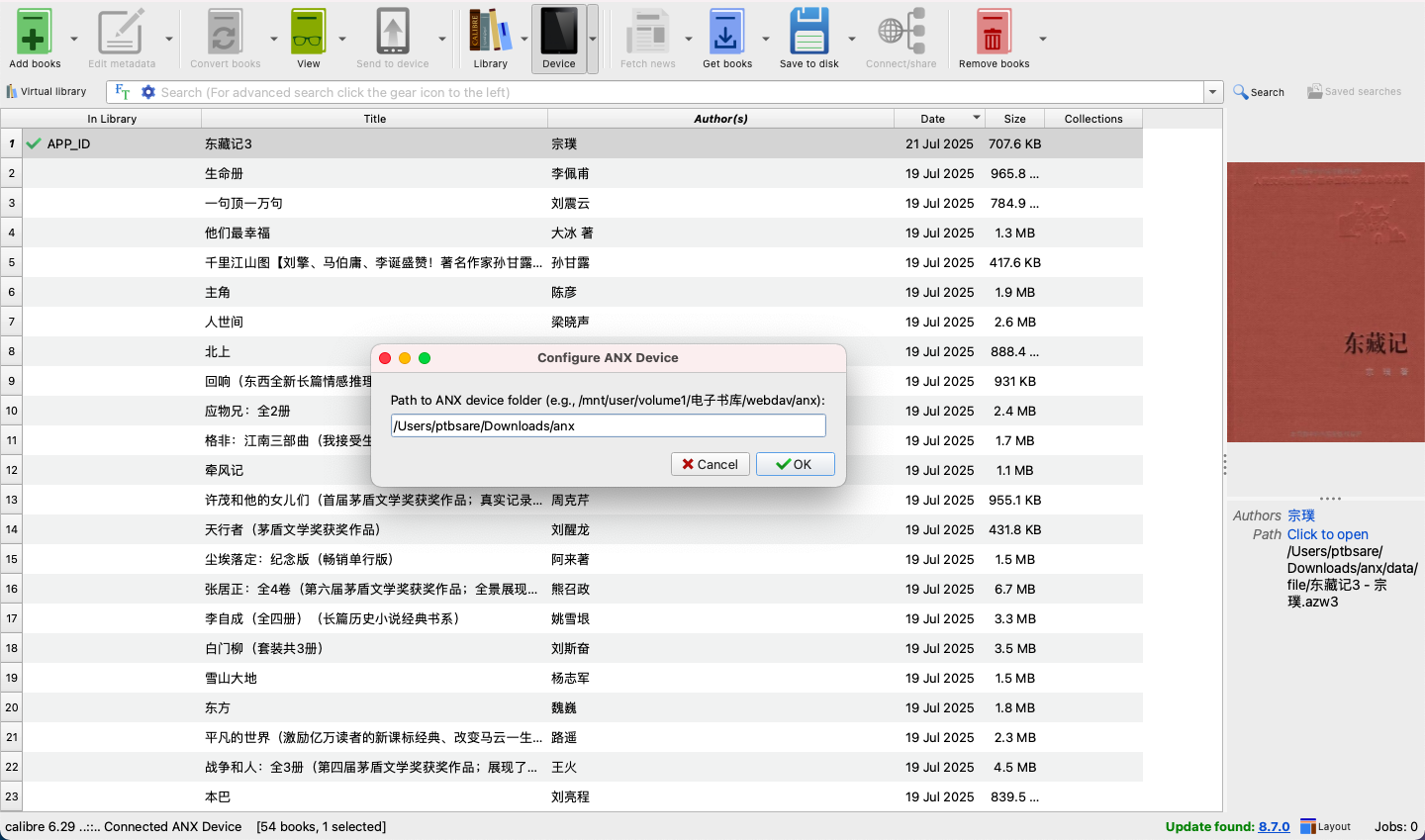
- Centralized Ebook Management: Seamlessly manage your ANX Reader ebook library stored on a NAS or server.
- Multi-Client Synchronization: Facilitate synchronization of your ebook collection to multiple mobile ANX Reader clients.
- Powerful Metadata Editing: Utilize Calibre's robust features to add, edit, and synchronize book metadata (including title, author, and all extended ANX DB properties) with your ANX Reader library.
- Flexible Library Maintenance: Leverage Calibre or LinuxServer Calibre Docker images for efficient adding, deleting, and updating of books and their metadata.
Installation
- Download the Plugin: Obtain the
anx-reader-calibre-plugin.zipfile. - Open Calibre Preferences: In Calibre, go to
Preferences->Plugins. - Load Plugin from file: Click on
Load plugin from fileand select theanx-reader-calibre-plugin.zipfile. - Restart Calibre: Restart Calibre for the plugin to take effect.
- Configure Device Path: After restarting, go to
Preferences->Plugins->Device Plugins->ANX Virtual Device->Customize plugin. Set the base directory where yourdatabase7.dbanddatafolders (containingfileandcoversub-folders) are located. This is typically your ANX Reader's ebook library root on your NAS/server.
Usage
Once configured, the ANX Virtual Device will appear in Calibre's device list when connected.
- Add Books: Use Calibre's "Send to Device" function to add books to your ANX Reader library. The plugin will handle copying the ebook file and its cover, and updating the ANX database.
- Delete Books: Select books on the device view in Calibre and use the "Remove from Device" function. The plugin will delete the files and update the database.
- Edit Metadata: Edit book metadata (title, author, and custom columns mapped to ANX DB fields) directly in Calibre's device view. Changes will be synchronized back to the ANX database.
- Browse Device Files: Use
ebook-device ls /command line tool to list files on the virtual device.
Troubleshooting
- Device Not Detected: Ensure the configured device path in the plugin settings is correct and accessible. Verify that
database7.db,data/file, anddata/coverexist within this path. - Errors During Operations: Check Calibre's debug log (
Preferences->Advanced->Show debug log) for detailed error messages.
For more detailed instructions and troubleshooting, please refer to the 简体中文 version.
Similar repos


Languages
Python
100.0%
This plugin for Calibre allows you to manage your ANX Reader ebook library directly from Calibre, especially useful for NAS users who want to centralize their ebook collection on a server and synchronize it across multiple mobile clients.
Python
28
44 commits
updated Aug 16, 2025
README
anx-reader-calibre-plugin
This plugin for Calibre allows you to manage your ANX Reader ebook library directly from Calibre, especially useful for NAS users who want to centralize their ebook collection on a server and synchronize it across multiple mobile clients.
Highlights
- Centralized Ebook Management: Seamlessly manage your ANX Reader ebook library stored on a NAS or server.
- Multi-Client Synchronization: Facilitate synchronization of your ebook collection to multiple mobile ANX Reader clients.
- Powerful Metadata Editing: Utilize Calibre's robust features to add, edit, and synchronize book metadata (including title, author, and all extended ANX DB properties) with your ANX Reader library.
- Flexible Library Maintenance: Leverage Calibre or LinuxServer Calibre Docker images for efficient adding, deleting, and updating of books and their metadata.
Installation
- Download the Plugin: Obtain the
anx-reader-calibre-plugin.zipfile. - Open Calibre Preferences: In Calibre, go to
Preferences->Plugins. - Load Plugin from file: Click on
Load plugin from fileand select theanx-reader-calibre-plugin.zipfile. - Restart Calibre: Restart Calibre for the plugin to take effect.
- Configure Device Path: After restarting, go to
Preferences->Plugins->Device Plugins->ANX Virtual Device->Customize plugin. Set the base directory where yourdatabase7.dbanddatafolders (containingfileandcoversub-folders) are located. This is typically your ANX Reader's ebook library root on your NAS/server.
Usage
Once configured, the ANX Virtual Device will appear in Calibre's device list when connected.
- Add Books: Use Calibre's "Send to Device" function to add books to your ANX Reader library. The plugin will handle copying the ebook file and its cover, and updating the ANX database.
- Delete Books: Select books on the device view in Calibre and use the "Remove from Device" function. The plugin will delete the files and update the database.
- Edit Metadata: Edit book metadata (title, author, and custom columns mapped to ANX DB fields) directly in Calibre's device view. Changes will be synchronized back to the ANX database.
- Browse Device Files: Use
ebook-device ls /command line tool to list files on the virtual device.
Troubleshooting
- Device Not Detected: Ensure the configured device path in the plugin settings is correct and accessible. Verify that
database7.db,data/file, anddata/coverexist within this path. - Errors During Operations: Check Calibre's debug log (
Preferences->Advanced->Show debug log) for detailed error messages.
For more detailed instructions and troubleshooting, please refer to the 简体中文 version.
Similar repos
Languages
Python
100.0%