
A modern, mobile-first web application to manage your ebook library, integrating with Calibre and providing a personal WebDAV server for your Anx-reader compatible devices.
Python
200
431 commits
updated Sep 21, 2026
README
Anx Calibre Manager


A modern, mobile-first web application to manage your ebook library, integrating with Calibre and providing a personal WebDAV server for your Anx-reader compatible devices.
English | 简体中文 | 繁體中文 | Español | Français | Deutsch
✨ Features
- Multi-language Support: Full internationalization support. The interface is available in English, Simplified Chinese (简体中文), Traditional Chinese (繁體中文), Spanish, French, and German.
- Mobile-First Interface: A clean, responsive UI designed for easy use on your phone.
- PWA Support: Installable as a Progressive Web App for a native-like experience.
- In-Browser Book Previewer: Preview E-Book directly in your browser. Features Text-to-Speech (TTS).
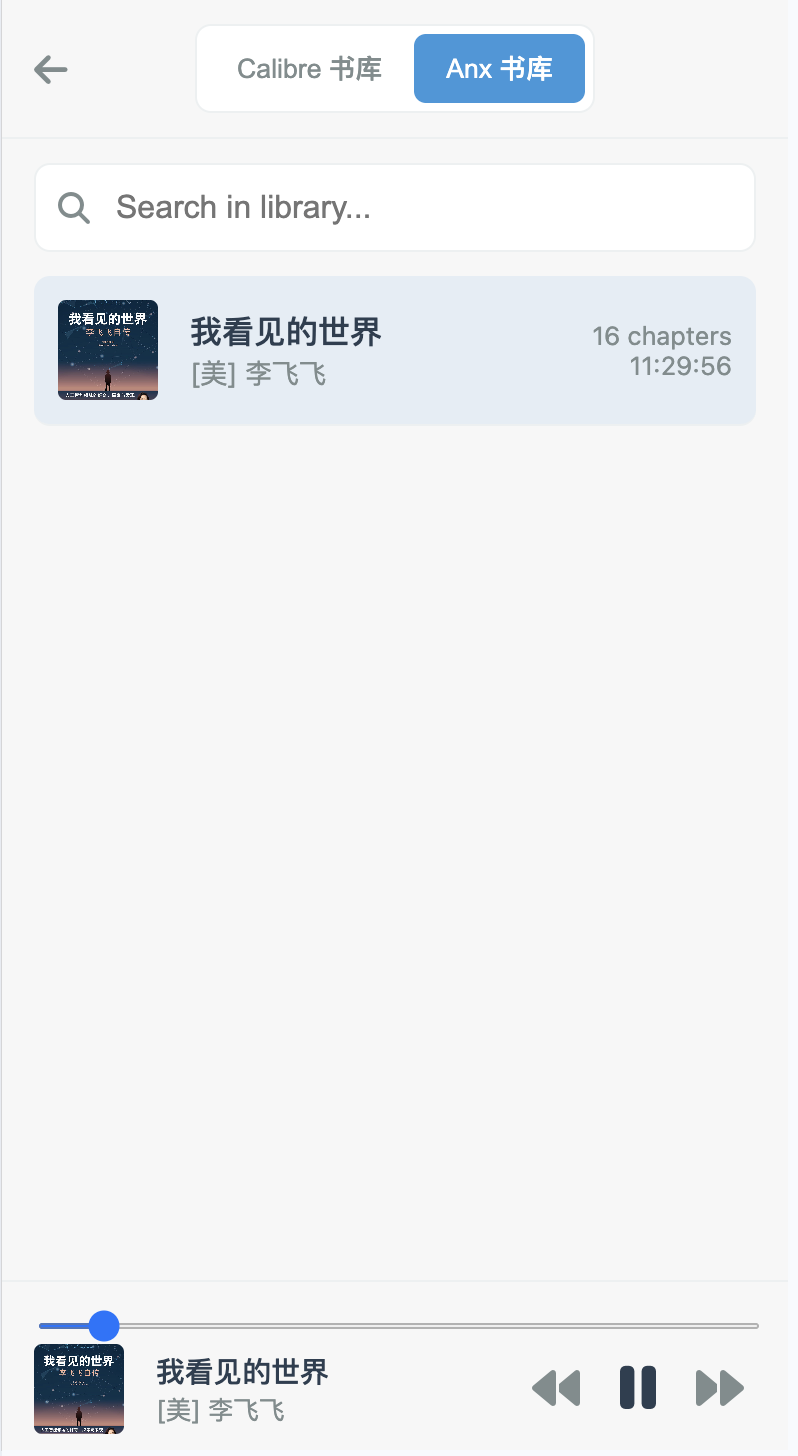
- Audiobook Generation: Convert EPUB books into M4B audiobooks with chapter markers, using configurable Text-to-Speech (TTS) providers (e.g., Microsoft Edge TTS). The generated M4B files are fully compatible with audiobook servers like Audiobookshelf.
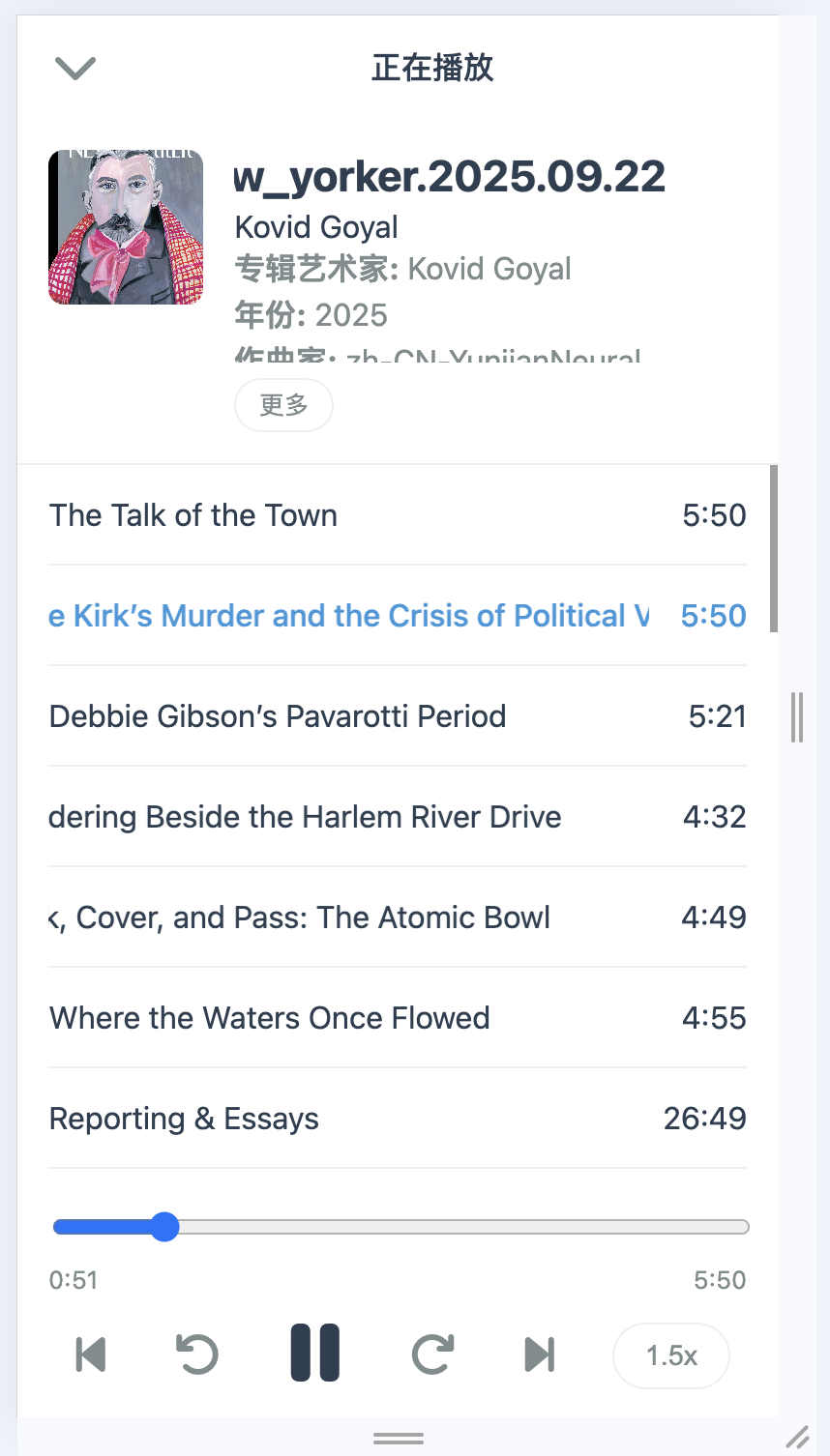
- Online Audiobook Player: Listen to your generated M4B audiobooks directly in the browser. Your listening progress is automatically saved and synced.
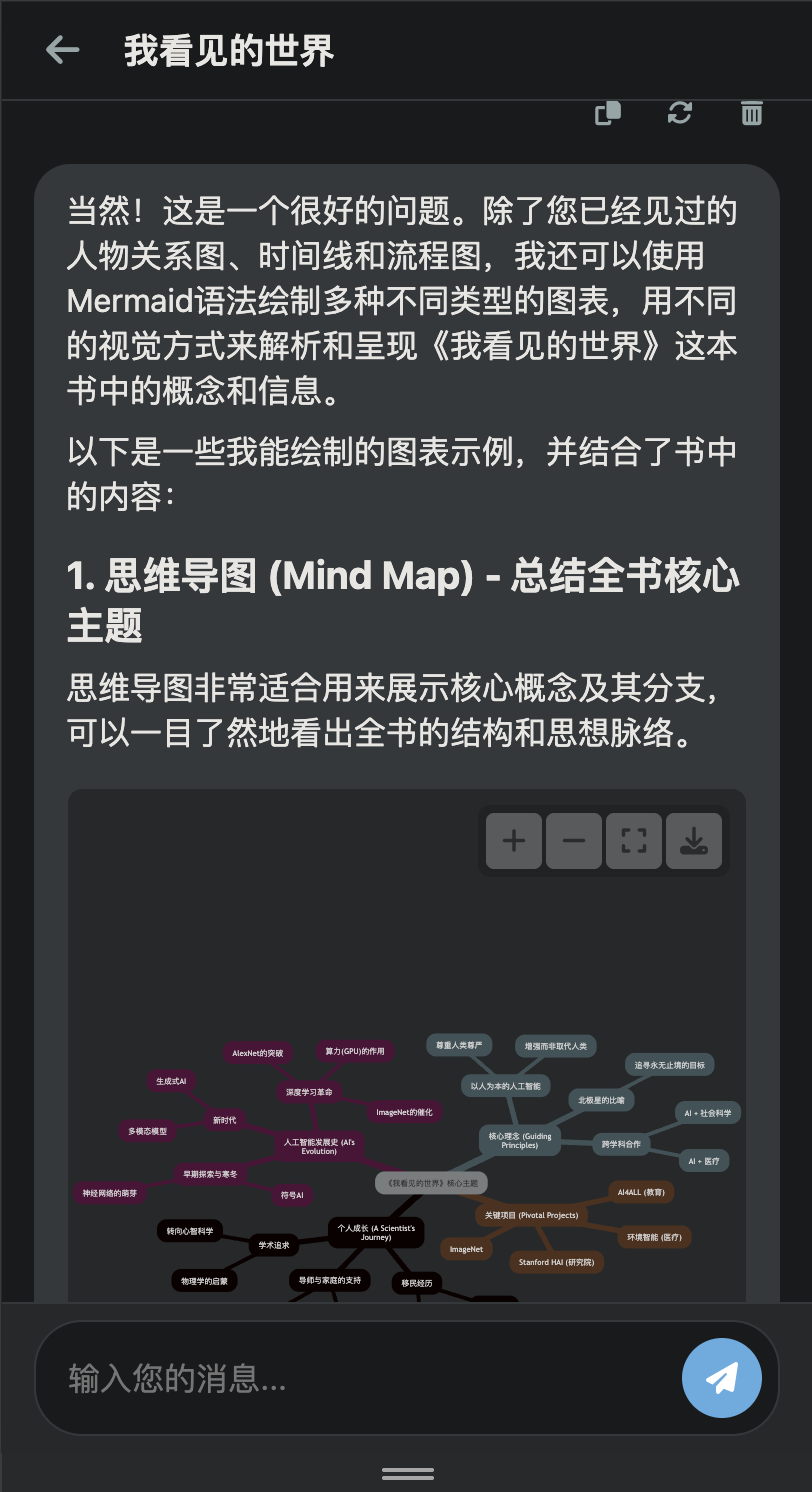
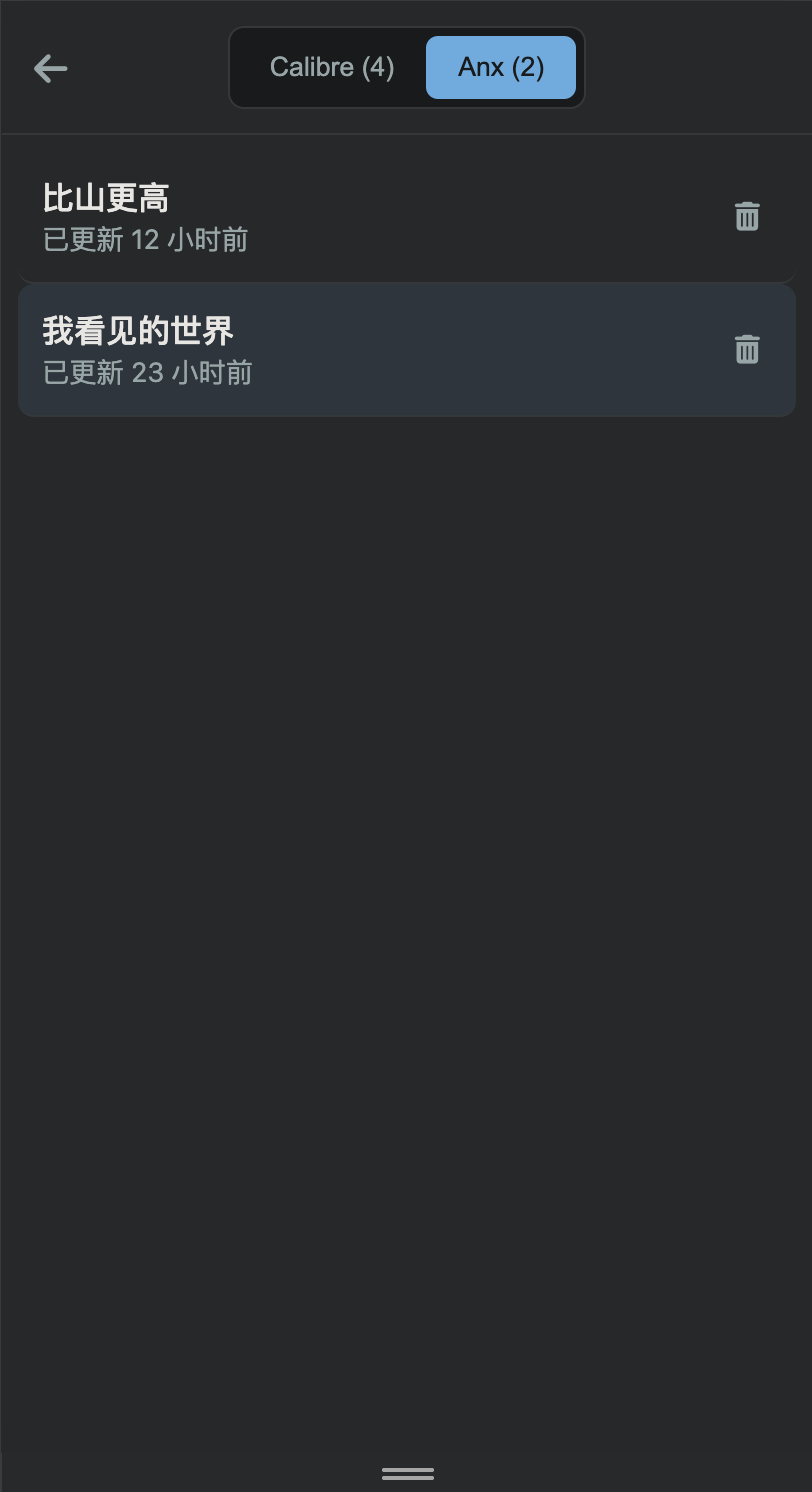
- Ask AI: Engage in conversations with your books. This feature allows you to chat with any book in your library, ask questions about its content, get summaries, or explore themes through an AI-powered interface.
- Calibre Integration: Connects to your existing Calibre server to browse and search your library.
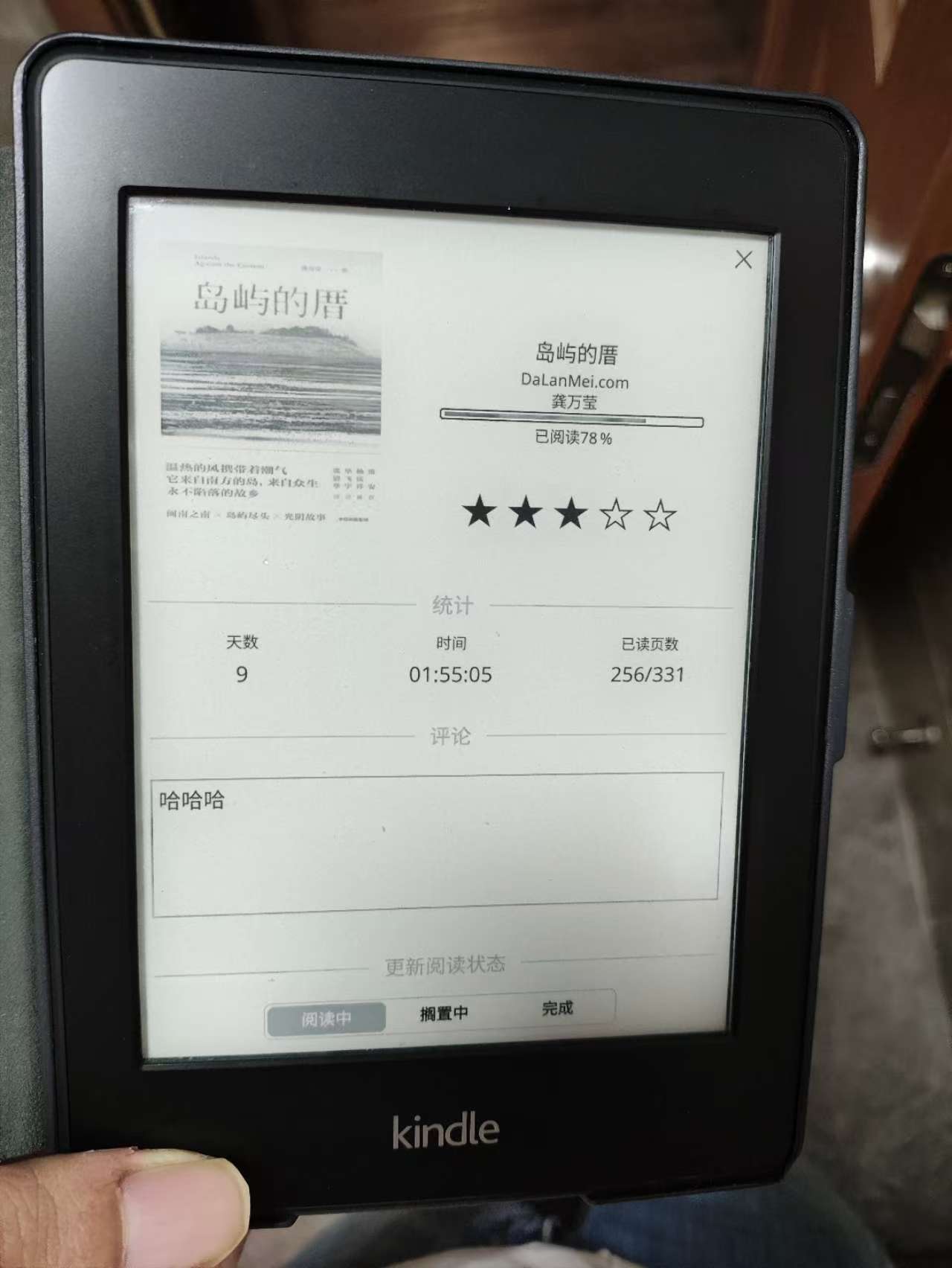
- KOReader Sync: Sync your reading progress and reading time with KOReader devices.
- Smart Send to Kindle: Automatically handles formats when sending to your Kindle. If an EPUB exists, it's sent directly. If not, the app converts the best available format to EPUB based on your preferences before sending, ensuring optimal compatibility.
- Push to Anx: Send books from your Calibre library directly to your personal Anx-reader device folder.
- Integrated WebDAV Server: Each user gets their own secure WebDAV folder, compatible with Anx-reader and other WebDAV clients.
- MCP Server: A built-in, compliant Model Context Protocol (MCP) server, allowing AI agents and external tools to interact with your library securely.
- User Management: Simple, built-in user management system with distinct roles:
- Admin: Full control over users, global settings, and all books.
- Maintainer: Can edit all book metadata.
- User: Can upload books, manage their own WebDAV library, MCP tokens, send books to Kindle, and edit books they have uploaded.
- Invite-Only Registration: Admins can generate invite codes to control user registration. This feature is enabled by default to prevent unauthorized sign-ups.
- User-Editable Uploaded Books: Regular users can now edit metadata for books they have uploaded. This functionality relies on a Calibre custom column named
#library(type:Text). When a user uploads a book, their username is automatically saved to this field. Users can then edit any book where they are listed as the owner in the#libraryfield.- Recommendation for Docker Users: To enable this feature, please ensure you have a custom column in your Calibre library named
#library(case-sensitive) with the typeText.
- Recommendation for Docker Users: To enable this feature, please ensure you have a custom column in your Calibre library named
- Easy Deployment: Deployable as a single Docker container with built-in multi-language locale support.
- Reading Stats: Automatically generates a personal reading statistics page, featuring a yearly reading heatmap, a list of books currently being read, and a list of finished books. The page can be shared publicly or kept private.
📸 Screenshots
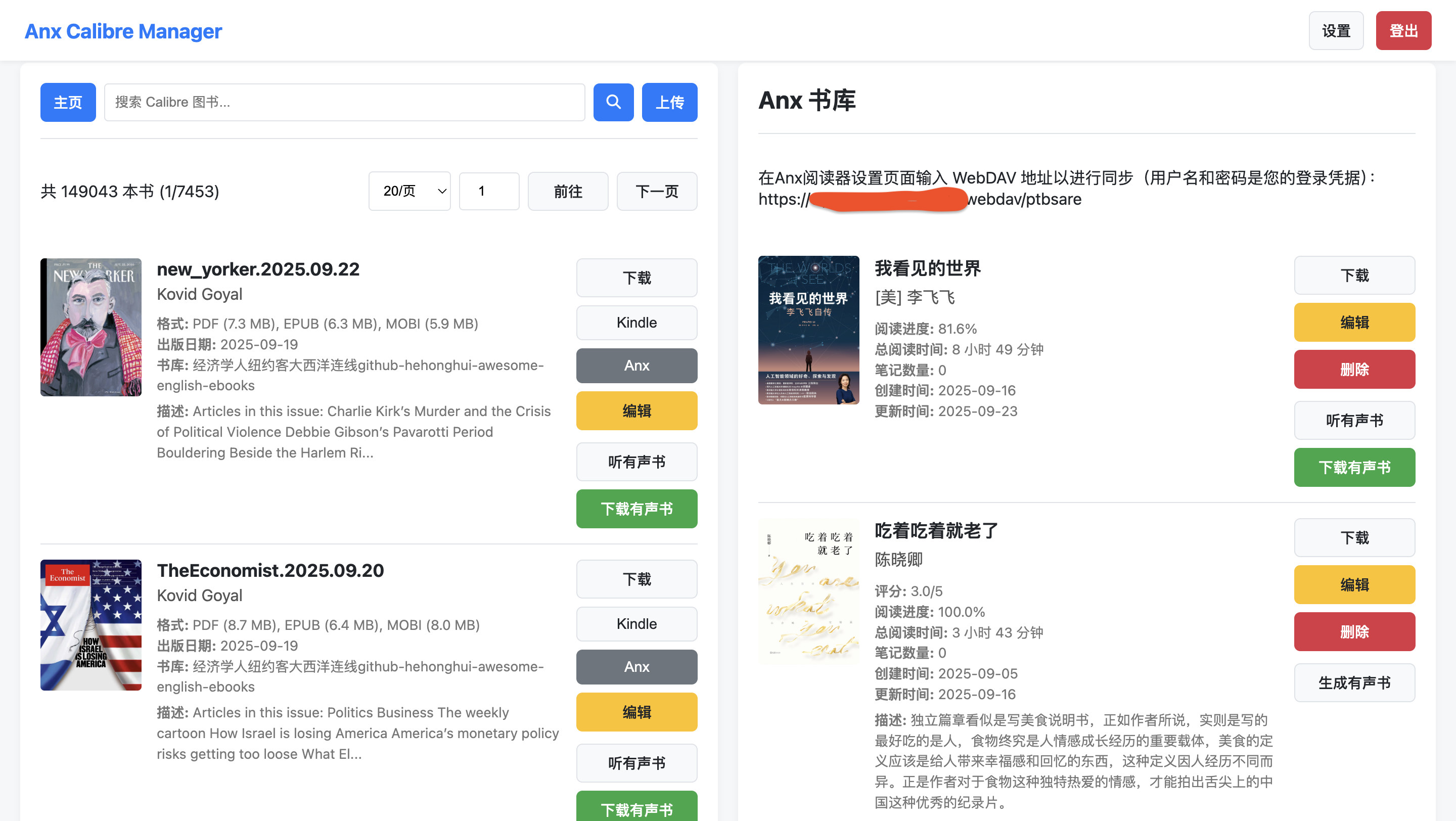
Main Interface
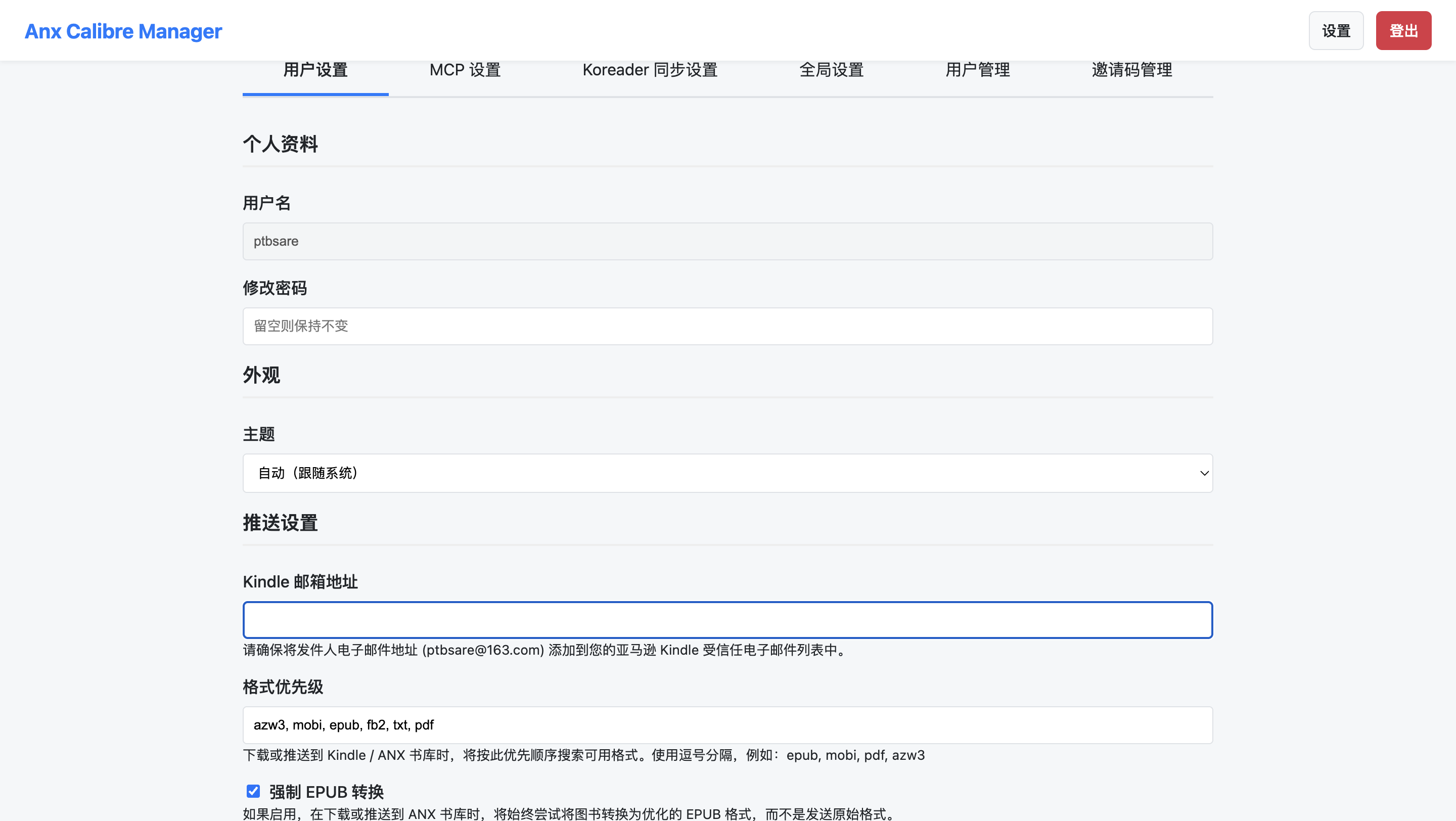
Settings Page
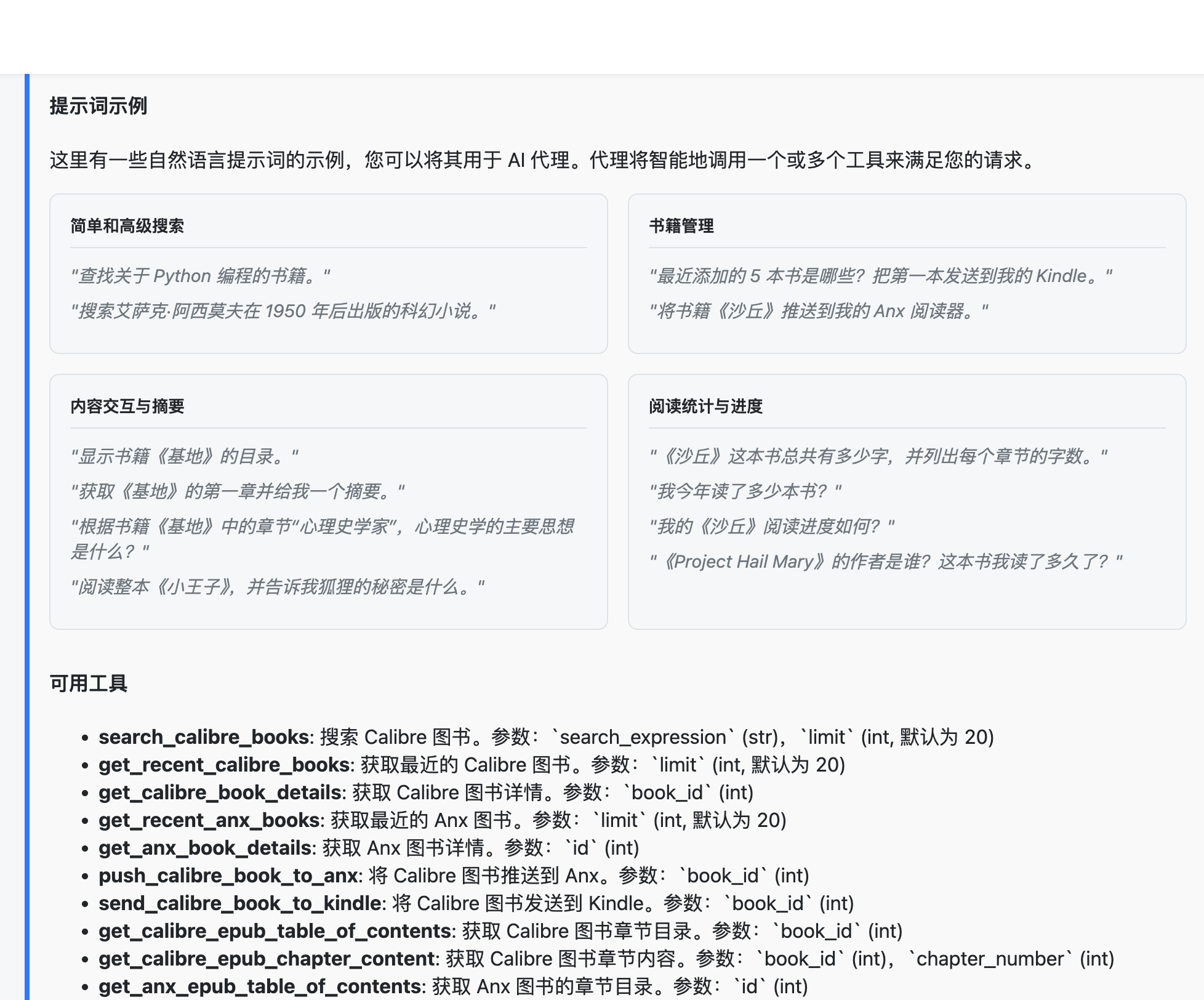
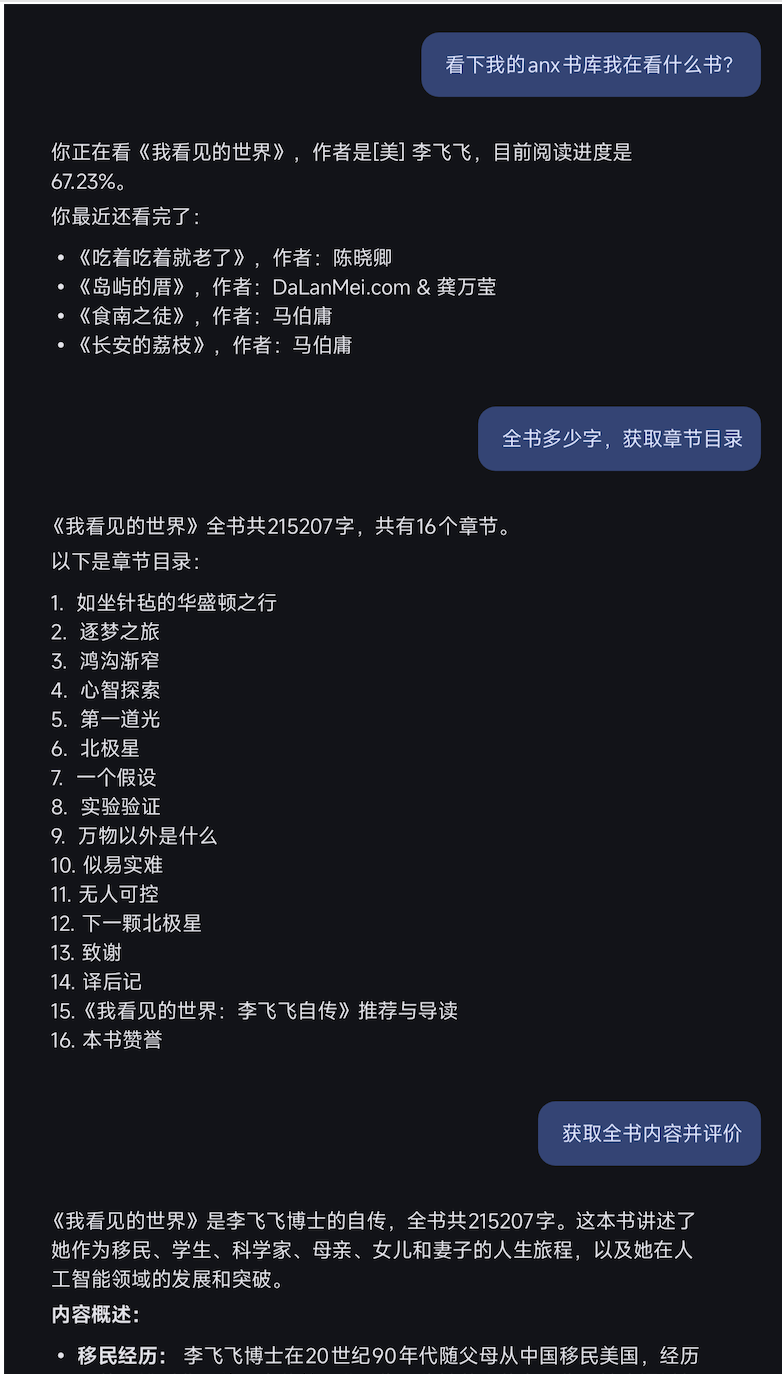
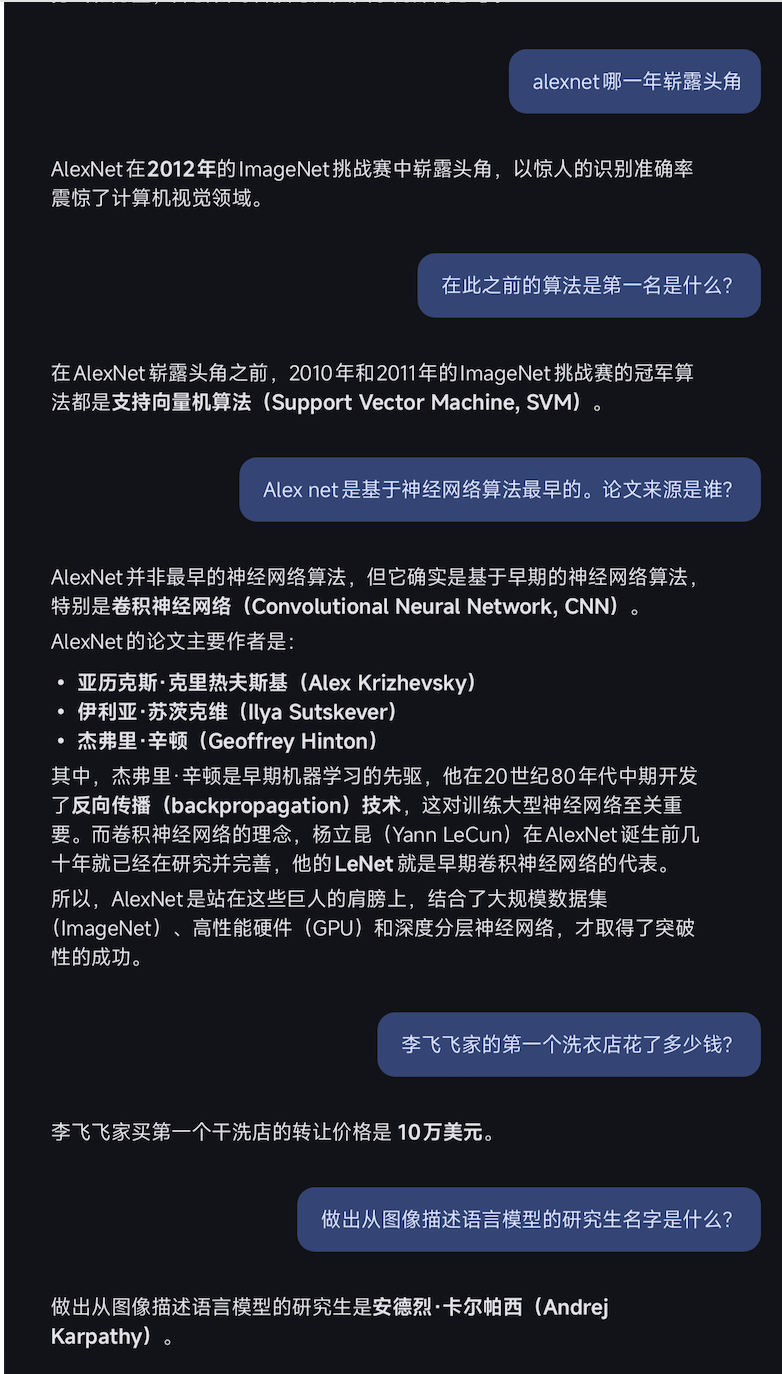
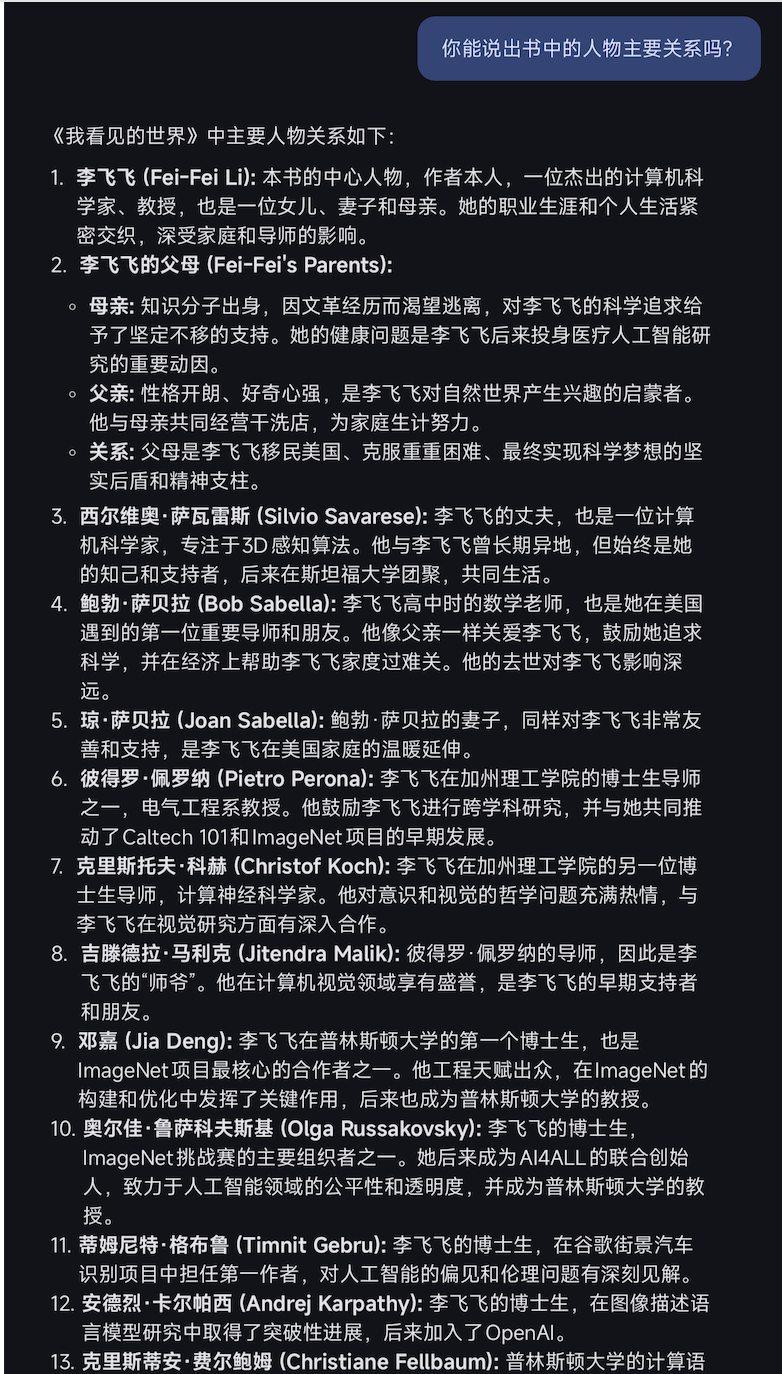
MCP Settings
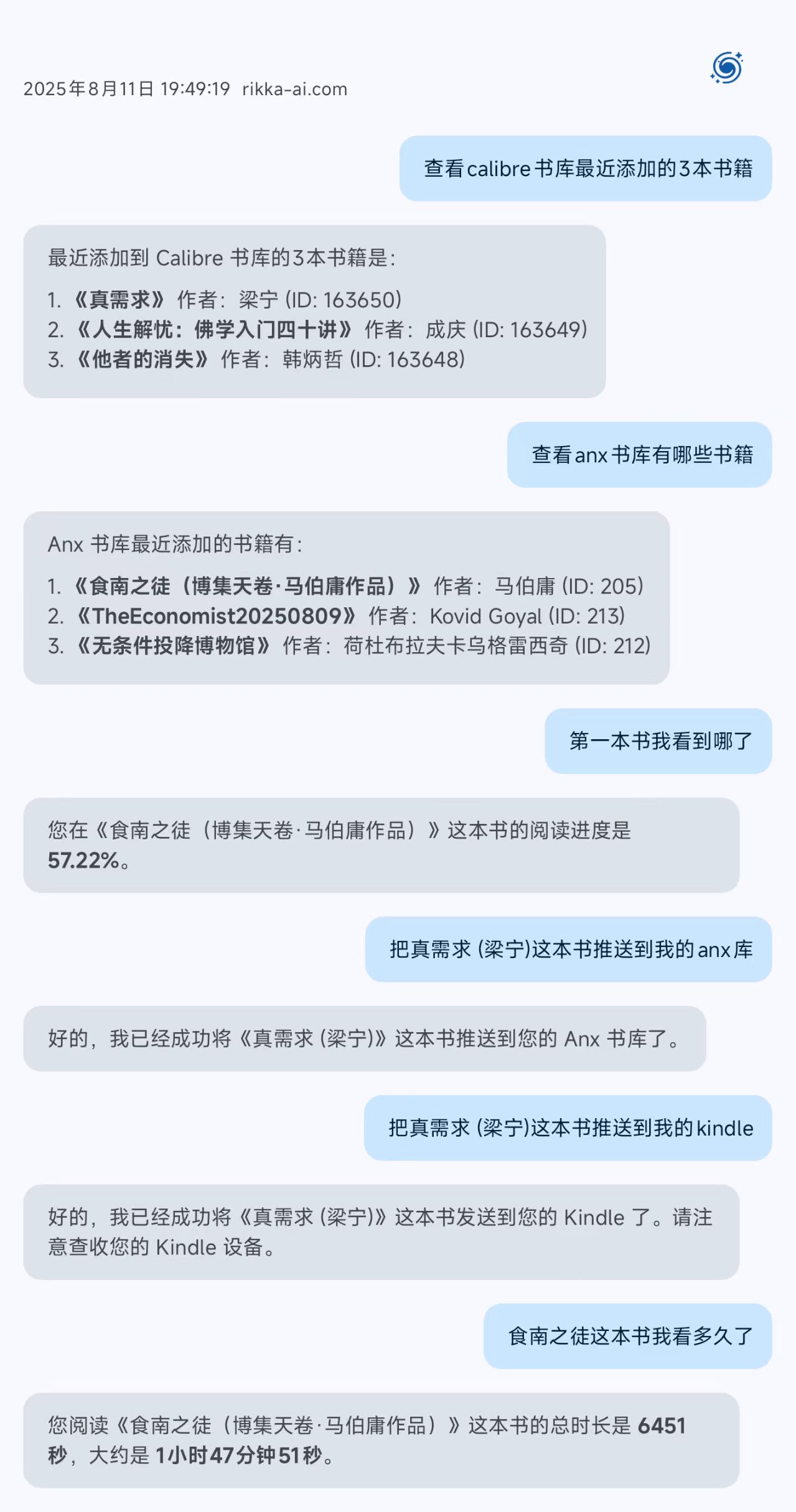
| MCP Chat | MCP Chat | MCP Chat | MCP Chat |
|---|---|---|---|
 |  |  |  |
| Koreader Book Status | Koreader Sync |
|---|---|
 | 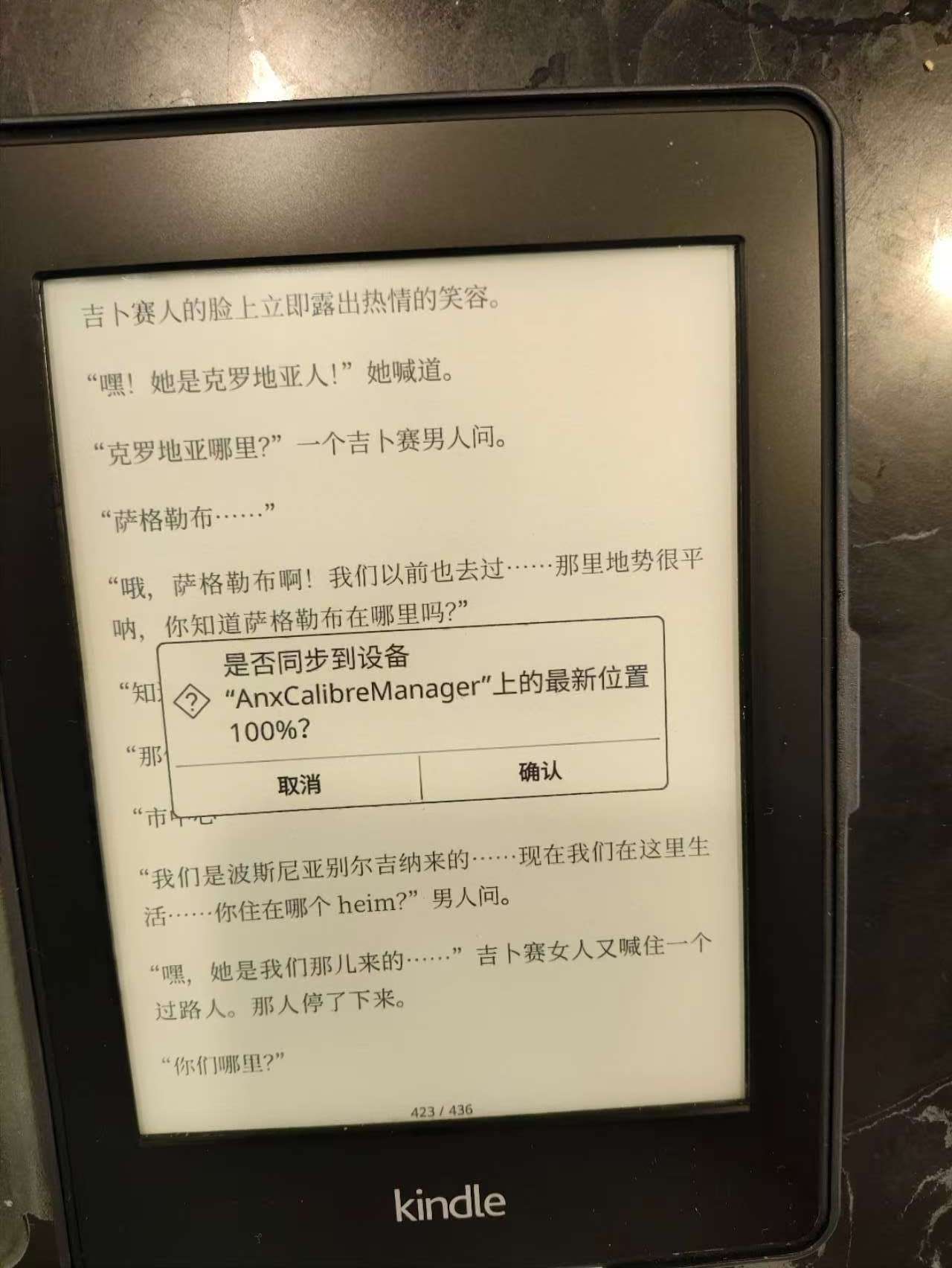 |
| Koreader Settings | Koreader WebDAV |
|---|---|
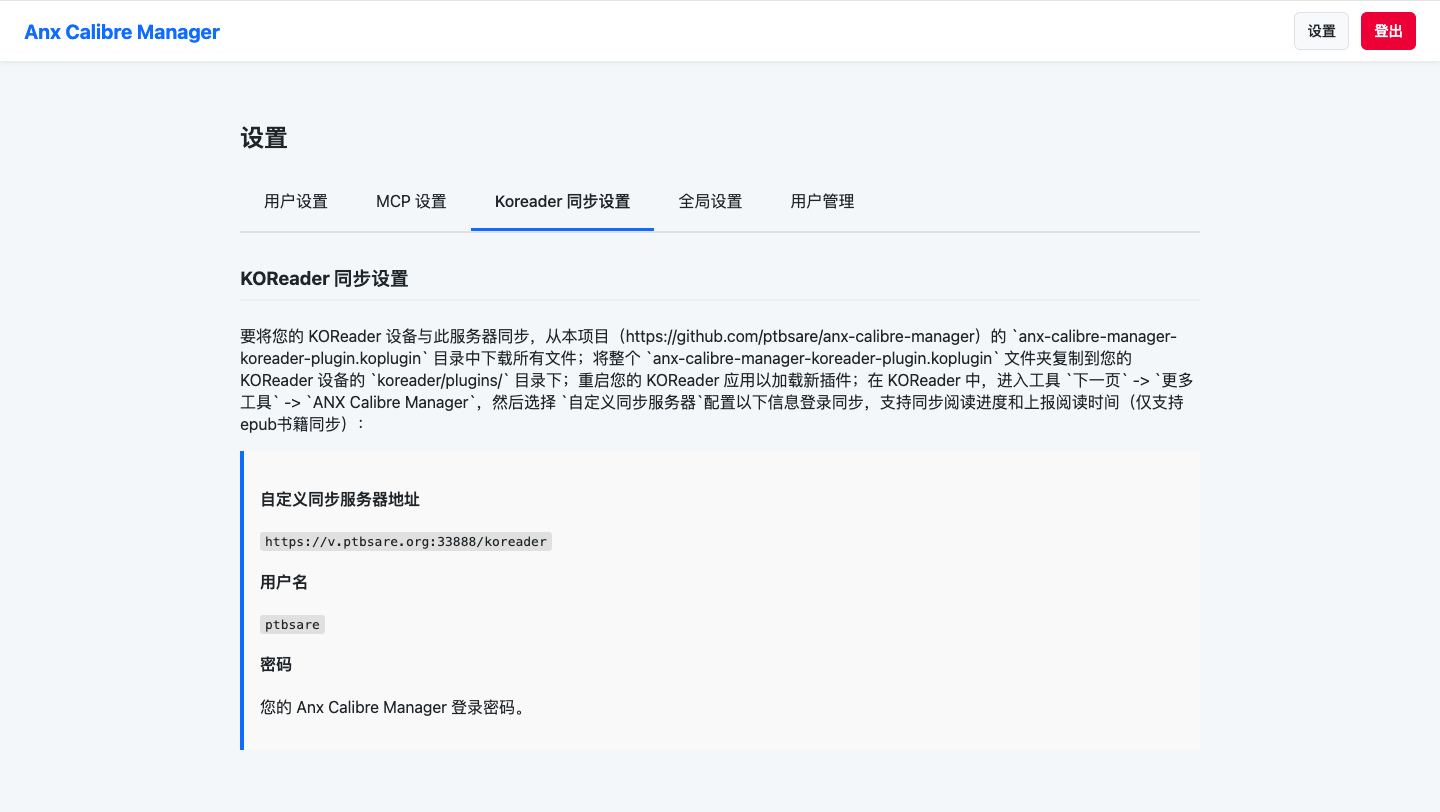 | 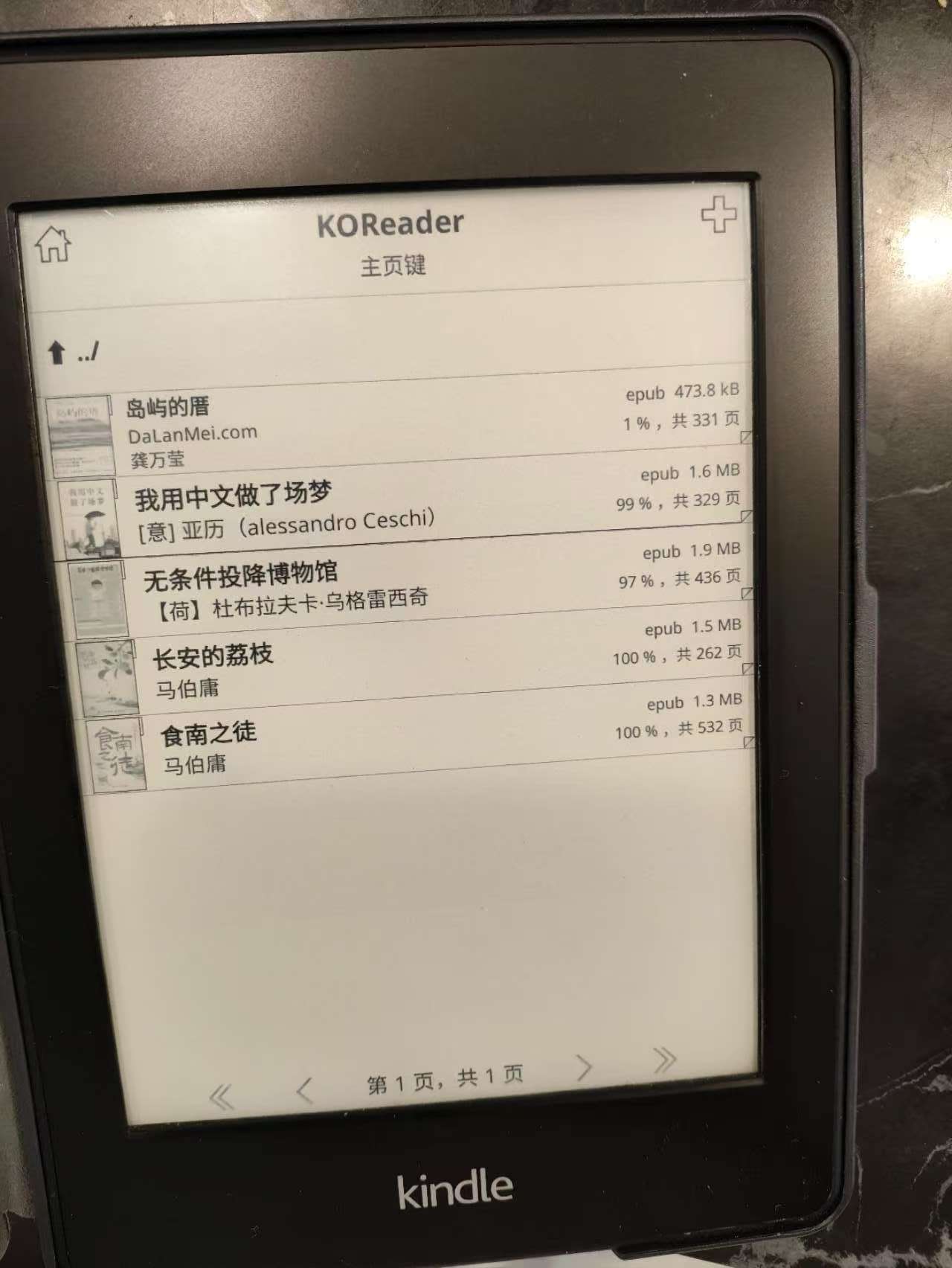 |
Stats Page
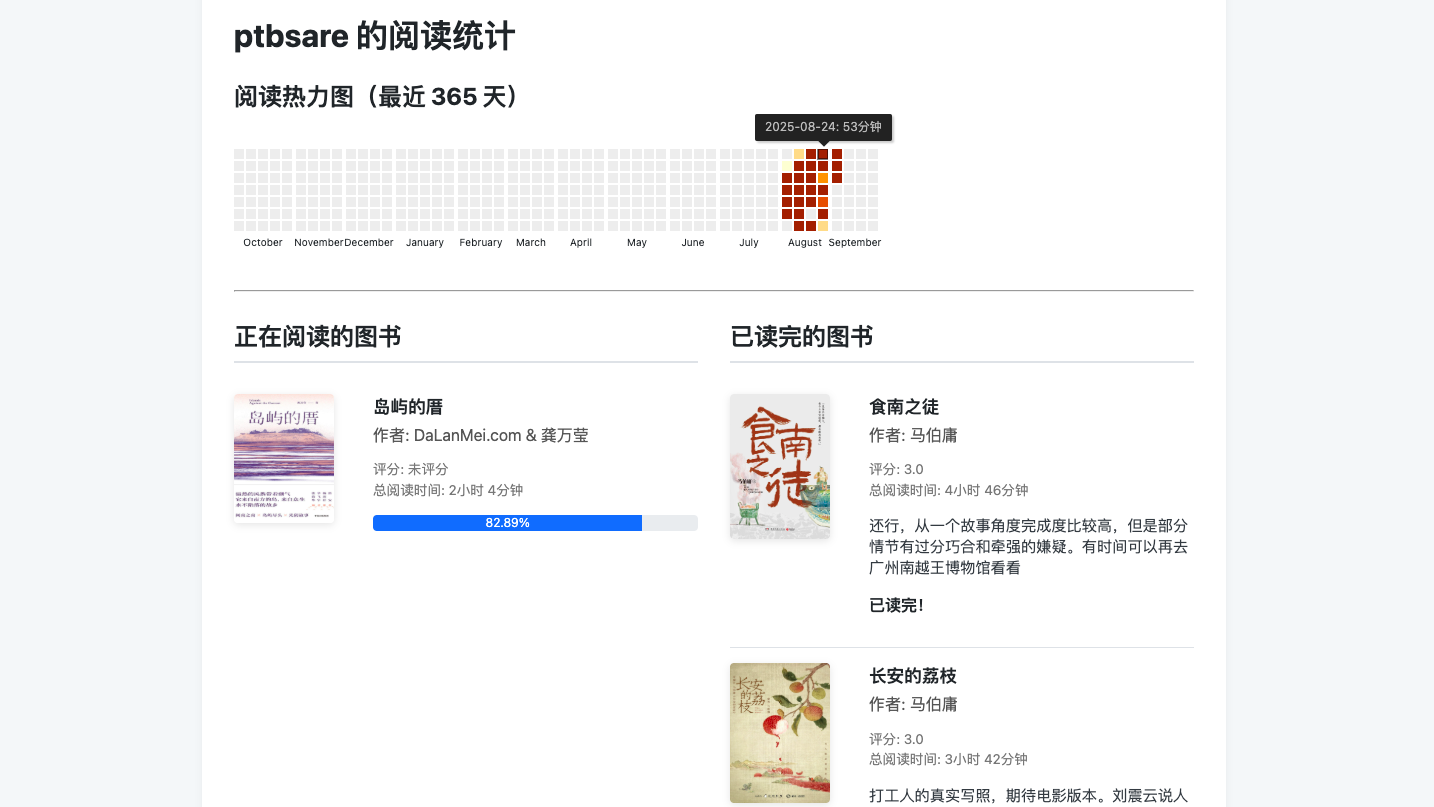
| Audiobook List | Audiobook Player |
|---|---|
 |  |
| Chat With Book | Chat With Book |
|---|---|
 |  |
🚀 Deployment
This application is designed to be deployed using Docker.
Prerequisites
- Docker installed on your server.
- Calibre Server (choose one):
- Option 1: Use AIO (All-In-One) image - Includes a built-in
calibre-server. Perfect for beginners who want a simple, single-container deployment. - Option 2: Use an existing Calibre server - Run a separate Calibre server Docker image. We recommend linuxserver/calibre or the lightweight lucapisciotta/calibre (default port:
8085).
- Option 1: Use AIO (All-In-One) image - Includes a built-in
Quick Start (Docker Run)
AIO Version (All-In-One - Recommended)
Perfect if you don't want to manage a separate Calibre server!
-
Create three directories for persistent data:
mkdir -p ./config mkdir -p ./webdav mkdir -p ./library -
Run the AIO Docker container:
docker run -d \ --name anx-calibre-manager-aio \ -p 5000:5000 \ -p 8080:8080 \ -v $(pwd)/config:/config \ -v $(pwd)/webdav:/webdav \ -v "$(pwd)/library:/Calibre Library" \ -e CALIBRE_URL=http://localhost:8080 \ -e CALIBRE_USERNAME=admin \ -e CALIBRE_PASSWORD=password \ --restart unless-stopped \ ghcr.io/ptbsare/anx-calibre-manager:aio-latest -
Access the application at
http://localhost:5000. The built-in Calibre server will be available athttp://localhost:8080.- Note: The
/Calibre Librarydirectory is your Calibre library folder. It will containmetadata.db(the Calibre database), book files, and cover images. This is where all your ebooks are stored and managed by the built-in Calibre server. - Note: Change the default username (
admin) and password (password) for security.
- Note: The
Standard Version
This is for users who already have a separate Calibre server.
-
Create two directories for persistent data:
mkdir -p ./config mkdir -p ./webdav -
Run the Docker container with this single command:
docker run -d \ --name anx-calibre-manager \ -p 5000:5000 \ -v $(pwd)/config:/config \ -v $(pwd)/webdav:/webdav \ --restart unless-stopped \ ghcr.io/ptbsare/anx-calibre-manager:latest -
Access the application at
http://localhost:5000. The first user to register will become the administrator. You can configure the Calibre server connection and other settings from the web interface later.
Advanced Configuration
Here is a more detailed docker-compose.yml example for users who want to connect to a Calibre server and customize more options.
-
Find your User and Group ID (PUID/PGID): Run
id $USERon your host machine. This is recommended to avoid permission issues. -
Create a
docker-compose.ymlfile:services: anx-calibre-manager: image: ghcr.io/ptbsare/anx-calibre-manager:latest container_name: anx-calibre-manager ports: - "5000:5000" volumes: - /path/to/your/config:/config - /path/to/your/webdav:/webdav - /path/to/your/audiobooks:/audiobooks # Optional - /path/to/your/fonts:/opt/share/fonts # Optional environment: - PUID=1000 - PGID=1000 - TZ=America/New_York - GUNICORN_WORKERS=2 # Optional - SECRET_KEY=your_super_secret_key # Change this! - CALIBRE_URL=http://your-calibre-server-ip:8080 - CALIBRE_USERNAME=your_calibre_username - CALIBRE_PASSWORD=your_calibre_password - CALIBRE_DEFAULT_LIBRARY_ID=Calibre_Library - CALIBRE_ADD_DUPLICATES=false restart: unless-stoppedNote: Replace
/path/to/your/...with the actual paths on your host machine. -
Run the container:
docker-compose up -d
Custom Fonts
The book conversion tool, ebook-converter, scans the /opt/share/fonts directory for fonts. If you encounter font-related issues when converting books with special characters (e.g., Chinese), you can provide custom fonts by mounting a local directory containing your font files (e.g., .ttf, .otf) to the container's /opt/share/fonts path.
Configuration
The application is configured via environment variables.
| Variable | Description | Default |
|---|---|---|
PUID | The User ID to run the application as. | 1001 |
PGID | The Group ID to run the application as. | 1001 |
TZ | Your timezone, e.g., America/New_York. | UTC |
PORT | The port the application listens on inside the container. | 5000 |
GUNICORN_WORKERS | Optional: The number of Gunicorn worker processes. | 2 |
CONFIG_DIR | The directory for the database and settings.json. | /config |
WEBDAV_DIR | The base directory for WebDAV user files. | /webdav |
SECRET_KEY | Required. A long, random string for session security. | "" |
LOGIN_MAX_ATTEMPTS | Maximum number of login attempts before account lockout. Set to 0 to disable. | 5 |
SESSION_LIFETIME_DAYS | Number of days a user session remains valid after login. | 7 |
ENABLE_ACTIVITY_LOG | Enable logging of user activities (login, download, upload, etc.) to the database for audit purposes. | false |
CALIBRE_URL | The URL of your Calibre content server. Dual purpose in AIO version: (1) Serves as the global default Calibre server connection for anx-calibre-manager. (2) The port number is extracted to determine which port the built-in calibre-server should listen on. For example, http://localhost:8080 will make calibre-server listen on port 8080. See Troubleshooting if you have connection issues. | "" |
CALIBRE_USERNAME | Username for your Calibre server. See Troubleshooting if you have connection issues. | "" |
CALIBRE_PASSWORD | Password for your Calibre server. See Troubleshooting if you have connection issues. | "" |
CALIBRE_DEFAULT_LIBRARY_ID | The default Calibre library ID. See How to find my library_id for details. | Calibre_Library |
CALIBRE_ADD_DUPLICATES | Whether to allow uploading duplicate books. | false |
DISABLE_NORMAL_USER_UPLOAD | When set to true, it disables the book upload functionality for users with the 'User' role, only Admins and Maintainers can upload books. | false |
SMTP_SERVER | SMTP server for sending emails (e.g., for Kindle). | "" |
SMTP_PORT | SMTP port. | 587 |
SMTP_USERNAME | SMTP username. | "" |
SMTP_PASSWORD | SMTP password. | "" |
SMTP_ENCRYPTION | SMTP encryption type (ssl, starttls, none). | ssl |
DEFAULT_TTS_PROVIDER | The default TTS provider for audiobook generation (edge_tts or openai_tts). | edge_tts |
DEFAULT_TTS_VOICE | The default voice for the selected TTS provider. | en-US-AriaNeural |
DEFAULT_TTS_RATE | The default speech rate for the TTS provider (e.g., +10%). | +0% |
DEFAULT_TTS_SENTENCE_PAUSE | The default pause duration between sentences in milliseconds. | 650 |
DEFAULT_TTS_PARAGRAPH_PAUSE | The default pause duration between paragraphs in milliseconds. | 900 |
DEFAULT_OPENAI_API_KEY | Your OpenAI API key (required if using openai_tts). | "" |
DEFAULT_OPENAI_API_BASE_URL | Custom base URL for OpenAI-compatible APIs. | https://api.openai.com/v1 |
DEFAULT_OPENAI_API_MODEL | The OpenAI model to use for TTS (e.g., tts-1). | tts-1 |
DEFAULT_LLM_BASE_URL | The base URL for the Large Language Model (LLM) API, compatible with the OpenAI API format. | "" |
DEFAULT_LLM_API_KEY | The API key for the LLM service. | "" |
DEFAULT_LLM_MODEL | The default model to use for the LLM service (e.g., gpt-4). | "" |
🔧 Troubleshooting
Here are some common issues and their solutions:
1. Why are there no books in my Calibre list?
- A: Please ensure you have started the Calibre Content Server in your Calibre client or container. It usually runs on port
8080. Remember, this application connects tocalibre-server, notcalibre-web(which typically runs on port8083). - B: Verify that your Calibre Server URL, username, and password are correct in the settings. You can test this by opening the configured URL in your browser and trying to log in.
2. Why do I get a 401 Unauthorized error when uploading/editing books?
- A: Make sure the Calibre user account you configured has write permissions for the library. To check, go to
Preferences->Sharing over the net->User accountsin the Calibre desktop application and ensure the "Allow write access" option is checked for the user.
3. Why do I get a 403 Forbidden error when uploading/editing books?
- A: This usually means you have configured an incorrect Calibre Library ID.
4. How do I find my library_id?
- Method 1 (Visual): Open your Calibre Content Server in a browser and log in. Look at the name of your library displayed on the page. The
library_idis usually this name with spaces and special characters replaced by underscores. For example, if your library is named "Calibre Library", the ID is likelyCalibre_Library. - Method 2 (From URL): In the Content Server interface, click on your library's name. Look at the URL in your browser's address bar. You should see a parameter like
library_id=.... The value of this parameter is your library ID (it might be URL-encoded, so you may need to decode it). - Common Default IDs: The default library id often depends on your system's language when you first ran Calibre. Here are some common defaults:
- English:
Calibre_Library - French:
Bibliothèque_calibre - German:
Calibre-Bibliothek - Spanish:
Biblioteca_de_calibre - Simplified Chinese (简体中文):
Calibre_书库 - Traditional Chinese (繁體中文):
calibre_書庫
- English:
5. Why do I get a 400 Bad Request error when editing the read date or library fields?
- A: This error occurs because your Calibre library is missing the required custom columns to store this information. To enable features like tracking the uploader/owner of a book and setting a specific read date, you need to add two custom columns in your Calibre desktop application:
- Go to
Preferences->Add your own columns. - Click
Add custom column. - Create the first column with the following details:
- Lookup name:
#library - Column heading:
Library(or as you prefer) - Column type:
Text
- Lookup name:
- Create the second column with these details:
- Lookup name:
#readdate - Column heading:
Read Date(or as you prefer) - Column type:
Date
- Lookup name:
- Click
Applyand restart your Calibre server if it's running. After adding these columns, the editing functions will work correctly.
- Go to
6. Why is there no delete button for Calibre books in the left panel?
This is an intentional security design. When Anx Calibre Manager is exposed to the public internet, to prevent accidental or malicious deletion of books in your library (especially libraries with thousands of books), we do not provide an interface for deleting Calibre books.
To delete Calibre books, please use one of the following methods:
- Access the Calibre Content Server via the internal network (default port
8080) to perform deletion - Or use the Calibre desktop client for management
This ensures that your library can enjoy the convenience of Anx Calibre Manager without the risk of data loss from being exposed to the public internet.
7. I don't want to use the heavy Calibre desktop client or the basic calibre-server to manage my library. Can I use other frontends like Calibre-Web, Calibre-Web-Automated, or Talebook?
Yes! You can use any Calibre-compatible frontend alongside this application. These frontends all interact with the same Calibre library database (metadata.db), as shown in this diagram:
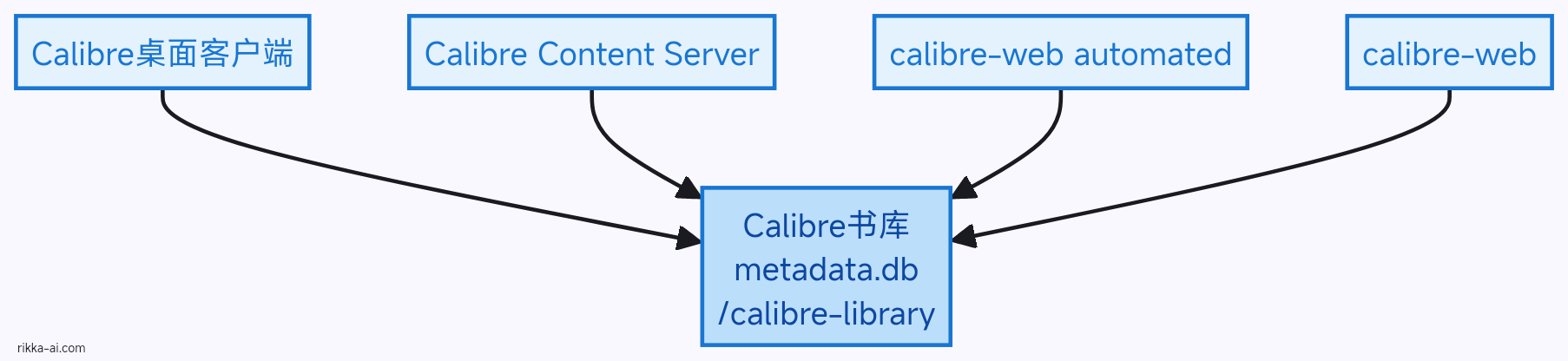
Recommended Approach: Sidecar Pattern
Run your preferred frontend as a separate container sharing the same library directory. This works especially well with the AIO version:
Example with Calibre-Web-Automated:
Using Docker Run:
# Run ANX Calibre Manager AIO (includes calibre-server)
docker run -d \
  --name anx-calibre-manager-aio \
  -p 5000:5000 \
  -p 8080:8080 \
  -v $(pwd)/config:/config \
  -v $(pwd)/webdav:/webdav \
  -v "$(pwd)/library:/Calibre Library" \
  -e CALIBRE_URL=http://localhost:8080 \
  -e CALIBRE_USERNAME=admin \
  -e CALIBRE_PASSWORD=password \
  ghcr.io/ptbsare/anx-calibre-manager:aio-latest

# Run Calibre-Web-Automated (shares the library)
docker run -d \
  --name calibre-web-automated \
  -p 8083:8083 \
  -v $(pwd)/library:/calibre-library:rw \
  -v $(pwd)/cwa-config:/config \
  -e PUID=1000 \
  -e PGID=1000 \
  ghcr.io/crocodilestick/calibre-web-automated:latest
Using Docker Compose:
services:
  anx-calibre-manager-aio:
    image: ghcr.io/ptbsare/anx-calibre-manager:aio-latest
    container_name: anx-calibre-manager-aio
    ports:
      - "5000:5000"
      - "8080:8080"
    volumes:
      - ./config:/config
      - ./webdav:/webdav
      - "./library:/Calibre Library"
    environment:
      - CALIBRE_URL=http://localhost:8080
      - CALIBRE_USERNAME=admin
      - CALIBRE_PASSWORD=password
    restart: unless-stopped

  calibre-web-automated:
    image: ghcr.io/crocodilestick/calibre-web-automated:latest
    container_name: calibre-web-automated
    ports:
      - "8083:8083"
    volumes:
      - ./library:/calibre-library:rw
      - ./cwa-config:/config
    environment:
      - PUID=1000
      - PGID=1000
    restart: unless-stopped
Key Points:
- Shared Library: Mount the same library directory (
./library) to all containers - No Conflicts: Each frontend runs on its own port (ANX: 5000, calibre-server: 8080, CWA: 8083)
- Independent Services: Each container can be started/stopped independently
- Works with Standard Version: You can also use this pattern with the standard (non-AIO) version if you already have a separate Calibre server
📖 KOReader Sync
You can sync your reading progress and reading time between your Anx library and KOReader devices. The setup involves two main steps: setting up WebDAV to access your books and configuring the sync plugin to handle progress synchronization.
Step 1: Configure WebDAV Cloud Storage
This step allows you to browse and read your Anx library books directly in KOReader.
- In KOReader, navigate to
Cloud storage->Add new cloud storage. - Select
WebDAV. - Fill in the details:
- Server address: Enter the WebDAV URL shown in the Anx Calibre Manager settings page (
Settings->Koreader Sync Settings). Ensure the path ends with a/. - Username: Your Anx Calibre Manager username.
- Password: Your Anx Calibre Manager login password.
- Folder:
/anx/data/file
- Server address: Enter the WebDAV URL shown in the Anx Calibre Manager settings page (
- Tap
Connectand save. You should now be able to see your Anx library in KOReader's file browser.
Step 2: Install and Configure the Sync Plugin
This plugin sends your reading progress back to the Anx Calibre Manager server.
- Download the Plugin:
- Log in to Anx Calibre Manager.
- Go to
Settings->Koreader Sync Settings. - Click the
Download KOReader Plugin (.zip)button to get the plugin package.
- Install the Plugin:
- Unzip the downloaded file to get a folder named
anx-calibre-manager-koreader-plugin.koplugin. - Copy this entire folder to the
koreader/plugins/directory on your KOReader device.
- Unzip the downloaded file to get a folder named
- Restart KOReader: Completely close and reopen the KOReader app to load the new plugin.
- Configure the Sync Server:
- Important: First, open a book from the WebDAV storage you configured in Step 1. The plugin menu is only visible in the reading view.
- In the reading view, go to
Tools (wrench icon)->Next page->More tools->ANX Calibre Manager. - Select
Custom sync server. - Custom sync server address: Enter the sync server URL shown in the Anx Calibre Manager settings page (e.g.,
http://<your_server_address>/koreader). - Go back to the previous menu, select
Login, and enter your Anx Calibre Manager username and password.
Once configured, the plugin will automatically or manually sync your reading progress. You can adjust settings like sync frequency in the plugin menu. Note: Only EPUB book progress is supported.
🤖 MCP Server
This application includes a JSON-RPC 2.0 compliant MCP (Model Context Protocol) server, allowing external tools and AI agents to interact with your library.
How to Use
- Generate a Token: After logging in, go to the Settings -> MCP Settings page. Click "Generate New Token" to create a new API token.
- Endpoint URL: The MCP server endpoint is
http://<your_server_address>/mcp. - Authentication: Authenticate by appending your token as a query parameter to the URL, e.g.,
http://.../mcp?token=YOUR_TOKEN. - Send Requests: Send
POSTrequests to this endpoint with a body compliant with the JSON-RPC 2.0 format.
Prompt Examples
Here are a few examples of natural language prompts you could use with an AI agent that has access to these tools. The agent would intelligently call one or more tools to fulfill your request.
-
Simple & Advanced Search:
-
"Find books about Python programming."
-
"Search for science fiction books by Isaac Asimov published after 1950."
-
-
Book Management:
-
"What are the 5 most recently added books? Send the first one to my Kindle."
-
"Push the book 'Dune' to my Anx reader."
-
"Upload the book 'The Three-Body Problem' from my Anx library to Calibre."
-
"Generate an audiobook for the book 'The Three-Body Problem'."
-
"What is the status of the audiobook generation for 'The Three-Body Problem'?"
-
-
Content Interaction & Summarization:
-
"Show me the table of contents for the book 'Foundation'."
-
"Fetch the first chapter of 'Foundation' and give me a summary."
-
"Based on the chapter 'The Psychohistorians' from the book 'Foundation', what are the main ideas of psychohistory?"
-
"Read the entire book 'The Little Prince' and tell me what the fox's secret is."
-
-
Reading Statistics & Progress:
-
"How many words is the book 'Dune' in total, and list the word count for each chapter."
-
"How many books have I read this year?"
-
"What's my reading progress on 'Dune'?"
-
"Who is the author of 'Project Hail Mary' and how long have I been reading it?"
-
Available Tools
You can get a list of all available tools by calling the tools/list method. The currently supported tools are:
search_calibre_books: Search Calibre books using Calibre's powerful search syntax.- Parameters:
search_expression(string),limit(integer, optional). - Example (Advanced Search): Find books by "O'Reilly Media" with a rating of 4 stars or higher.
{
    "jsonrpc": "2.0",
    "method": "tools/call",
    "params": {
        "name": "search_calibre_books",
        "arguments": {
            "search_expression": "publisher:\"O'Reilly Media\" AND rating:>=4",
            "limit": 10
        }
    },
    "id": "search-request-1"
}
- Parameters:
get_recent_books: Get recent books from a specified library.- Parameters:
library_type(string, 'anx' or 'calibre'),limit(integer, optional).
- Parameters:
get_book_details: Get details for a specific book in a library.- Parameters:
library_type(string, 'anx' or 'calibre'),book_id(integer).
- Parameters:
push_calibre_book_to_anx: Push a book from the Calibre library to the user's Anx library.- Parameters:
book_id(integer).
- Parameters:
push_anx_book_to_calibre: Upload a book from the user's Anx library to the public Calibre library.- Parameters:
book_id(integer).
- Parameters:
send_calibre_book_to_kindle: Send a book from the Calibre library to the user's configured Kindle email.- Parameters:
book_id(integer).
- Parameters:
get_table_of_contents: Get the table of contents for a book from a specified library.- Parameters:
library_type(string, 'anx' or 'calibre'),book_id(integer).
- Parameters:
get_chapter_content: Get the content of a specific chapter from a book.- Parameters:
library_type(string, 'anx' or 'calibre'),book_id(integer),chapter_number(integer).
- Parameters:
get_entire_book_content: Get the entire text content of a book from a specified library.- Parameters:
library_type(string, 'anx' or 'calibre'),book_id(integer).
- Parameters:
get_word_count_statistics: Get word count statistics for a book (total and per-chapter).- Parameters:
library_type(string, 'anx' or 'calibre'),book_id(integer).
- Parameters:
generate_audiobook: Generate an audiobook for a book from either the Anx or Calibre library.- Parameters:
library_type(string, 'anx' or 'calibre'),book_id(integer).
- Parameters:
get_audiobook_generation_status: Get the status of an audiobook generation task by its task ID.- Parameters:
task_id(string).
- Parameters:
get_audiobook_status_by_book: Get the status of the latest audiobook task for a specific book by its ID and library type.- Parameters:
library_type(string, 'anx' or 'calibre'),book_id(integer).
- Parameters:
get_user_reading_stats: Get reading statistics for the current user.- Parameters:
time_range(string). This parameter is required. It can be "all", "today", "this_week", "this_month", "this_year", a number of recent days (e.g., "7", "30"), or a date range "YYYY-MM-DD:YYYY-MM-DD".
- Parameters:
💻 Development
-
Clone the repository:
git clone https://github.com/ptbsare/anx-calibre-manager.git cd anx-calibre-manager -
Create a virtual environment:
python3 -m venv .venv source .venv/bin/activate -
Install dependencies:
pip install -r requirements.txt -
Run the development server:
python app.pyThe app will be available at
http://localhost:5000.
🤝 Contributing
Contributions, issues, and feature requests are welcome! Feel free to check the issues page.
🙏 Acknowledgements
This project utilizes the following open-source projects:
- foliate-js for providing the ebook preview functionality.
- ebook-converter for providing the ebook conversion functionality.
📄 License
This project is licensed under the GPLv3 License.
Similar repos


Languages
Python
46.5%
JavaScript
26.1%
HTML
12.3%
CSS
7.7%
Lua
6.0%
A modern, mobile-first web application to manage your ebook library, integrating with Calibre and providing a personal WebDAV server for your Anx-reader compatible devices.
Python
200
431 commits
updated Sep 21, 2026
README
Anx Calibre Manager
A modern, mobile-first web application to manage your ebook library, integrating with Calibre and providing a personal WebDAV server for your Anx-reader compatible devices.
English | 简体中文 | 繁體中文 | Español | Français | Deutsch
✨ Features
- Multi-language Support: Full internationalization support. The interface is available in English, Simplified Chinese (简体中文), Traditional Chinese (繁體中文), Spanish, French, and German.
- Mobile-First Interface: A clean, responsive UI designed for easy use on your phone.
- PWA Support: Installable as a Progressive Web App for a native-like experience.
- In-Browser Book Previewer: Preview E-Book directly in your browser. Features Text-to-Speech (TTS).
- Audiobook Generation: Convert EPUB books into M4B audiobooks with chapter markers, using configurable Text-to-Speech (TTS) providers (e.g., Microsoft Edge TTS). The generated M4B files are fully compatible with audiobook servers like Audiobookshelf.
- Online Audiobook Player: Listen to your generated M4B audiobooks directly in the browser. Your listening progress is automatically saved and synced.
- Ask AI: Engage in conversations with your books. This feature allows you to chat with any book in your library, ask questions about its content, get summaries, or explore themes through an AI-powered interface.
- Calibre Integration: Connects to your existing Calibre server to browse and search your library.
- KOReader Sync: Sync your reading progress and reading time with KOReader devices.
- Smart Send to Kindle: Automatically handles formats when sending to your Kindle. If an EPUB exists, it's sent directly. If not, the app converts the best available format to EPUB based on your preferences before sending, ensuring optimal compatibility.
- Push to Anx: Send books from your Calibre library directly to your personal Anx-reader device folder.
- Integrated WebDAV Server: Each user gets their own secure WebDAV folder, compatible with Anx-reader and other WebDAV clients.
- MCP Server: A built-in, compliant Model Context Protocol (MCP) server, allowing AI agents and external tools to interact with your library securely.
- User Management: Simple, built-in user management system with distinct roles:
- Admin: Full control over users, global settings, and all books.
- Maintainer: Can edit all book metadata.
- User: Can upload books, manage their own WebDAV library, MCP tokens, send books to Kindle, and edit books they have uploaded.
- Invite-Only Registration: Admins can generate invite codes to control user registration. This feature is enabled by default to prevent unauthorized sign-ups.
- User-Editable Uploaded Books: Regular users can now edit metadata for books they have uploaded. This functionality relies on a Calibre custom column named
#library(type:Text). When a user uploads a book, their username is automatically saved to this field. Users can then edit any book where they are listed as the owner in the#libraryfield.- Recommendation for Docker Users: To enable this feature, please ensure you have a custom column in your Calibre library named
#library(case-sensitive) with the typeText.
- Recommendation for Docker Users: To enable this feature, please ensure you have a custom column in your Calibre library named
- Easy Deployment: Deployable as a single Docker container with built-in multi-language locale support.
- Reading Stats: Automatically generates a personal reading statistics page, featuring a yearly reading heatmap, a list of books currently being read, and a list of finished books. The page can be shared publicly or kept private.
📸 Screenshots
Main Interface
Settings Page
MCP Settings
| MCP Chat | MCP Chat | MCP Chat | MCP Chat |
|---|---|---|---|
| | | |
| Koreader Book Status | Koreader Sync |
|---|---|
| |
| Koreader Settings | Koreader WebDAV |
|---|---|
| |
Stats Page
| Audiobook List | Audiobook Player |
|---|---|
| |
| Chat With Book | Chat With Book |
|---|---|
| |
🚀 Deployment
This application is designed to be deployed using Docker.
Prerequisites
- Docker installed on your server.
- Calibre Server (choose one):
- Option 1: Use AIO (All-In-One) image - Includes a built-in
calibre-server. Perfect for beginners who want a simple, single-container deployment. - Option 2: Use an existing Calibre server - Run a separate Calibre server Docker image. We recommend linuxserver/calibre or the lightweight lucapisciotta/calibre (default port:
8085).
- Option 1: Use AIO (All-In-One) image - Includes a built-in
Quick Start (Docker Run)
AIO Version (All-In-One - Recommended)
Perfect if you don't want to manage a separate Calibre server!
-
Create three directories for persistent data:
mkdir -p ./config mkdir -p ./webdav mkdir -p ./library -
Run the AIO Docker container:
docker run -d \ --name anx-calibre-manager-aio \ -p 5000:5000 \ -p 8080:8080 \ -v $(pwd)/config:/config \ -v $(pwd)/webdav:/webdav \ -v "$(pwd)/library:/Calibre Library" \ -e CALIBRE_URL=http://localhost:8080 \ -e CALIBRE_USERNAME=admin \ -e CALIBRE_PASSWORD=password \ --restart unless-stopped \ ghcr.io/ptbsare/anx-calibre-manager:aio-latest -
Access the application at
http://localhost:5000. The built-in Calibre server will be available athttp://localhost:8080.- Note: The
/Calibre Librarydirectory is your Calibre library folder. It will containmetadata.db(the Calibre database), book files, and cover images. This is where all your ebooks are stored and managed by the built-in Calibre server. - Note: Change the default username (
admin) and password (password) for security.
- Note: The
Standard Version
This is for users who already have a separate Calibre server.
-
Create two directories for persistent data:
mkdir -p ./config mkdir -p ./webdav -
Run the Docker container with this single command:
docker run -d \ --name anx-calibre-manager \ -p 5000:5000 \ -v $(pwd)/config:/config \ -v $(pwd)/webdav:/webdav \ --restart unless-stopped \ ghcr.io/ptbsare/anx-calibre-manager:latest -
Access the application at
http://localhost:5000. The first user to register will become the administrator. You can configure the Calibre server connection and other settings from the web interface later.
Advanced Configuration
Here is a more detailed docker-compose.yml example for users who want to connect to a Calibre server and customize more options.
-
Find your User and Group ID (PUID/PGID): Run
id $USERon your host machine. This is recommended to avoid permission issues. -
Create a
docker-compose.ymlfile:services: anx-calibre-manager: image: ghcr.io/ptbsare/anx-calibre-manager:latest container_name: anx-calibre-manager ports: - "5000:5000" volumes: - /path/to/your/config:/config - /path/to/your/webdav:/webdav - /path/to/your/audiobooks:/audiobooks # Optional - /path/to/your/fonts:/opt/share/fonts # Optional environment: - PUID=1000 - PGID=1000 - TZ=America/New_York - GUNICORN_WORKERS=2 # Optional - SECRET_KEY=your_super_secret_key # Change this! - CALIBRE_URL=http://your-calibre-server-ip:8080 - CALIBRE_USERNAME=your_calibre_username - CALIBRE_PASSWORD=your_calibre_password - CALIBRE_DEFAULT_LIBRARY_ID=Calibre_Library - CALIBRE_ADD_DUPLICATES=false restart: unless-stoppedNote: Replace
/path/to/your/...with the actual paths on your host machine. -
Run the container:
docker-compose up -d
Custom Fonts
The book conversion tool, ebook-converter, scans the /opt/share/fonts directory for fonts. If you encounter font-related issues when converting books with special characters (e.g., Chinese), you can provide custom fonts by mounting a local directory containing your font files (e.g., .ttf, .otf) to the container's /opt/share/fonts path.
Configuration
The application is configured via environment variables.
| Variable | Description | Default |
|---|---|---|
PUID | The User ID to run the application as. | 1001 |
PGID | The Group ID to run the application as. | 1001 |
TZ | Your timezone, e.g., America/New_York. | UTC |
PORT | The port the application listens on inside the container. | 5000 |
GUNICORN_WORKERS | Optional: The number of Gunicorn worker processes. | 2 |
CONFIG_DIR | The directory for the database and settings.json. | /config |
WEBDAV_DIR | The base directory for WebDAV user files. | /webdav |
SECRET_KEY | Required. A long, random string for session security. | "" |
LOGIN_MAX_ATTEMPTS | Maximum number of login attempts before account lockout. Set to 0 to disable. | 5 |
SESSION_LIFETIME_DAYS | Number of days a user session remains valid after login. | 7 |
ENABLE_ACTIVITY_LOG | Enable logging of user activities (login, download, upload, etc.) to the database for audit purposes. | false |
CALIBRE_URL | The URL of your Calibre content server. Dual purpose in AIO version: (1) Serves as the global default Calibre server connection for anx-calibre-manager. (2) The port number is extracted to determine which port the built-in calibre-server should listen on. For example, http://localhost:8080 will make calibre-server listen on port 8080. See Troubleshooting if you have connection issues. | "" |
CALIBRE_USERNAME | Username for your Calibre server. See Troubleshooting if you have connection issues. | "" |
CALIBRE_PASSWORD | Password for your Calibre server. See Troubleshooting if you have connection issues. | "" |
CALIBRE_DEFAULT_LIBRARY_ID | The default Calibre library ID. See How to find my library_id for details. | Calibre_Library |
CALIBRE_ADD_DUPLICATES | Whether to allow uploading duplicate books. | false |
DISABLE_NORMAL_USER_UPLOAD | When set to true, it disables the book upload functionality for users with the 'User' role, only Admins and Maintainers can upload books. | false |
SMTP_SERVER | SMTP server for sending emails (e.g., for Kindle). | "" |
SMTP_PORT | SMTP port. | 587 |
SMTP_USERNAME | SMTP username. | "" |
SMTP_PASSWORD | SMTP password. | "" |
SMTP_ENCRYPTION | SMTP encryption type (ssl, starttls, none). | ssl |
DEFAULT_TTS_PROVIDER | The default TTS provider for audiobook generation (edge_tts or openai_tts). | edge_tts |
DEFAULT_TTS_VOICE | The default voice for the selected TTS provider. | en-US-AriaNeural |
DEFAULT_TTS_RATE | The default speech rate for the TTS provider (e.g., +10%). | +0% |
DEFAULT_TTS_SENTENCE_PAUSE | The default pause duration between sentences in milliseconds. | 650 |
DEFAULT_TTS_PARAGRAPH_PAUSE | The default pause duration between paragraphs in milliseconds. | 900 |
DEFAULT_OPENAI_API_KEY | Your OpenAI API key (required if using openai_tts). | "" |
DEFAULT_OPENAI_API_BASE_URL | Custom base URL for OpenAI-compatible APIs. | https://api.openai.com/v1 |
DEFAULT_OPENAI_API_MODEL | The OpenAI model to use for TTS (e.g., tts-1). | tts-1 |
DEFAULT_LLM_BASE_URL | The base URL for the Large Language Model (LLM) API, compatible with the OpenAI API format. | "" |
DEFAULT_LLM_API_KEY | The API key for the LLM service. | "" |
DEFAULT_LLM_MODEL | The default model to use for the LLM service (e.g., gpt-4). | "" |
🔧 Troubleshooting
Here are some common issues and their solutions:
1. Why are there no books in my Calibre list?
- A: Please ensure you have started the Calibre Content Server in your Calibre client or container. It usually runs on port
8080. Remember, this application connects tocalibre-server, notcalibre-web(which typically runs on port8083). - B: Verify that your Calibre Server URL, username, and password are correct in the settings. You can test this by opening the configured URL in your browser and trying to log in.
2. Why do I get a 401 Unauthorized error when uploading/editing books?
- A: Make sure the Calibre user account you configured has write permissions for the library. To check, go to
Preferences->Sharing over the net->User accountsin the Calibre desktop application and ensure the "Allow write access" option is checked for the user.
3. Why do I get a 403 Forbidden error when uploading/editing books?
- A: This usually means you have configured an incorrect Calibre Library ID.
4. How do I find my library_id?
- Method 1 (Visual): Open your Calibre Content Server in a browser and log in. Look at the name of your library displayed on the page. The
library_idis usually this name with spaces and special characters replaced by underscores. For example, if your library is named "Calibre Library", the ID is likelyCalibre_Library. - Method 2 (From URL): In the Content Server interface, click on your library's name. Look at the URL in your browser's address bar. You should see a parameter like
library_id=.... The value of this parameter is your library ID (it might be URL-encoded, so you may need to decode it). - Common Default IDs: The default library id often depends on your system's language when you first ran Calibre. Here are some common defaults:
- English:
Calibre_Library - French:
Bibliothèque_calibre - German:
Calibre-Bibliothek - Spanish:
Biblioteca_de_calibre - Simplified Chinese (简体中文):
Calibre_书库 - Traditional Chinese (繁體中文):
calibre_書庫
- English:
5. Why do I get a 400 Bad Request error when editing the read date or library fields?
- A: This error occurs because your Calibre library is missing the required custom columns to store this information. To enable features like tracking the uploader/owner of a book and setting a specific read date, you need to add two custom columns in your Calibre desktop application:
- Go to
Preferences->Add your own columns. - Click
Add custom column. - Create the first column with the following details:
- Lookup name:
#library - Column heading:
Library(or as you prefer) - Column type:
Text
- Lookup name:
- Create the second column with these details:
- Lookup name:
#readdate - Column heading:
Read Date(or as you prefer) - Column type:
Date
- Lookup name:
- Click
Applyand restart your Calibre server if it's running. After adding these columns, the editing functions will work correctly.
- Go to
6. Why is there no delete button for Calibre books in the left panel?
This is an intentional security design. When Anx Calibre Manager is exposed to the public internet, to prevent accidental or malicious deletion of books in your library (especially libraries with thousands of books), we do not provide an interface for deleting Calibre books.
To delete Calibre books, please use one of the following methods:
- Access the Calibre Content Server via the internal network (default port
8080) to perform deletion - Or use the Calibre desktop client for management
This ensures that your library can enjoy the convenience of Anx Calibre Manager without the risk of data loss from being exposed to the public internet.
7. I don't want to use the heavy Calibre desktop client or the basic calibre-server to manage my library. Can I use other frontends like Calibre-Web, Calibre-Web-Automated, or Talebook?
Yes! You can use any Calibre-compatible frontend alongside this application. These frontends all interact with the same Calibre library database (metadata.db), as shown in this diagram:
Recommended Approach: Sidecar Pattern
Run your preferred frontend as a separate container sharing the same library directory. This works especially well with the AIO version:
Example with Calibre-Web-Automated:
Using Docker Run:
# Run ANX Calibre Manager AIO (includes calibre-server)
docker run -d \
  --name anx-calibre-manager-aio \
  -p 5000:5000 \
  -p 8080:8080 \
  -v $(pwd)/config:/config \
  -v $(pwd)/webdav:/webdav \
  -v "$(pwd)/library:/Calibre Library" \
  -e CALIBRE_URL=http://localhost:8080 \
  -e CALIBRE_USERNAME=admin \
  -e CALIBRE_PASSWORD=password \
  ghcr.io/ptbsare/anx-calibre-manager:aio-latest

# Run Calibre-Web-Automated (shares the library)
docker run -d \
  --name calibre-web-automated \
  -p 8083:8083 \
  -v $(pwd)/library:/calibre-library:rw \
  -v $(pwd)/cwa-config:/config \
  -e PUID=1000 \
  -e PGID=1000 \
  ghcr.io/crocodilestick/calibre-web-automated:latest
Using Docker Compose:
services:
  anx-calibre-manager-aio:
    image: ghcr.io/ptbsare/anx-calibre-manager:aio-latest
    container_name: anx-calibre-manager-aio
    ports:
      - "5000:5000"
      - "8080:8080"
    volumes:
      - ./config:/config
      - ./webdav:/webdav
      - "./library:/Calibre Library"
    environment:
      - CALIBRE_URL=http://localhost:8080
      - CALIBRE_USERNAME=admin
      - CALIBRE_PASSWORD=password
    restart: unless-stopped

  calibre-web-automated:
    image: ghcr.io/crocodilestick/calibre-web-automated:latest
    container_name: calibre-web-automated
    ports:
      - "8083:8083"
    volumes:
      - ./library:/calibre-library:rw
      - ./cwa-config:/config
    environment:
      - PUID=1000
      - PGID=1000
    restart: unless-stopped
Key Points:
- Shared Library: Mount the same library directory (
./library) to all containers - No Conflicts: Each frontend runs on its own port (ANX: 5000, calibre-server: 8080, CWA: 8083)
- Independent Services: Each container can be started/stopped independently
- Works with Standard Version: You can also use this pattern with the standard (non-AIO) version if you already have a separate Calibre server
📖 KOReader Sync
You can sync your reading progress and reading time between your Anx library and KOReader devices. The setup involves two main steps: setting up WebDAV to access your books and configuring the sync plugin to handle progress synchronization.
Step 1: Configure WebDAV Cloud Storage
This step allows you to browse and read your Anx library books directly in KOReader.
- In KOReader, navigate to
Cloud storage->Add new cloud storage. - Select
WebDAV. - Fill in the details:
- Server address: Enter the WebDAV URL shown in the Anx Calibre Manager settings page (
Settings->Koreader Sync Settings). Ensure the path ends with a/. - Username: Your Anx Calibre Manager username.
- Password: Your Anx Calibre Manager login password.
- Folder:
/anx/data/file
- Server address: Enter the WebDAV URL shown in the Anx Calibre Manager settings page (
- Tap
Connectand save. You should now be able to see your Anx library in KOReader's file browser.
Step 2: Install and Configure the Sync Plugin
This plugin sends your reading progress back to the Anx Calibre Manager server.
- Download the Plugin:
- Log in to Anx Calibre Manager.
- Go to
Settings->Koreader Sync Settings. - Click the
Download KOReader Plugin (.zip)button to get the plugin package.
- Install the Plugin:
- Unzip the downloaded file to get a folder named
anx-calibre-manager-koreader-plugin.koplugin. - Copy this entire folder to the
koreader/plugins/directory on your KOReader device.
- Unzip the downloaded file to get a folder named
- Restart KOReader: Completely close and reopen the KOReader app to load the new plugin.
- Configure the Sync Server:
- Important: First, open a book from the WebDAV storage you configured in Step 1. The plugin menu is only visible in the reading view.
- In the reading view, go to
Tools (wrench icon)->Next page->More tools->ANX Calibre Manager. - Select
Custom sync server. - Custom sync server address: Enter the sync server URL shown in the Anx Calibre Manager settings page (e.g.,
http://<your_server_address>/koreader). - Go back to the previous menu, select
Login, and enter your Anx Calibre Manager username and password.
Once configured, the plugin will automatically or manually sync your reading progress. You can adjust settings like sync frequency in the plugin menu. Note: Only EPUB book progress is supported.
🤖 MCP Server
This application includes a JSON-RPC 2.0 compliant MCP (Model Context Protocol) server, allowing external tools and AI agents to interact with your library.
How to Use
- Generate a Token: After logging in, go to the Settings -> MCP Settings page. Click "Generate New Token" to create a new API token.
- Endpoint URL: The MCP server endpoint is
http://<your_server_address>/mcp. - Authentication: Authenticate by appending your token as a query parameter to the URL, e.g.,
http://.../mcp?token=YOUR_TOKEN. - Send Requests: Send
POSTrequests to this endpoint with a body compliant with the JSON-RPC 2.0 format.
Prompt Examples
Here are a few examples of natural language prompts you could use with an AI agent that has access to these tools. The agent would intelligently call one or more tools to fulfill your request.
-
Simple & Advanced Search:
-
"Find books about Python programming."
-
"Search for science fiction books by Isaac Asimov published after 1950."
-
-
Book Management:
-
"What are the 5 most recently added books? Send the first one to my Kindle."
-
"Push the book 'Dune' to my Anx reader."
-
"Upload the book 'The Three-Body Problem' from my Anx library to Calibre."
-
"Generate an audiobook for the book 'The Three-Body Problem'."
-
"What is the status of the audiobook generation for 'The Three-Body Problem'?"
-
-
Content Interaction & Summarization:
-
"Show me the table of contents for the book 'Foundation'."
-
"Fetch the first chapter of 'Foundation' and give me a summary."
-
"Based on the chapter 'The Psychohistorians' from the book 'Foundation', what are the main ideas of psychohistory?"
-
"Read the entire book 'The Little Prince' and tell me what the fox's secret is."
-
-
Reading Statistics & Progress:
-
"How many words is the book 'Dune' in total, and list the word count for each chapter."
-
"How many books have I read this year?"
-
"What's my reading progress on 'Dune'?"
-
"Who is the author of 'Project Hail Mary' and how long have I been reading it?"
-
Available Tools
You can get a list of all available tools by calling the tools/list method. The currently supported tools are:
search_calibre_books: Search Calibre books using Calibre's powerful search syntax.- Parameters:
search_expression(string),limit(integer, optional). - Example (Advanced Search): Find books by "O'Reilly Media" with a rating of 4 stars or higher.
{
    "jsonrpc": "2.0",
    "method": "tools/call",
    "params": {
        "name": "search_calibre_books",
        "arguments": {
            "search_expression": "publisher:\"O'Reilly Media\" AND rating:>=4",
            "limit": 10
        }
    },
    "id": "search-request-1"
}
- Parameters:
get_recent_books: Get recent books from a specified library.- Parameters:
library_type(string, 'anx' or 'calibre'),limit(integer, optional).
- Parameters:
get_book_details: Get details for a specific book in a library.- Parameters:
library_type(string, 'anx' or 'calibre'),book_id(integer).
- Parameters:
push_calibre_book_to_anx: Push a book from the Calibre library to the user's Anx library.- Parameters:
book_id(integer).
- Parameters:
push_anx_book_to_calibre: Upload a book from the user's Anx library to the public Calibre library.- Parameters:
book_id(integer).
- Parameters:
send_calibre_book_to_kindle: Send a book from the Calibre library to the user's configured Kindle email.- Parameters:
book_id(integer).
- Parameters:
get_table_of_contents: Get the table of contents for a book from a specified library.- Parameters:
library_type(string, 'anx' or 'calibre'),book_id(integer).
- Parameters:
get_chapter_content: Get the content of a specific chapter from a book.- Parameters:
library_type(string, 'anx' or 'calibre'),book_id(integer),chapter_number(integer).
- Parameters:
get_entire_book_content: Get the entire text content of a book from a specified library.- Parameters:
library_type(string, 'anx' or 'calibre'),book_id(integer).
- Parameters:
get_word_count_statistics: Get word count statistics for a book (total and per-chapter).- Parameters:
library_type(string, 'anx' or 'calibre'),book_id(integer).
- Parameters:
generate_audiobook: Generate an audiobook for a book from either the Anx or Calibre library.- Parameters:
library_type(string, 'anx' or 'calibre'),book_id(integer).
- Parameters:
get_audiobook_generation_status: Get the status of an audiobook generation task by its task ID.- Parameters:
task_id(string).
- Parameters:
get_audiobook_status_by_book: Get the status of the latest audiobook task for a specific book by its ID and library type.- Parameters:
library_type(string, 'anx' or 'calibre'),book_id(integer).
- Parameters:
get_user_reading_stats: Get reading statistics for the current user.- Parameters:
time_range(string). This parameter is required. It can be "all", "today", "this_week", "this_month", "this_year", a number of recent days (e.g., "7", "30"), or a date range "YYYY-MM-DD:YYYY-MM-DD".
- Parameters:
💻 Development
-
Clone the repository:
git clone https://github.com/ptbsare/anx-calibre-manager.git cd anx-calibre-manager -
Create a virtual environment:
python3 -m venv .venv source .venv/bin/activate -
Install dependencies:
pip install -r requirements.txt -
Run the development server:
python app.pyThe app will be available at
http://localhost:5000.
🤝 Contributing
Contributions, issues, and feature requests are welcome! Feel free to check the issues page.
🙏 Acknowledgements
This project utilizes the following open-source projects:
- foliate-js for providing the ebook preview functionality.
- ebook-converter for providing the ebook conversion functionality.
📄 License
This project is licensed under the GPLv3 License.
Similar repos
Languages
Python
46.5%
JavaScript
26.1%
HTML
12.3%
CSS
7.7%
Lua
6.0%