
ML-assisted manga translation desktop app built with Rust, Tauri, and Next.js.
See the codeREADME

Yomika
A local-first workspace for translating, cleaning, typesetting, and exporting manga.



Documentation · First-page tutorial · Issues · Discussions
English | 日本語 | 简体中文 | Português (Brasil) | Türkçe kurulum
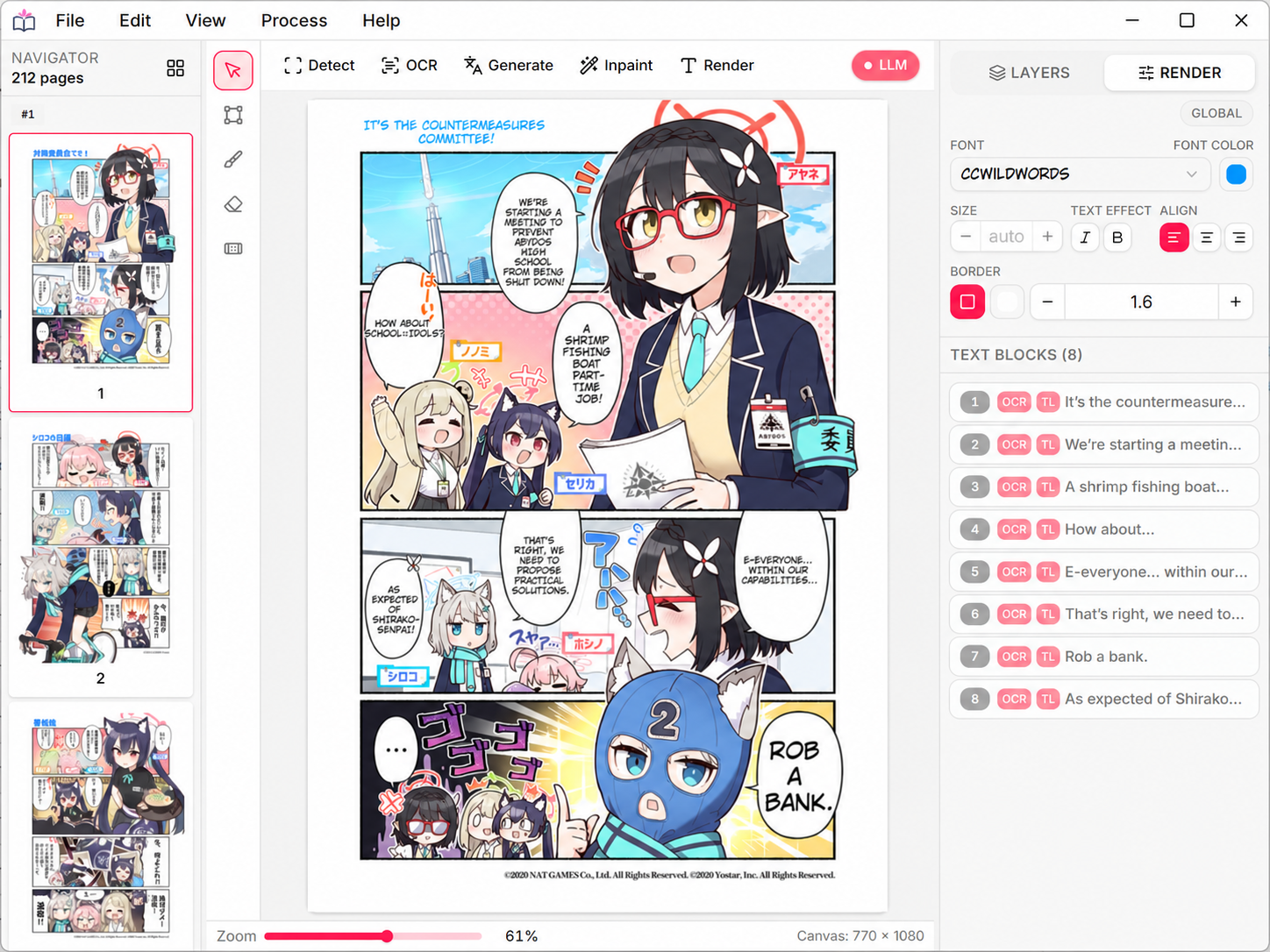
Yomika combines text and speech-bubble detection, OCR, inpainting, translation, review, typesetting, and export in one page-aware desktop app. The vision pipeline and downloaded translation models can run on your device. Hosted providers and Codex are optional and send data only when you choose those workflows.
What Yomika Does
- Processes individual pages or multi-page projects through a staged pipeline
- Runs local vision models with candle and local GGUF language models with llama.cpp
- Supports local, hosted, machine-translation, and OpenAI-compatible providers
- Renders vertical CJK, right-to-left text, font fallback, strokes, and effects
- Uses Google Fonts plus installed OpenType, TrueType, and variable fonts
- Exports rendered images, editable layered PSD files, and Yomika project archives
- Exposes the same runtime through the desktop UI, headless Web UI, HTTP API, and MCP
- Separates model downloads from loading, with cancellation and storage controls
The desktop shell uses Tauri and Rust; its embedded interface is built with Next.js.
Installation
Windows portable release
Download either the portable .exe or .zip from
GitHub Releases. The ZIP
contains the same executable; extract it anywhere you can write files, then run
Yomika-<version>-windows-x64.exe. Yomika does not use an installer.
Source Build Requirements
- Rust 1.95 or later
- Bun 1.0 or later
- LLVM/Clang with a usable
libclangshared library - Platform-specific Tauri prerequisites
- CUDA Toolkit 13.0 for the default Windows and Linux CUDA build, or Apple Silicon for the macOS Metal build
Build From Source
git clone https://github.com/proxlavee/yomika.git
cd yomika
bun install --frozen-lockfile
bun run build
The binary is written to target/release/yomika or
target/release/yomika.exe. First launch initializes runtime libraries and
downloads the default vision/OCR models. Optional local translation models use
an explicit Download action and can be cancelled before you choose Load.
See Build From Source for Windows, Linux, macOS, and WSL notes.
Yomika checks GitHub for a newer release at startup and from Settings → About. An available-update notice opens the Releases page; the app never downloads or installs application updates automatically.
First Page
- Import one or more PNG, JPEG, or WebP pages.
- Run Detect → OCR → Inpaint → Translate → Render.
- Review text blocks, repair masks, and adjust the lettering.
- Export a finished image or layered PSD.
Read Translate Your First Page for the complete walkthrough.
Usage
Hotkeys
Canvas:
- Mouse Wheel: Zoom in/out around the pointer
- Hand tool + Drag: Pan the canvas
- Ctrl + Drag: Pan the canvas
Tools:
- V: Select tool
- M: Block tool
- B: Brush tool
- E: Eraser tool
- R: Repair Brush tool
- [ / ]: Decrease / increase brush size
History and selection:
- Ctrl + Z / Cmd + Z: Undo
- Ctrl + Shift + Z / Cmd + Shift + Z: Redo
- Ctrl + A / Cmd + A: Select all text blocks on the current page
For the full list and customization details, see Keyboard Shortcuts.
Desktop, Headless, and MCP
Run without the desktop window:
# macOS / Linux
yomika --headless --port 4000

# Windows
yomika.exe --headless --port 4000
Open http://127.0.0.1:4000/ for the Web UI, use
http://127.0.0.1:4000/api/v1 for the HTTP API, or connect an MCP client to
http://127.0.0.1:4000/mcp. See
Run GUI, Headless, and MCP Modes.
Models, Providers, and Acceleration
Yomika downloads required detection, OCR, inpainting, and font-analysis models on demand. Active downloads can be cancelled, and completed model files can be deleted or downloaded again from Settings → Runtime. The model library can use its default app-data location or a folder you choose. Translation can use a local GGUF model or a configured OpenAI, Gemini, Claude, DeepSeek, DeepL, Google Cloud Translation, Caiyun, LM Studio, OpenRouter, or other compatible endpoint. API keys are stored through the platform credential store.
Codex image generation is a separate opt-in workflow that sends the source page and prompt to the ChatGPT Codex backend. Use the staged local pipeline when pages must remain on-device.
| Backend | Platforms | Notes |
|---|---|---|
| CUDA | Windows, Linux | Main NVIDIA path for the local pipeline |
| ZLUDA | Windows | Experimental AMD path; requires AMD HIP SDK |
| Metal | Apple Silicon | Native macOS acceleration |
| Vulkan | Windows, Linux | Primarily OCR and local LLM inference |
| CPU | All | Force at runtime with --cpu |
See Models and Providers and Acceleration and Runtime for supported models, provider setup, and fallback behavior.
Export and Project Files
- Rendered export produces a finished, flattened page.
- PSD export preserves editable text and helper layers for manual cleanup.
.ymkarchives move complete Yomika projects between installations.
See Export Pages and Manage Projects.
Development
bun install --frozen-lockfile
bun run dev
Before opening a pull request, run the complete verification suite:
bun run verify
While iterating, use bun run verify:rust or bun run verify:ui to check one
side of the workspace.
Read CONTRIBUTING.md before submitting changes.
Troubleshooting
Use yomika --debug (or yomika.exe --debug) for detailed startup,
download, GPU, and model logs. The
troubleshooting guide covers first-run
downloads, CUDA fallback, source-build failures, headless access, and exports.
Contributors
Thanks to everyone helping improve Yomika.
License
Yomika is licensed under the GNU General Public License v3.0.
Contributors

16 commits
Similar repos


Languages
Rust
77.3%
TypeScript
22.5%
ML-assisted manga translation desktop app built with Rust, Tauri, and Next.js.
See the codeREADME
Yomika
A local-first workspace for translating, cleaning, typesetting, and exporting manga.
Documentation · First-page tutorial · Issues · Discussions
English | 日本語 | 简体中文 | Português (Brasil) | Türkçe kurulum
Yomika combines text and speech-bubble detection, OCR, inpainting, translation, review, typesetting, and export in one page-aware desktop app. The vision pipeline and downloaded translation models can run on your device. Hosted providers and Codex are optional and send data only when you choose those workflows.
What Yomika Does
- Processes individual pages or multi-page projects through a staged pipeline
- Runs local vision models with candle and local GGUF language models with llama.cpp
- Supports local, hosted, machine-translation, and OpenAI-compatible providers
- Renders vertical CJK, right-to-left text, font fallback, strokes, and effects
- Uses Google Fonts plus installed OpenType, TrueType, and variable fonts
- Exports rendered images, editable layered PSD files, and Yomika project archives
- Exposes the same runtime through the desktop UI, headless Web UI, HTTP API, and MCP
- Separates model downloads from loading, with cancellation and storage controls
The desktop shell uses Tauri and Rust; its embedded interface is built with Next.js.
Installation
Windows portable release
Download either the portable .exe or .zip from
GitHub Releases. The ZIP
contains the same executable; extract it anywhere you can write files, then run
Yomika-<version>-windows-x64.exe. Yomika does not use an installer.
Source Build Requirements
- Rust 1.95 or later
- Bun 1.0 or later
- LLVM/Clang with a usable
libclangshared library - Platform-specific Tauri prerequisites
- CUDA Toolkit 13.0 for the default Windows and Linux CUDA build, or Apple Silicon for the macOS Metal build
Build From Source
git clone https://github.com/proxlavee/yomika.git
cd yomika
bun install --frozen-lockfile
bun run build
The binary is written to target/release/yomika or
target/release/yomika.exe. First launch initializes runtime libraries and
downloads the default vision/OCR models. Optional local translation models use
an explicit Download action and can be cancelled before you choose Load.
See Build From Source for Windows, Linux, macOS, and WSL notes.
Yomika checks GitHub for a newer release at startup and from Settings → About. An available-update notice opens the Releases page; the app never downloads or installs application updates automatically.
First Page
- Import one or more PNG, JPEG, or WebP pages.
- Run Detect → OCR → Inpaint → Translate → Render.
- Review text blocks, repair masks, and adjust the lettering.
- Export a finished image or layered PSD.
Read Translate Your First Page for the complete walkthrough.
Usage
Hotkeys
Canvas:
- Mouse Wheel: Zoom in/out around the pointer
- Hand tool + Drag: Pan the canvas
- Ctrl + Drag: Pan the canvas
Tools:
- V: Select tool
- M: Block tool
- B: Brush tool
- E: Eraser tool
- R: Repair Brush tool
- [ / ]: Decrease / increase brush size
History and selection:
- Ctrl + Z / Cmd + Z: Undo
- Ctrl + Shift + Z / Cmd + Shift + Z: Redo
- Ctrl + A / Cmd + A: Select all text blocks on the current page
For the full list and customization details, see Keyboard Shortcuts.
Desktop, Headless, and MCP
Run without the desktop window:
# macOS / Linux
yomika --headless --port 4000

# Windows
yomika.exe --headless --port 4000
Open http://127.0.0.1:4000/ for the Web UI, use
http://127.0.0.1:4000/api/v1 for the HTTP API, or connect an MCP client to
http://127.0.0.1:4000/mcp. See
Run GUI, Headless, and MCP Modes.
Models, Providers, and Acceleration
Yomika downloads required detection, OCR, inpainting, and font-analysis models on demand. Active downloads can be cancelled, and completed model files can be deleted or downloaded again from Settings → Runtime. The model library can use its default app-data location or a folder you choose. Translation can use a local GGUF model or a configured OpenAI, Gemini, Claude, DeepSeek, DeepL, Google Cloud Translation, Caiyun, LM Studio, OpenRouter, or other compatible endpoint. API keys are stored through the platform credential store.
Codex image generation is a separate opt-in workflow that sends the source page and prompt to the ChatGPT Codex backend. Use the staged local pipeline when pages must remain on-device.
| Backend | Platforms | Notes |
|---|---|---|
| CUDA | Windows, Linux | Main NVIDIA path for the local pipeline |
| ZLUDA | Windows | Experimental AMD path; requires AMD HIP SDK |
| Metal | Apple Silicon | Native macOS acceleration |
| Vulkan | Windows, Linux | Primarily OCR and local LLM inference |
| CPU | All | Force at runtime with --cpu |
See Models and Providers and Acceleration and Runtime for supported models, provider setup, and fallback behavior.
Export and Project Files
- Rendered export produces a finished, flattened page.
- PSD export preserves editable text and helper layers for manual cleanup.
.ymkarchives move complete Yomika projects between installations.
See Export Pages and Manage Projects.
Development
bun install --frozen-lockfile
bun run dev
Before opening a pull request, run the complete verification suite:
bun run verify
While iterating, use bun run verify:rust or bun run verify:ui to check one
side of the workspace.
Read CONTRIBUTING.md before submitting changes.
Troubleshooting
Use yomika --debug (or yomika.exe --debug) for detailed startup,
download, GPU, and model logs. The
troubleshooting guide covers first-run
downloads, CUDA fallback, source-build failures, headless access, and exports.
Contributors
Thanks to everyone helping improve Yomika.
License
Yomika is licensed under the GNU General Public License v3.0.
Similar repos
Contributors
16 commits
Languages
Rust
77.3%
TypeScript
22.5%