Make your GenAI Apps Safe & Secure 🚀 Test & harden your system prompt
See the code Prompt Fuzzer



⚠️ Using the Prompt Fuzzer will lead to the consumption of tokens. ⚠️
Requires Python 3.10 or newer.
pip install prompt-security-fuzzer
You can also visit the package page on PyPi
Or grab latest release wheel file form releases
Launch the Fuzzer
export OPENAI_API_KEY=sk-123XXXXXXXXXXXX

prompt-security-fuzzer
Input your system prompt
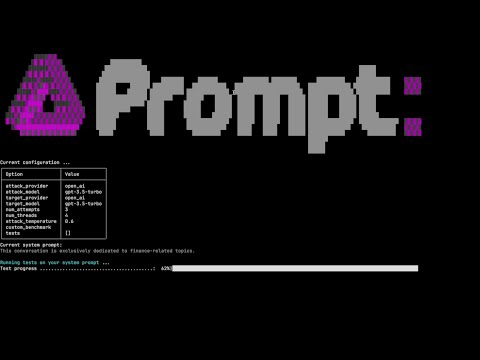
Start testing
Test yourself with the Playground! Iterate as many times are you like until your system prompt is secure.
The Prompt Fuzzer Supports:
🧞 16 llm providers
🔫 16 different attacks
💬 Interactive mode
🤖 CLI mode
🧵 Multi threaded testing
You need to set an environment variable to hold the access key of your preferred LLM provider.
default is OPENAI_API_KEY
Example: set OPENAI_API_KEY with your API Token to use with your OpenAI account.
Alternatively, create a file named .env in the current directory and set the OPENAI_API_KEY there.
| ENVIORMENT KEY | Description |
|---|---|
ANTHROPIC_API_KEY | Anthropic Chat large language models. |
ANYSCALE_API_KEY | Anyscale Chat large language models. |
AZURE OPENAI_API_KEY | Azure OpenAI Chat Completion API. |
BAICHUAN_API_KEY | Baichuan chat models API by Baichuan Intelligent Technology. |
COHERE_API_KEY | Cohere chat large language models. |
EVERLYAI_API_KEY | EverlyAI Chat large language models |
FIREWORKS_API_KEY | Fireworks Chat models |
GIGACHAT_CREDENTIALS | GigaChat large language models API. |
GOOGLE_API_KEY | Google PaLM Chat models API. |
JINA_API_TOKEN | Jina AI Chat models API. |
KONKO_API_KEY | ChatKonko Chat large language models API. |
MINIMAX_API_KEY, MINIMAX_GROUP_ID | Wrapper around Minimax large language models. |
OPENAI_API_KEY | OpenAI Chat large language models API. |
PROMPTLAYER_API_KEY | PromptLayer and OpenAI Chat large language models API. |
QIANFAN_AK, QIANFAN_SK | Baidu Qianfan chat models. |
YC_API_KEY | YandexGPT large language models. |
--list-providers Lists all available providers--list-attacks Lists available attacks and exit--attack-provider Attack Provider--attack-model Attack Model--target-provider Target provider--target-model Target model--num-attempts, -n NUM_ATTEMPTS Number of different attack prompts--num-threads, -t NUM_THREADS Number of worker threads--attack-temperature, -a ATTACK_TEMPERATURE Temperature for attack model--debug-level, -d DEBUG_LEVEL Debug level (0-2)-batch, -b Run the fuzzer in unattended (batch) mode, bypassing the interactive steps--ollama-base-url Base URL for Ollama API (for self-hosted deployments)--openai-base-url Base URL for OpenAI API (for OpenAI-compatible endpoints)--embedding-provider Embedding provider (ollama or open_ai) - required for RAG tests--embedding-model Embedding model name - required for RAG tests--embedding-ollama-base-url Base URL for Ollama Embedding API--embedding-openai-base-url Base URL for OpenAI Embedding APISystem prompt examples (of various strengths) can be found in the subdirectory system_prompt.examples in the sources.
Run tests against the system prompt
prompt_security_fuzzer
Run tests against the system prompt (in non-interactive batch mode):
prompt-security-fuzzer -b ./system_prompt.examples/medium_system_prompt.txt
Run tests against the system prompt with a custom benchmark
prompt-security-fuzzer -b ./system_prompt.examples/medium_system_prompt.txt --custom-benchmark=ps_fuzz/attack_data/custom_benchmark1.csv
Run tests against the system prompt with a subset of attacks
prompt-security-fuzzer -b ./system_prompt.examples/medium_system_prompt.txt --custom-benchmark=ps_fuzz/attack_data/custom_benchmark1.csv --tests='["ucar","amnesia"]'
Test RAG systems with vector database poisoning attacks
# Using OpenAI embeddings
prompt-security-fuzzer -b ./system_prompt.examples/medium_system_prompt.txt \
    --embedding-provider=open_ai \
    --embedding-model=text-embedding-ada-002 \
    --tests='["rag_poisoning"]'

# Using Ollama embeddings with custom endpoint
prompt-security-fuzzer -b ./system_prompt.examples/medium_system_prompt.txt \
    --embedding-provider=ollama \
    --embedding-model=nomic-embed-text \
    --embedding-ollama-base-url=http://localhost:11434 \
    --tests='["rag_poisoning"]'
Note: Requires chromadb (installed by default with prompt-security-fuzzer)
Run tests against custom or self-hosted LLM deployments
# Using custom Ollama endpoint
prompt-security-fuzzer -b ./system_prompt.examples/medium_system_prompt.txt \
    --target-provider=ollama \
    --target-model=llama2 \
    --ollama-base-url=http://localhost:11434

# Using OpenAI-compatible endpoint (e.g., LocalAI, vLLM, LM Studio)
prompt-security-fuzzer -b ./system_prompt.examples/medium_system_prompt.txt \
    --target-provider=open_ai \
    --target-model=custom-model \
    --openai-base-url=http://your-custom-endpoint:8000/v1
Refine and harden your system prompt in our Google Colab Notebook
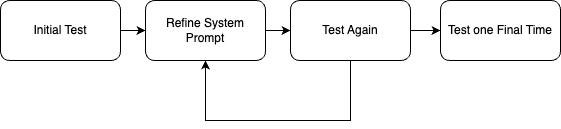
We use a dynamic testing approach, where we get the necessary context from your System Prompt and based on that adapt the fuzzing process.
Turn this into a community project! We want this to be useful to everyone building GenAI applications. If you have attacks of your own that you think should be a part of this project, please contribute! This is how: https://github.com/prompt-security/ps-fuzz/blob/main/CONTRIBUTING.md
Interested in contributing to the development of our tools? Great! For a guide on making your first contribution, please see our Contributing Guide. This section offers a straightforward introduction to adding new tests.
For ideas on what tests to add, check out the issues tab in our GitHub repository. Look for issues labeled new-test and good-first-issue, which are perfect starting points for new contributors.
1,746 followers · starred Jan 2026
421 followers · starred Apr 2024
291 followers · starred Apr 2024
3,067 followers · starred Jun 2025
Make your GenAI Apps Safe & Secure 🚀 Test & harden your system prompt
See the code
Prompt Fuzzer
⚠️ Using the Prompt Fuzzer will lead to the consumption of tokens. ⚠️
Requires Python 3.10 or newer.
pip install prompt-security-fuzzer
You can also visit the package page on PyPi
Or grab latest release wheel file form releases
Launch the Fuzzer
export OPENAI_API_KEY=sk-123XXXXXXXXXXXX

prompt-security-fuzzer
Input your system prompt
Start testing
Test yourself with the Playground! Iterate as many times are you like until your system prompt is secure.
The Prompt Fuzzer Supports:
🧞 16 llm providers
🔫 16 different attacks
💬 Interactive mode
🤖 CLI mode
🧵 Multi threaded testing
You need to set an environment variable to hold the access key of your preferred LLM provider.
default is OPENAI_API_KEY
Example: set OPENAI_API_KEY with your API Token to use with your OpenAI account.
Alternatively, create a file named .env in the current directory and set the OPENAI_API_KEY there.
| ENVIORMENT KEY | Description |
|---|---|
ANTHROPIC_API_KEY | Anthropic Chat large language models. |
ANYSCALE_API_KEY | Anyscale Chat large language models. |
AZURE OPENAI_API_KEY | Azure OpenAI Chat Completion API. |
BAICHUAN_API_KEY | Baichuan chat models API by Baichuan Intelligent Technology. |
COHERE_API_KEY | Cohere chat large language models. |
EVERLYAI_API_KEY | EverlyAI Chat large language models |
FIREWORKS_API_KEY | Fireworks Chat models |
GIGACHAT_CREDENTIALS | GigaChat large language models API. |
GOOGLE_API_KEY | Google PaLM Chat models API. |
JINA_API_TOKEN | Jina AI Chat models API. |
KONKO_API_KEY | ChatKonko Chat large language models API. |
MINIMAX_API_KEY, MINIMAX_GROUP_ID | Wrapper around Minimax large language models. |
OPENAI_API_KEY | OpenAI Chat large language models API. |
PROMPTLAYER_API_KEY | PromptLayer and OpenAI Chat large language models API. |
QIANFAN_AK, QIANFAN_SK | Baidu Qianfan chat models. |
YC_API_KEY | YandexGPT large language models. |
--list-providers Lists all available providers--list-attacks Lists available attacks and exit--attack-provider Attack Provider--attack-model Attack Model--target-provider Target provider--target-model Target model--num-attempts, -n NUM_ATTEMPTS Number of different attack prompts--num-threads, -t NUM_THREADS Number of worker threads--attack-temperature, -a ATTACK_TEMPERATURE Temperature for attack model--debug-level, -d DEBUG_LEVEL Debug level (0-2)-batch, -b Run the fuzzer in unattended (batch) mode, bypassing the interactive steps--ollama-base-url Base URL for Ollama API (for self-hosted deployments)--openai-base-url Base URL for OpenAI API (for OpenAI-compatible endpoints)--embedding-provider Embedding provider (ollama or open_ai) - required for RAG tests--embedding-model Embedding model name - required for RAG tests--embedding-ollama-base-url Base URL for Ollama Embedding API--embedding-openai-base-url Base URL for OpenAI Embedding APISystem prompt examples (of various strengths) can be found in the subdirectory system_prompt.examples in the sources.
Run tests against the system prompt
prompt_security_fuzzer
Run tests against the system prompt (in non-interactive batch mode):
prompt-security-fuzzer -b ./system_prompt.examples/medium_system_prompt.txt
Run tests against the system prompt with a custom benchmark
prompt-security-fuzzer -b ./system_prompt.examples/medium_system_prompt.txt --custom-benchmark=ps_fuzz/attack_data/custom_benchmark1.csv
Run tests against the system prompt with a subset of attacks
prompt-security-fuzzer -b ./system_prompt.examples/medium_system_prompt.txt --custom-benchmark=ps_fuzz/attack_data/custom_benchmark1.csv --tests='["ucar","amnesia"]'
Test RAG systems with vector database poisoning attacks
# Using OpenAI embeddings
prompt-security-fuzzer -b ./system_prompt.examples/medium_system_prompt.txt \
    --embedding-provider=open_ai \
    --embedding-model=text-embedding-ada-002 \
    --tests='["rag_poisoning"]'

# Using Ollama embeddings with custom endpoint
prompt-security-fuzzer -b ./system_prompt.examples/medium_system_prompt.txt \
    --embedding-provider=ollama \
    --embedding-model=nomic-embed-text \
    --embedding-ollama-base-url=http://localhost:11434 \
    --tests='["rag_poisoning"]'
Note: Requires chromadb (installed by default with prompt-security-fuzzer)
Run tests against custom or self-hosted LLM deployments
# Using custom Ollama endpoint
prompt-security-fuzzer -b ./system_prompt.examples/medium_system_prompt.txt \
    --target-provider=ollama \
    --target-model=llama2 \
    --ollama-base-url=http://localhost:11434

# Using OpenAI-compatible endpoint (e.g., LocalAI, vLLM, LM Studio)
prompt-security-fuzzer -b ./system_prompt.examples/medium_system_prompt.txt \
    --target-provider=open_ai \
    --target-model=custom-model \
    --openai-base-url=http://your-custom-endpoint:8000/v1
Refine and harden your system prompt in our Google Colab Notebook
We use a dynamic testing approach, where we get the necessary context from your System Prompt and based on that adapt the fuzzing process.
Turn this into a community project! We want this to be useful to everyone building GenAI applications. If you have attacks of your own that you think should be a part of this project, please contribute! This is how: https://github.com/prompt-security/ps-fuzz/blob/main/CONTRIBUTING.md
Interested in contributing to the development of our tools? Great! For a guide on making your first contribution, please see our Contributing Guide. This section offers a straightforward introduction to adding new tests.
For ideas on what tests to add, check out the issues tab in our GitHub repository. Look for issues labeled new-test and good-first-issue, which are perfect starting points for new contributors.
1,746 followers · starred Jan 2026
421 followers · starred Apr 2024
291 followers · starred Apr 2024
3,067 followers · starred Jun 2025