
One structure, many editable views — with an AI assistant. A projectional editor written in Julia: view and edit structured data, and a generic user interface for Julia programs.
See the codeSee what people are saying
README
ProjecturEd
ProjecturEd: one structure, many editable views — with an AI assistant. It is an application to view and edit structured data, made to be extended with your own data structures and views, and a generic user interface for any Julia program.
Status: under development. Most features work, but ProjecturEd is not a finished product. Some parts are incomplete, and names and interfaces can still change. The roadmap lists what works today and what comes next. Problem reports and questions are welcome as GitHub issues.
ProjecturEd is an application to view and edit structured data, with an AI assistant, and it is made to be extended: you define your own data structures as documents and their views as projections. About twenty domains come with it, among them JSON, YAML, XML, Markdown, SQL, Julia code, math formulas, charts, graphs and state machines. They are examples, not the limit. ProjecturEd shows them in one window, in tabs and split panes, and one document can mix kinds, yours with the others: JSON inside XML inside prose. ProjecturEd is written in Julia. So it is also a generic user interface for your own Julia programs: it shows your documents, and the values of a running program, in the same way.
You can extend ProjecturEd with your own domain: its document types, the projections that make its views, its operations and its key bindings. A domain is a package of its own, and no other domain depends on it. So you can work on your domain without changes to other domains, while other developers work on theirs. Your domain gets the general features with little or no extra code: selection and navigation, search, copy and paste, filtered and sorted views, a text notation and a file format, saving, every backend, and the AI assistant, which can find and call your functions.
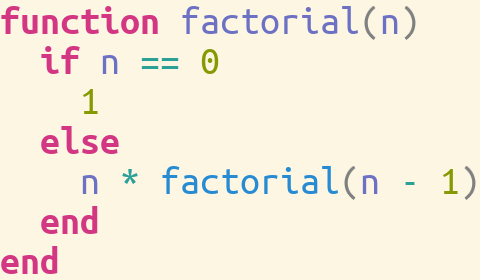
A view can be a tree, a statement with syntax colours, a chart, a diagram, a form or a table. When the data changes, every view of it changes with it: each view reads the data through reactive cells, so no view on the screen can show an old value. Most views are also editors: an edit in a view changes the data itself, not a text copy of it. You can design your own user interface from views and widgets. For data that has no view yet, you get one on demand: a generic view that ProjecturEd makes by reflection over the value, or a view that the assistant opens for you.
The same views work in a native window, in a web browser, in a terminal, and without a screen for tests and scripts. A view can also go to a PDF file, an image or a video. The data goes to text files or to binary files. A text file uses the notation of its domain, and several files can refer to each other. So data with shared parts and mutually recursive structures comes back unchanged after a save and a load. Parts of a document that are not on the screen cost nothing, so a view can show a part of a very large document, or of an infinite list.
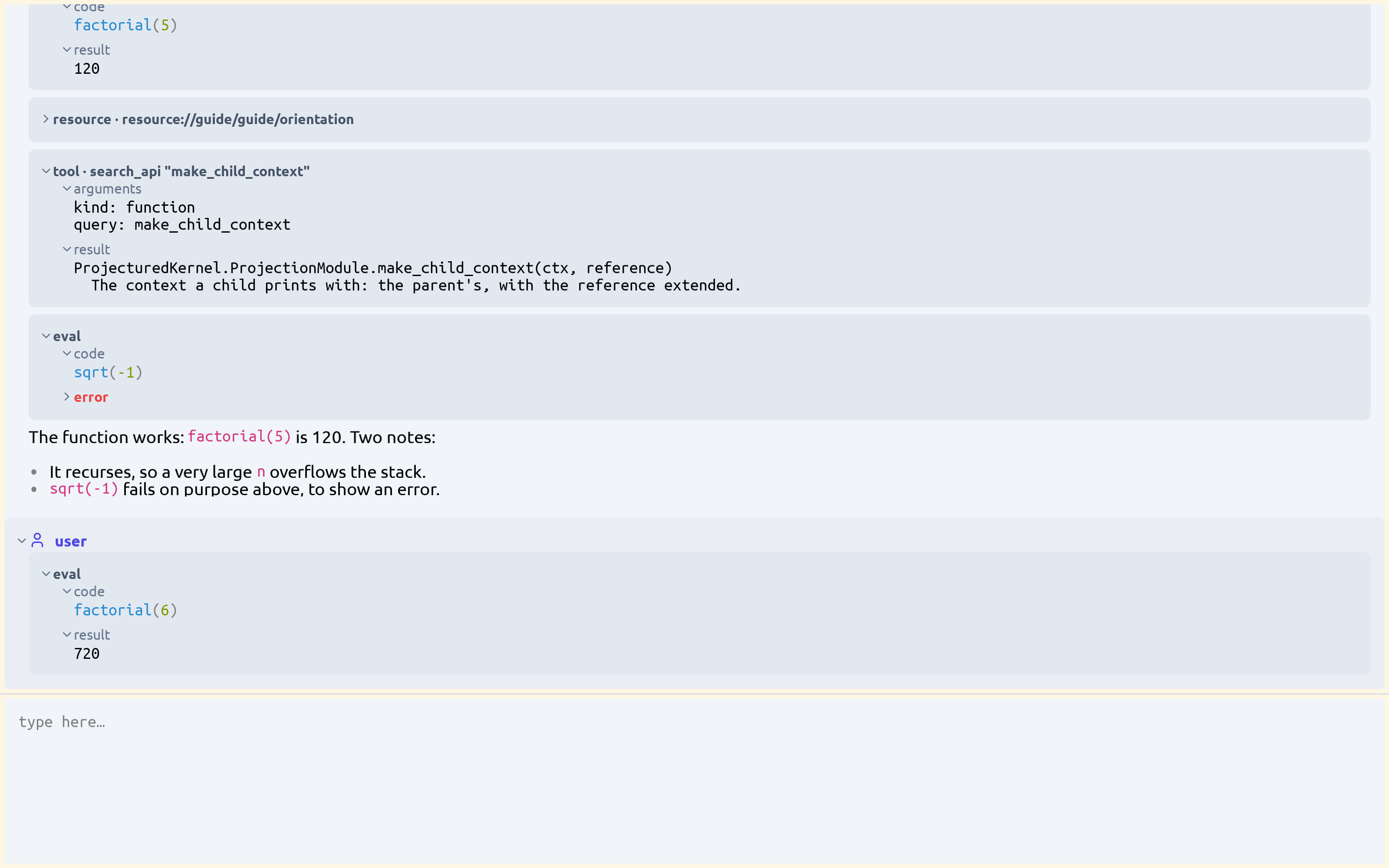
The AI assistant runs inside the application, with a local model through Ollama or with Claude. It searches the API of the loaded packages, writes Julia code and runs it in the application. It changes the data with the same operations as your key presses. The window is a document too, so the assistant also controls the user interface: it can open a tab, split a pane or scroll a view. The conversation is a document too, with its own view, and you can also run Julia code in it yourself. An external AI client, for example Claude Code, can use the same tools through MCP.
Screenshots
| JSON editor | Widget forms | Table view |
|---|---|---|
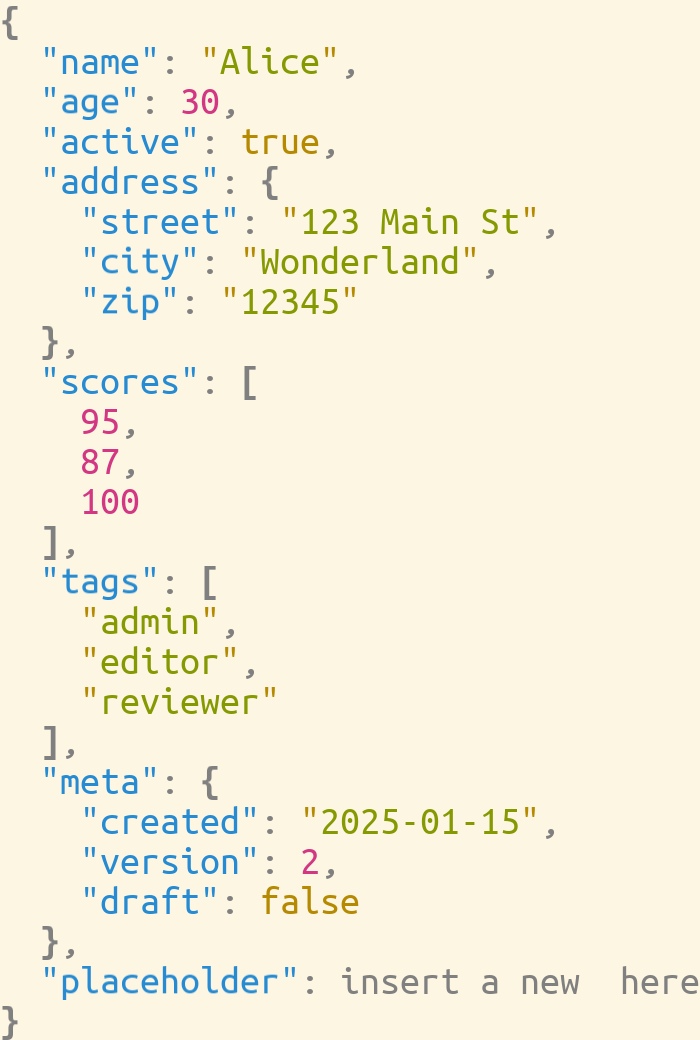 | 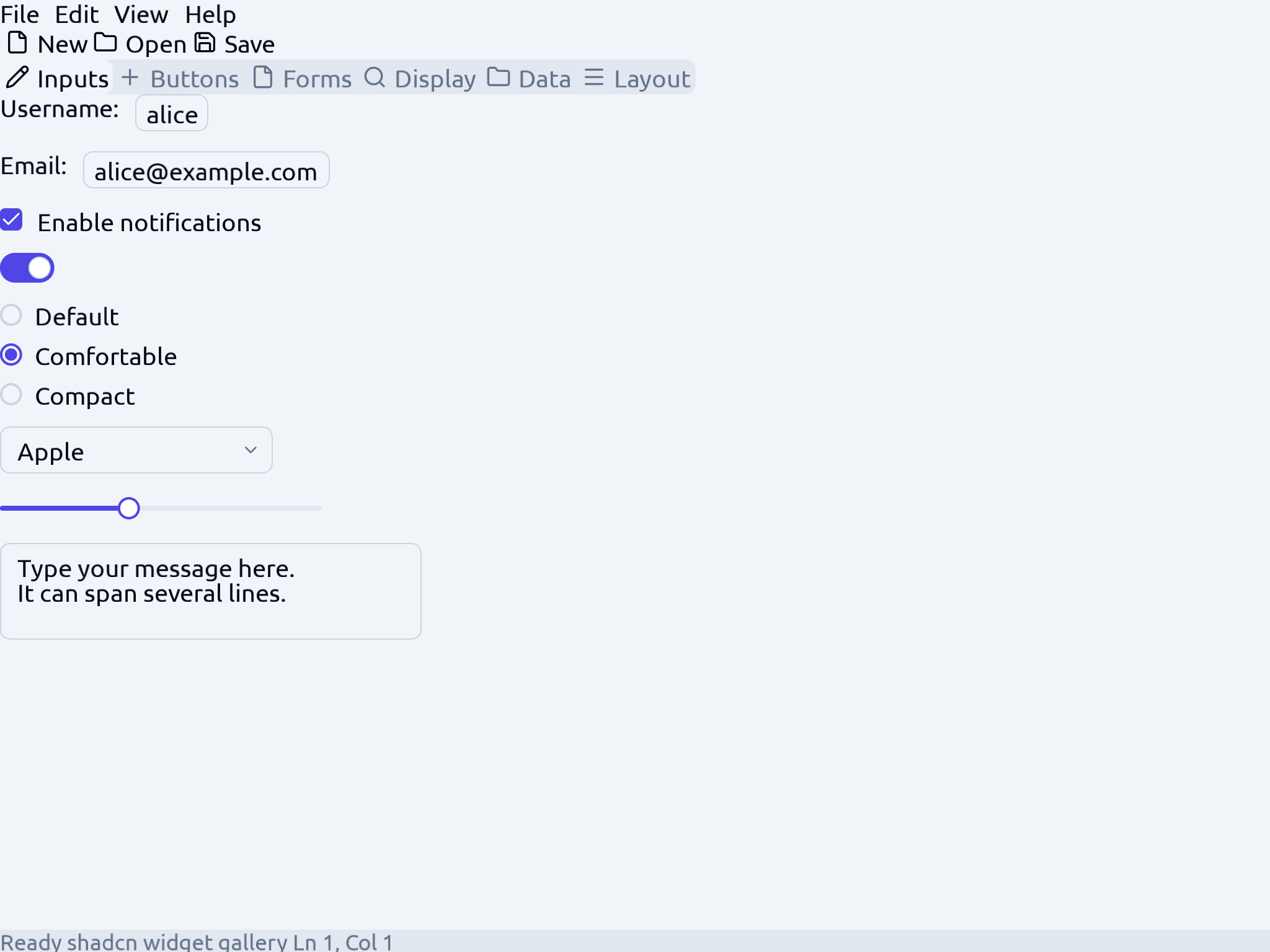 | 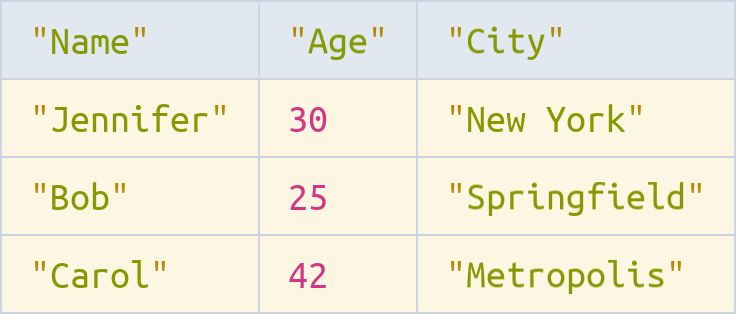 |
| Syntax tree | Julia AST | Assistant |
|---|---|---|
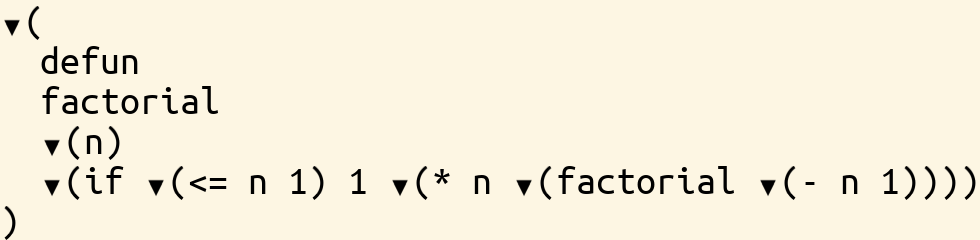 |  |  |
What you can do with it
- Build an application for your own data. Define the structure of your data as documents and its views as projections, in a package of its own. new-domain-guide.md walks through a whole domain, and view-your-data-guide.md shows your own Julia values with no new domain.
- Edit files as structures. The domains that come with ProjecturEd open, change and save their files through their own parsers, among them JSON, YAML, XML, Markdown, reStructuredText, SQL, Julia and a math notation. See the domain inventory.
- Design a tool window without a GUI toolkit. Widgets, tables, cards, tabs, split panes and a pane tree come from the widget and pane packages. ProjecturEd's own window is a complete application of this kind.
- Look into a running Julia program. A reflection view shows any object as a tree that opens one level at a time.
- Show results. Line, bar, histogram, scatter and strip charts, and sequence charts, are documents. A data point can be selected like any other part.
- Model behaviour and run it. A state machine produces runnable Julia code. A process flowchart runs with breakpoints and a live trace.
- Ask for a change in plain words. The assistant searches the API, writes Julia and runs it against the live editor. It works with a local model through Ollama, or with Claude.
- Drive the editor from outside. An MCP client connects to
http://127.0.0.1:9876/mcpand gets the same tools as the assistant in the window. - Put a view somewhere else. The same view goes to a native window, a browser, a terminal, a PDF file, a PNG file or an MP4 video.
- Take a change back.
Ctrl+ZandCtrl+Ywork in the application, for your edits and for the assistant's. The history is a document too, so you can read it. - Keep working after a fault. A failure in a view, in an edit or in a tool does not stop the editor: the editor takes the broken change back, shows what went wrong where the view would be, and goes on.
- Open a tool by its name. Type
repl,log,gestures,selection,reference,explorerorassistantinto an empty tab, and the tab becomes that tool.
Quick start
You need Julia 1.11 or later, and SDL2 with SDL_ttf for a native window. The packages are not in the General registry, so clone the repository.
git clone https://github.com/projectured/projectured-julia
cd projectured-julia
bin/projectured
bin/projectured opens a window with a file navigator on the left, the open files in tabs in the middle, and the assistant on the right. The navigator lists the directory you start it in, and a double click opens a file. Name the files on the command line to open them at once: bin/projectured notes.md data.json. The first start compiles the code, which takes some minutes; later starts are fast.
The window is drawn in its own chrome: a menu bar, a toolbar and a status line that says which tab has the focus. The toolbar has one picture for each tool of the window: the file explorer, the assistant, the evaluator, the message log, the gesture log, the fault log, the frame statistics and the selection. A press opens the tool in a tab, or gives the focus to the tab that already holds it, and the pointer at rest on a picture names the tool. A right press opens the menu the thing under the pointer offers, F1 lists the keys that work where you are, and Ctrl+Shift+P finds a command by its name. View → Gesture log opens a tab that lists every gesture of the session and what each one did, including the gestures made before the tab opened.
bin/projectured --help                       # every option
bin/projectured --assistant=none notes.txt   # no assistant
bin/projectured --backend=web a.json         # in a browser, at http://127.0.0.1:8080
bin/projectured --mcp a.json                 # with an MCP server for an external client
The menu bar has Open and Save As for a file outside the directory the navigator lists. save_user_interface(editor, path) writes the whole window — its panes, its tabs and what each one holds — to one file, and load_user_interface(path) brings it back; an open file tab is saved as a reference to its file, not as a copy.
The assistant. By default it asks a local model through Ollama: the Ollama server must run on your machine, and the model must be pulled. For Claude, set ANTHROPIC_API_KEY in your environment and start with --assistant=anthropic. Without a server and without a key, the assistant pane opens and says what it needs.
A binary. bin/build_projectured compiles the application into build/projectured/, which runs without Julia and without this checkout. build-guide.md says what the build does and what it costs.
From a session. Load the packages and open any value or example:
julia --project=environment/all
using Projectured, ProjecturedExample, ProjecturedSdl
run_example("json")                          # one example in a window
setup-guide.md says what to do when a load fails, and examples-tour.md lists the examples.
How it works
ProjecturEd is a projectional editor. The data is the source, and every view is computed from it. A projection turns the data into a view, and it turns an edit in the view back into an operation on the data. Projections compose: one view can show several kinds of data, and one piece of data can have many views. Each field of the data is a reactive cell. After a change, ProjecturEd recomputes only the parts of the views that depend on the change and are on the screen.
Five ideas carry the whole system.
| Idea | What it is |
|---|---|
| Document | The data: a tree of typed structures, each field a reactive cell. |
| Projection | A pair of functions: a printer that makes the view, and a reader that turns an intent in the view into an operation. |
| Selection | Where you are, as a path into the data, not as a caret in a text. |
| Operation | A change of the data, from a key press or from the assistant. |
| Tool set | What the assistant and an MCP client can call: search the API, read a guide, run Julia, change the data. |
A key press goes through the projections to the data, and the change comes back through the same projections to the screen. concepts.md explains the five ideas without code, and engineer-tour.md derives the system from them.
Status and limits
ProjecturEd is under development. These limits are true today:
- Undo and redo work in the application, which puts a history around each file and one around the window. A window of your own has none until you put one there.
- Type-in of single characters does not work the same way in every domain.
- A drag inside a table cell does not select text. A click, the arrows and typing edit the cell.
- A click selects where a projection wires it, and elsewhere it does nothing.
- The assistant needs a local Ollama server with a pulled model, or an Anthropic API key.
- The packages are not in the General registry. You clone the repository and use
environment/all. - SDL2 and SDL_ttf must be installed for a native window.
- Commercial use needs a licence from the author.
The roadmap says what comes next.
Where to read next
To use it: setup-guide.md, then examples-tour.md, keyboard-and-mouse-guide.md and the assistant guide.
To show your own data: concepts.md, then view-your-data-guide.md and own-project-guide.md.
To work on ProjecturEd: concepts.md, engineer-tour.md, system-anatomy.md, then CONTRIBUTING.md and the rules in documentation/rule/. The guide index lists every document.
Repository layout
One dimension per level: what a file is decides its top folder, and which slice it belongs to decides the folder under that.
| Path | Contents |
|---|---|
| source/ | The system — one folder per slice, and kernel/ with its layers |
| test/ | The suites, one folder per slice, plus suite/ for what belongs to no package |
| example/ | Documents, galleries and workload bodies, one folder per slice |
| package/ | One directory per package: a Project.toml and a src/<Name>.jl, and nothing else |
| environment/ | all/ for the whole suite, build/ for a build. No code |
| documentation/ | The guides — see the guide index |
| asset/ | Fonts, screenshots, the web client, and the precompile recording |
| bin/ | The commands: run the application, build the binary |
| tool/ | Scripts that are not part of the system |
| plan/ | Design notes and plans |
A package and its code do not share a directory. package/ProjecturedJson/ is a name and an include list; the code it includes is source/json/, its suite is test/json/ and its documents are example/json/.
Contributing
Forks and pull requests are welcome. CONTRIBUTING.md says how the repository is organised, what a change must keep, and how to add a domain of your own. If you are an AI assistant working in this repository, read CLAUDE.md and SEALING.md first.
Licence, author and contact
ProjecturEd is free for non-commercial use, and you can modify it for that use. Commercial use needs a licence from the author.
- LICENCE-PD — non-commercial use.
- LICENCE-COMMERCIAL — commercial use.
Author: Levente Mészáros. Contact: projectured@gmail.com.
Similar repos


Languages
Julia
99.6%
One structure, many editable views — with an AI assistant. A projectional editor written in Julia: view and edit structured data, and a generic user interface for Julia programs.
See the codeSee what people are saying
README
ProjecturEd
ProjecturEd: one structure, many editable views — with an AI assistant. It is an application to view and edit structured data, made to be extended with your own data structures and views, and a generic user interface for any Julia program.
Status: under development. Most features work, but ProjecturEd is not a finished product. Some parts are incomplete, and names and interfaces can still change. The roadmap lists what works today and what comes next. Problem reports and questions are welcome as GitHub issues.
ProjecturEd is an application to view and edit structured data, with an AI assistant, and it is made to be extended: you define your own data structures as documents and their views as projections. About twenty domains come with it, among them JSON, YAML, XML, Markdown, SQL, Julia code, math formulas, charts, graphs and state machines. They are examples, not the limit. ProjecturEd shows them in one window, in tabs and split panes, and one document can mix kinds, yours with the others: JSON inside XML inside prose. ProjecturEd is written in Julia. So it is also a generic user interface for your own Julia programs: it shows your documents, and the values of a running program, in the same way.
You can extend ProjecturEd with your own domain: its document types, the projections that make its views, its operations and its key bindings. A domain is a package of its own, and no other domain depends on it. So you can work on your domain without changes to other domains, while other developers work on theirs. Your domain gets the general features with little or no extra code: selection and navigation, search, copy and paste, filtered and sorted views, a text notation and a file format, saving, every backend, and the AI assistant, which can find and call your functions.
A view can be a tree, a statement with syntax colours, a chart, a diagram, a form or a table. When the data changes, every view of it changes with it: each view reads the data through reactive cells, so no view on the screen can show an old value. Most views are also editors: an edit in a view changes the data itself, not a text copy of it. You can design your own user interface from views and widgets. For data that has no view yet, you get one on demand: a generic view that ProjecturEd makes by reflection over the value, or a view that the assistant opens for you.
The same views work in a native window, in a web browser, in a terminal, and without a screen for tests and scripts. A view can also go to a PDF file, an image or a video. The data goes to text files or to binary files. A text file uses the notation of its domain, and several files can refer to each other. So data with shared parts and mutually recursive structures comes back unchanged after a save and a load. Parts of a document that are not on the screen cost nothing, so a view can show a part of a very large document, or of an infinite list.
The AI assistant runs inside the application, with a local model through Ollama or with Claude. It searches the API of the loaded packages, writes Julia code and runs it in the application. It changes the data with the same operations as your key presses. The window is a document too, so the assistant also controls the user interface: it can open a tab, split a pane or scroll a view. The conversation is a document too, with its own view, and you can also run Julia code in it yourself. An external AI client, for example Claude Code, can use the same tools through MCP.
Screenshots
| JSON editor | Widget forms | Table view |
|---|---|---|
| | |
| Syntax tree | Julia AST | Assistant |
|---|---|---|
| | |
What you can do with it
- Build an application for your own data. Define the structure of your data as documents and its views as projections, in a package of its own. new-domain-guide.md walks through a whole domain, and view-your-data-guide.md shows your own Julia values with no new domain.
- Edit files as structures. The domains that come with ProjecturEd open, change and save their files through their own parsers, among them JSON, YAML, XML, Markdown, reStructuredText, SQL, Julia and a math notation. See the domain inventory.
- Design a tool window without a GUI toolkit. Widgets, tables, cards, tabs, split panes and a pane tree come from the widget and pane packages. ProjecturEd's own window is a complete application of this kind.
- Look into a running Julia program. A reflection view shows any object as a tree that opens one level at a time.
- Show results. Line, bar, histogram, scatter and strip charts, and sequence charts, are documents. A data point can be selected like any other part.
- Model behaviour and run it. A state machine produces runnable Julia code. A process flowchart runs with breakpoints and a live trace.
- Ask for a change in plain words. The assistant searches the API, writes Julia and runs it against the live editor. It works with a local model through Ollama, or with Claude.
- Drive the editor from outside. An MCP client connects to
http://127.0.0.1:9876/mcpand gets the same tools as the assistant in the window. - Put a view somewhere else. The same view goes to a native window, a browser, a terminal, a PDF file, a PNG file or an MP4 video.
- Take a change back.
Ctrl+ZandCtrl+Ywork in the application, for your edits and for the assistant's. The history is a document too, so you can read it. - Keep working after a fault. A failure in a view, in an edit or in a tool does not stop the editor: the editor takes the broken change back, shows what went wrong where the view would be, and goes on.
- Open a tool by its name. Type
repl,log,gestures,selection,reference,explorerorassistantinto an empty tab, and the tab becomes that tool.
Quick start
You need Julia 1.11 or later, and SDL2 with SDL_ttf for a native window. The packages are not in the General registry, so clone the repository.
git clone https://github.com/projectured/projectured-julia
cd projectured-julia
bin/projectured
bin/projectured opens a window with a file navigator on the left, the open files in tabs in the middle, and the assistant on the right. The navigator lists the directory you start it in, and a double click opens a file. Name the files on the command line to open them at once: bin/projectured notes.md data.json. The first start compiles the code, which takes some minutes; later starts are fast.
The window is drawn in its own chrome: a menu bar, a toolbar and a status line that says which tab has the focus. The toolbar has one picture for each tool of the window: the file explorer, the assistant, the evaluator, the message log, the gesture log, the fault log, the frame statistics and the selection. A press opens the tool in a tab, or gives the focus to the tab that already holds it, and the pointer at rest on a picture names the tool. A right press opens the menu the thing under the pointer offers, F1 lists the keys that work where you are, and Ctrl+Shift+P finds a command by its name. View → Gesture log opens a tab that lists every gesture of the session and what each one did, including the gestures made before the tab opened.
bin/projectured --help                       # every option
bin/projectured --assistant=none notes.txt   # no assistant
bin/projectured --backend=web a.json         # in a browser, at http://127.0.0.1:8080
bin/projectured --mcp a.json                 # with an MCP server for an external client
The menu bar has Open and Save As for a file outside the directory the navigator lists. save_user_interface(editor, path) writes the whole window — its panes, its tabs and what each one holds — to one file, and load_user_interface(path) brings it back; an open file tab is saved as a reference to its file, not as a copy.
The assistant. By default it asks a local model through Ollama: the Ollama server must run on your machine, and the model must be pulled. For Claude, set ANTHROPIC_API_KEY in your environment and start with --assistant=anthropic. Without a server and without a key, the assistant pane opens and says what it needs.
A binary. bin/build_projectured compiles the application into build/projectured/, which runs without Julia and without this checkout. build-guide.md says what the build does and what it costs.
From a session. Load the packages and open any value or example:
julia --project=environment/all
using Projectured, ProjecturedExample, ProjecturedSdl
run_example("json")                          # one example in a window
setup-guide.md says what to do when a load fails, and examples-tour.md lists the examples.
How it works
ProjecturEd is a projectional editor. The data is the source, and every view is computed from it. A projection turns the data into a view, and it turns an edit in the view back into an operation on the data. Projections compose: one view can show several kinds of data, and one piece of data can have many views. Each field of the data is a reactive cell. After a change, ProjecturEd recomputes only the parts of the views that depend on the change and are on the screen.
Five ideas carry the whole system.
| Idea | What it is |
|---|---|
| Document | The data: a tree of typed structures, each field a reactive cell. |
| Projection | A pair of functions: a printer that makes the view, and a reader that turns an intent in the view into an operation. |
| Selection | Where you are, as a path into the data, not as a caret in a text. |
| Operation | A change of the data, from a key press or from the assistant. |
| Tool set | What the assistant and an MCP client can call: search the API, read a guide, run Julia, change the data. |
A key press goes through the projections to the data, and the change comes back through the same projections to the screen. concepts.md explains the five ideas without code, and engineer-tour.md derives the system from them.
Status and limits
ProjecturEd is under development. These limits are true today:
- Undo and redo work in the application, which puts a history around each file and one around the window. A window of your own has none until you put one there.
- Type-in of single characters does not work the same way in every domain.
- A drag inside a table cell does not select text. A click, the arrows and typing edit the cell.
- A click selects where a projection wires it, and elsewhere it does nothing.
- The assistant needs a local Ollama server with a pulled model, or an Anthropic API key.
- The packages are not in the General registry. You clone the repository and use
environment/all. - SDL2 and SDL_ttf must be installed for a native window.
- Commercial use needs a licence from the author.
The roadmap says what comes next.
Where to read next
To use it: setup-guide.md, then examples-tour.md, keyboard-and-mouse-guide.md and the assistant guide.
To show your own data: concepts.md, then view-your-data-guide.md and own-project-guide.md.
To work on ProjecturEd: concepts.md, engineer-tour.md, system-anatomy.md, then CONTRIBUTING.md and the rules in documentation/rule/. The guide index lists every document.
Repository layout
One dimension per level: what a file is decides its top folder, and which slice it belongs to decides the folder under that.
| Path | Contents |
|---|---|
| source/ | The system — one folder per slice, and kernel/ with its layers |
| test/ | The suites, one folder per slice, plus suite/ for what belongs to no package |
| example/ | Documents, galleries and workload bodies, one folder per slice |
| package/ | One directory per package: a Project.toml and a src/<Name>.jl, and nothing else |
| environment/ | all/ for the whole suite, build/ for a build. No code |
| documentation/ | The guides — see the guide index |
| asset/ | Fonts, screenshots, the web client, and the precompile recording |
| bin/ | The commands: run the application, build the binary |
| tool/ | Scripts that are not part of the system |
| plan/ | Design notes and plans |
A package and its code do not share a directory. package/ProjecturedJson/ is a name and an include list; the code it includes is source/json/, its suite is test/json/ and its documents are example/json/.
Contributing
Forks and pull requests are welcome. CONTRIBUTING.md says how the repository is organised, what a change must keep, and how to add a domain of your own. If you are an AI assistant working in this repository, read CLAUDE.md and SEALING.md first.
Licence, author and contact
ProjecturEd is free for non-commercial use, and you can modify it for that use. Commercial use needs a licence from the author.
- LICENCE-PD — non-commercial use.
- LICENCE-COMMERCIAL — commercial use.
Author: Levente Mészáros. Contact: projectured@gmail.com.
Similar repos
Languages
Julia
99.6%