🚀 A comprehensive full-stack application that combines React frontend with Python AI backend for advanced video generation and user authentication.
MultiTalk is an AI-powered video generation platform that allows users to create and manipulate videos using advanced machine learning models. The application features user authentication, a modern React frontend, and a powerful Python backend with AI capabilities.
┌─────────────────────────────────────────────────────────────────┐
│                        MULTITALK PLATFORM                      │
│                     AI Video Generation System                 │
└─────────────────────────────────────────────────────────────────┘

┌─────────────────┐    ┌─────────────────┐    ┌─────────────────┐
│                 │    │                 │    │                 │
│   USER LAYER    │    │  FRONTEND LAYER │    │  BACKEND LAYER  │
│                 │    │                 │    │                 │
├─────────────────┤    ├─────────────────┤    ├─────────────────┤
│                 │    │                 │    │                 │
│  👤 Web Browser │────│  React App      │────│  Authentication │
│  📱 Mobile      │    │  Port: 5001     │    │  Server (Node)  │
│  💻 Desktop     │    │                 │    │  Port: 5002     │
│                 │    │  ┌─────────────┐│    │                 │
│                 │    │  │   ROUTES    ││    │  ┌─────────────┐│
│                 │    │  │             ││    │  │   ROUTES    ││
│                 │    │  │ /login      ││    │  │             ││
│                 │    │  │ /signup     ││◄───┤  │ POST /login ││
│                 │    │  │ /dashboard  ││    │  │ POST /signup││
│                 │    │  │ /create     ││    │  │             ││
│                 │    │  └─────────────┘│    │  └─────────────┘│
│                 │    │                 │    │                 │
└─────────────────┘    └─────────────────┘    └─────────────────┘
                                │                       │
                                │                       │
                                ▼                       ▼
                       ┌─────────────────┐    ┌─────────────────┐
                       │                 │    │                 │
                       │  UI COMPONENTS  │    │  AI PROCESSING  │
                       │                 │    │                 │
                       ├─────────────────┤    ├─────────────────┤
                       │                 │    │                 │
                       │ • Login/Signup  │    │  Python Backend │
                       │ • Dashboard     │    │                 │
                       │ • Video Studio  │    │  ┌─────────────┐│
                       │ • AI Assistant  │    │  │   WAN AI    ││
                       │ • Video Player  │    │  │   Models    ││
                       │                 │    │  │             ││
                       │                 │    │  │ • Video Gen ││
                       │                 │    │  │ • Processing││
                       │                 │    │  │ • Analysis  ││
                       │                 │    │  └─────────────┘│
                       │                 │    │                 │
                       └─────────────────┘    └─────────────────┘
                                                       │
                                                       │
                                                       ▼
                              ┌─────────────────────────────────────┐
                              │           DATABASE LAYER            │
                              │                                     │
                              ├─────────────────────────────────────┤
                              │                                     │
                              │         MongoDB Database            │
                              │         Port: 27017                 │
                              │                                     │
                              │  ┌─────────────┐  ┌─────────────┐  │
                              │  │    USERS    │  │   VIDEOS    │  │
                              │  │             │  │             │  │
                              │  │ • _id       │  │ • _id       │  │
                              │  │ • name      │  │ • title     │  │
                              │  │ • email     │  │ • url       │  │
                              │  │ • password  │  │ • metadata  │  │
                              │  │ • token     │  │ • user_id   │  │
                              │  └─────────────┘  └─────────────┘  │
                              │                                     │
                              └─────────────────────────────────────┘

┌─────────────────────────────────────────────────────────────────┐
│                        DATA FLOW                               │
└─────────────────────────────────────────────────────────────────┘

1. 👤 User → 🌐 React Frontend (Login/Signup)
2. 🌐 Frontend → 🔧 Node.js Auth Server (JWT Verification)
3. 🔧 Auth Server → 🗄️ MongoDB (User Validation)
4. 👤 User → 🌐 React Frontend (Video Generation Request)
5. 🌐 Frontend → 🤖 Python AI Backend (Processing)
6. 🤖 AI Backend → 🧠 WAN Models (Video Generation)
7. 🧠 Models → 🤖 AI Backend (Generated Video)
8. 🤖 AI Backend → 🌐 Frontend (Video Response)
9. 🌐 Frontend → 👤 User (Display Result)
┌─────────────────────────────────────────────────────────────────┐
│                     FRONTEND COMPONENTS                        │
└─────────────────────────────────────────────────────────────────┘

App.js
├── Navbar.js
├── LandingPage.js
├── Login.js (Auth System)
├── Dashboard.js
│   ├── AICreationStudio.js
│   ├── AIVideoStudio.js
│   ├── CreationMode.js
│   ├── VideoDetails.js
│   └── GeminiAssistant.js
└── [Protected Routes]

┌─────────────────────────────────────────────────────────────────┐
│                     BACKEND ARCHITECTURE                       │
└─────────────────────────────────────────────────────────────────┘

Authentication Server (Node.js)
├── server.js (Main Express Server)
├── User Schema (MongoDB)
├── JWT Middleware
├── bcrypt Password Hashing
└── CORS Configuration

AI Processing Backend (Python)
├── app.py (Main Flask Application)
├── server.py (Alternative Server)
├── wan/ (WAN AI Models)
│   ├── modules/ (Neural Network Components)
│   ├── configs/ (Model Configurations)
│   ├── utils/ (Utility Functions)
│   └── multitalk.py (Core AI Logic)
├── kokoro/ (Audio Processing)
└── src/ (Additional Processing Modules)
┌─────────────────┐    ┌─────────────────┐    ┌─────────────────┐
│    FRONTEND     │    │    BACKEND      │    │    DATABASE    │
│                 │    │                 │    │                 │
│ React 19.2.0    │────│ Node.js +       │────│ MongoDB 4.4+    │
│ React Router    │    │ Express 5.1.0   │    │                 │
│ Axios 1.13.1    │    │                 │    │ Collections:    │
│ CSS3 + Glass    │    │ Python 3.8+     │    │ • users         │
│ Morphism        │    │ Flask           │    │ • videos        │
│                 │    │                 │    │ • sessions      │
│                 │    │ AI Libraries:   │    │                 │
│                 │    │ • PyTorch 2.8   │    │ Features:       │
│                 │    │ • Transformers  │    │ • Authentication│
│                 │    │ • Diffusers     │    │ • User Profiles │
│                 │    │ • OpenCV        │    │ • Video Storage │
│                 │    │ • Gradio        │    │ • Metadata      │
│                 │    │                 │    │                 │
└─────────────────┘    └─────────────────┘    └─────────────────┘
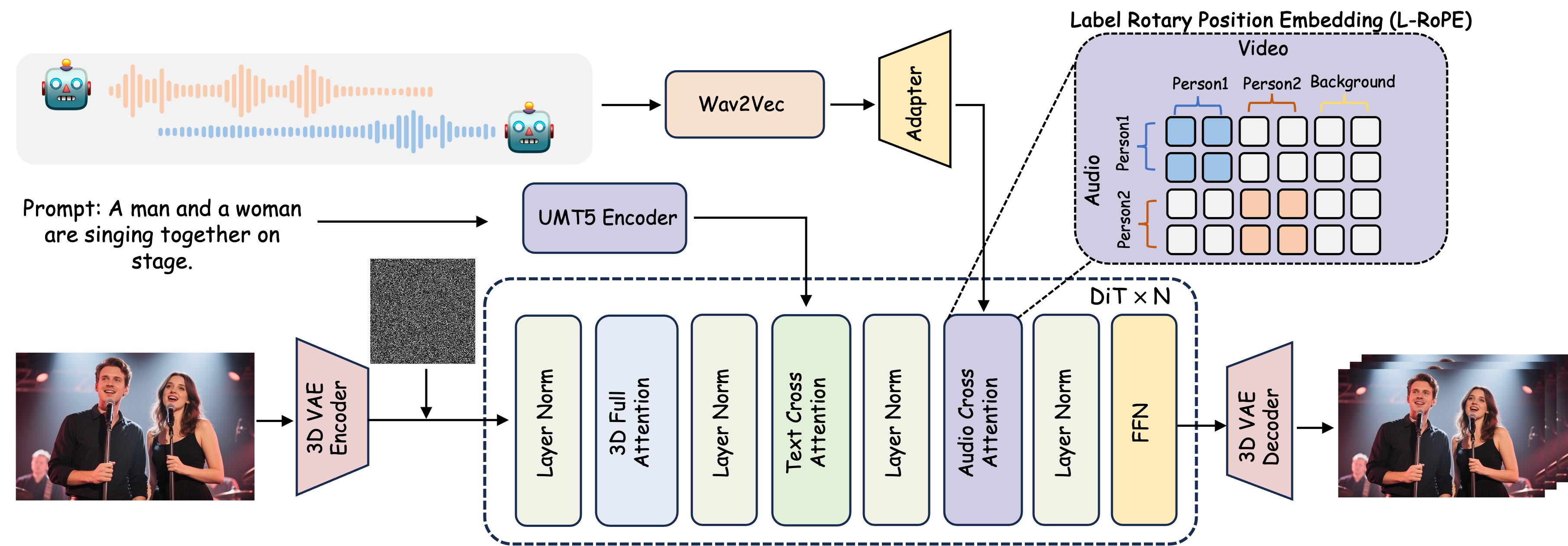
Complete system architecture showing the integration between React frontend, Node.js authentication, Python AI backend, and MongoDB database.
Experience the power of MultiTalk's AI video generation capabilities through these demonstration videos:
https://github.com/pranavreddy2006/MultiTalk-Platform/assets/videos/demo-video-generation-1.mp4
Demonstrates basic AI video generation with single person scenarios and text-to-video conversion.
https://github.com/pranavreddy2006/MultiTalk-Platform/assets/videos/demo-video-generation-2.mp4
Showcases advanced MultiTalk features with multi-person video generation and complex scene creation.
MultitalkFinal1/
├── MultiTalk/                    # Frontend (React Application)
│   ├── src/
│   │   ├── components/
│   │   │   ├── Login.js         # Authentication component
│   │   │   └── Login.css        # Authentication styles
│   │   ├── App.js               # Main React component
│   │   └── index.js             # React entry point
│   ├── public/                  # Static assets
│   ├── package.json             # Frontend dependencies
│   ├── server.js                # Authentication server (Node.js)
│   └── .env                     # Environment variables
│
├── Multi-Talk/                   # Backend (Python AI Application)
│   ├── src/                     # Source code
│   ├── wan/                     # WAN model implementation
│   ├── kokoro/                  # Kokoro model files
│   ├── weights/                 # Model weights
│   ├── app.py                   # Main Python application
│   ├── server.py                # Flask server
│   ├── requirements.txt         # Python dependencies
│   └── generate_multitalk.py    # Video generation script
│
└── README.md                    # This file
Before setting up the project, ensure you have the following installed:
git clone https://github.com/yourusername/MultitalkFinal1.git
cd MultitalkFinal1
cd MultiTalk
npm install
cd ../Multi-Talk
pip install -r requirements.txt
Create MongoDB data directory:
mkdir C:\data\db
Create .env file in the MultiTalk directory:
MONGO_URI=mongodb://localhost:27017/multitalk
JWT_SECRET=your_jwt_secret_key_here_please_change_in_production
PORT=5002
Follow these steps in order to start all services:
mongod --dbpath "C:\data\db"
cd MultiTalk
node server.js
✅ Authentication API: http://localhost:5002
cd MultiTalk
npm start
✅ Frontend: http://localhost:5001
cd Multi-Talk
python app.py
✅ AI Backend: Available for video processing
| Method | Endpoint | Description |
|---|---|---|
| POST | /signup | User registration |
| POST | /login | User authentication |
{
  "name": "John Doe",
  "email": "[email protected]",
  "password": "securepassword123"
}
{
  "email": "[email protected]",
  "password": "securepassword123"
}
| Variable | Description | Default |
|---|---|---|
MONGO_URI | MongoDB connection string | mongodb://localhost:27017/multitalk |
JWT_SECRET | Secret key for JWT tokens | Required |
PORT | Authentication server port | 5002 |
"Server connection error" during signup
CUDA/GPU errors in Python backend
Port conflicts
Module import errors
npm install in MultiTalk directorypip install -r requirements.txt in Multi-Talk directoryIf you encounter issues, restart all services:
# Stop all running processes (Ctrl+C in each terminal)

# Restart MongoDB
mongod --dbpath "C:\data\db"

# Restart Authentication Server
cd MultiTalk && node server.js

# Restart Frontend
cd MultiTalk && npm start
git checkout -b feature/AmazingFeature)git commit -m 'Add some AmazingFeature')git push origin feature/AmazingFeature)This project is licensed under the MIT License - see the LICENSE file for details.
⭐ If you find this project helpful, please give it a star!
If you have any questions or need help, please:
Built with ❤️ using React, Python, and MongoDB
🚀 A comprehensive full-stack application that combines React frontend with Python AI backend for advanced video generation and user authentication.
MultiTalk is an AI-powered video generation platform that allows users to create and manipulate videos using advanced machine learning models. The application features user authentication, a modern React frontend, and a powerful Python backend with AI capabilities.
┌─────────────────────────────────────────────────────────────────┐
│                        MULTITALK PLATFORM                      │
│                     AI Video Generation System                 │
└─────────────────────────────────────────────────────────────────┘

┌─────────────────┐    ┌─────────────────┐    ┌─────────────────┐
│                 │    │                 │    │                 │
│   USER LAYER    │    │  FRONTEND LAYER │    │  BACKEND LAYER  │
│                 │    │                 │    │                 │
├─────────────────┤    ├─────────────────┤    ├─────────────────┤
│                 │    │                 │    │                 │
│  👤 Web Browser │────│  React App      │────│  Authentication │
│  📱 Mobile      │    │  Port: 5001     │    │  Server (Node)  │
│  💻 Desktop     │    │                 │    │  Port: 5002     │
│                 │    │  ┌─────────────┐│    │                 │
│                 │    │  │   ROUTES    ││    │  ┌─────────────┐│
│                 │    │  │             ││    │  │   ROUTES    ││
│                 │    │  │ /login      ││    │  │             ││
│                 │    │  │ /signup     ││◄───┤  │ POST /login ││
│                 │    │  │ /dashboard  ││    │  │ POST /signup││
│                 │    │  │ /create     ││    │  │             ││
│                 │    │  └─────────────┘│    │  └─────────────┘│
│                 │    │                 │    │                 │
└─────────────────┘    └─────────────────┘    └─────────────────┘
                                │                       │
                                │                       │
                                ▼                       ▼
                       ┌─────────────────┐    ┌─────────────────┐
                       │                 │    │                 │
                       │  UI COMPONENTS  │    │  AI PROCESSING  │
                       │                 │    │                 │
                       ├─────────────────┤    ├─────────────────┤
                       │                 │    │                 │
                       │ • Login/Signup  │    │  Python Backend │
                       │ • Dashboard     │    │                 │
                       │ • Video Studio  │    │  ┌─────────────┐│
                       │ • AI Assistant  │    │  │   WAN AI    ││
                       │ • Video Player  │    │  │   Models    ││
                       │                 │    │  │             ││
                       │                 │    │  │ • Video Gen ││
                       │                 │    │  │ • Processing││
                       │                 │    │  │ • Analysis  ││
                       │                 │    │  └─────────────┘│
                       │                 │    │                 │
                       └─────────────────┘    └─────────────────┘
                                                       │
                                                       │
                                                       ▼
                              ┌─────────────────────────────────────┐
                              │           DATABASE LAYER            │
                              │                                     │
                              ├─────────────────────────────────────┤
                              │                                     │
                              │         MongoDB Database            │
                              │         Port: 27017                 │
                              │                                     │
                              │  ┌─────────────┐  ┌─────────────┐  │
                              │  │    USERS    │  │   VIDEOS    │  │
                              │  │             │  │             │  │
                              │  │ • _id       │  │ • _id       │  │
                              │  │ • name      │  │ • title     │  │
                              │  │ • email     │  │ • url       │  │
                              │  │ • password  │  │ • metadata  │  │
                              │  │ • token     │  │ • user_id   │  │
                              │  └─────────────┘  └─────────────┘  │
                              │                                     │
                              └─────────────────────────────────────┘

┌─────────────────────────────────────────────────────────────────┐
│                        DATA FLOW                               │
└─────────────────────────────────────────────────────────────────┘

1. 👤 User → 🌐 React Frontend (Login/Signup)
2. 🌐 Frontend → 🔧 Node.js Auth Server (JWT Verification)
3. 🔧 Auth Server → 🗄️ MongoDB (User Validation)
4. 👤 User → 🌐 React Frontend (Video Generation Request)
5. 🌐 Frontend → 🤖 Python AI Backend (Processing)
6. 🤖 AI Backend → 🧠 WAN Models (Video Generation)
7. 🧠 Models → 🤖 AI Backend (Generated Video)
8. 🤖 AI Backend → 🌐 Frontend (Video Response)
9. 🌐 Frontend → 👤 User (Display Result)
┌─────────────────────────────────────────────────────────────────┐
│                     FRONTEND COMPONENTS                        │
└─────────────────────────────────────────────────────────────────┘

App.js
├── Navbar.js
├── LandingPage.js
├── Login.js (Auth System)
├── Dashboard.js
│   ├── AICreationStudio.js
│   ├── AIVideoStudio.js
│   ├── CreationMode.js
│   ├── VideoDetails.js
│   └── GeminiAssistant.js
└── [Protected Routes]

┌─────────────────────────────────────────────────────────────────┐
│                     BACKEND ARCHITECTURE                       │
└─────────────────────────────────────────────────────────────────┘

Authentication Server (Node.js)
├── server.js (Main Express Server)
├── User Schema (MongoDB)
├── JWT Middleware
├── bcrypt Password Hashing
└── CORS Configuration

AI Processing Backend (Python)
├── app.py (Main Flask Application)
├── server.py (Alternative Server)
├── wan/ (WAN AI Models)
│   ├── modules/ (Neural Network Components)
│   ├── configs/ (Model Configurations)
│   ├── utils/ (Utility Functions)
│   └── multitalk.py (Core AI Logic)
├── kokoro/ (Audio Processing)
└── src/ (Additional Processing Modules)
┌─────────────────┐    ┌─────────────────┐    ┌─────────────────┐
│    FRONTEND     │    │    BACKEND      │    │    DATABASE    │
│                 │    │                 │    │                 │
│ React 19.2.0    │────│ Node.js +       │────│ MongoDB 4.4+    │
│ React Router    │    │ Express 5.1.0   │    │                 │
│ Axios 1.13.1    │    │                 │    │ Collections:    │
│ CSS3 + Glass    │    │ Python 3.8+     │    │ • users         │
│ Morphism        │    │ Flask           │    │ • videos        │
│                 │    │                 │    │ • sessions      │
│                 │    │ AI Libraries:   │    │                 │
│                 │    │ • PyTorch 2.8   │    │ Features:       │
│                 │    │ • Transformers  │    │ • Authentication│
│                 │    │ • Diffusers     │    │ • User Profiles │
│                 │    │ • OpenCV        │    │ • Video Storage │
│                 │    │ • Gradio        │    │ • Metadata      │
│                 │    │                 │    │                 │
└─────────────────┘    └─────────────────┘    └─────────────────┘
Complete system architecture showing the integration between React frontend, Node.js authentication, Python AI backend, and MongoDB database.
Experience the power of MultiTalk's AI video generation capabilities through these demonstration videos:
https://github.com/pranavreddy2006/MultiTalk-Platform/assets/videos/demo-video-generation-1.mp4
Demonstrates basic AI video generation with single person scenarios and text-to-video conversion.
https://github.com/pranavreddy2006/MultiTalk-Platform/assets/videos/demo-video-generation-2.mp4
Showcases advanced MultiTalk features with multi-person video generation and complex scene creation.
MultitalkFinal1/
├── MultiTalk/                    # Frontend (React Application)
│   ├── src/
│   │   ├── components/
│   │   │   ├── Login.js         # Authentication component
│   │   │   └── Login.css        # Authentication styles
│   │   ├── App.js               # Main React component
│   │   └── index.js             # React entry point
│   ├── public/                  # Static assets
│   ├── package.json             # Frontend dependencies
│   ├── server.js                # Authentication server (Node.js)
│   └── .env                     # Environment variables
│
├── Multi-Talk/                   # Backend (Python AI Application)
│   ├── src/                     # Source code
│   ├── wan/                     # WAN model implementation
│   ├── kokoro/                  # Kokoro model files
│   ├── weights/                 # Model weights
│   ├── app.py                   # Main Python application
│   ├── server.py                # Flask server
│   ├── requirements.txt         # Python dependencies
│   └── generate_multitalk.py    # Video generation script
│
└── README.md                    # This file
Before setting up the project, ensure you have the following installed:
git clone https://github.com/yourusername/MultitalkFinal1.git
cd MultitalkFinal1
cd MultiTalk
npm install
cd ../Multi-Talk
pip install -r requirements.txt
Create MongoDB data directory:
mkdir C:\data\db
Create .env file in the MultiTalk directory:
MONGO_URI=mongodb://localhost:27017/multitalk
JWT_SECRET=your_jwt_secret_key_here_please_change_in_production
PORT=5002
Follow these steps in order to start all services:
mongod --dbpath "C:\data\db"
cd MultiTalk
node server.js
✅ Authentication API: http://localhost:5002
cd MultiTalk
npm start
✅ Frontend: http://localhost:5001
cd Multi-Talk
python app.py
✅ AI Backend: Available for video processing
| Method | Endpoint | Description |
|---|---|---|
| POST | /signup | User registration |
| POST | /login | User authentication |
{
  "name": "John Doe",
  "email": "[email protected]",
  "password": "securepassword123"
}
{
  "email": "[email protected]",
  "password": "securepassword123"
}
| Variable | Description | Default |
|---|---|---|
MONGO_URI | MongoDB connection string | mongodb://localhost:27017/multitalk |
JWT_SECRET | Secret key for JWT tokens | Required |
PORT | Authentication server port | 5002 |
"Server connection error" during signup
CUDA/GPU errors in Python backend
Port conflicts
Module import errors
npm install in MultiTalk directorypip install -r requirements.txt in Multi-Talk directoryIf you encounter issues, restart all services:
# Stop all running processes (Ctrl+C in each terminal)

# Restart MongoDB
mongod --dbpath "C:\data\db"

# Restart Authentication Server
cd MultiTalk && node server.js

# Restart Frontend
cd MultiTalk && npm start
git checkout -b feature/AmazingFeature)git commit -m 'Add some AmazingFeature')git push origin feature/AmazingFeature)This project is licensed under the MIT License - see the LICENSE file for details.
⭐ If you find this project helpful, please give it a star!
If you have any questions or need help, please:
Built with ❤️ using React, Python, and MongoDB



